-
Morph ExplodingYou probably have the vertex count correct but the vertex order completely wrong. It can still be imported with incorrect vertex order and made into a morph. Count must be correct, though, you are right about that part.Morph Exploding
I've applied a morph to one of the models I've imported into DS. It's going to be a fairly simple one that starts here...

...and removes the ribbons on the sleeves with a Conditional Graft to look like this:

The Morph successfully imports, but when I go to test it, I get this:

I know the vertex counts and order have to be the same between the base and morph, or the morph won't even import. I've also made sure to use the same scaling (10000% coming from Blender) on the Morph. What did I do wrong?
Elementary, my dear Walter 9I've noticed that Walter's mouth doesn't fit his head. He doesn't come with a custom mouth morph. I created one myself, because I got tired of only seeing his bottom teeth where his top teeth should be visible. The Walter expression packs for sale look OK in the promos, but I didn't buy any of them. I've just been applying existing expressions I already own.
Clothes with custom mesh.To expand on my previous post, DS is first and foremost a platform for using Daz content. You put Daz clothes and Daz hair on a Genesis figure, and everything works great. It's possible to use non-Daz content in DS, especially if that content was made for DS but just sold/given away somewhere else, but that's not really what it's for. If you wanted to fit the clothes to your figure in DS, you could do that, but it would involve rigging your character inside DS to a Genesis skeleton, particularly through the transfer utility. Whether it would be worth it for you to learn how to do that is up to you.
Importing Face Mocap Data Into DazThanks for all of the replies guys. This was a misunderstanding by me thinking that the face bones / joints were the main drivers behind the face performances however so much of it is dependant on the morphs themselves. This makes much more since as to why every program uses different techniques for face mocap.
Already having Face Mojo is good enough even if it is not as accurate as I would like, it's still pretty good. I have looked at Facemotion3D for a very long time even before I bought Face Mojo but there was a sale sometime back and couldn't help but get Mojo.
I appriciate everyone helping me understand a bit better as to why it is more difficult to get face mocap into Daz from outside sources.I know of being able to edit the .duf and change the morph names but I am very lost on which morphs to change and am at the point of thinking that could be more work than it's worth as it would take less time, even with clean up, using Face Mojo.
What is needed for Babyficationcontedesfees said:
"This new product called "Babyfication" for Caryn and Tobyn is a morph that makes any character look like a baby without changing their features."
And the copy clearly states that Genesis 8 Male and Female are compatible. Why the product is described as being "for Caryn and Tobyn" is something of a mystery. At least, it is to me. In your shoes, I would wait for a sale or PM the vendor for clarification.
Yes, the information there is confusing, at least not accurately described.
Caryn and Tobyn are pre-requisites that will be automatically dialed when applying Babyfication shapes...
What is needed for Babyfication"This new product called "Babyfication" for Caryn and Tobyn is a morph that makes any character look like a baby without changing their features."
And the copy clearly states that Genesis 8 Male and Female are compatible. Why the product is described as being "for Caryn and Tobyn" is something of a mystery. At least, it is to me. In your shoes, I would wait for a sale or PM the vendor for clarification.
Help Genesis 8 MaleThe issue probably comes from other wrongly-defined body morph(s) or corrective morph(s). Go to Parameters pane, Show Hidden Properties from the hambergur menu, select Currently Used. Then check if there's any property unexpectedly dialed.
Then identify the related product(s), uninstall them and send a ticket to Daz asking for a fix. If you wanna fix them yourself at the same time, post a screenshot of what you found...
G9 lip morphs will LIE mask work?A morph will move the vertecesd, but not the UV map. So a mask will still work.
AIUTO...CHI CONOSCE L’ITALIANO? PARTE QUATTORDICIMuscleman said:
Kainjy said:
@Muscleman
Tipo ? Ci sono diversi stile anime (quasi realistici, chibi, alla Toryama) e diciamo che le figure anime rendono bene se usi toon shader o similari... Se usi rese fotorealistiche hai effetti stranianti.
Comunque il problema di queste figure non sono le body shapes (che ci vuole poco a fare dei morph).. ma gli occhi e i capelli. Renderizzare una pettinatura alla Goku non è sempre credibile.
Creare un morph per gli occhi è complicato a causa del numero di joint che ci sono sulla faccia. Volevo farne uno ma poi ho dovuto lasciare per problemi di posa...Non ci sono ambienti, vestiti più adati, si va sempre troppo sul realistico o contemporaneo, per non parlare dei capelli, per dire
Mi fai un esempio di cosa vorresti ?
Ad esempio c'è lo stile Square-Enix che hanno applicato a Final Fantasy 7 Remake (i personaggi sembrano bambolotti.. proporzioni quasi anime ma materiali realistici). Della stessa software House c'è Kingdom Hearts 3 con uno stile più semplificato che poi a volte tenta di ricreare anche lo stile Disney di molti film (quando il personaggio va in un mondo Disney).C'è ad esempio il gioco Jump Force dove ci sono personaggi provenienti da diversi anime tutti però fatti con uno stile medio (Yu-Hi-Oh, Naruto, City Hunter, I Cavalieri dello Zodiaco, ...)
Poi ci sono giochi stile anime tipo Scarlet Nexus ,God Eater 3, Code Vein, Xenoblade 1-2-3 dove lì il grosso lo fa lo shader dei materiali
Ci sono anche altri ibridi tipo Star Ocean Last Hope.
Di ambienti ne puoi mettere uno qualsiasi.. basta usare un toon shader e ti diventa effetto disegnato. I capelli dipende invece dallo stile che vuoi avere.. vedi i videogichi che ti ho citato sopra.
@Imago
In moltissimi giochi di Dragon Ball i capelli sono piramidi solide piegate con un effetto di toon-shader a coprire. Vedi la serai Budokai o Xenoverse. Lì è la resa grafica a cartone che rende il gioco simil-anime.
Per gli occhi il problema non è dare la forma.. ma creare tutti i i morph correttivi per rendere ancora funzionanti le pose delle espressioni.
Se cambio forma all'occhio, poi quando applico la posa dell'occhiolino chiuso la palpebra si chiude male. I G8 hanno almeno 4 joint per controllare la posizione delle ciglia di un singolo occhio più un ulteriore joint per far ruotare l'occhio stesso.
Si può fare ma è un lavoraccio... e poi l'occhio deve essere sferico se vuoi mantenere le pose degli sguardi. In molti giochi 3D gli occhi sono dei piani 2D appiccicati alla faccia (vedi ad esempio Link in Zelda - Link’s Awakening o Pokemon su Switch).Bisognerebbe pertanto decidere uno stile e da quello stabilire delle "regole" per mantenerlo.. per questo è un discorso generico dire voglio cose anime.. e comunque se volete io moltissime cose so convertirle per DAZ senza problemi.
AIUTO...CHI CONOSCE L’ITALIANO? PARTE QUATTORDICIKainjy said:
@Muscleman
Tipo ? Ci sono diversi stile anime (quasi realistici, chibi, alla Toryama) e diciamo che le figure anime rendono bene se usi toon shader o similari... Se usi rese fotorealistiche hai effetti stranianti.
Comunque il problema di queste figure non sono le body shapes (che ci vuole poco a fare dei morph).. ma gli occhi e i capelli. Renderizzare una pettinatura alla Goku non è sempre credibile.
Creare un morph per gli occhi è complicato a causa del numero di joint che ci sono sulla faccia. Volevo farne uno ma poi ho dovuto lasciare per problemi di posa...Non ci sono ambienti, vestiti più adati, si va sempre troppo sul realistico o contemporaneo, per non parlare dei capelli, per dire
Elementary, my dear Walter 9barbult said:
Walter 9 HD out of the box. He is already pretty skinny. I don't see a need for an extra skinny morph.
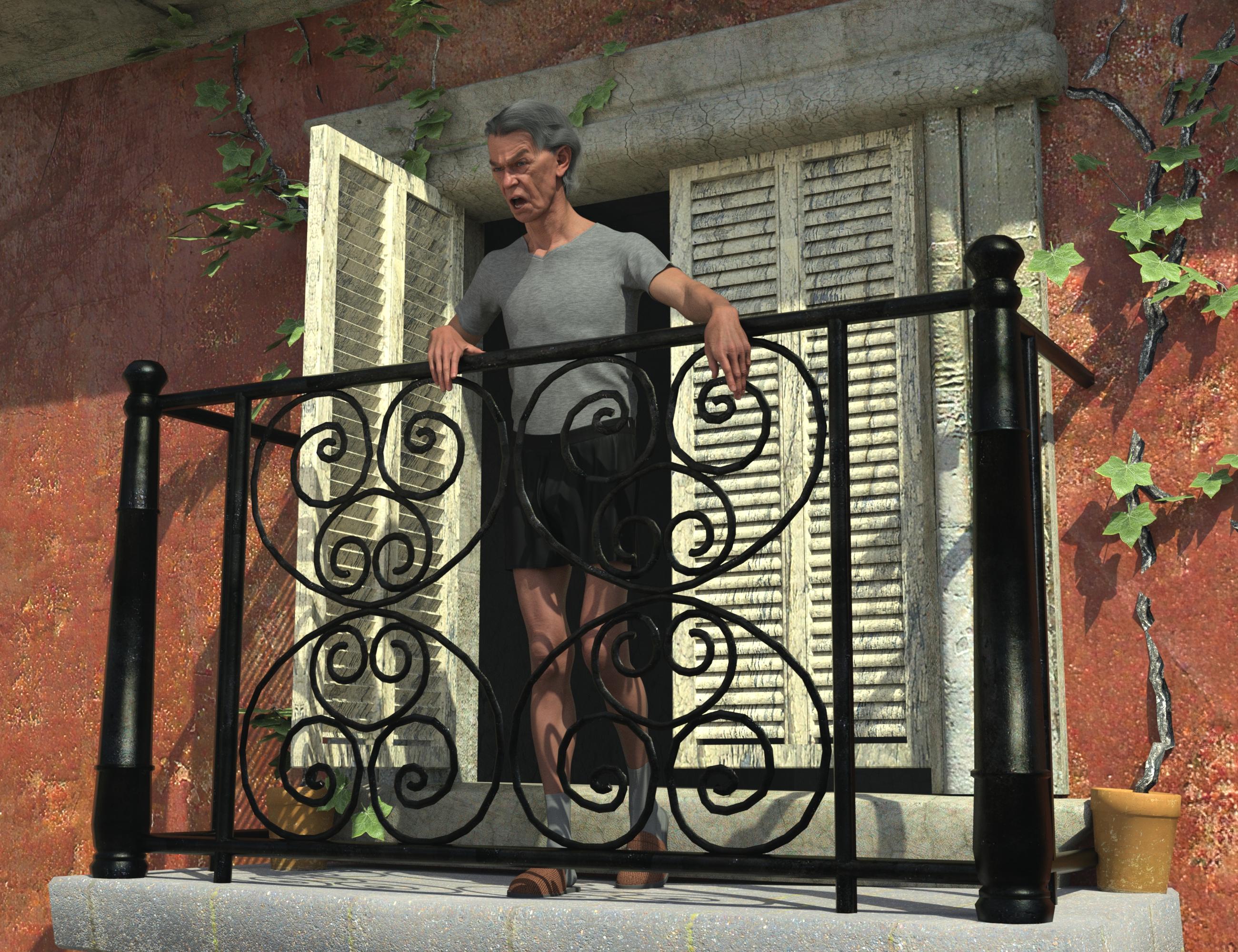
@barbult, really great render of him.
I did Walter 9 HD late yesterday on another computer so I can't post now. He was easy to pose and put expressions on.
My impression of the thin version was that he might be good if you need a frail, ill version of an older man who has been treated for cancer or something else that supressed his ability to eat food or keep it in. Or a long distance runner in his 90s who doesn't have an ounce of fat on him. God help him if he does get sick. Had a friend like that here in his 80s.
Mary
[SOLVED] Saving assets for product for saleNormally you don't need to save Genesis figures as Figure Assets. On the contrary, you have to be cautious about doing so. You just need to save Morph Assets.
Well, Assets and Presets are different things. The former are supporting files saved in Data folder, the latter are user-facing files you may repetitively load from Content Library to target objects. For instance, as for custom figure, you can save Character Presets or Properties Preset, etc.
So as a common user, most of the time you just need to well utilize Presets rather than Assets. But if you aim to be a content creator or need more customization, you'll need to deal with both of them.
[SOLVED] Saving assets for product for saleUPDATE :
The morph seems to be OK... but "figure asset" don't show any properties tree (and then save everything).
For materials and for figure "applied", do I have to save as "normal" preset instead of "support" (see picture)?
Elementary, my dear Walter 9
No, I didn't buy the alternate shapes. I just loaded Walter 9 HD.vwrangler said:barbult said:
Walter 9 HD out of the box. He is already pretty skinny. I don't see a need for an extra skinny morph.
Looks good.
I'll bet if you used his alternate Thin Shape add-on, you could make a MUCH more reasonable Famine horseman of the apocalypse than Dain 9 Emaciated, who looks like he hasn't missed a moment of protein in his long and evil life.
Elementary, my dear Walter 9barbult said:
Walter 9 HD out of the box. He is already pretty skinny. I don't see a need for an extra skinny morph.
Looks good.
I'll bet if you used his alternate Thin Shape add-on, you could make a MUCH more reasonable Famine horseman of the apocalypse than Dain 9 Emaciated, who looks like he hasn't missed a moment of protein in his long and evil life.
What the hell is Gordig doing now?Brought one of the characters I've been working on to populate the gun store into Houdini. Karma has a weird way of resolving opacity, so I thought I'd project the haircap texture onto the figure itself. I really hope there's an easier solution that bypassed my normal overthinking, because what I ended up having to do is:
- Use an experimental node in Houdini to transfer the UV from the figure to the haircap
- Export the new haircap
- Import it into DS as a UV set for the original haircap
- Set up new surfaces on the haircap for the face and head
- Map transfer the opacity map onto those new surfaces
- Add those maps into Houdini so I could mix them onto the proper surfaces
My first attempt had the bleed factor at 0 in map transfer settings, and it left a noticeable gap between the two surfaces.
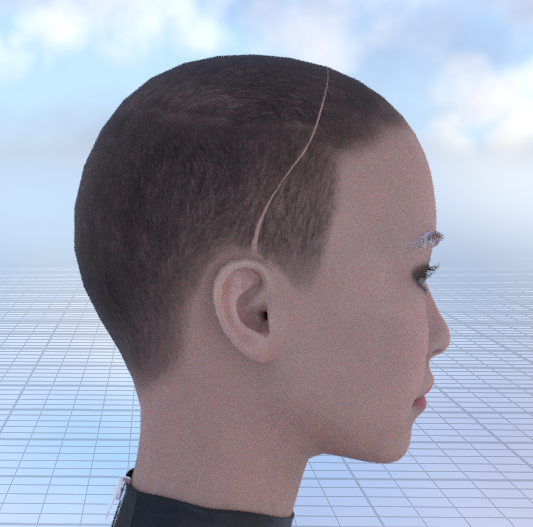
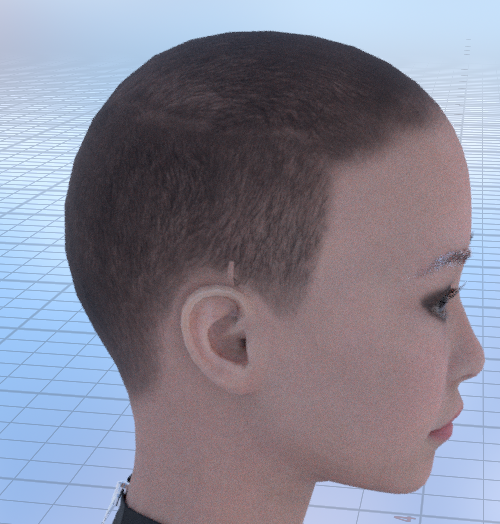
I map transferred again with standard bleed factor settings. It closed the gap, but there are still some artifacts left over. Fortunately, I'm at, if not well past, the "eh, good enough" stage of this process.
 Elementary, my dear Walter 9
Walter 9 HD out of the box. He is already pretty skinny. I don't see a need for an extra skinny morph.
The Houdini MegathreadI feel like there has to be an easier way of doing this that just hasn't occurred to me. I tried the UV Transfer SOP to transfer the figure UV to the haircap (rather than vice versa, which is what I was originally trying to do), then exported the haircap with the new UV, imported that into DS as a UV set for the haircap, map transferred the opacity map to the G8 UV and then imported those maps into Houdini. It turned out to be an imperfect solution.
The Houdini MegathreadDoes anyone know how to project textures across UVs? I'm trying to transfer a haircap texture from a haircap to the figure itself, because Karma isn't the best at resolving opacity on overlapping objects. There's a Labs UV Transfer SOP, but I don't want to overwrite any of the figure's UVs.
Daz 3D is part of

Connect
DAZ Productions, Inc.
7533 S Center View Ct #4664
West Jordan, UT 84084Licensing Agreement | Terms of Service | Privacy Policy | EULA
© 2026 Daz Productions Inc. All Rights Reserved.