-
Are there any Bouffant hairstyles from the 50's , 60's or 70's ?
I really like this one : https://www.daz3d.com/juliet-hair-for-genesis-3-female-s-genesis-2-female-s-and-victoria-4
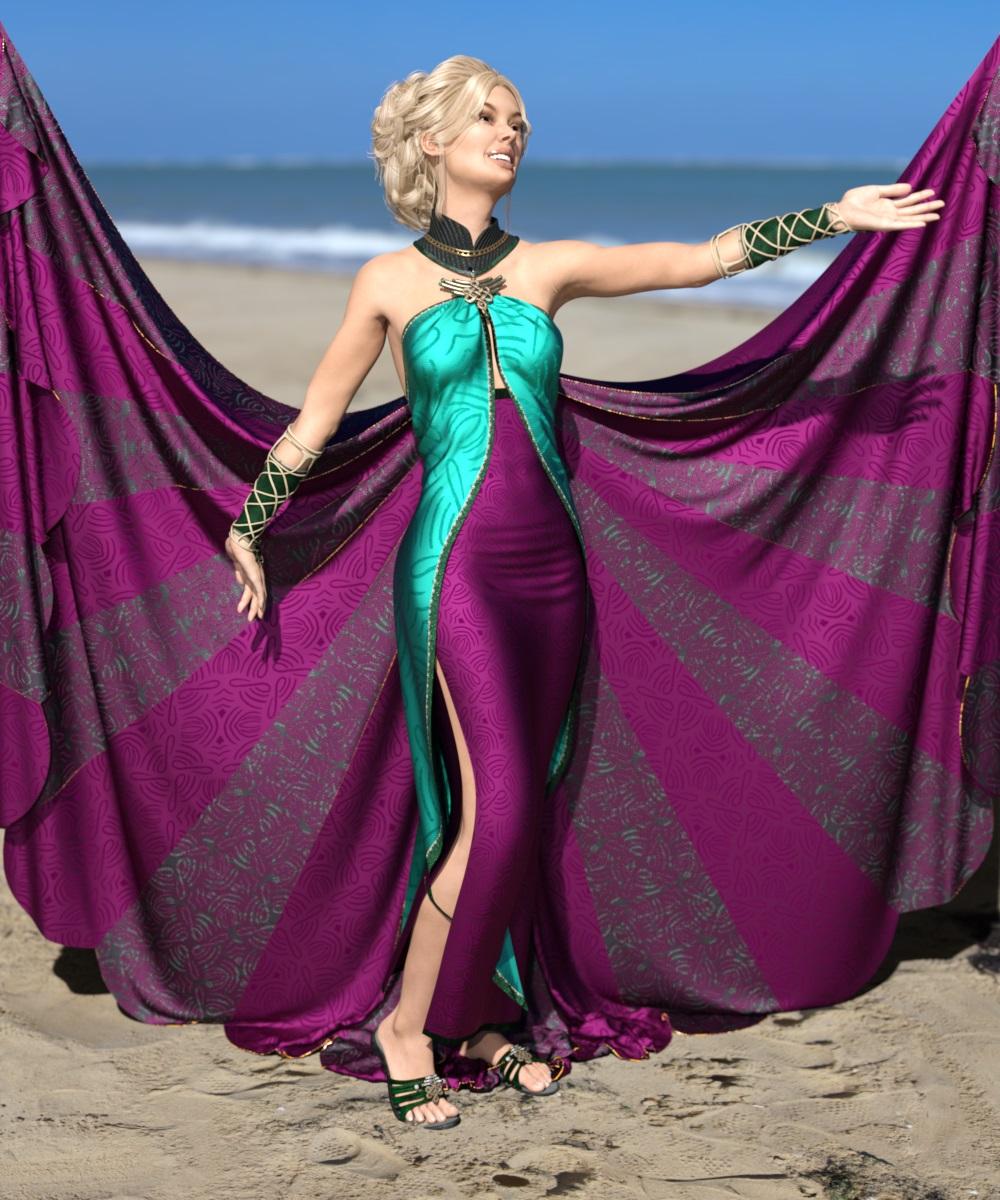
Artwork from SpaceVagabondTable Posing
Content used:
Chace Hair for Genesis 3 Female(s) and Genesis 2 Female(s)
Cut Out Heels for Genesis 2 Female(s)
Postwork in Photoshop
 Unique Fabrics - Shaders and Merchant Resource [Commercial]
I have used shaders on https://www.daz3d.com/jade-dream-outfit-for-genesis-3-female-s
and https://www.daz3d.com/jepe-s-wondersheetz-for-victoria-7
 Auto Face Enhancer [Commercial]
I bought the "Auto Face Enhancer HD With PowerPose for Genesis 8 Male(s)" but not the other two products. I had already bought "Auto Face Enhancer" for G8F and it seems that the PowerPoser works so much better in the AFE for G8F than for "Auto Face Enhancer HD With PowerPose for Genesis 8 Male(s)".
Is that true or is that just me have a bit of bad luck? Do I need the "AFE - Real Male HD Expressions for Genesis 8 Male(s)" product as well to make it work as well as the "Auto Face Enhancer" for Genesis 8 Females product does all by itself?
I do think that the geoshell skin materials after being assigned do work better on "AFE - Real Male HD Expressions for Genesis 8 Male(s)" then on the "Auto Face Enhancer" for Genesis 8 Females product but that may of been just the odd angle the camera used to render through in my scene.
Will there be a
a) AFE - Real Female HD Expressions for Genesis 8 Female(s)
b) Auto Face Enhancer Skin HD Details for Genesis 8 Female(s)
or will that be a part of the "Auto Face Enhancer" for Genesis 8 Females product update when you publish it?
I'm not sure I will update if it doesn't keep the same excellent PowerPose capabilities it has now really.
+++ BUG+++BUG+++
Also, there is some type of conflict between Auto Face Enhancer.
a) I installed the AFE for G8F it works OK.
b) I installed the AFE for G8M, it works OK but AFE for G8F is broken.
c) I reinstall AFE for G8F and it works OK again. I had already applied AFE for G8M in the scene and didn't change that but it didn't mess up.
d) I save scene. I exit DAZ Studio.
e) I open DAZ Studio & open the saved scene. The AFE for G8F works OK still but now the AFE for G8M is a grey block head (and the AFE for G8M no longer shows in Accessories and the (Apply AFE for G8M Preset) in props is in DS Lost & Found!
f) I deinstall AFE for G8M & reinstall AFE for G8M via DIM. I refresh the Smart Content / Content Library via "refresh" instead of restarting DAZ Studio.
g) I again apply the AFE for G8M prop to G8M in my scene & they both work again. I deleted and re-added both props on the G8F & G8M without restarting DS and they still worked. I will try to save to scene, exit DAZ, start DAZ & re-open the scene and see if they break again.
h) I saved scene, exited DAZ Studio, opened DAZ Studio, loaded the scene & this time again the AFE for G8F was a grey blockhead. So it seems for those that own both products the last product installed of those two will be the one that works when you create, save, and reopen a scene using those products but the 1st one installed will be broken grey blockhead after you save & reopen the scene with both of them.
By the way, there is a naming conflict that might cause your product to be buggy if DS has bugs. Both AFE props are named simple Auto Face Enhancer when applied in a scene to a character. The AFE for G8F should load in a scene with a unique name as compared to AFE for G8M. Even though DS will postpend a (2), (3), ...(n) number to the name if it's assuming these are 2nd, 3rd, & so on instances of the 1st Auto Face Enhancer loaded into the scene it's probably going to cause problems because the AFE for G8M & the AFE for G8F are not seperate instances of the same AFE but completely different products. It's best not to take chances and simply name them differently from the start: eg AFE for G8F and AFE for G8M. To be extra safe clear, you could have a dialogue popup to use for the user to give a name to postpend to the AFE prop being loaded, eg a popup asks user for a name & they type Victoria 8 so when loaded the AFE is named AFE for G8F (Victoria 8) and a second AFE for Olympia 8 could wind up with a name like AFE for G8F (Olympia 8).
+++BUG+++BUG+++
Thanks for your assistance in fixing these matters. It would be nice to see AFE for G8M PoserPose work as good as it does with AFE for G8F.
Unique Fabrics - Shaders and Merchant Resource [Commercial]I needed a break, thank you for this! I dug into my runtime and picked out five outfits that offered challenges or a chance to change their original usage to something else. For one outfit that had metal and jeweled aspects, I had to go to other shader packs to upgrade it from 3Delight to Iray. I also tried to keep track of what I used, but lost track, even when working on separate pieces of an outfit.)
Left to Right:
https://www.daz3d.com/dforce-flared-layer-outfit-for-genesis-8-females
(I wanted to take this casual outfit to a dressier one. Just before I rendered, I changed the blouse again. It had been a white/grey pattern and the masks just didn’t do very much, so I upped the color.)
Jacket: UF Beaded 2; Beaded Mask 3; Beaded Mask 2; Scale 15 x 15
Blouse: UF Beaded 2; Art Patten Mask 2A: Pattern Mask 2; Scale 40 x 40; I lowered the cutout opacity of the skirt to the blouse down to 0.
Pants: UF Beaded 2; Scale 40 x 40
https://www.daz3d.com/penny-dreadfull-outfit-for-genesis-2-female-s
Blouse and Skirt: UF Pattern 4; Pattern 4 Mask 2; Pattern 4 Mask 3; Normal Square 3; Scale 15 x 15
Lace: UF White Base Grey 01
https://www.daz3d.com/dforce-1920s-evening-gown-outfit-for-genesis-8-females
(I wanted to try for another style than an evening gown, lost the little jacket. Came up with a 1970s vibe sundress.)
Dress: UF ART Flower 02 Tan; Flower Mask 2; Flower Mask 3; Scale 5 x 5; I used the horizontal offset for the bottom and top bands to try to match the pattern as best as possible.
https://www.daz3d.com/fwsa-teagan-hd-for-victoria-7-and-lf-faux-corset
Corset: UF ART Pattern 12R; White base color purple 06; scale 30 x 30
Skirt and Lacing: Changed color only: UF White base color grey 07.
Panties: UF ART Pattern 12R; White base color purple 06; scale 30 x 30
https://www.daz3d.com/dakota-for-a3
This outfit has a number of items, I used only two and even those had a large number of material zones. And I can remember my younger sister wearing things like this in the 1970s as well.
Pants and Belt Loops: UF Art Pattern 01 Blue; Scale 4 x 4
Pants Belt: UF White Base Color Orange 02; Normals UF Square 2
Pants Belt Buckle: https://www.daz3d.com/elaborate-metals-iray-shaders
Shader 20; Scaled 30 x 30; Stone: https://www.daz3d.com/uhd-minerals--shaders-and-merchant-resource Mineral N
Pants Conchos: https://www.daz3d.com/elaborate-metals-iray-shaders
Shader 20; Scaled 30 x 30;
Top: UF Art Pattern 07 Dark Coral; Scale 4 x 4
Lacing: UF White Base Color Grey 01
Yours are really fun too. The first reminds me of sort of like a 1950s sort of feel. I really love the jacket on that one especially. And the next one suits that style dress really well I think. IDK that I would have come up with that but it looks very victorian and the color choices look really good on that one. (You did a nice job custom coloring it to fit the time period). And last but not least may I just say Id not ever thought of doing jeans with it. That is also very cool...I may have to try that
 Novica & Forum Members Tips & Product Reviews Pt 12
As someone who joined the Daz family in November 2019 I can't bring myself to buy G4 stuff.
I bought I think a victoria 4.2 pack/bundle at christmas time for under 2$ that had a lot of stuff but most of the old stuff really doesn't look well enough for me to get.
At one point I considered buying a lot of stuff because it is cheap and then buying a converter to G8 but I think I'm better off just sticking to G8 stuff (some few G3s if they looks really good and don't have a G8 counterpart).
It's funny but when people outside of Daz or the 3D community see my old art with V4 I get tons of compliments but when I show them new stuff they just say " But that's a photograph!." I explain, no, it's not. Then I try to explain for 15 minutes what it is, but I don't actually get compliments like I did on my old art. So I end up taking everything into Photoshop and doing arty postwork to make it not look real after spending hours on a render that would have taken me minutes in Poser...
That is hilarious!
I guess it depends who your target audience is :D .
Novica & Forum Members Tips & Product Reviews Pt 12As someone who joined the Daz family in November 2019 I can't bring myself to buy G4 stuff.
I bought I think a victoria 4.2 pack/bundle at christmas time for under 2$ that had a lot of stuff but most of the old stuff really doesn't look well enough for me to get.
At one point I considered buying a lot of stuff because it is cheap and then buying a converter to G8 but I think I'm better off just sticking to G8 stuff (some few G3s if they looks really good and don't have a G8 counterpart).
It's funny but when people outside of Daz or the 3D community see my old art with V4 I get tons of compliments but when I show them new stuff they just say " But that's a photograph!." I explain, no, it's not. Then I try to explain for 15 minutes what it is, but I don't actually get compliments like I did on my old art. So I end up taking everything into Photoshop and doing arty postwork to make it not look real after spending hours on a render that would have taken me minutes in Poser...
Unique Fabrics - Shaders and Merchant Resource [Commercial]I needed a break, thank you for this! I dug into my runtime and picked out five outfits that offered challenges or a chance to change their original usage to something else. For one outfit that had metal and jeweled aspects, I had to go to other shader packs to upgrade it from 3Delight to Iray. I also tried to keep track of what I used, but lost track, even when working on separate pieces of an outfit.)
Left to Right:
https://www.daz3d.com/dforce-flared-layer-outfit-for-genesis-8-females
(I wanted to take this casual outfit to a dressier one. Just before I rendered, I changed the blouse again. It had been a white/grey pattern and the masks just didn’t do very much, so I upped the color.)
Jacket: UF Beaded 2; Beaded Mask 3; Beaded Mask 2; Scale 15 x 15
Blouse: UF Beaded 2; Art Patten Mask 2A: Pattern Mask 2; Scale 40 x 40; I lowered the cutout opacity of the skirt to the blouse down to 0.
Pants: UF Beaded 2; Scale 40 x 40
https://www.daz3d.com/penny-dreadfull-outfit-for-genesis-2-female-s
Blouse and Skirt: UF Pattern 4; Pattern 4 Mask 2; Pattern 4 Mask 3; Normal Square 3; Scale 15 x 15
Lace: UF White Base Grey 01
https://www.daz3d.com/dforce-1920s-evening-gown-outfit-for-genesis-8-females
(I wanted to try for another style than an evening gown, lost the little jacket. Came up with a 1970s vibe sundress.)
Dress: UF ART Flower 02 Tan; Flower Mask 2; Flower Mask 3; Scale 5 x 5; I used the horizontal offset for the bottom and top bands to try to match the pattern as best as possible.
https://www.daz3d.com/fwsa-teagan-hd-for-victoria-7-and-lf-faux-corset
Corset: UF ART Pattern 12R; White base color purple 06; scale 30 x 30
Skirt and Lacing: Changed color only: UF White base color grey 07.
Panties: UF ART Pattern 12R; White base color purple 06; scale 30 x 30
https://www.daz3d.com/dakota-for-a3
This outfit has a number of items, I used only two and even those had a large number of material zones. And I can remember my younger sister wearing things like this in the 1970s as well.
Pants and Belt Loops: UF Art Pattern 01 Blue; Scale 4 x 4
Pants Belt: UF White Base Color Orange 02; Normals UF Square 2
Pants Belt Buckle: https://www.daz3d.com/elaborate-metals-iray-shaders
Shader 20; Scaled 30 x 30; Stone: https://www.daz3d.com/uhd-minerals--shaders-and-merchant-resource Mineral N
Pants Conchos: https://www.daz3d.com/elaborate-metals-iray-shaders
Shader 20; Scaled 30 x 30;
Top: UF Art Pattern 07 Dark Coral; Scale 4 x 4
Lacing: UF White Base Color Grey 01
Novica & Forum Members Tips & Product Reviews Pt 12As someone who joined the Daz family in November 2019 I can't bring myself to buy G4 stuff.
I bought I think a victoria 4.2 pack/bundle at christmas time for under 2$ that had a lot of stuff but most of the old stuff really doesn't look well enough for me to get.
At one point I considered buying a lot of stuff because it is cheap and then buying a converter to G8 but I think I'm better off just sticking to G8 stuff (some few G3s if they looks really good and don't have a G8 counterpart).
Issues with dials/slidersHi, I bought them from Renderosity, not the Daz Store. Since I had to download the files to try them out, I don't think a refund is possible. They are .PZ2 and .PMD files. Link to product here
Issues with dials/slidersI think the file you need to run is DzCreateExPFiles-M4.bat, and the same except V4 for Victoria 4
Issues with dials/slidersHi everyone, I suspect there might be nothing you can do to help me, but I just want to be certain before giving up.
So I bought Lyrra's height dials for Michael and Victoria 4 and they wouldn't apply, specifying a 'no current channel for valueOP' error. Only then did I realise that on the product page it lists Poser as the compatible software arghhhh. Is there anyway to make them work? No worries if not, I'll just learn my lesson and move on.
Celebrity Look-a-Likes for 3D figures Part 2Aside from MRL Faryn, MRL Tiffany & CS12, other characters likened to Jennifer Lawrence include:
- LYFW Adrienne: https://www.daz3d.com/gallery/images/68400
- VH Foxy: http://www.beammeup.net/blog/3d-celebrities/poser-celebrities-6.php
- Jenn for V4.2 (no longer available): http://pixelsizzle.com/product/jennifer-lawrence-jenn-for-v4-2/
- Biljana HD for Genesis 8 Female: https://www.deviantart.com/isourcetexturespa/art/Biljana-HD-For-Genesis-8-Female-777741245
Personally I could add Tarian HD for Genesis 3 and 8 Female to the list. Any others I've missed, comment is free.
There's also a new Mystique inspired character here: https://www.renderosity.com/mod/bcs/indigo-hd-for-victoria-8-/141087/
It doesn't resemble Jennifer completely, but combined with other morphs this texture would be great to create her role as Mystique. :)
Sheaths?It will require a conversion from Michael/Victoria 4 or Genesis to Genesis 8 (bless @RiverSoftArt
), but this looks quite good:Thanks
Sheaths?It will require a conversion from Michael/Victoria 4 or Genesis to Genesis 8 (bless @RiverSoftArt
), but this looks quite good:Can 6 year old content still be used?Hey my name is kylumi....I was once long time Platinum Club member...and still have a semblence of a gallery left on here. I was lucky enough to have some of my stuff feature in "The Official Guide to Using DAZ Studio to Create Beautiful Art".
I must admit that i'm completly baffled by all the updates etc......but my question is this, Is old content still valid and useable?? I have a whole bunch of content which is GREYED OUT, when I double click them, the icons then appear in color but seem to require updates... Michael 5 and Victoria 6 for example.
Thank you for any help you may give.
Can 6 year old content still be used?Hey my name is kylumi....I was once long time Platinum Club member...and still have a semblence of a gallery left on here. I was lucky enough to have some of my stuff feature in "The Official Guide to Using DAZ Studio to Create Beautiful Art".
I must admit that i'm completly baffled by all the updates etc......but my question is this, Is old content still valid and useable?? I have a whole bunch of content which is GREYED OUT, when I double click them, the icons then appear in color but seem to require updates... Michael 5 and Victoria 6 for example.
Thank you for any help you may give.
!! Side Renders - More Xerr! - Double More Xerr!! - Other Creatures Also !!Traveling with the Xerr - (we call him "Chomp")

Description
...after saving the young Xerr, he shows up at the most unusual times to make sure his friends are safe!
This new update of Dartanbeck uses both Mon Chevalier hair as well as Carrara's dynamic hair. Both Dart and Rosie use Arki's EYEdeas 3+, which I can no longer live without! :)Xerr (Chomp) is sporting translucent hairs, claws, horns and teeth. I didn't like any of the translucency settings from one for the other, so each has their own special shader.
Made with...
- Mon Chevalier Hair
- Carrara 8.5 Pro
- Jazlyn for Genesis Bundle
- Victoria 4.2 Shapes++
- Michael 4 Shapes++
- Michael 4 Skin Maps (High Res)
- Victoria 4 Skin Maps (High Res)
- Wild Hunt: Wildenlander for Michael 3
- Genesis Evolution: Muscularity
- Genesis Evolution: Expressions
- Genesis Evolution: Shapes Bundle
- Elf Age Light
- Xerr
- B.A.W.
- GenX2 AddOn for Genesis 2
- Genesis Generation X2
- Carrara EnvironKit - Badlands
- Aiko 6
- Cory 6
- EYEdeas 3+ for Victoria 4 and Michael 4
- Etaiji Pass
- PD Howler 11 - powered by Project Dogwaffle: Paint, Motion, 3D and fun with pixels
- Awful Soul's Platina Armor For V3
Woohoo - love it !!!
!! Side Renders - More Xerr! - Double More Xerr!! - Other Creatures Also !!Traveling with the Xerr - (we call him "Chomp")
Description
...after saving the young Xerr, he shows up at the most unusual times to make sure his friends are safe!
This new update of Dartanbeck uses both Mon Chevalier hair as well as Carrara's dynamic hair. Both Dart and Rosie use Arki's EYEdeas 3+, which I can no longer live without! :)Xerr (Chomp) is sporting translucent hairs, claws, horns and teeth. I didn't like any of the translucency settings from one for the other, so each has their own special shader.
Made with...
- Mon Chevalier Hair
- Carrara 8.5 Pro
- Jazlyn for Genesis Bundle
- Victoria 4.2 Shapes++
- Michael 4 Shapes++
- Michael 4 Skin Maps (High Res)
- Victoria 4 Skin Maps (High Res)
- Wild Hunt: Wildenlander for Michael 3
- Genesis Evolution: Muscularity
- Genesis Evolution: Expressions
- Genesis Evolution: Shapes Bundle
- Elf Age Light
- Xerr
- B.A.W.
- GenX2 AddOn for Genesis 2
- Genesis Generation X2
- Carrara EnvironKit - Badlands
- Aiko 6
- Cory 6
- EYEdeas 3+ for Victoria 4 and Michael 4
- Etaiji Pass
- PD Howler 11 - powered by Project Dogwaffle: Paint, Motion, 3D and fun with pixels
- Awful Soul's Platina Armor For V3
Welcome to Hatsune Miku Anime Manga Cafe ☕R5 Manga

Made with...
- Carrara 8.5 Pro
- Victoria 4.2 Shapes++
- Kunoichi for A4/V4
- Victoria 4 Wet Maps
- Victoria 4 Skin Maps (High Res)
- Gen 3 Iconic Shapes for Genesis
- Genesis Evolution: Muscularity
- Genesis Evolution: Body Morphs
- Genesis Evolution: Expressions
- Genesis Evolution: Head Morphs
- SG RealEyes
- GenX2 AddOn for Genesis 2
- Genesis Generation X2
- Aiko 6
- Keiko 6
- EYEdeas 3+ for Victoria 4 and Michael 4
- PD Howler 11 - powered by Project Dogwaffle: Paint, Motion, 3D and fun with pixels
Daz 3D is part of

Connect
DAZ Productions, Inc.
7533 S Center View Ct #4664
West Jordan, UT 84084Licensing Agreement | Terms of Service | Privacy Policy | EULA
© 2026 Daz Productions Inc. All Rights Reserved.