-
Export fbx without smoothing
I understand. My problem is that if I use the pre-Daz fbx directly on any 3d viewer or Substance Painter it has hard edges. But when I import it to Daz and then export it again, the post-Daz fbx has smoothing so I can't use it on substance painter. Is there a setting or even a plugin that will allow me to keep the hard edges? Or is this a limitation of Daz?
going online, Metadata update breaks productsNo, I only use DIM. One of the products had no contents and the UPDATE button underneath it; from Smart Content dbl-click product, normally the product shows all the categories and contents but this had no content and an UPDATE button underneath the product picture. I clicked UPDATE believing DIM couldn't install the product and as soon as I completed the login it began performing Metadata updates on a lot of my library. Having spent hours (days really), fixing things like broken DSX references to icons, categories, etc, all fixes were wiped out. If vendors made sure (read that QA'd) their installer content before pushing it up then this would be a zero-impact. I'm not talking about Gen1/V4 either, I've been running into bad products in Gen8 NEW products. Just aggravating^10. Product prices should reflect the QA of the items.
Thanks. I'll keep it off-line.
Diffeomorphic: Adding Custom Morphs to clothingit's setup > morphs > import custom morphs
going online, Metadata update breaks productsAre you installing with Daz Connect? If not - do not go on line; that is ONLY required for installing with connect. And there is NO way to stop Studio from immediately downloading the metadata when you connect to Daz.
going online, Metadata update breaks productsI have had to fix numerous products from Daz3D. A few products required update before being usable. As soon as the metadata update was through, all of the fixes of unrelated products were lost.
How do you disable the "update metadata when going online" in daz studio? This is beyond annoying. Bad category assignment, bad or missing icons, bad metadata pathing in dsx files. All undone because of forced metatdata updating.
It's either that or refund all the products with bad content. Having to constantly repair products is not something outlined in the product readme's shown on the product pages.
Diffeomorphic: Adding Custom Morphs to clothingHello, is it possible to import and apply Custom Morphs to the body and clothing or do I have to use a workaround?
If I have to use a workaround, is there something better than just using the shrink wrap modifier?
I am beginner to Daz Studio, I have tried my luck in vain...@Halcon Bluesky, I unfortunately had the same issues that you did with the models from that site. No matter what I tried they all seemed to have the same issues and I could not import them properly :( They did look nice tho so perhaps I will try another time when I have learned a bit more.
However, in the meantime I have managed to put together a scene that finally has a story to it. I don't know why it was so hard to come up with a concept using cars but I have finally got there in the end. It's only just come together so it will have to wait till tomorrow for me to render it since it's bedtime for me now. Managed to find 3 suitable cars from sketchfab.com which are perfect for the scene and look good in the iray preview atleast. Fingers crossed that the proper render will turn out good tomorrow!
Export fbx without smoothingpainterly said:
Thank you for the quick reply Richard. Unfortuantely it is already set at base resolution (in fact it is the only option available anyway).
That is what I would expect, and that means the exported geometry matches the imported geometry. I suspect what you are seeing is the loss of the adjustment to Smooth Shading - whatever the destiantion application calls it and however it adjusts it - just as when you import the model into Daz Studio.
Buy Something That Doesn't Work in Carrara? Post your Questions and Workarounds here. (please)WendyLuvsCatz said:
UnifiedBrain said:
Wendy, thanks for the response. Since I have never used Zbrush, I don't know what I don't know. It would be "logical" to assume that the plugin has features which allow a more complete transfer of infermation between the two programs - more than a simple OBJ import/export.
Is that incorrect?
For sure, it is a challenge to find someone who actually uses the plugin.

well the DAZ studio one is worse than an obj as it loses the UV mapping especially UDIM
No, but it does lose all grouping which makes it harder to work with (you essentially need to regroup in Zbrush - there is a one-click tool but that will give each UV island its own surface group, so each nail and tooth for example, which can be undesirable)
I don't have the Carrara one so cannot speak for that
it might have more funtionality but since the D|S one doesn't that did not encourage me to spend money finding out
Buy Something That Doesn't Work in Carrara? Post your Questions and Workarounds here. (please)UnifiedBrain said:
Wendy, thanks for the response. Since I have never used Zbrush, I don't know what I don't know. It would be "logical" to assume that the plugin has features which allow a more complete transfer of infermation between the two programs - more than a simple OBJ import/export.
Is that incorrect?
For sure, it is a challenge to find someone who actually uses the plugin.
well the DAZ studio one is worse than an obj as it loses the UV mapping especially UDIM
I don't have the Carrara one so cannot speak for that
it might have more funtionality but since the D|S one doesn't that did not encourage me to spend money finding out
Buy Something That Doesn't Work in Carrara? Post your Questions and Workarounds here. (please)Wendy, thanks for the response. Since I have never used Zbrush, I don't know what I don't know. It would be "logical" to assume that the plugin has features which allow a more complete transfer of infermation between the two programs - more than a simple OBJ import/export.
Is that incorrect?
For sure, it is a challenge to find someone who actually uses the plugin.
Help! Copper Twinklefoot broke my Genesis 8 Male! (Solved)NorthOf45 said:
Reinstalling the Genesis 8 Male Essentials will redefine the alias for Genesis 8 Male CompatibilityBase, but the danger still lurks that if you reinstall or re-import the metadata for Copper Twinklefoot, you will get the same problem again. To permanently correct the problem, there are 4 lines to remove from the metadata support file in the Runtime/Support folder (DAZ_3D_79941_Copper_Twinklefoot_for_Genesis_8_Male_and_Drutherson_8.dsx). It's just text, so any edtor will do.
The first Asset is "People/Genesis 8 Male/Characters/Copper Twinklefoot with Drutherson 8.duf". A few lines down is
<CompatibilityBase VALUE="/Copper Twinklefoot for Genesis 8 Male and Drutherson 8/Copper Twinklefoot"/>Delete that line. The second Asset is "People/Genesis 8 Male/Characters/Copper Twinklefoot.duf". A few lines down from that is (same string)
<CompatibilityBase VALUE="/Copper Twinklefoot for Genesis 8 Male and Drutherson 8/Copper Twinklefoot"/>Delete that line, too. Now, down at the very end of the file, there are two identical lines:
<ObjectCompatibility VALUE="/data/DAZ%203D/Genesis%208/Male/Genesis8Male.dsf#Genesis8Male" REF="/Copper Twinklefoot for Genesis 8 Male and Drutherson 8/Copper Twinklefoot"/>Delete them both. Save and copy the file either to a safe place and replace the one in the product package so that you can reinstall without any fuss later. Leaving the metadata file in the support folder is perfectly fine, but it could get overwritten by the one in the .zip file if you re-install the original and make a mess of things again. If and when an update arrives, it will replace the package and the modified metadata. If it is done properly, end of story. If not, you've got a backup.
Thank you for this. The file has not been corrected, so this post helped me fix it. Very obnoxious problem that should have been caught by QA pretty easily.
Buy Something That Doesn't Work in Carrara? Post your Questions and Workarounds here. (please)I don't even use the free DAZ Studio GoZ
obj import works
so why spend money
Need Help: Diffeomorphic + Rigify *SOLVED*Yes, I confirm that on my end, the cone comes out well after the Rigify deployment using my usual Easy Import settings. Importing a DUF pose has the cone repositioned accordingly; so the parenting works. (As an aside, is there a way in Blender -- even via Python -- to show what an object is parented to? There are tons of tutorials about the process of rig parenting, but none I've found about revealing the parenting info after the fact.
)I'll see if I can provide a simple use case DUF that recreates the problem I ran into.
Cheers!
Padone said:
Just tested with a basic figure and everything seems to work fine here. If I easy import with rigify the cone is paranted to the hand same as daz studio. Test scene attached.
If you didn't, please get the dev version with the latest fixes.
Let us know if this works or please provide a test scene yourself, as simple as possible, so Thomas can fix this.
Is it possible to bake face Bone rig animation to shape key animation with diffeo?No I don't think it is possible. I did some tests and diffeomorphic recognizes the genesis figure so we can't import the daz studio animations on a custom figure, even if the custom figure is "compatible" with genesis. What you can do is to use a retargeting tool from the daz figure to your custom figure but this doesn't work for morphs.
We could ask Thomas to let diffeomorphic import the daz animations on a custom figure too, if compatible names are found for bones and morphs. But honestly don't know how much this makes sense. I mean if you change the rig and morphs from the standard daz figure then importing the daz animations may mostly fail.
That said, I was able to do something that may help. We could ask Thomas to automate step 3, if it isn't already done in some other way that I don't know of. Let me know.
steps:
- load the daz animation on the genesis figure
- convert morphs to shape keys
- cut and paste the timeline from the morphs to the shapekeys
- delete or disable the original rig
edit. I opened a issue at diffeomorphic of course feel free to participate.
https://bitbucket.org/Diffeomorphic/import_daz/issues/1176/
Need Help: Diffeomorphic + Rigify *SOLVED*Just tested with a basic figure and everything seems to work fine here. If I easy import with rigify the cone is paranted to the hand same as daz studio. Test scene attached.
If you didn't, please get the dev version with the latest fixes.
Let us know if this works or please provide a test scene yourself, as simple as possible, so Thomas can fix this.
Import Daz environments props etc with emissive intactSenor_Monkey said:
s they work completely differently to how they do in Daz
Yes everything works differently in Unreal, that's why we have a bridge, if it can support materials, it can support emmsive materials by recognizing it at impprt as emmisive and routing it to a base material that is emmssive, picking up the color and translating the intensity.
Same is needed for glass materials
But currently the Unreal import side of things only has 3 base materials none for such cases.
I think it's a matter of recognizing and routing these to new base materials I mentioned above
Please David fix this, it renders environment export useless for night city scenes etc..
Also, please flip the normal maps green channel, everything is inverted in unreal and would take days to go thru 1000's of normal maps
thanks youIs it possible to bake face Bone rig animation to shape key animation with diffeo?The papagayo animations rely on morph names and should work both on G1 G2 with facial shapekeys and G3 G8 with facial bones. So if you convert the bones to shapekeys I guess you should be able to import papagayo on shapekeys, if you use the same names.
I am not using papgayo which only exports. “MOHO” .dat files( like lipsyncontizer)
I am talking about effecively importing animated pose files base soley based on morphs as was done with G1,G2 and the ,millenials of the past
before face bone rigs came with G3
Here is an example of a G8 male re-rigged with Auto rig pro
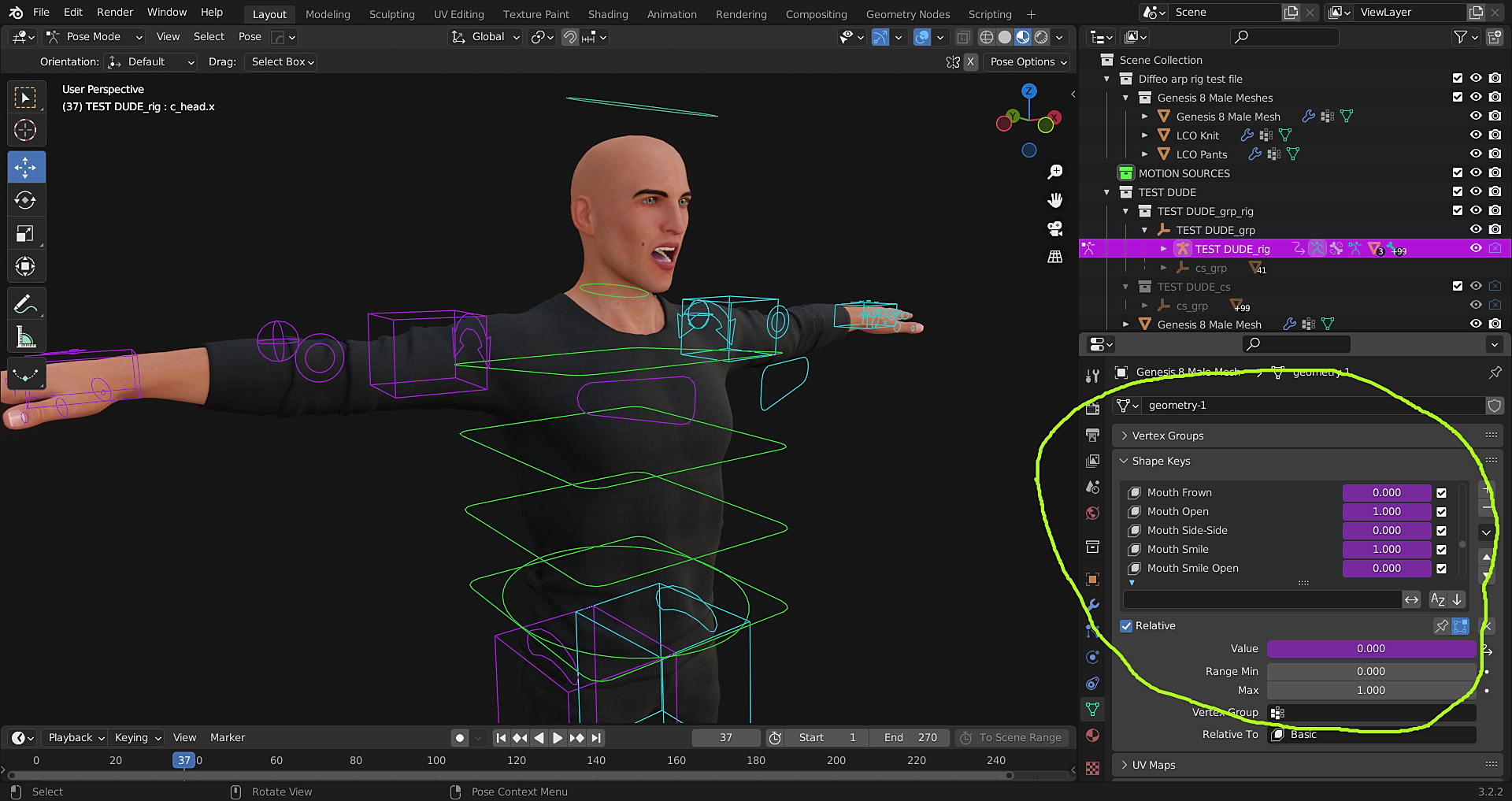
Except his face mesh contains ALL of the Daz phonemes and expressions as blend shapes.
I have even assigned Drivers to them.
They could be manually hand keyed
However I as hoping for a way to just import a pre animated.duf file, exported from Daz studio ,that was created with mimic basic or Anilip 2.
Is it possible to bake face Bone rig animation to shape key animation with diffeo?As I understand it there are two ways. The FACS animations rely on a facs rig so if you change the rig it's not possible to transfer the animation. The papagayo animations rely on morph names and should work both on G1 G2 with facial shapekeys and G3 G8 with facial bones. So if you convert the bones to shapekeys I guess you should be able to import papagayo on shapekeys, if you use the same names.
Didn't try let me know if this works. Then we can ask to Thomas if something is needed.
Making a character in Daz from a photoIf you export the base character, you can sculp it in a 3D modelling program, and then import it as a morph.
Daz 3D is part of

Connect
DAZ Productions, Inc.
7533 S Center View Ct #4664
West Jordan, UT 84084Licensing Agreement | Terms of Service | Privacy Policy | EULA
© 2026 Daz Productions Inc. All Rights Reserved.