-
Photo-real characters. A different approach.
Thanks guys! There's really not a whole heap to it. I do play around with bump maps (they are usually too high) and top coat, but each character is different. In terms of SSS, I take the color map and then go to Photoshop. From there, I overlay one of the good G3 SSS maps (for females, Vicky 7 for Vicky 8 with brows removed because it uses the base UV and for males Lee 7 with brows removed because it has no hair painted on and it also seems to match the base male UV). I then use blood vessel maps that I found on DeviantArt and overlay those to the color map and G3 SSS map...creating a new improved SSS for the character. I don't really feel comfortable sharing the link to the blood vessel maps, as the person who posted them isn't the original artist...I don't even know who the original artist is. I only use them for my own stuff. You should be able to pull them right up on Google (and no, I am not the person who posted them on DeviantArt). The maps were made for the base G3F/G8F UV, so ones for male characters will take some manual modification. But that's really it...it's that same formula I use for all characters, and it works out to 100% color map, 25% G3 SSS, 25% Blood Vessel Map.
Some additional notes - Bump is usually too high on characters out of the box. I turn it down on everything but lips and nails. Most characters can benefit from a little bit of Top Coat. To get a good idea of individual shader settings, try opening up one of the base G8 figures to see what those settings look like. The settings themselves are typically pretty good, and I've noticed that Daz tends to use the same (or very similar) settings across the board for their characters. I've used Tasha 8 shader settings as a good reference for females, and Nix 8 for males (and then you just have to swap out the SSS map and maybe play around with the SSS tints). Lastly, don't be afraid to mix and match. I use a lot of what I call "frankenskins"....color map from here, specular map from there, etc. Just experiment with what looks good.
Oh, and don't be afraid to dial up the HD add-on's to above 100%! Also note that I always render my characters at SubD 4.
In the examples attached, I have my tweaked version of Tasha 8 compared to out of the box. I also have Muosso's Reese to show that even top-shelf PA characters can benefit. And lastly, I have my most recent "frankenskin"...which uses the color map from Bramble by Lyoness. For this customized character, I only used the color map from Bramble...the Specular and Bump maps come from Victoria 7 for Victoria 8 (Bramble on the left, my tweaks on the right).
This is a fascinating point. It’s also pretty easy to add some of this procedurally in Blender using a noise texture node and running the color output of into a MixRGB node and adjusting to taste. Thanks for the tip!
I have no idea what you just said, lol. I just know how to tweak my twerks with the shader settings. :/
This is the basic idea: https://www.youtube.com/watch?v=_deRNqDcwRk
But it's only useful if you use Blender, really. Although the principles can be applied to Octane, Redshift, Arnold, and some others—not iRay that I’m aware, though.
Photo-real characters. A different approach.Thanks guys! There's really not a whole heap to it. I do play around with bump maps (they are usually too high) and top coat, but each character is different. In terms of SSS, I take the color map and then go to Photoshop. From there, I overlay one of the good G3 SSS maps (for females, Vicky 7 for Vicky 8 with brows removed because it uses the base UV and for males Lee 7 with brows removed because it has no hair painted on and it also seems to match the base male UV). I then use blood vessel maps that I found on DeviantArt and overlay those to the color map and G3 SSS map...creating a new improved SSS for the character. I don't really feel comfortable sharing the link to the blood vessel maps, as the person who posted them isn't the original artist...I don't even know who the original artist is. I only use them for my own stuff. You should be able to pull them right up on Google (and no, I am not the person who posted them on DeviantArt). The maps were made for the base G3F/G8F UV, so ones for male characters will take some manual modification. But that's really it...it's that same formula I use for all characters, and it works out to 100% color map, 25% G3 SSS, 25% Blood Vessel Map.
Some additional notes - Bump is usually too high on characters out of the box. I turn it down on everything but lips and nails. Most characters can benefit from a little bit of Top Coat. To get a good idea of individual shader settings, try opening up one of the base G8 figures to see what those settings look like. The settings themselves are typically pretty good, and I've noticed that Daz tends to use the same (or very similar) settings across the board for their characters. I've used Tasha 8 shader settings as a good reference for females, and Nix 8 for males (and then you just have to swap out the SSS map and maybe play around with the SSS tints). Lastly, don't be afraid to mix and match. I use a lot of what I call "frankenskins"....color map from here, specular map from there, etc. Just experiment with what looks good.
Oh, and don't be afraid to dial up the HD add-on's to above 100%! Also note that I always render my characters at SubD 4.
In the examples attached, I have my tweaked version of Tasha 8 compared to out of the box. I also have Muosso's Reese to show that even top-shelf PA characters can benefit. And lastly, I have my most recent "frankenskin"...which uses the color map from Bramble by Lyoness. For this customized character, I only used the color map from Bramble...the Specular and Bump maps come from Victoria 7 for Victoria 8 (Bramble on the left, my tweaks on the right).
This is a fascinating point. It’s also pretty easy to add some of this procedurally in Blender using a noise texture node and running the color output of into a MixRGB node and adjusting to taste. Thanks for the tip!
I have no idea what you just said, lol. I just know how to tweak my twerks with the shader settings. :/
Photo-real characters. A different approach.Thanks guys! There's really not a whole heap to it. I do play around with bump maps (they are usually too high) and top coat, but each character is different. In terms of SSS, I take the color map and then go to Photoshop. From there, I overlay one of the good G3 SSS maps (for females, Vicky 7 for Vicky 8 with brows removed because it uses the base UV and for males Lee 7 with brows removed because it has no hair painted on and it also seems to match the base male UV). I then use blood vessel maps that I found on DeviantArt and overlay those to the color map and G3 SSS map...creating a new improved SSS for the character. I don't really feel comfortable sharing the link to the blood vessel maps, as the person who posted them isn't the original artist...I don't even know who the original artist is. I only use them for my own stuff. You should be able to pull them right up on Google (and no, I am not the person who posted them on DeviantArt). The maps were made for the base G3F/G8F UV, so ones for male characters will take some manual modification. But that's really it...it's that same formula I use for all characters, and it works out to 100% color map, 25% G3 SSS, 25% Blood Vessel Map.
Some additional notes - Bump is usually too high on characters out of the box. I turn it down on everything but lips and nails. Most characters can benefit from a little bit of Top Coat. To get a good idea of individual shader settings, try opening up one of the base G8 figures to see what those settings look like. The settings themselves are typically pretty good, and I've noticed that Daz tends to use the same (or very similar) settings across the board for their characters. I've used Tasha 8 shader settings as a good reference for females, and Nix 8 for males (and then you just have to swap out the SSS map and maybe play around with the SSS tints). Lastly, don't be afraid to mix and match. I use a lot of what I call "frankenskins"....color map from here, specular map from there, etc. Just experiment with what looks good.
Oh, and don't be afraid to dial up the HD add-on's to above 100%! Also note that I always render my characters at SubD 4.
In the examples attached, I have my tweaked version of Tasha 8 compared to out of the box. I also have Muosso's Reese to show that even top-shelf PA characters can benefit. And lastly, I have my most recent "frankenskin"...which uses the color map from Bramble by Lyoness. For this customized character, I only used the color map from Bramble...the Specular and Bump maps come from Victoria 7 for Victoria 8 (Bramble on the left, my tweaks on the right).
This is a fascinating point. It’s also pretty easy to add some of this procedurally in Blender using a noise texture node and running the color output of into a MixRGB node and adjusting to taste. Thanks for the tip!
Daz Install Manager (DIM) 1.4.0.94, Now Available! (*UPDATED*)Interesting note... it seems I don't even need DIM to install anymore? For some reason my new purchases appear in Studio as greyed out options that I can install by right clicking and "Install"ing from inside. I just need to find the ones not installed which is a bother as you need to find them (I got what again?) but not impossible. I still need DIM to interface with my content but it is doing that with no difficulties. For the time being this screw up isnt costing me working time. Its just annoying. Make it stop lol
Yes, most recent and some older content can be installed through Daz Connect - from within Daz Studio. The main exception, gnoring fiels that simply are not DS compatible, would be the fourth generation Daz Figures (Michael 4, Victoria 4 etc.)
Daz Studio Plugins are another category that cannot be installed with Daz Connect.
Yes, and some scripts and shaders - anything that installs like a plug-in, placing files in the application folder, rather than purely as content.
Daz Install Manager (DIM) 1.4.0.94, Now Available! (*UPDATED*)Reinstalled. Same result. Its in your court now I guess. I have no Security software that would interfere with it. It opens, it finds new content then just crashes out.
If by your you mean Daz' then you need to open a support ticket https://www.daz3d.com/help/help-contact-us
Interesting note... it seems I don't even need DIM to install anymore? For some reason my new purchases appear in Studio as greyed out options that I can install by right clicking and "Install"ing from inside. I just need to find the ones not installed which is a bother as you need to find them (I got what again?) but not impossible. I still need DIM to interface with my content but it is doing that with no difficulties. For the time being this screw up isnt costing me working time. Its just annoying. Make it stop lol
Yes, most recent and some older content can be installed through Daz Connect - from within Daz Studio. The main exception, gnoring fiels that simply are not DS compatible, would be the fourth generation Daz Figures (Michael 4, Victoria 4 etc.)
Daz Studio Plugins are another category that cannot be installed with Daz Connect.
Photo-real characters. A different approach.
Oh I never thought of login. Thank you very much! I will try.Thanks guys! There's really not a whole heap to it. I do play around with bump maps (they are usually too high) and top coat, but each character is different. In terms of SSS, I take the color map and then go to Photoshop. From there, I overlay one of the good G3 SSS maps (for females, Vicky 7 for Vicky 8 with brows removed because it uses the base UV and for males Lee 7 with brows removed because it has no hair painted on and it also seems to match the base male UV). I then use blood vessel maps that I found on DeviantArt and overlay those to the color map and G3 SSS map...creating a new improved SSS for the character. I don't really feel comfortable sharing the link to the blood vessel maps, as the person who posted them isn't the original artist...I don't even know who the original artist is. I only use them for my own stuff. You should be able to pull them right up on Google (and no, I am not the person who posted them on DeviantArt). The maps were made for the base G3F/G8F UV, so ones for male characters will take some manual modification. But that's really it...it's that same formula I use for all characters, and it works out to 100% color map, 25% G3 SSS, 25% Blood Vessel Map.
Some additional notes - Bump is usually too high on characters out of the box. I turn it down on everything but lips and nails. Most characters can benefit from a little bit of Top Coat. To get a good idea of individual shader settings, try opening up one of the base G8 figures to see what those settings look like. The settings themselves are typically pretty good, and I've noticed that Daz tends to use the same (or very similar) settings across the board for their characters. I've used Tasha 8 shader settings as a good reference for females, and Nix 8 for males (and then you just have to swap out the SSS map and maybe play around with the SSS tints). Lastly, don't be afraid to mix and match. I use a lot of what I call "frankenskins"....color map from here, specular map from there, etc. Just experiment with what looks good.
Oh, and don't be afraid to dial up the HD add-on's to above 100%! Also note that I always render my characters at SubD 4.
In the examples attached, I have my tweaked version of Tasha 8 compared to out of the box. I also have Muosso's Reese to show that even top-shelf PA characters can benefit. And lastly, I have my most recent "frankenskin"...which uses the color map from Bramble by Lyoness. For this customized character, I only used the color map from Bramble...the Specular and Bump maps come from Victoria 7 for Victoria 8 (Bramble on the left, my tweaks on the right).
Thank you for sharing your technique - it's very impressive! Unfortunately, the link on DeviantArt from the person who shared the maps have expired as well ... or I didn't search thorough enough, only did a short search.
It's the first result that comes up when searching "daz blood vessel maps g8"...at least for me. The link should be in the user's stash...and they link to it in the description of translucency color. Please note that I do not use the person's shader settings, so this would only be for the actual maps. It's for the AJ Blood Vessel Maps, which I've heard of before, but I guess the original creator has disappeared from the worl do Daz. I'm not entirely sure, as I only started in with 3d art about 18mo ago. From what I've been able to find, these things only exist on this person's DA Stash, so I'd hate to see them go.
I get an error when I click on the link to the stash. It says the link doesn't exist. I guess the link expired or something. Sad ...It's still active...I was just there today. You have to be logged into DeviantArt for it to work.
Daz Install Manager (DIM) 1.4.0.94, Now Available! (*UPDATED*)Reinstalled. Same result. Its in your court now I guess. I have no Security software that would interfere with it. It opens, it finds new content then just crashes out.
If by your you mean Daz' then you need to open a support ticket https://www.daz3d.com/help/help-contact-us
Interesting note... it seems I don't even need DIM to install anymore? For some reason my new purchases appear in Studio as greyed out options that I can install by right clicking and "Install"ing from inside. I just need to find the ones not installed which is a bother as you need to find them (I got what again?) but not impossible. I still need DIM to interface with my content but it is doing that with no difficulties. For the time being this screw up isnt costing me working time. Its just annoying. Make it stop lol
Yes, most recent and some older content can be installed through Daz Connect - from within Daz Studio. The main exception, gnoring fiels that simply are not DS compatible, would be the fourth generation Daz Figures (Michael 4, Victoria 4 etc.)
Photo-real characters. A different approach.Thanks guys! There's really not a whole heap to it. I do play around with bump maps (they are usually too high) and top coat, but each character is different. In terms of SSS, I take the color map and then go to Photoshop. From there, I overlay one of the good G3 SSS maps (for females, Vicky 7 for Vicky 8 with brows removed because it uses the base UV and for males Lee 7 with brows removed because it has no hair painted on and it also seems to match the base male UV). I then use blood vessel maps that I found on DeviantArt and overlay those to the color map and G3 SSS map...creating a new improved SSS for the character. I don't really feel comfortable sharing the link to the blood vessel maps, as the person who posted them isn't the original artist...I don't even know who the original artist is. I only use them for my own stuff. You should be able to pull them right up on Google (and no, I am not the person who posted them on DeviantArt). The maps were made for the base G3F/G8F UV, so ones for male characters will take some manual modification. But that's really it...it's that same formula I use for all characters, and it works out to 100% color map, 25% G3 SSS, 25% Blood Vessel Map.
Some additional notes - Bump is usually too high on characters out of the box. I turn it down on everything but lips and nails. Most characters can benefit from a little bit of Top Coat. To get a good idea of individual shader settings, try opening up one of the base G8 figures to see what those settings look like. The settings themselves are typically pretty good, and I've noticed that Daz tends to use the same (or very similar) settings across the board for their characters. I've used Tasha 8 shader settings as a good reference for females, and Nix 8 for males (and then you just have to swap out the SSS map and maybe play around with the SSS tints). Lastly, don't be afraid to mix and match. I use a lot of what I call "frankenskins"....color map from here, specular map from there, etc. Just experiment with what looks good.
Oh, and don't be afraid to dial up the HD add-on's to above 100%! Also note that I always render my characters at SubD 4.
In the examples attached, I have my tweaked version of Tasha 8 compared to out of the box. I also have Muosso's Reese to show that even top-shelf PA characters can benefit. And lastly, I have my most recent "frankenskin"...which uses the color map from Bramble by Lyoness. For this customized character, I only used the color map from Bramble...the Specular and Bump maps come from Victoria 7 for Victoria 8 (Bramble on the left, my tweaks on the right).
Thank you for sharing your technique - it's very impressive! Unfortunately, the link on DeviantArt from the person who shared the maps have expired as well ... or I didn't search thorough enough, only did a short search.
It's the first result that comes up when searching "daz blood vessel maps g8"...at least for me. The link should be in the user's stash...and they link to it in the description of translucency color. Please note that I do not use the person's shader settings, so this would only be for the actual maps. It's for the AJ Blood Vessel Maps, which I've heard of before, but I guess the original creator has disappeared from the worl do Daz. I'm not entirely sure, as I only started in with 3d art about 18mo ago. From what I've been able to find, these things only exist on this person's DA Stash, so I'd hate to see them go.
I get an error when I click on the link to the stash. It says the link doesn't exist. I guess the link expired or something. Sad ...It's still active...I was just there today. You have to be logged into DeviantArt for it to work.
Photo-real characters. A different approach.
I get an error when I click on the link to the stash. It says the link doesn't exist. I guess the link expired or something. Sad ...Thanks guys! There's really not a whole heap to it. I do play around with bump maps (they are usually too high) and top coat, but each character is different. In terms of SSS, I take the color map and then go to Photoshop. From there, I overlay one of the good G3 SSS maps (for females, Vicky 7 for Vicky 8 with brows removed because it uses the base UV and for males Lee 7 with brows removed because it has no hair painted on and it also seems to match the base male UV). I then use blood vessel maps that I found on DeviantArt and overlay those to the color map and G3 SSS map...creating a new improved SSS for the character. I don't really feel comfortable sharing the link to the blood vessel maps, as the person who posted them isn't the original artist...I don't even know who the original artist is. I only use them for my own stuff. You should be able to pull them right up on Google (and no, I am not the person who posted them on DeviantArt). The maps were made for the base G3F/G8F UV, so ones for male characters will take some manual modification. But that's really it...it's that same formula I use for all characters, and it works out to 100% color map, 25% G3 SSS, 25% Blood Vessel Map.
Some additional notes - Bump is usually too high on characters out of the box. I turn it down on everything but lips and nails. Most characters can benefit from a little bit of Top Coat. To get a good idea of individual shader settings, try opening up one of the base G8 figures to see what those settings look like. The settings themselves are typically pretty good, and I've noticed that Daz tends to use the same (or very similar) settings across the board for their characters. I've used Tasha 8 shader settings as a good reference for females, and Nix 8 for males (and then you just have to swap out the SSS map and maybe play around with the SSS tints). Lastly, don't be afraid to mix and match. I use a lot of what I call "frankenskins"....color map from here, specular map from there, etc. Just experiment with what looks good.
Oh, and don't be afraid to dial up the HD add-on's to above 100%! Also note that I always render my characters at SubD 4.
In the examples attached, I have my tweaked version of Tasha 8 compared to out of the box. I also have Muosso's Reese to show that even top-shelf PA characters can benefit. And lastly, I have my most recent "frankenskin"...which uses the color map from Bramble by Lyoness. For this customized character, I only used the color map from Bramble...the Specular and Bump maps come from Victoria 7 for Victoria 8 (Bramble on the left, my tweaks on the right).
Thank you for sharing your technique - it's very impressive! Unfortunately, the link on DeviantArt from the person who shared the maps have expired as well ... or I didn't search thorough enough, only did a short search.
It's the first result that comes up when searching "daz blood vessel maps g8"...at least for me. The link should be in the user's stash...and they link to it in the description of translucency color. Please note that I do not use the person's shader settings, so this would only be for the actual maps. It's for the AJ Blood Vessel Maps, which I've heard of before, but I guess the original creator has disappeared from the worl do Daz. I'm not entirely sure, as I only started in with 3d art about 18mo ago. From what I've been able to find, these things only exist on this person's DA Stash, so I'd hate to see them go.
What figure is this female?Looks like Victoria 8 Base
Photo-real characters. A different approach.Thanks guys! There's really not a whole heap to it. I do play around with bump maps (they are usually too high) and top coat, but each character is different. In terms of SSS, I take the color map and then go to Photoshop. From there, I overlay one of the good G3 SSS maps (for females, Vicky 7 for Vicky 8 with brows removed because it uses the base UV and for males Lee 7 with brows removed because it has no hair painted on and it also seems to match the base male UV). I then use blood vessel maps that I found on DeviantArt and overlay those to the color map and G3 SSS map...creating a new improved SSS for the character. I don't really feel comfortable sharing the link to the blood vessel maps, as the person who posted them isn't the original artist...I don't even know who the original artist is. I only use them for my own stuff. You should be able to pull them right up on Google (and no, I am not the person who posted them on DeviantArt). The maps were made for the base G3F/G8F UV, so ones for male characters will take some manual modification. But that's really it...it's that same formula I use for all characters, and it works out to 100% color map, 25% G3 SSS, 25% Blood Vessel Map.
Some additional notes - Bump is usually too high on characters out of the box. I turn it down on everything but lips and nails. Most characters can benefit from a little bit of Top Coat. To get a good idea of individual shader settings, try opening up one of the base G8 figures to see what those settings look like. The settings themselves are typically pretty good, and I've noticed that Daz tends to use the same (or very similar) settings across the board for their characters. I've used Tasha 8 shader settings as a good reference for females, and Nix 8 for males (and then you just have to swap out the SSS map and maybe play around with the SSS tints). Lastly, don't be afraid to mix and match. I use a lot of what I call "frankenskins"....color map from here, specular map from there, etc. Just experiment with what looks good.
Oh, and don't be afraid to dial up the HD add-on's to above 100%! Also note that I always render my characters at SubD 4.
In the examples attached, I have my tweaked version of Tasha 8 compared to out of the box. I also have Muosso's Reese to show that even top-shelf PA characters can benefit. And lastly, I have my most recent "frankenskin"...which uses the color map from Bramble by Lyoness. For this customized character, I only used the color map from Bramble...the Specular and Bump maps come from Victoria 7 for Victoria 8 (Bramble on the left, my tweaks on the right).
Thank you for sharing your technique - it's very impressive! Unfortunately, the link on DeviantArt from the person who shared the maps have expired as well ... or I didn't search thorough enough, only did a short search.
It's the first result that comes up when searching "daz blood vessel maps g8"...at least for me. The link should be in the user's stash...and they link to it in the description of translucency color. Please note that I do not use the person's shader settings, so this would only be for the actual maps. It's for the AJ Blood Vessel Maps, which I've heard of before, but I guess the original creator has disappeared from the worl do Daz. I'm not entirely sure, as I only started in with 3d art about 18mo ago. From what I've been able to find, these things only exist on this person's DA Stash, so I'd hate to see them go.
Photo-real characters. A different approach.Thanks guys! There's really not a whole heap to it. I do play around with bump maps (they are usually too high) and top coat, but each character is different. In terms of SSS, I take the color map and then go to Photoshop. From there, I overlay one of the good G3 SSS maps (for females, Vicky 7 for Vicky 8 with brows removed because it uses the base UV and for males Lee 7 with brows removed because it has no hair painted on and it also seems to match the base male UV). I then use blood vessel maps that I found on DeviantArt and overlay those to the color map and G3 SSS map...creating a new improved SSS for the character. I don't really feel comfortable sharing the link to the blood vessel maps, as the person who posted them isn't the original artist...I don't even know who the original artist is. I only use them for my own stuff. You should be able to pull them right up on Google (and no, I am not the person who posted them on DeviantArt). The maps were made for the base G3F/G8F UV, so ones for male characters will take some manual modification. But that's really it...it's that same formula I use for all characters, and it works out to 100% color map, 25% G3 SSS, 25% Blood Vessel Map.
Some additional notes - Bump is usually too high on characters out of the box. I turn it down on everything but lips and nails. Most characters can benefit from a little bit of Top Coat. To get a good idea of individual shader settings, try opening up one of the base G8 figures to see what those settings look like. The settings themselves are typically pretty good, and I've noticed that Daz tends to use the same (or very similar) settings across the board for their characters. I've used Tasha 8 shader settings as a good reference for females, and Nix 8 for males (and then you just have to swap out the SSS map and maybe play around with the SSS tints). Lastly, don't be afraid to mix and match. I use a lot of what I call "frankenskins"....color map from here, specular map from there, etc. Just experiment with what looks good.
Oh, and don't be afraid to dial up the HD add-on's to above 100%! Also note that I always render my characters at SubD 4.
In the examples attached, I have my tweaked version of Tasha 8 compared to out of the box. I also have Muosso's Reese to show that even top-shelf PA characters can benefit. And lastly, I have my most recent "frankenskin"...which uses the color map from Bramble by Lyoness. For this customized character, I only used the color map from Bramble...the Specular and Bump maps come from Victoria 7 for Victoria 8 (Bramble on the left, my tweaks on the right).
Thank you for sharing your technique - it's very impressive! Unfortunately, the link on DeviantArt from the person who shared the maps have expired as well ... or I didn't search thorough enough, only did a short search.
Photo-real characters. A different approach.Thanks guys! There's really not a whole heap to it. I do play around with bump maps (they are usually too high) and top coat, but each character is different. In terms of SSS, I take the color map and then go to Photoshop. From there, I overlay one of the good G3 SSS maps (for females, Vicky 7 for Vicky 8 with brows removed because it uses the base UV and for males Lee 7 with brows removed because it has no hair painted on and it also seems to match the base male UV). I then use blood vessel maps that I found on DeviantArt and overlay those to the color map and G3 SSS map...creating a new improved SSS for the character. I don't really feel comfortable sharing the link to the blood vessel maps, as the person who posted them isn't the original artist...I don't even know who the original artist is. I only use them for my own stuff. You should be able to pull them right up on Google (and no, I am not the person who posted them on DeviantArt). The maps were made for the base G3F/G8F UV, so ones for male characters will take some manual modification. But that's really it...it's that same formula I use for all characters, and it works out to 100% color map, 25% G3 SSS, 25% Blood Vessel Map.
Some additional notes - Bump is usually too high on characters out of the box. I turn it down on everything but lips and nails. Most characters can benefit from a little bit of Top Coat. To get a good idea of individual shader settings, try opening up one of the base G8 figures to see what those settings look like. The settings themselves are typically pretty good, and I've noticed that Daz tends to use the same (or very similar) settings across the board for their characters. I've used Tasha 8 shader settings as a good reference for females, and Nix 8 for males (and then you just have to swap out the SSS map and maybe play around with the SSS tints). Lastly, don't be afraid to mix and match. I use a lot of what I call "frankenskins"....color map from here, specular map from there, etc. Just experiment with what looks good.
Oh, and don't be afraid to dial up the HD add-on's to above 100%! Also note that I always render my characters at SubD 4.
In the examples attached, I have my tweaked version of Tasha 8 compared to out of the box. I also have Muosso's Reese to show that even top-shelf PA characters can benefit. And lastly, I have my most recent "frankenskin"...which uses the color map from Bramble by Lyoness. For this customized character, I only used the color map from Bramble...the Specular and Bump maps come from Victoria 7 for Victoria 8 (Bramble on the left, my tweaks on the right).
Ladies AND Laddies of Mousso appreciation thread@Eeyore - it is interesting to see something else than the glamorous divas we all render, I like it.

Another one from me with Nicole.
Hey, you!
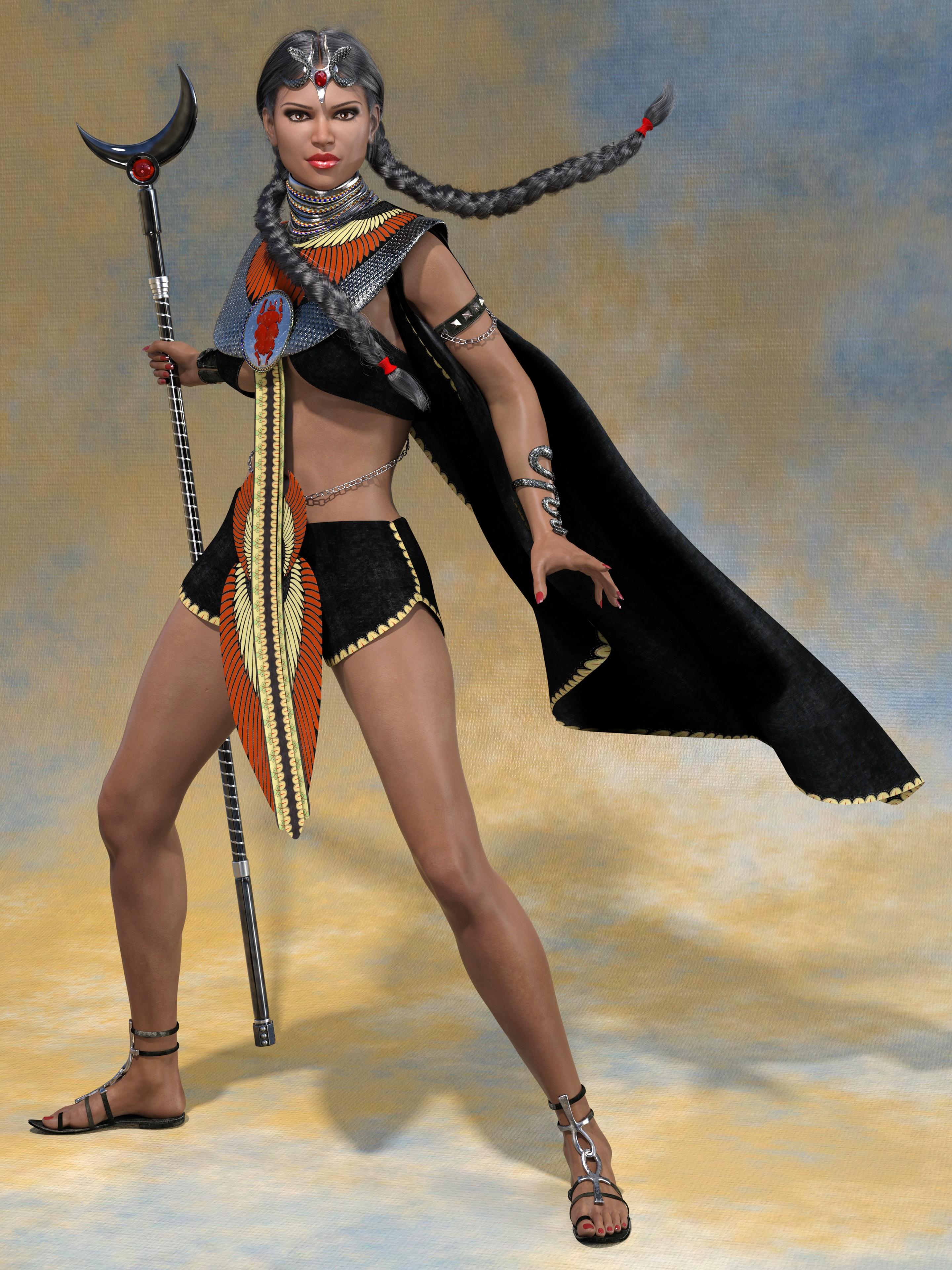
Gallery link: https://www.daz3d.com/gallery/#images/937256
I had to use body dials, because the Desert Watcher Outfit only properly fits Olympia 8 and Victoria 8. The chest plate gets terribly distorted on any other body shape. The body is therefore 0% Nicole, 50% Olympia 8 and 100% Victoria 8. Vicky is a beauty, but she seemed a bit too thin as I needed at least some curves and "thigh material".
 DnD races
https://www.daz3d.com/damien-demon-for-genesis-3-male-s
https://www.daz3d.com/anneka-demon-for-genesis-3-female-s
https://www.daz3d.com/tara-2-hd-for-victoria-7-victoria-8 (horns can also be used on male characters)
Not DnD, but you can at least get the idea...

 How to use G2M (and other Legacy Male) uvs on G3F/G8F and vice versa
According to the product page for the Genesis 2 Raven there are both G2F Base UVs and M5 UVs, presumably for the respective Female and Male versions.
If, however, this is not correct, you can make a copy of the Genesis 2 Base Male UV file (..\data\DAZ 3D\Genesis 2\Male\UV Sets\DAZ 3D\Base\Base Male.dsf) and paste it into the equivalent Female folder. This will enable you to use the G2M UV Set directly with G2F. You can then use the Map Transfer facility to convert the textures to Genesis 2 Female Base, and thence the Legacy UVs product to put the textures onto Genesis 3 Female. A tutorial for using Map Transfer can be found here: https://www.daz3d.com/forums/discussion/95701/tutorial-converting-custom-genesis-2-uvs-to-genesis-3.
For Genesis (and Victoria 4/Michael 4 textures) you can use Map Transfer without needing to copy the UVs across because they all inhere in the same figure. Although Genesis 2 Male and Female are separate figures you can copy the UVs across because they share the same basic mesh. With later figures this is not possible.
Download links missing finally fixedThanks for the heads up, Chantelle has been in my wishlist, she has now been removed. No manual download availability, no sale.
That got me to thinking, how many more like that? Well, lots more. There was a running list of encrypted content in a thread at the time, and of the ones I bought (after 12 months) about half of them don't have the manual download links to this day, but were available through DIM.
In no particular order:
Kailani Outfit for Genesis 3 Female(s) (no product link, just templates)
Little Trouble Outfit for Genesis 3 Female(s) (no product link, just templates)
Heart Breaker Hair for Genesis 3 Female(s)
Hip Hop Outfit Genesis 3 Female(s)
Action Girl Poses for The Girl 7
Lynsey for Genesis 3 Female(s)
Lulu Outfit Genesis 3 Female(s)
They have finally fixed the issue and there is a manual; download link now. No response to my ticket or even a note or email to say "Hey it works now" But it is fixed now so that is the important part
Download links missing finally fixedThanks for the heads up, Chantelle has been in my wishlist, she has now been removed. No manual download availability, no sale.
That got me to thinking, how many more like that? Well, lots more. There was a running list of encrypted content in a thread at the time, and of the ones I bought (after 12 months) about half of them don't have the manual download links to this day, but were available through DIM.
In no particular order:
Kailani Outfit for Genesis 3 Female(s) (no product link, just templates)
Little Trouble Outfit for Genesis 3 Female(s) (no product link, just templates)
Heart Breaker Hair for Genesis 3 Female(s)
Hip Hop Outfit Genesis 3 Female(s)
Action Girl Poses for The Girl 7
Lynsey for Genesis 3 Female(s)
Lulu Outfit Genesis 3 Female(s)
Genesis 8 Female example and improvement discussionThis is Victoria 8 for Genesis 8
See the full resolution on DA: http://fav.me/ddpxlw2
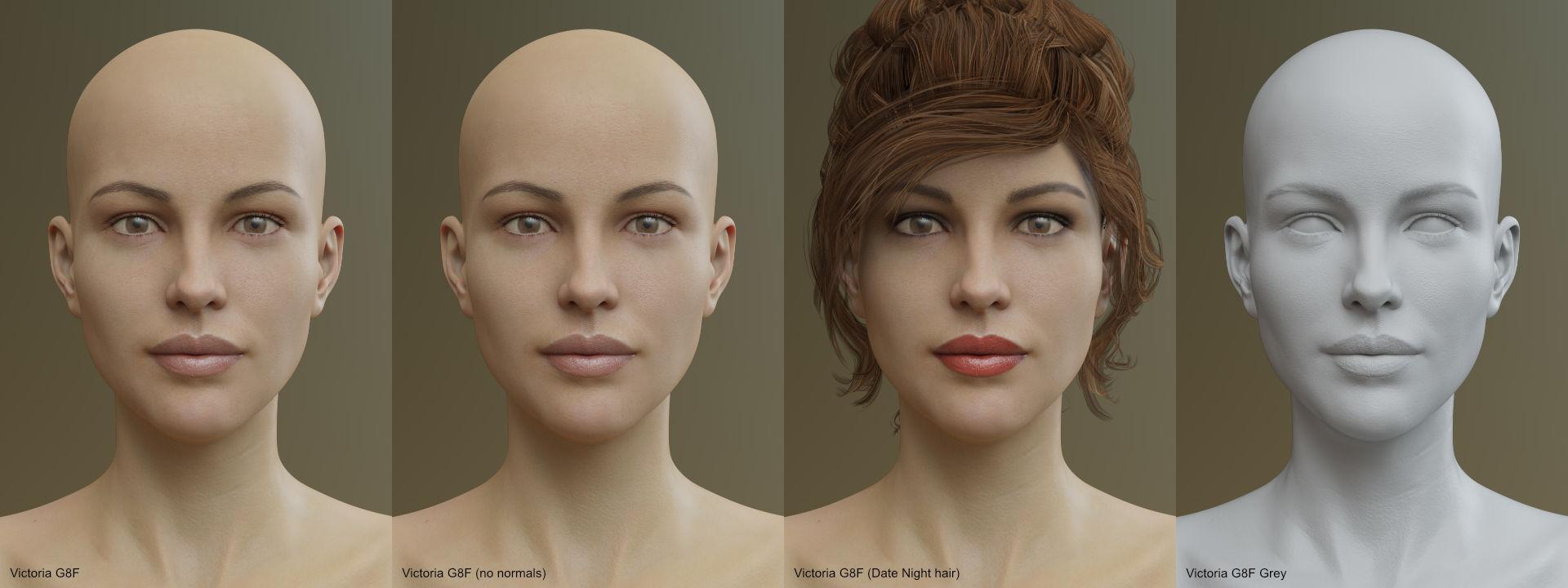
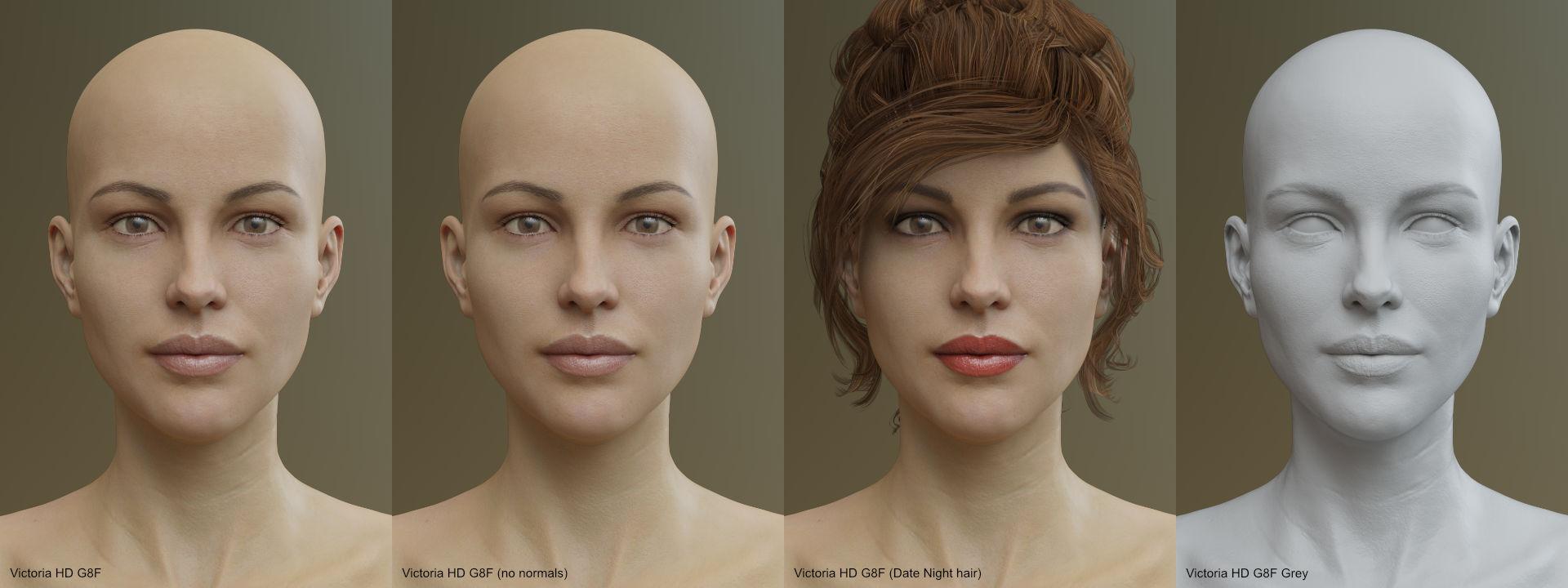
This is Victoria 8 HD for Genesis 8
See the full resolution on DA: http://fav.me/ddpxlw6
 Mystique for Genesis 8 Female(s) [Commercial]
Panties that are shaped like real panties? I'm in! Well, er, I mean, I'm going to buy this. Though I am concerned how this outfit works in a combat setting.
That's obvious - they wil give less protection than the 'proper' skimpwear armour available to all good Victoria's!

Daz 3D is part of

Connect
DAZ Productions, Inc.
7533 S Center View Ct #4664
West Jordan, UT 84084Licensing Agreement | Terms of Service | Privacy Policy | EULA
© 2026 Daz Productions Inc. All Rights Reserved.