-
Diffeomorphic produces two tongues if Lickalicious is attached
I see lickalicious is a nested geograft, that is, it includes two geografts linked to each other. In this case do not "create duplicate bones" or you will get a double set, also do not "merge uv layers" since it may not work for all cases and confuses the plugin. Blender doesn't need to merge uv layers that is for game export only, and it is better done by hand since the automatic merge may fail in some cases.
Tested both with easy import and manual import and works fine here. Settings attached.
RSSY Hair Converter V4 -> G8F - compatibility broken for G8Fhello.
i used this hair converter:
https://www.daz3d.com/rssy-hair-converter-from-victoria-4-to-genesis-8-female
to convert this hair:
https://www.daz3d.com/melia-hair
...which did work, as far as i can tell (it created files in the correct folder) but when i closed the script window and returned to the scene with the G8F loaded, almost all of the figure's options for pose, wardrobe etc. were missing, as if it were now a prop or similar.
checking its scene ID, its compatibility base was set to 'None' so i restored that to '/Genesis 8/Female' but it still appears as incompatible, or a prop
if i turn off 'filter by content' then everything shows up, as expected (EVERYTHING shows up)
i compared its settings to G8M and everything looks correct.
how do i restore G8F to normal?
-----> uninstall-reinstall G8F starter essentials did NOT fix it. neither did deleting the hair i'd converted.
-----> neither did import metadata via DIM.
Where is most Daz hair made that is sold in the store?Gordig said:
Richard Haseltine said:
dForce hair may be made with the Strand Based hair tools, but it may also be made in an external application.
Is it possible for non-PAs to import hair made with curves as SBH?
No, the mesh could be imported as curves (given an application that would write them - not all will) but not as Strand Based Hair as I recall.
Where is most Daz hair made that is sold in the store?Richard Haseltine said:
dForce hair may be made with the Strand Based hair tools, but it may also be made in an external application.
Is it possible for non-PAs to import hair made with curves as SBH?
Diffeomorphic produces two tongues if Lickalicious is attachedThank you for the suggestion; I've attached two screenshots, my easy import settings and the result; as you can see, I've selected the setting <<Merge Geografts>> but the model still has two tongues.
Iray won't work if not switched to as the first action after running DSNo, rendering won't start as well. It's like DS can't find the rendering device.
I've started DS and made a different first action instead of turning on Iray to get a fresh log. Here it is:
2022-10-04 18:07:29.558 [WARNING] :: QColor::setRgb: RGB parameters out of range
2022-10-04 18:07:29.559 Iray [INFO] - IMAGE:IO :: 1.0 IMAGE io info : Loading image "D:\DAZ 3D\DAZStudio4\shaders\iray\resources\DTHDR-RuinsB-500.hdr", no selector, pixel type "Rgb_fp", 512x256x1 pixels, 1 miplevel.
2022-10-04 18:07:29.562 Iray [INFO] - IRAY:RENDER :: 1.0 IRAY rend info : Updating geometry.
2022-10-04 18:07:29.562 Iray [INFO] - IRAY:RENDER :: 1.0 IRAY rend info : Updating motion transforms.
2022-10-04 18:07:29.562 Iray [INFO] - IRAY:RENDER :: 1.0 IRAY rend info : Importing scene graph.
2022-10-04 18:07:29.562 Iray [INFO] - IRAY:RENDER :: 1.0 IRAY rend info : Importing geometry for motion time 0
2022-10-04 18:07:29.562 Iray [INFO] - IRAY:RENDER :: 1.0 IRAY rend info : Geometry import (0 triangle objects with 0 triangles, 0 fiber objects with 0 fibers (0 segments), 0 triangle instances yielding 0 triangles, 0 fiber instances yielding 0 segments) took 0.000 s
2022-10-04 18:07:29.562 Iray [INFO] - IRAY:RENDER :: 1.0 IRAY rend info : Updating section objects.
2022-10-04 18:07:29.562 Iray [INFO] - IRAY:RENDER :: 1.0 IRAY rend info : Updating materials.
2022-10-04 18:07:29.562 Iray [INFO] - MATCNV:RENDER :: 1.0 MATCNV rend info : found 0 textures, 0 lambdas (0 unique)
2022-10-04 18:07:29.562 Iray [INFO] - IRAY:RENDER :: 1.0 IRAY rend info : Updating volumes.
2022-10-04 18:07:29.562 Iray [INFO] - IRAY:RENDER :: 1.0 IRAY rend info : Updating environment.
2022-10-04 18:07:29.568 Iray [INFO] - IRAY:RENDER :: 1.0 IRAY rend info : Updating lens.
2022-10-04 18:07:29.568 Iray [INFO] - IRAY:RENDER :: 1.0 IRAY rend info : Updating lights.
2022-10-04 18:07:29.568 Iray [INFO] - IRAY:RENDER :: 1.0 IRAY rend info : Updating object flags.
2022-10-04 18:07:29.568 Iray [INFO] - IRAY:RENDER :: 1.0 IRAY rend info : Updating backplate.
2022-10-04 18:07:29.569 Iray [INFO] - IRAY:RENDER :: 1.0 IRAY rend info : Updating caustic portals.
2022-10-04 18:07:29.569 Iray [INFO] - IRAY:RENDER :: 1.0 IRAY rend info : Updating decals.
2022-10-04 18:07:29.573 Iray [INFO] - IRAY:RENDER :: 1.0 IRAY rend info : Using iray core convergence estimate.
2022-10-04 18:07:29.573 Iray [INFO] - IRAY:RENDER :: 1.0 IRAY rend info : Allocating 1-layer frame buffer
2022-10-04 18:07:29.576 Iray [INFO] - IRAY:RENDER :: 1.0 IRAY rend info : Using interactive scheduling, caustic sampler disabled
2022-10-04 18:07:29.576 Iray [INFO] - IRAY:RENDER :: 1.0 IRAY rend info : Initializing local rendering.
2022-10-04 18:07:29.577 Iray [INFO] - IRAY:RENDER :: 1.0 IRAY rend info : Using OptiX version 7.3.0
2022-10-04 18:07:29.579 Iray [INFO] - IRAY:RENDER :: 1.0 IRAY rend info : Initializing OptiX for CUDA device 0
2022-10-04 18:07:29.687 [WARNING] :: ..\..\..\..\..\src\pluginsource\DzIrayRender\dzneuraymgr.cpp(367): Iray [ERROR] - IRAY:RENDER :: 1.0 IRAY rend error: cuLinkCreate: PTX JIT compiler library not found
2022-10-04 18:07:29.687 [WARNING] :: ..\..\..\..\..\src\pluginsource\DzIrayRender\dzneuraymgr.cpp(367): Iray [ERROR] - IRAY:RENDER :: 1.0 IRAY rend error: Errors: error : Unable to load library 'nvptxJitCompiler.dll'
2022-10-04 18:07:29.687 [WARNING] :: ..\..\..\..\..\src\pluginsource\DzIrayRender\dzneuraymgr.cpp(367): Iray [ERROR] - IRAY:RENDER :: 1.0 IRAY rend error: CUDA device 0 (NVIDIA GeForce RTX 3090): device kernel image is invalid (Failed to get function attributes)
2022-10-04 18:07:29.687 [WARNING] :: ..\..\..\..\..\src\pluginsource\DzIrayRender\dzneuraymgr.cpp(367): Iray [WARNING] - IRAY:RENDER :: 1.0 IRAY rend warn : CUDA device 0 (NVIDIA GeForce RTX 3090) is no longer available for rendering.
2022-10-04 18:07:29.687 [WARNING] :: ..\..\..\..\..\src\pluginsource\DzIrayRender\dzneuraymgr.cpp(367): Iray [WARNING] - IRAY:RENDER :: 1.0 IRAY rend warn : All available GPUs failed.
2022-10-04 18:07:29.687 [WARNING] :: ..\..\..\..\..\src\pluginsource\DzIrayRender\dzneuraymgr.cpp(367): Iray [ERROR] - IRAY:RENDER :: 1.0 IRAY rend error: Fallback to CPU not allowed.
2022-10-04 18:07:29.687 [WARNING] :: ..\..\..\..\..\src\pluginsource\DzIrayRender\dzneuraymgr.cpp(367): Iray [ERROR] - IRAY:RENDER :: 1.0 IRAY rend error: CUDA device 0 (NVIDIA GeForce RTX 3090): Device initialization failed, will not be used
2022-10-04 18:07:29.687 Iray [INFO] - IRAY:RENDER :: 1.0 IRAY rend info : Rendering with 0 device(s):
2022-10-04 18:07:29.687 Iray [INFO] - IRAY:RENDER :: 1.0 IRAY rend info : Rendering...
2022-10-04 18:07:29.687 [WARNING] :: ..\..\..\..\..\src\pluginsource\DzIrayRender\dzneuraymgr.cpp(367): Iray [ERROR] - IRAY:RENDER :: 1.0 IRAY rend error: No worker to render with: aborting render
2022-10-04 18:07:29.688 [ERROR] Iray :: Internal rendering error.felis said:
So you can render fine using the GPU, but just not using Iray preview.
Finding rogue morphs?If you download the originals you cansee the format required - you just need to adjust to show the mutliple sources and note your modifications:
/**********************************************************************
This script is provided as part of the Daz Script Documentation. The
contents of this script, and\or any portion thereof, may only be used
in accordance with the following license:
Creative Commons Attribution 3.0 Unported (CC BY 3.0)
- http://creativecommons.org/licenses/by/3.0
To contact Daz 3D or for more information about Daz Script visit the
Daz 3D website:
- http://www.daz3d.com
**********************************************************************/
// Source: http://docs.daz3d.com/doku.php/public/software/dazstudio/4/referenceguide/scripting/api_reference/samples/metadata/list_products_used/startDiffeomorphic produces two tongues if Lickalicious is attachedHello, hope somebody could help me out or point me in the right direction, I'm using Diffeomorphic and if I import a character with the Lickalicious tongue attached it produces two tongues in Blender, basically I have the Daz model tongue and the Lickalicious one, see attached screenshot. I'm now wondering if it is a limitation in Diffeo, a bug or I am doing something wrong.
Updating Morphs on Existing Character(Solved)
Every time I ask a question in a forum, I figure it out almost immediately.
All you have to do, is to untick the Replace on Import box on the character in your scene. The mesh of your existing character, now has the new morphs, and all components are still attached. I'm curious as to why that's ticked by default. I guess I should have done a little more research, or realized it was going to happen, but it kinda sucks that I lost a couple of hours of work when I imported an updated version of my character. Going forward though, it should make my workflow a lot more efficient.
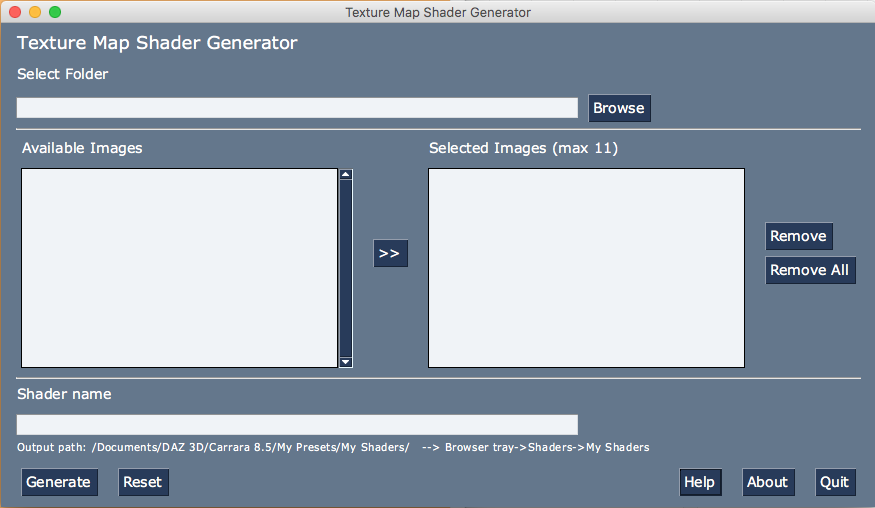
Mac Catalina and later image import script?@Khoe and others on macOS Catalina and above. I've developed a stand-alone Python programm, called 'TextureMapShaderGenerator'. It will provide you with an alternative way to import image files ( to be used as texture maps in a shader ) into Carrara 8.5 Up to 11 files can be imported in the same time.
The programm can be downloaded at my SourceForge page: https://sourceforge.net/projects/carrara-plug-ins-adventures/
 Blender Addon: Daz For Blender Bridge: Everything from DTB 2022 + 14 more features
Update: 2022.10.04
Merged everything from Official DTB 2022. Now, with this one, you'll have both benefit from DTB 2022 and all those new features done by me.
I also changed addon name from DTB to DFB (Daz For Blender), so now it can be used with Official DTB 2022 together.
Again, Key new features:
- It converts Daz Shader to Blender's default Principled Shader . So, you can export Daz model from Blender with all textures correctly. Then, you can use Blender as a Daz Bridge for all 3D tools.
- Changed addon name to "Daz For Blender"(DFB), so you can use it with Official DTB 2022 together.
- Import animation
- Handle tiled material
- It fixed an important bug so you can import pose file correctly.
- Handle High Heel. I believe every Daz user need this.
- Merge eyelashes into body mesh, so you can export morphs from blender to other 3D tools.
- Convert Bump to Normal Map when importing, so you can export your character to game engine.
- Everything official DTB 2022 Blender addon has, is merged into this one.
Disassociating meshes that have been modified via Geometry EditorIf you are using the same object 2 times, it does, to my knowledge, refer to the same dataset.
The easiest solution would be to export it as an obj, and then reimport. Then it will be considered a new item. After reimport you probably have to copy surfaces from the original.
Personally though, I would load the exported object into a modeller, and delete every except the door, and then export-import into Daz Studio, so you will just have the door.
Disassociating meshes that have been modified via Geometry EditorIt's surprising as the dissociation workflow you describe is one I've done countless times without ever facing such an issue. Some workarounds that would help :
- load the bundle once. Select the door (select a polygon then Ctrl+* to select all polygons attached to your current selection), delete everything else (Ctrl+/ to invert the selection). Save the door alone : File > Save As > Scene Subset. Delete it. Load the environment again. Select the door and delete it. Open the scene Subset you just saved to merge it to your current project. And all should work fine.
Maybe rename the door before saving it. The fact that both items have the same Scene Tab name could be the reason why this is happening ? Although I doubt it.
- load the bundle once. Select the door with the Surface Selection Tool (Alt+Shift+M). Copy its surface(s). Delete everything else. Export the door as obj. Delete it. Load the bundle again. Select and delete the door. Import the obj and paste the surface that is still in Windows' Clipboard.
- If you know Blender, 3DS Max, C4D, etc. export the bundle or the door alone as obj. Load it in any third party 3D modeler. And from there export the door as obj. Similar workflow as the precedent one : import it in Daz and copy/paste Surfaces from the original.
P.S : Use this very useful script to help you place the door pivot : MoveOrigin 1.5, or place a Null (Create > New Null) at the door's rotation axis and parent the door to it.
Texture & Shader Alignment IssuesThose lines are happening because the uvmap was not unfolded/flattened resulting in what may be called stretch marks.
In the modeller, make seams along the edges and unfold the uvmaps. Rearrange them as you please inside the one square, giving them different surface names esp. if they are going to be overlapping on the uvmap.
Providing no change was made to the mesh, one can then export out the new .obj file from the modeller, and bring it into D/S via the Edit options for a new uv set. Give it a sensible name. If it 'takes' and you like it, then it's VERY important to first save the new uv set, then save any new mats made with it.
OR, you could import the new .obj into D/S and make a new prop with it. Might be easier this way in the long run.
Rhino to Daz Studio – surfaces and nodesmark_z2487 said:
...., it imports with 3dlight not iray materials, did I miss a setting?DS assigns the material type.
You will have to manually change the material after import.
Character not showing upHow did you install? I used Connect (installed through Daz Studio) and was recently online so my metadata would be current.
How can I use the skin texture exported from Character Creator 4?but I believe that's what it does: To transfer CC4 to Daz3D compatible UV mapping.
Reallusion's aim is not to loose customers to their main competitor Daz3D. They have tools to import and convert Daz textures, reorganizing UV islands so that they fit the unwrapping of their own human meshes. Importing from Daz can potentially bring them customers.
But they don't provide a way to convert CC UVs into Daz UVs, and export their textures to another app. That would be a weird marketing idea. All I see about SkinGen (that I don't know so I could be wrong) is : texture import capability. Nowhere do they speak about converting and exporting to Daz. Only FROM Daz.
----------------------
When two meshes have a totally different topology, and when at least one of them has been unwrapped (has UVs) the only way to "transfer" per vertex or per pixel color info is : baking.
In your case, it would mean shaping the Genesis' Base wireframe into the Character Creator's Base shape (using wrap tools or manual vertex snapping tools). When Genesis is shaped as a CC, you can then bake pixel/vertex color info onto the Genesis UVs.
BUT a texture is NOT a sculpt. From a sculpt, you get height and normal maps. Which are the bases for the whole texturing workflow. CC being low-poly Real-Time orientated 3D, all you'll get is the albedo (diffuse color). All those nice details in CC that are displacement or normal map will NOT be "transfered" during a baking process.
In other words it's feasible, the same way most of the Genesis morphs of Game Characters are made on Renderhub. But to get a character in Genesis that look as good as the original in CC, it would mean a lot of extra work in Substance Painter.
Morality : without an official tool from Reallusion to export and convert UVs it'd be a lot of work (Shaping Genesis into a CC shape, then Baking the diffuse color) for a not really interesting result. Character Creator's skin details (height, world/object normals, etc.) come from a bake of their own human sculpts. If they don't want to share that data by coding a specific app for that, then it's a lost cause.
----------------------
N.B : Maybe tools such as R3DS Wrap4 do better than just transfering the diffuse after a wrap's done. Can't tell as I didn't use that app yet (although I bought it recently). But according to what I read in their forums, no matter how dedicated to wrapping and baking their app is, those details even there seem to come only from an HD sculpt.
Imported model - texture shaded draw style view always shows all model surfaces as blackApparently, import format MATTERS! The anomalies appeared when model imported using 3DS setting. Also orientation was incorrect. When Lightwave setting was used, orientation and textures appeared as expected. With both settings, all user options appeared the same. But the handling of the model was quite different, one from another. Quite curious.
Take away: if you don't know the source software for the model, try different import settings. You just may get one that works right out of the box, whereas another... not so much with the working.
Saving a DAZ Studio PUSH MODIFIER?You don't import the OBJ as an obnject, you import it as a morph - Edit>Figure>Moprh loader pro (with the xport just the figure, no add-ons, and at base resolution - also, make sure that the preset used in the OBJ exporter matches the preset used in Morph Loader).
Finding rogue morphs?Since your scripts derive from http://docs.daz3d.com/doku.php/public/software/dazstudio/4/referenceguide/scripting/api_reference/samples/metadata/list_products_used/start you do need to abide by the terms of the CC license. Downloading the script will get you the necessary comments in the opening, and then you need to note the changes you have made and provide a link from your posts here.
Daz 3D is part of

Connect
DAZ Productions, Inc.
7533 S Center View Ct #4664
West Jordan, UT 84084Licensing Agreement | Terms of Service | Privacy Policy | EULA
© 2026 Daz Productions Inc. All Rights Reserved.