-
Can I use promo images from Daz Store to promote my PC game?
For example, I bought Victoria 7 but creating high-quality rendered image of her is too difficult for me (I am not an artist).
let's not bring deceitful marketing topic into discusstion and assume that my game has the same quality of the characters as in promo images of Daz website.
You contradict yourself.
First you say you are not able to create the same quality images and afterwards you say your game has the same quality.
Just commision an artist to do a few screens for you (that you can also use in your game) and than problem solved and also no decitful marketing involved.
Can I use promo images from Daz Store to promote my PC game?let's not bring deceitful marketing topic into discusstion and assume that my game has the same quality of the characters as in promo images of Daz website.
If your game actually does have the same quality as the characters in the promo images you should be using screenshots instead of trying to rip off someone else's artwork.
It would also likely annoy people who bought it based on faked "screenshots" of something completely different and probably have to have "NOT ACTUAL FOOTAGE" put somewhere.
Not sure how extremely multipurpose (or generic) a game it would have to be that basically any shot of Victoria 7 would do though. I guess there are no unique elements at all?
Traditional Dance poses for G8F and G8MFor ballroom, there are these:
https://www.daz3d.com/feralfey-s-ballroom-dance-poses-for-genesis-3-male-and-female
https://www.daz3d.com/enchanted-dance-poses-for-michael-7-and-victoria-7
As far as the others, there might be a bit of a wait.
Can I use promo images from Daz Store to promote my PC game?In my game I use Daz characters and I want to post their images on my website.
For example, I bought Victoria 7 but creating high-quality rendered image of her is too difficult for me (I am not an artist).
Can I use images from this page? https://www.daz3d.com/victoria-7-pro-bundle
If not, is there websites with Daz rendered images shared by CC-BY-3.0 license (free license to use in commercial products)?
Dasan 8 is hereIf you’re not looking only for male characters, Xochil is the best female native character I’ve seen, with Alaska and Uki falling more on the stylized side of things.
Thanks for that, Gordig, but I am not interested in Female characters
Rawart did a Genesis 3 male and female as well:
https://www.daz3d.com/anicinabe-for-genesis-3-female
https://www.daz3d.com/anicinabe-for-genesis-3-maleAnd two by Raiya also for G3:
https://www.daz3d.com/anna-hd-for-victoria-7
https://www.daz3d.com/awan-hd-for-michael-7See, I completely forgot about Anicinabe and Awan - I have them both.
 Dasan 8 is here
I was just discussing with a friend about Native American characters and doing a render with all I have (at the moment, waiting for DM's)
Off the top of my head I can think of:
But I am sure there are some for G, G2M, and G3M. I know I have shapes for Genesis without skins but can't remember any characters. I have Gypsyangel's shape (Ranger) from Rendo for G8M.
Anyone jog my memory (and Product Library)? And then the kitbashing clothes begins...
If you’re not looking only for male characters, Xochil is the best female native character I’ve seen, with Alaska and Uki falling more on the stylized side of things.
Rawart did a Genesis 3 male and female as well:
https://www.daz3d.com/anicinabe-for-genesis-3-female
https://www.daz3d.com/anicinabe-for-genesis-3-maleAnd two by Raiya also for G3:
https://www.daz3d.com/anna-hd-for-victoria-7
https://www.daz3d.com/awan-hd-for-michael-7Genesis 8 to Genesis 2 Clothing Converter?Hell, I think a clothing converter for everything from Victoria 1 to Genesis 8 and back would be awesome. How many great clothing items did V2, V3, and V4 have that would look great on G2, G3, and G8? and of course if we're doing it for the females, we have to do it for the males. I know it's a lot to ask, but seriously, this needs to be done!
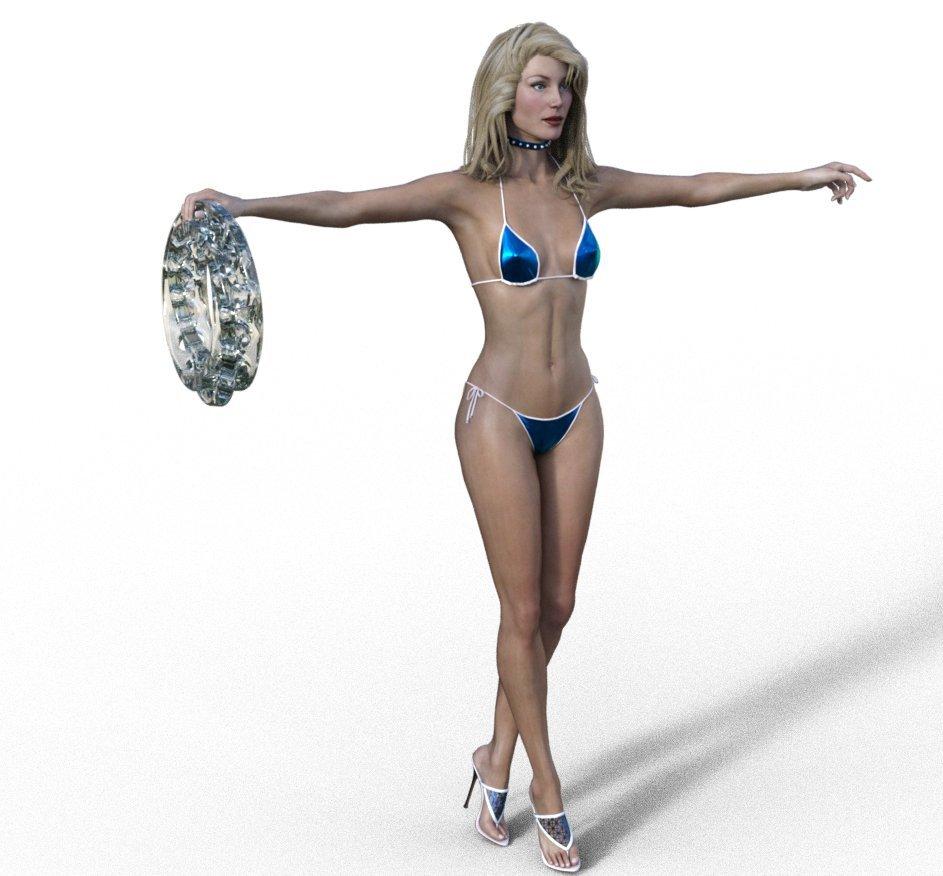
The older generation: Victoria 2/3, Michael 2/3 and their children rendersI played about with Glamorous Vickie3 by Jim Burton (https://www.daz3d.com/glamorous-vicki-set-for-victoria-3-0) in iRay trying to improve the skin shader, and added a model of a double interlocked mobius strip from green glass. May have to do something for SSS, displacement maps and normal maps. However, without any of that she doesn't look too bad.
 (Answered) Kayleyss' Tara 2 and Aurora
Looking at these two:
https://www.daz3d.com/tara-2-hd-for-victoria-7-victoria-8 and https://www.daz3d.com/aurore-for-genesis-3-and-8-female
I have had both in my wishlist for ages, but only just noticed; The human version of Tara2 looks almost identical to Aurora in the promo images. Am I right, or is it an optical illusion? Can anyone who has experience of both comment?
Thanks in advance,
Richard
Getting skin to look more realistic. Maps?Oh gosh, that was like 2 1/2 years ago, so I'm not sure what all I did. That was probably just testing and experimenting I was doing before making my "Altern8 - Skin Shader System" product. If you have that product of mine I can recommend some Altern8 settings for Victoria 7: Load "HDR B" and then render settings A. Apply "Alexandra 8 - No Maps", "Translucency D - 45", "Sclera 025", and "Skin Shine B - Medium". I also recommend dropping the saturation of the SSS Reflectance Tint color to around 28 and increasing the Normal Map setting to 1.00.Of course, people's skin appearance preferences are all different, so you might tweak it from there to suit your tastes/preferences. :)
@Divamakeup, thank you! :)
Model not importing with Duf scene - bones doHya, just playing with that well known Carrara Plugin in Daz Studio and saving out a duf = but when I bring it into Carrara only t he bones come in.
When I load up Victoria 4 in Studio I ghet an error (?) message flashed on the screen that I cant read (too fast) - but she loads up okay.
Previous to that I was advised I didnt have my poser runtime setup properly in Studio - so I added my Carrara runtime to Studio (where I have m4 V4 etc.
I have been using Stuido 4.5 but in an attempt to get carraar smart content to work I reinstalled Studi0 4.1.
Thanks for help. Same thing happens in Studio 4.5 and 4.1
EDIT It happens with all figures!
cheese
Getting skin to look more realistic. Maps?You really don't need an expensive program. The texture maps that Daz creates are often detailed enough. Occasionally they need slight adjustments with Photoshop or Gimp or pretty much any photo editing program - but most of them are detailed enough "out of the box". The problem is their Iray settings are usually pretty bad, imo. You just have to learn how iray settings affect the look of the textures and adjust accordingly.
It depends on your definition of "detailed enough". The DAZ tex maps I've seen are jpg (!), so you are already talking about a lot of loss of fidelity from the start. JPG files are lossy and only 8 bit, so you are already starting out on the low end of the spectrum. But a good knowledge of how textures work in relation to realistic skin is a must.
That sounds a bit condescending. I think my definition of "detailed enough" would cover many (most?) people's idea of "detailed enough".
This is Victoria 7's textures - with no changes made to the texture maps (click for full size):
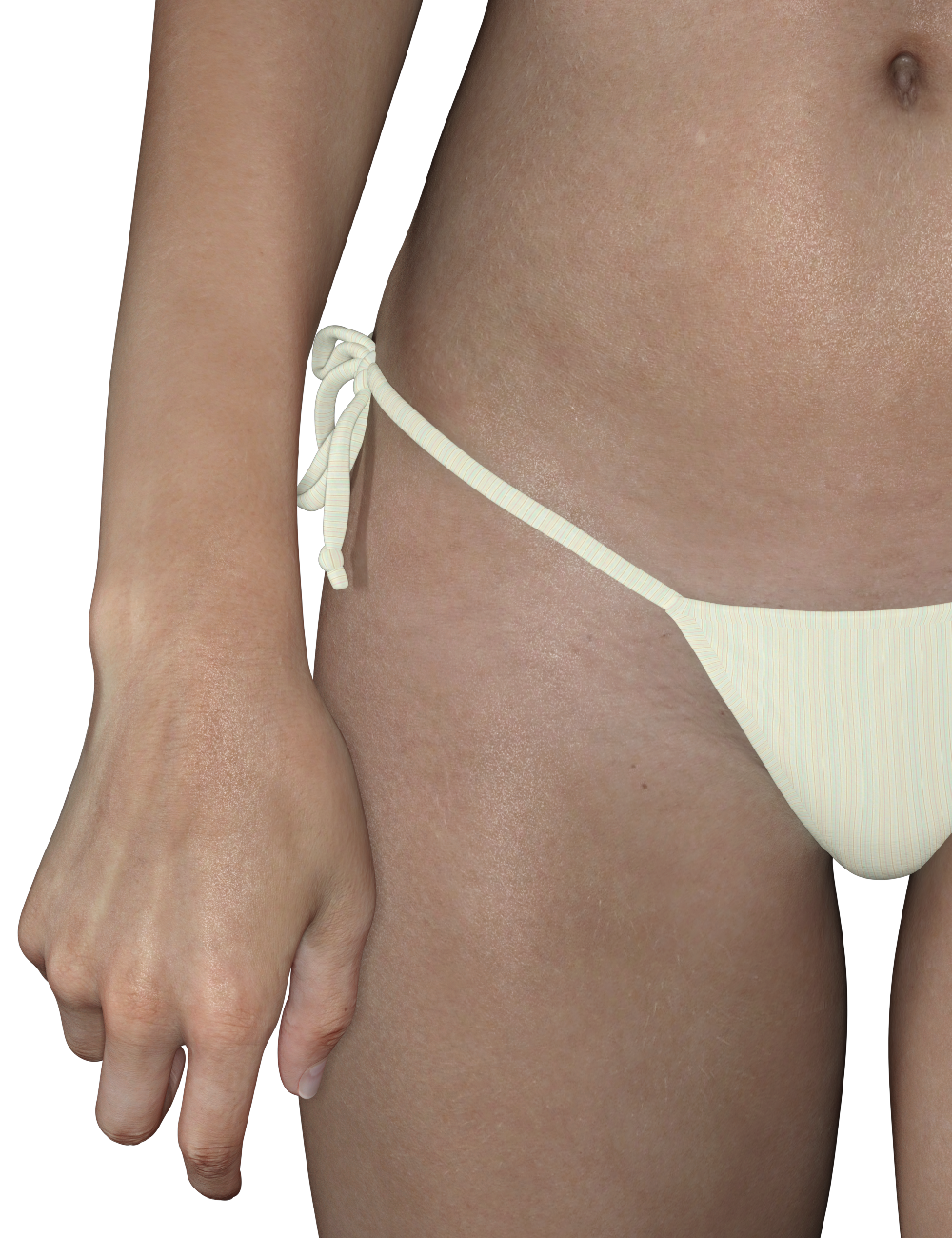
Most people aren't going to need more detail than that. The only things I changed where her Iray settings, added displacement maps, and Duel Lobe Specular bumps.
And as I said earlier, lighting and render settings can play a big role in adding realism.
@DivaMakeup, I'd love to know if there is a clear tutorial on how you adjusted her skin to look so fantastic. I know this post is a bit old, but I'm really trying to learn.
Oh gosh, that was like 2 1/2 years ago, so I'm not sure what all I did. That was probably just testing and experimenting I was doing before making my "Altern8 - Skin Shader System" product. If you have that product of mine I can recommend some Altern8 settings for Victoria 7: Load "HDR B" and then render settings A. Apply "Alexandra 8 - No Maps", "Translucency D - 45", "Sclera 025", and "Skin Shine B - Medium". I also recommend dropping the saturation of the SSS Reflectance Tint color to around 28 and increasing the Normal Map setting to 1.00.
Of course, people's skin appearance preferences are all different, so you might tweak it from there to suit your tastes/preferences. :)
Daz Studio Pro BETA - version 4.12.2.60! (*UPDATED*)and so the whole dropping back to CPU hasn't been completely fixed.
Seriously in Studio 4.9, I can render up to 7 G3F fully dressed, clothed, using Swam and OOT hair and to top it off using a "Peanterra" forest set, again using Studio 4.9 and I can do multiple test renders with changing up textures all over the place and not drop to cpu. And by multiple tests I mean 20 to 30 tests.
Dump Studio for a fresh start....
I can do the same with this version of the Studio Beta using 12 V4's, fully dressed, differnet skins, differnet Iray set hair in the same forest set and do maybe 10 or 12 test renders before dropping to CPU.
Dump Studio again for a fresh start (becuase sea-lawyers will say that's the problem, not starting fresh.)
Still using the current Beta..as in the most current release, but the second I use 3...yes thats THREE G3F in the same forest set and boom second test render and "GPU Temp" says all my cards are offline and I'm back to CPU renders. FYI don't assume, ever, let the facts speak for them selvles. GPU Temp says the GPU load prior to renders RAM is 10%, load all these scenes and it's 17%, click render and it explodes up to 86%
Currently I'm also seeing Studio falling back to using my two GTX960's and blowing off my RTX2070 that's an issue that can't be explained right now, and I'll figure out myself but what I'm seeing is Studio is loading up the video card ram with morph data, textures, and a host of other information the V4's do not carry as 'bloat'. This bloat is part of the problem and part of why I sustect Studio falls back to CPU so readily.
Iray is sent only the final mesh, not the rigging or shaping data on top of the base mesh (it wouldn't knoww hat to do with that anyway). Remember that, unless you have lowered the SubD level, Genesis # has a higher final mesh resolution than Victoria 4 (Victoria 4 is roughtly the same as Render division level 1), and of course the newer materials tend to have more, possibly higher-rsolution, maps and more complex materials.
On the issue with the 960 and the 2070, what driver version are you using? "REQUIRES NVIDIA Driver 441.22 (or newer) on Windows for pre-Turing GPUs, 442.19 (or newer) on Windows for Turing GPUs;" - that is, the 2070 (Turing) cared needs a newer driver than the 960s (pre-Turing).
V4 (and those of the pre-Genesis era) all load faster, scenes ; exclusively v4 based load faster, scenes clear faster, render faster, pose faster. Studio responds faster even with 10 V4's in a scene vice 3 G3F's.
Now how can that be an Nvidia issue?
System
CPU 3.50 i7
32GB Ram
RTX 2070
GTX 960 (x2)
Driver version Game Developer : 445.87 Unable to use Studio version due to it does not support anything below GTX 1050
I do apploaud the current fixes, but it's still not enough. Octane from what I've seen never once drops to CPU, it in fact rolls over to use system ram to help carry the ram load. And with Disney now signing a contract with OTOY, I'd strongly suggest this might be the way to go to help carry this problem through.
Getting skin to look more realistic. Maps?You really don't need an expensive program. The texture maps that Daz creates are often detailed enough. Occasionally they need slight adjustments with Photoshop or Gimp or pretty much any photo editing program - but most of them are detailed enough "out of the box". The problem is their Iray settings are usually pretty bad, imo. You just have to learn how iray settings affect the look of the textures and adjust accordingly.
It depends on your definition of "detailed enough". The DAZ tex maps I've seen are jpg (!), so you are already talking about a lot of loss of fidelity from the start. JPG files are lossy and only 8 bit, so you are already starting out on the low end of the spectrum. But a good knowledge of how textures work in relation to realistic skin is a must.
That sounds a bit condescending. I think my definition of "detailed enough" would cover many (most?) people's idea of "detailed enough".
This is Victoria 7's textures - with no changes made to the texture maps (click for full size):
Most people aren't going to need more detail than that. The only things I changed where her Iray settings, added displacement maps, and Duel Lobe Specular bumps.
And as I said earlier, lighting and render settings can play a big role in adding realism.
@DivaMakeup, I'd love to know if there is a clear tutorial on how you adjusted her skin to look so fantastic. I know this post is a bit old, but I'm really trying to learn.
V4 instalokay, now i'm confused. anyway, in spite of content library appearing empty, i am able to find my missing files and load Victoria 4.2 if i search for it by name. so that's something. a bit incovenient, but i can live with it. by the way, i'm not unzipping directly to the directory path - i'm unzipping to my downloads folder, then opening each folder and moving the contents to the appropriate place in My DAZ 3D Library inside Runtime. I know some of Daz's content isnt in there, but most of the instals are, so i go with that. I also have Poser 7, but that's not installed on this laptop - i think things are confused enough as it is.
it's been a couple of years since i used DS and I'm trying to relearn everything. the latest version is a lot more complex than the old v3.5 I'm used to, but the results using iray are so much better. I'm still confused by how the light's work in iray though. it doesnt like skydomes, but i'm finding a way round that. what i do find a puzzle is shadows. if i create a new distant light or spotlight, the shadow option is disabled and greyed out, so i have to load a preset - however, even though shadows are permitted i'm only seeing the default shadow. coloured spots dont seem to work unless i drop a skydome over the whole scene and turn up luminocity. thank heavens for lockdown - i'm having fun.
Xtrart-3d characterSup! Bit late to the party, but any like achiecing that look? Thank you so much P3Design for the texture!
But what about the shape? Victoria 8 base pose looks like her, but definitely isn't.
Which Jane are you guys refering to?
Xtrart-3d has a character named Jane so that's probably it.Yep! That was the secret ingredient :) Thanks
Xtrart-3d character
Xtrart-3d has a character named Jane so that's probably it.Sup! Bit late to the party, but any like achiecing that look? Thank you so much P3Design for the texture!
But what about the shape? Victoria 8 base pose looks like her, but definitely isn't.
Which Jane are you guys refering to?
Xtrart-3d characterSup! Bit late to the party, but any like achiecing that look? Thank you so much P3Design for the texture!
But what about the shape? Victoria 8 base pose looks like her, but definitely isn't.
Which Jane are you guys refering to?
Auto Shape Enhancer [Commercial]Yes, I grasp the Skin Folds and creases HD when it was 70%. It was too good to pass that up.
Yes to: K. H. Image Studio: https://www.daz3d.com/ultimate-natural-bend-morphs-for-genesis-8-male
I don't have the male setting yet. I only have Victoria 8. Thus I have 5% of Victoria in the G8females in order to use the ultimate natural bend with ASE.
Offering a Discount on the Pro Bundle when you've already got the Starter BundleAs was mentioned before, you can open a ticket and ask.
hmmm interesting but still would be good if it could be added direct to the store, because could make things more easy for both customer and daz support because could be 1 less "ticket type to deal" and focus on maybe more important ones.
here's a exemple: I do have basically everything from here:
https://www.daz3d.com/victoria-4-2-pro-bundle
while i don't own/have bought the full pro bundle, i do have everything inside the pro.
some i have bought, others i have get free then tecnically i'm supposed to get the pro for free or at last for a really small simbolic price or large discount like 95% to 98% or 99%, not full price or "regular discounts".
Daz 3D is part of

Connect
DAZ Productions, Inc.
7533 S Center View Ct #4664
West Jordan, UT 84084Licensing Agreement | Terms of Service | Privacy Policy | EULA
© 2026 Daz Productions Inc. All Rights Reserved.