-
Relative poly count or burden on resources from different generations?
When a character says "for Victoria 7", it means it uses the Victoria 7 shape as a base to create the character. Maybe not at 100%, but you will need the V7 shape for the character to look like in the promos.
Relative poly count or burden on resources from different generations?You get G1,2,3,8 base figures free with Daz Studio. The poly counts are shown in the information box below the Scene tab.
Fantastic! Just what I needed. Thank you very much Sevrin!
Another question, that may or may not be related(?): Can anyone tell me why I see some "character" products that say, e.g., "for Victoria 7 and Genesis 3 female," but then others will say only "for Victoria 7" or "for Genesis 3," not both?
DAZ 3D Human Figures - A HistoryCan't even begin to describe how utterly confusing this is for a (brand) newcomer to DAZ. It is beyond incomprensible how you're supposed to know configurations and what is compatible with what.
Case in point: I got a bunch of free shapes/materials yesterday (Candace) that was built on Stephanie 5 base - and I read that Stephanie five was compatible with Genesis base, but then I now read in here that Stephanie 5 was created from Michael?!?!?! WTF.
So I load in the Base Gen character (thinking to myself: Ok, so it says Stephanie 5 is compatible on Genesis - cool, this should work then!) and try applying the Candace head shape and skin, but it maps totally wrong. So I go into change the UV Set and I'm given the options of either Victoria 4, Michael 4, The Kids 4, Gen male, and Gen female. I try ALL of them, nothing works.
So now what? Do I indeed need to actually purchase Stephanie 5? Why doesn't Genesis Female base work????? It is CRAZY that you need endless multiple base characters in order for anything to happen, complete mine field and my entire experience of DAZ so far has been one of endless hours trawling through the shop and reading/watching tutorials instead of diving into it - the software is not difficult at all, but the compatability of characters/surfaces/textures (endless list) is just staggeringly frustrating.
Sorry (not sorry!) to vent, but I just want to throw my laptop out of the window right now.
Unfortunately in this case, yes, you do need Stephanie 5 because Canadace does use the UV set for Stephanie 5. With Genesis(1) through Gennesis 3, the DAZ CharacterNameX (or named/numbered characters) typically had unique UV mapping. Some of the characters that require another character don't need the base character to work (they just don't look the same) because PA's started using the base Genesis(x) UV set. If you don't own the "required" base, and the product description doesn't mention it, it's always best to ask in the Commons to see if the base product is required.
I think due to the issue you are experiencing, with Genesis 8 DAZ seems to have moved away from the custom UV's (the custom UV's for each character reduced texture distortion). If you don't need to use Candace now, watch the sales and you should be able to get Stephanie 5 really cheap (or free) in the next month or so. The price of old content is often greatly reduced.
DAZ 3D Human Figures - A HistoryCan't even begin to describe how utterly confusing this is for a (brand) newcomer to DAZ. It is beyond incomprensible how you're supposed to know configurations and what is compatible with what.
Case in point: I got a bunch of free shapes/materials yesterday (Candace) that was built on Stephanie 5 base - and I read that Stephanie five was compatible with Genesis base, but then I now read in here that Stephanie 5 was created from Michael?!?!?! WTF.
So I load in the Base Gen character (thinking to myself: Ok, so it says Stephanie 5 is compatible on Genesis - cool, this should work then!) and try applying the Candace head shape and skin, but it maps totally wrong. So I go into change the UV Set and I'm given the options of either Victoria 4, Michael 4, The Kids 4, Gen male, and Gen female. I try ALL of them, nothing works.
So now what? Do I indeed need to actually purchase Stephanie 5? Why doesn't Genesis Female base work????? It is CRAZY that you need endless multiple base characters in order for anything to happen, complete mine field and my entire experience of DAZ so far has been one of endless hours trawling through the shop and reading/watching tutorials instead of diving into it - the software is not difficult at all, but the compatability of characters/surfaces/textures (endless list) is just staggeringly frustrating.
Sorry (not sorry!) to vent, but I just want to throw my laptop out of the window right now.
Candace for Stephanie 5 shows Stephanie 5 as a required product. Also "for Stephanie 5" is right in the product name. That's pretty clear to me. Sometimes required products aren't absolutely essential, but it's kind of a proceed at your own risk kind of situation. Anyway, Steph 5 was only USD 5.59 a few days ago and she'll be on deep discount again soon.
Anyway, I stick to G3 and G8 as a new-ish user. They play together reasonably well, and all the materials they come with work with Iray. They're also heavily discounted often enough that it's possible to accumulate a decent number of assets if you're patient.
OT, Mornington Crescent: Round 8 :- (Tudor Court Rules)
Well played. I'm not sure there was any option apart from Victoria there. The only hope was that everyone would miss the double diagonal.Vauxhall > Acton Town > Cowcaddens > Ibrox > St Enoch > Harrow & Wealdstone > Gorbals > Barbican > Sloane Square > Victoria
Well, if offered Victoria what can I do but play
Mornington Crescent
[Released] Character Converter from Genesis 3 Female to Genesis 8 Female(Now Conv JCMs) [Commercial]So, tried the product. The conversion went well but the converted character has strange, wavy biceps. Ill post a pic tomorrow.
That is strange. What character? Homegrown?
Its Jenn HD, https://www.daz3d.com/jenn-hd-for-victoria-7 . Heres a pic.
OT, Mornington Crescent: Round 8 :- (Tudor Court Rules)Vauxhall > Acton Town > Cowcaddens > Ibrox > St Enoch > Harrow & Wealdstone > Gorbals > Barbican > Sloane Square > Victoria
Well, if offered Victoria what can I do but play
Mornington Crescent
OT, Mornington Crescent: Round 8 :- (Tudor Court Rules)Ah wuz expectin' that, ya wee sleekit, cow'rin, tim'rous sassenach bampot !
thwack!
"Six !"Vauxhall > Acton Town > Cowcaddens > Ibrox > St Enoch > Harrow & Wealdstone
Gorbals
Challenge: Are proposed future changes allowed under these rules? I thought they were only allowed under the Zemeckis Delorean subset. I should have realized that something was up when the official at St Enoch (I assume he was an official because he was wearing a hat) told me that the construction work at Gorbals hadn't started yet... but that he could give me the half-price sassenach discount fare if I walked.
Ascania said:
Vauxhall > Acton Town > Cowcaddens > Ibrox > St Enoch > Harrow & Wealdstone > Gorbals
If you really want to enjoy life in Nidd we can oblige.
Barbican
Because I have no idea why else you'd have chosen that particular move.
Luckily Nid's Yorkshire rules, so doesn't apply here. I was actually going for a Smart Alec play, but fell into the Hoist By One's Own Petard trap.
So it's time for a cautious play - one stop downwind to:Vauxhall > Acton Town > Cowcaddens > Ibrox > St Enoch > Harrow & Wealdstone > Gorbals > Barbican > Sloane Square
Victoria
The *most* photorealistic skin/settingsYeah, with chromatic SSS, you pretty much want to use white for the base and transluceny colors. You can alter the skin tone itself a bit using the transmitted color, which is generally a shade from pink to orange. No longer does the rule "lower transluceny for ligher skin" work...with chromatic SSS, you need a higher translucency (all my characters use 75% and higher), even on lighter skinned characters, because you need that SSS map to shine through. The SSS map is where you want all the nice fleshy details and veins. To build a SSS map, I take the color map and blend in AJ's blood vessel maps along with one of the more detailed DO G3 SSS maps (V7 for girls and Lee 7 for boys). The end result is a nicely blended SSS map. It can become tricky when the character you are working on has body hair painted directly onto the color map...which is a whole other issue and I wish it wasn't done but I understand why because not everybody has the horsepower to render modeled body hair (Dain and Michael 7 being prime examples).
For specular details, you are defiinitely not forced to use the ones that come with the character you're working on. I tend to build out "frankenskins" or mashups of skins...color map from here, specular map from there, etc. As long as they line up relatively decent (and use the base UV), you're good to go. I've attached an example of a mashup...it is LY Bramble's color map, with a rebuilt SSS map, and Victoria 7's specular, bump, and normal maps. Victoria 7 has gorgeous specular details. The second example I've attached is reworked Monique 7 (borrowing Monique 8's eyebrows)...but you can see how gorgeous of specular details Monique 7 has after reworking the skin to use chromatic SSS. The third example is completely reworked Michael 7 to use chromatic SSS.
It should be noted for render racers, that chromatic SSS will add on to render times rather significantly (it's pretty much the main reason why G8 characters will take longer to render than G3 characters...generally speaking).
hmmm.. tips i've been looking for
 The *most* photorealistic skin/settings
I try to do a lot of photo-realistic art. I think the skins from Mousso may fit the bill if you want "smooth and nonblemished". But all photorealistic skins will have blemishes one way or another. I find what helps with realism is turning down the brightness of the sclera and iris, playing with translusency weight of the skin, and manipulating the lighting of the setting so that the shadows create a more realistic look.
Ironically, one of the most photo-realistic skins I've used was from London, a V4 character. You can use V4 skins on G3/G8 with a product called Legacy UVs for Genesis 8: Victoria 4 by Cayman Studios (also has a G3 equivalent). Then, use N.G.S. Anagenessis 2 - Revolution to make the skin iRay compatible.
Danae has made some beautiful photorealistic skins that even today, hold up really well. You can also find more under the "Metropolitan Collection", some other characters like Lyon, Paris, Tokyo, etc, are all well done too. I don't know how easy they are to add onto but I know they look realistic out of the box.
Another helpful, non-DAZ technique is to take the render into Photoshop and adjust it, brightness/contrast/filters can bring out even more of the realism.
Endlessly ongoing... playing cards/casino chips/coins/banknotes scatter... hiatus time (still)...btw - would there be any possibilities of being able to swap out the chips for say, little asteroids and stuff like that?
Not as things stand. Remember that the base mesh for the 54-chip scatter prop consists of 54 separate chips. Each morph target was created manually from that base mesh. The base mesh OBJ was imported into Poser, and then each morph target in turn was incorporated into the Poser prop using the 'Load Morph Target' with the appropriate OBJ.
To do the same for other objects (banknotes, playing cards,asteroids, whatever) would require creation of a completely new base mesh) plus versions of each MT derived from that new mesh. Which is why I commented back in this post, "But do I really want to go through all this morph target creation again for a pack of cards and a wad of bank notes ?"Creating an MT to convert the meshes of each individual chip to playing cards, asteroids, whatever is possible.The X/Y/Z translation morphs would still work correctly. However,the rotation morphs wouldtotally screw things up. Also you'd want different UV-mapping. So I can'tsee that approach working.
However, an alternative that I started playing with back when I was doing the multiple-rows-of-books Poser prop was using old-school geometry swapping, as used way back (I'm talking V1/2 time) in Anton's Victoria's Changing Fantasy Suit , Sixus1's Bunch O'Props for Behemoth, etc). Basically each separate item (row of books, casino chip, playing card, asteroid, whatever...) is a mesh attached to a separate bone in the figure. Lots of big advantages doing it that way, but also lots of problems (both expected and unexpected). A few clever tricks and a bit of lateral thinking and I had the basic concept working. And then I got bored and went onto something else. Maybe time to look at it again ?
The *most* photorealistic skin/settingsYeah, with chromatic SSS, you pretty much want to use white for the base and transluceny colors. You can alter the skin tone itself a bit using the transmitted color, which is generally a shade from pink to orange. No longer does the rule "lower transluceny for ligher skin" work...with chromatic SSS, you need a higher translucency (all my characters use 75% and higher), even on lighter skinned characters, because you need that SSS map to shine through. The SSS map is where you want all the nice fleshy details and veins. To build a SSS map, I take the color map and blend in AJ's blood vessel maps along with one of the more detailed DO G3 SSS maps (V7 for girls and Lee 7 for boys). The end result is a nicely blended SSS map. It can become tricky when the character you are working on has body hair painted directly onto the color map...which is a whole other issue and I wish it wasn't done but I understand why because not everybody has the horsepower to render modeled body hair (Dain and Michael 7 being prime examples).
For specular details, you are defiinitely not forced to use the ones that come with the character you're working on. I tend to build out "frankenskins" or mashups of skins...color map from here, specular map from there, etc. As long as they line up relatively decent (and use the base UV), you're good to go. I've attached an example of a mashup...it is LY Bramble's color map, with a rebuilt SSS map, and Victoria 7's specular, bump, and normal maps. Victoria 7 has gorgeous specular details. The second example I've attached is reworked Monique 7 (borrowing Monique 8's eyebrows)...but you can see how gorgeous of specular details Monique 7 has after reworking the skin to use chromatic SSS. The third example is completely reworked Michael 7 to use chromatic SSS.
It should be noted for render racers, that chromatic SSS will add on to render times rather significantly (it's pretty much the main reason why G8 characters will take longer to render than G3 characters...generally speaking).
Great information, thank you! I'd seen your reworked M7 image in another thread and was blown away by how much better it made the character look.
The *most* photorealistic skin/settingsThere is no one size fits all color for SSS and other settings. And it is almost impossible to just say what will work on any given character because any given character may be totally different from another. It all depends on how the textures were created, what color the base textures are, and what the intent is with them. If you desire to have a darker skin tone, then the settings you want will differ from somebody who wants a light skin.
I personally prefer sticking to near white for the base and trans colors, which lets the texture color do the talking so to speak. I like the textures to be closer to what the intended skin is, if possible.
Having said that, I really like how bluejaunte's characters tackle skin (and clearly I am not alone). IMO, it is the gloss maps that take the starring role, they provide the important top layer of skin, and are pretty much unique to BJ characters. They give the skin the tiny cracks that real skin has. Many other characters just use noise generated maps to create bump and gloss maps, not everybody, but a lot. This can work, but they become visible in closeups. Also, many Daz models have too much shine in their skin, like the entire model has shiny skin, I don't think that is right, and it is big part of why Daz models "look like 3D models" instead of more realistic people. The BJ gloss maps are made in a way that they reflect the light more properly, with the natural ridges in our skin being highlighted more correctly because the gloss maps actually have those ridges in fine detail. If you want realism, that matters.
The great thing is these gloss maps are very versatile and will work quite well with just about any character and skin with some tweaking on the material settings If you look at the BJ color textures, they surprisingly lack a lot of baked in detail, like creases and folds. Again, that detail comes from the bump and gloss maps, and this is the way I think it should be done most of the time. Normal maps can help, too, to compliment the sculpt. But one has to be careful not to go overboard with normals or details start to look like canyons, which seems to happen to a number of Daz Originals' hands. Generally, normals are for large details, bumps are for small/fine details.
Blood vessels, are you talking about visible under the skin or about the ones that kind of pop out of the skin a bit? If you need ones that pop out, this can be done with either HD morphs or displacement maps, or both. There are vascularity HD products in the store for G3 and G8, and there is a product that uses displacement maps. I can't remember if it is for G2 or G3.
You can make under the skin blood vessels by using translucency maps. Many models use the same map for both base color and trans color, but some don't. Some do have painted vessels. You can paint in vessels on a base color and use this as a trans map if you want. You can use them in base color maps, too, but be careful as that can backfire and look fake, too. Again, it all depends on how everything else is set up. All of these things have to be balanced with each other to produce the desired effect.
I didn't mean to shift the direction of the original post; sorry if it turned out that way. This is all good information, Outrider; thanks for taking the time to share it.
With regard to the blood vessel maps, I was referring to the sub dermal kind. (I have seen the vascularity morph products in the store).
I have several BJ characters, so I will look more closely at how the skins are set up.

Oh nice. That is exactly what I did, study how those were set up. The gloss maps that BJ uses in the dual lobe specularity are pretty important to that top layer. The SSS works with the translucency for the sub dermal layers. I have blended textures together a lot to get what I want. The translucency maps can be pretty different, but certain key details need to be present on both the color and trans maps in order for them to look correct in the render. Otherwise the maps will compete with each other and will look washed out in the render.
I have seen a variety of characters with sub dermal veins. The one I remember most is actually Victoria 7, yes, Vicky 7, I'm surprised, too, LOL. If you have her, which is likely, take a look at her SSS maps. They have some pretty strong veins. There is a "Victoria 7 for Victoria 8" version, which brings her to the G8 line. As you may know, the original V7 has a unique UV map, so you cannot just pop a V7 map onto G8, that does not work. So you can grab the V7 for V8 product, or you can bake the textures for V7 to match G3. Then when you are done you can use the new textures freely on G8 characters. There is a guide for "baking" the unique UV maps to match the base UV in the forum if you need it.
Anyway, once you have the textures converted to G3/8, what you can do is use GIMP or whatever to paint the veins from the V7 SSS maps onto the SSS maps you want to use. OR you could do the reverse and blend the details of your SSS characters into the V7 SSS maps. Whichever works better. The important part is the face, you want the correct details from brows (or no brows), eye outlines, and lips, and any prominent features like large moles and marks. Then onto the body, the nipples and belly button should probably match, and so on.
Genesis Generation X2 and DS 4.9?Sorry to necro this topic, but I've just spent the last half hour trying to figure out what I'd done wrong.
Problem: GenX tab buttons are dimmed out.
Background: Wiped and resinstalled my Win10 machine recently. I've been using the Beta of Daz 4.10. My library is on a seperate hard drive. Reinstalled some of my content using DIM, but (obviously) not all of it. One of my problems was that the GenX tab was useless. The buttons dimmed out.
At some point, I thought I'd managed to configure DIM to install everything in the right place, but I did something wrong. Still not sure what.
Solution: I found all the GenX2 data files burried under C:\Users\[UserName[\AppData\Roaming\DAZ 3D\Studio4\GenX2. I needed to copy them maually to C:\Users\[User name]\AppData\Roaming\DAZ 3D\Studio4 Public Build\GenX2. Once I did that (and restarted Daz Studio) everything worked fine.
After spending over an hour trying to get GenX2 to work (the Source button was greyed out), your solution above has worked.
Thank you very much. Now I just need to find out how to get Victoria 4 to be recognised.
Cayman's Legacy UVs - M4/V4 for G8M/G8F - issue with eyes (solved)Hey, Hylas. Yes, in the Legacy UVs for Genesis 8 pdf I explain about the alterations I needed to make to deal with the eyes. I also gave instructions for using legacy eye textures with Genesis 8 textures, but not the other way around!
The solution is to hide the Sclera attachment (by selecting the Cornea Legacy and Sclera Legacy Surfaces of the geograft and setting the opacity to zero), then click the "Legacy UVs Eyes Zero Adjustment" preset in the Components subfolder, which will reset the Irises size using a hidden morph. Your preset seems to replicate the "Legacy UVs Eyes Zero Adjustment" preset, but you will still need to hide the Sclera attachment.
3D Art Freebie Challenge-February 2020-Winners Announced"Natural Love" -Entries Thread OnlyD Art Freebie Challenge February 2020 "Natural Love"
"After all the jacks are in their boxes, And the clowns have all gone to bed..." (© 1967 Jimi Hendrix - The Wind Cries Mary)
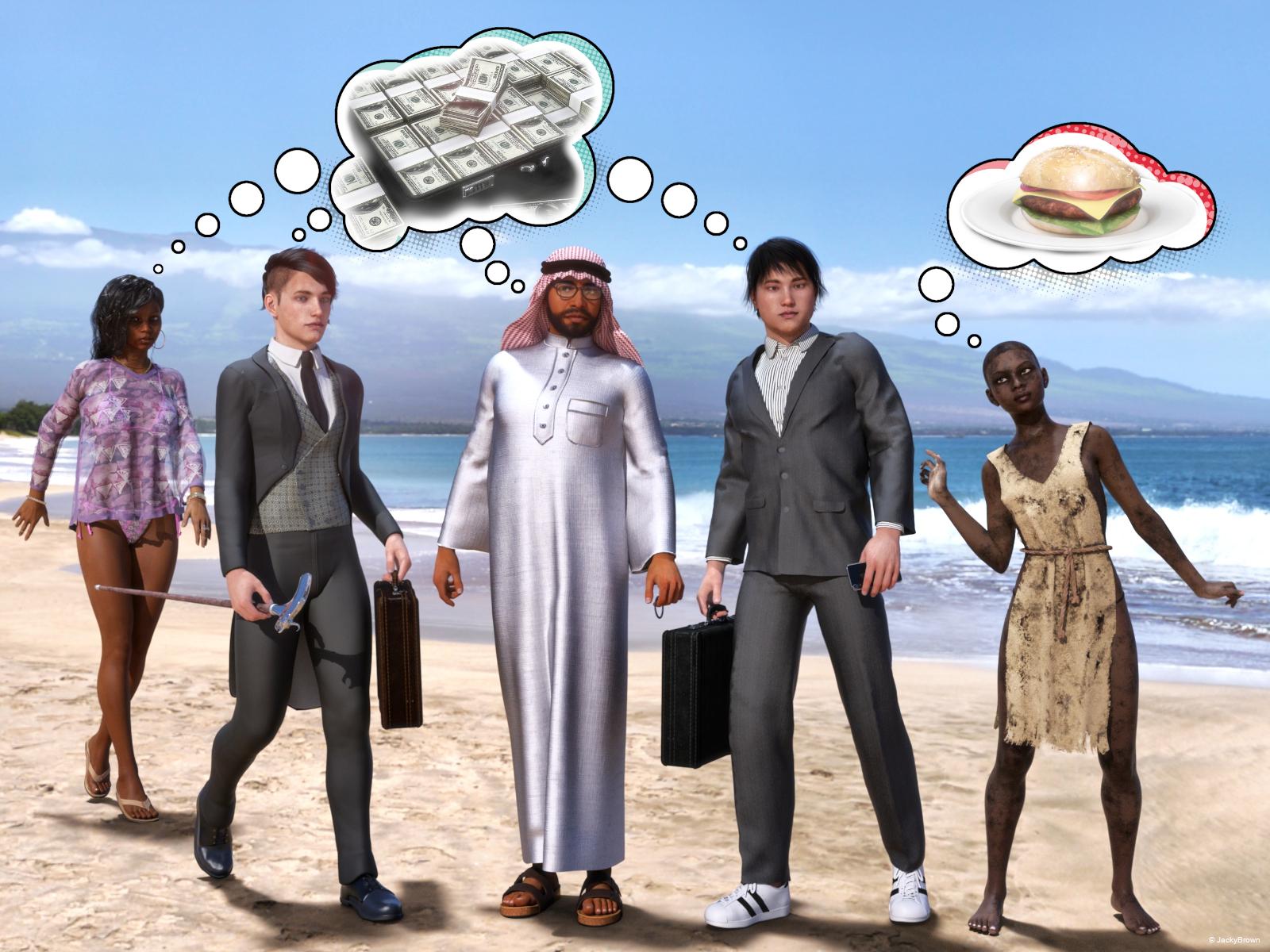
After loading a fifth character into the scene I could not render it anymore because my computer ran out of memory, so I had to make 2 scenes... (Deleting something from a crowed scene sometimes almost takes forever!) Oh well, here is my entry for this month's 3D Art Freebie Challenge! :D
[Best watched at full size for details.]
"Wishful thinking..." (Food for thought)
Starring: Alysha, Tiana, Barack and Walther
The tale:
Whether you are a wealthy African-American woman, a son of an American aristocratic banker, an Arab oil magnate, an Asian businessman or a poor African orphan girl, (almost) everyone has a natural love of money...
Soundtrack:
Phil Collins - Another Day In Paradise (© 1989) https://www.youtube.com/watch?v=Qt2mbGP6vFI
Abba - Money, Money, Money (© 1976) https://www.youtube.com/watch?v=ETxmCCsMoD0
COUNTABLE FREEBIES: (Alphabetic order)#01! African Summer for Wilmap's Summer Top for G3F by eblank99
http://www.sharecg.com/v/81693/gallery/21/DAZ-Studio/African-Summer **#02! AfroHead G3M 1 by abe01
https://sharecg.com/v/86164/gallery/21/DAZ-Studio/AfroHead-G3M-1 **#03! Alysha For G8 by EmotionalDreams
https://sharecg.com/v/94680/browse/21/DAZ-Studio/Alysha-For-G8 **#04! Arabian Dress (for G3M) by Noone102000
https://www.deviantart.com/noone102000/art/FREEBIE-Arabian-Dress-814819412 **#05! A Summer Top for Genesis 3 Female by Wilmap's Digital Creations
https://www.wilmapsdigitalcreations.co.uk/view_product.php?id=398 **#06! Barack for G3M by dumbuser
https://www.sharecg.com/v/88699/gallery/21/DAZ-Studio/Barack-for-G3M **#07! Burger on Plate by CGAxis
https://free.cgaxis.com/product/3d-burger-plate-free/ *1#08! Dante DMC5 Free Stubble for Genesis 8 Male by InTheFlesh
https://sharecg.com/v/94752/gallery/21/DAZ-Studio/Dante-DMC5-Free-Stubble-for-Genesis-8-Male **#09! David 5 Starter Bundle by Daz Originals (DAZ3D Bi-weekly Freebie Feb 17 - Mar 2)
https://www.daz3d.com/david-5-starter-bundle **
[Pure Hair: Punk and Royal Punk outfit used]#10! Dirty Skin Textures for G3F AND G8F by Noone102000
https://www.deviantart.com/noone102000/art/UPDATE-FREEBIE-Dirty-Skin-Textures-G3F-AND-G8F-801889979 **#11! DOA 6 Marie Rose - Head and Body Morphs for G8F by TritiumCG
https://www.deviantart.com/tritiumcg/art/DOA-6-Marie-Rose-Head-and-Body-Morphs-for-G8F-825236730 **#12! EA Sidecut Hair for Genesis 3 & 8 Female(s) by EichhornArt
https://www.renderosity.com/mod/freestuff/ea-sidecut-hait-for-genesis-3-amp-8-femela-s-/82972 **#13! Eyes Dilate for Genesis 8 Female by felldude
https://www.renderosity.com/mod/freestuff/eyes-dilate-for-genesis-8-female/82869 **#14! Face Morphs (Older/Younger) for Genesis 8 Female by felldude
https://www.renderosity.com/mod/freestuff/face-morphs-older-younger-for-genesis-8-female/82938 **#15! Fantasy Amazon Bundle for G8F - 100% FREE by SquarePeg3D
https://www.renderosity.com/mod/freestuff/fantasy-amazon-bundle-for-g8f---100-free/79046 **#16! Fiberhair Goatee Beard for Genesis 3 Male by RedzStudio
https://www.renderosity.com/mod/freestuff/fiberhair-goatee-beard-for-genesis-3-male/75957 **#17! freeSPEX Glasses for Genesis by Slosh
https://www.sharecg.com/v/69673/browse/21/DAZ-Studio/freeSPEX-Glasses-for-Genesis-DAZ-4.6#18! Jewelry Set (G3F & G8F) by Leilana
https://www.renderosity.com/mod/freestuff/jewelry-set/78314 **#19! Hawaiian Floral Prints Seamless by RedEyeCat
https://redeyecat.wordpress.com/2014/06/07/its-a-tile-lollapalooza/ (First item)
[Used on String Bikini for Victoria 6]#20! Huge Hoop Earrings for Genesis 3 Female by Fisty
https://sharecg.com/v/87043/gallery/21/DAZ-Studio/Huge-Hoop-Earrings-for-Genesis-3-Female **#21! iPhone X by klausdbg
https://www.sharecg.com/v/89747/gallery/5/3D-Model/iPhone-X **#22! Kim for G3M by dumbuser
http://www.sharecg.com/v/88737/related/21/DAZ-Studio/Kim-for-G3M **#23! Money by Yughues aka Nobiax
http://www.sharecg.com/v/62461/gallery/5/3D-Model/Money **#24! Mystics Floor & Backplanes by MysticArtDesign
https://sharecg.com/v/94620/browse/21/DAZ-Studio/Mystics-Floor-Backplanes **#25! Rainbow Sandals for Genesis 8 Female by amyaimei
https://www.deviantart.com/amyaimei/art/Rainbow-Sandals-for-Genesis-8-Female-713258864 **#26! RE5 Sheva Alomar Head Morph for G8F by TritiumCG
https://www.deviantart.com/tritiumcg/art/RE5-Sheva-Alomar-Head-Morph-for-G8F-822643742 **#27! RGB HDRi Soft Lights for Daz Studio - Iray by VAlzheimer *1
https://gumroad.com/valzheimer (3rd item)#28! Side Swept ROse Hair (G3F,G8F) Part 1&2 by zoro_d
https://www.renderosity.com/mod/freestuff/side-swept-rose-hair-g3f-g8f-part-1/79533 **
https://www.renderosity.com/mod/freestuff/side-swept-rose-hair-g3f-g8f-part-2/79534 **#29! Slave Tunic Dirty and Thorn for G3F and G8F by Noone102000
https://www.deviantart.com/noone102000/art/FREEBIE-Slave-Tunic-Dirty-and-Thorn-G3F-and-G8F-800738388 **#30! SY 200 Morphs for Genesis 8 Head and Body by SickleYield
https://sharecg.com/v/91888/view/21/DAZ-Studio/SY-200-Morphs-for-Genesis-8-Head-and-Body **#31! Tiana for G8F by RenderGuyNY
http://www.sharecg.com/v/88548/gallery/21/DAZ-Studio/Tiana-for-G8F-%5Bsome-nudity%5D **#32! Walking Cane (OBJ Version) by LuxXeon
https://www.renderosity.com/mod/freestuff/walking-cane-obj-version-/73706 **#33! Walther for G8M by Ruslanomar
https://sharecg.com/v/92848/browse/21/DAZ-Studio/G8M-Walther **
NO-COUNT ITEMS:--- 3Stone Ring for Genesis 3 Female by AllenArt
--- A Gentleman's Wardrobe for Teen Jayden 6 by Daz Originals, Aave, Nainen (DAZ3D Bi-weekly Freebie Jan 20 - Feb 3)
--- AllenArt Iray Jewelry Shaders by AllenArt (Still available on DeviantArt)
--- Betty Carique for G3F/G8F by hindudreams
--- Bezel Cut Ring for Genesis 3 & 8 Female by AllenArt
--- Briefcase by MikeD (The Holiday Loyalty Sale 2019 Free Item)
--- Casual Outfit for G3M by Tab [Sandals used]
--- CasualOutfit2 for G3M by Tab [Bracelet used]
--- Channel Bangle for Genesis 3 Female by AllenArt
++ DAZ Studio Iray HDR Outdoor Environments by Daz Originals, DimensionTheory [Maui used]
--- Free Iray Outdoor Lights by Dreamlight
--- Gem Bangles for G3F by AllenArt
--- Genesis 2 Male Beard by Laticis Imagery
--- Genesis 2 Male Beard 03 by Laticis Imagery
--- Nose Ring 01 for G2F, G3F and/or G8F by AllenArt
++ Rocker Outfit for G3F and G8F by by Daz Originals, DirtyFairy, Mada [Necklace and Thong used]
--- Sneakers for G3F by Tab
++ String Bikini for Victoria 6 by Daz Originals, Mada, Sarsa
++ Toulouse Hair for Genesis 3 Female by Daz Originals
PURCHASED/PAID FOR ITEMS: None 100% Freebies
*1 E-mail address required
** Registration required
#x! Countable Items (Bold ones are used by me for the first time I think.)
--- No longer available freebies
++ Free with DAZ Studio (or the Essentials)
$x. Purchased/Paid For Item
Rendered with DAZ Studio 4.10.0.123 (nVidia Iray)Other free software used: GIMP v2.10.14 and Irfanview 4.54
Postwork: used the AltaLux Image Enhancement Filter (Effect) by Stefano Tommesani that comes with Irfanview and some filters (oa) that come with GIMP. Also used mcjDenoise by mcasual. (https://sites.google.com/site/mcasualsdazscripts9/mcjdenoise)
"Wishful thinking..." (Food for thought)
Cayman's Legacy UVs - M4/V4 for G8M/G8F - issue with eyes (solved)Hi there!
I'm still confused about Cayman's Legacy UV products, M4 for G8M and V4 for G8F.
I know how to make them work and apply a M4 skin to my G8M.
But then I'd like to change just the eyes to conventional G8 materials (while keeping the rest of the M4 skin) and I can't quite figure it out. The iris and pupils are extremly dilated and there's a weird geograft part in the sclera that I can't make sense of. I can see that there's some kind of hidden eye morph connected to the product but I can't figure out how to get rid of it.
Help please? How do I apply conventional G8 eye materials to a G8 figure that has Cayman's Legacy UV applied to them? Thank you!
Novica & Forum Members Tips & Product Reviews Pt 12Mystique G8F Alison G8F by Raiya Advanced Seated Poses G8F Classic Long Curly Hair G8F
When I seen this outfit I thought that is really well done! And I was not disappointed, I like that it has full coverage and still looks sexy. It has morphs included to shape areas to fit a corseted body. All the pieces are seperate so you can kitbash all you want. I only had to do a few tweaks on the shoulder and one of the garters had a slight bump in it. I thought I would have to adjust the hat but all I did was run an simulation with the timeline starting the hat just above the hair and coming down durning the sim. I used to do more risque scenes back when I used Poser and this is probably one of my first since then!
The poses are wonderful! In the original pose the creator used a different stool but I made some minor adjustments and that was all! The pose looked great, of course then I had to tweak this and that and adjust things to my OCD liking, LOL. (They work well with G8M too!)
The hair is one of my favorites! I have always pretty well been able to get it to drape pretty close to how I want it.
The girl Alison by Raiya is beautiful but I had a really hard time getting a decent smile from her. She comes with 3 eyelash options, 2 normal options, 6 eye colors (some unique ones too), 7 lip options with glossy on and off, No brow option, 6 makeup options and 3 eyeliner options. She has no nail color options so I had to get those from another character.
 The *most* photorealistic skin/settings
Yeah, with chromatic SSS, you pretty much want to use white for the base and transluceny colors. You can alter the skin tone itself a bit using the transmitted color, which is generally a shade from pink to orange. No longer does the rule "lower transluceny for ligher skin" work...with chromatic SSS, you need a higher translucency (all my characters use 75% and higher), even on lighter skinned characters, because you need that SSS map to shine through. The SSS map is where you want all the nice fleshy details and veins. To build a SSS map, I take the color map and blend in AJ's blood vessel maps along with one of the more detailed DO G3 SSS maps (V7 for girls and Lee 7 for boys). The end result is a nicely blended SSS map. It can become tricky when the character you are working on has body hair painted directly onto the color map...which is a whole other issue and I wish it wasn't done but I understand why because not everybody has the horsepower to render modeled body hair (Dain and Michael 7 being prime examples).
For specular details, you are defiinitely not forced to use the ones that come with the character you're working on. I tend to build out "frankenskins" or mashups of skins...color map from here, specular map from there, etc. As long as they line up relatively decent (and use the base UV), you're good to go. I've attached an example of a mashup...it is LY Bramble's color map, with a rebuilt SSS map, and Victoria 7's specular, bump, and normal maps. Victoria 7 has gorgeous specular details. The second example I've attached is reworked Monique 7 (borrowing Monique 8's eyebrows)...but you can see how gorgeous of specular details Monique 7 has after reworking the skin to use chromatic SSS. The third example is completely reworked Michael 7 to use chromatic SSS.
It should be noted for render racers, that chromatic SSS will add on to render times rather significantly (it's pretty much the main reason why G8 characters will take longer to render than G3 characters...generally speaking).
3D Art Freebie Challenge-February 2020-"Natural Love" -Main Thread Only3D Art Freebie Challenge February 2020 "Natural Love"
"After all the jacks are in their boxes, And the clowns have all gone to bed..." (© 1967 Jimi Hendrix - The Wind Cries Mary)
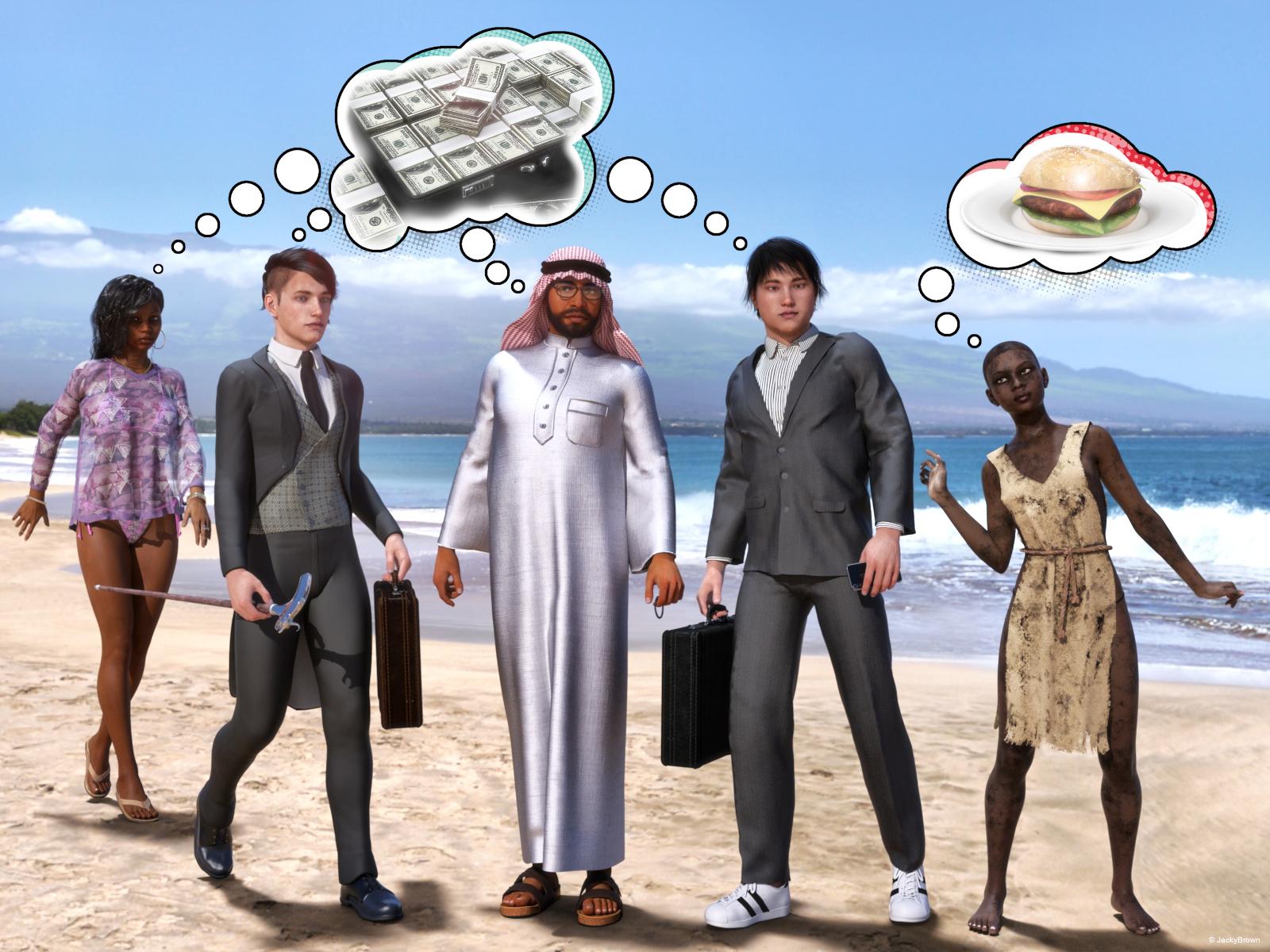
After loading a fifth character into the scene I could not render it anymore because my computer ran out of memory, so I had to make 2 scenes... (Deleting something from a crowed scene sometimes almost takes forever!) Oh well, here is my entry for this month's 3D Art Freebie Challenge! :D
[Best watched at full size for details.]
"Wishful thinking..." (Food for thought)
Starring: Alysha, Tiana, Barack and Walther
The tale:
Whether you are a wealthy African-American woman, a son of an American aristocratic banker, an Arab oil magnate, an Asian businessman or a poor African orphan girl, (almost) everyone has a natural love of money...
Soundtrack:
Phil Collins - Another Day In Paradise (© 1989) https://www.youtube.com/watch?v=Qt2mbGP6vFI
Abba - Money, Money, Money (© 1976) https://www.youtube.com/watch?v=ETxmCCsMoD0
COUNTABLE FREEBIES: (Alphabetic order)#01! African Summer for Wilmap's Summer Top for G3F by eblank99
http://www.sharecg.com/v/81693/gallery/21/DAZ-Studio/African-Summer **#02! AfroHead G3M 1 by abe01
https://sharecg.com/v/86164/gallery/21/DAZ-Studio/AfroHead-G3M-1 **#03! Alysha For G8 by EmotionalDreams
https://sharecg.com/v/94680/browse/21/DAZ-Studio/Alysha-For-G8 **#04! Arabian Dress (for G3M) by Noone102000
https://www.deviantart.com/noone102000/art/FREEBIE-Arabian-Dress-814819412 **#05! A Summer Top for Genesis 3 Female by Wilmap's Digital Creations
https://www.wilmapsdigitalcreations.co.uk/view_product.php?id=398 **#06! Barack for G3M by dumbuser
https://www.sharecg.com/v/88699/gallery/21/DAZ-Studio/Barack-for-G3M **#07! Burger on Plate by CGAxis
https://free.cgaxis.com/product/3d-burger-plate-free/ *1#08! Dante DMC5 Free Stubble for Genesis 8 Male by InTheFlesh
https://sharecg.com/v/94752/gallery/21/DAZ-Studio/Dante-DMC5-Free-Stubble-for-Genesis-8-Male **#09! David 5 Starter Bundle by Daz Originals (DAZ3D Bi-weekly Freebie Feb 17 - Mar 2)
https://www.daz3d.com/david-5-starter-bundle **
[Pure Hair: Punk and Royal Punk outfit used]#10! Dirty Skin Textures for G3F AND G8F by Noone102000
https://www.deviantart.com/noone102000/art/UPDATE-FREEBIE-Dirty-Skin-Textures-G3F-AND-G8F-801889979 **#11! DOA 6 Marie Rose - Head and Body Morphs for G8F by TritiumCG
https://www.deviantart.com/tritiumcg/art/DOA-6-Marie-Rose-Head-and-Body-Morphs-for-G8F-825236730 **#12! EA Sidecut Hair for Genesis 3 & 8 Female(s) by EichhornArt
https://www.renderosity.com/mod/freestuff/ea-sidecut-hait-for-genesis-3-amp-8-femela-s-/82972 **#13! Eyes Dilate for Genesis 8 Female by felldude
https://www.renderosity.com/mod/freestuff/eyes-dilate-for-genesis-8-female/82869 **#14! Face Morphs (Older/Younger) for Genesis 8 Female by felldude
https://www.renderosity.com/mod/freestuff/face-morphs-older-younger-for-genesis-8-female/82938 **#15! Fantasy Amazon Bundle for G8F - 100% FREE by SquarePeg3D
https://www.renderosity.com/mod/freestuff/fantasy-amazon-bundle-for-g8f---100-free/79046 **#16! Fiberhair Goatee Beard for Genesis 3 Male by RedzStudio
https://www.renderosity.com/mod/freestuff/fiberhair-goatee-beard-for-genesis-3-male/75957 **#17! freeSPEX Glasses for Genesis by Slosh
https://www.sharecg.com/v/69673/browse/21/DAZ-Studio/freeSPEX-Glasses-for-Genesis-DAZ-4.6#18! Jewelry Set (G3F & G8F) by Leilana
https://www.renderosity.com/mod/freestuff/jewelry-set/78314 **#19! Hawaiian Floral Prints Seamless by RedEyeCat
https://redeyecat.wordpress.com/2014/06/07/its-a-tile-lollapalooza/ (First item)
[Used on String Bikini for Victoria 6]#20! Huge Hoop Earrings for Genesis 3 Female by Fisty
https://sharecg.com/v/87043/gallery/21/DAZ-Studio/Huge-Hoop-Earrings-for-Genesis-3-Female **#21! iPhone X by klausdbg
https://www.sharecg.com/v/89747/gallery/5/3D-Model/iPhone-X **#22! Kim for G3M by dumbuser
http://www.sharecg.com/v/88737/related/21/DAZ-Studio/Kim-for-G3M **#23! Money by Yughues aka Nobiax
http://www.sharecg.com/v/62461/gallery/5/3D-Model/Money **#24! Mystics Floor & Backplanes by MysticArtDesign
https://sharecg.com/v/94620/browse/21/DAZ-Studio/Mystics-Floor-Backplanes **#25! Rainbow Sandals for Genesis 8 Female by amyaimei
https://www.deviantart.com/amyaimei/art/Rainbow-Sandals-for-Genesis-8-Female-713258864 **#26! RE5 Sheva Alomar Head Morph for G8F by TritiumCG
https://www.deviantart.com/tritiumcg/art/RE5-Sheva-Alomar-Head-Morph-for-G8F-822643742 **#27! RGB HDRi Soft Lights for Daz Studio - Iray by VAlzheimer *1
https://gumroad.com/valzheimer (3rd item)#28! Side Swept ROse Hair (G3F,G8F) Part 1&2 by zoro_d
https://www.renderosity.com/mod/freestuff/side-swept-rose-hair-g3f-g8f-part-1/79533 **
https://www.renderosity.com/mod/freestuff/side-swept-rose-hair-g3f-g8f-part-2/79534 **#29! Slave Tunic Dirty and Thorn for G3F and G8F by Noone102000
https://www.deviantart.com/noone102000/art/FREEBIE-Slave-Tunic-Dirty-and-Thorn-G3F-and-G8F-800738388 **#30! SY 200 Morphs for Genesis 8 Head and Body by SickleYield
https://sharecg.com/v/91888/view/21/DAZ-Studio/SY-200-Morphs-for-Genesis-8-Head-and-Body **#31! Tiana for G8F by RenderGuyNY
http://www.sharecg.com/v/88548/gallery/21/DAZ-Studio/Tiana-for-G8F-%5Bsome-nudity%5D **#32! Walking Cane (OBJ Version) by LuxXeon
https://www.renderosity.com/mod/freestuff/walking-cane-obj-version-/73706 **#33! Walther for G8M by Ruslanomar
https://sharecg.com/v/92848/browse/21/DAZ-Studio/G8M-Walther **
NO-COUNT ITEMS:--- 3Stone Ring for Genesis 3 Female by AllenArt
--- A Gentleman's Wardrobe for Teen Jayden 6 by Daz Originals, Aave, Nainen (DAZ3D Bi-weekly Freebie Jan 20 - Feb 3)
--- AllenArt Iray Jewelry Shaders by AllenArt (Still available on DeviantArt)
--- Betty Carique for G3F/G8F by hindudreams
--- Bezel Cut Ring for Genesis 3 & 8 Female by AllenArt
--- Briefcase by MikeD (The Holiday Loyalty Sale 2019 Free Item)
--- Casual Outfit for G3M by Tab [Sandals used]
--- CasualOutfit2 for G3M by Tab [Bracelet used]
--- Channel Bangle for Genesis 3 Female by AllenArt
++ DAZ Studio Iray HDR Outdoor Environments by Daz Originals, DimensionTheory [Maui used]
--- Free Iray Outdoor Lights by Dreamlight
--- Gem Bangles for G3F by AllenArt
--- Genesis 2 Male Beard by Laticis Imagery
--- Genesis 2 Male Beard 03 by Laticis Imagery
--- Nose Ring 01 for G2F, G3F and/or G8F by AllenArt
++ Rocker Outfit for G3F and G8F by by Daz Originals, DirtyFairy, Mada [Necklace and Thong used]
--- Sneakers for G3F by Tab
++ String Bikini for Victoria 6 by Daz Originals, Mada, Sarsa
++ Toulouse Hair for Genesis 3 Female by Daz Originals
PURCHASED/PAID FOR ITEMS: None 100% Freebies
*1 E-mail address required
** Registration required
#x! Countable Items (Bold ones are used by me for the first time I think.)
--- No longer available freebies
++ Free with DAZ Studio (or the Essentials)
$x. Purchased/Paid For Item
Rendered with DAZ Studio 4.10.0.123 (nVidia Iray)Other free software used: GIMP v2.10.14 and Irfanview 4.54
Postwork: used the AltaLux Image Enhancement Filter (Effect) by Stefano Tommesani that comes with Irfanview and some filters (oa) that come with GIMP. Also used mcjDenoise by mcasual. (https://sites.google.com/site/mcasualsdazscripts9/mcjdenoise)
"Wishful thinking..." (Food for thought)
All Links Check Out Plz Move To Entries Thread
I will give you time to move this entry then I will close the contest!
Daz 3D is part of

Connect
DAZ Productions, Inc.
7533 S Center View Ct #4664
West Jordan, UT 84084Licensing Agreement | Terms of Service | Privacy Policy | EULA
© 2026 Daz Productions Inc. All Rights Reserved.