-
Remove Items from 'Lost and Found' Tab
I have purchased 'Face Transfer' and I have saved many characters using the 'Save Face...' function.
When I was new to DAZ I didn't know how to properly delete some of these characters (I have since learned to do it the right way).
But back then I just deleted the files, causing DAZ to move them to the 'Lost and Found' tab (see pic below).
Even though it's not important, is there a way to remove these items from the tab so it's empty?
Thanks for any help! :)
Freebie Challenge March 2024 - "Power Source" - Main ThreadFae3D said:
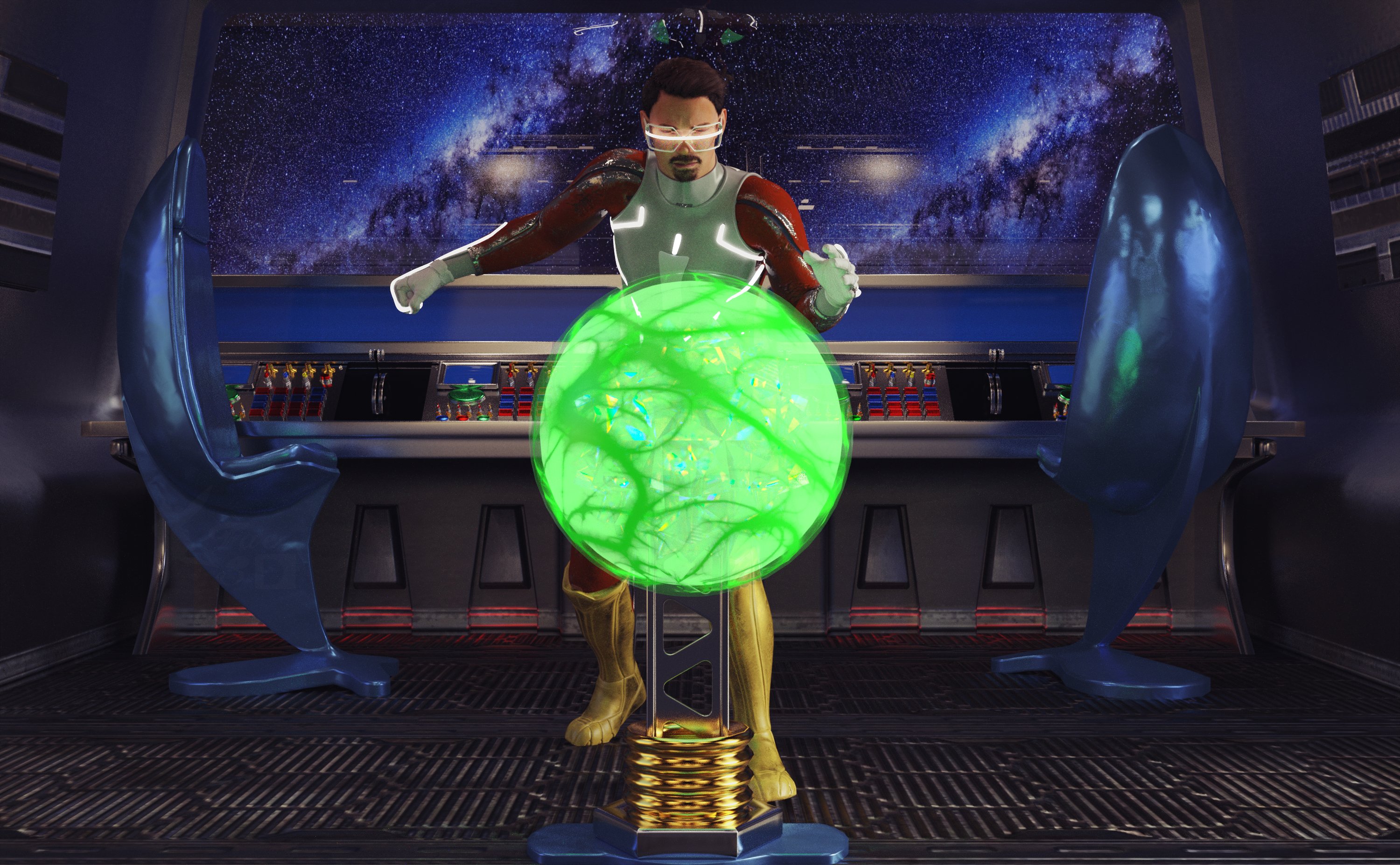
Stealing the Power Core
No one else was on the ship, they had all fled to the escape shuttles when all the emergency alarms went off. Of course, he had been the one to trigger them. The traitor was alone, no one had noticed that he had remained behind. Now was his chance - the brand new, secretly developed power core was unguarded and ripe for the taking. With the fortune he would make from selling it on the black market, he knew he would be able to retire to any planet he desired!
Freebies:
Anakin Skywalker for G8M and G8.1M (Character Morph) - https://www.deviantart.com/shinteo/art/Anakin-Skywalker-for-G8M-and-G8-1M-873019338
Walther G8M (materials) - https://sharecg.com/v/92848/favorite/21/DAZ-Studio/G8M-Walther
S.EXE Full Outfit G8F - https://www.renderosity.com/freestuff/items/96378/sexe-full-outfit-g8f
Sci-fi Suit for Gf8 - https://www.renderosity.com/freestuff/items/88617/sci-fi-suit-for-gf8
Panther Gloves G8M - https://www.sdebstore.com/collections/free-stuff/products/panther-gloves-g8m-free
Batgirl for G8F and G8M dForce (Boots) - https://sharecg.com/v/94473/browse/21/DAZ-Studio/Batgirl-for-G8F-and-G8M-dForce
Cyber Glasses 2 - https://www.renderhub.com/mbit/cyberglasses-2
Every Day Style Hair (and beard) G8M - https://www.renderhub.com/zoro-d/everyday-style-hair-for-genesis-8-males
Glowing Eyes - https://sharecg.com/v/99763/browse/21/DAZ-Studio/Glowing-eyes
The Brawl! Poses for G8M - https://www.renderosity.com/freestuff/items/84898/the-brawl-poses-for-g8m
Unsplash Space BG (I don’t remember which one, sorry!) - https://unsplash.com
AAL Plasmaball (Glowing Core) - https://sharecg.com/v/74972/favorite/21/DAZ-Studio/AAL-Plasmaball (This thing is really useful!)
Tetrasphere (It's inside the sphere for colors) - https://www.daz3d.com/forums/discussion/541886/the-january-2022-render-challenge-glass/p2 (scroll down a little over half way)
Ghastly's Sci-Fi Sets - https://sharecg.com/v/93518/gallery/21/DAZ-Studio/Ghastlys-Sci-Fi-Sets
Iray Jewelry Shaders (On just about everything except the character) - https://sharecg.com/v/95893/favorite/21/DAZ-Studio/Iray-Jewelry-Shaders
No Count:
Space Station Window - Can’t find anymore, was free when I got it (I used this once before and forgot that it was no count, lol!)
Paid:
None
Lighting is the default HDRI light and point lights in Daz Studio. I tweaked the materials, the lights and the pose. Set up and rendered within Daz Studio Iray. Postwork in Pixelmator Pro.
I’ve attached the before post render (the one that says Raw Render) and the finished image file.
"Tetrasphere" link is broken, but since you have enough freebies anyway:
Entry approved, please move to Entries Thread!
Weird 'hole' in clothing - Genesis 9crosswind said:
I think the culprit comes from the body shape / morph you dialed on this figure... if you find no issue after fitting jeans on Base figure. And you used auto-fit by the way? Yes, I used autofit
Yes, I used autofit but I get the same result when applying Genesis 9 clothing. The character is extensvely morphed, including my custom morphs but it was fine the day before. The other issue is that the problem is with the clothes not the body. Yet I have not done anything to the clothes....so I'm at a loss as to what the problem is...which is why I posted on this forum. I will try to recreate a duplicate figure using the same morphs to see which is causing the problem.
FBX doesn't match in other software - HELPAfter importing to C4D, go to Pose Morph, you'll find the corrective morph properties. Normally they'll be auto dialed.
G8.1 Morphs visible in parameters but don't workThat was it. Thanks for the detailed info.
PerttiA said:
Making the G8 base expressions (and any expressions that are using them) work on G8.1 requires removing dummy/placeholder expressions that are installed to G8.1 morph folders - These dummy/placeholder expression files have no other function than to prevent the base G8 expressions from loading.
The dummy/placeholder files are located in;
...\Data\DAZ 3D\Genesis 8\Female 8_1\Morphs\Daz 3D\Base Pose Head\ (255 files, can be more if you have additional DAZ expression packs)
...\Data\DAZ 3D\Genesis 8\Female 8_1\Morphs\Daz 3D\Expressions\ (24 files, can be more if you have additional DAZ expression packs)
...\Data\DAZ 3D\Genesis 8\Male 8_1\Morphs\Daz 3D\Base Pose Head\ (255 files, can be more if you have additional DAZ expression packs)
...\Data\DAZ 3D\Genesis 8\Male 8_1\Morphs\Daz 3D\Expressions\ (24 files, can be more if you have additional DAZ expression packs)Please make sure you are removing the files from G8.1 morph folders and not G8 morph folders.
Note 1; If you are logging in to DS and letting DAZ Connect (within DS) to install/update your content, you may have these also in an other location that has "\Data\Cloud\" in it's path
Note 2; Do not remove any files from "FACS" or "FACSExpressions" foldersTroubles when creating custom morph for G8F based on combination of other morph dialsAs Gordig says - apply your character, using the existing morph settings not the OBJ, and then right-click in the Parameters pane and check Edit Mode (if it isn't already checked)
- right-click in the group you want to hold your character (e.g. Actor>People) and select Create New Property
- In the dialogue that opens enter a name and label (the label is what appears in the property list, the name is the internal identifier which isn't user-facing and absolutely must be unique), usually turn on respect Limits and set the minimum to either -100% or 0 according to taste. Clicjk Accept
- Set the new property to 100%
- Right-click on the new property and select ERC Freeze
- In the dialogue that opens run your eye down the list of Sub-components to make sure there is nothing that shouldn't be there (you don't usually want to include any poses, for example, or expression controls). Click Accept.
- Test your new morph controller
Assuming all is well you can either save a Scene subset (if this is for a specific project, for example) or a morph asset (if you want to have the character available all the time): to save as a morph File>Save As>Suport Assets>Morph Asset (or Modifier Asset, according to the change log the command is getting updated to reflect the scope of the function); in the dialogue that opens the Author and Product names are used for folder names within the data folder for the character, so you know what to back up.
Troubles when creating custom morph for G8F based on combination of other morph dialsYou should do an ERC freeze to link all the morph dials together instead of exporting as a single object, because that destroys the links to JCMs.
Troubles when creating custom morph for G8F based on combination of other morph dialsI've been looking online for a while now, but have not found anything that helped me understand or solve this. I have a number of morphs going into a character that I'd like to consolidate into a single morph. I've gotten as far as exporting the character as an .obj and re-importing to create the morph on a new Genesis 8 figure, and everything looks great - until I try and pose the character. I assume it has to do with JCMs, but I'm not entirely sure what that means, or if what I'm trying to do is even possible because of some underlying issues.
Does anyone know if there's a tutorial out there that would help me understand what's going on, or able to provide some input?
Thank you ahead of time!!!
FBX doesn't match in other software - HELPThanks for the reply, I added the corrected morph to the morph export but how do I apply them in daz - I can't see the corrective forearm dial on the current used tab. Also the corrective morph don't work in C4D. I have the dials but it doesn't effect the mesh. Any clue?
Weird 'hole' in clothing - Genesis 9I think the culprit comes from the body shape / morph you dialed on this figure... if you find no issue after fitting jeans on Base figure. And you used auto-fit by the way?
Transferring G8 morphs to G9nabob21 said:
Hi franky85. I'm still not clear on this yet., but if I have a G8F in the scene with 200 morphs and only 10 are active (i.e. set greater than zero) are all 200 morphs converted and transfered to G9 or only the 10 that are active?
ManFriday's converter does not "transfer morphs" - rather it will transfer the shape. You could have 200 active, at the end it will merge them and split the head/body etc. If you wish to transfer a bunch of individual morphs, I think the transfer tool remains your best bet - however it will rely on you using a clone shape on your G9 figure.
FBX doesn't match in other software - HELPCheck the body morph you use...as some body morphs are already embedded with HD mesh. And DTC bridge can export HD mesh, you just need to Bake SubD when exporting the figure.
Then go to the folder: your user name\Documents\DAZ 3D\Bridges\Daz To Cinema 4D\Exports\FIG\FIG0, to check the exported FBX file.
Question About Weight MappingI'm trying to teach myself how to fit and rig clothing on G8F. The transfer utility works great, but I'm not satisfied with the weight mapping it applies. I tried playing around with the weight mapping, but for some reason, I'm getting spots that I just can't remove (circled in red in the attached image). I'm sure the main issue is that I have no idea what I'm doing, but can anyone tell me why this happens, or how to fix it?
Thanks!
Transferring G8 morphs to G9nabob21 said:
When the ManFriday Figure Converter is used, do all of the morphs that are available for G8 get converted, or just the ones that are currently used?
You have to select a G8 and G9 figure in your scene - it won't create a morph-by-morph transfer, rather it will create a new morph with the name of your choosing for head / body / full body etc.
FBX doesn't match in other software - HELPHi,
I have an odd issue latly, I built a character using morph that I purshased. Everything looks good inside DAZ but when I'm exporting in FBX the character doesn't look like inside DAZ. I tried the classic FBX export and the daz bridge to C4D but I got the same reasult. The character doesn't match what I see in DAZ. However when I exporting in OBJ the export match perfectly. See the image attached below
Anyone can help me with that issue please!Thanks
From Daz

FBX Export
Squishy Human for Genesis 8 and 8.1 Female - Nails issueSo I have had this product (Squishy Human for Genesis 8 and 8.1 Female) for some time now and never really paid attention to changing the nails or addign a morph with elongated nails
I tried to test some nails, many of my morphs that do not make "Long" nails do not display the morph issue but I found some that when set to 100% show the issue and finally I tested to show that if set to below the invisible threshold the issue is not there till I go a few % over and the issue shows up.
 01 Squishy on left (pink) and G8F base on Right (textured)
 02 Found some nail morphs and favorited them, nail morphs that can show the issue to show that it was not specific body morph that was the cause and as you can see on the Base G81F, there is no issue
 03 another one
 04 pears
 05 testing to show that below that magical threshold it does not show the issue
 06 and when I go above that threshold, had to goto 38% so you can see it better but it subtly starts at 28%Australian common brushtail possum
if you want to try creating one, I would start with the housecat
(I am not the best at sculpting and even worse at doing any correctives needed on the ERC frozen imported morph so not even going to try for others but as an Aussie might look at it for myself)
I have Zbrush and have attempted crazier things
 gen 9 to gen 8.1 or gen 8 converters
FSMCDesigns said:
Like what?
To go back to my first post: "JCMs (and, indeed, anything that requires control links to function properly), geografts, anything that uses a custom UV and scripts that are locked to only work on specific base figures". To which I should also add "dForce add-on meshes", which aren't converted correctly by autofit or RSSY's converter.
There is right now no Centaur 9, for example. If I wanted to do a Vicky 9 centaur, getting the existing centaur graft to work with G9 would either be a huge amount of technical effort to get it to work properly, or require a lot of fudging... so, in many ways, it would be far, far more practical to do a V9 centaur by converting V9 back to G8, because that's just a matter of converting a morph and a skin rather than trying to make a geograft work with a new geometry. (It was reasonably possible G3 to G8, but those were such similar figures).
Hell, for the sake of the argument, I have indeed just done a G8 conversion of V9, because I have my own tools that let me do that, so I can now have her as a centaur:
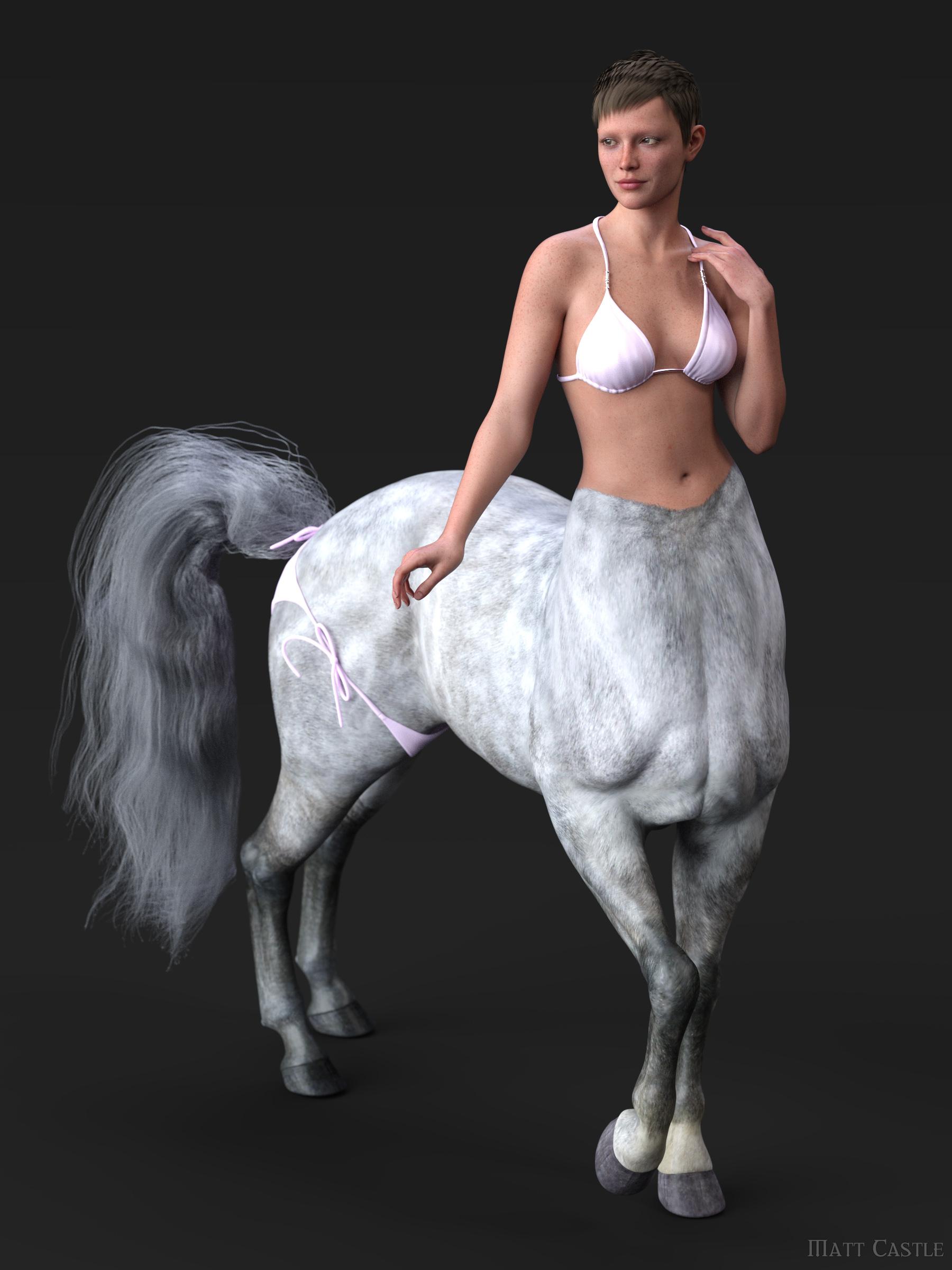
If anyone fancies trying to do a proper G9 conversion of the centaur body - one that doesn't have to be constantly adjusted or have problems patched up in photoshop - I wish them luck, because I don't have the patience for that, and I've already seen some fairly wonky Frankensteining attempts on DeviantArt.
We're definitely not in the position that we can properly convert all G8 assets flawlessly to G9. That's not to say that I necessarily think that G9 to G8 products would necessarily be productive things for PAs to provide, but as some stuff can't be practically converted, having the option to convert the stuff we can convert in either direction gives more capacity to get around the parts that are troublesome or impossible to convert properly.
johnbuckeridge said:
What are JCMs?
"Joint Controlled Morphs" (which became CBs, Corrective Blendshapes, on G9). They're morphs that are automatically dialled in based on how the figure is posed, and they're used to correct problems with how the figure poses. The base figure has some to correct how it poses, but when you morph the figure, you need new morphs to recorrect the pose for the new shape.
At present, I don't believe any of the character converters can adapt JCMs correctly from G8 to G9, nor do all of the linking of the parameters to make them work.
The right way to export Victoria 4 into, and out of Daz?What is the right way to export Victoria 4(.2) into, and out of Daz?
This whole thing has been driving me mad for months.
Grab a coffee, this could get confusing, and monotonous (plus, I'm in a library, and I hate the keyboards here).
Like with G8 you have to delete eyelashes. Does anything of V4 need to be hidden or deleted? Does her resolution need to be set at "Base"? Does her Sub-D need to be lowered? What settings to I use in Blender when I'm importing and exporting her? (Are the setting that I use for G8 good enough?) What settings do I need the importer and exporter do I need Daz to be set at (is it the Poser option, or does it not work anymore, like Blender's setting from the drop-down menu)?
I'm trying to create a morph for V4(.2) in Faceform Wrap. The mesh wrap with no issues. The only issue is getting the morph back into Daz without having a delta go missing.
One Wrap failed because the eyes failed to morph with the figure (the figure morphed, but the eyes stayed in place). Then there's the eyelashes that don't morph with the morph (i.e. either get bigger or smaller with the size of the eye, or conform to the shape of the eye).
I'm probably mad for trying to do this. But what's driving me is that I know that it CAN be done.
How to keep the thickness of clothing?Another approach is to export to blender then simulate there. In blender you will simulate a low resolution proxy that you can easily get with a decimate modifier, then transfer the animation to the high resolution outfit via a surface modifier, keeping your thickness and whatnot.
Daz 3D is part of

Connect
DAZ Productions, Inc.
7533 S Center View Ct #4664
West Jordan, UT 84084Licensing Agreement | Terms of Service | Privacy Policy | EULA
© 2026 Daz Productions Inc. All Rights Reserved.