-
Content Catalog - Windows/macOS (Commercial) - Out now
How many products do you have in your DIM (or any other) download folder? 500? 1,000? 10,000? No matter how many you have, the chance is that you can't remember what they are, what they contain. Especially if you don't install everything.
Content Catalog was created to keep track of all your product downloads (DAZ and other stores). It scans the folder(s) and builds a searchable, browsable catalog with thumbnails — without extracting or installing anything. Find what you own, see what it looks like, and know who made it, all from one window.
It automatically identifies creators for your DAZ store purchases using a local Creator Database that's downloaded once and updated whenever you like. No internet connection needed for everyday browsing.
Search by name, creator, tags, or your own notes. Filter by format, content type, or creator. Sort by name, download date, or product SKU.
It includes a comprehensive PDF guide to help you get the most out of it. It is strongly recommended that you read it before scanning your library for the first time.
System requirements: Windows x64 and macOS 13 or later.
macOS users: it is a .dmg file, which will be found under General/DJB. The installation is a macOS standard: drag it to the link that points to your Application Folder (see last image).
Slow rendering time.There have been other discussions on this topic here on the forum, but my problem is different from the others. What usually happens is that a standard render on my system (I’ll list the specifications below) takes 10–12 minutes, rendering images at a resolution of 1920x1080 in a standard scene containing objects, lighting and two Genesis 9 figures.
The problem occurs occasionally, where the scene takes between 40 and 60 minutes to render, using the same scene, lighting and figures.
I use Nvidia Iray as the engine, in photorealistic mode, with CPU fallback disabled and CPU unchecked in devices. The GPU is identified correctly.
Using the CPUID HWMonitor software, I identified differences in the GPU’s performance in both cases. CPU usage remains constant throughout both.
| ITEM | NORMAL RENDER | SLOW RENDER |
| GPU Power Consumption | 140W to 150W | ~60W |
| Temperature | ~80°C | ~56°C |
| GPU usage | 100% | 100% |
| VRAM usage | 98% to 99% | 96% to 99% |
| Frame Buffer | 69% to 74% | 2% to 6% |
| Bus Interface | ~60% | ~16% |
| 3D Usage | 94% to 100% | 56% to 100% |
There is a notable discrepancy in some itens, where even though the GPU reports that it is using 100% of its capacity during rendering, it does not utilise its full processing power to complete the task, resulting in a significant increase in the time between interactions during rendering. This problem occurs in both Daz Studio 4.24.0.4 and Daz Studio 6 – beta version 6.25.2026.14722.
The only solutions I have found for the problem so far have been to close the Daz Studio application, clear the RAM using RAMMap, and reset the graphics card driver using the shortcut Win+Shift+Ctrl+B. If that doesn’t work, try resetting the graphics card using the command (nvidia-smi --gpu-reset) in the system terminal, or, if that doesn’t work, perform a full reboot of the operating system.
I’d like to know if other users are experiencing this or if it’s just me. This problem persists even after reinstalling the software, the operating system, in both the Game Ready and Studio versions from NVIDIA driver.
System information:
Windows 11
DAZ Studio 4.24.0.4 - Daz Studio 6 – beta version 6.25.2026.14722
AMD Ryzen 7 5700X 8-core processor
NVIDIA RTX 3060 12GB
NVIDIA GeForce Game Ready Driver 610.47
64GB RAM
Error Downloading NFP 3D filesroustan said:
Help? Anyone? Still unable to download my files. it says,
{"error":"Token ownership lookup error"}Please contact support, I don't think this is likely to be anything the forum can help with.
Rolling backdropIt's not clear to me exactly what you want. The hits I get when I google rolling backdrop don't match what there is of your description.
If you want a backdrop that can be used out of the side window of a car, so its scrolling from one side to the other, you could use a plane to make a very long billboard, put your background image on it, and then move it. Or you could make a big cylinder primitive, put your image on the side, and rotate it. In both cases, I'd render, or find, or create with AI a short stretch of backdrop, use an image program to turn it into a seamless image in the horizontal axis, and then tile it on the primitive.
RTX 40xx series cards are out of production. When will Daz work with the RTX-50xx family?There is a version of DAZ Studio that works with the 50xx series cards. There are other people on the forum that know a lot more about it than I do. I don't have a 50xx so I haven't studied it.
Mixamo animation in Studio?The Power of aniMate 2 is a page with a ton of info. It begins with promo for the course, but below that there's a whole bunch of valuable info and links to forum threads.
Also, you can adjust the arms position a bit using the Pose Control dials on the figure: Arms Up/Down and Arms Front/Back, etc., :)
Cool, eh? You're doing it!!!
The cool thing about aniMate 2 is that, when we create an aniBlock using the existing animation, we can then stretch the block to make it loop, and if the character is moving forward, backward, whatever, it will continue on from where it left of instead of starting over at the beginning, like we'd get by applying the animated pose more times.
There's a lot more cool stuff about it, but that one is HUGE!
UltraScenery - new(er) territory [Commercial]Xandyr78 said:
You mentioned workarounds and such for USC1 scenes in USC2. I'm not sure how best to search for those within this thread. Is there a "master post" with links or something that would be helpful?
I had this problem before, you can see the exchange with barbult on page 54:
https://www.daz3d.com/forums/discussion/636346/ultrascenery-new-er-territory-commercial/p54
In my case, I temporarly solved with copying files to make Daz belive I had USC1 and I replaced the missing grass by replacing USC1 grass by USC2 grass (they are instances, so I just changed the instances' original node by USC2 grass).
I don't know if it could apply in your case, because what you're missing may be too specific and the real solution was, in the end, to get USC1, which I did when it was very cheap (and USC1 is now alongside USC2 catching dust in my library, one day I'll find the motivation and time to see what I can really do with them
 ).Freebie Challenge May 2026 - "Lies and Truth" - Main Thread
emanuela1 said:
Hi Angel_X , now to complete your participation you must send your rendering in the entry thread here: entry thread.
Done.

Sorry for the delay, but I've had a terrible day with my arrhythmia, caused by repeated cases of pericarditis, diagnosed after an ambulance ride to the emergency room two years ago. Chronic arrhythmia is incurable and not life-threatening, but it's making my chronic headaches worse.
I'm dealing with a serious situation with loneliness, illness, and I'm also losing the house I was renting. I hope I don't completely lose my strength to live.I'm happy to read this forum; it keeps me company, even if I don't understand many things, and the translator sometimes writes nonsensical sentences that make me smile.

(Google Translator)
There's Always Another Sale Thread -- Discussions Only Pt 6joanna said:
SilverGirl said:
Guessed wrong on the punchcard. Sorry folx.
To be honest, I would have almost preferred a punchcard, seeing as it gave one a choice what to get for a $+1 deal. Having to choose between only 2 products, neither of which interests me even at the $1.99 price... Well, it's going to be easier to not play and keep the purchases up, I suppose.
On the other hand, the "buy or own" is a better deal as you don't have to buy ahead of time. If there's some really good deal, you can just put 2-3 daily deals in your cart and shop instantly.
I was never a fan of the punchcards, but certainly were better than this $1.99 (or more) low selection.
Today's Special started with offering only the (imo) overpriced morphs.
"New code every day", a slap in the face for members of Daz+/Premier that can't combine.
Price floors looks too high all over the place.
There has been no decent Gift Card sale in months.
Since last year we saw very little 'daz+ related stuff' during the Daz+ sale (compared to how it used to be), it looks like Daz decided to rename it and completelly and avoid the original 'theme'. Considering how very slow things are in Daz+ forum and without new contest formart after more than 2 months, I just hope Daz didn't decide to replace Jack with an AI.
I will keep an eye to see if some of the $1.99 is actually something i really need/want or if something of the daily stuff is really good for a one off. But keeping up with the sale in hopes one day i can make a juicy big purchase under those conditions is not worth it for me. And here is where having regular good GC sales would had worked in favor of Daz. If one has already money ready, the barrier to hit 'purchase' is always lower.
Rendo and Renderhub are likely rejoicing over this (miss)DealZ sale.
UltraScenery - new(er) territory [Commercial]Xandyr78 said:
barbult said:
As I recall, the problem had to do with UltraScenery2 referencing some texture files from the original UltraScenery. If someone did not own the original UltraScenery, those files would turn up as missing in UltraScenery2. If you have both products installed, you should not run into this issue. It would take some time to find that message again in the forum. I found it not too long ago for someone else, so it may be referenced again not too far back in this thread. But since you own everything, i don't think you need to worry about it, and it would likely be a waste of time to go looking for the info.
Even better. Time to dive in, and to keep an eye on Country Ford for pickup later. LOL. Thanks again!
If you haven't put Country Ford on your wishlist, do it immediately. It might have become available in the sale today or soon in another at a great price.
Freebie Challenge June 2026 - "INVASION!" - Main Thread
Freebie Challenge June 2026 - INVASION!
!VIDEO!
Denizens, i know what you're thinking. "A flashy video, Higher prize amounts, a hacky theme that you've done before ... this looks like an april fools competition?". Well, that's where you're wrong. This was always meant to be an april June comeptition, and has nothing to do with the fact that i was totally unprepared for April, and had to cobble together a random competition to cover my tracks. Anyway, they're back! An invasion like no other (aside from the last one). A terrible hoard of creatures have invaded earth and brought chaos in their wake. It's time gather talent from the farthest reaches of the Daz3D freebie forum area to battle this foe with power of rendering. We must capture any alien encounters, and comit them to the boards so a crack squad of talented investigators can pour over the evidence.
TL:DR - Render alien invasion images and post them here.
It's not just saving the earth that's at stake either, take a look at these spiffy prizes....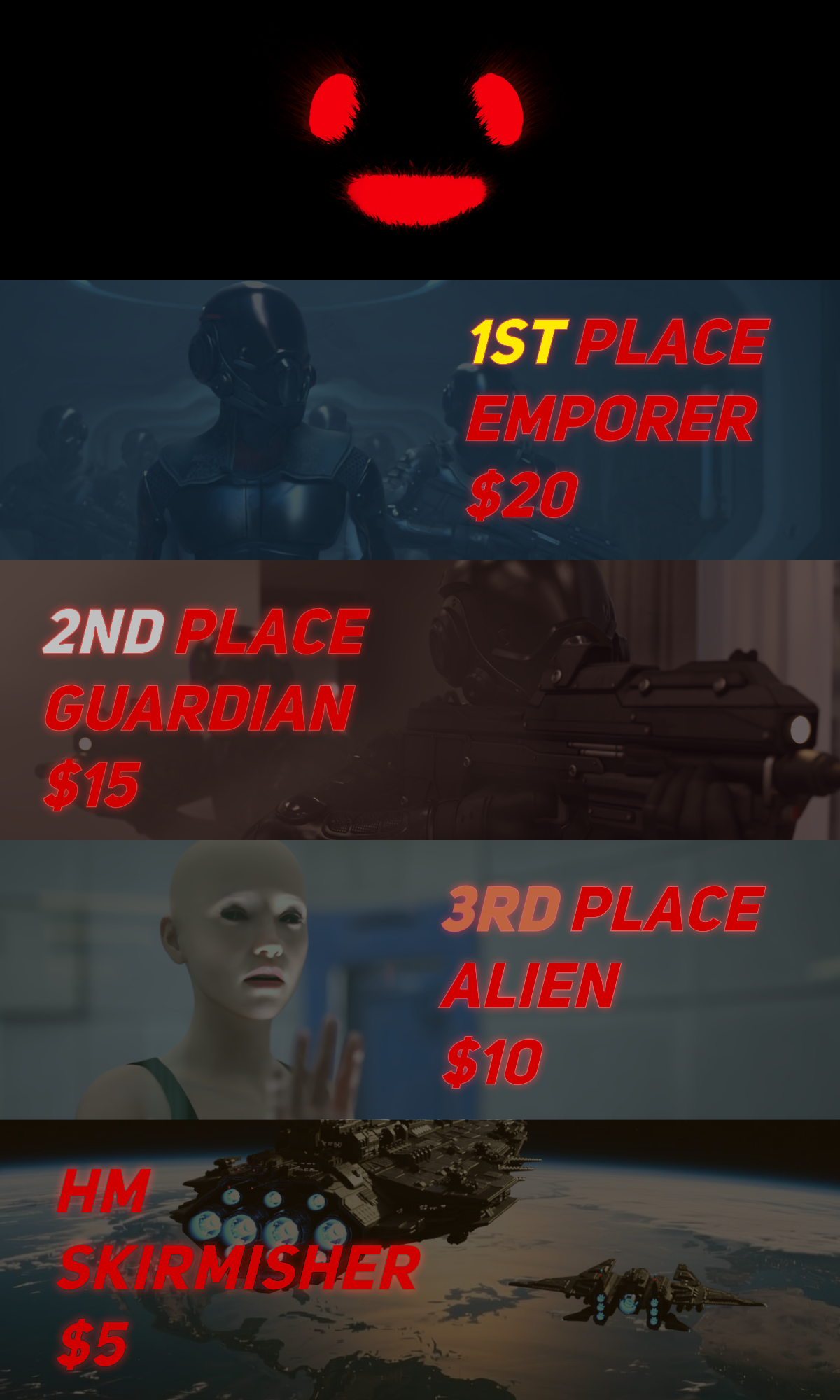
Spiffy indeed. Good luck denizens, the stakes have never been higher!Rules:
-
Minimum of 3 freebies.
-
A Maximum of 5 purchased items.
-
Genesis and its standard morphs are fine.
-
If you postwork your images, provide the base image.
-
You can use AI for post-work, upscaling, colour work etc, just go easy and stick with the spirit of the competition.
-
All Daz ecosystem programs are allowed – Bryce, carrara etc (Even poser, If you behave yourself)
-
Images pictures are subject to Daz TOS.
-
No max Entries on this one. I can't count. Do as many as you want.
This Freebie Challenge will end June 30th, 2026 @ 23:59 Daz time.
First Place: $20 store credit from KindredArts
Second Place: $15 store credit from KindredArts
Third Place: $10 store credit from KindredArts
HM: $5 store credit from KindredArts
Please post your entries in the entries thread below...
ENTRIES THREAD
A LOVELY LIST OF FREEBIES YOU CAN USE!
Creating Animations on Blender then exporting to Daz3DPadone said:
In your video it is not clear how you animate the feet, as the ik controls don't move. If you animate mixing ik and fk controls then bake ik to fk I guess the addon is trying to preserve your fk animation, possibly altering the end result. This looks like a bug. If you can explain the steps to reproduce your animation I can try it myself and eventually prepare a bug report for Thomas.
However, if you use the IK controls to animate the feet, as it's usually done, then everything works fine here. I attached the videos for IK and baked FK, where you can see I use the IK controls to animate the feet. Just remove the zip extension to watch the mp4 videos, as the forum doesn't allow to upload mp4 directly.
note. important. If you imported the figure with locks and limits, then the daz FK limits may come in the way when switching IK or baking, as IK has different limits than FK. To prevent this it is best to import the figure without locks and limits, so just disable them in the global settings. May be this is what happens in your example if you didn't animate the feet on purpose.
https://github.com/Diffeomorphic/import_daz/wiki/Setup_Rigging
Ty for the video example and explination, so far things are working fine atm, I have to pay attention to where the shins are postioned terms of rotation, if they aren't placed properly they will be gittery. Luckily after I figured that out the animations are not gittering and it's working really well especially after I export to daz, it's 1:1, previous tool i used looked like it worked properly but it didn't after daz export, great work you two! I intentionally have strechness to 0, because I want to have things exported to Daz, I haven't planned to move to Blender yet, from what I've seen however when I ported my models it worked quite flawlessly.
But my question is which might be difficult. What would you recommend that I do before importing my model and settings I should go for if I want to import back to Daz animations? Also if I pose in FK, I can't seem to find a bake option, at least with IK I can just do IK transfer to FK and it bakes, but there isn't one where FK just bakes unless I'm missing something. I've been trying to go through the wiki here but sadly no clue https://github.com/Diffeomorphic/mhx_rts/wiki/Animation
I'll try and recreate it again the issue for you today or tomorrow then share steps on how I did it!
UltraScenery - new(er) territory [Commercial]barbult said:
As I recall, the problem had to do with UltraScenery2 referencing some texture files from the original UltraScenery. If someone did not own the original UltraScenery, those files would turn up as missing in UltraScenery2. If you have both products installed, you should not run into this issue. It would take some time to find that message again in the forum. I found it not too long ago for someone else, so it may be referenced again not too far back in this thread. But since you own everything, i don't think you need to worry about it, and it would likely be a waste of time to go looking for the info.
Even better. Time to dive in, and to keep an eye on Country Ford for pickup later. LOL. Thanks again!
UltraScenery - new(er) territory [Commercial]Xandyr78 said:
barbult said:
This same sort of thing often happens to me. When I am testing software, the very first thing I try, fails. Everything else might be fine, but I magically hit immediately on the one thing that doesn't work. I'm always happy to help people with UltraScenery problems.
You mentioned workarounds and such for USC1 scenes in USC2. I'm not sure how best to search for those within this thread. Is there a "master post" with links or something that would be helpful?
As I recall, the problem had to do with UltraScenery2 referencing some texture files from the original UltraScenery. If someone did not own the original UltraScenery, those files would turn up as missing in UltraScenery2. If you have both products installed, you should not run into this issue. It would take some time to find that message again in the forum. I found it not too long ago for someone else, so it may be referenced again not too far back in this thread. But since you own everything, i don't think you need to worry about it, and it would likely be a waste of time to go looking for the info.
Hitchens: A DAZ Studio to Blender Live Linkas a singer/guitarist... i gotta say that song in your forum sig kicks friggin butt! (hey Dartanbeck, go check it out - you'll be way-impressed!)
Lyrics and production both, it cracks me up and inspires me to go play some more, and/or figure out how to make any one of the zillion AI tools let me tell my stories with that kind of substance. Bravo! (I'd be curious about the back story/mechanisms employed - it's truly an impressive and fun piece!)
i am not worthy, sir! (bowing like the boyz on 'Waynes World')
cheers, and mo mo more!
--ms
PS - and congrats on your Hitchens breakthrough - much as I'm loving lurking in the nearby animation/ai forum topic (Dart/Wsterdan/and crew), I'm also still digging the hands-on part of it all and excited to run your new masterpiece through some paces (no pressure!).
UltraScenery - new(er) territory [Commercial]barbult said:
This same sort of thing often happens to me. When I am testing software, the very first thing I try, fails. Everything else might be fine, but I magically hit immediately on the one thing that doesn't work. I'm always happy to help people with UltraScenery problems.
You mentioned workarounds and such for USC1 scenes in USC2. I'm not sure how best to search for those within this thread. Is there a "master post" with links or something that would be helpful?
UltraScenery - new(er) territory [Commercial]Xandyr78 said:
barbult said:
@Xandyr78 The files that you are missing are part of the Country Ford product, not the UltraScenery - Country Ford product. When you look at the product page for UltraScenery - Country Ford you will see that Country Ford is a required product. Do you own Country Ford ? If not, that is the reason you are missing those files. UltraScenery - Country Ford is just a product that allows the previously released stand alone product Country Ford to also be used within UltraScenery products.
If you do own Country Ford and have it installed,we need to dig deeper to solve the problem. Keep in touch here. I'm confident I can help you resolve the issue.I could have sworn that I'd purchased it at one point, but my library doesn't seem to contain it. And that makes perfect sense. I hadn't realized I'd need to check that (I've owned the USC elements for a WHILE). Guess that one goes onto my Wishlist! Thanks, @barbult, for helping me troubleshoot this!
In what has to be the ultimate in irony, after you brought this to my attention, I went back and did a search through the store...Country Ford is literally the only USC element that I don't own. SOMEHOW I managed to choose the ONE set of ecology elements that I hadn't yet purchased.
Murphy's Law sometimes is helpful, I suppose. LOL. Thanks again for your help!This same sort of thing often happens to me. When I am testing software, the very first thing I try, fails. Everything else might be fine, but I magically hit immediately on the one thing that doesn't work. I'm always happy to help people with UltraScenery problems.
UltraScenery - new(er) territory [Commercial]barbult said:
@Xandyr78 The files that you are missing are part of the Country Ford product, not the UltraScenery - Country Ford product. When you look at the product page for UltraScenery - Country Ford you will see that Country Ford is a required product. Do you own Country Ford ? If not, that is the reason you are missing those files. UltraScenery - Country Ford is just a product that allows the previously released stand alone product Country Ford to also be used within UltraScenery products.
If you do own Country Ford and have it installed,we need to dig deeper to solve the problem. Keep in touch here. I'm confident I can help you resolve the issue.I could have sworn that I'd purchased it at one point, but my library doesn't seem to contain it. And that makes perfect sense. I hadn't realized I'd need to check that (I've owned the USC elements for a WHILE). Guess that one goes onto my Wishlist! Thanks, @barbult, for helping me troubleshoot this!
In what has to be the ultimate in irony, after you brought this to my attention, I went back and did a search through the store...Country Ford is literally the only USC element that I don't own. SOMEHOW I managed to choose the ONE set of ecology elements that I hadn't yet purchased.
Murphy's Law sometimes is helpful, I suppose. LOL. Thanks again for your help!
You mentioned issues and workarounds...has anyone posted tutorials for how to do those?UltraScenery - new(er) territory [Commercial]Xandyr78 said:
This may have been asked/answered somewhere in this or another forum, but I've not been able to find it:
I have UltraScenery, USXT, and US2 all installed on my system, on the same drive. I tried to generate a landscape in US2 using the Country Ford ecology option that (I think) originally was created for USC1. I get error messages for every. single. .jpg file that's part of that. Is the Country Ford ecology just not compatible? Am I doing something wrong? All the USC, USXT and USC2 content is on the same drive. I'd really like to start learning to use this plugin/script, but if nothing will load...- To use USC1 ecologies in USC2, you need to us the Classic Ecologies section. Is that what you are doing?
- What files are giving you errors? You said every single .jpg file, but please give a few specific examples, because there are some known issues with USC1 files in USC2 (issues and workarounds posted earlier in the commercial thread). Those problems are not specific to Country Ford, though.
- Make absolutely sure you have NEVER installed or updated any UltraScenery related content from inside Daz Studio (i.e. using Daz Connect). It simply will not work.
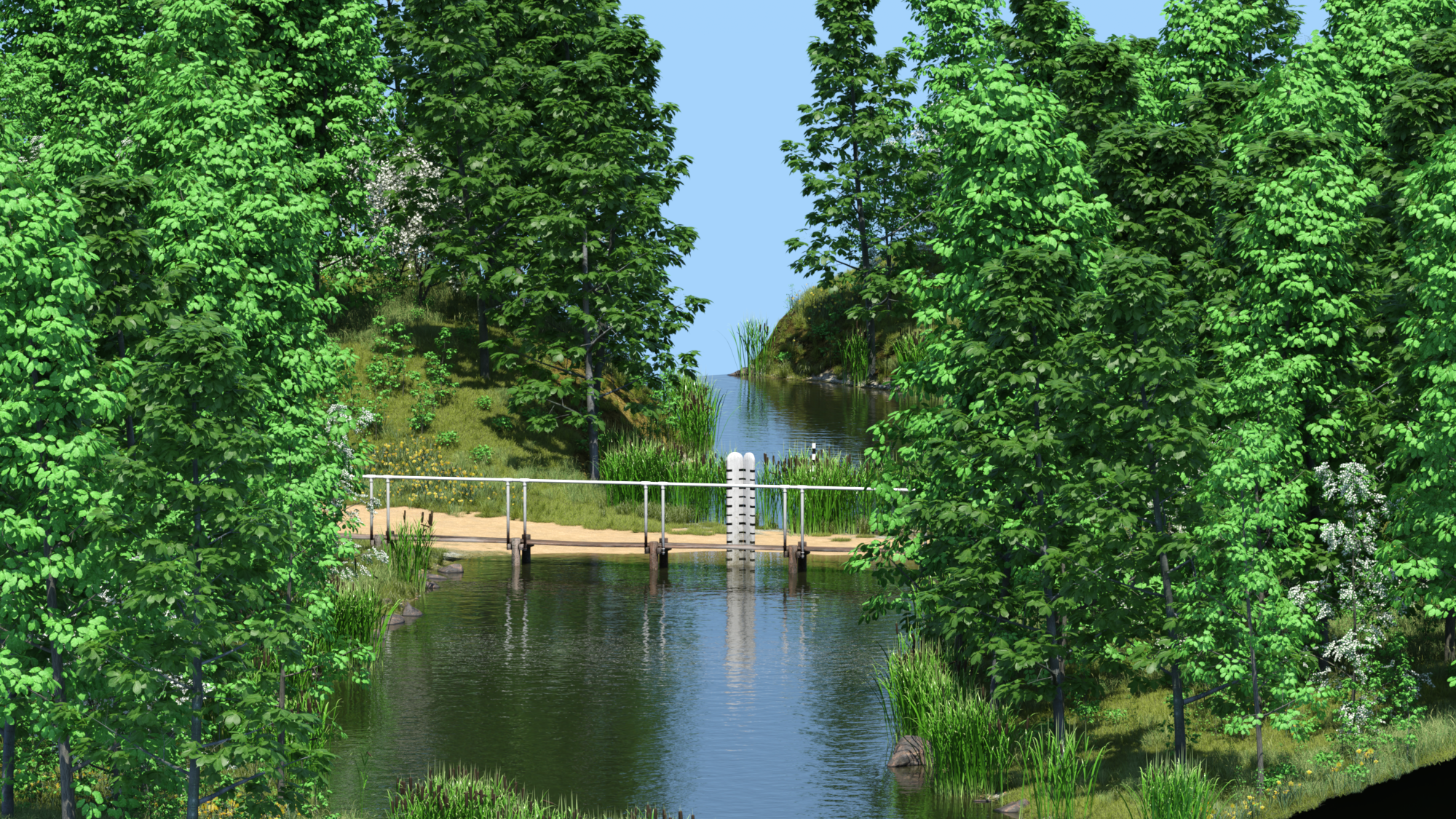
- I am attaching a render of Country Ford 1 built and rendered in UltraScenery2 just now. I also have all of my UltraScenery 1,2 and XT installed in the same Content Library onthe same drive. That is not a problem. Let's try to resolve your specific issue, starting with the specific missing file messages.
 June 2026 - Daz 3D New User Challenge - Scenes, Landscapes, and Working Modularly
Beginner Challenge - June 2026
Sponsored by DAZ 3D
"Scenes and Landscapes"
This month's focus will be scenes and landscapes. If you haven't noticed when you look at images made by the various 3D software some of the packages do a lot better then others in treating an expansive scene or a magnificent landscape. Ones that come to mind are software such as Bryce or Vue. Both have some built in features that make those wonderfully big expansive images come true. DAZ Studio on the other hand does not have some of these features built into it but if you know the tricks there is no reason why you can't get those same kinds of results. For this contest we will be exploring the principles of how such scenes and landscapes are built and how to control the environment to create the sense of expansiveness a scene or landscape creates for the viewer.
There are some key elements that should be considered when creating a landscape, they are the inspiration, lighting, perspective and depth of focus. I have gathered some links for you that talk about each of these elements.
Inspiration:
Photos and Art:
Perspective and Depth of Focus:
Things to consider when setting up your landscape:
As stated by Jon A. Bell in his book, 3ds max 6 Killer Tips, "For more realistic outdoor scenes, especially if you're seeing a distant horizon, you should always add a slight amount of atmospheric haze.... If you look at a distant mountain range (or if you don't have one right outside your window, just grab a travel magazine or pretend), you'll notice how colors become muted and washed out with distance. You can use just a slight amount of atmospheric fog (it depends on the scale of your scene), and the colors will determine the clarity or quality of your "atmosphere." For clear outdoor settings, using a slight bit of white fog is desirable; for sunset or urban settings (where the air might be more polluted), a slight yellowish or reddish cast makes your horizons look better." In DAZ Studio you have a couple of options in getting that affect. The first would be to add just a tiny bit of Depth of Field so that the objects become a bit more blurred and muted. Another way is to have a volumetric camera that will add the fog feature to the render.
Lighting:
Approaching Realism in DAZ Studio and Gamma Correction Demystified
http://www.daz3d.com/forums/discussion/54913/
Using HDR Files In DAZ Studio 3delight renders
https://www.youtube.com/watch?v=okaYS1jeAewhttp://www.daz3d.com/forums/discussion/37753/
and for Iray
https://www.youtube.com/watch?v=L5FZ5gS9v50
https://thinkdrawart.com/how-i-light-my-daz-studio-iray-scenes
Handy tools for DAZ Studio ( note: these can help but are not in any way necessary):
https://www.daz3d.com/terradome-3-iray
https://www.daz3d.com/ultrascatter-advanced-instancing-for-daz-studio
https://www.daz3d.com/modular-cove-landscape-creator
https://www.daz3d.com/digital-kit-bashing--cities-landscapes-and-structures
https://www.daz3d.com/ultrascenery--realistic-landscape-system
https://www.daz3d.com/ultrasceneryxt--expansive-landscape-system
https://www.daz3d.com/ultrascenery2-realistic-landscape-system
Bryce 7.1
I will be checking in as will the rest of the Community Volunteers to try and help with anything you all may need.
Daz 3D is part of

Connect
DAZ Productions, Inc.
7533 S Center View Ct #4664
West Jordan, UT 84084Licensing Agreement | Terms of Service | Privacy Policy | EULA
© 2026 Daz Productions Inc. All Rights Reserved.