-
Marahzen's Musings on Creating Characters (and other matters)
So ... FaceGen. That singular thing that literally brought me here and sustained me through five months of newbie fumblings, allowing me to learn Daz while using my characters, not someone else's characters, just like I wanted.
Mostly, I broke up with FaceGen because Face Transfer - once I figured out the Face Transfer Shapes thing - produced a better starter character for me. At the time I still had no idea how to fix a stock G8 character simply updated with FaceGen textures - which looked like it had been staked out in the desert for six months. When my hacky Altern8 workaround fell out of the sky within days of revisiting Face Transfer, I took that chance new pairing and ran with it. I'm always looking for newer or better ways to do something, and if I find one, I move on, with no hard feelings about yesterday's "new better."
But to be honest, I also left FaceGen because there was another problem that was starting to bug me.
I am the kind of person who is glad to rave about things I love; who is happy to talk about what works for me. What I don't want to do, especially in context of a hobby that is supposed to be fun, is clutter it up with the negative energy of complaint or of being unhappy with things. If I don't like something, I'd rather turn my back and walk away than linger and be unhappy with it.
So that said, here it is: FaceGen creates wide squirrel cheeks and sometimes long faces/noses, and as time went by, I ran across more and more characters that just looked terrible as FaceGen characters. At a certain point, I finally squirmed and edged away from blaming all of it on my newbieness. Some of them were fine; in fact, some of them I like better in some ways than their subsequent FT/FTS version.
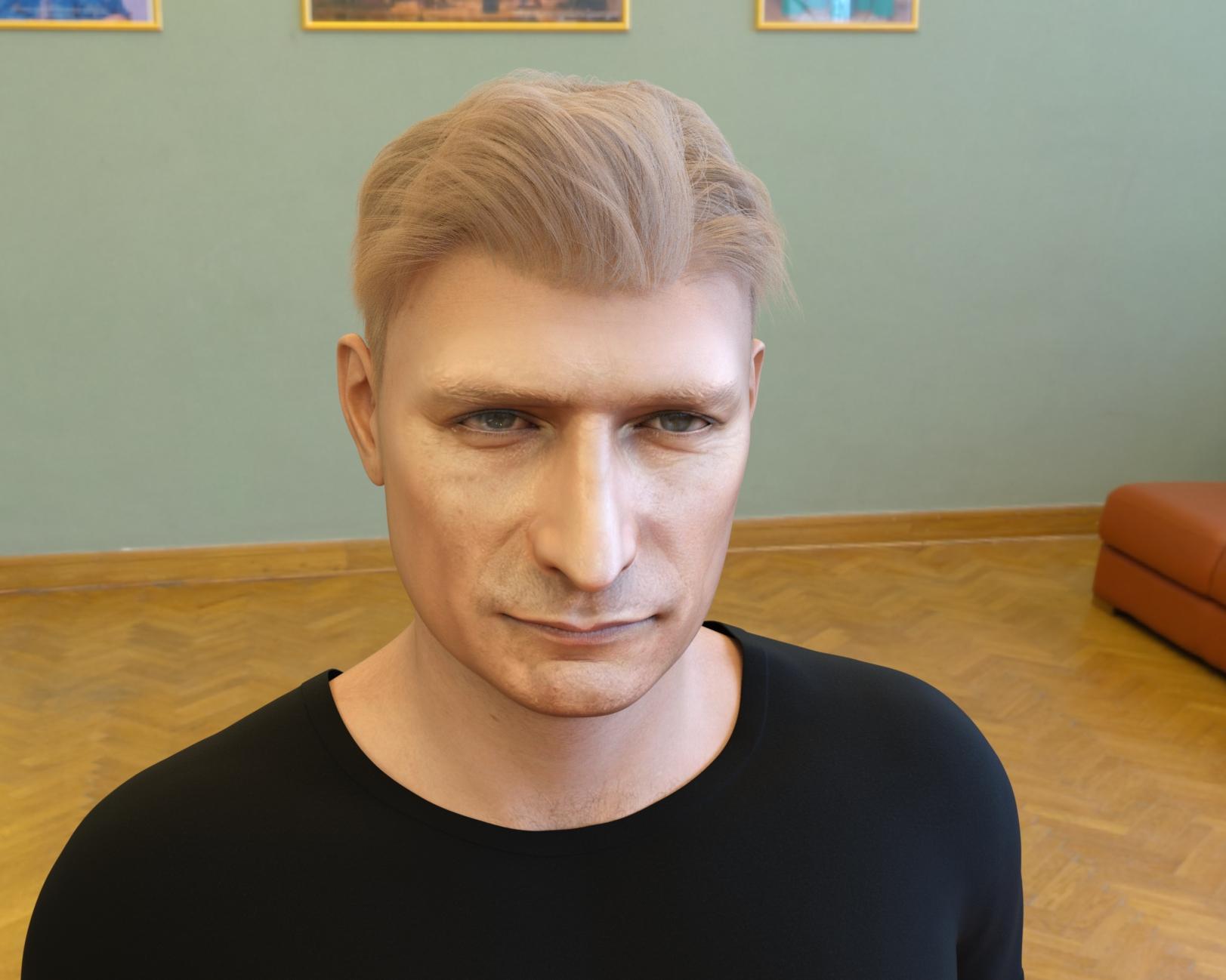
And then, some of them looked like this one.
That just wasn't going to do.
So I moved on to FT/FTS/Altern8 and produced a version of him (and most of the others) that I could live with.
 x4 PCIe 4.0 bottleneck for RTX A4000, how relevant is it?
PCIE 4 can transfer a theoretical maximum of 2GB/s per lane. I doubt you'd see that maximum in everyday work but it won't be too far off. A 14GB scene transferred via your slowest lane (4X) would take less than 2 seconds to be pushed from RAM to VRAM. Even if you had a PCIE 3 board it would be under 4 or 5 seconds. If you only used one card on the 16X lane the transfer would be almost instantaneous but I doubt you'll miss 2 seconds!
You will notice essentially zero difference using a second card in a slower lane, or even a previous gen. motherboard. Unless you are a droid; in which case all bets are off.
The better your processor the faster the scene will be assembled in system memory before it's drop-kicked over to the GPU. That's where you'll see a performance increase which will more than negate the eye-blink time loss of adding another card.
Just be aware that although the A-series cards operate at lower temperatures than their gaming equivalents the blowers do need good airflow and can't be butted right up against each other. Check your motherboard slots have clearance to allow a case fan to blow through them. Yours are single slot cards so this hopefully shouldn't be an issue - ours are dual slot and it took a while to pin down a motherboard that would work.
how to load a morph for v4?John 9!tsroemi said:
Elor said:
tsroemi said:
Also, it looks to me like we're not getting any real body shape included with the character itself anymore - ? Just something like the base masculine shape. So, no HD, no body shape ...
Maybe Daz added it since your message, but the main page of John 9 lists a 'John 9 Full Body Shape' morph.
Thanks, what I meant was that the included body shape seems very generic to me and very 'doughy'.
It's not chiselled, but its got some nice details for a more average bod, and to my eyes better proportioned that the couple of other average bodies we've had in the core figures. Little details like the shoulder blades, neck muscles, and hands, all seem to pose better than expected. The pectoral muscles seem to deform well when I tried the yoga pose set. I like the shape of his arms and legs. Shoulders look a bit strange when posed with arms overhead, but that's pretty much universal with all the figures.
So, for me, the body ended up being a bonus. :)
Ha, OrangeFalcon. That was my first thought when I saw the bundle.
dortybassa - Michael 9 mixed with Julius 9 was always my Oscar Issac go to. I do love me a bearded Oscar tho.

I hope everyone has some fun with him over Easter and can post some renders.
how to load a morph for v4?thanks crosswind
I meant the latter, with morph loader pro
Why are G8 nails messed up?PerttiA said:
MelanieL said:
Richard Haseltine said:
lou_harper said:
I did it with a G8 base figure loaded into the scene, no pose, nothing. I'm lost. But I realized I have too many G8 figures and I'm uninstalling a bunch.
A base figure isn't necessarily zeroed - if shapes ar saved with non-zero default values they will be applied but, because they are at their defaults, they will not show in Currently Used (I wish therte was a way to show non-zero values, which is what would help here)
Is it possible to write a script to find non-zero morph values? If it is, then it would be a great kindness if someone who knew their way round DS scripting could make and post one.
Zeroing the figure makes those non-zero defaults also change their value to zero, and then they can be seen in "Currently used" with the value of 0 shown in white.
To fix any ill-behaving (non-zero default value) morphs, do as follows;
1. Open DS and load "Genesis 8 Basic Female" (to an empty scene)
2. Right Click at Parameters Tab->Preferences->Choose "Show Hidden Properties" (part 3 zeroes only 'visible' dials)
3. Right Click at Parameters Tab->Zero->Zero Figure (Zeroes the value of all the 'visible' dials)
4. Right Click at Parameters Tab->Memorize->Memorize Figure (Sets the current value of all the dials as their default value)
5. Edit->Save As->Support Asset->Save Modified Assets (Writes the changed default value to the morph files that were changed)When saving "Modified Assets" DS shows a dialog and asks for confirmation;
"The following file(s) will be permanently modified:" - "Accept/Cancel" - Choose "Accept"Okay, that seems to have done it. Step 3 took 7 minutes. Step 5 should be File, not edit. ;)
Thank you!!! I will save this for future reference.
Why are G8 nails messed up?MelanieL said:
Richard Haseltine said:
lou_harper said:
I did it with a G8 base figure loaded into the scene, no pose, nothing. I'm lost. But I realized I have too many G8 figures and I'm uninstalling a bunch.
A base figure isn't necessarily zeroed - if shapes ar saved with non-zero default values they will be applied but, because they are at their defaults, they will not show in Currently Used (I wish therte was a way to show non-zero values, which is what would help here)
Is it possible to write a script to find non-zero morph values? If it is, then it would be a great kindness if someone who knew their way round DS scripting could make and post one.
Zeroing the figure makes those non-zero defaults also change their value to zero, and then they can be seen in "Currently used" with the value of 0 shown in white.
To fix any ill-behaving (non-zero default value) morphs, do as follows;
1. Open DS and load "Genesis 8 Basic Female" (to an empty scene)
2. Right Click at Parameters Tab->Preferences->Choose "Show Hidden Properties" (part 3 zeroes only 'visible' dials)
3. Right Click at Parameters Tab->Zero->Zero Figure (Zeroes the value of all the 'visible' dials)
4. Right Click at Parameters Tab->Memorize->Memorize Figure (Sets the current value of all the dials as their default value)
5. Edit->Save As->Support Asset->Save Modified Assets (Writes the changed default value to the morph files that were changed)When saving "Modified Assets" DS shows a dialog and asks for confirmation;
"The following file(s) will be permanently modified:" - "Accept/Cancel" - Choose "Accept"Why are G8 nails messed up?MelanieL said:
Richard Haseltine said:
lou_harper said:
I did it with a G8 base figure loaded into the scene, no pose, nothing. I'm lost. But I realized I have too many G8 figures and I'm uninstalling a bunch.
A base figure isn't necessarily zeroed - if shapes ar saved with non-zero default values they will be applied but, because they are at their defaults, they will not show in Currently Used (I wish therte was a way to show non-zero values, which is what would help here)
Is it possible to write a script to find non-zero morph values? If it is, then it would be a great kindness if someone who knew their way round DS scripting could make and post one.
It's on my (not so) little list. Edit: I think this would do the heavy lifting (heavy listing?) http://docs.daz3d.com/doku.php/public/software/dazstudio/4/referenceguide/scripting/api_reference/samples/properties/node_properties/start - it would just need a filter at the output stage to get the current value and list it only if it was non-zero.
How to rig cloth to a shaped character?You need to set the Source Shape to Current, or to the morph used if it is just one, then check Reverse Source Shape from Target in the additional options. The process will then adjust the model to fit the base, rig that, and project the morph(s) into the result to make it follow the figure shape.
It is better to make the outfit around the base shape, then mape new shapes for each morph used and load them as new morphs via Morph Loader - that way you are not relying on any auto-adjustments or projections.
How to rig cloth to a shaped character?All the tutorial are makeing cloth for the default G9/8 figures, using the Transfer Utility to convert it in to a duf asset, but who will do that in the production? Of cause I want the garment to fit my customed character first and foremost (I mean I am not using the defaut G9/8 figure), and than I will consider to transform it into a duf cloth asset and use it on other characters.
And when I tried to use the transfer Utility tool on a deformed character, things will go wrong. (http://docs.daz3d.com/doku.php/public/software/dazstudio/4/userguide/creating_content/rigging/tutorials/transfer_utility/start) Because the figure is not in default shape. I guess that it's because DAZ restore the figure to the default shape and rig the static cloth and then revert to the shape I manually disigned. So the cloth will be definitly warped.
Can anyone tell me if there is some setting that I missed? That could rig the .obj cloth on a non-default G9 figure?
Why are G8 nails messed up?Richard Haseltine said:
lou_harper said:
I did it with a G8 base figure loaded into the scene, no pose, nothing. I'm lost. But I realized I have too many G8 figures and I'm uninstalling a bunch.
A base figure isn't necessarily zeroed - if shapes ar saved with non-zero default values they will be applied but, because they are at their defaults, they will not show in Currently Used (I wish therte was a way to show non-zero values, which is what would help here)
Is it possible to write a script to find non-zero morph values? If it is, then it would be a great kindness if someone who knew their way round DS scripting could make and post one.
can you help me understand thisI'm reading through the EULA
- Terms of Use. Two-Dimensional Works. Subject to the terms and conditions of this Agreement, User may (i) access, use, copy and modify the Content in the creation and presentation of two-dimensional animations and renderings, (ii) incorporate two-dimensional images (including two-dimensional images that simulate motion of three-dimensional objects) derived by User from the Content in User's other works, and (iii) publish, market, distribute, transfer, sell or sublicense User's two-dimensional animations, renderings and other works; provided that User may not in any case publish, market, distribute, transfer, sell or sublicense any renderings, animations, software applications, data or any other product from which any Content, or any part thereof, or any substantially similar version of the Content can be separately exported, extracted or de-compiled into any re-distributable form or format.
I don't understand; I'm new here. What do I need if I animate the model or use the model for my game, like a visual novel? Do I need an interactive license? or just the general?
how to load a morph for v4?You mean Inject a Head / Body morph from the runtime folder or export OBJ and import OBJ as morph slider with Morph Loader Pro ?
If you mean the latter, you have to first go to : Edit - Figure - Rigging - Convert Figure to Weight Mapping : General Weight Mapping, then export / import OBJ with MLP. You'll find the morph slider under "Morphs/Morph Loader" (the path by default)
Daz Studio BETA - version 4.23.0.4! (*UPDATED*)Dolce Saito said:
Richard Haseltine said:
When you first use a morph, or bend a joint that triggers a corrective morph, the morph deltas (the shape change) have to be loaded from disc. Also, every time you make a change DS has to trace through the links to and from the changed bone/shape to look for links that may be affected by the change and so need updating.
Hi Richard;
Thanks for the knowledge. I already knew most of this. But I would like to point to the problem that "it happens all the time". So, not when first used.
Yesterday, I did something very drastic. Deleted almost all of my content, started by first uninstalling all connect items from the studio itself. And moved everything to the content directory by reinstalling everything from DIM. While doing this, at certain point I barely had any 3rd party plug-ins, only had genesis 3/8 and a few vanilla morphs give or take. Also my ssd drive was almost %90 empty. At this point, I opened a genesis figure, did the same test. UI froze again.
Unfortunately, I couldn't be able to identify root cause yet. However, this only occurs in Daz studio and during character movement.
I identified the source of the problem after 2 full days of trial-error. It is a bios setting, which decides to slightly overclock the cache sram frequency when the system is under heavy load for raptor lake processors (13900ks). Daz Studio is very sensitive to the system's state, so it was the only application for me that got destabilized with this setting. I disabled it and after that no more UI freezes on viewport.
how to load a morph for v4?how to load a morph for v4?
there is no sliders I can find for imported morphs, thnks for letting me know how it's done
Why are G8 nails messed up?crosswind said:
In Parameters pane, with Show Hidden Properties checked, selecte Currently Used and see if there's any body morph(s) dialed...
I did that and scrolled through until my eyes crossed over and this is the only thing I found–I assume Toon Generations. Turning it to 0 made no difference, which is no surprise since the enable is at 0. Turning that up didn't help either.
Why are G8 nails messed up?In Parameters pane, with Show Hidden Properties checked, selecte Currently Used and see if there's any body morph(s) dialed...
Let's appreciate/discuss today's new releases - ongoing thread
I'm still going to get it for the variety, need to see if I've got separate armpit hair that will work with G9. Most body hair is all one piece now, and armpit hair doesn't transfer well because it's on both sides of a joint. I understand why it's such a difficult piece to create, but with so few options I think it's worth it for someone to do...AmnesiacThief said:Hylas said:
A guy that's hairy all over but shaves his armpits... *SIGH*
I agree. I likely would've grabbed this, but its incomplete without armpit hair. Luckily, I already have Jepe's Sandor character package which includes excellent strand-based body hair.
x4 PCIe 4.0 bottleneck for RTX A4000, how relevant is it?privatepixels99 said:
Dear All,
I'm considering upgrading my older HP z440 Intel rig to something AMD AM5-based. I have a RTX A4000, which i lurve. Relatively low-power, quiet, fast enough for me. The motherboard I'm looking to build my new rig on (ASRock B650M PG Riptide) has two x16 PCIe 4.0 slots, but only one has 16 lanes. The second one has 4 lanes.
My question is whether my understanding of Daz Iray rendering is correct. As I understand it, a scene is pushed to the GPU and fills up the framebuffer of the GPU. If the scene fits, there will be minimal back and forth over the PCIe bus - just the results of a render pass. This would suggest that the performance penalty of sticking an additional RTX A4000 in the four-lane slot would be less punative than say in a video editing or gaming scenario where lots of data runs over the PCIe bus at any given moment.
Is my (primitive) understanding correct?
Thanks.
Yes, I believe so - you would see an impact in the initial data transfer, but once the render started it should make very little difference (certainly not enough to lose the benenfit of having two cards instead of one working on the render).
Genesis 9 nipples: too low?alienarea said:
For example, Gia 8 and Amelia 9 have very similar bodies except for the face. Put them side by side and you will see.
Two different characters looking different is not evidence. I could absolutely morph a G8F figure to have her nipples lower, or a G9 figure to have her nipples higer.
The figures can be morphed. The body shapes can be changed. Where G9's nipples are by default does not particularly force where a morph creator can choose to have them in the end.
This? This is the G8F centaur. (If you look at her feet, you can see where I've had to simplify the shape of the toes because of the available mesh detail).

For a fuller demonstration, I did it as an experiment that eventually turned into this transformation sequence on my gallery. There is no compositing there, that is me morphing a figure the whole way between human and centaur.
If I (someone with no special vendor tools at all) can make a horse into a person, then anyone creating morphs for G9 absolutely has the flexibility to morph exactly where the nipples are on the breast. If they've put the nipples somewhere, they *chose* to do that, it is not a fundamental limitation of G9.
It's not about the converter.
And yet, if I do a conversion with my own tools, the nipples line up just fine.
Daz 3D is part of

Connect
DAZ Productions, Inc.
7533 S Center View Ct #4664
West Jordan, UT 84084Licensing Agreement | Terms of Service | Privacy Policy | EULA
© 2026 Daz Productions Inc. All Rights Reserved.