-
Genesis 3 and 8 to 9 Pose Converter (Commercial)
Zev0 said:
"It would be nice if the script didn't break if the pose being converted isn't in /People."
This tells me nothing. What exactly happens? Regardless it is an issue we addressed.
- Metadata now considered when suggesting whether pose is G3 or G8 (before it was only based on file path)
This right here is you fixing the problem without knowing that that was what I was referring to. Thank you!
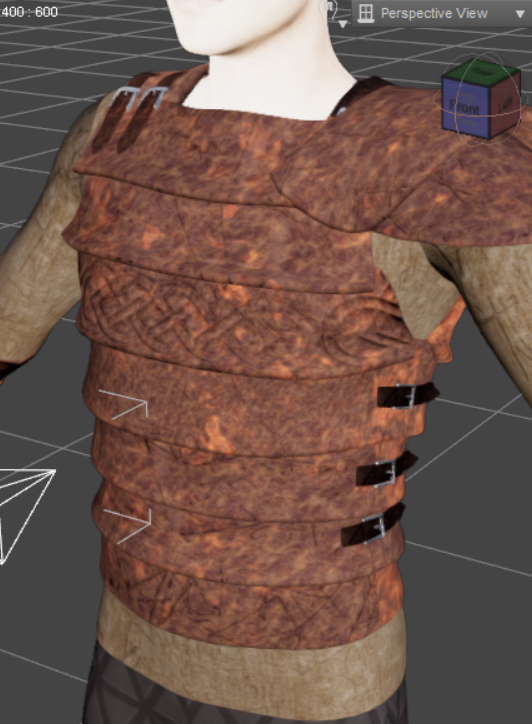
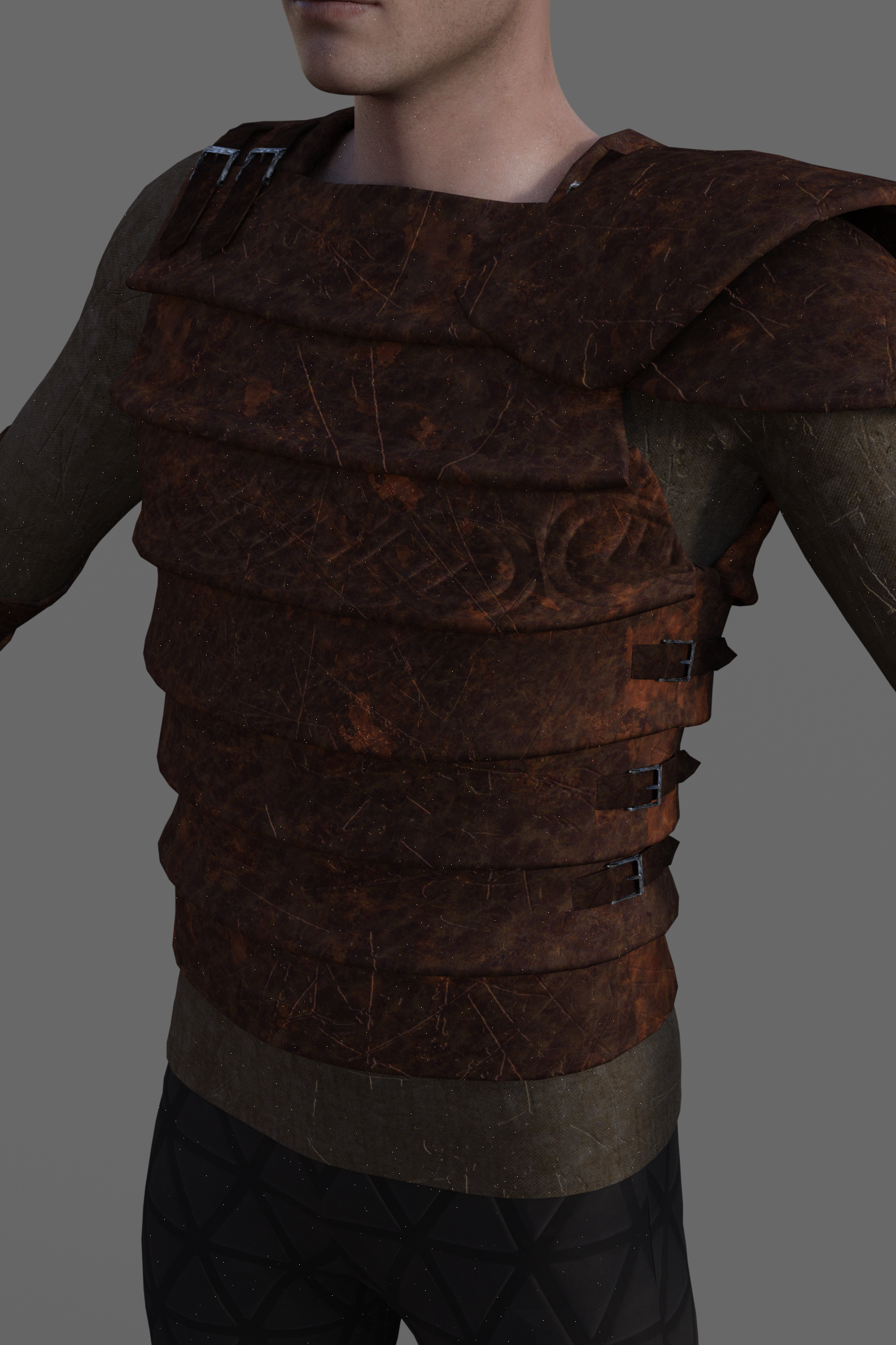
Normal map more visibile in renderingHi everyone! I created this material with Quixel Mixer, it has some problems but it's just an example.
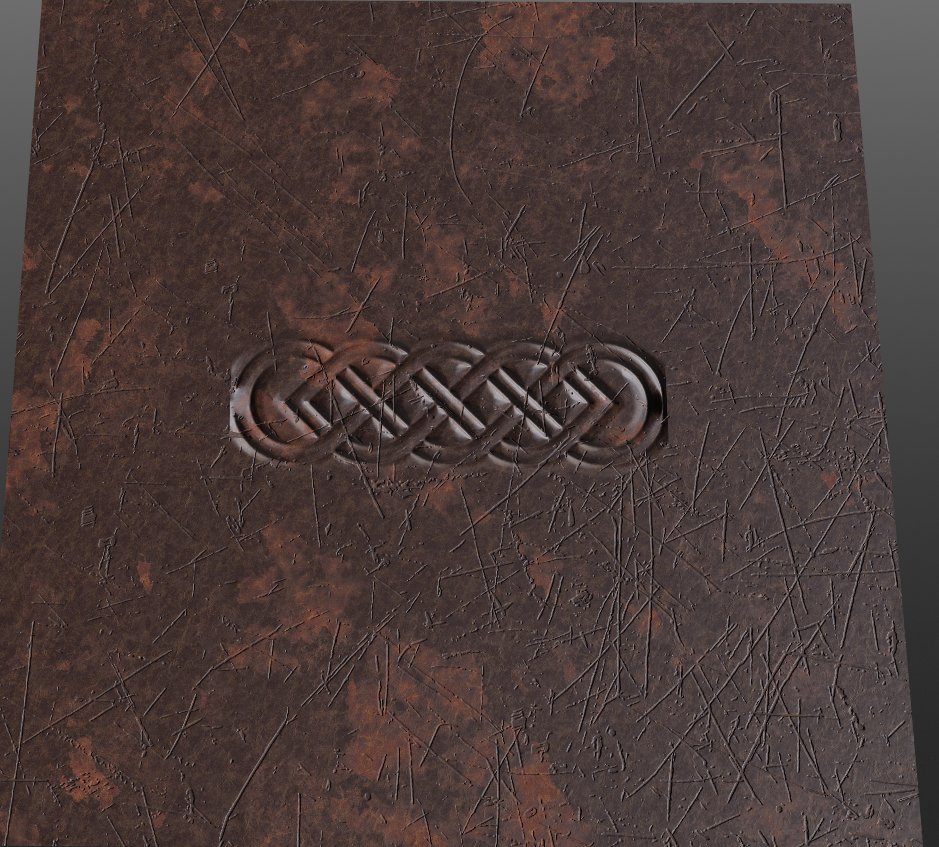
I'm interested in showing the Celtic relief in the center.
When I import it into Daz studio it is hardly noticeable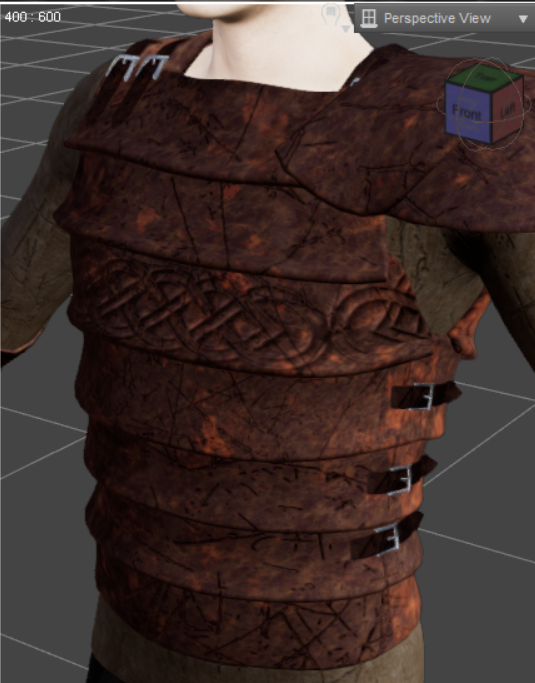
And when I render it, it shows even less.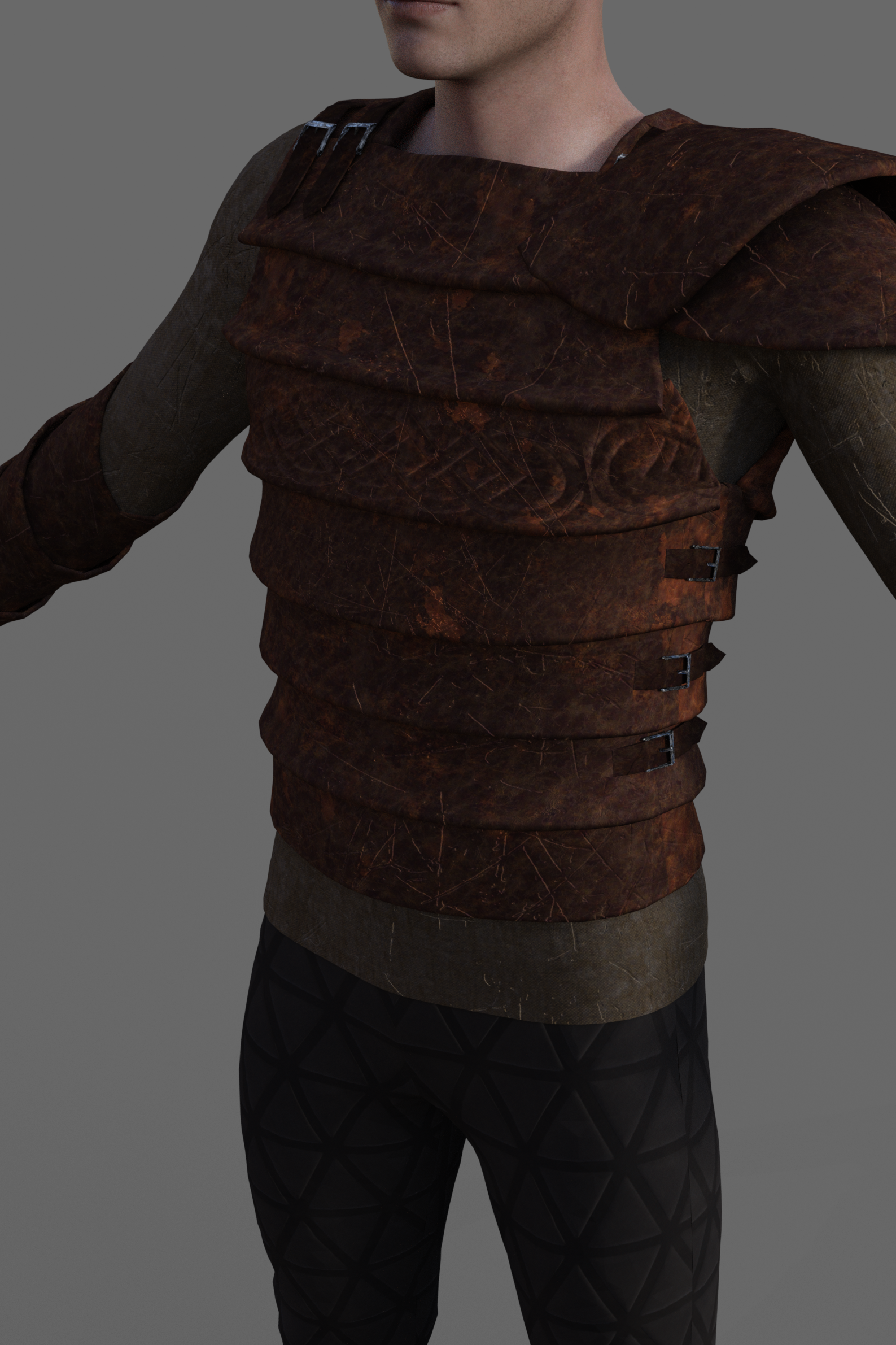
On Quixel Mixer, however, it can be seen well and also in Unity on which I wanted to do a further test.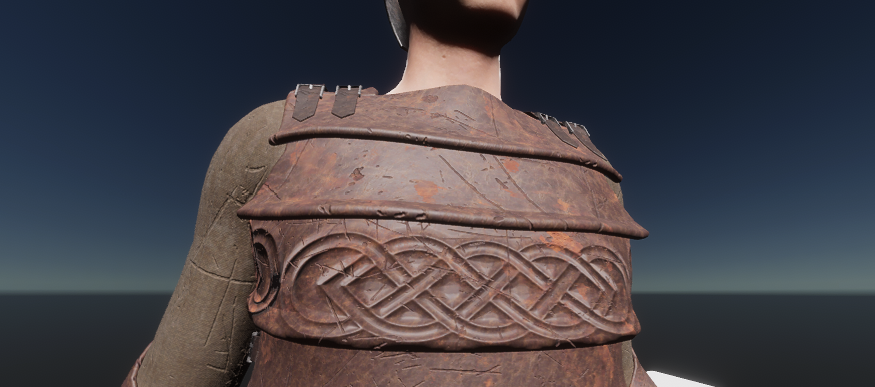
How can I make it equally visible in Daz studio? Maybe I need to change some render settings? Which?
Thank you.PS:
Even if I put a brighter light the rendering is always dark
 How to import custom categories from one PC to another with a new installation
Absolutely. Open the Content DB Maintenance panel and select "Export User Data". One or more "UserData_nn.dsx" files will be saved in the Runtime/Support folder (i.e., all the metadata files) of the first Library in your setup (if you have more than one). Copy those files to the same relative location in the library on the new machine. Make sure your paths are properly defined in Studio. On the new machine, open the Content DB Maintenance panel and now "Re-Import Metadata". You will be presented with a list of all known installed products and the User Data. You will probably want to import everything to restore the full database. The "known installed products" comes from the Manifest Archive, which has a record of every installed product. You should copy that folder to the new machine to the same location, too, before re-importing the metadata, if it wasn't on the same disk as the library.
Some users just copy the entire database, but I have never tried that.
How to import custom categories from one PC to another with a new installationHello, everyone.
I have purchased a new PC. Now, I should install Daz on the new PC, have the content directory point to the old hard drive, but import the custom categories where I have all the model material before genesis 3.
Daz on the old PC is version 4.20, on the new one DAZ 4.21 will be installed with the DAZ Central utilityDaz Studio will be installed on disk C, while the MyLibrary directory is on disk Y (it has always been called that since Daz Studio version 3)
How can I do this?
Should I first export something from the old PC and then re-import it on the new PC?Thank you, I would like to avoid losing the old categories. It took me years to get them right.
Tagan
The I Miss the Old Days Complaint ThreadCharlie Judge said:
@ KK: I guess so. It is Corsair CMK32GX4M2A2666C16 Vengeance LPX 32GB (2x16GB) DDR4 DRAM 2666MHz (PC4-21300) C16 Memory Kit.
...yeah that's standard PC memory.
I am looking at server components to get a high core count CPU while still on W7. Broadwell Xeons are about the last generation CPUs before the move to Kaby Lake which requires W10/11. (Skylake is the last but tend to be more expensive and exclusive to data centres). Not going to go into why anymore other than saying its a personal choice.
As to the CPU I can get a 16 core E5-2683v4 for under 400$ from a reputable source. However the downside is EEC memory is more expensive than PC memory so no 65$ deals here. For 64 GB of DDR4 2133 Kingston ECC memory the cost is about 225$. the interesting part is moving to 128 GB doesn't cost much more as for 4 x 32 DDR4 2133 is 258$ the one rub is the motherboard as LGA 2011-3 ATX tower boards are not easy to find new these days, though I did find one at Newegg with 4 PCIe 3.0x16 slots for 379$ . So for about 1030$ I will have a pretty respectable system with a 16 core/32 thread CPU and 128 GB of memory even given it's a few generations old, as it still supports W7.
Yeah, I know it limits me given W7 reached EOL over 2 years ago, but that hasn't stopped me. I have a driver that works for Iray rendering (5 revisions above the current required one for Daz Iray). I also still mess around with 3DL and Carrara so that is where the core count and memory is important. Also who knows, maybe Daz5 sill might make use of all CPU cores in the assembly phase (which would be a real blessing). Carrara is still the best for large scale environment creation, all it needs is a bridge to Daz. to import characters (odd they don't have one when they have them for non Daz software). 3DL using Wowies Awe Shader system (which I understand is getting another update) and scripted rendering it opens more capabilities of the render engine allowing for near photo real quality.
At this stage in life I'm done keeping up with the Joneses particularly as I am on a fixed income. I just need a system that's reliable and is capable of supporting the work I do
G8 Male Filter By Context BrokeSomething you recently installed has taken over the compatibility base. Try re-installing Genesis 8 Starter Essentials.
This has happened in the past where the metadata was in error, and defines something incorrectly. Some have been corrected, others might still be lurking. Which products have you installed just before you noticed the problem?
Pirate ship that looks good in a close up?markusmatern said:
jdavison67 said:
markusmatern said:
Have not tried them, but other assets in the past. Usually their stuff is really good and free. May need some work to get them into DAZ. And not a real pirate ship.
https://polyhaven.com/a/ship_pinnace
https://polyhaven.com/a/dutch_ship_medium
I have pulled one of these in to DAZ....and it's actually pretty good!
I just have one question for those of you with some Blender smarts....
How do I import this in to DAZ retaining all of the object groups?
It comes in as a single mesh...and in Blender... it is a group of individual objects...
I would like to retain the individual objects if possible.
JD
I'm not a Blender expert myself and am using version 3.3.1
There are at least two possible options
- You can select one of the objects in Blender in the Outliner and export to OBJ with the option Object Properties ► Limit to Selected Only checked.
Repeat this for all parts and import all in DAZ. - If you want something like a figure (where the groups are converted to bones) you can disable the above mentioned option and export everything with the option Grouping ► Export Material Groups
To get the individual groups converted to bones you need to use the pane Figure Setup in DAZ and create a new figure by importing the geometry using the context menu Add geometry
For more info on the process see here in the official documentation
Thanks! That was very helpful!
JD
Getting on the 9 train, or notBasically you use a similar technique as is used to port over the morphs from G8 to G9. Export a G8F/G8M obj in base resolution, then import them back in as obj. I deleted the eye and internal mouth polygons before I exported. Use the Transfer utility to fit this to G9 (taking advantage of the G8 clone), then Sub divide the fitted item. You can either load the G3/G8 skins on to this "clothing" item on G9, or geo shell attached to it. Hide the G9 base, but not the eyes etc. Finally save this G8 skin as a G9 asset like you would with any autofitted clothing item.
It works, but there are some major snags. First is the nipples don't line up, as was mentioned above, but worse than that is when the mouth is opened the lips don't follow G9's lips properly and the result looks horrible. I guess an edit of the UV map would overcome the first issue, and a weight map to make the lips move properly should overcome the second. Either way it is a compromise, and ideally the skins need to be converted to G9 UV maps. It is however a stop gap solution to give G9 more variety in skins now, since not many have been released up to now. Anyway, judge the result for yourself. Below is V9 wearing Bridget 8's skin. Note that only Bridget's skin is used, the eyes and lashes are still those of V9.

 CARRARA CHALLENGE #64: Old egypt..... WIP
Diomede said:
Thanks for the comments, UB, Stezza, and Bunyip.
Looking good, ed3D. Did you decide to import the Bryce pyramids? Or are those Carrara objects?
And only Sphere is an Carraia object + All others is Blenders - And Thanx
Please do not forget Hexagon@ ShelLuser / Just because a software program doesn't get frequent updates doesn't imply that it's also dead or suddenly "unusable", that's plain out silly.
Hello Sheeuser,
you yourself write that you have not actively used Hexagon, we on the other hand use Hexagon intensively and import the models created with it across other platforms, which in the meantime have problems depending on the version. They would thus see, if they worked intensively with it, that there are problems here, in building as well as in exporting.
What good are the models you build in Hexagon if I can't use them ?
Apart from the fact that Hexagon crashes during certain actions or the models are displayed incorrectly or not at all after the export, the modeling software of other manufacturers is constantly evolving to keep up with this, which Hexagon has not been doing for years. One has the impression that prefers to limit itself to the core business of selling the models.
Especially newcomers are faced with an insoluble problem when a tool does not work properly, unsettled is added that it is simply ignored by the manufacturer and mine doesn't get any information if and how it will continue.You can work around some problems by importing models built in Hexagon to Blender and exporting them from Blender. Then they will be displayed correctly. But does this make sense?
Please do not take my answer as an attack on you, we are discussing.
UltraScenery - new territory [Commercial]ok.. I guess I need to update my Gimp... I have version 2.8.2 and exr is not showing up to import or just open ... I'll update asap... Thanks one and all.
Blunt QuestionHey guys,
I'm confused. As a relatively inexperienced Poser user I am trying to explore the options out there for figures and clothing. I know about HiveWire's content having been moved to Renderosity. Then there's Daz 3d. I know there is a lot of good content at Daz 3d -- but I'm getting the feeling that the Daz 3d figures don't work in Poser. Is this true or false? I am a set designer in the film industry and basically dress figures and pose them and then generate obj's of them that I then import in my 3d models. Would the Daz 3d figures (Genesis, V4, M4 and whatever other figures may be out there) work well enough for my purpose?
Thank you, all. I really appreciate your reply.
Pirate ship that looks good in a close up?jdavison67 said:
markusmatern said:
Have not tried them, but other assets in the past. Usually their stuff is really good and free. May need some work to get them into DAZ. And not a real pirate ship.
https://polyhaven.com/a/ship_pinnace
https://polyhaven.com/a/dutch_ship_medium
I have pulled one of these in to DAZ....and it's actually pretty good!
I just have one question for those of you with some Blender smarts....
How do I import this in to DAZ retaining all of the object groups?
It comes in as a single mesh...and in Blender... it is a group of individual objects...
I would like to retain the individual objects if possible.
JD
I'm not a Blender expert myself and am using version 3.3.1
There are at least two possible options
- You can select one of the objects in Blender in the Outliner and export to OBJ with the option Object Properties ► Limit to Selected Only checked.
Repeat this for all parts and import all in DAZ. - If you want something like a figure (where the groups are converted to bones) you can disable the above mentioned option and export everything with the option Grouping ► Export Material Groups
To get the individual groups converted to bones you need to use the pane Figure Setup in DAZ and create a new figure by importing the geometry using the context menu Add geometry
For more info on the process see here in the official documentation
CARRARA CHALLENGE #64: Old egypt..... WIPThanks for the comments, UB, Stezza, and Bunyip.
Looking good, ed3D. Did you decide to import the Bryce pyramids? Or are those Carrara objects?
Pirate ship that looks good in a close up?markusmatern said:
Have not tried them, but other assets in the past. Usually their stuff is really good and free. May need some work to get them into DAZ. And not a real pirate ship.
https://polyhaven.com/a/ship_pinnace
https://polyhaven.com/a/dutch_ship_medium
I have pulled one of these in to DAZ....and it's actually pretty good!
I just have one question for those of you with some Blender smarts....
How do I import this in to DAZ retaining all of the object groups?
It comes in as a single mesh...and in Blender... it is a group of individual objects...
I would like to retain the individual objects if possible.
JD
DAZ Install manager and DSON ImporterMartirilla said:
The DAZ Install Manager is for the DAZ Studio software, not Poser. Forget about it. Doesn't work in/with Poser and never has. They are very different software, as I would have expected most people in the community to know by now. Though there are of course some sly trolls who continually pretend not to know the difference, in order to try to confuse newbies on forums. Possibly you've been confused by one of those.
Completel nonsense. Install Manager can install Poser-format content for use in Poser, you just have to add the destination folder (e.g. My Daz 3D Library by default) as an external runtime in Poser.
Anyway, Poser 11 + a copy of old DSON plugin is what you need to easily import DAZ Genesis 1 & 2 figures to Poser 11. Some people can also get G3 and G8 into Poser 11 via DSON, but they make it look like a lot of work and I've never tried it. There may also be other routes to import, but they involve some technical savvy.
You can even save a DSON G1 or G2 import in Poser 11 and then open it in Poser 12, but the figure no longer works correctly. I'm guessing the figure needs to 'see' the DSON plugin, which doesn't exist for Poser 12 (and never will).
To have the Poser 11 Library see what DAZ items can be imported by DSON, simply point the Library to the DAZ Studio runtime. So far as I recall, if it can't be imported then it won't show up in the DAZ folders.
DAZ Install manager and DSON ImporterThe DAZ Install Manager is for the DAZ Studio software, not Poser. Forget about it. Doesn't work in/with Poser and never has. They are very different software, as I would have expected most people in the community to know by now. Though there are of course some sly trolls who continually pretend not to know the difference, in order to try to confuse newbies on forums. Possibly you've been confused by one of those.
Anyway, Poser 11 + a copy of old DSON plugin is what you need to easily import DAZ Genesis 1 & 2 figures to Poser 11. Some people can also get G3 and G8 into Poser 11 via DSON, but they make it look like a lot of work and I've never tried it. There may also be other routes to import, but they involve some technical savvy.
You can even save a DSON G1 or G2 import in Poser 11 and then open it in Poser 12, but the figure no longer works correctly. I'm guessing the figure needs to 'see' the DSON plugin, which doesn't exist for Poser 12 (and never will).
To have the Poser 11 Library see what DAZ items can be imported by DSON, simply point the Library to the DAZ Studio runtime. So far as I recall, if it can't be imported then it won't show up in the DAZ folders.
Copy/paste blend shapesIn case someone else is going through the issues of face blendshapes for G8M and using Rokoko face fbx files, I thought I would document a solution for them
While I could not make this work in Maya 2022, I was able to make it work in Maya 2020, with the help of Laylo3d Genesis 8 for Maya scripts.
With the use of Laylo3d Genesis 8 for Maya, within Daz, I would favorite the 52 blendshapes to be exported.
All of the 52 blendshapes can be found under Parameters> Gen 8> Actor> Face Mojo> FACS Morphs (I think I have these parameters because I also purchased the Face Mojo plugin for G8M/G8F). By favoriting the 52 blendshapes, you inform the plugin of what morphs you want to export, along with the character.
Export to whatever filename you wish, in this case, I kept it at the default name Genesis8Male.fbx
I installed the Laylo3d scripts in the same plugins that both Maya 2022 and Maya 2020 use, but it does not load in Maya 2022, showing the following errors:
// Error: file: C:/Program Files/Autodesk/Maya2022/scripts/others/pluginWin.mel line 316: invalid syntax //
// Warning: file: C:/Program Files/Autodesk/Maya2022/scripts/others/pluginWin.mel line 316: Failed to run file: C:/Users/tam2000k2/Documents/maya/plug-ins/Genesis8ForMaya.py //
// Error: file: C:/Program Files/Autodesk/Maya2022/scripts/others/pluginWin.mel line 316:  (Genesis8ForMaya) //
With that said, I do not experience these errors in Maya 2020. This is probably due to the fact that the script/plugin was created before the changes in Maya 2022 were made
Nevertheless, import the file using the Laylo3d script within Maya 2020, which opens a dialog box to change the name, which I changed mine to default.
Once you can see the 52 blendshapes, then the import was successful - that was the big bottleneck right there. Without this, you have nothing.
Import the face fbx that was created in Rokoko. I watched a tutorial which they changed the color of the Rokokofaceroot from limegreen to grey and, I agree with them, that it makes it easier to view the various changes in the face when you use a grey texture - open Hypershade to make the changes
Select all the keys from the Rokokofaceroot, followed by using the "Paste connect" on the G8M blendshapes. "Paste connect" is not the same as just "Paste"
When you see the same keys appear in the timeline, then it was a success. For some reason, maybe because this was a long animation, but my keys took a minute or so to show up. At first I thought, it didn't work - after all that and still nothing - along with some expletives, but it did worked
socksI was looking in Aeon Souls catalogue as they have some undress products, but they seem not to include socks.
And I am not aware of other products that can do it out of the box.
Some methods I can see if you just want one sock falling down.
A) Use mesh grabber to pull the upper part of one sock down
B) Use a D-former to do the same
C) Applying dForce to the socks and then weightpaint it to only the upper part of one sock. I would also increase Expansion-Contraction to 110-120.
If you want one sock on and one sock on the floor, I would load 2 pair of socks, hiding one sock in each, so one sock is on the character and the other is not and then simulate the other to lie in the floor.
It might be easier to export the socks and remove one in a modeller, and then import it twice.
PC Transfer, Saved Files Under Smart ContentMelanieL said:
Did you remember to "Export User Data" on your old PC? That will create a file (or multiple files) in your Runtime/Support folder which you need to copy to the new PC and import into the content management system there.
ETA: To expand a little, the entries within the Local User "product" are stored in the CMS database as "User Data" when you save the scenes/presets/etc, so this is what you need to get copied across to your new PC.
If you still have access to Daz Studio on your old PC then my first sentence is the way to go:
On your old PC, from the Smart Content or Content Library tab hamburger menu, select "Content Database Maintenance" and you will a window with several options - checkmark "Export User Data" and Accept. This will place a file called UserData_1.dsx (and UserData_2, ... if you had a large amount of user data) in Runtime/Support library of your first Daz Content library.
Copy this file or files to your new PC into the corresponding Runtime/Support library on that PC then open Content Database Manager there. This time, checkmark "Re-import Metadata..." and Accept. On the window that opens, checkmark your copied Userdata file (or files) and uncheck everything else then click Accept. You should then see all your old scenes again.
Hey thanks, unfortunately I don't have access. I am assuming then there is no way other than to re-save each scene. (I can load them from the content library, they just dont show on smart content saved (local user))
Daz 3D is part of

Connect
DAZ Productions, Inc.
7533 S Center View Ct #4664
West Jordan, UT 84084Licensing Agreement | Terms of Service | Privacy Policy | EULA
© 2026 Daz Productions Inc. All Rights Reserved.