-
IRAY Photorealism?
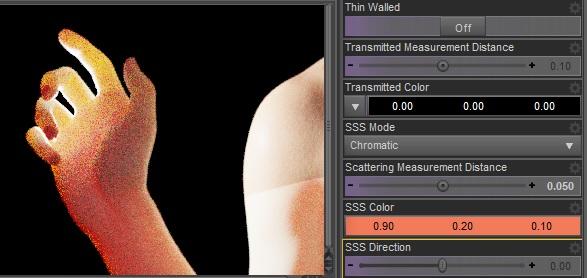
Back to iray. Below there's a little test showing scattering vs transmission. I did it to show why scattering can't be used instead of transmission or vice versa, since I see some "freedom" around on using and/or not using them. They are different physics effects and you need both of them to properly simulate volumetric skins. The shoulder seam is because I only changed the arm material for demonstration purpose. The subject is a Victoria 8 hand with a strong backlight. Scene included.
Scatter.
Transmit.
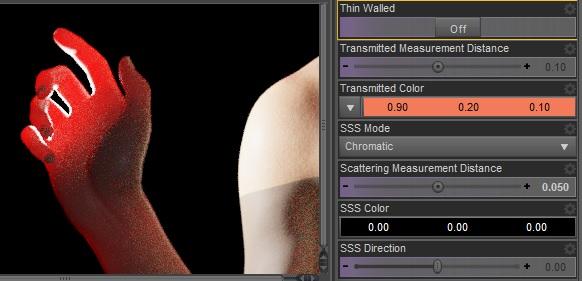
There's also my personal suggestion for a realistic skin. I agree for a high level translucency but I'd use the same color for scatter and transmit that's more pbr correct. This seems to work fine for the main skin features that are soft reaction to overexposure and soft shadows due to scattering, plus translucency due to transmission. Then again I'm more on the tech side so this is just a basic suggestion that I hope may be useful.
As for spectral rendering use faithful and avoid natural that doesn't work with photometric lights. I don't seem to be able to reproduce the spectral texture seams issue with these settings so may be this is fixed too. Personally I'd avoid spectral rendering though since it seems to strongly limit the translucency effect. Below you can see the standard rgb vs faithful spectral with the same skin settings.
edit. As for using the burn highlights or not in tone mapping, it depends if you want to simulate the human eyes perception or a real camera. For a real camera burn highlights and crash blacks are needed so it's up to you.
Standard RGB.

Faithful Spectral.
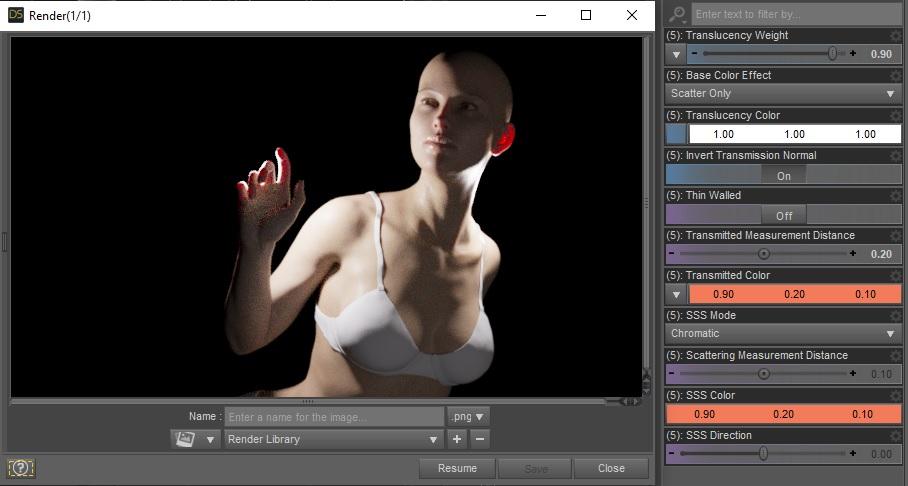
edit. Added picture labels. The included scene can be used to verify the results, it's Victoria 8 with the free basic wear.
*Released dforce Dark Match* Commercialhttps://www.daz3d.com/dforce-dark-match-hair-for-genesis-8-female
YAY for Strand Based Hair!!!
I'd like to include some general information and helpful tips for you to use my new sets in the store :)
What is the difference between strand based hair and fibermesh?
Strand Based Hair is generated inside Daz Studio. Fibermesh is actual mesh generated within Zbrush. Fibermesh can bring even the nicest computers to a painful crawl once it is imported into Daz Studio. Strand Based Hair is so much lighter!! There are a lot less hairs in your viewport, and the rest are generated during the render. I don't know all the magic behind that part, but its really awesome.
SBH ( Strand Based Hair ) is DYNAMIC! - Yes!!!!!!!!!!!!!. As an artist that has been working with Daz Studio and Poser for almost 20 years, this is what I always dreamed of!!!!!! Well I have also dreamed of being a millionaire too, but I'll settle for this
 .
.But what if I don't want to run a simulation? With the ones currently in the store, you do not need to run a simulation unless you want to. There are morphs that will move the hairs around like a traditional hair model too! The coolest part is that you can use the morphs before a simulation, without a simulation, and/ or after a simulation.
How do I use it? Select your figure and load the model like you normally would. Make sure that you do not have the geometry editor tool or the awesome Mesh Grabber Tool selected, pose your figure and render.
How do I use the morphs? These SBH hair models are currently in pieces to add more versatility. Selecting it in the scene tab will make the morphs appear in the parameters tab ( They are parented to the head) . Keep in mid that because these hairs are separate pieces they are grouped. So you will have to expand the options in the scene tab to find the individual pieces. Then just play with the sliders to your liking!
How do I simulate the hair? Welll there are several ways to do this, but the easiest way is to click on the simulate tab and click simulate. No extra settings needed. You can also use a timeline animation, or use the settings provided to use just gravity.
There will be so much versatility!! I have added a ton of separate surfaces so you will be able to easily kitbash these. Shut off certain surfaces to combine them with other SBH hairs orrrr maybe even combine them with some of the regular 3d hair models in the store and make a hybrid!
Technical Stuff:
Line Start With & Line End Width - This is how thick your hair is and how it tapers. I kept mine slightly thicker @ .09. and .03 to keep the amount of generated hairs to a minimum. If you want the hair to be thinner or taper more, you can turn this amount down, but oviously you will have to add more hairs.
Root Radius - This is the mode I have chosen to favor. It doesn't require painted maps or interpolation algorithms ( where hairs can go off in crazy directions for almost no good reason) and it is much more predictable for me when I import my hair from outside programs. With that said, there are no options for the cool stuff like frizz. Sorry guys :(
PS Points (per hair) - for those of you that model this is similar to CVS in a curve. It can control how smooth the hair will look. If you do a simulation and the hair just turns to a straight mess, try turning this down. The lower the setting, the more stiff the hair itself will behave and keep it's shape. Too low and you may end up with some jaggy edges. I feel like 20 to 30 is a good start for these stiffer styles.
PS Hairs (Per guide)- This is fairly self explanatory. If you want a fuller look, you can try adding more hairs. More hairs will probably require more computing power. But feel free to play with the setting.
PS Hair Tip Separation - This is a clumping option. Positive direction moves the hair away from the tip. Negative direction forms a clump at the tip.
Bias and Gain - This also has to do with clumping.
Bias is where along the hair shaft the clumping/non clumping starts. The lower the number the higher up the hair shaft the tip separation starts and vice versa.
Gain is how the bias transitions along the hair shaft.
I don't bother messing with these too much, but feel free to play with them.
PS Hairs and PR Hairs - PS hairs are supposed to be more accurate when simming than PR hairs. Also, I have found that PS hairs have a more delicate, natural look to them. PR hairs are great for adding a little extra bulk or frizz depending on how you use it. To get hair more dense looking, you can add PR hairs one or two at a time. I like to think of PR hairs as a multiplier, so you don't need to add a whole lot. If you want to make the hair appear a little more frizzy, you can play with the distribution radius and the tip separation for the PR hairs.
More Technical Questions * This will be added to as questions come up so all info can be placed in one convenient place
I want a certain section of my hair to drape more. Is there a way to do that? Yes! There are a few options you can use to adjust the draping so it suits your particular scene better. You can adjust the PS Points on the surface you select to something higher. The double dutch braids in particular are kept fairly low around 20. This keeps the whole hairstyle fairly stiff. I would start fairly high at maybe 60 and see what results you get and what you are exactly looking for. If it drapes better but its lost too much of your shape you can adjust other options as well.
You can also adjust the Local Shape Constraint Stiffness. Turning this down lower will also make the hair drape more while keeping the shape of the hair more in tact.
You can also adjust the tips of the hair with Local Shape Constraint Tip Stiffness. This will loosen up how the tips drape more. A lower number will spread those tips out more during a simulation.
All of this is a process of trial and error and what exactly you are looking for in an end result.
I want to simulate hair on a figure that is on a floor. When I sim the hair it makes an explosive mess. Help! This wasn't a question posed here yet but I know it's on the way :) You have a few options to handle this situation. If you are on an older computer that doesn't do so well with simulations, try keeping the model's head height as the same level the default figure loads in. I hope that makes sense. When a simulation is going it is essentially pulling those hairs to the end pose. Further away from default equals more pulling.
If you have a decent computer and you don't have an issue with simulations then you can simply change the simulation settings - Pose Transition Time to something higher than 1. The promos I did with Victoria on the floor all had a pose transition time of 3 - but I believe 2 probably would have done just fine.
Now go have some fun and be creative already!
I will be here checking this thread as often as I can to help, should you get stuck, have questions, or just wanna show off pretty pictures :
 Question about BVH Animations on certain figures
I am trying to use the BVH files from CGSpeed. I realized they are not compatible with Michael 4, as mentioned on the site.
They are compatible with Victoria 4, however. But I have Victoria 4.2, and at least some of the BVH animations do not work on my Victoria 4.2. Could the bone names be different on Victoria 4.2 as opposed to Victoria 4?. I may have to consider purchasing Aiko 4 soon.
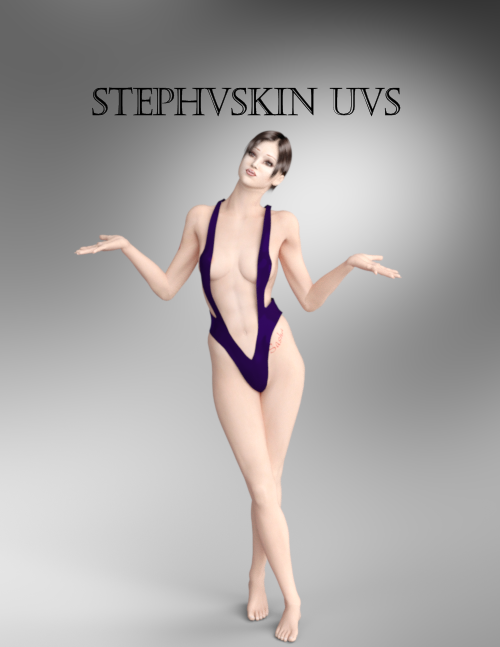
The older generation: Victoria 2/3, Michael 2/3 and their children rendersHere is Stephanie 1 with Victoria 2's textures. Stephanie 1 is based upon Micheal 2 mesh so her orignal UVs were the same as Micheal's. AprilyYSH did a remap but her cr2 did not include the morphs so I added them back in so that I could use the Stephanie 1 morphs identified in on the PoserDAZfreebie wiki.
So here is Stephanie with Victoria 2's Sasha textures and 3Dream's fullbody morph for Stephanie 1.
Pretty - and I like her pose.
The older generation: Victoria 2/3, Michael 2/3 and their children rendersHere is Stephanie 1 with Victoria 2's textures. Stephanie 1 is based upon Micheal 2 mesh so her orignal UVs were the same as Micheal's. AprilyYSH did a remap but her cr2 did not include the morphs so I added them back in so that I could use the Stephanie 1 morphs identified in on the PoserDAZfreebie wiki.
So here is Stephanie with Victoria 2's Sasha textures and 3Dream's fullbody morph for Stephanie 1.
PoserDAZ Freebie Wiki - Image Creation Party 2020We have gone quiet. How is every one. Working on images I hope. I do images because I am trying to create my Smart Content library and I like to look at the pretty pictures. I am also drawn to the older models. don't know why but I am. Gotta go where the mojo goes. Below is an early AprilYSH freebie when Stephanie 1 was the latest new model at DAZ. AprilYSH's product remapped Stephanie so that she could be textured using Victoria 2 textures. AprilYSH did not include Stephanie's morphs in the cr2 she created and there used to be a morph loader that you could use to put the morphs back into the cr2 if you owned Stephanie. After many years and me wanting a pretty picture for my library, I tried to find that morph loader. No joy it has vanished so I said to myself if the computer can do it I can too. It took me several days but I now have a full fledged Stephanie with the new UVs and all of her morphs. I present to you.
So this is Stephanie with a 3Dream full body morph and Victoria 2 skin rendered in iray. I think she is very pretty.
Question about BVH Animations on certain figuresWhat does CGSpeed mean?
Also, will the BVH animations work on Victoria 4.2?
Is Genesis 8 Going to Stick Around a While?Is Genesis 8 going to stick around a while?
Well Aiko 3 is still available as are Victoria 4 and other old products; that suggests that Genesis 8 wll still be available for those who want to use it for a long time.
Many folks use older characters for a variety of reasons.
When a new one is released, you'll still be able to use any product you already possess. Genesis N will be provided for free (presuming this continues), and if you're serious about creating art, you'll use the best tool you can for any given project; that may or may not be the "latest and greatest".
Question about BVH Animations on certain figuresI tried to apply a BVH animation which involves sitting, onto a Michael 4 figure. Apparently, the animation still stands and moves around strangely.
I'd like to ask, would it be recommended for me to use the Joint Editor tool in order to make the animation work well?
I did read somewhere that BVH animations may not be applied to Michael 4 or Victoria 4, but can be added to older versions.
Is Genesis 8 Going to Stick Around a While?There is no need for a new line without improvents or changes that customers want. G8 could be the standard for years to come for the hobbyist render market of which I am a part as well. Unfortunately the hobbyist market is not always going to have the best hardware so there is only so much you an improve core figures before you lose that market due to hardware requirements
rather the g9, id rather see paid upgrades for G8m, m8 victoria etc which make my current figures more useful. I'd have preferred that with g3 as well. But then they couldn't sell us a new round of the same figures over again
 [Released] Character Converter from Genesis 2 Female to Genesis 8 Female [Commercial]
Hi,
unfortunately I do still have issues with conversion efforts. Tried the main character converter on Belle 6, Victoria 6 and Teen Josie 6.
Both Belle and Victoria do not have no neck. Teen Josie has one but the eyes look weird. Any ideas or what further info do you need? I do have lots of your products so could there be any problems with one product having a negative impact on another one?
Edit: Just tested The Girl 6. Even worse. No neck and the head looks bad. Don't know what goes wrong. Just recently started to update my complete runtime. So currently there a not much figures installed, just some plus the main morph packages. Have no idea where to look for to fix things.
Thanks,
RWD
The best thing to do is RENAME the converted morphs directory. The converted morphs go in data/DAZ 3D/Genesis 8/Female/Morphs under the FIRST directory for Daz Studio Formats specified in the Content Directory Manager (F2->"Content" tab->"Content Directory Manager..." button). Rename the Morphs to OldMorphs so Daz does not pull it in while loading G8F. Now, try to convert Belle or Victoria. I would uncheck the convert JCMs just because the conversion goes faster. Did it work properly? If not, can you post the daz log of the conversion?
Kayo 8Wow, only $15 off DOs even with 4 add-ons? The deals seem to get worse and worse... She's OK, nothing special, I would only use a bit of her to mix with other characters, I like one outfit in the bundle (CB Take Down Outfit) and the Togatta hair especially as used on men. I hate the strategy of making us buy two items in advance to get a discount on a future bundle sight unseen. I wish we could get another character as beautiful as Victoria 7 was. Besides her, I always prefer the PA characters to the Daz core characters.
"There's Always Another Sale™" (Report sales issue here.)Is Behemoth HD by Kayleyss supposed to be included in the selection of horror items for the Slay Your Urge sale?
I'm asking because Kayleyss' other G8 demon character, Tara 2 HD, *is* included in the selection for the sale.
Despite being a horror fan, I'm having a tough time making a satisfactory cart, but Behemoth at the sale discount could make it worthwhile, so I'm hoping the omission was a mistake.
I don't know about this offer specifically, but I do know in general, the PAs usually have a say in which products are included in specialized offers.
Today's featured artist stores seem to be incomplete. For example, when I browse Fugazi's store from the list on the sales page, only 6 items are shown. However, when I browse Fugazi's store directly, many more items are shown with a 40% discount (base for this sale). If I add one of the items that isn't shown from the link on the sales page (eg - messy room bundle) and a new release, it seems to be getting the additional discount.
As a side note, on Fugazi's store page, all not new releases are showing a discount except home props.
It has become less common for Daz to feature a complete back catalog of any given PA in a daily promo. In the past, doing so lead to offers stacking that were never meant to stack. Getting 83% off a PAs back catalog, (for example,) might be nice for the customer, but wasn't so great for the PAs income.
Fugazi1968 is featured in today's promo. She (he?) is also featured in the "Take Your Medieval Up a Notch" promo from two days ago. Both promotions offer an increased discount by purchasing qualifying products. As the previous requirement was any new release, anything from today's offer will bump the discount to 60%. If the full back catalog were included in both offers, it would be possible to stack 60% on top of 50% or 60% with the purchase of one or two of today's new releases.
The way it is set up now, you can get up to 60% off, but the two offers do not stack. (Which is how it should be, IMO. I'd hate to see a PA leave for another store, or quit altogether, because they can't make enough money with all the stacking discounts.)
[Released] Character Converter from Genesis 2 Female to Genesis 8 Female [Commercial]Hi,
unfortunately I do still have issues with conversion efforts. Tried the main character converter on Belle 6, Victoria 6 and Teen Josie 6.
Both Belle and Victoria do not have no neck. Teen Josie has one but the eyes look weird. Any ideas or what further info do you need? I do have lots of your products so could there be any problems with one product having a negative impact on another one?
Edit: Just tested The Girl 6. Even worse. No neck and the head looks bad. Don't know what goes wrong. Just recently started to update my complete runtime. So currently there a not much figures installed, just some plus the main morph packages. Have no idea where to look for to fix things.
Thanks,
RWD
ZDG random Daz Studio discoveries and questions.well, an interim post, some fussing around with the versa dress and a few figures.
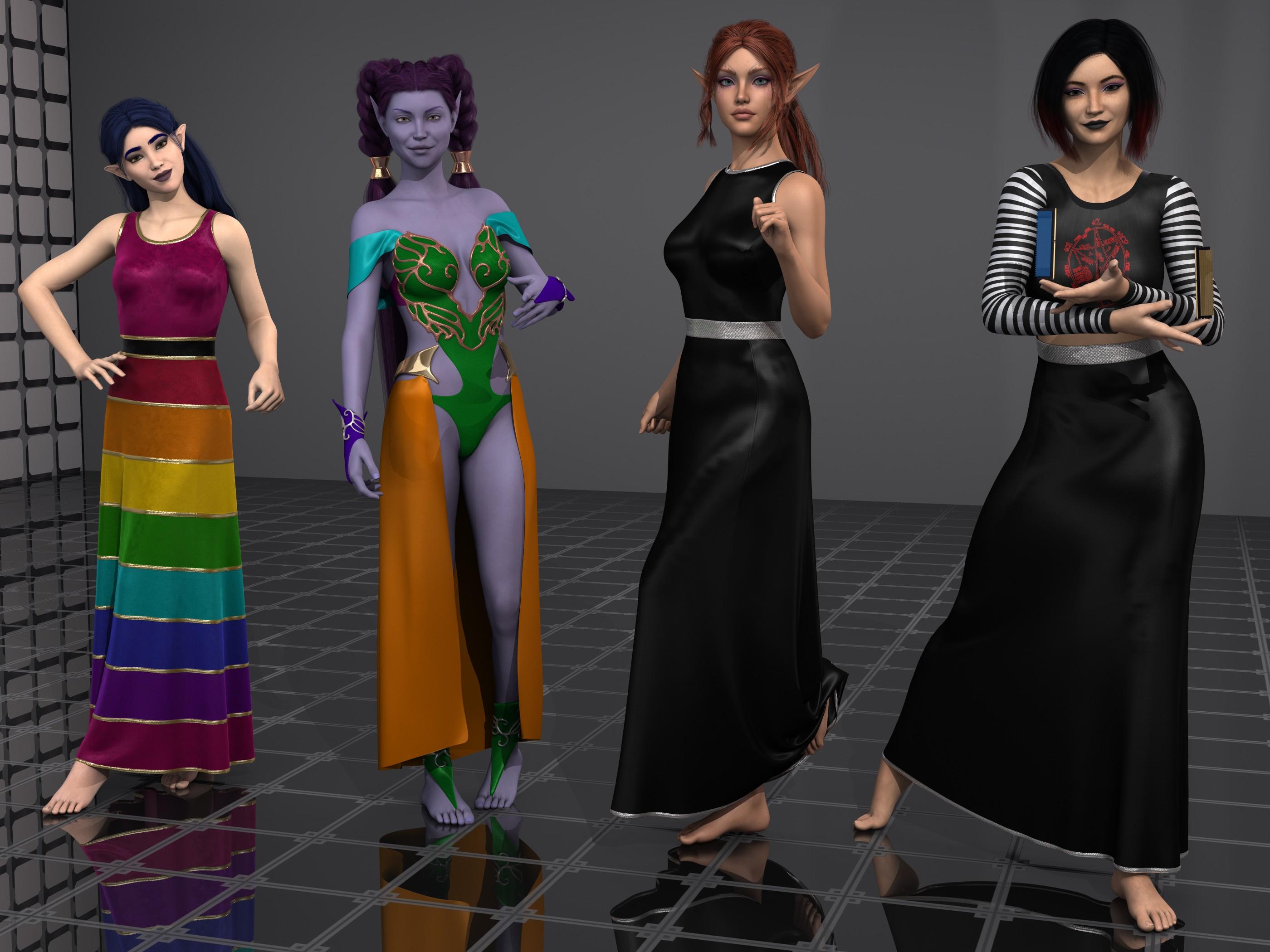
Left is Daisy8, this time with the dress all as that preset is instead of zones set to invisible for the monster tube top thing. Realy nice Rowana hair for elves. Next over is Violetta (Rendo) with an outfit I pulled out due to a promo that caught my eye for someone else. I messed up the skirt by forcing D-force on it, I could have done that better, however, it was the surface zones then the versatile dress shaders I was more interested in. Next is ADJA Alloralla, overall ok, some adjustments, tho overall not bad. Sherry hair was nice to work with (I don't recall auto fitting the G3F item to G8F, tho I may have). Then far-right is Norah, ahhhh, well, yeah. For a start, I will say turning the black dress preset on ADJA Alloralla to the left into a skirt, and using the Party monster top was rather fun, including the fun new AHOC memory OCing spell shirt design Buildzoid made. The Carla hair was also easy to set up. so, first up is Violetta skipping past Daisy that I only have nice nice nice to say about.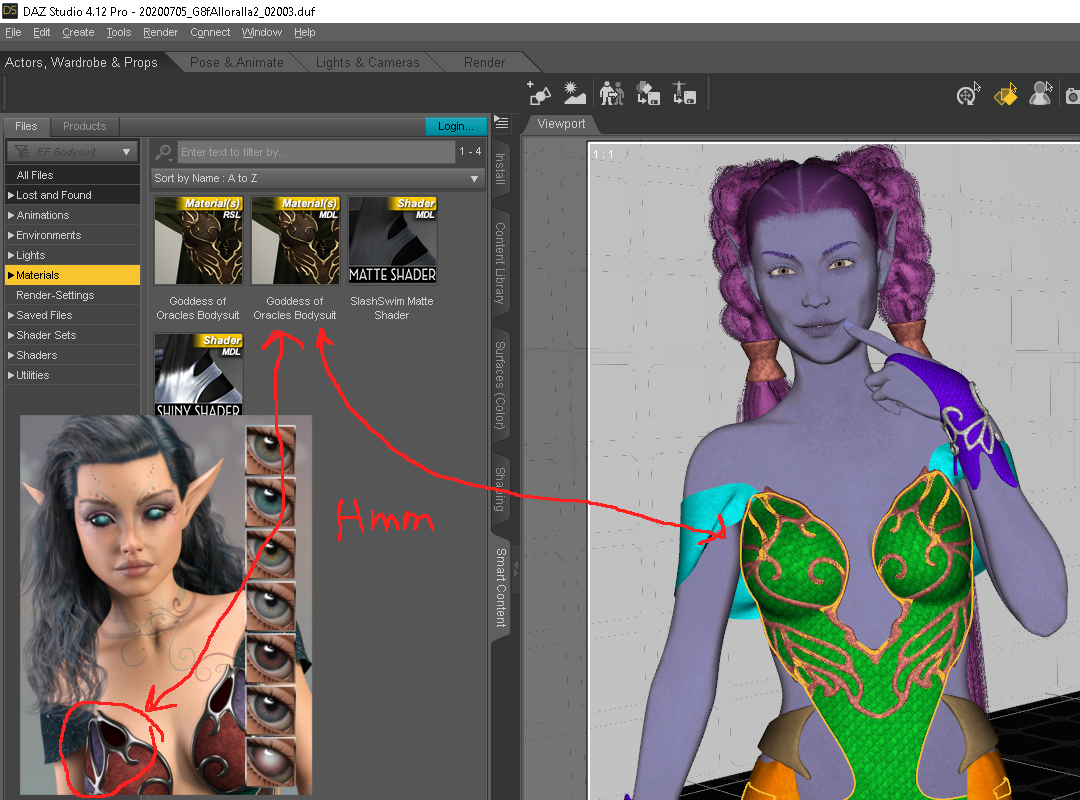
for the most part, Violetta was a pleasant surprise to set up, drop the maps into a 3DL shared throw a shaping dial and render away. As for the outfit (goddess of oracles? Ethereal Fantasy?),
yes, Ethereal Fantasy outfit, as I was saying, I just don't want people looking at Alloralla's promo and thinking that outfit has more surface zones than it has. the entire area on Violetta that is green, is a single zone. so unless there is an add on texture set (oops, there is) I didn't notice, or you make maps yourself for the outfit, that is all going to be one shader preset there. The outfit does have plenty of zones to work with for the most part, and that is where the deforce forced onto the skirt was a mistake. I should have set the top edge of that skirt cloth as a separate zone so I could turn to deforce off on it, that way the cloth would not be falling off the metal band part. That is about the only missing zone on the thing, the rest is really nice. ... after digging up links, I notice I don't have the correct skirt matched with that bodysuit, hmmm, I think I made a few mistakes there. When going threw the smart tab icons of stuff, it looked like it belonged with it, lol. And it looks like the preset used in the promo is in the Ethereal Fantasy add-on set I didn't know existed.
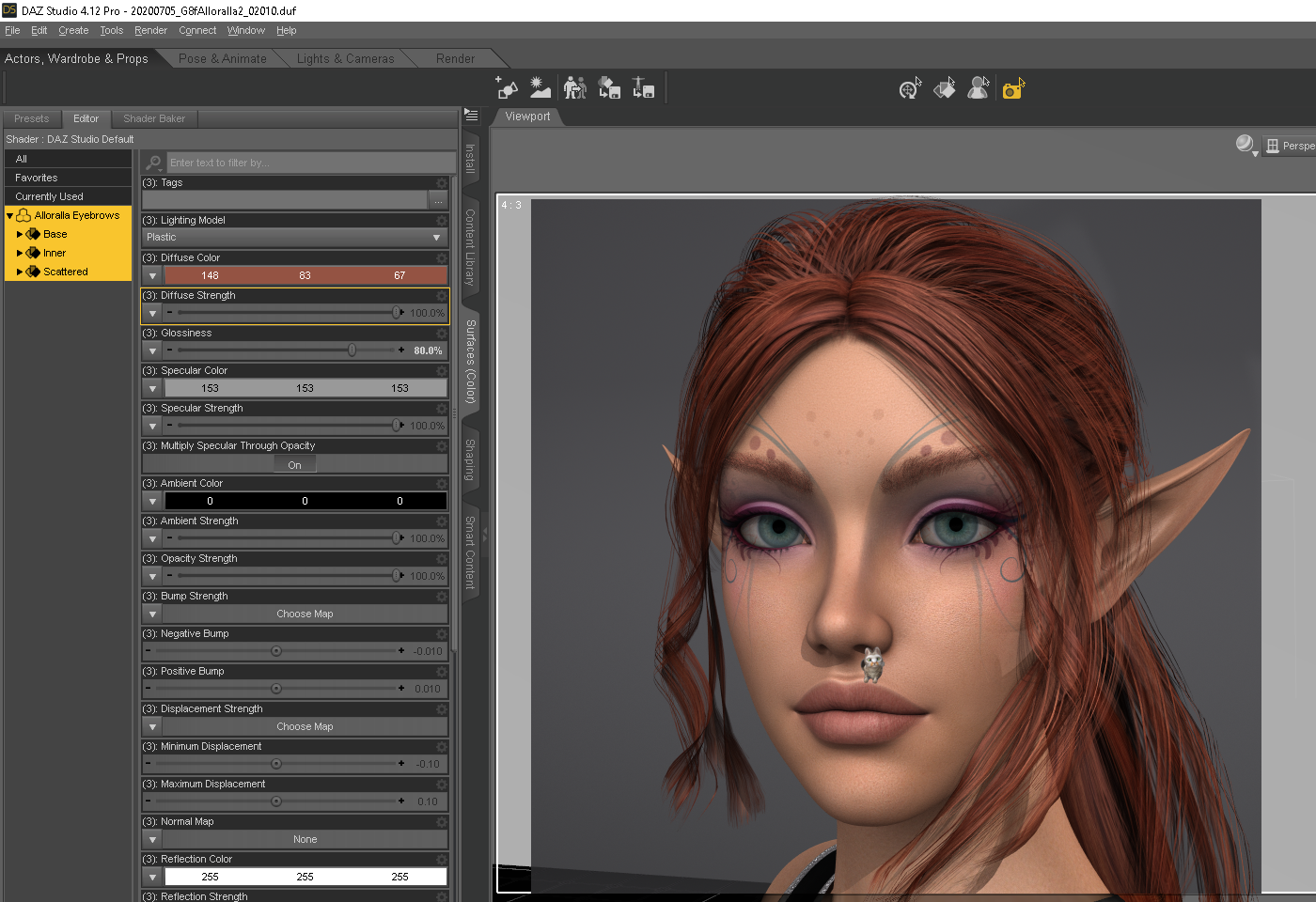
ok, the FYI out of the way for the promos, I do have a few constructive criticisms for ADJA Alloralla. For one, the 3delight presets are on the dark side compared to the promos, which is rather easy to address with some value adjustments (more diffuse surface strength&brightness, less wax candle maybe). Also, the "ginger" eyebrow preset looks a tad more bleach-blond in 3delight than red, I ended up setting my own colors for that, shown above. Maybe someday I can find a shaping dial that tames the upper lip ledge a tad (Graystillplays lounging Tonsils not included), some are ok others a bit excessive, it's just eh. Other than that, really glad to have another cute elf in my collection.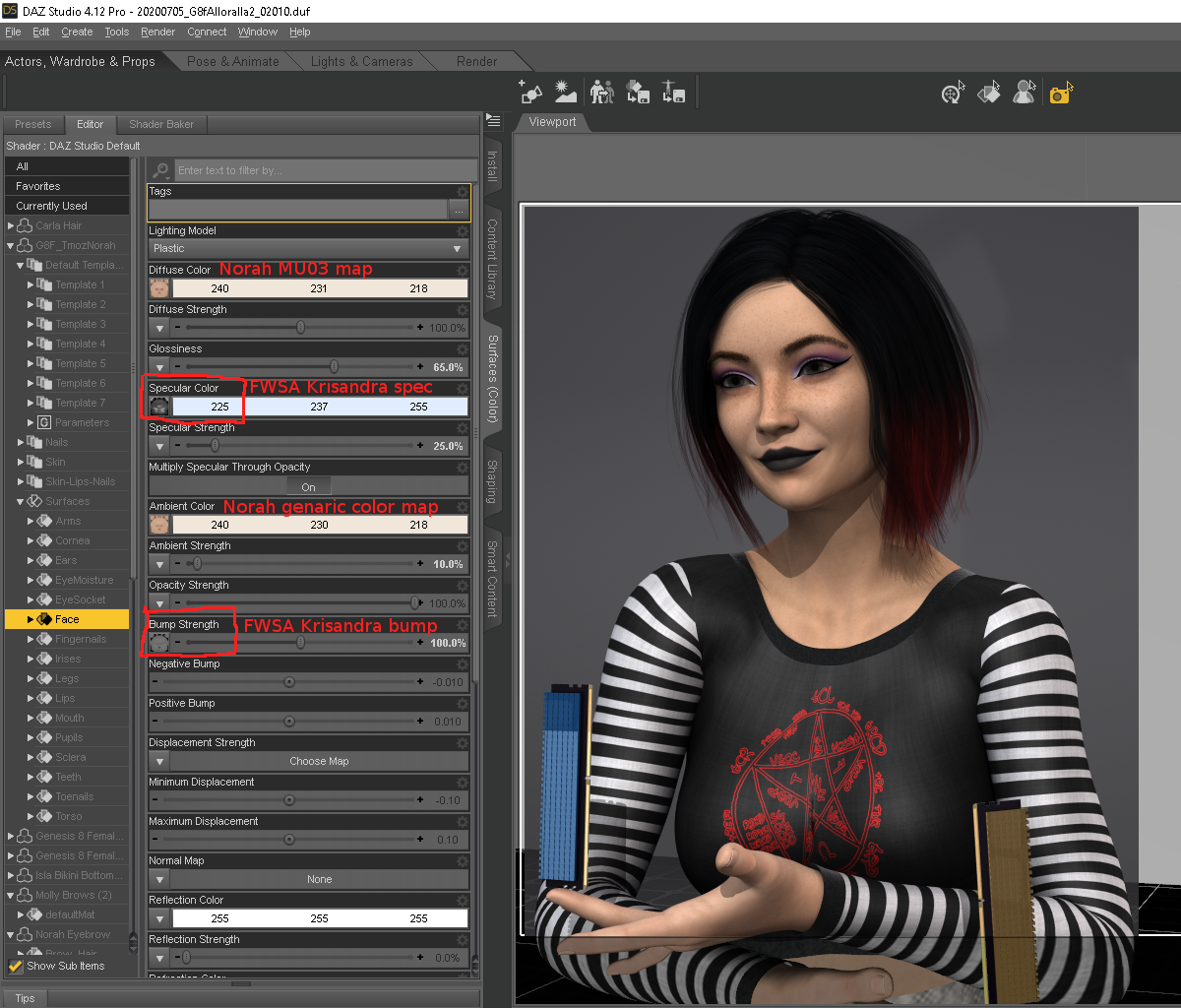
All I'll say here is maybe she looks incredible in Iray with the included Iray only mats, I'm not working in Iry. I knew this may be a 3DL failure given the store page, so I won't harp too much. I took one look at the two included spec maps and the complete lack of bump, and decided I wasn't going to play the how to tile one map for each surface zone without tiling the other maps game. As for the normal maps, it was just something I didn't want to waste time with, as so many times in the past the ever so slight rib shaping in Iray ends up looking like malnourished bulging ribs with some in 3DL or just a mess, so I didn't even bother looking, yet.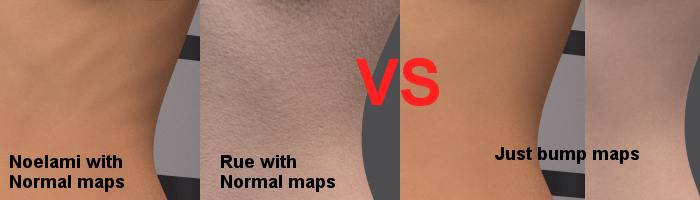
For some, it's just better to drop the Iray normals in 3DL and only use the bump maps. Norah has no bump maps, so, I borrowed all the spec and bump maps from FWSA Krisandra (no baked in eyebrow options for use with fiber-mesh brows), and went from there. the color maps are ok (they are not inverted colorspace maps), so things didn't go as bad as I was first afraid they would when first I looked at the maps folder. The PartyMonster top is a completely custom map I baked up for the stripes on the sleeves and the AHOC memory OC joke. I do need to look at some stuff more, tho over all the figure-shaping is ok, and the makeup options did go rather well.
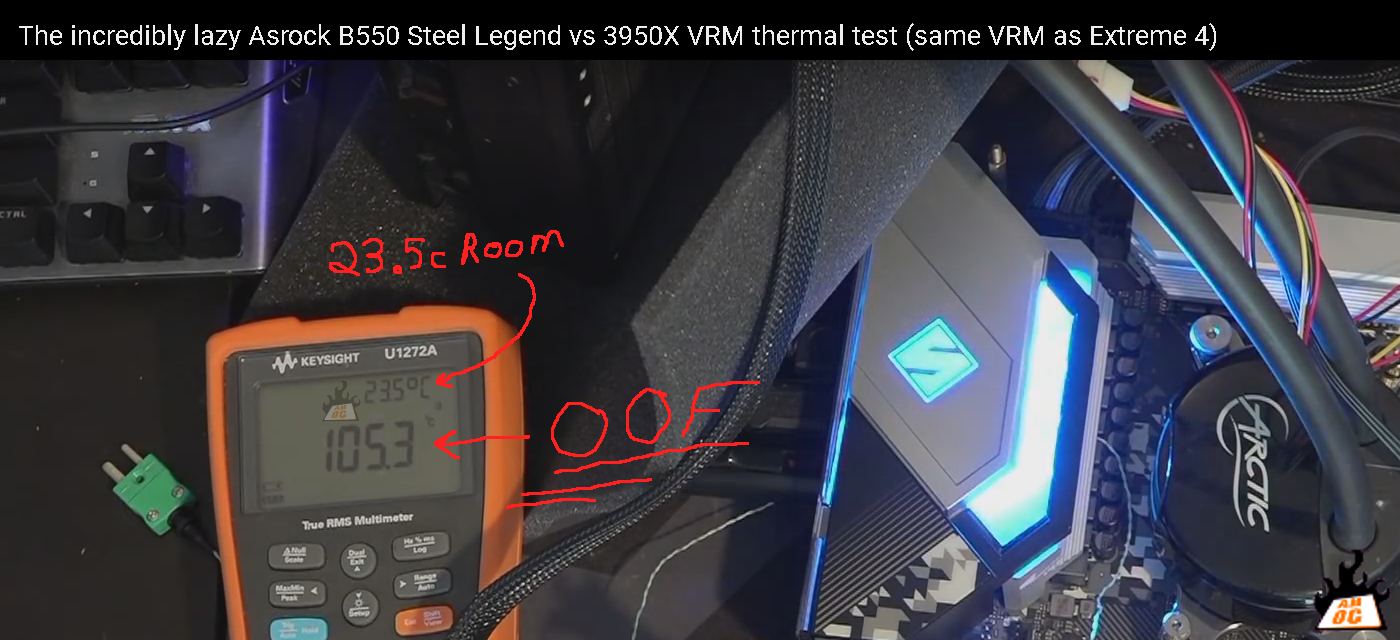
ye know, 23.5c room temp (AHOC YT vid link) is a bit low compared to the ATX spec of below 40c inside a case, and just because some parts are rated for "up to" a Tmax of 125c does not imply that is the preferred operating temp for them.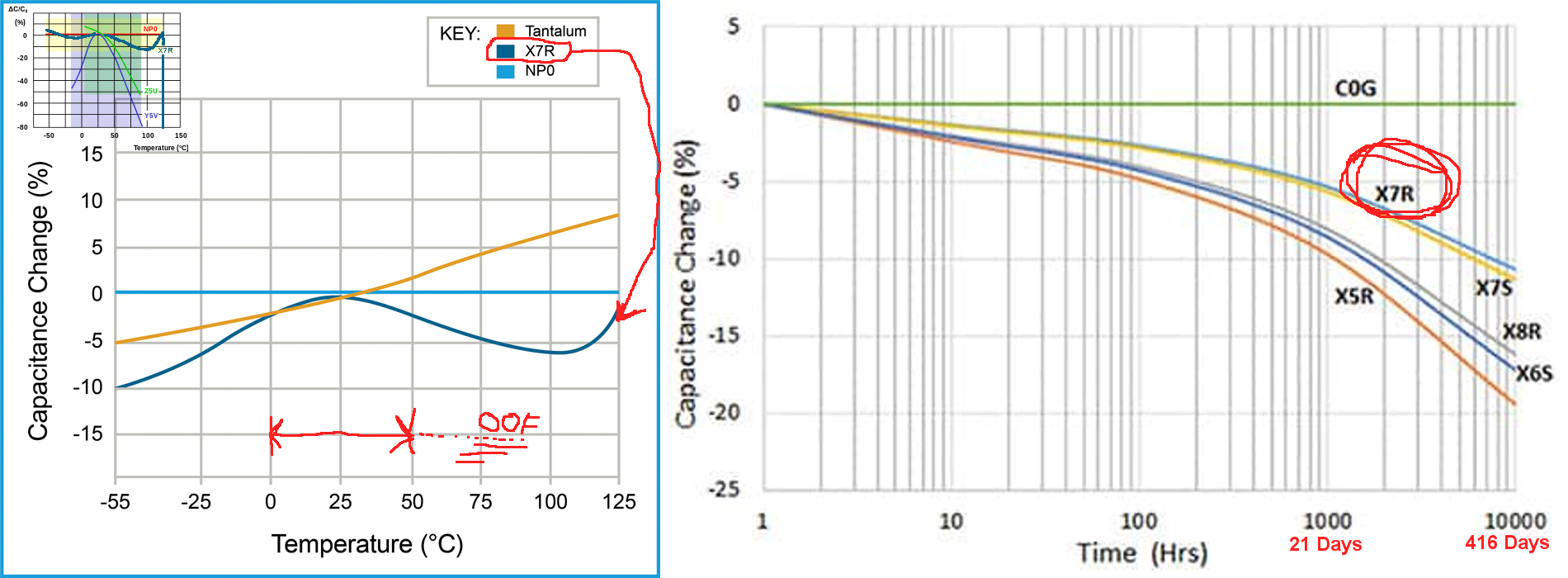
ah, yeah, in any case, that short VRM test Buildzoid did was cool, and at least there was no breaking ceramics from thermal expansion of the metal film inside them. Just som rather toasty FETs. in a case with even modest airflow (forget the original Evolve or InOven cases), the VRM should be 'OK' so long as ye isn't pushing things. That particular Asrock isn't nearly as bad as some z490 ones Hardware unboxed looked at, tho that is for another pending post.
in the meantime, I guess I am going through some Computex withdrawals, esp the GN Steve vs PC World Gordon collabs.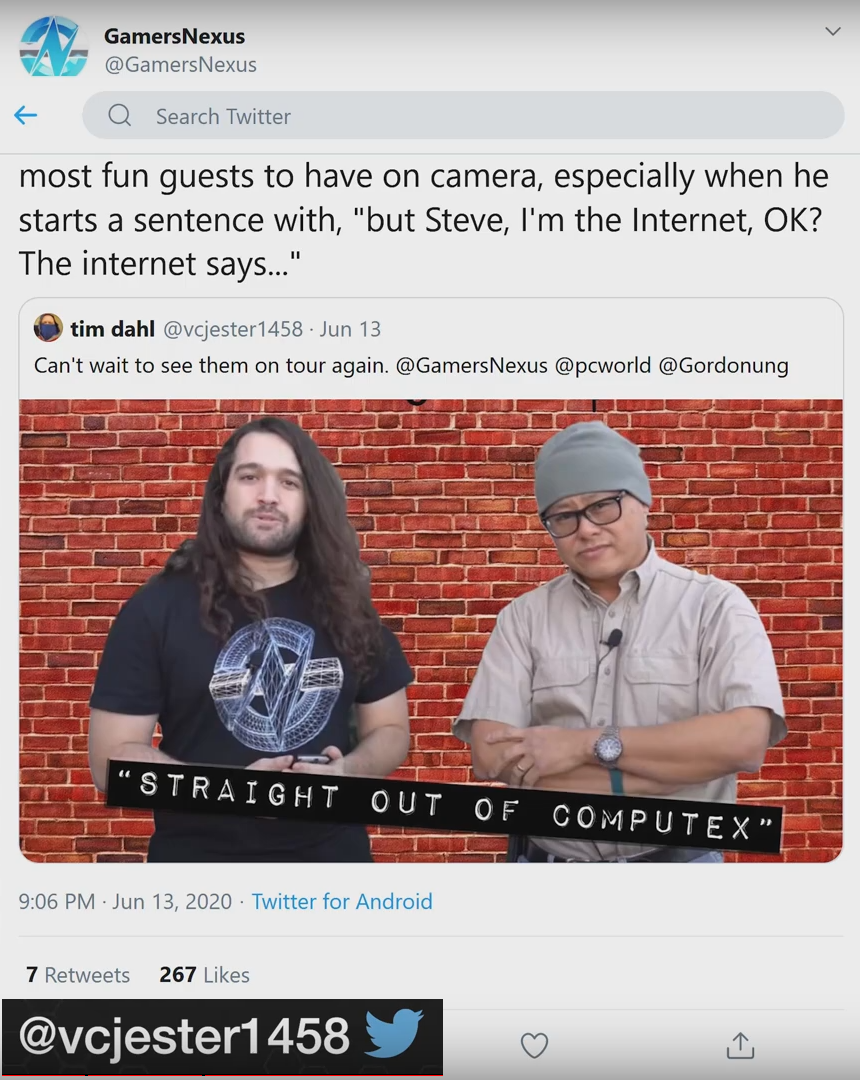
With luck, we will maybe get some more content from the both of them, I hopes at least.
"we get it amd, ye can make a 3700x, like Nvidia can make a 1080ti", oof, just like motherboard makers are perfecting the featureless lump of metal some erroneously call a VRM heatsink, lol. Steve is being brutally honest again (YT 3800XT vid). 39% more watts for 3.7% more performance, really reminds me of the 7700k vs 6700k 200MHz bump, hmm.
"There's Always Another Sale™" (Report sales issue here.)Is Behemoth HD by Kayleyss supposed to be included in the selection of horror items for the Slay Your Urge sale? I'm asking because Kayleyss' other G8 demon character, Tara 2 HD, *is* included in the selection for the sale. Despite being a horror fan, I'm having a tough time making a satisfactory cart, but Behemoth at the sale discount could make it worthwhile, so I'm hoping the omission was a mistake.Dynamic Clothing Control - old alternative for dforce? [solved]well there was this thing that annoyed me with those dynamic items: they only fit the figure they were designed for. and since i happily mix everything cross-generation and -gender... i got very few of the freebies from their site and then gave up.There's an easy(ish) solution to the Optitex dynamics only fitting one figure; don't fit them. I use dynamics on a lot of critter characters from Melody and Micah, which are based on the Aiko3 and Hiro3 figures. I've also used them on all Genesis generations, and even some non-human characters — the old RDNA store used to have the Jager werewolf figure, so I now know how to do a dog in a dress.

- Load the clothes into your scene without trying to fit-to the figure.
- Parent the clothes to some body part of the figure; where you parent it depends on what the clothes are. Trousers or dresses I parent to the figure's hip, a bikini top parents to the lower or upper chest.
- On the root body part of the clothes, zero all Translate and Rotate transforms.
- This is where it can get a bit fiddly. Working out from the clothes body part corresponding to where on the figure you parented the clothes, fiddle with each part's Transform controls until the clothes pose more or less matches the figure pose. Don't forget Scaling, sometimes that's the only way to get something to fit. It doesn't have to be exact; unlike dForce, Optitex dynamics don't always explode when there's pokethrough. Only sometimes.

- Honest, long sleeves and trouser legs can be done using this technique. It just might take a while to get everything lined up right.
- Cross your fingers and try to run a simulation. If there's only a little pokethrough, the clothes will jiggle about as the simulation tries to push it out from under the figure's surface. If it doesn't explode, but the clothes obviously haven't settled at the end of the run, do another simulation.
- Don't forget materials; I think all the Optitex clothes were made long before Iray, so their materials will all be for 3Delight rendering. If you want to convert them to Iray, do this as step zero and save a materials preset.
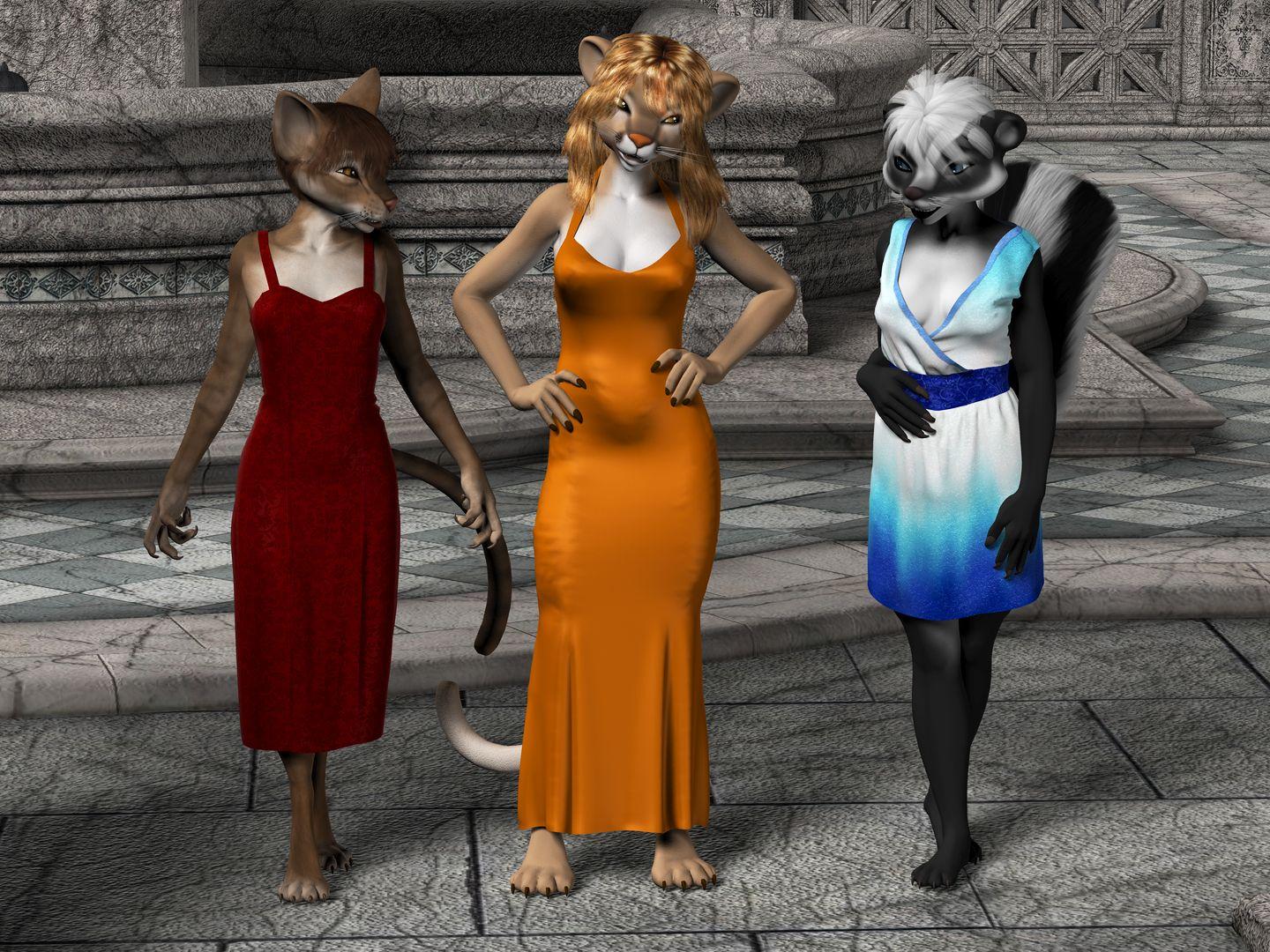
And here's what's possible if you fiddle long enough. Originally rendered a good few years ago, so these are all 3Delight materials. The Melody figures are all based on Aiko3, and the dynamic clothes are all for Victoria 4.
omg.. this sounds like an awful lotta work XDDD - just to get some old cloth to fit.. especially in the age of G8 with all the clones fitting everything. no, srsly, i enjoy playing with my dolls, but it has to be fun, not too much work. maybe it's necessary for special figures, but i use mainly G8 and G3, i have clones and fit-them-all, and usually the results are ok. if all i had to do was buy this optitex plugin, click a few buttons, and whoop my cloth falls elegantly, ok. but fumbling around to that extent.. it's already hard enough with clones, SY fitting tools, and just a coat/robe made for another generation...
anyways, i'll keep a tab on this too, just in case i'm in the mood to experiment, thank you ^^
Dynamic Clothing Control - old alternative for dforce? [solved]well there was this thing that annoyed me with those dynamic items: they only fit the figure they were designed for. and since i happily mix everything cross-generation and -gender... i got very few of the freebies from their site and then gave up.There's an easy(ish) solution to the Optitex dynamics only fitting one figure; don't fit them. I use dynamics on a lot of critter characters from Melody and Micah, which are based on the Aiko3 and Hiro3 figures. I've also used them on all Genesis generations, and even some non-human characters — the old RDNA store used to have the Jager werewolf figure, so I now know how to do a dog in a dress.
- Load the clothes into your scene without trying to fit-to the figure.
- Parent the clothes to some body part of the figure; where you parent it depends on what the clothes are. Trousers or dresses I parent to the figure's hip, a bikini top parents to the lower or upper chest.
- On the root body part of the clothes, zero all Translate and Rotate transforms.
- This is where it can get a bit fiddly. Working out from the clothes body part corresponding to where on the figure you parented the clothes, fiddle with each part's Transform controls until the clothes pose more or less matches the figure pose. Don't forget Scaling, sometimes that's the only way to get something to fit. It doesn't have to be exact; unlike dForce, Optitex dynamics don't always explode when there's pokethrough. Only sometimes.
- Honest, long sleeves and trouser legs can be done using this technique. It just might take a while to get everything lined up right.
- Cross your fingers and try to run a simulation. If there's only a little pokethrough, the clothes will jiggle about as the simulation tries to push it out from under the figure's surface. If it doesn't explode, but the clothes obviously haven't settled at the end of the run, do another simulation.
- Don't forget materials; I think all the Optitex clothes were made long before Iray, so their materials will all be for 3Delight rendering. If you want to convert them to Iray, do this as step zero and save a materials preset.
And here's what's possible if you fiddle long enough. Originally rendered a good few years ago, so these are all 3Delight materials. The Melody figures are all based on Aiko3, and the dynamic clothes are all for Victoria 4.
Need help identifying the clothing in this character promo pictureHello. Does anyone know what is the clothing in the promo pictures in this charac product?
https://www.daz3d.com/fw-destiny-hd-for-victoria-6
Thank you.
Need help identifying the clothing in this character promo pictureHello. Does anyone know what is the clothing in the promo pictures in this character product?
https://www.daz3d.com/fw-destiny-hd-for-victoria-6
Thank you.
Daz 3D is part of

Connect
DAZ Productions, Inc.
7533 S Center View Ct #4664
West Jordan, UT 84084Licensing Agreement | Terms of Service | Privacy Policy | EULA
© 2026 Daz Productions Inc. All Rights Reserved.