-
[Released] Character Converter from Genesis 2 Female to Genesis 8 Female [Commercial]
Trying out the tool with Paige: https://www.daz3d.com/paige and just can't seem to get the eyes become anything I would consider even close to circular. Tried 2020 several times and got probably the best result, attached, with 2019 and really low tolerance. Ideas? I
've just been removing "sc_paige/RSG2FPaige" from the morphs, am I missing a file and staring at the same conversion with imagined changes? :D
How low was the tolerance? Pushing it down to as low as it can go and not go to zero helps (for the 2019 method). The 2020 method gives the best results usually, but if you have tried it?
You need to be removing the FHM (H is for head) file to see a change (unless overwrite morphs is checked, not that I recommend that as it is so slow).
Well, I tried a bunch of settings down to 0.0005 on 2019, the one that gave the best result (posted above). I did have overwrite on, so it wasn't all in my head :D
I also understand now my confusion re: the FHM. Paige is a victoria 6 based character that has no custom body. It applies 30 % victoria 6 and then adds body morphs from the gen 2 morph pack to it. No FBM being created.
The head, otoh, applies 30 % vicky 6 and the "sc_paige" morph at 100. Sc_paige morph is not being recognized as an FHM.
The character also applies pupil and iris size morphs which are getting ported over (not sure if there are no corresponding ones or if the naming has been changed).
I was ecstatic when I discovered this, since I assumed that the eye morphs would be the culprits. Unfortunately, they weren't, the results were identical from a character preset saved without them.
Now I'm wondering it the issue is the sc_paige headmorph and the fact that it isn't getting recognized as an FHM one? Any further ideas? I did port over vicky 6, which worked just fine.
Late edit: I verified everything else ports over fine and its indeed SC_Paige, the non-FHM head morph, that causes the distortion.
RSSY Hair ConvertersHas anybody tried the RSSY hair converters on hair pre-Victoria 4? I have always liked the Petite Fleur Hair, but it was made for a Victoria 3.0 base. I've seen promo renders where PAs have used it on older figures but I've had little success with that, and as the generations got older it's just taking up space on my HD. I saw the RSSY hair converters for different generations, and wondered if the one for Victoria 4 to Genesis 8 might work.
Where is Victoria 4.2??Yes, that's correct. "Victoria 4.2.cr2" should be in C:\Users\Public\Documents\My DAZ 3D Library\Runtime\Libraries\Character\DAZ People (in Windows Explorer); inside DS it should be in:
Content Library pane > Poser formats > My DAZ 3D Library > Figures > DAZ People
Where is Victoria 4.2??In DIM go to settings (the cog in the upper right) > Basic Settings and post a screenshot. "Victoria 4.2.cr2" should be in C:\Users\Public\Documents\My DAZ 3D Library\Runtime\Libraries\Character\DAZ People
Where is Victoria 4.2??Okay, that's a different issue -- DIM says it's installed but DS can't find the file. Can you post a screenshot of the Content Directory Manager in DS with the 4 sections expanded, and the full path to "Victoria 4.2.cr2"?
Is Genesis 8 Going to Stick Around a While?When a new one is released, you'll still be able to use any product you already possess. Genesis N will be provided for free (presuming this continues), and if you're serious about creating art, you'll use the best tool you can for any given project; that may or may not be the "latest and greatest".
Exactly.
Well, yes and no, as there's no guarantee at all that G9 will work with all of the utilities and scripts most of us use as part of our regular process. And, of course, as those of us who went through the transition of DS 3 to DS 4 remember, there were a whole slew of products that stopped working at that time that never were upgraded to 4 or Genesis. I personally think that the main reason G8 caught on so quickly was because it was really only a slight upgrade from G3, and the two systems were extremely cross-compatible without the need for a lot of purchased add-ons. G9, on the other hand, may be a whole new kettle of fish, which might mean that the have a technically superior figure but get kicked back to the basics when it comes to the operatiing tools...
We're not talking about a new version of studio, only a new version of Genesis; pre-existing itterations will still work in Studio.
If there is a new studio version that breaks lots of scripts, well the old one will still work; if a person doesn't back up, well that's their responsibility.
Well, DS is going get majorly updated sooner or later, what with it being based on QT4 which is no longer supported. There will need to be a lengthy transition so that our script jockeys have time to bring their work up-to-date, as well as a period during which users will be able to use two versions independently.
I upgraded to G8 because of the better posing tools; I can actually get the same look on a G3 character that I can on a G8. Now there are other aspects of G8 that make it a little better (and it is worth having), but that isn't down to have the final render will look, but how easy it is to get to that final render.
Whenever Genesis N finally appears, I'll be interested in it and will likely buy the first release (sadly it will be Victoria, but whatever). If I like what it can do versus G8, then I may jump on board.
However...
I do all of my rendering in Blender now; I just prefer all the tools I have access to there. Iray for me, is both a resource and cash hog. So whilst I may jump on board, I also consider it likely I will not - certainly not until Genesis X becomes useful - about a year perhaps. Genesis 8 actually caught up with G3 much quicker that G3 did with G2 because of the similarities between them; the UVs were effectively the same.
Where is Victoria 4.2??Purchased years back......Creature Morths and Add Ons are in Daz......only Victoria 4.2 is missing
We can’t see your product library.
Lol, I know thats why I posted it .....so you folks could see I had purchased......along with 800 other products
 Where is Victoria 4.2??
Actually, I cannot find Victoria 4.2 Creature Creator Morphs either
 Where is Victoria 4.2??
Purchased years back......Creature Morths and Add Ons are in Daz......only Victoria 4.2 is missing
We can’t see your product library.
Where is Victoria 4.2??Purchased years back......Creature Morths and Add Ons are in Daz......only Victoria 4.2 is missing
Where is Victoria 4.2??Have you actually purchased Victoria 4?
Where is Victoria 4.2??Victoria 4.2 dosen't show up in DIM
Where is Victoria 4.2??If you filter in DIM for "Victoria 4.2 Base" where does it show up?
Where is Victoria 4.2??Hello guys,
I have recently istalled reinstalled Daz after a 4 years or so, and there has been many changes.

I have a reasonably large collection of shop stuff which I have just started to reload. Then I came up against the MISSING Victoria 4.2. I have no clue where where she's at or why she's not there...lol
Any help would be good, please.....thank you
Noob Looking for Cheapest Anatomy ExamplesMichael 4 is a none genesis model so none of the genesis items will work on his, at least not without a converter and those can be hit or miss.
the first addon you linked to is just morphs which change the shape of the body. the promo images you see on that page also use the second product you linked to which are the maps or textures to make it look like bare muscles. You can use the second product you linked to by itself, but it will lack any shape.
Hey there! Welcome to the convoluted world of DAZ figures!
DAZ comes with a variety of base figures, most free (Genesis, Genesis 2, Genesis 3, Genesis 8) and some you have to pay for (Michael 4 and Victoria 4). First you want to decide which base figure you're going to work with. I would suggest working with G8. It's the latest model and poses better than G2, Genesis, or M4. The posing of G3 and G8 is pretty much the same, but I don't really see a reason why you should choose G3 over G8. Either is fine I guess. I'm gonna continue this post assuming you went with G8.
There is shape (aka morph) and there is texture (aka material). Let's deal with shape first.
Load the G8 male figure, it comes for free with the DAZ Studio program. Click on the shaping tab. You'll see that you have some very limited options to change the figure's shape. There are morphs called Bodybuilder, Tone, and Fitness, amongst others. Does this get you the kind of figure you need for your drwaings? If so, congratulations, you don't have to spend any money on morphs!
Do you want more options to further change the figures shape?
Start here: https://www.daz3d.com/genesis-8-male-body-morphsNeed more options still?
https://www.daz3d.com/shape-shift-for-genesis-8-male-s
https://www.daz3d.com/muscularity-morphs-for-genesis-8-males
https://www.daz3d.com/swole-for-genesis-8-maleThere's more products of this kind... they all just give you more options to shape your figure.
Note that you need different products to shape your figure's face, and again different products for your female characters.As for texture, the G8 base comes with a very basic caucasian skin. If you only use DAZ Studio as a drawing aid you probably don't need to invest in different kinds of skins. If I understand you correctly, the only thing you'd additionally want is a version that looks like the skin has been peeled off. So that would indeed be this product:
https://www.daz3d.com/muscle-maps-for-genesis-3-and-8-male
As for skeletons, they are separate figures.
https://www.daz3d.com/midnight-skeleton-for-genesis-8-male - this one matches your G8 and can share poses with it. I don't know how anatomically accurate it is.
https://www.daz3d.com/m4-skeleton - this one appears to be anatomically accurate, but it won't exactly match your G8, it will have a slightly different size and pose differently. I don't know how important that is to you. It's an old product, so it will go on sale on a regular basis.
https://www.daz3d.com/skeleton - and there is this even older thing. I don't know how well it poses.
Hope this helps, good luck!
Also this stuff, especially the older stuff, goes on sale pretty often. Since you are looking to save money, you might want to install this browser extension to get an idea of how often, and how deep the discounts are.
https://www.daz3d.com/forums/discussion/106296/announcing-daz-deals-browser-add-on/p1
Thank you all for your help.
REDISTRIBUTE CUSTOM OUTFIT - HOW DO I DO THIS?I have created a 100% custom outfit for Victoria 4 and want to redistribute it to a friend. The Daz documentation isn't very helpful, honestly. What are the steps to properly do this so that all I have to do is give them the zip to copy to their Daz library? I know the manual download folder typically has a Runtime/Data kind of folder format, but I can't figure out how to properly do this so that it works on his machine.
Thanks in advance!
Who are the most realistic Genesis 8 characters in 2020?https://www.daz3d.com/catalogsearch/result/?q=bluejaunte
https://www.daz3d.com/emma-for-genesis-3--8-female
https://www.daz3d.com/carly-hd-for-genesis-8-female
https://www.daz3d.com/margot-for-victoria-8
https://www.daz3d.com/hagar-for-genesis-8-female
https://www.daz3d.com/malin-for-jenni-8
https://www.daz3d.com/kim-seohyun-for-genesis-8-female
Not for the same reasons.
Some i like the skin, some the shape and some both. But these are my favorites in terms of realism.ZDG random Daz Studio discoveries and questions.well, I dragged my feet long enough. After a vid from Hardware unboxed (Bribes & Bullying to Prevent Bad Coverage, YT vid) convinced me, I shouldn't be so paranoid about my opinions about VRM thermal solutions despite the overwhelming amount of vitreal I have received on some channels from a few individuals, so here it is. I can only hope most caught wind of Hardware Unboxed's warning vids about some less than optimum z490 boards that shouldn't be paired with something like an i5 or i7, and in fact, I think a few of them were meant for i-zero's or underclocked i3's. I'll get to that, so, Thermal incompetence.

(much appreciation for the necklace string, the costume pendant and joke not-heatsinks I made myself. the 'Coffee Shop' cup I had to redo the UVing on, as the seam was smack in the middle of the logo spot on that side of the cup. G3F1W converted to G8F, using Paloma mats.)

I get that some don't like the looks of "real heatsinks", proper true fined heatsinks that are not crafted to inhibit the cooling functionality of the thing. Many more just don't care, they want a PC to 'do' something, and the rest of the stuff in the thing doesn't matter to them, and I totally understand wanting to 'use' a PC rather than constantly maintaining the thing. What I have an issue with, is how inefficient designs compound, bad FETs need more cooling, and bad heatsinks need a gluttonous watt consuming fan for that cooling, compounding how much power the system needs and heat it puts into the room, and it's not just a single PC. it's millions of 'affordable' PCs like that in any non-arctic country or region, on a power grid that likely is Not getting most of its power from renewable sources (I'll say no more on that angle). Yes, millions, there are about 7.6 billion people on earth, that's a lot of PCs even if only 10% of the population or 1% for that matter has one. To top it off, most live where AC units are needed during the summer, and that inefficient PC is probably in a room that's cooled by an AC that has to work harder to cool that room, due to inefficient design of the PC. It's multiple angles I'm looking at, it's not just me obsessing about how cool can I make something. it's a matter of if I can make it "this" much cooler, that is less work for the case fans to cool the thing, and ultimately, less noise and less work an AC unit has to do to keep me cool in the room with the PC. So even if some boards did not use the most inefficient FETs on the planet, a heatsink really helps. a finned heatsink, not a featureless lump of metal.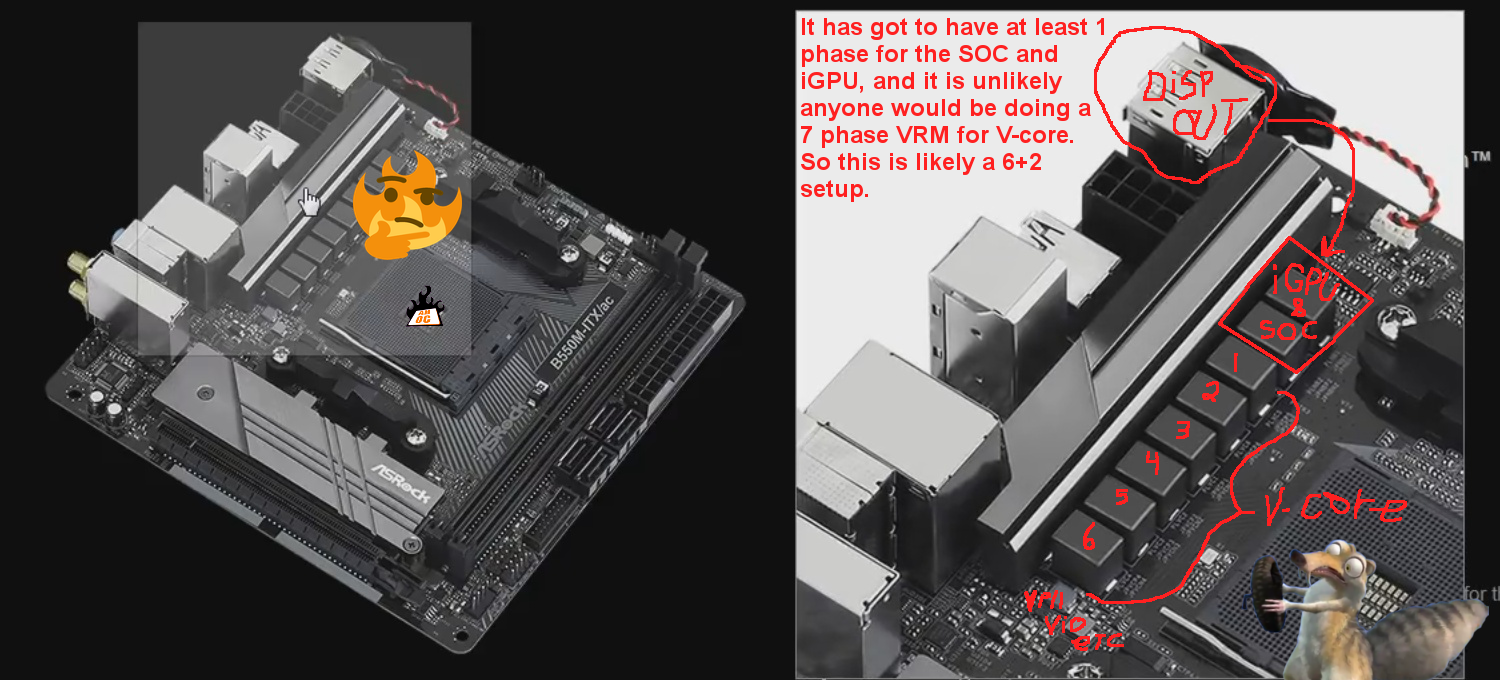
That thing really is a joke, a complete joke (GN B550 motherboard lineup Buildzoid ramble vid). And sadly, proper heatsinks are not on the cheapest boards with the worst FETs that need the cooling, there not even on mid-range boards with almost adequate VRMs. The only boards with proper heatsinks are boards with gluttonous VRMs that are wasting power by having way too many phases. It is kind of pathetic really, it's like there trying to offer a complete lineup of inefficient products from the incapable low end to the power wasting top end. Ye want a heatsink, ye has to pay 500+usd for a board that has a VRM so big it truly doesn't need the heatsink the lower end boards need to not be "almost adequate".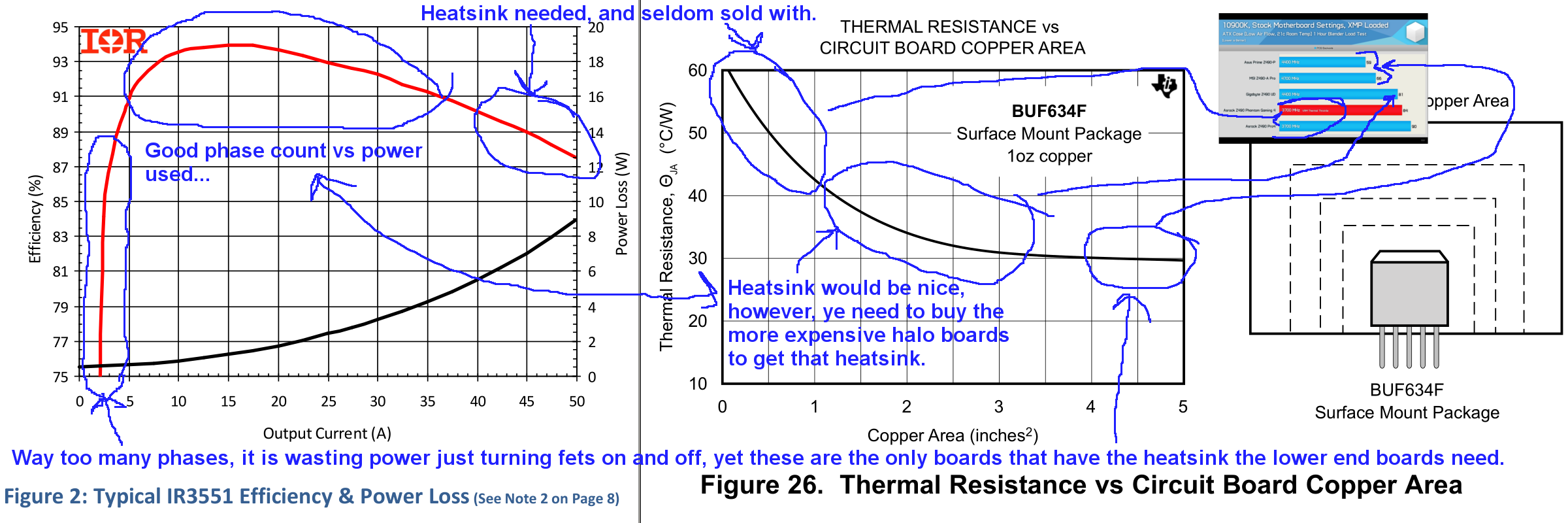
And it's played out in that z490 line-up. it's a bit difficult to see at first, however, the boards that did the worst, are ones with deliberately designed to not-cool blocks, and inadequate firecracker FETs. and B550 and x570 also had similar choices of inadequate VRMs to overpriced watt-hog bling.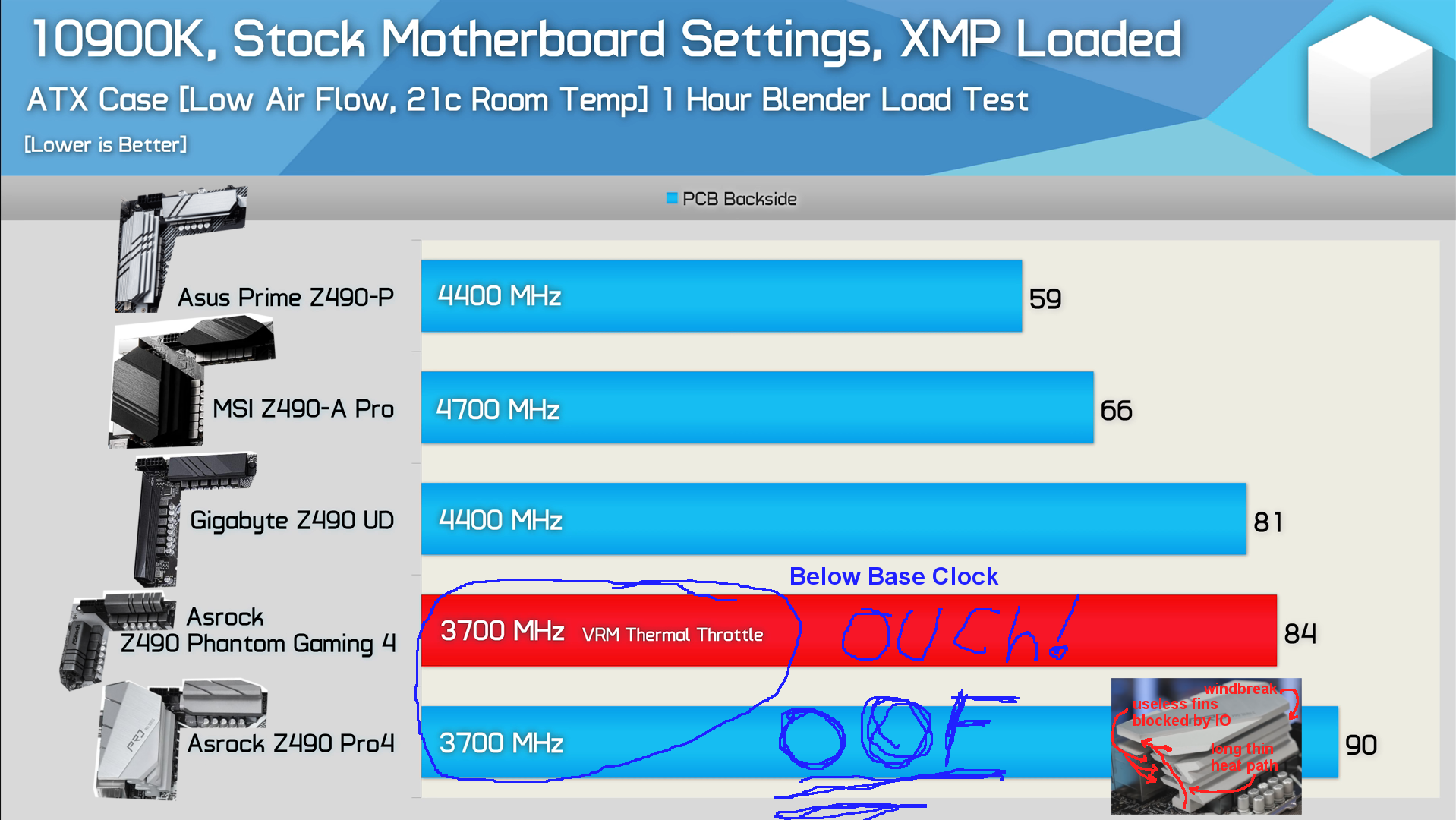
Some are not just "almost adequate", they are completely inadequate to the point they should have used another VRM (HU, z490 Budget Buyers Beware of Lies & Misleading Marketing YT vid). oh, and that was at around 21c (69.8F), not 40c (104F) that a computer case is allowed to get up to according to the ATX spec. Only a note, that things 'can' be far worse in some airflow-challenged computer cases, than what Hardware Unboxed found in their tests.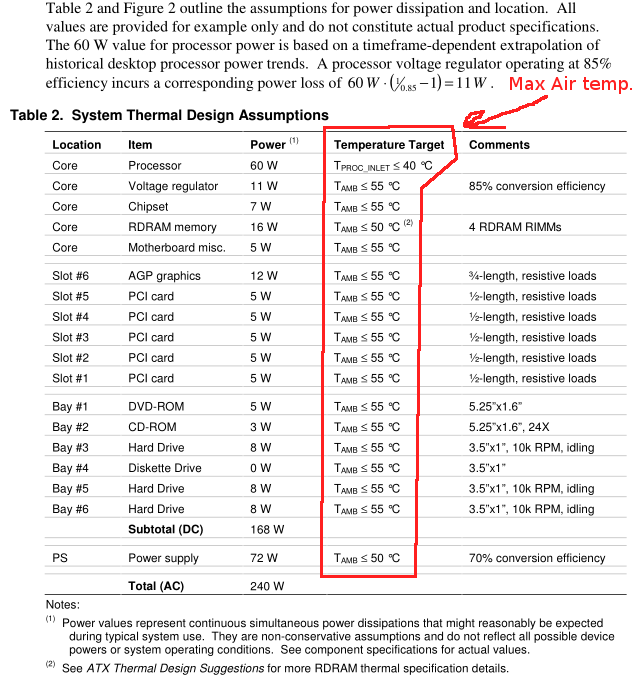
one board maker even found a way to triple the power-wasting by putting 3 fans on an overpriced inefficient VRM, instead of just using a better VRM. (triple-Spleens, from "I Shouldn't Have Cloned My Cat 18 Times") The board is so over priced, that even for a 10400 you should not get (GN vid) at that price, the thing just isn't worth it.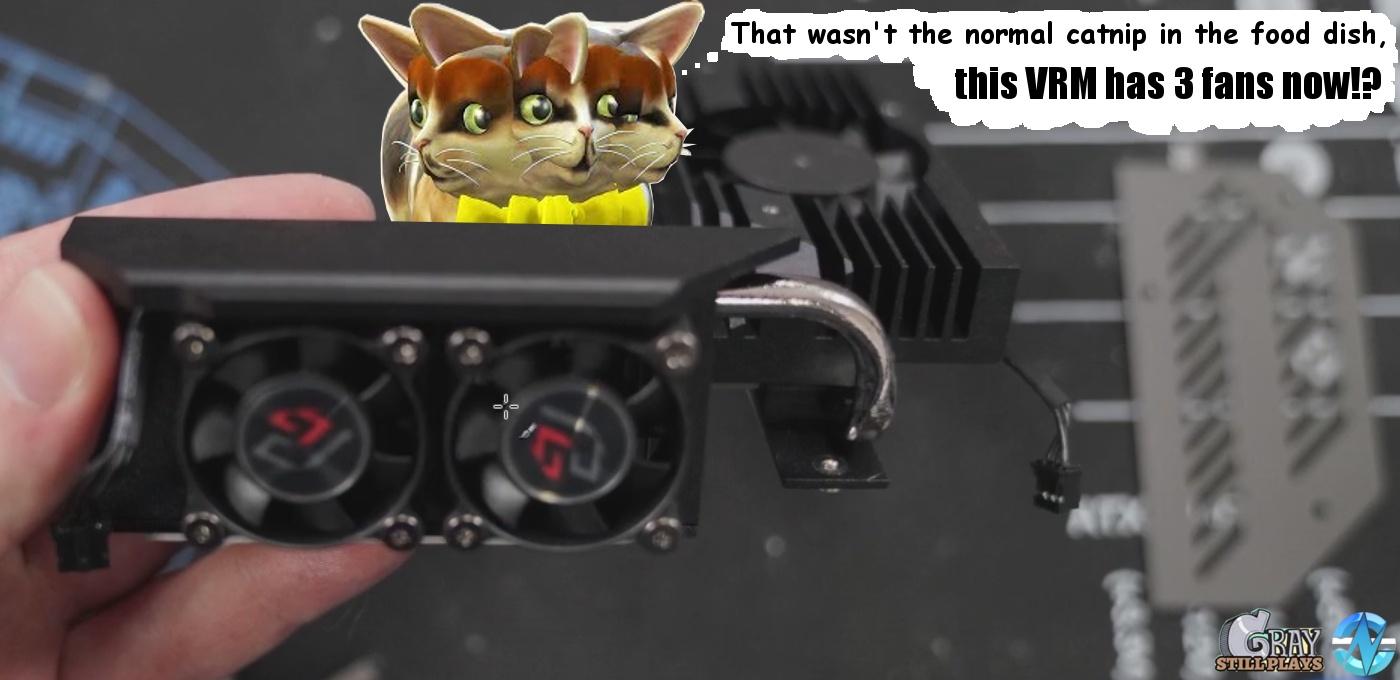
(GN Asrock z490 Velocita YT vid) I agree with buildzoide with that one, if you need to put a fan on your VRM that isn't space-constrained, use a better VRM. if each fan uses 100mA at 12v, that's 1.2 watts per fan, multiply that by a million extra fans for PCs in any area, and ye sees how this adds up fast for power grids, and that is also more heat and noise to deal within the room. Also, It's not like there aren't options for a VRM block that actually has fins that can actually cool the thing. you kind of have to let fresh air get to it, you can't block it with an "air restrictor plate" as BZ calls them. Heatsinks do need to breathe, ye can't suffocate them in RGB heated blankets.
ok, I get it, 'everybody' HATES the 3D examples I came up with. I'm only pointing out that there are options for cooling. adding texture to the extrude molds can also help, calculating 'A' is simple geometry maths, have fun with that. So, it's not just VRM's that have had a decrease of fins over the years. Asetek monopolized the CLC market through litigation, then started making revision updates with ever-smaller micro fin areas, to the point that the gen7 Asetek pump is on the edge of not covering a zen2 CPU dies (especially if the 'round' pump is mounted at a 45), and is far short of direct micro-fin coverage of the Threadripper chiplets.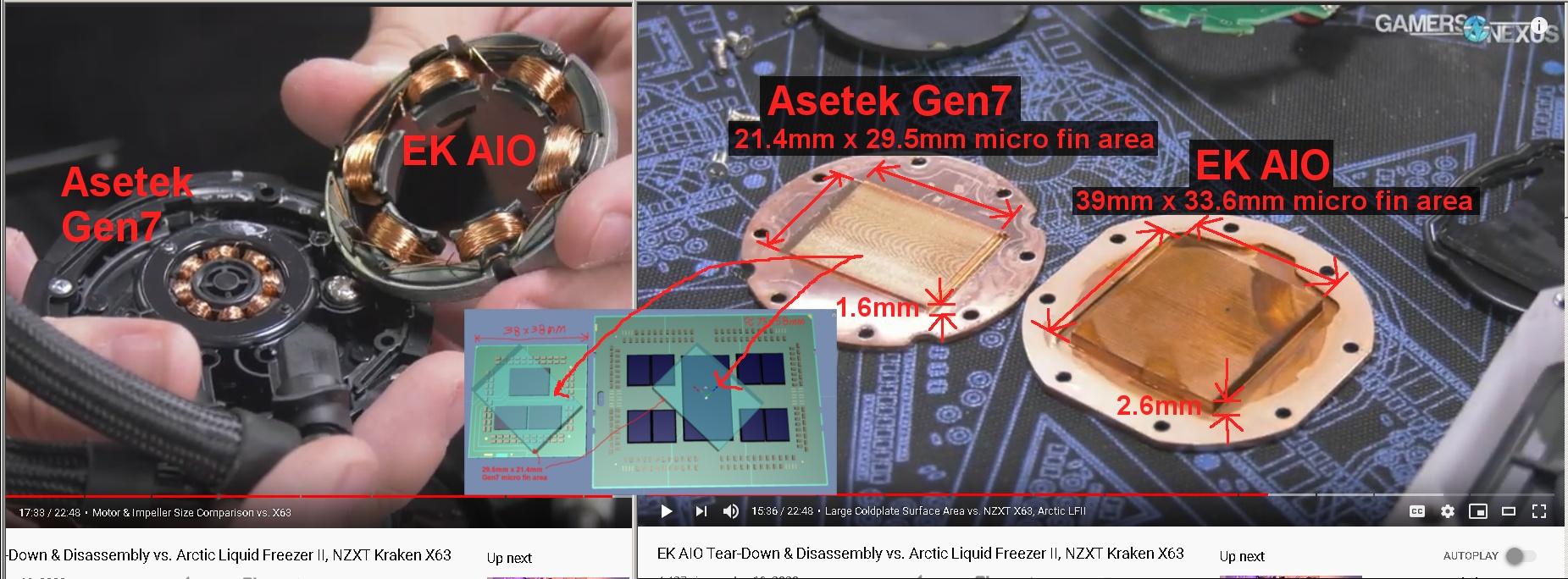
I'm sorry Steve, I respectfully disagree on one point, "stagnation" isn't quite how I would describe how Asetek cold plates have evolved, or shall I say, "de-volved" over time. just because the pump in the gen7 CLC supposedly moves more water, doesn't make a smaller fin area better for anyone other than Asetek's profit margins. The 'stagnation' Steve talked about, is shrinking the fins to match the same performance of the old design with a new faster pump, they could have easily had a better product and Asetek chose not to. Thankfully it looks like EK has an option for zen2 CPUs (GN EK AIO breakdown YT vid), even if I agree with Steve and I don't particularly like the RGB cover thing on the CLC (can I get that in no-RGB all-black?). I do work with 3D art, and the last thing I want in my workspace is a rainbow strobe in an otherwise color-neutral workspace. That's my looks preference more than objective cooling, I do like the rest of the EK cooler, so on with the thermal stuff. The Arctic Liquid Freezer II (another GN vid, that vs EK and others) also looks promising, I just hope that and the EK one doesn't end up with that Enermax Slime issue. as for mobile.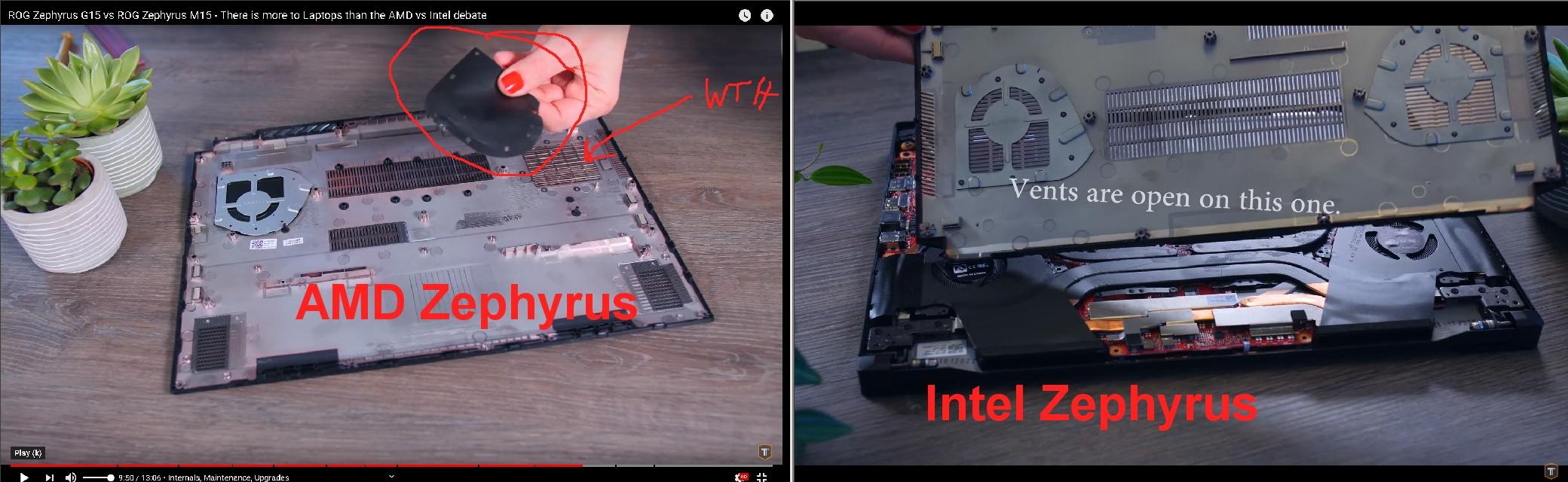
as with the opening linked vid from Hardware Unboxed, I do appreciate Techtesters for not caving to any wishes of ASUS with the test results of laptop manufacturing choices. (their vid is here, time-stamped to that comparison) It was implied that the gimping of the CPU and GPU cooler on the AMD model, was to lower the keyboard and SSD temps. I'm really sure, there are 'ways' (that's plural, as in more than one) to cool such parts without stifling the CPU and GPU cooler in the process.
I think what Tim was dealing with on another laptop (original TUF vid, and later TUF mod tests vid), was the more efficient 7nm process of AMD made the inadequate cooling of the SSD more apparent than on the far more inefficient 14nm Intel versions that run far hotter anyway. And Tim did have a few good points, move the SSD to the other slot, and open up the vents to let fresh air in over the SSD locations. I really don't think that AMD laptop cooler obsolescence was related to what AdoredTV had hinted at possibly happening in an intel "meets Competition" discussion vid some time back. I get that things have happened in the past that were not good (AMD vs intel Adored vid). I think this is just the thermal-incompetence of the individuals making product construction decisions, nothing more than that. I don't even think they are looking at the compound results of the inefficiency of the end result of their product choices. their just looking at how to make it cheaper for more profit to keep the shareholders happy, and some things get forgotten during the bean-counting process. That said, I am not happy with a lot of cooler choices of late. I keep seeing the same mistakes over and over and over again. The case needs to let in air, the coolers need an adequate surface area that air can get to for cooling them, and the VRMs need to be efficient with minimal waste heat production for the intended components there powering.edit 2020 AUG 09. ok, maybe they don't 'all' suck for cooling. I guess there are a few laptop makers trying to do Linus's free walk in the rain advice, "make the best thing you can, for the cheapest price you can". Hardwear Unboxed XMG laptop intel vs AMD prelim look vid.
2nd of nine lives Cat Girrrl render thread prrrHoly Moly! How exciting is this! I have Concord Navy. I am so excited. What tail did you use? a free one or paid. I have Cat Character for Victoria 1 I need to see what that looks like. There is a tail and nails in the pack. Oh my, gosh I learned a lot. Her name is Mia and you helped to bring her about. Well that information will diffidently go on to her page on the freebie wiki. Thank you so much. Little Dragon released several cat figures. Did you help with those too? I am not the greatest modeler but I am not afraid to try and see what I can do. You got any more tid bits on the story behind Mia. Were there other things developed for her? Thank you and really love what you did with Mia.
FYI, the V2 & M2 concord textures were for a garment called "Remapped Bodysuit" it may still be around and I'll see if I can find it". The V3 texture was a 2nd skin and may be convertable to modern figures.
Alembic ExporterFirst, I would like to understand your planned workflow on how Diffeomorphic's material script is applied to Alembic imported objects.If I can duplicate Diffeo's reckoning of materials, no script will be necessary. Since the material slot names will all be the same for both both import methods, simply importing the Diffeo model and then importing the Alembic model will have them all applied correctly to the Alembic model.
Are you making changes to Diffeomorphic scripts so that the material creation scripts can be applied?
This won't be necessary. The only missing piece is how to name the Alembic surfaces after the id of the material on that surface. This information is in the DSON.
Or are you importing a .duf file via Diffemorphic and using your own custom script to copy over materials?
Or something else?
I'm parsing the duf file as well, because Diffeo has access to the unique material IDs it uses to name the materials, but the C++ SDK does not seem to. So I think it'll be easiest to just get them from the DSON as well.
I'm having trouble seeing why not simply infer the material id from material script within blender.
I don't see how the material ID can be inferred. Can you explain what you mean in more detail? I don't rule out my over-looking something.
The .duf files may look small but they are gzipped. So if you extract it, they can be 10x the size.
i.e. a single Victoria 8 with full Samurai outfit is ~9MB in raw DSON file vs 595KB as gzipped .duf file
And for large scenes, I can only imagine how big the raw DSON file will be. (100MB? possible)
I can see DSON parsing within Alembic exporter definitely slowing down the export speed noticeably
I think you are basing your estimate on python or javascript? JsonCpp parses my 28MB unzipped test file in 1.056 seconds.
Let me know.
Daz 3D is part of

Connect
DAZ Productions, Inc.
7533 S Center View Ct #4664
West Jordan, UT 84084Licensing Agreement | Terms of Service | Privacy Policy | EULA
© 2026 Daz Productions Inc. All Rights Reserved.