-
puppy dog for daz?
---
editl: aH WAIT WAIT I think I found a wolf! Can those items be mixed with the puppy morph? So like I buy the dog, buy the puppy morph and then the wolf and I can get a wolf cub?
puppy dog for daz?The Hivewire Big Dog at Renderosity has a nice puppy morph and various coat colors.
puppy dog for daz?Yeah, the Milenium animals are all pretty old. Roughtly around 2004, although the pup was a bit later.
The Hivewire animals are weightmapped figures and all come in Poser and Studio versions. There is a seperate puppy morph for their dog. Sparky, over on Philosopher's Egg has close to a dozen 3rd-party species and breed morphs for it. As well as a newborn puppy.
Most of the Hivewire lable products can be found over on Rendo.
"Mature Content" images blurredhttps://www.daz3d.com/fk-chrysalis-wings-for-genesis-9-8-and-81-females Shows up as mature from the sales page, but when you open it none of the images are flagged as mature. I didn't see anything in the description text that seems to be mature, unless the word "chest" is considered mature (for a wing morph). That's just a body part and should not be mature. I think the filters need a bit of tweaking.
Eyes popping out (Morph Loader Pro) (Solved)Edit>Figure>Rigging>Adjust rigging to Shape. You can then test it, assuming ti works you then use ERC Freeze to link the adjustments to the morph - right-click in the Parameters pane and check Edit Mode (if it isn't already), reset the pose, right-click on the slider for your morph and select ERC Freeze - look through the list of sub-components to make sure there are no interlopers, uncheck them if there are (you mainly should see joint centre adjustments), click Accept and test again to make sure everything worked, and that the figure goes back to normal when you zero your morph.
Transfer Utility problemWhat I meant is that I followed two tutorials. Both ended by me using the Transfer utility to make the shirts adhere to the figure.
The first one worked perfectly but the second one’s shirt ballooned up when I used the transfer tool.
I guess I will have to chalk this up as a learning experience. From now on I will periodically send the cloths that I make to DAZ and make sure that the transfer utility is working OK before continuing - I spent a lot of time on that second shirt getting it just right - what a waste of time since I can’t use it now. Oh well.
Richard - thanks for trying to help.
Star Trek Builders Unite 8: THE REBOOTI kind of like the new items. I'm just curious on the texture product why there's all the races except for the "alien warrior"? We have the morph but no texture to go with it. Or maybe it's there and they didn't include a promo for it. If it is that would entice me to buy it.
Eyes popping out (Morph Loader Pro) (Solved)After importing the morph with MLP, make sure you firstly do Adjust Rigging to Shape and ERC Freeze on the morph property before giving any expression to the figure.
Eyes popping out (Morph Loader Pro) (Solved)I created a G8F character by using Morph Loader Pro which i created it in blender. When I try to get her to look away the eyes popping out. I added a picture below showing the problem. How can i solve the problem any idea?
Ron's Birds Brushes possible to use on Gimp?- (solved:yes)I noticed Ron's birds brushes today in the sale and was wondering if I could transfer them to gimp. it says Photoshop CS and Up Only, I honestly have no clue if that is already and old PS version, that the transfer should work
Anyway here is the link
https://www.daz3d.com/rons-birds
thanks for input
Star Wars Renders 2013 +Phloki3D said:
Had a crack at making live-action Sabine. Custom morph and textures by me with a kitbashed outfit:
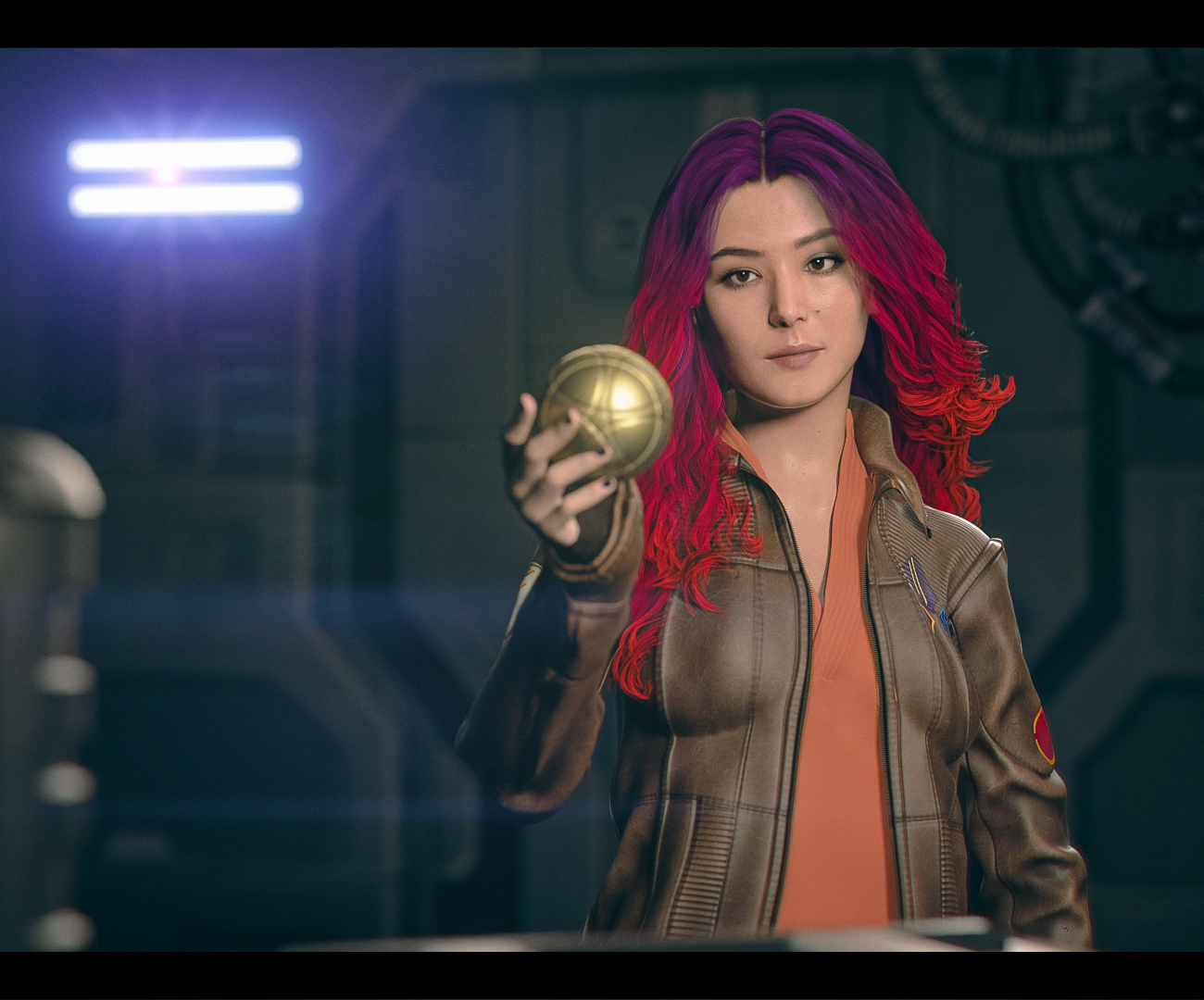
That looks really good
and my first thought when I saw this was "she's holding an apple of eden?" then I rememberd the episode
Body morph looks great but messes up the breast
No I'm sorry, I'm new to Daz so I may not understand all the terminology- I bought some characters and they each have a slider called "body," which chnages their entire body (excluding the head), I took two bodies and morphed them together to get proportions I liked but combining them messed up the breasts.Richard Haseltine said:What do you mean by blended? If you exported them as OBJ and then loaded that as a single new morph then you will have broken the links to any joint adjustments or corrective morphs that were making the morphs used play nicely with posing and other (suported) shapes, which may well be some or all of the problem you are seeing.
Body morph looks great but messes up the breastWhat do you mean by blended? If you exported them as OBJ and then loaded that as a single new morph then you will have broken the links to any joint adjustments or corrective morphs that were making the morphs used play nicely with posing and other (suported) shapes, which may well be some or all of the problem you are seeing.
Body morph looks great but messes up the breastI have a G9F character nearly done but one problem remains that I can't seem to fix with any morph pack I throw at it. I blended multiple bodies together to get a base shape that I liked, but it did something weird to the breasts where they are now a weird shape. The breast itself is warped a little which i CAN fix with the morphs, but the nipples aren't circular anymore and when i try to extend the nipples with any morph they get sharp. I found Shape Splitter on Daz store but it doesnt look like it supports gen9. Is there any other way I omit the breasts from the body morph that's messing it up?
G8 male to female morphs and vice versa?There is a thread "somewhere" in these forums showing how to transfer morphs between M/F G8.
eta; https://www.daz3d.com/forums/discussion/520226/transferring-morphs-from-g8f-to-g8m
AOBB's head morph Luc G9(M). No material nor textures. Commercial use allowed.I couldn't upload any images nor the file itself, so I am posting a google drive link to the zip file with the head morph. The zip includes images of the morph from three sides, so for now you can download the zip file and check those out before installing. I will try to upload the images to this post later.
https://drive.google.com/file/d/1UD1WFOwQxsLoksAoNEDoylpoTfjk2mzm/view?usp=sharing
Assets used in promos:
Bold Brows II for G8M (Brow 3)
dForce Redz Kaz Hair for G9
Gentleman Style Outfit for G9
Enjoy!
AOBB
Edit ; I could finally upload the images! Hurray!
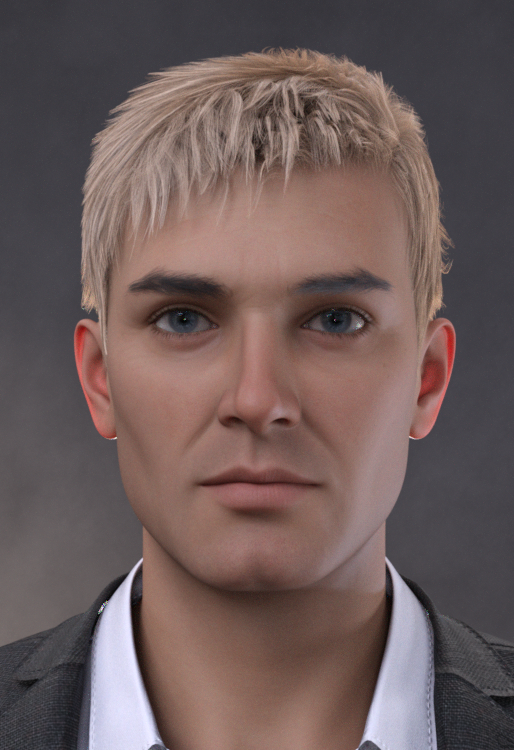
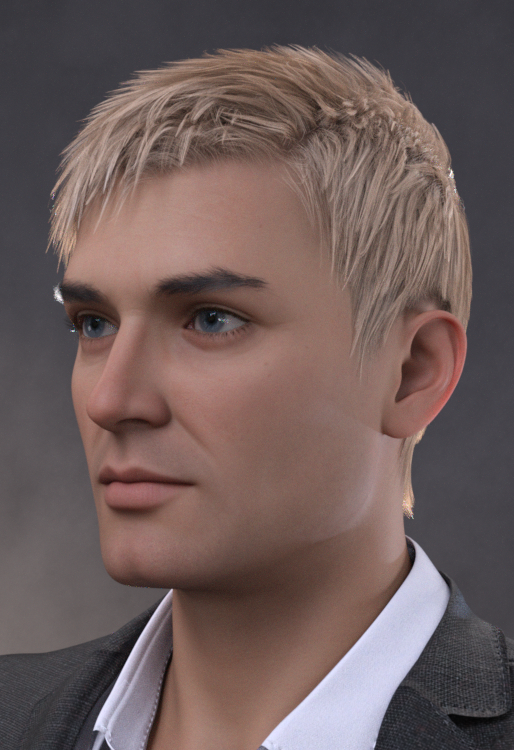
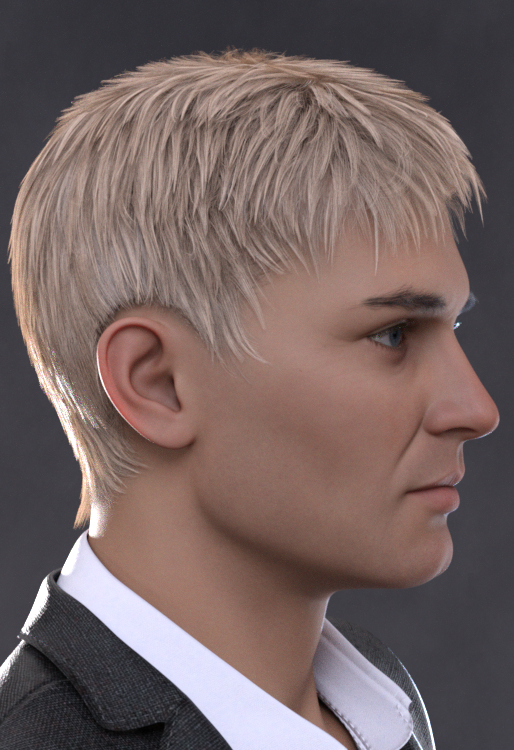 Transfer Utility problem
Ideally clothing should be modelled aroound the base shape, with a morph or morphs added for the target shape, but you can set the Source Shape to whatever morph is used (or Current for multiple morphs) and enable reverse Source Shape from Target in the options to get a reasonable result (though the greater the difference from the base shape the more it may struggle).
G8 male to female morphs and vice versa?It can be converted. There are different ways to do that, however you might not like the results depending on exactly what you want to do. Some cartoonish shapes may not convert well, and require additional work to manually tweak them in an external modeler like Blender.
There are clone morphs for Genesis 2, 3, and 8 males in the parameters for G8F. It may be hidden, if it is, make sure "show hidden properties" is checked. They are full body shapes, though. But that might be all you need for what you want.
The easiest thing might be finding a morph pack that has some male shapes for G8F. They do exist, and that would avoid needing to convert anything. There is a transgender morph pack that has some.
https://www.daz3d.com/transgender-shapes-for-genesis-8
Another option would be the male/female UV swap product, which would allow you to use a male skin on G8F, or female skin on G8M. So you could tackle this in a totally different way, using Sakura skin on a G8 male and using the male morphs to get what you want. There are feminine shapes for males, too. So you can do this from either direction.
https://www.daz3d.com/genesis-8-uv-swap-male-and-female-base
Transfer Utility problemI forgot to add - Previously I was able to successfully use Transfer Utility to do this (create a different shirt) with a Genesis 8M. So I think I have the steps down correctly. This is why I am perplexed.
Transfer Utility problemI am following a tutorial on how to make a shirt. I used GoZ to send my Ogre HD from DAZ to ZBrush. I then made a shirt by masking off the shirt location on his body and then converted the mask into polygroups, etc.
After doing some detailing on the shirt, I decided to test it on the Ogre in DAZ (using GoZ). At first it look OK though for some reason there were a few poke-throughs on his upper back (which were not there in ZBrush). But when I did the Transfer Utility on the shirt - it blew up. No matter what I did, it blew up.
I don’t know why but the forum won’t upload my picts. So let me describe the blowup. It is like the Ogre jumped from some place high and the air was caught in the shirt ballooning it up over his head and out from his body. The Ogre’s arms dropped below the arm holes and created two new holes.
What am I doing wrong?
Daz 3D is part of

Connect
DAZ Productions, Inc.
7533 S Center View Ct #4664
West Jordan, UT 84084Licensing Agreement | Terms of Service | Privacy Policy | EULA
© 2026 Daz Productions Inc. All Rights Reserved.