-
Commissioning a Head Morph
You should sumbit a request to 3D Universe for such a service if he still does commissions.
You might try if he doesn't or you can't afford it the following:
1) multiple images to create an LoRA so you can create a good AI generated reference image of the subject from all angles
2) feed those images to Face Transfer 2 in DAZ Studio or FaceGen Pro to create the morph for Genesis 9.
Or if that's not a good enough likeness, there are AI generated meshes now from reference images so conceivably you can do one of the head-body and then shrink wrap the exported DAZ Genesis 9 mesh to AI generate mesh shop. I think you still have to do so manyy adjustments of the weighmaps and such afterwards though.
Released: Auto Rigging Pipeline [Commercial]Artini said:
umblefugly said:
rhye_7b205b2b74 said:
So can you rig a character created in Meshy and turn it into G9 figure? or is it just clothing made in blender etc
If you can get the mesh into DAZ Studio (Currently the script only imports obj) even though the script only imports obj, if it is imported say via fbx for example, you can just skip the import step in the script, go to step 2 and hit refresh list if the items dont show up.Refresh List and it will add those items to the list, then you can continue to selecting a template to use for rigging apply options etc.
So it is possible to convert a character into G9 figure?
In one of your previous post you said it is impossible. I am a bit confused.
I do not need to transfer any more cloth items,
but having possibility to transfer characters from the other programs is very interesting for me.This script is for rigging clothing items. Hope that helps.
Released: Auto Rigging Pipeline [Commercial]umblefugly said:
rhye_7b205b2b74 said:
So can you rig a character created in Meshy and turn it into G9 figure? or is it just clothing made in blender etc
If you can get the mesh into DAZ Studio (Currently the script only imports obj) even though the script only imports obj, if it is imported say via fbx for example, you can just skip the import step in the script, go to step 2 and hit refresh list if the items dont show up.Refresh List and it will add those items to the list, then you can continue to selecting a template to use for rigging apply options etc.
So it is possible to convert a character into G9 figure?
In one of your previous post you said it is impossible. I am a bit confused.
I do not need to transfer any more cloth items,
but having possibility to transfer characters from the other programs is very interesting for me.Make this character a reality... meaning on the store!Looks sort of like a mix of George for Genesis 8 Male | Daz 3D and The Brute 8 | Daz 3D inn Genesis 8 but I think it's actually a Genesis 9 base character with the fat morph applied from the Genesis 9 Morphs Essentials product.
Released: Auto Rigging Pipeline [Commercial]Masterstroke said:
Sorry, I don't really understand, what it does better, than the Transfer Utility, that I've been using before for rigging any *.obj to fit a figure.
(I'd be totally hyped, if it automatically added rigs for tails, second pair of arms, ties or anything that is not included in the standard human rig.)Those types of rigs are out of scope for the current iteration of this script, I agree it would be cool.
What actually IS new in DAZ Studio 6?soandso said:
I use Mesh Grabber quite a bit so 6 is a no go for me
Use Mesh Grabber in DS 4, bake to morph (or raw geometry) and open in DS 6 if you need/want. For Premier members, Geometry Sculptor will lod mesh Grabber modifiers as is.
Editing DAZ environments in Blender and exporting them back to DAZPadone said:
Diffeomorphic does provide some tools to export morphs and animations back to daz, but what you're aiming for is beyond these features. Destroying something means to modify the geometry, that will not be possible to import back as a morph.
I don't want to export is back as a morph. It can be static edited mesh, that isn't a problem. What I meant is does Diffeomorphic will allow me to export environment with all of its textures and materials untouched? I want to avoid situation when after export to Blender or import back to DAZ all meshes will be grey and textureless or something.
AIUTO...CHI CONOSCE L’ITALIANO? PARTE QUATTORDICIRuthven said:
Ti confermo che purtroppo è mancato diversi anni fa; i suoi prodotti, comunque, sono ancora sullo store.
Ah, accipicchia... Speravo in una versione per DAZ Studio 6 del suo Batch Renderer, visto che molto probabilmente sarò costretto a lasciare 4.24.
E anche un update di GenX per portare i mieo morph di G1 a G9.
Released: Auto Rigging Pipeline [Commercial]Masterstroke said:
Sorry, I don't really understand, what it does better, than the Transfer Utility, that I've been using before for rigging any *.obj to fit a figure.
(I'd be totally hyped, if it automatically added rigs for tails, second pair of arms, ties or anything that is not included in the standard human rig.)From what I understand reading the product page it uses Transfer utility, it doesn't replace it. But it integrates it in a multi steps process and sets some settings automatically. It also allows you to rig a bunch of objects as a batch.
Released: Auto Rigging Pipeline [Commercial]Sorry, I don't really understand, what it does better, than the Transfer Utility, that I've been using before for rigging any *.obj to fit a figure.
(I'd be totally hyped, if it automatically added rigs for tails, second pair of arms, ties or anything that is not included in the standard human rig.)Daz Studio 6.25[.0.x], General Release!So far, I have not "lost" any of my workflow. I Google searched how to transfer my setup from 4.24 to 6. Basically it requires copying files from the APPDATA folder for Studio4 to Studio6. All of my scripts, bookmarks and layouts transfered with zero issues. I could not stand the new layout and font and color scheme and none of the default styles seemed to fit what I had before without adding or removing tabs and going through a ton of setup to make things look as I wanted. Sooo glad that visually I was able to make it identical with a simple drag and drop of some files.
As for whether or not all the scripts I use will work is yet to be seen but they are still in my cutom actions (I did have to reactive many in "About Installed Plugins"). I definitely cannot live without my Bookmark script as so many of the "ported" items from other stores from a few years back still lack any Smart Content and they would just end up lost in a sea of endless quantity. I can confirm that scenes not only load faster but the program itself shuts down much faster than 4.24. One of my biggest gripes with Daz is that a scene with a few models can take 15 minutes to clear from memory (DDR5 and a decent MOBO!) and that is extra annoying when you just want to shut down your computer and call it a day.
Iray Preview is leaps and bounds faster for me now than previous. I have a Nvidia 3060TI (because VRAM matters more than power) and it seems to work much smoother in the current build.
This is all first glance impressions but so far, this version just seems to be a minor upgrade and people should definitely give it a try. None of this means I will indefinitely stick with it but until I find something that has been lost that I cannot live without, I think this is a step up for me (I mean, after wasting an hour transfering my workspace over and making it function exactly as before).
Editing DAZ environments in Blender and exporting them back to DAZDiffeomorphic does provide some tools to export morphs and animations back to daz, but what you're aiming for is beyond these features. Destroying something means to modify the geometry, that will not be possible to import back as a morph.
Try I for freeChoppski said:
It would be nice, however, if they indicated what tools you get with premier.
I thought there was a comparison table somewhere but I can't find it right now...
Here are the premier plugins I know of:
- Render Queue
- Shape Transfer
- Pose Convertor
- Geometry Sculptor
- dForce Manager
- Auto Save
Daz Studio 6.25[.0.x], General Release!Masterstroke said:
richardandtracy said:
Elor said:
richardandtracy said:
So, no manual install for offline machines?
You should be able to install DIM on an offline machine, and use it in offline mode to install files you moved from an online computer to the DIM Download folder on your offline machine, and DIM should install them.
It's how I'm using DIM on my rendering computer (it doesn't have my Daz credential saved), the main difference between your situation is that rendering computer is actually online but instead of downloading each files two times, I have synchronised DIM Download folder on my Mac with DIM Download folder on my PC, and so far, so good.
How do I get the files onto a machine so I can transfer them to an offline machine when there is no page for DS6 like the DS4 download page below?
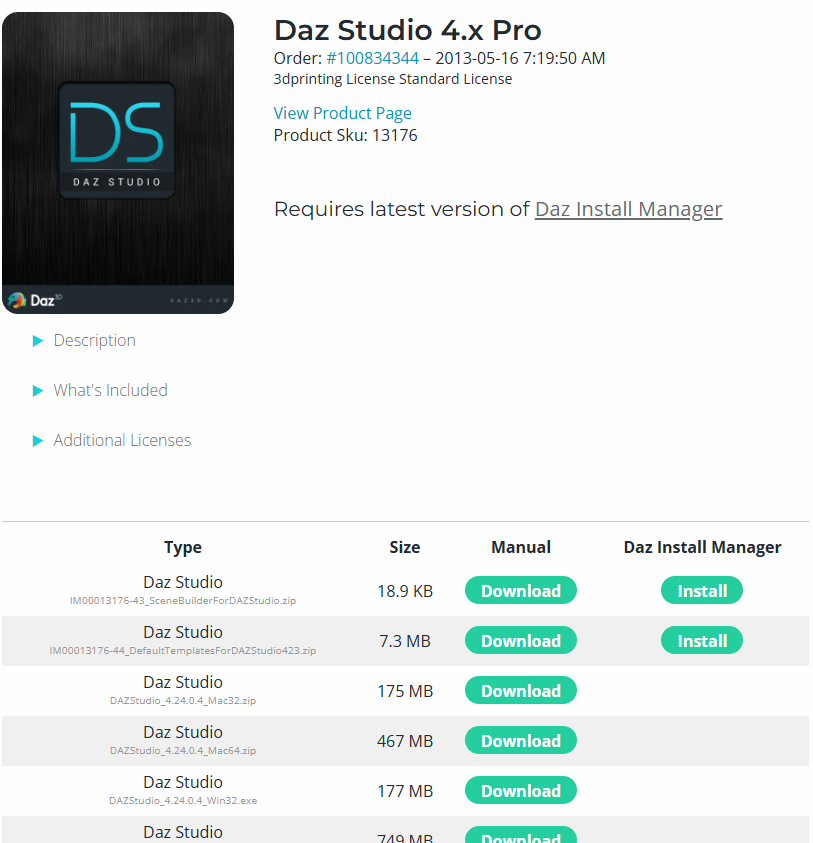
My only machine I can download any files on to is an Android tablet, and DIM does not work on Android. I have no PC connected to the internet at home, and I have never had a Mac.
Regards,
Richard
I don't really understand.
Do you want DS 4.24 offline on your PC or DS 6.25?
The screenshot shows 4.24
You download the files on a internet connected PC, copy them to a mobile hard drive, connect that hard drive to your offline computer and run the install exe.
I see, Android tablet.
Should still work to download them either to your tablet and copy those files to a mobile harddrive or download those files directly to your hard drive.I agree, it shows DS4, that's because I can't get an equivalent for DS6. It's a bit difficult to show it when I can't get it. I also mentioned I don't have an internet connected PC. And because there is no manual download I can't get the files onto a tablet. If you can show the steps, please do so.
Regards,
Richard
Daz Studio 6.25[.0.x], General Release!Masterstroke said:
richardandtracy said:
Elor said:
richardandtracy said:
So, no manual install for offline machines?
You should be able to install DIM on an offline machine, and use it in offline mode to install files you moved from an online computer to the DIM Download folder on your offline machine, and DIM should install them.
It's how I'm using DIM on my rendering computer (it doesn't have my Daz credential saved), the main difference between your situation is that rendering computer is actually online but instead of downloading each files two times, I have synchronised DIM Download folder on my Mac with DIM Download folder on my PC, and so far, so good.
How do I get the files onto a machine so I can transfer them to an offline machine when there is no page for DS6 like the DS4 download page below?
My only machine I can download any files on to is an Android tablet, and DIM does not work on Android. I have no PC connected to the internet at home, and I have never had a Mac.
Regards,
Richard
I don't really understand.
Do you want DS 4.24 offline on your PC or DS 6.25?
The screenshot shows 4.24
You download the files on a internet connected PC, copy them to a mobile hard drive, connect that hard drive to your offline computer and run the install exe.
I see, Android tablet.
Should still work to download them either to your tablet and copy those files to a mobile harddrive or download those files directly to your hard drive.They want DS6. But unlike DS4 which does have a download section (as shown on the screenshot), there is currently none on the product library page for DS6, you can only get the files through DIM.
Daz Studio 6.25[.0.x], General Release!richardandtracy said:
Elor said:
richardandtracy said:
So, no manual install for offline machines?
You should be able to install DIM on an offline machine, and use it in offline mode to install files you moved from an online computer to the DIM Download folder on your offline machine, and DIM should install them.
It's how I'm using DIM on my rendering computer (it doesn't have my Daz credential saved), the main difference between your situation is that rendering computer is actually online but instead of downloading each files two times, I have synchronised DIM Download folder on my Mac with DIM Download folder on my PC, and so far, so good.
How do I get the files onto a machine so I can transfer them to an offline machine when there is no page for DS6 like the DS4 download page below?
My only machine I can download any files on to is an Android tablet, and DIM does not work on Android. I have no PC connected to the internet at home, and I have never had a Mac.
Regards,
Richard
I don't really understand.
Do you want DS 4.24 offline on your PC or DS 6.25?
The screenshot shows 4.24
You download the files on a internet connected PC, copy them to a mobile hard drive, connect that hard drive to your offline computer and run the install exe.
I see, Android tablet.
Should still work to download them either to your tablet and copy those files to a mobile harddrive or download those files directly to your hard drive.Daz Studio 6.25[.0.x], General Release!Elor said:
richardandtracy said:
So, no manual install for offline machines?
You should be able to install DIM on an offline machine, and use it in offline mode to install files you moved from an online computer to the DIM Download folder on your offline machine, and DIM should install them.
It's how I'm using DIM on my rendering computer (it doesn't have my Daz credential saved), the main difference between your situation is that rendering computer is actually online but instead of downloading each files two times, I have synchronised DIM Download folder on my Mac with DIM Download folder on my PC, and so far, so good.
How do I get the files onto a machine so I can transfer them to an offline machine when there is no page for DS6 like the DS4 download page below?
My only machine I can download any files on to is an Android tablet, and DIM does not work on Android. I have no PC connected to the internet at home, and I have never had a Mac.
Regards,
Richard
What actually IS new in DAZ Studio 6?gederix said:
DS6 can't find certain morph files for one of my custom figures so it loads looking like the base g8.1 figure (its a g3 character converted to g8.1, another figure done exactly the same way loads no problem so???), I checked the folders its looking for and they do not exist, however the scene still loads fine in 4.x; I havent checked the morph locations there yet since I dont get the load error. I tried clearing the dson cache as suggested by the internets but no effect.
How are your content directories setup? DS6 is a separate install with its own settings, so if you had custom directories in DS4 you might need to set DS6 preferences so it can find your content.
What actually IS new in DAZ Studio 6?DS6 can't find certain morph files for one of my custom figures so it loads looking like the base g8.1 figure (its a g3 character converted to g8.1, another figure done exactly the same way loads no problem so???), I checked the folders its looking for and they do not exist, however the scene still loads fine in 4.x; I havent checked the morph locations there yet since I dont get the load error. I tried clearing the dson cache as suggested by the internets but no effect.
There's Always Another Sale Thread -- Discussions Only Pt 6My only 'online' machine at home is an Android tablet, which doesn't seem to like DIM for some reason. It's sufficient to download most manual download stuff and then I can transfer the stuff from there.
At work where I can go online with a PC, - I can't install anything. Not unreasonably.
Regards,
Richard
Daz 3D is part of

Connect
DAZ Productions, Inc.
7533 S Center View Ct #4664
West Jordan, UT 84084Licensing Agreement | Terms of Service | Privacy Policy | EULA
© 2026 Daz Productions Inc. All Rights Reserved.