-
Postgre, CMS, SSD & Mac
Totte said:
Loser said:
I'm at my complete wits end, I'm so frustrated. I reinstalled all my content onto a new Mac but now I have the gd'd postgre, cms location issues with trying to transfer everything to an SSD since the space is a joke on this laptop. I'm honestly at a loss, everything I've looked up and tried is a complete failure. Please help me. Let's dumb it down and keep it basic because computer literate I am not. I need basic bish set up instructions. I'll uninstall the whole gd thing and all the content if I have to.
Please just help me.
My setup on my main mac, a macStudio is:
- Applications in default location
- All Content Libraries (I have several, one main from DAZ, and one third party, one for freebees, and a bunch of my own special), all located on two external SSD drives via USB-C/Thunderbolt 3
My secondary machine (macPro2014):
- Applications in default location
- All Content Libraries located on one external Thunderbolt drive
My old machines (macPros 2012):
- Applications in default location
- All Content Libraries located on internal drives.
You can do this two ways:
(1) On Fresh Install via DIM, create a directory and tell DIM that that is the installation content dir, and delete the old one and remove it from DIM
(2) Copy the old content library, then reset the CMS and reimport metadataHope this helps
Few questions:
Does the order of install make any difference?
Should I install Daz & DIM & Postgre-whatever directly onto the Mac and put the content onto my external(s)?
Default install for DIM is directly onto the "Application" folder (as you know). This also separates the "App Support folders" into
Mac HD > Users > Name > Library *Hidden Folder* > Application Support > DAZ 3D
which contains the DIM install files.In DIM: Changing the directory
That's going to the gear in the top right, advanced settings, right?
Is there any special thing I need to do in the Daz software under 'Prefrences'?I'm going to try and reinstall this whole nightmare once I get some clarification so I can't mess things up for the 7th time.
I am so tired -_-Blender 3.4 Import/Export OBJ settingsfelis said:
I am using the new blender obj im/exporter, and that is working fine.
In and out of blender I use scale 1, so it is consistent.
Out of DS I export at 1% like @Marble, but my import is 10000%, so locally DS is also consistent (so if I export and reimport the same obj, it will be unchanged).
So your Blender export scale is 10,000% ?? Wow... I didn't expect that. I'll try that later but what I don't get is the fact Morph Loader Pro imports without error but instead of the morph being applied, all that happens is the scale is changed by the morph slider. I don't see any sign that the actual morph shape is being applied as well.
content confusionUninstall it, using the emthod you used to install. If it was manual then you will need to find and remove the files, and clear any metadata assigned or imported for the item.
Blender 3.4 Import/Export OBJ settingsI am using the new blender obj im/exporter, and that is working fine.
In and out of blender I use scale 1, so it is consistent.
Out of DS I export at 1% like @Marble, but my import is 10000%, so locally DS is also consistent (so if I export and reimport the same obj, it will be unchanged).
Blender 3.4 Import/Export OBJ settingsI did say leaving everything default scale (100% or 1.0 scale) works as tested with 3.3.
Given that this also worked with legacy blender importer exporter, I'm assuming rescaling on import export should work the same too.
Postgre, CMS, SSD & MacLoser said:
I'm at my complete wits end, I'm so frustrated. I reinstalled all my content onto a new Mac but now I have the gd'd postgre, cms location issues with trying to transfer everything to an SSD since the space is a joke on this laptop. I'm honestly at a loss, everything I've looked up and tried is a complete failure. Please help me. Let's dumb it down and keep it basic because computer literate I am not. I need basic bish set up instructions. I'll uninstall the whole gd thing and all the content if I have to.
Please just help me.
My setup on my main mac, a macStudio is:
- Applications in default location
- All Content Libraries (I have several, one main from DAZ, and one third party, one for freebees, and a bunch of my own special), all located on two external SSD drives via USB-C/Thunderbolt 3
My secondary machine (macPro2014):
- Applications in default location
- All Content Libraries located on one external Thunderbolt drive
My old machines (macPros 2012):
- Applications in default location
- All Content Libraries located on internal drives.
You can do this two ways:
(1) On Fresh Install via DIM, create a directory and tell DIM that that is the installation content dir, and delete the old one and remove it from DIM
(2) Copy the old content library, then reset the CMS and reimport metadataHope this helps
Blender 3.4 Import/Export OBJ settingsfelis said:
The attached images are what is working.
But what settings do you use that is not working?
Well, I left the DAZ side the same and the new Blender OBJ import at default other than trying different scaling. As I said above, I also tried it with Vertex Group checked and un-checked. I'm assuming that nobody has it working yet otherwise I would have hoped someone would post their settings as I asked in my OP.
Smart Content Library is empty. HelpTo explain a little further, PostreSQL is basically a database server but 99% of users don't really need to know the details of that. You can probably just use "PostgreSQL" or "CMS" interchangably and when everything is installed fine either DIM or DazStudio will fire it up in the background (so you don't have to worry about launching it yourself).
However, what you do need to know is that PostgreSQL/CMS handles all your "Smart Content"/Categories and uses a separate place to store it's data - this data is probably not something that you have backed up. This is the reason why when you re-installed and hooked up your base directories again the Smart Content was empty - that is to be expected and not something that has "gone wrong" at all.
The above comment mentioning to "Reimport metadata" is the correct way to resolve this and this will put all your Smart Content back to "factory defaults" i.e. Categoried as the PA or Daz has set it. It does this by going through all dsx files contained in the Runtime/Support folders for all linked base directories and recreates the data within the CMS.
If you do make manual changes to the SmartContent/Categories and want to make sure they would be re-applied if you ever need to re-install again then you can select "Export Metadata" from the same "Content DB Maintenance" menu. This will simply export all your changes from the CMS and creates a custom UserData1.dsx file within the Runtime/Support folder of your primary base directory. This means that if you ever have to "Reimport metadata" again then your changes are re-imported also.
Smart Content Library is empty. HelpHave are you installating?
And have you tried for Smart Content to click the '"burger menu" (3 horisontal bars) > Content DB Maintenance > Reimport metadata?
DIM suddenly hates content not on C: driveIs the DIM config file being saved properly? (%APPDATA%\DAZ 3D\InstallManager\UserAccounts\[yourUsername.ini]). It should have an entry (or several) in a section called [InstallPaths] with your choice of path(s).
It sounds like the Not-C-Drive can't read/write data. Where is the CMS data cluster? By default it is in the AppData\Roaming\DAZ 3D\cms folder. If you deleted the entire DAZ3D folder under Roaming, you nuked your database. You can re-build it by re-importing your metadata (product and user) in Studio.
Blender 3.4 Import/Export OBJ settingslilweep said:
Vertex Order when importing into Blender was important in the legacy Blender (pre 3.2 days). There is a button on import to click Keep Vertex Groups (but that's not the same as Vert Order). It seems like the new blender obj import and export has the default setting to maintain vert order, so we dont have to worry about constantly clicking that 'Keep Vert Order' button.
Anyway, using the new Blender obj importer (from 3.2 onwards) you can still just export from Daz at default 100% scale, import to Blender using default settings (i.e., scale 1.0), export from Blender using default settings (scale 1.0), then bring back to Daz using default 100% import scale and it will be the right size. You can test this as I dont know about Blender 3.4, as I only have 3.3 installed, and it the scale still works properly.
It would be interesting to know what scale you are exporting from Daz at, importing to Blender at, and exporting from Blender at? If you're not rescaling again within Blender itself, then you can just work out what scale adjustment you need to make from those values.
Side note: Make sure you expand the 'Show Individual Settings' for morph loader pro to see if youre not applying some weird rescale on Moprh Loader Pro.
I'l try to attach screen shots of my (pre-3.2 AKA "Legacy") settings which work for me (but not with the new OBJ Blender import/export). I also check "Apply Modifiers" when I create the morphs using Shape Keys.
Otherwise, yes, I always look at the full settings for Morph Loader Pro as I am in the habit of setting Reverse Deformations to "Yes" for evey import.
Blender 3.4 Import/Export OBJ settingsmarble said:
lilweep said:
sounds like you just have it at different scale in blender. In my experience, if you export from daz at 100% and then edit in blender without changing scale, it will go back into Daz at correct scale.
You pobably just need to rescale your mesh by some order of magnitude before doing morph loader.
(In the blenders legacy obj importer and exporter, you had to preserve vertex order (that was the crucial thing to remember), but I think you can forget about that in the new versions of blender.)
Yes, that was my first thought too so I played with the export/import scales but it doesn't apply the morph and I can't get it to scale right either. Maybe I'm changing the wrong things. I've also tried to make sure Vertex Groups is selected in Blender (I saw a YouTube video saying this is important but that was not for DAZ to Blender).
I think I will go back to the Legacy OBJ import/export in Blender 3.4 rather than the new "improved" version - at least until there is some clarification.
Vertex Order when importing into Blender was important in the legacy Blender (pre 3.2 days). There is a button on import to click Keep Vertex Groups (but that's not the same as Vert Order). It seems like the new blender obj import and export has the default setting to maintain vert order, so we dont have to worry about constantly clicking that 'Keep Vert Order' button.
Anyway, using the new Blender obj importer (from 3.2 onwards) you can still just export from Daz at default 100% scale, import to Blender using default settings (i.e., scale 1.0), export from Blender using default settings (scale 1.0), then bring back to Daz using default 100% import scale and it will be the right size. You can test this as I dont know about Blender 3.4, as I only have 3.3 installed, and it the scale still works properly.
It would be interesting to know what scale you are exporting from Daz at, importing to Blender at, and exporting from Blender at? If you're not rescaling again within Blender itself, then you can just work out what scale adjustment you need to make from those values.
Side note: Make sure you expand the 'Show Individual Settings' for morph loader pro to see if youre not applying some weird rescale on Moprh Loader Pro.
Blender 3.4 Import/Export OBJ settingslilweep said:
sounds like you just have it at different scale in blender. In my experience, if you export from daz at 100% and then edit in blender without changing scale, it will go back into Daz at correct scale.
You pobably just need to rescale your mesh by some order of magnitude before doing morph loader.
(In the blenders legacy obj importer and exporter, you had to preserve vertex order (that was the crucial thing to remember), but I think you can forget about that in the new versions of blender.)
Yes, that was my first thought too so I played with the export/import scales but it doesn't apply the morph and I can't get it to scale right either. Maybe I'm changing the wrong things. I've also tried to make sure Vertex Groups is selected in Blender (I saw a YouTube video saying this is important but that was not for DAZ to Blender).
I think I will go back to the Legacy OBJ import/export in Blender 3.4 rather than the new "improved" version - at least until there is some clarification.
Blender 3.4 Import/Export OBJ settingsI have been happily using Blender for years to create morphs for clothing, etc. I have saved a list of settings for both DAZ and Blender Import/Export OBJ files. However, Blender 3.4 seems to have changed all that and now the parameters don't match my saved list. I just tried a new morph on a dress and, although the morph imported back from Blenderusing Morph Loader Pro without error, it did not work. All that happens is that the dress either shrinks or grows in total size as I dial in the morph.
Please, can someone walk me through the new settings? Or does anyone have a working set of parameters?
Sagan: A DAZ Studio to Blender Alembic ExporterTorkuda said:
Okay, after a TON of work, I figured out why strand based hair may not be working very well for many of you. Mesh based hair still stubbronly refuses to not look like a helmet when rendered and I believe Sagan has said before he's still working on that- as is the creator of diffeomorphic as that problem exists with or without the alembic.
When you import your figure through diffeomorphic, on the hair, under material method, make sure to use single principaled. I don't know WHY this makes a difference, it just does.
Hi @Torkuda
One rationale behind simplifying Sagan 3 was to make it simpler to add functionality that is orthogonal to actually exporting Alembic: Figuring out SBH. With so much unrelated functionality, it was really getting difficult to keep things straight. David asked for the code, and I'm sure he probably threw up a little when he looked at it :)
But now, it should be pretty simple: Set tesselation to 2, and calculate all the vertices of each strand as being the average between the sides at any given point along the strand. Another user pointed out that I can determine which end is the root by looking at the UV coordinates.
But as you probably know, the old particle system in Blender is quite old and it's pretty janky what you have to do in order to do something as simple as create a hair particle system from a bunch of know vertices that model the strands. The new hair curve object has a great (read simple) Python API to access the hair, all its strands, and all the vertices of each strand. That's perfect. But what hasn't been implemented yet is the Python API to add a strand with its vertices. It's going to be glorious when it's implemented, but my question when it might be worked on went unanswered. From that I infer that know one knows yet. So I'm going to wait for the better way, and then we'll have functionality to export SBH as a new Blender Curve object at a given frame, animated over a frame range, and also in a binary format suitable for the Houdini hair sim tool I paid Alex to write. As an incidental aside, Alex is Ukrainian, and I sent him a message asking if he was OK, and got no response. I don't know what that means.
NVIDIA vMaterials 1.7.0 PresetsOmniflux said:
This includes 2261 presets (many are identical except for colors).
Thank you to @Catherine3678ab and @Bejaymac for help with shader bricks!
These were automatically generated using a script and were generated with one of the attached shader networks depending on whether the provided material uses a cutout.
If you have suggestions for improving the shader networks, I would love to hear them!
I have added support for adding a user specified cutout (recommended by @Catherine3678ab), but adding a cutout forces the material to be "Thin Walled" and so does not work as expected with all materials. I have not found a way to determine if a material is thin walled while generating the presets (other than if it already uses a cutout), so for some materials you must enable cutouts via an additional option.
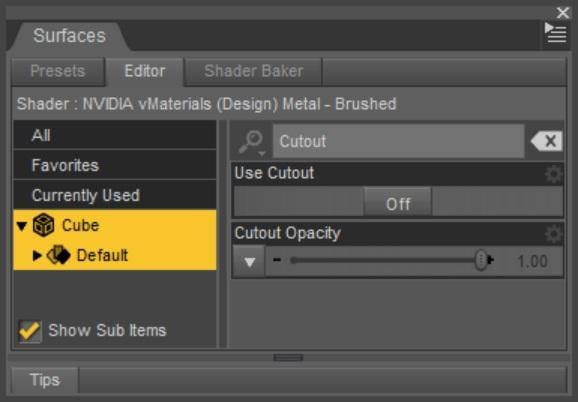
- Install NVIDIA vMaterials 1.7.0 (1.44 GB)
- Install NVIDIA vMaterials 1.7.0 Presets for DS (252 MB)
- Restart Daz Studio if it was open when you installed vMaterials
- Navigate to "/Shader Presets/NVIDIA vMaterials 1.7.0/Setup"
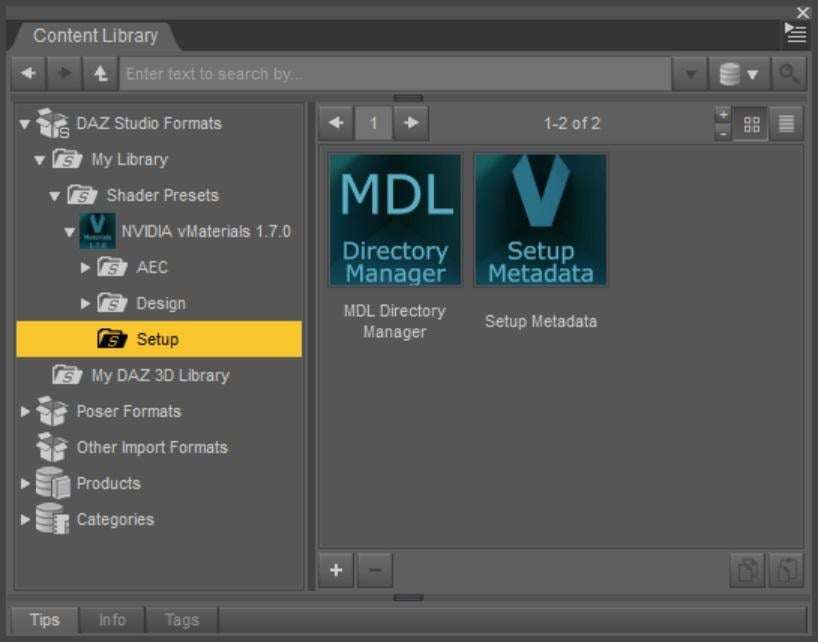
- Run the "MDL Directory Manager" script
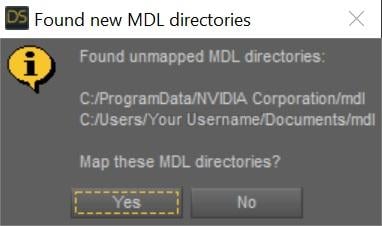
- If the new MDL directories were automatically found, click "Yes" to map them
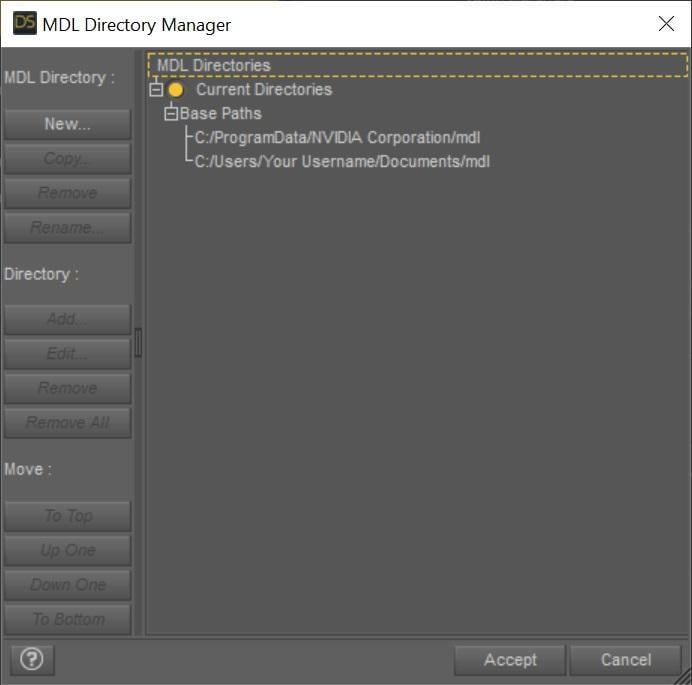
- If the new MDL directories were not automatically found, map them manually
- If the new MDL directories were automatically found, click "Yes" to map them
- Click Accept
- Run the "Setup Metadata" script
NOT WORKING , NO MATTER WHAT [...] I DO.
Casual Outfits for Genesis 8 Male - as a single piece - is this possible?With a little Blender work it's possible to split the pieces up into their respective parts, then import them into Daz and tweak with Mesh Grabber
The most difficult thing is that the texture is superimposed over the top of the mesh, so you would have to adjust the UV mapping (or create your own from scratch) in order to get a jacket with a visible zipper or pants with visible pockets and seams.
In this quickie example, I started with James sporting "Casual Outfit 01," imported just the outfit into Blender, deleted the jeans and t-shirt, then imported the sweatshirt it back into Daz and paired it with '50s Fab Jeans.' Red cloth shader is from Fabric Factory.
(i didn't spend much time smoothing the rough cuts, but this is not hard to do in Blender)
iClone 8 and CC4 anyone?MachineClaw said:
do you HAVE to have the iray plugin? Also is there a way once in CC4 and character is created modified etc is there a way to import back into Daz Studio as FBX or something?
Hi, you don't need the IRay plugin, it's slow... Importing back from iClone to DAZ, I tried it but then I sometimes need to buy an additional license (which I don't have or willing to buy).
The winning combo to me is DAZ Studio and export it the model as an FBX file.
I use iClone 8.12 and Character Creator 4.12...
I really only do toon/stylized /anime renders and Daz3d just doesn't have the 3d assets to purchase for what I do and renders I work on. I'd like to get into animation and do simple memes or short animations, Daz Studio is just not suited to animations and I have lots of issues with the Daz Studio animation timelines etc (some is down to learning), most is Daz Studio limitations.
content confusionRight-click on Daz Studio Formats in the Content Library and select Add New Base Directory. Browse to and select the folder that contains the Runtime and Data folders. If there are two such folders, one inside the other, you need to select one and merge the other with it (having additional content directories that are not inside others is fine). Do the same for Poser Formats, this time selecting Add New Runtime Directory - again, you want the folder with the Data and Runtime folders inside it.
Having doen that, right-click on the tab of the Content Library pane, select Content DB Maintenance, check reimport Metadata, and Accept. In the next dialogue you would again select everything and click Accept. That should rebuild the CMS Database, used by Smart Content and the presets tabs in many property panes (among other things).
iClone 8 and CC4 anyone?do you HAVE to have the iray plugin?
Yes but it will cost you extra $99 USD on top of the $900 USD buy in for IC8/CC4
Also is there a way once in CC4 and character is created modified etc is there a way to import back into Daz Studio as FBX or something?IC/CC4 have FBX export with presets for the major 3DCC's&game engines
However I am not certain DS has reliable FBX import.
I'd like to get into animation and do simple memes or short animations, Daz Studio is just not suited to animationsHonestly I think DS can handle this type of animation no problem.
Daz 3D is part of

Connect
DAZ Productions, Inc.
7533 S Center View Ct #4664
West Jordan, UT 84084Licensing Agreement | Terms of Service | Privacy Policy | EULA
© 2026 Daz Productions Inc. All Rights Reserved.