-
Little Pony Hair
Thank you for all the hair items that you make, I really like them.
But I have no clue on how to use them in Daz, as far as I see there is no way to import Car files.
How would I get these hairs in Daz or would I need Carrara to export to OBJ?Renaming the assets of the Smart Content tabYou can rename products in Content Library>Products
Select the product, right-click select Rename, rename the product, click OK.
Edit: Existing metadata should be unaffected. I have no idea if changing the product name affects DIM, DAZ Central or DAZ Connect update notifications or if the product name will be changed back (if it's tracking the SKU for updates) if there is an update.
Diffeomorphic and poses librariesI'm not sure what you mean. You can just use the "import pose library" tool to import a whole daz library into blender. Of course be sure to delete unneccesary data or the scene will be heavy depending what you have in it. For poses to work you only need to keep the armature and delete everything else. You may also need to use "file > cleanup > recursive unused data blocks" to prune the internal data.
note. Anyway daz poses can be complex and also use morphs. The blender approach is only good for armature poses. In general you need to load the pose from the daz library directly to affect morphs as well.
 Importing Vroid characters in Daz
taiuri said:
Hi!
I'd like to import Vroid characters into Daz, but I can't figure out how to do it.
I tried to convert them to .pmx and then import them into Daz, but they don't do it correctly. That's why I think it'd be better if I export directly from Vroid to Daz, but I don't know how to do it.
I hope you can help me, guys!
OLÁ, SOU WAGNER DAVI, PARA IMPORTAR DO DAZ USE O BLENDER, PROCURE POR UM PLUGIN DO BLENDER, É GRATUITO E FUNCIONA, DO BLENDER VOCÊ PODERÁ IMPORTAR DO VROID E EXPORTAR COMO QUALQUER TIPO DE ARQUIVO.
Beta testers for DAZ Studio metadata pluginlilweep said:
TheMysteryIsThePoint said:
I don't have the experience you require, but if your solution is easy to use with clear concepts that make it obvious what metadata is and does, I'd buy it on day one.
Edit: And if it can make content purchased in other stores appear as "first class citizens", even better...
Yes and would be good if 3rd party content creators could supply metadata categorization that could be loaded/or automatically read by this plugin so then at least 3rd party vendors can provide metadata support for people with pluginThey can - Content Wizard can make DIM packages, and, slightly down from first class, anyone can create a product using the tools in DS and ad the metadata to their zip for users to import.
Beta testers for DAZ Studio metadata plugin
Yes and would be good if 3rd party content creators could supply metadata categorization that could be loaded/or automatically read by this plugin so then at least 3rd party vendors can provide metadata support for people with pluginTheMysteryIsThePoint said:I don't have the experience you require, but if your solution is easy to use with clear concepts that make it obvious what metadata is and does, I'd buy it on day one.
Edit: And if it can make content purchased in other stores appear as "first class citizens", even better...
Import animation from blender into dazYes, I've got a few issues to resolve having to do with mocap with armature bones that have different orientations, but I'm close. And I still have to port the import app to Win32, but I'm just going to make a quick and dirty command line app. I just have to find the time to do it.
Beta testers for DAZ Studio metadata pluginOoooh I would love to help with this. I have been messing with my metadata for a long time and added a lot of my old stuff with various frustions. I have followed a number of your posts and suggestions. This week I managed to figure out how to finally solve my duplicate product icon problems. I would love to see a way to make this easier with less frustration.
Grasp Helper for Genesis 8 and Genesis 8.1 - ideas?mazinkaiserzero said:
I'm still kind of lost on how this is any different than making it yourself, (hide every part of the G8 you don't need, export as obj with higher subd, import back, add as collision object on the object you want grabbed/squeezed, hide the obj)
does this improve in any way how the smoothing mod actually works or something?
Okay, so I'm quite familiar with this method, and it works great when figure1 grabs figure2. But uh. If I want figure1 to grab themselves. After I hide the collision object, and bring figure1's hand into the pre-grabbed deformed section. It then also collides with the hidden object. How do you hide an object and make it so it's prior collisions remain intact but it generates no new collisions?
Can anyone explain that step to me please?Website improvement DAZ3D.COM - Product metadata/keywordsIt isn't exactly a product improvement, but relates to products... specifically, locating products. The website desperately needs an overhaul and one of the biggest areas would be that of metadata. Locating a product is often difficult and the metadat is sorely lacking. You can search all around a product you've seen before and still never find it. Most of the time I resort to going to google and doing a search out there in order to find something on the DAZ site. That's pretty sad. With advances in AI, there has to be engines that would analyze an image and generate keywords. This would do a good deal of the heavy lifting in generating some additional product search terms. The invetory of products is huge, ant the task is daunting, I'm sure. But starting with newer products and working backwards would make sense. And moving forward, initiate a requirement for new products to include broader general search terms. I mean this should be of great interest to DAZ as it drives sales. One cannot purchase what one cannot find. While your at it, have PAs list other (indirect) products used in generating promotional images. This also would increase sales. Anyone agree with this notion?
Diffeomorphic: Adding Custom Morphs to clothingPadone said:
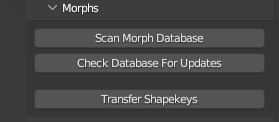
it's setup > morphs > import custom morphs
I tried to do this too but the parameter you mention (import custom morphs) is not there. Here's what appears to me under the heading Morphs
 [Released] RSSY Clothing Converter from Genesis 8 to Genesis 9 [Commercial]
Use your Genesis 8 and 8.1 clothing with your Genesis 9 characters! Convert almost your entire wardrobe of clothes using the new Clothing Converter from Genesis 8 Female to Genesis 9 or the Clothing Converter from Genesis 8 Male to Genesis 9 scripts! The Clothing Converter scripts provide batch execution for converting your Genesis 8 and 8.1 clothing to Genesis 9 clothing in your library. Easily select the wardrobe items in your library, select an output directory, and execute the script. Even better, icons and categories are copied from your original Genesis 8 clothing to the new Genesis 9 clothing items.
Your new Genesis 9 wardrobe is completely Smart Content aware! They will show up when you select a Genesis 9 figure. Plus, all materials shown in Smart Content for your Genesis 8 item will show for your converted Genesis 9 item. Converted clothing, instead of using Auto-Fit, produce vastly less distorted results.
The Clothing Converter script does not work with props (e.g., swords, wands, etc) and wearables (e.g., outfits). Items without metadata can be converted but will not show up in Smart Content. They may also need to be converted using a Force Convert Item(s) button. It may also not work as well with high-heeled shoes because of problems with positioning the feet without turning on the Use Foot Dialog option during conversion.
The script may not be able to convert all clothing items without issues. Converted items may exhibit poke-through. Usually, this can be fixed by adding a smoothing modifier.
Features
- Convert Genesis 8 and 8.1 Clothing items for use by Genesis 9 characters.
- Convert Dresses, Pants, Shirts, Skirts, Shoes, etc. Converted clothing, instead of using Auto-Fit to fit clothing to Genesis 9, produce vastly less distorted results.
- Convert Accessories* (e.g., Hats, Belts, etc)
- Copies icons from Genesis 8 clothing to Genesis 9 clothing for a professional look
- Copies Smart Content Products! Converted clothing will be organized into similar products as the original items, with multiple converted items in one converted product and even using the original product image.
- Converted Clothing is Smart Content enabled! All materials shown in Smart Content for your Genesis 8 item will show for your converted Genesis 9 item.
Note: Converting accessories are limited because the bone structure is too different between Genesis 9 and Genesis 8. By default, only accessories with metadata for the head or hip are accepted as these bones have the same name between generations. You can try to convert other accessories. Many accessories do not use the bone structure and will load and convert correctly. However, for accessories that attempt to load onto a missing bone, the accessory will load in the wrong location. Daz Studio may also become unstable and crash the script when trying to SAVE the accessory.
Experimenting with ML Deformer in UE5.1Macislav said:
It looks more like a weighting issue (smaller weights get culled on import to UE?).
Try to set minweight to "const float MINWEIGHT = 0.004f;".
The glitch occurs esp. in high density skeletal meshes.
It's hidden in the following structure (source version of ue5): Engine\UE5\Source\Developer\SkeletalMeshUtilitiesCommon\Private\LODUtilities.cpp
Thanks for the tip! I will look into that as I'm seeing a similar issue with traditional JCM's on Genesis 9 figures in Unreal.
How to import bones and weight maps into DAZ?Thanks, I'll keep that in mind in the future. I've moved on to another software for this project. The original was in DAZ, but there's no reason for me to stay there. I am doing more rigging in DAZ lately and was hoping to get more experience with it, but without being able to import rigging and weight maps, DAZ Studio is pretty much dead in the water for me for asset creation. It's just too much hassle setting it up in DAZ.
Experimenting with ML Deformer in UE5.1It looks more like a weighting issue (smaller weights get culled on import to UE?).
Try to set minweight to "const float MINWEIGHT = 0.004f;".
The glitch occurs esp. in high density skeletal meshes.
It's hidden in the following structure (source version of ue5): Engine\UE5\Source\Developer\SkeletalMeshUtilitiesCommon\Private\LODUtilities.cpp
When you delete a product is it all deleted?If it was installed through Daz Studio then right-click on the product>Uninstall. If installed through Install Manager or Daz Central then Install Manager can uninstall from its Installed tab. If you installed manually and imported the metadata then you would use the delete option you began with, and manually remove the files.
How to import bones and weight maps into DAZ?Daz Studio will, I believe, import Motion Builder FBX files (not something I have the means to test) - unfortunately the format is loose enough that a general importere that could handle all variants would be a huge undertaking. If the FBX doesn't work then I don't think there is a way to get rigging in.
When you delete a product is it all deleted?That deletes the database entries for the product (the metadata) - it doesn't touch the files.
Unity Terrain Export to Daz StudioI know this thread focuses on Daz to Unity, but I found a neat trick to go the other way.
So far, I haven't found a great way of creating terrains easily in Daz Studio. I know there are some paid products that do it, but considering I already have the tools necessary to create nice terrains in Unity, it would be cool to be able to create them there, and bring them over to Daz. The good news, is that it is actually super easy, barely an inconvienence.
All you need, is to create a terrain in Unity (I use the Terrain Tools asset in Unity Registry so I can control the size of the Terrain). I then deform the terrain to create valleys and hills. No need to mess with any textures, unless you want to visualize it before exporting. Then I use the Terrain to Object Exporter to export it as an OBJ. Import it as an OBJ in Daz, apply textures, and then adjust the tiling so it looks right. Now I have a cool terrain to put my characters in. One downside, is that I haven't figured out an easy way to have varied textures on the Terrain. I have to use the same one for the entire Terrain. To give variety, I would use several Terrain OBJs and have different textures on each one.
How to import bones and weight maps into DAZ?I wanted to modify a figure in third party software as I needed to fix some things. I'd rather not start over. Is there a way to import a rig and weight maps into DAZ studio? I tried importing from FBX, but it imports the rig separate from the figure. And the object itself is just one big mesh with no bones. Very strange. In DAZ Studio, I can't delete the bones (they're actually the root structure) without clearing the scene.
Daz 3D is part of

Connect
DAZ Productions, Inc.
7533 S Center View Ct #4664
West Jordan, UT 84084Licensing Agreement | Terms of Service | Privacy Policy | EULA
© 2026 Daz Productions Inc. All Rights Reserved.