-
I need a super simple way to install zip files
gecko89 said:
Richard Haseltine said:
gecko89 said:
Leana said:
gecko89 said:
Leana said:
Unzip the file in a temp folder.
Look at the extracted files and folders to find the root folder, which is the one which will contain the main folders like Runtime, data, people...
Take everything inside that root folder and move it to your Daz content directory root folder, so that existing folders are merged (Runtime merges with your existing Runtime folder, data merges with data, and so on). Content should now be available in content library tab. Reimport metadata in case there are some provided with the new content, if not you'll have to add it to smart content yourself.
Note that the content directory you install too can not be the connect library, you can't install content manually there.
I have no folder marked as Daz Content Directory.
I have DAZ3D>Studio, then in Studio I have My Daz Connect Library, My Library, and Render Library. I'm assuming it is not Render Library because that's where the results of my experimentation have gone.
"Content library" is a generic term for a directory setup as content directory in DS preferences. Different people use different folders.
From the folders you're listing it would likely be the "My library" folder.OK I've already done that. It doesn't work. When I got to DAZ to install it, it says the file is not there.
Install what? Or do you mean load? If you are getting an error on loading, assuming the thing you are installing is complete in itself and not an addon, then that probably means that you have an extra folder that shouldn't be there - the Data, Runtime, and any other folders at the same level of the zip are what needs to go in your content directory (on Windows you can just drag them theer and then tell Windows to merge them when it asks; Mac users need to work their way down to the folders thata re not already present before copying anything across)
I have Windows 10. No it doesn't say anything about merging. I have read about this merging thing before in instructions. My version of Windows 10 doesn't seem to have that feature.
If you had put the folders in the right place, with the pre-existing folders, then Windows would have told you that there was already a folder of that name present and asked you what to do. if you don't get the pop up when trying to add the new content to an existing content directory then you are definitely not using the correct destination or are copying the wrong folders from the zip.
I need a super simple way to install zip filesLeana said:
You can also purchase this product which will help you install content and create metadata for Smart Content tab: https://www.daz3d.com/content-wizard
OK I had to manually download it as a zip file because it wouldn't let me downlaod and install. I love the irony of having to install a zip file in order to install zip files.
I need a super simple way to install zip filesRichard Haseltine said:
gecko89 said:
Leana said:
gecko89 said:
Leana said:
Unzip the file in a temp folder.
Look at the extracted files and folders to find the root folder, which is the one which will contain the main folders like Runtime, data, people...
Take everything inside that root folder and move it to your Daz content directory root folder, so that existing folders are merged (Runtime merges with your existing Runtime folder, data merges with data, and so on). Content should now be available in content library tab. Reimport metadata in case there are some provided with the new content, if not you'll have to add it to smart content yourself.
Note that the content directory you install too can not be the connect library, you can't install content manually there.
I have no folder marked as Daz Content Directory.
I have DAZ3D>Studio, then in Studio I have My Daz Connect Library, My Library, and Render Library. I'm assuming it is not Render Library because that's where the results of my experimentation have gone.
"Content library" is a generic term for a directory setup as content directory in DS preferences. Different people use different folders.
From the folders you're listing it would likely be the "My library" folder.OK I've already done that. It doesn't work. When I got to DAZ to install it, it says the file is not there.
Install what? Or do you mean load? If you are getting an error on loading, assuming the thing you are installing is complete in itself and not an addon, then that probably means that you have an extra folder that shouldn't be there - the Data, Runtime, and any other folders at the same level of the zip are what needs to go in your content directory (on Windows you can just drag them theer and then tell Windows to merge them when it asks; Mac users need to work their way down to the folders thata re not already present before copying anything across)
I have Windows 10. No it doesn't say anything about merging. I have read about this merging thing before in instructions. My version of Windows 10 doesn't seem to have that feature.
I need a super simple way to install zip filesLeana said:
You can also purchase this product which will help you install content and create metadata for Smart Content tab: https://www.daz3d.com/content-wizard
LOL I did. I bought it and when I click on 'Download and Install' nothing happens.
I'm afraid to try to manually install it because I might have yet another file I can't use because I can't put zip files in Daz because no instructions work.
More money wasted.
I need a super simple way to install zip filesgecko89 said:
Leana said:
gecko89 said:
Leana said:
Unzip the file in a temp folder.
Look at the extracted files and folders to find the root folder, which is the one which will contain the main folders like Runtime, data, people...
Take everything inside that root folder and move it to your Daz content directory root folder, so that existing folders are merged (Runtime merges with your existing Runtime folder, data merges with data, and so on). Content should now be available in content library tab. Reimport metadata in case there are some provided with the new content, if not you'll have to add it to smart content yourself.
Note that the content directory you install too can not be the connect library, you can't install content manually there.
I have no folder marked as Daz Content Directory.
I have DAZ3D>Studio, then in Studio I have My Daz Connect Library, My Library, and Render Library. I'm assuming it is not Render Library because that's where the results of my experimentation have gone.
"Content library" is a generic term for a directory setup as content directory in DS preferences. Different people use different folders.
From the folders you're listing it would likely be the "My library" folder.OK I've already done that. It doesn't work. When I got to DAZ to install it, it says the file is not there.
Install what? Or do you mean load? If you are getting an error on loading, assuming the thing you are installing is complete in itself and not an addon, then that probably means that you have an extra folder that shouldn't be there - the Data, Runtime, and any other folders at the same level of the zip are what needs to go in your content directory (on Windows you can just drag them theer and then tell Windows to merge them when it asks; Mac users need to work their way down to the folders thata re not already present before copying anything across)
I need a super simple way to install zip filesLeana said:
gecko89 said:
Leana said:
Unzip the file in a temp folder.
Look at the extracted files and folders to find the root folder, which is the one which will contain the main folders like Runtime, data, people...
Take everything inside that root folder and move it to your Daz content directory root folder, so that existing folders are merged (Runtime merges with your existing Runtime folder, data merges with data, and so on). Content should now be available in content library tab. Reimport metadata in case there are some provided with the new content, if not you'll have to add it to smart content yourself.
Note that the content directory you install too can not be the connect library, you can't install content manually there.
I have no folder marked as Daz Content Directory.
I have DAZ3D>Studio, then in Studio I have My Daz Connect Library, My Library, and Render Library. I'm assuming it is not Render Library because that's where the results of my experimentation have gone.
"Content library" is a generic term for a directory setup as content directory in DS preferences. Different people use different folders.
From the folders you're listing it would likely be the "My library" folder.OK I've already done that. It doesn't work. When I got to DAZ to install it, it says the file is not there.
[Released] RSSY Clothing Converter from Genesis 8 to Genesis 9 [Commercial]Once the update is out, Is there an option to convert again that doesn't actually update the item? For instance, I spent some time doing some heels. I'd like to have the Metadata updated, but I don't want the converter to actually touch any data/morph files.I need a super simple way to install zip filesgecko89 said:
Leana said:
Unzip the file in a temp folder.
Look at the extracted files and folders to find the root folder, which is the one which will contain the main folders like Runtime, data, people...
Take everything inside that root folder and move it to your Daz content directory root folder, so that existing folders are merged (Runtime merges with your existing Runtime folder, data merges with data, and so on). Content should now be available in content library tab. Reimport metadata in case there are some provided with the new content, if not you'll have to add it to smart content yourself.
Note that the content directory you install too can not be the connect library, you can't install content manually there.
I have no folder marked as Daz Content Directory.
I have DAZ3D>Studio, then in Studio I have My Daz Connect Library, My Library, and Render Library. I'm assuming it is not Render Library because that's where the results of my experimentation have gone.
"Content library" is a generic term for a directory setup as content directory in DS preferences. Different people use different folders.
From the folders you're listing it would likely be the "My library" folder.I need a super simple way to install zip filesLeana said:
Unzip the file in a temp folder.
Look at the extracted files and folders to find the root folder, which is the one which will contain the main folders like Runtime, data, people...
Take everything inside that root folder and move it to your Daz content directory root folder, so that existing folders are merged (Runtime merges with your existing Runtime folder, data merges with data, and so on). Content should now be available in content library tab. Reimport metadata in case there are some provided with the new content, if not you'll have to add it to smart content yourself.
Note that the content directory you install too can not be the connect library, you can't install content manually there.
I have no folder marked as Daz Content Directory.
I have DAZ3D>Studio, then in Studio I have My Daz Connect Library, My Library, and Render Library. I'm assuming it is not Render Library because that's where the results of my experimentation have gone.
I need a super simple way to install zip filesYou can also purchase this product which will help you install content and create metadata for Smart Content tab: https://www.daz3d.com/content-wizard
I need a super simple way to install zip filesUnzip the file in a temp folder.
Look at the extracted files and folders to find the root folder, which is the one which will contain the main folders like Runtime, data, people...
Take everything inside that root folder and move it to your Daz content directory root folder, so that existing folders are merged (Runtime merges with your existing Runtime folder, data merges with data, and so on). Content should now be available in content library tab. Reimport metadata in case there are some provided with the new content, if not you'll have to add it to smart content yourself.
Note that the content directory you install too can not be the connect library, you can't install content manually there.How do I install Renderosity content in DAZ Studio 4.10?Unzip the file in a temp folder.
Look at the extracted files and folders to find the root folder, which is the one which will contain the main folders like Runtime, data, people...
Take everything inside that root folder and move it to your Daz content directory root folder, so that existing folders are merged (Runtime merges with your existing Runtime folder, data merges with data, and so on). Content should now be available in content library tab. Reimport metadata in case there are some provided with the new content, if not you'll have to add it to smart content yourself.
Note that the content directory you install too can not be the connect library, you can't install content manually there.Problems with shading (Fine in Blender, but not in Daz)You may also try not to export/import normals if you have the option, so to force daz studio to rebuild them. Unless you use custom normals for your model that would be bad anyway for export purposes.
Animating Face/Mouth via imported sound fileDoes anyone remember the name of a DAZ animation application that allowed you to import a wav file and have it auto-synch the sounds to a figure and animate the figure's face and mouth? It added auto-blinking as well. I used this way way back in the day and I cannot remember what this plug-in was called. I would like to do the same thing now, but with Genesis 8.1 and 9. I assume that the old tool from back then has a modern version? Does anyone know where to point me to accomplish this? I am not looking for full automated body animation, but automated facial animation and lip-synch via an imported wav or mp4 file like I did over 12 years ago. Does anyone have any recommended DAZ tools to accomplish this? I'd also like to know how to use motion capture of a live person to do an entire body pose, but that will be a different subject for another day.
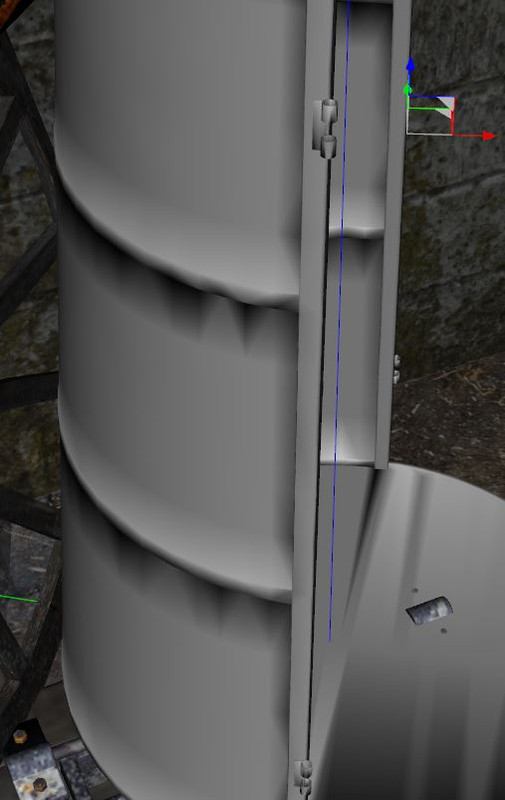
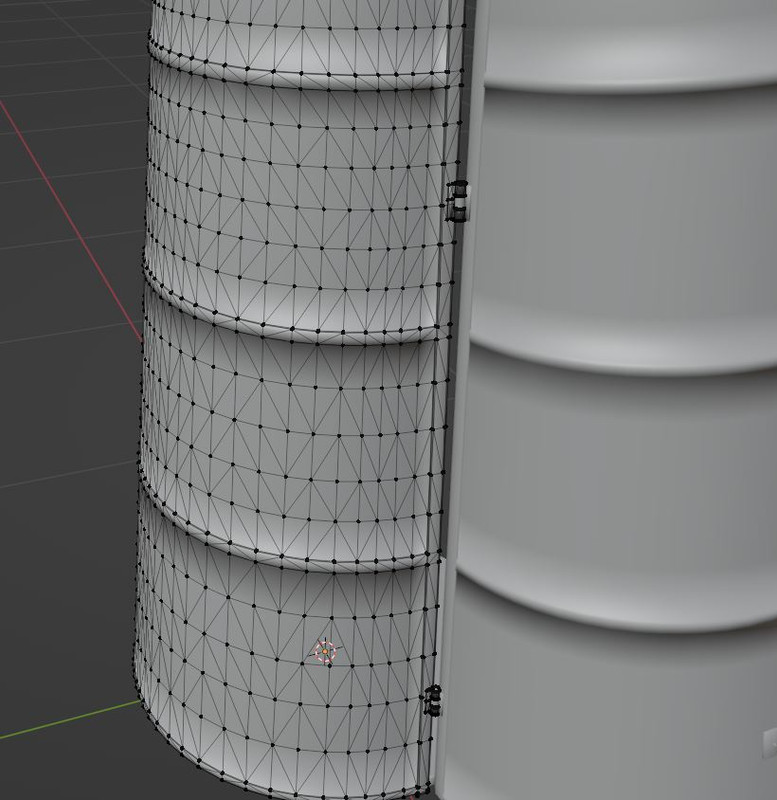
Problems with shading (Fine in Blender, but not in Daz)I have a problem with normal shading in Daz. In Blender everything looks smooth and fine, but imported to DAZ it does not anymore. See screenshots. It's the very same mesh. I tried wried fbx and dae import.
Content creators out there... Any ideas on this? Thank you in advice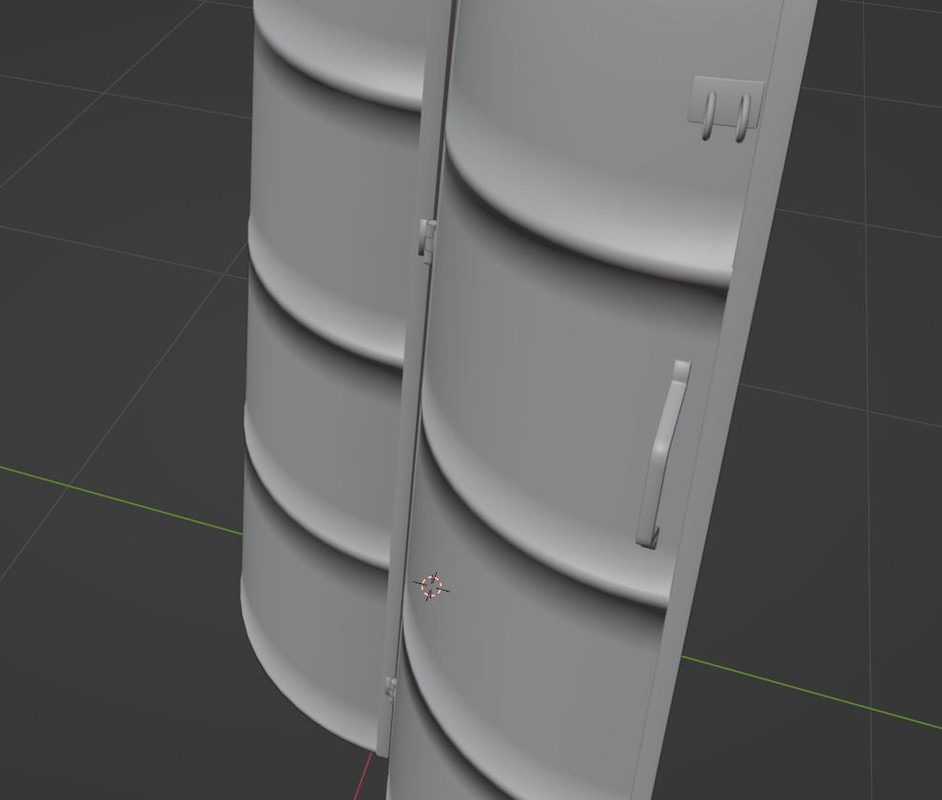
 Import animation from blender into daz
I don't know that answer to your first two questions, but the answer seems obvious: All open source licenses grant the right to observe, understand, improve, extend, and modify the source code. It can easily be imagined as the option of first resort.
As for applying the license to its output, the license triggers when you link to your code, or in the case of Python, import, GPL'ed code. Displaying source code in a web app does not meet the requirement. It is I that would have to apply the license, and even then only if and when I chose to distribute the code.
But your point, I think I understand it, is interesting... I think I'll test it by asking it to generate a Houdini hda and see how far it gets, or if it just talks about it. Houdini is well documented but proprietary and I will assume that they didn't set chat loose on their source.
But I also think this is all sort of burying the lead... it knew exactly what I was doing, generated correct comments in the code, and even changed the identifiers to more python-like code conventions. I really thought that AI would come for my job last. Nope. Won't be long now.
Question about using DS from a different computerWonderland said:
SofaCitizen said:
I would probably avoid using Daz Central or Connect in that situation - infact if you setup the base library on the external drive properly you won't even have to run DIM after Daz Studio is installed. Once DS is installed, immediately go into the list of base libraries and remove the pre-created ones which will be on C: - you will probably want to manually remove those folders. Then you can add the base library from your external drive and within Content DB Maintenance you can check Process Metadata Queue and Re-import Metadata and this will import everything into Smart Content (after several minutes).
However, even if you fully clean up and uninstall everything before you go home you would have to check the T&Cs to see if that is allowed. It probably would be since you would not be loading paid assets onto your friends computer but it's best to check for sure.
Iray preview does run on non-nvidia cards - albeit slowly. However, I don't know what the minimum spec would be for that, or filament or even just textured preview.
I don't want to screw up my existing DS (which already has multiple issues!) so I'd bring a fresh HD and install probably just what I needed on the new HD or who knows, maybe a fresh install would clear up my current issues. I don't see another way except through DIM but I have issues with DIM when I want to install into different folders (ie; I have a separate G9 folder) it will not show the items (all greyed out) on the folder that was not used in the last download. So if I download G9 items into its folder through DIM then open DS all my other content is greyed out and vice versa. I'm having so many issues with DS I
Have you added the new G9 folder to the daz search path within Daz studio?
for me to do this I select the 'Content Library' tab
then, from the menu icon at the top of the 'Content Library' tab column select 'Content Directory Manager'
Inside the 'Content Directory Manager' select DAZ Studio formats
add the path to your new G9 folder
Genesis 9 in PoserAnimations - QuestionsTimotheus said:
I'm going to be checking out Cascadeur for animating, but I have no idea yet how it works with Daz. Haven't had a chance to get into it. Here are a couple of links to check out....
https://blog.daz3d.com/create-animations-for-your-daz-characters-with-cascadeur/
https://cascadeur.com/blog/general/how-to-animate-daz3d-characters-with-cascadeur-tutorial
I've been dubbed the resident expert on Cascadeur, but I do my animating in C4D rather than DS. I've made a couple animations in Cascadeur that kind of freaked out when I tried to import them to DS, though I haven't tried enough to say how consistently it works.
I Upgraded to an Nvidia 4090.......What a nightmare!kwannie said:
Thanks for all the wonderful feedback, I will get the techs to give the that tool a whirl Leather. Wendy I didn't Install a name brand anti-virus yet but what does PostgreSQL do anyway?? I love the way that the 16 cores on the 7950x were handling PWToon with the 3090 build (2 seconds per frame at 1080) then I ruined all that by opting to immediately trade out for a 4090. I just don't get why the 4090 build can render a single frame fast then gets bogged down rendering each frame when doing an image series. I definately don't get why it bogs down doing a single frame in OpenGL and takes more than 3 minutes for a single frame, that should be instantaneous.
handles all the metadata, smart content etc
I am totally ignorant BTW but do know there were AVs such as ZoneAlarm which clashed with it
Daz 3D is part of

Connect
DAZ Productions, Inc.
7533 S Center View Ct #4664
West Jordan, UT 84084Licensing Agreement | Terms of Service | Privacy Policy | EULA
© 2026 Daz Productions Inc. All Rights Reserved.