-
How to Use dForce: Creating a Blanket, Draping Clothes on Furniture, and Much More [Commercial]
i'm just starting to get into this. but one thing i'm already *really* wishing for is some sort of central command module (or module hierachy) in the primary dforce panel.
'include in simulation' on/off should be at the top there, on top of a hiearchal list with the old familar show-hide eyeball appearing alongside each item. having to enable or disable each item's visibility to dforce in the individual item's parameter tabs is a royal pain. there should also be some flagging involved, so that items which are not things that would be likely to have any dforce properties do not appear.
then some interface for adjusting the layering of the items that are interacting, and their individual dforce simulation settings.
part of that a) dforce at this point seems to be a bit slack about figuring out what is supposed to be on top of what. it's kind of the like the basic studio principle you wind up figuring out eventually. put your pants on before you put your shirt on, if you don't want to have bits of your shirt trapped weirdly in your pants. do it the other way 'round, and you won't have any problems. but kitbashing with dforce, for whatever reason, dforce items from different products with different default settings can give each other some really strange wedgies. i've had a top and pair of pants dforce themselves together so devotedly that you couldn't even tell that they were separate objects.
part of that b) some simple slider + numeric value strength input to determine how strongly the dforce values will be applied to the other objects/physics layers in the scene. perhaps you want your top and long flowing sleeves, responding to windforce, to glide very lightly (0.33) along your wide belt, and interact with your pants lightly (0.48).
Select all objects set as dforce. Go to surfaces tab. select the surfaces you want to be less affected by the simulation. Scroll down the surfaces tab until you come to a button labeled "dforce simulation on/off) with a series of dials/sliders on a different colored background. "Reduce Simulation Strength" is like the second or third option in that list.
thank you, Odaa...
that's very helpful. :)
j
How to Use dForce: Creating a Blanket, Draping Clothes on Furniture, and Much More [Commercial]i'm just starting to get into this. but one thing i'm already *really* wishing for is some sort of central command module (or module hierachy) in the primary dforce panel.
'include in simulation' on/off should be at the top there, on top of a hiearchal list with the old familar show-hide eyeball appearing alongside each item. having to enable or disable each item's visibility to dforce in the individual item's parameter tabs is a royal pain. there should also be some flagging involved, so that items which are not things that would be likely to have any dforce properties do not appear.
then some interface for adjusting the layering of the items that are interacting, and their individual dforce simulation settings.
part of that a) dforce at this point seems to be a bit slack about figuring out what is supposed to be on top of what. it's kind of the like the basic studio principle you wind up figuring out eventually. put your pants on before you put your shirt on, if you don't want to have bits of your shirt trapped weirdly in your pants. do it the other way 'round, and you won't have any problems. but kitbashing with dforce, for whatever reason, dforce items from different products with different default settings can give each other some really strange wedgies. i've had a top and pair of pants dforce themselves together so devotedly that you couldn't even tell that they were separate objects.
part of that b) some simple slider + numeric value strength input to determine how strongly the dforce values will be applied to the other objects/physics layers in the scene. perhaps you want your top and long flowing sleeves, responding to windforce, to glide very lightly (0.33) along your wide belt, and interact with your pants lightly (0.48).
Select all objects set as dforce. Go to surfaces tab. select the surfaces you want to be less affected by the simulation. Scroll down the surfaces tab until you come to a button labeled "dforce simulation on/off) with a series of dials/sliders on a different colored background. "Reduce Simulation Strength" is like the second or third option in that list.
How to Use dForce: Creating a Blanket, Draping Clothes on Furniture, and Much More [Commercial]i'm just starting to get into this. but one thing i'm already *really* wishing for is some sort of central command module (or module hierachy) in the primary dforce panel.
'include in simulation' on/off should be at the top there, on top of a hiearchal list with the old familar show-hide eyeball appearing alongside each item. having to enable or disable each item's visibility to dforce in the individual item's parameter tabs is a royal pain. there should also be some flagging involved, so that items which are not things that would be likely to have any dforce properties do not appear.
then some interface for adjusting the layering of the items that are interacting, and their individual dforce simulation settings.
part of that a) dforce at this point seems to be a bit slack about figuring out what is supposed to be on top of what. it's kind of the like the basic studio principle you wind up figuring out eventually. put your pants on before you put your shirt on, if you don't want to have bits of your shirt trapped weirdly in your pants. do it the other way 'round, and you won't have any problems. but kitbashing with dforce, for whatever reason, dforce items from different products with different default settings can give each other some really strange wedgies. i've had a top and pair of pants dforce themselves together so devotedly that you couldn't even tell that they were separate objects.
part of that b) some simple slider + numeric value strength input to determine how strongly the dforce values will be applied to the other objects/physics layers in the scene. perhaps you want your top and long flowing sleeves, responding to windforce, to glide very lightly (0.33) along your wide belt, and interact with your pants lightly (0.48). apart from being great for wrangling clothing, this would be a godsend for dealing with dforce hair and/or dforced hair.
:)
i'm not complaining in any way. dforce is pretty awesome. and the PA's whose dforce clothing i've experimented with this past week seem to really know what they were doing. trying to figure out how they've worked the magic is probably going to be about as tricky as trying to figure out why their surfaces always seem so wonderful.
but that's kind of the thing. i don't really want to have to mess around with excellent default dforce simulation presets to get my kitbashery to work. i want to be able to leave those alone, or maybe finetune them a little, and then--in a separate interface--try to figure out how to make my physics layers get along.
randomly, some script or series of scripts that could weld wayward vertices in pre-dforce clothing (or at least approximate that enough to keep dforce-insecure clothing from falling apart) without losing JCMs would be awesome.
:)
j
OT: Passion other then 3DHi Kyoto, thanks for sharing. I enjoy your painting choices, I love both scenic and surreal, specially surreal. Now that is very cool, had no idea kite flying was a pro sport. Kite flying takes some serious skills, manuevers ? I can't even get a kite into the air, Rofl !!!! Very cool video, I've never seen that style of kite sport, scenary is beautiful, he's definetly a master, didn't see Bethel though, probably from concenttrating on Barresi kite, thanks for sharing. I can imagine, person has to have strong upper body, hands to manuever a kite, in that style. Surely hope you can get back into it someday, just watching vid takes me back in time to my youth.
Beautiful kite you own, looks huge. Now, I wanna get a kite
 Tx never has kite flying wind, just tornado's. You mean, you borrowed. Great to see, how passionate you are in sport kite.
 That's very cool, you had a fascination for planes. Actually, aviation is what led me to begin my career in design engineering. Congrats on the flying lessons, no argument from me, education/training is expensive, but happy you were able to experience. Very true, aeronautical engineers were a dime of dozen. Was a challenge finding a job. I worked for Boeing in Dallas back in the 90's,. I was never able to experience radio control airplanes, would still love to get one though, but rocketry I can relate.
Awesome experience for you, flying in a P-51 !!! You so lucky !!! Now, I'm jealous, Rofl !!!! P-51 Mustangs are my favorite. I love to build P-51 models out of balsa wood. Flying over the Great lakes, wow ! what an experience for you. A forever lasting happy memory.
Congrats finishing 4th in the freestyle nationals, certainly was a proud day for you
 National competition is a challenge. I was 10th best pool shooter in central Tx, 2002, lost my first billiards game in the nationals, Lol !!! If my body wasn't so physically broken, I would love to attend those kite events. You experienced a lot of fun adventures. I would have loved to done all that cool stuff.
 ...thank you. Yeah I have two kite bags which contain several 1,000$s worth of sport kites, pretty much everything for m a small 2' indoor kite to an 8' Flexifoil powerkite (which produces a lot of pull) and a couple Revolution foue line kites. 4-line flying is a lot different in that you have two lines coming off a single handle similar to what those old control line petrol powered model aeroplanes used for control. This not only lets you steer the kite but warp it to do some pretty amazing moves like propeller spins sudden stops in mid air and even flying backwards or sideways.
Mr. Baressi again with a quad line Revolution kite.

My first ever performance was flying a black Flexifoil with a 60' white tail to Debussy's Clair de Lune. Never competed before and the only openings left at the event were in the "Masters" Division (the top class). Yeah was out of my league but finished 8th out of 12 flyers. and received some nice complements. I primarily fly to classical as I know it so well. The trick though is the maximum time allowed is 4 minutes 5 for the freestyle event) so finding a short enough work (or editing one) is a real challenge in itself. My other best performance was flying to a Mazurka by Chopin (placed first in several competitions that season) where I touched the wingtip to the ground for each of the last 6 notes. I tried other genres of music like jazz and "newage" (which lost of other flyers used) but didn't fare as well as it just wasn't in me I guess.
Again, no longer on the circuit (just can't get to all the events as I don't drive and flying across country to a major event it would cost almost as much for my luggage and all my kites as for my ticket) but I try to make the big festival in Long Beach WA just North of Portland where I live every year where I fly demo performances (non competition). Thinking of reviving that old Debussy routine and adding a few more twists to it now that I am a a bit more experienced.
As to the P-51 flight, that was during press day before an airshow in Everett WA (I was doing a report of the event for my local radio station). Not only a legendary plane but with a legendary pilot, John "Wild Bill" Crump who was also a WWII hero. he was best known for having adopted a coyote pup he named "Jeep" which often flew with him on missions. That afternoon, we first went up in a Cessna aerobatic trainer where he let me feel through the moves and even fly back to the airport (I had mentioned bout my previous flight lessons) and land as he was also a certified flight instructor. After we were back on the ground he asked me "now how about a real ride" and thumbed towards the Miss America P-51 sitting on the tarmac (highly modified for racing). When I mentioned I'd love to but it must be expensive he said "you're press, let's go get you a G-suit over in the hanger." We did a full airshow routine including high speed (425 knot) passes "over the deck". Even with the suit I was getting tunnel vision but never blacked out or felt ill. After we landed I was grinning from ear to ear like the proverbial cat that got the canary. Since that day I no longer get excited about going to theme parks, except maybe on a big fast roller coaster.
Mr. Crump and the Cessna we flew in / The Miss America P-51.
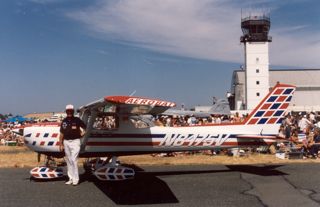
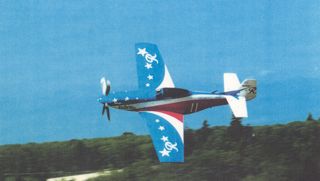
Sadly he is no longer with us having passed away in 2008. One thing he loved was getting people interested in learning how to fly.
Another Tech Recommendation ThreadHI Diomede :)
firstly,. I've never bought a computer,. just the bilts i want,. all the parts are designed to fit together with common sense,. (no previous electronics of construction knowledge required)
it's the way PC's were designed to be used,. upgraded easily by the user.,. whereas Apple chose the opposite route,. buy the new one, throw away the old one.
so,. I may not be the right person to offer advice on buying a computer.
buy a case and build your own,.. would be my advice
I need to upgrade my motherboard/cpu and ram soon-ish,. so this thread offers some interesting thoughts.
I currently have a dual boot system (work/play),. i also have a couple of external drives to Store "important" files,.. one for each system.
hard drives are relatively cheap,. and switching between systems is just a reboot,. plus you can still access files and folders on both drives from whatever boot you select.
Liquid cooling,
I have a sealed loop unit (silent knight) which fits onto the cpu, and has a central fan and fins to keep things cool.
despite the obvious fears associated with having liquid and electronics in the same area,. i'm really happy with how it works,. no problems,.
the problems i've read about seem to be ones where there is an "open" system where coolants can be added by the users.
Hope it helps :)
OT: Passion other then 3DHi Kyoto, thanks for sharing. I enjoy your painting choices, I love both scenic and surreal, specially surreal. Now that is very cool, had no idea kite flying was a pro sport. Kite flying takes some serious skills, manuevers ? I can't even get a kite into the air, Rofl !!!! Very cool video, I've never seen that style of kite sport, scenary is beautiful, he's definetly a master, didn't see Bethel though, probably from concenttrating on Barresi kite, thanks for sharing. I can imagine, person has to have strong upper body, hands to manuever a kite, in that style. Surely hope you can get back into it someday, just watching vid takes me back in time to my youth.
Beautiful kite you own, looks huge. Now, I wanna get a kite
Tx never has kite flying wind, just tornado's. You mean, you borrowed. Great to see, how passionate you are in sport kite. That's very cool, you had a fascination for planes. Actually, aviation is what led me to begin my career in design engineering. Congrats on the flying lessons, no argument from me, education/training is expensive, but happy you were able to experience. Very true, aeronautical engineers were a dime of dozen. Was a challenge finding a job. I worked for Boeing in Dallas back in the 90's,. I was never able to experience radio control airplanes, would still love to get one though, but rocketry I can relate.
Awesome experience for you, flying in a P-51 !!! You so lucky !!! Now, I'm jealous, Rofl !!!! P-51 Mustangs are my favorite. I love to build P-51 models out of balsa wood. Flying over the Great lakes, wow ! what an experience for you. A forever lasting happy memory.
Congrats finishing 4th in the freestyle nationals, certainly was a proud day for you
National competition is a challenge. I was 10th best pool shooter in central Tx, 2002, lost my first billiards game in the nationals, Lol !!! If my body wasn't so physically broken, I would love to attend those kite events. You experienced a lot of fun adventures. I would have loved to done all that cool stuff. Novica & Forum Members Tips & Product Reviews Pt 11Our Sears is ultra clearn and opens at 9am so I'm not in the same boat. If ours was like what you described, it would deserve to tank. Yours sounds yukky and there's no excuse for large chain stores to have those kinds of bathrooms. (or anywhere else.) Lol the thought that just flashed through my mind- I remember a long time ago, being highed ticked off at an airport bathroom that was PAID only- so I simply ducked under the bathroom door (like everyone else, I might add) and refused to pay 25 cents for a public service facility. Those quickly went by the wayside, too. Other people simply waited until they boarded the plane and used that lavoratory. There was always a line and I think the airlines said, "ENOUGH!"
I can't remember the last time I saw a had-to-pay-for toilet. Anyone recall seeing one or have them in your vicinity?
Not sure how wide-spread it was and I beleive they ahve dropped it now, but at a few main tarin stations in London youhad topay 20p to enter the toiltes - the gents at least, I did not check the ladies ;)
It's a long-standing thing - hence "spending a penny" (though inflation has kicked in since those days).
Oh, I know that, it's just taht a fair few years ago I was 'caught short' as they say up at ... not sure which station and found I nedded to cough up 20p before being admitted; and that had never been required before.
It's generally the stations in central London (and maybe other city centres, I've not visited many by train recently) - but the smaller local stations tend to be free. I think it was the sheer number of people (and not necessarily rail cutomers, just passers by) that made upkeep costs too high for the train companies to manage.
I seem to recall reading, or hearing, a few years back that they had removed the fee to pee :)
According to this, it's being phased out with the last ones next year: https://www.bbc.co.uk/news/uk-43253389
Always reassuring to know that (on this at least) I am not losing what little is left of my mind
 Novica & Forum Members Tips & Product Reviews Pt 11
Our Sears is ultra clearn and opens at 9am so I'm not in the same boat. If ours was like what you described, it would deserve to tank. Yours sounds yukky and there's no excuse for large chain stores to have those kinds of bathrooms. (or anywhere else.) Lol the thought that just flashed through my mind- I remember a long time ago, being highed ticked off at an airport bathroom that was PAID only- so I simply ducked under the bathroom door (like everyone else, I might add) and refused to pay 25 cents for a public service facility. Those quickly went by the wayside, too. Other people simply waited until they boarded the plane and used that lavoratory. There was always a line and I think the airlines said, "ENOUGH!"
I can't remember the last time I saw a had-to-pay-for toilet. Anyone recall seeing one or have them in your vicinity?
Not sure how wide-spread it was and I beleive they ahve dropped it now, but at a few main tarin stations in London youhad topay 20p to enter the toiltes - the gents at least, I did not check the ladies ;)
It's a long-standing thing - hence "spending a penny" (though inflation has kicked in since those days).
Oh, I know that, it's just taht a fair few years ago I was 'caught short' as they say up at ... not sure which station and found I nedded to cough up 20p before being admitted; and that had never been required before.
It's generally the stations in central London (and maybe other city centres, I've not visited many by train recently) - but the smaller local stations tend to be free. I think it was the sheer number of people (and not necessarily rail cutomers, just passers by) that made upkeep costs too high for the train companies to manage.
I seem to recall reading, or hearing, a few years back that they had removed the fee to pee :)
According to this, it's being phased out with the last ones next year: https://www.bbc.co.uk/news/uk-43253389
Novica & Forum Members Tips & Product Reviews Pt 11Our Sears is ultra clearn and opens at 9am so I'm not in the same boat. If ours was like what you described, it would deserve to tank. Yours sounds yukky and there's no excuse for large chain stores to have those kinds of bathrooms. (or anywhere else.) Lol the thought that just flashed through my mind- I remember a long time ago, being highed ticked off at an airport bathroom that was PAID only- so I simply ducked under the bathroom door (like everyone else, I might add) and refused to pay 25 cents for a public service facility. Those quickly went by the wayside, too. Other people simply waited until they boarded the plane and used that lavoratory. There was always a line and I think the airlines said, "ENOUGH!"
I can't remember the last time I saw a had-to-pay-for toilet. Anyone recall seeing one or have them in your vicinity?
Not sure how wide-spread it was and I beleive they ahve dropped it now, but at a few main tarin stations in London youhad topay 20p to enter the toiltes - the gents at least, I did not check the ladies ;)
It's a long-standing thing - hence "spending a penny" (though inflation has kicked in since those days).
Oh, I know that, it's just taht a fair few years ago I was 'caught short' as they say up at ... not sure which station and found I nedded to cough up 20p before being admitted; and that had never been required before.
It's generally the stations in central London (and maybe other city centres, I've not visited many by train recently) - but the smaller local stations tend to be free. I think it was the sheer number of people (and not necessarily rail cutomers, just passers by) that made upkeep costs too high for the train companies to manage.
I seem to recall reading, or hearing, a few years back that they had removed the fee to pee :)
Novica & Forum Members Tips & Product Reviews Pt 11Our Sears is ultra clearn and opens at 9am so I'm not in the same boat. If ours was like what you described, it would deserve to tank. Yours sounds yukky and there's no excuse for large chain stores to have those kinds of bathrooms. (or anywhere else.) Lol the thought that just flashed through my mind- I remember a long time ago, being highed ticked off at an airport bathroom that was PAID only- so I simply ducked under the bathroom door (like everyone else, I might add) and refused to pay 25 cents for a public service facility. Those quickly went by the wayside, too. Other people simply waited until they boarded the plane and used that lavoratory. There was always a line and I think the airlines said, "ENOUGH!"
I can't remember the last time I saw a had-to-pay-for toilet. Anyone recall seeing one or have them in your vicinity?
Not sure how wide-spread it was and I beleive they ahve dropped it now, but at a few main tarin stations in London youhad topay 20p to enter the toiltes - the gents at least, I did not check the ladies ;)
It's a long-standing thing - hence "spending a penny" (though inflation has kicked in since those days).
Oh, I know that, it's just taht a fair few years ago I was 'caught short' as they say up at ... not sure which station and found I nedded to cough up 20p before being admitted; and that had never been required before.
It's generally the stations in central London (and maybe other city centres, I've not visited many by train recently) - but the smaller local stations tend to be free. I think it was the sheer number of people (and not necessarily rail cutomers, just passers by) that made upkeep costs too high for the train companies to manage.
Hidden Treasures- Fun with Older SetsThe subway set is this:
thanks
Hidden Treasures- Fun with Older SetsThe subway set is this:
It's My Party and I'll Complain If I Want To Complaint ThreadIt is 4pm now on Sunday, June 3, 2018! Where did the time go?
Into the time-space continuum
Is the time-space continuum moving or are we?
 It's probably all relative.
I think we all say "continuum" as <con-tin-you-um> so ...
Query: How do you say "vacuum" <vak-youm>? Or <vac-you-um>?
Query: If the the British say "clerk" as <klark> do they say "jerk" as <jark>? And should "berry" be <bear-ee> or should it <ber-ee>. And what about "bury"? <bear-ee>, <ber-ee> or <boor-ee> I'm sooo confused.

Clerk as in jerk here. And Hoover for vacuum ;0
Nah, hoover is pronounced "Dyson"

Shone is shon not shown. (shone is past participle of to shine, shown is past participle of to show)
Primer is pry-mer not primmer
(the 2nd of each I've heard on US audiobooks. Took me a while to realise what they were saying!)
The shon/shown aberration seems to be a regional affectation, the only (two) people I've met that say shown are both from Central Pennsylvania. The prymer/primmer issue might be more of an elitist affectation. Back in the mid 80's I worked with a crop of new doctors who all insisted on pronouncing centimeter as santimeter some went so far as to put the emphasis on the -ti- syllable. It took me a while to figure out what a freaking sanTImeter was. However, my vacuum/Hoover IS a Dyson.

Not really on the regional thing. I'm from SE Tennessee, and the only way I've heard it agrees with this:
https://dictionary.cambridge.org/us/pronunciation/english/shone
It's My Party and I'll Complain If I Want To Complaint ThreadIt is 4pm now on Sunday, June 3, 2018! Where did the time go?
Into the time-space continuum
Is the time-space continuum moving or are we?
It's probably all relative. I think we all say "continuum" as <con-tin-you-um> so ...
Query: How do you say "vacuum" <vak-youm>? Or <vac-you-um>?
Query: If the the British say "clerk" as <klark> do they say "jerk" as <jark>? And should "berry" be <bear-ee> or should it <ber-ee>. And what about "bury"? <bear-ee>, <ber-ee> or <boor-ee> I'm sooo confused.
Clerk as in jerk here. And Hoover for vacuum ;0
Nah, hoover is pronounced "Dyson"
Shone is shon not shown. (shone is past participle of to shine, shown is past participle of to show)
Primer is pry-mer not primmer
(the 2nd of each I've heard on US audiobooks. Took me a while to realise what they were saying!)
The shon/shown aberration seems to be a regional affectation, the only (two) people I've met that say shown are both from Central Pennsylvania. The prymer/primmer issue might be more of an elitist affectation. Back in the mid 80's I worked with a crop of new doctors who all insisted on pronouncing centimeter as santimeter some went so far as to put the emphasis on the -ti- syllable. It took me a while to figure out what a freaking sanTImeter was. However, my vacuum/Hoover IS a Dyson.
with the proper amount of section.
the vacuum brand popular here now is shark. costco had a deal on one the maintenance guy at work bought, its cute, now most of us want one
It's My Party and I'll Complain If I Want To Complaint ThreadIt is 4pm now on Sunday, June 3, 2018! Where did the time go?
Into the time-space continuum
Is the time-space continuum moving or are we?
It's probably all relative. I think we all say "continuum" as <con-tin-you-um> so ...
Query: How do you say "vacuum" <vak-youm>? Or <vac-you-um>?
Query: If the the British say "clerk" as <klark> do they say "jerk" as <jark>? And should "berry" be <bear-ee> or should it <ber-ee>. And what about "bury"? <bear-ee>, <ber-ee> or <boor-ee> I'm sooo confused.
Clerk as in jerk here. And Hoover for vacuum ;0
Nah, hoover is pronounced "Dyson"
Shone is shon not shown. (shone is past participle of to shine, shown is past participle of to show)
Primer is pry-mer not primmer
(the 2nd of each I've heard on US audiobooks. Took me a while to realise what they were saying!)
The shon/shown aberration seems to be a regional affectation, the only (two) people I've met that say shown are both from Central Pennsylvania. The prymer/primmer issue might be more of an elitist affectation. Back in the mid 80's I worked with a crop of new doctors who all insisted on pronouncing centimeter as santimeter some went so far as to put the emphasis on the -ti- syllable. It took me a while to figure out what a freaking sanTImeter was. However, my vacuum/Hoover IS a Dyson.
Twitch Stream about using DAZ Studio and ZBrush to make 3D Printable Miniatures!Well, I've decided to move the Sunday stream to 6 PM Central for a few weeks, and see how things go... Going live in about 40 minutes or so.
[Released] Misumi HD & Signature Smile HD Expression for Genesis 8 FemaleAnother beautiful character. I'm wondering what her country of origin is meant to be? She looks central European, but with a name like Misumi, I wonder, especially as you have done something to give her eyefolds that hint at Chinese/Korean eyes (note that Japanese eyefolds are not the same as Chinese). Please don't take this as criticism, as it's not. I like this character, and expect to buy it, credit permitting.
And, as for those eyefolds, you must have worked hard to overcome the geometry restrictions. Great job!
Thanks! I was thinking half Japanese, hence the name. Definitely part Asian at a minimum. My approach is usually very hands on. If I like it I like it, wether that is exactly Japanese or Chinese or whatever. I imagine plenty of Japanese people having more Chinese eyefolds depending on their heritage and whatnot? People also migrate so let's say some European had a baby with a Chinese living in Japan and Misumi was born
It worked. She looks great; like someone you'd meet.
[Released] Misumi HD & Signature Smile HD Expression for Genesis 8 FemaleAnother beautiful character. I'm wondering what her country of origin is meant to be? She looks central European, but with a name like Misumi, I wonder, especially as you have done something to give her eyefolds that hint at Chinese/Korean eyes (note that Japanese eyefolds are not the same as Chinese). Please don't take this as criticism, as it's not. I like this character, and expect to buy it, credit permitting.
And, as for those eyefolds, you must have worked hard to overcome the geometry restrictions. Great job!
Thanks! I was thinking half Japanese, hence the name. Definitely part Asian at a minimum. My approach is usually very hands on. If I like it I like it, wether that is exactly Japanese or Chinese or whatever. I imagine plenty of Japanese people having more Chinese eyefolds depending on their heritage and whatnot? People also migrate so let's say some European had a baby with a Chinese living in Japan and Misumi was born
[Released] Misumi HD & Signature Smile HD Expression for Genesis 8 FemaleAnother beautiful character. I'm wondering what her country of origin is meant to be? She looks central European, but with a name like Misumi, I wonder, especially as you have done something to give her eyefolds that hint at Chinese/Korean eyes (note that Japanese eyefolds are not the same as Chinese). Please don't take this as criticism, as it's not. I like this character, and expect to buy it, credit permitting.
And, as for those eyefolds, you must have worked hard to overcome the geometry restrictions. Great job!
Price vs QualityI'm not in favor of reviews, and the reason is that angry people leave more reviews than happy people do.
That's not my impression from what I see on "the other site" (I've read reviews for thousands of products there). The vast majority I've seen there are positive. But then, I'm only going for top quality and usually have a good eye for it, so maybe it has to do with the products I look at. But that would also mean that the reviews are fairly reliable, I think.
Just checked my cart over there where I currently have 6 items, in total they have 24 reviews, all positive with 5 stars, not a single negative one.
6 items giving an average of 4 reviews; not worth reading imo; on such small numbers can't make a realistic evaluation. I like 100 plus reviews; 100 is a minimum. They are worth considering then.
And the idea of gettng that many reviews for a product here at DAZ is extremely unlikely, to say the least. Most products on Amazon have less reviews than that, even products that vastly outsell anything sold here at DAZ, and Amazon aggressively nags for reviews, sending e-mails requesting feedback for months after the purchase.
There was actually an interesting post over on Amazon Seller Central a while back asking about the corellation of reviews to number of purchases, where the person asking for the information had a medical device that was selling multiple units a day yet had only aquired 3 reviews in all that time. You can read through the thread here https://sellercentral.amazon.com/forums/t/number-of-reviews-as-a-correlate-to-number-of-sales/329779 but the general response from both Amazon and other posters was that a vendor would be doing good to have a purchase to review rate of 0.5 to 1% (one review for every 100-200 copies of an item sold) but other vendors posted review rates that were even lower. From what I understand, selling a thousand units of anything here at DAZ is considered to be doing quite well, so it would be unreasonable to expect the majority of products sold here at DAZ to get more than 10-20 reviews over their entire lifetime in the store.
Daz 3D is part of

Connect
DAZ Productions, Inc.
7533 S Center View Ct #4664
West Jordan, UT 84084Licensing Agreement | Terms of Service | Privacy Policy | EULA
© 2026 Daz Productions Inc. All Rights Reserved.