-
I need a super simple way to install zip files
You can also purchase this product which will help you install content and create metadata for Smart Content tab: https://www.daz3d.com/content-wizard
I need a super simple way to install zip filesUnzip the file in a temp folder.
Look at the extracted files and folders to find the root folder, which is the one which will contain the main folders like Runtime, data, people...
Take everything inside that root folder and move it to your Daz content directory root folder, so that existing folders are merged (Runtime merges with your existing Runtime folder, data merges with data, and so on). Content should now be available in content library tab. Reimport metadata in case there are some provided with the new content, if not you'll have to add it to smart content yourself.
Note that the content directory you install too can not be the connect library, you can't install content manually there.How do I install Renderosity content in DAZ Studio 4.10?Unzip the file in a temp folder.
Look at the extracted files and folders to find the root folder, which is the one which will contain the main folders like Runtime, data, people...
Take everything inside that root folder and move it to your Daz content directory root folder, so that existing folders are merged (Runtime merges with your existing Runtime folder, data merges with data, and so on). Content should now be available in content library tab. Reimport metadata in case there are some provided with the new content, if not you'll have to add it to smart content yourself.
Note that the content directory you install too can not be the connect library, you can't install content manually there.Problems with shading (Fine in Blender, but not in Daz)You may also try not to export/import normals if you have the option, so to force daz studio to rebuild them. Unless you use custom normals for your model that would be bad anyway for export purposes.
Animating Face/Mouth via imported sound fileDoes anyone remember the name of a DAZ animation application that allowed you to import a wav file and have it auto-synch the sounds to a figure and animate the figure's face and mouth? It added auto-blinking as well. I used this way way back in the day and I cannot remember what this plug-in was called. I would like to do the same thing now, but with Genesis 8.1 and 9. I assume that the old tool from back then has a modern version? Does anyone know where to point me to accomplish this? I am not looking for full automated body animation, but automated facial animation and lip-synch via an imported wav or mp4 file like I did over 12 years ago. Does anyone have any recommended DAZ tools to accomplish this? I'd also like to know how to use motion capture of a live person to do an entire body pose, but that will be a different subject for another day.
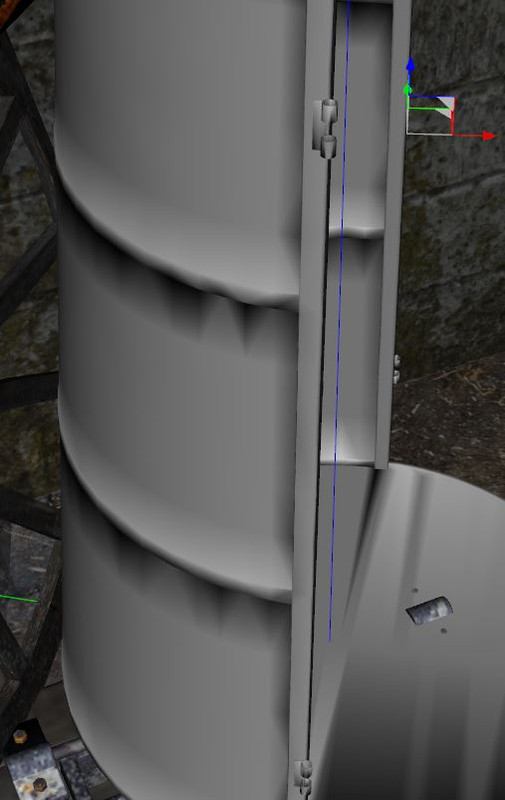
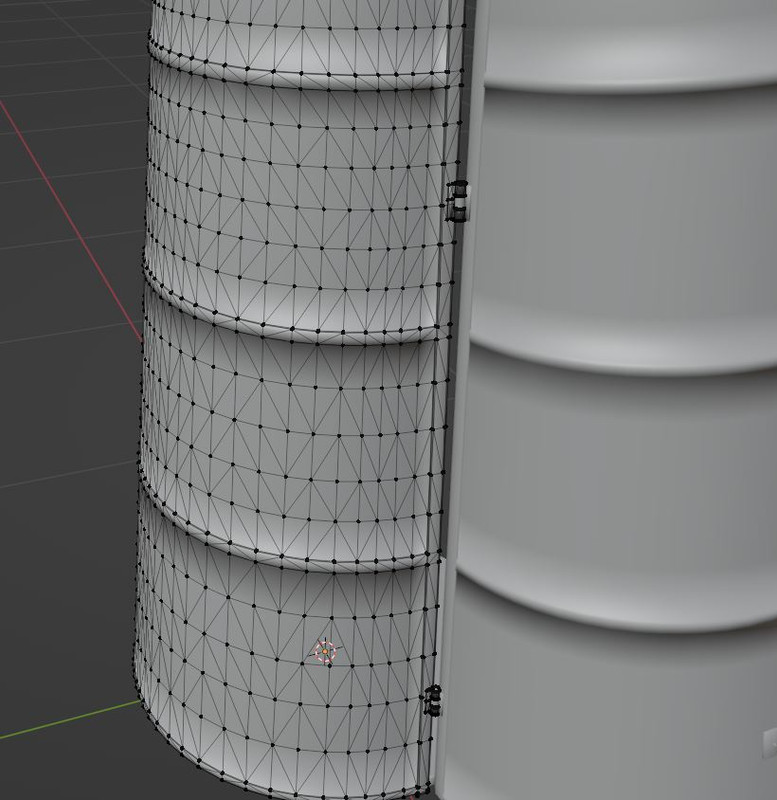
Problems with shading (Fine in Blender, but not in Daz)I have a problem with normal shading in Daz. In Blender everything looks smooth and fine, but imported to DAZ it does not anymore. See screenshots. It's the very same mesh. I tried wried fbx and dae import.
Content creators out there... Any ideas on this? Thank you in advice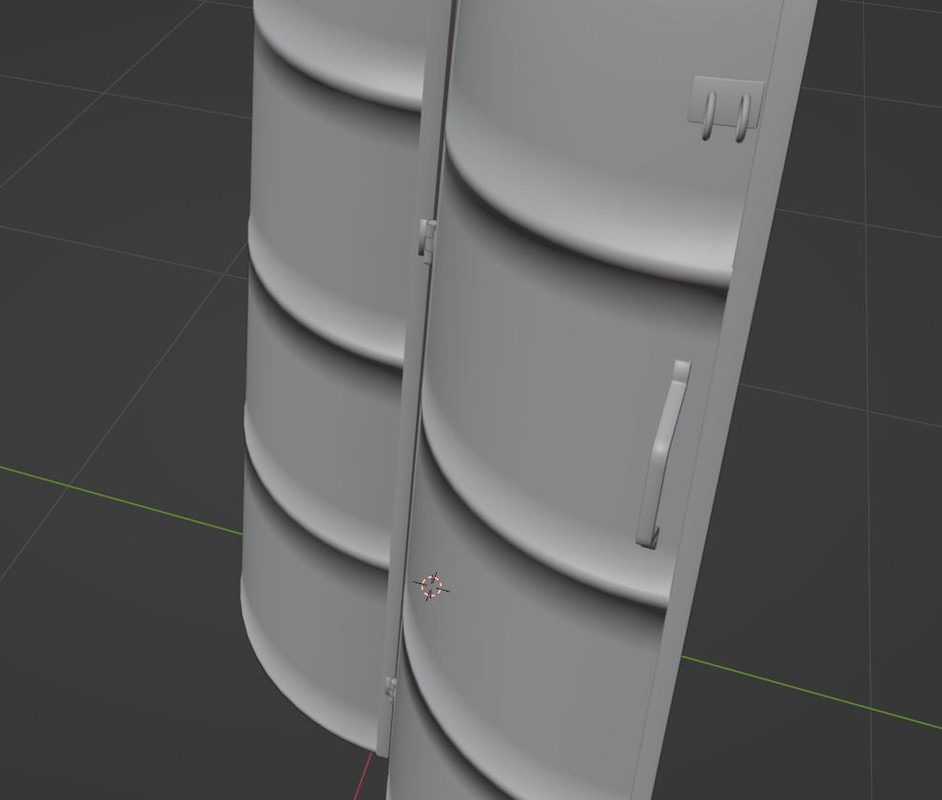
 Import animation from blender into daz
I don't know that answer to your first two questions, but the answer seems obvious: All open source licenses grant the right to observe, understand, improve, extend, and modify the source code. It can easily be imagined as the option of first resort.
As for applying the license to its output, the license triggers when you link to your code, or in the case of Python, import, GPL'ed code. Displaying source code in a web app does not meet the requirement. It is I that would have to apply the license, and even then only if and when I chose to distribute the code.
But your point, I think I understand it, is interesting... I think I'll test it by asking it to generate a Houdini hda and see how far it gets, or if it just talks about it. Houdini is well documented but proprietary and I will assume that they didn't set chat loose on their source.
But I also think this is all sort of burying the lead... it knew exactly what I was doing, generated correct comments in the code, and even changed the identifiers to more python-like code conventions. I really thought that AI would come for my job last. Nope. Won't be long now.
Question about using DS from a different computerWonderland said:
SofaCitizen said:
I would probably avoid using Daz Central or Connect in that situation - infact if you setup the base library on the external drive properly you won't even have to run DIM after Daz Studio is installed. Once DS is installed, immediately go into the list of base libraries and remove the pre-created ones which will be on C: - you will probably want to manually remove those folders. Then you can add the base library from your external drive and within Content DB Maintenance you can check Process Metadata Queue and Re-import Metadata and this will import everything into Smart Content (after several minutes).
However, even if you fully clean up and uninstall everything before you go home you would have to check the T&Cs to see if that is allowed. It probably would be since you would not be loading paid assets onto your friends computer but it's best to check for sure.
Iray preview does run on non-nvidia cards - albeit slowly. However, I don't know what the minimum spec would be for that, or filament or even just textured preview.
I don't want to screw up my existing DS (which already has multiple issues!) so I'd bring a fresh HD and install probably just what I needed on the new HD or who knows, maybe a fresh install would clear up my current issues. I don't see another way except through DIM but I have issues with DIM when I want to install into different folders (ie; I have a separate G9 folder) it will not show the items (all greyed out) on the folder that was not used in the last download. So if I download G9 items into its folder through DIM then open DS all my other content is greyed out and vice versa. I'm having so many issues with DS I
Have you added the new G9 folder to the daz search path within Daz studio?
for me to do this I select the 'Content Library' tab
then, from the menu icon at the top of the 'Content Library' tab column select 'Content Directory Manager'
Inside the 'Content Directory Manager' select DAZ Studio formats
add the path to your new G9 folder
Genesis 9 in PoserAnimations - QuestionsTimotheus said:
I'm going to be checking out Cascadeur for animating, but I have no idea yet how it works with Daz. Haven't had a chance to get into it. Here are a couple of links to check out....
https://blog.daz3d.com/create-animations-for-your-daz-characters-with-cascadeur/
https://cascadeur.com/blog/general/how-to-animate-daz3d-characters-with-cascadeur-tutorial
I've been dubbed the resident expert on Cascadeur, but I do my animating in C4D rather than DS. I've made a couple animations in Cascadeur that kind of freaked out when I tried to import them to DS, though I haven't tried enough to say how consistently it works.
I Upgraded to an Nvidia 4090.......What a nightmare!kwannie said:
Thanks for all the wonderful feedback, I will get the techs to give the that tool a whirl Leather. Wendy I didn't Install a name brand anti-virus yet but what does PostgreSQL do anyway?? I love the way that the 16 cores on the 7950x were handling PWToon with the 3090 build (2 seconds per frame at 1080) then I ruined all that by opting to immediately trade out for a 4090. I just don't get why the 4090 build can render a single frame fast then gets bogged down rendering each frame when doing an image series. I definately don't get why it bogs down doing a single frame in OpenGL and takes more than 3 minutes for a single frame, that should be instantaneous.
handles all the metadata, smart content etc
I am totally ignorant BTW but do know there were AVs such as ZoneAlarm which clashed with it
Diffeomorphic DAZ Importer version 1.6.0 releasedIs it impossible to import a pose in a blender model(.blend), not a Genesis model? Appears as a T pose.
Import body morphs from DAZ Studio to BlenderCornelius said:
lilweep said:
Desired Resolution = usually would be Base Resolution but can be High Resolution if you want (up to you and your limitations of what youre doing), but you have to keep the same throughout process
in Daz:
Load Gen 3 and set Resolution to "Desired Resolution"Export Gen 3 figure as obj (only export the Gen 3 figure, no eyelashes, no hair, no tearline etc)
Load the morph you want at the same "Desired Resolution"
Export Gen 3 morphed figure as obj (only export the Gen 3 figure, no eyelashes, no hair, no tearline etc)
in Blender:
Load both Objs you exported
Do the Join as Shapes process outlined earlier
Under Shapekeys, dial in the shape
For the work I'm supposed to do, I only need the body without the head, since the shape of the head and face shouldn't be changed.
If I import the entire Genesis it will change the shape of the face too, right?No, if you make no changes to the shape of the head the head will be unchanged by the morph (and it won't interfere with any other head morphs - morphs just stack).
Anyway, great explanation!
 Import body morphs from DAZ Studio to Blender
lilweep said:
Desired Resolution = usually would be Base Resolution but can be High Resolution if you want (up to you and your limitations of what youre doing), but you have to keep the same throughout process
in Daz:
Load Gen 3 and set Resolution to "Desired Resolution"Export Gen 3 figure as obj (only export the Gen 3 figure, no eyelashes, no hair, no tearline etc)
Load the morph you want at the same "Desired Resolution"
Export Gen 3 morphed figure as obj (only export the Gen 3 figure, no eyelashes, no hair, no tearline etc)
in Blender:
Load both Objs you exported
Do the Join as Shapes process outlined earlier
Under Shapekeys, dial in the shape
For the work I'm supposed to do, I only need the body without the head, since the shape of the head and face shouldn't be changed.
If I import the entire Genesis it will change the shape of the face too, right?
Anyway, great explanation!Animations - QuestionsDon't know about Unity, but with Blender, go and download Diffeomorphic. With that use easy import and set up the rig to be Rigify and you will be able to animate perfectly. I'm sure there's an easy way to get blender animations into Unity, I just don't have any experience with that. If you go to the Blender forum section, there's a whole thread on Diffeomorphic. And importing through Diffeo, your characters will have the correct textures. There's three options on the easy import, each has it's own pros and cons so you just have to experiment and find which suits your needs, but they all look good. Happy animating!
metadata on startupIf you do not install content products with Daz Connect (inside Daz Studio) don't log in to your Account from inside Daz Studio. Go to Preferences and disable Automatic Login. That will eliminate those automatic metadata downloads.
daz obj fitted in MD got geometry not matchRichard Haseltine said:
Although the vertex count is right several detail look diferent in your Scen Infor pane (and not just because you have only the base resolution):
Name :
SportsBra_7768
Label :
Basic Wear Sports Bra
Class :
DzFigure
Vertices :
30,602 / 7,768
Triangles :
0 / 0
Quads :
30,128 / 7,532
Total Faces :
30,128 / 7,532
Total Lines :
0 / 0
:
Hello Richard,
I didn't do anything on it. This sport bra was straight from the library, and then export to an OBJ file for MD to import.
Best,
Josh
metadata on startupOn one of my Desktop Computers DAZ Studio 4.21.0.5 loads thousands of metadata on startup. I had this problem once before I cannot remember how I fixed the problem.Any suggestions would be helpful. Cheers
Daz Studio 5 development updateRichard Haseltine said:
wsterdan said:
algovincian said:
Torquinox said:
vrba79 said:
What is the actual purpose of Filament anyway?
I could be wrong, but I think it was supposed to be a really fast real-time renderer like Blender's Eevee. I don't think it reached its potential, though.
My understanding is that Filament was designed for use as a real-time physically based rendering engine for Android mobile devices. I believe it was originally a side project by a few people at Google.
It's being used in DS as an alternative option for viewport previews (as opposed to a full blown render engine meant for final renders).
- Greg
It will be the Mac replacement for the Apple-depredated OpenGL, for one thing. Personally, as I've mentioned way too many times, I'm pumped about using it for toon animation. I'm currently using OpenGL and getting 1080p frames for under under half-a-second, Filament should give me the same render times or faster, an will add features like HDRI and better transparency, among other things. For me, at the very least, an OpenGL renderer equivalent but on steroids.
I believe a fully-supported version of Filament has the abilty to cast shadows as well, though I have no idea what features will be provided in DAZ Stuido 5. Fingers crossed, though.-- Walt Sterdan
We are told that on Mac, as on Windows, Filament will be an alternative PBR preview Drawstyle. The OpenGL Drawstyles are being updated to take advantage of more modern technology in Qt 6, but that is separate from Filament.
Well, as a Mac user that is fairly promising and may actually get me to use DS again outside of shaping characters and prepping them for import into Blender.
Create background like thisI'm a longtime beginner at Daz Studio. Another possibility could be to create a gradient color scheme in a 2D image editor such as GIMP, Photoshop, even Microsoft Paint/Word (which I just experimented with), etc., and save the image in a file format (png, jpg, etc) that Daz Studio can import into the Diffude color chanel in the Surfaces tab. In Daz Studio, create a plane Primitive, position it as desired and use the saved image file in the Diffuse color channel for the plane.
Daz 3D is part of

Connect
DAZ Productions, Inc.
7533 S Center View Ct #4664
West Jordan, UT 84084Licensing Agreement | Terms of Service | Privacy Policy | EULA
© 2026 Daz Productions Inc. All Rights Reserved.