-
"There's Always Another Sale™" (Report sales issue here.)
Get 52% OFF* their Genesis 3 Items, 58% OFF* their Genesis 2 Items, and 67% OFF* their Genesis, Michael 4 and Victoria 4 Items
Does not work with their Genesis 2 Items etc...
The oens I just tested seem to be working, please post a screen shot of your cart.
"There's Always Another Sale™" (Report sales issue here.)Get 52% OFF* their Genesis 3 Items, 58% OFF* their Genesis 2 Items, and 67% OFF* their Genesis, Michael 4 and Victoria 4 Items
Does not work with their Genesis 2 Items etc...
Okay, so it has to be only Gen2; a Gen2, Gen3, Gen8 item is just 40% not 67%.
"There's Always Another Sale™" (Report sales issue here.)Get 52% OFF* their Genesis 3 Items, 58% OFF* their Genesis 2 Items, and 67% OFF* their Genesis, Michael 4 and Victoria 4 Items
Does not work with their Genesis 2 Items etc...
GUIDE - What To Buy On The Daz Store?This is a great jumping off point for a discussion!
Here's some of my opinions. Needless to say, very subjective!
Utilities/Tools/Plugins
XTransfer: Easy to use, reliable, and very accurate in almost all cases. Expands your G8 library to include all G3 characters, which is huge.
Advanced: GenX, Legacy UVs, IRAY Converter
When combined with XTransfer, these products will allow you to use pre-G3 characters on G8. They're harder to use and less accurate, and taken together they're quite the investment. I would not recommend them for beginners. It also really depends how much you're invested in using older content, obviously. Personally, I'm having a lot of fun with them, so at least for me they're essential.Gen4 clones for G8: There's so much free Gen4 content out there, I find that these clones are worth it, even if they don't always produce good results.
Ultimate Freckles: Great product if you like freckles, the promos don't really do it justice. Using this product may result in large file sizes if you're not careful but there are ways around it.
Advanced: dForce Magnet
Not for beginners and a little tricky to use, but I think it's a good tool to have.Shave ThisLink: https://www.daz3d.com/cc-shave-this--body-hair-for-genesis-8-males
I think that male bodies without body hair look very unrealistic. This fixes the problem!
Just remember to hide the hair when your character has clothes covering them, otherwise you'll have to hide them in Photoshop.
Jepe's Bodyhair Project: Looks great, renders quick, fits underneath clothing, is compatible with a certain 3rd party anatomical geograft product. What's not to love? Only the armpits are a little iffy.
Shader PresetsMy personal opinion is that you shouldn't buy too many shader packs. A set with 50 rusty metal surfaces (or whatever) may look great, but just how many different rusty metal surfaces do you really need? Aren't two or three enough? These large sets tend to take up a lot of disk space and clutter up your library. That being said:
Grungy Threads: Hugely versatile shader set that you can use to dirty up skin, clothes, and environments. Can also be used to tear up clothes.
Here's some free high-quality texture resources:
https://texturehaven.com/
https://cc0textures.comMorphs Basic OnesSY 200 Morphs for G8: I find these morphs to be less sophisticated than the packs mentioned above, but they're free, so nothing to complain about. Perhaps not necessary if you own Rarestone and Zevo's packs, but ideal if you're just starting out
SWOLE for G8: If you like them beefy boys dial in a little (or a lot of) SWOLE for instant beefcake goodness!
Poses
100 Ultimate Superhero Poses: You already mentioned Fight Lab by the same creator. This set is worth mentioning if you like Superheroes because of its incredible value for money.
https://www.daz3d.com/forums/discussion/109961/pose-and-animation-conversion-for-multiple-generations-of-daz-figures/p1
https://www.sharecg.com/v/89846/view/8/Script/Daz3d-Pose-Converter-Standalone
https://www.deviantart.com/agentunawares/art/G3M-to-G8M-World-s-Greatest-Pose-Converter-709731867
https://www.deviantart.com/agentunawares/art/G3F-to-G8F-World-s-Greatest-Pose-Converter-709591348
With these free pose converters you will be able to use almost all Gen4-G3 poses on G8. With a little bit of patience you can convert all those old random pose packs that keep showing up amongst the bi-weekly freebies and get a huge pose library.ETA: Wrestling Poses
If you like wrestling, this pose set is huge.HDRIs
Some free HDRI resources that I use all the time:
https://www.deviantart.com/agentunawares/gallery/64098035/freebies
https://www.deviantart.com/zbyg/gallery/6278123/resources
https://gumroad.com/l/DXEPj
https://hdrihaven.com/
https://www.deviantart.com/laticis/art/Laticis-FREE-Images-Lighting-Accessories-497411807LightsUltra Genesis Studio: This set shows up for free every now and then and it's worth grabbing. The promo pictures don't do it justice.
Wardrobe
Genesis Supersuit: This is an old product and be warned, it doesn't play nice with the Smoothing Modifier. Definitely don't pay anything close to the full price for this one. However, once in a blue moon you will find it discounted by 90% or something like that. If you like toony Superheroes and SciFi this product is a lot of fun!
Eyeglasseshttp://www.sharecg.com/v/85745/gallery/5/3D-Model/Glasses
http://www.sharecg.com/v/85662/gallery/5/3D-Model/Nerd-glasses-reloaded
Not only some of the best glasses avilable but also a freebie!Thank you Hylas, I'm sure your contribution is precious! :D
The first products you've mentioned are very useful for people who have many Genesis 3 characters!
I haven't tested dForce Magnet yet.
I like freckles, and I make them with Skin Builder 8.
But the fact that they are LIE, and so that they don't create custom textures (I assume), is great, and I want to check it out!So you're telling me that Jepe's Bodyhair don't penetrate the clothing? That sounds awesome!
Especially with leg hair and shorts: with the product I use, either I have to fix the pokethrough on the shorts with Photoshop, or I have to remove the hair from the bare part of the legs as well.And thanks for sharing the other resources as well!
GUIDE - What To Buy On The Daz Store?This is a great jumping off point for a discussion!
Here's some of my opinions. Needless to say, very subjective!
Utilities/Tools/Plugins
XTransfer: Easy to use, reliable, and very accurate in almost all cases. Expands your G8 library to include all G3 characters, which is huge.
Advanced: GenX, Legacy UVs, IRAY Converter
When combined with XTransfer, these products will allow you to use pre-G3 characters on G8. They're harder to use and less accurate, and taken together they're quite the investment. I would not recommend them for beginners. It also really depends how much you're invested in using older content, obviously. Personally, I'm having a lot of fun with them, so at least for me they're essential.Gen4 clones for G8: There's so much free Gen4 content out there, I find that these clones are worth it, even if they don't always produce good results.
Ultimate Freckles: Great product if you like freckles, the promos don't really do it justice. Using this product may result in large file sizes if you're not careful but there are ways around it.
Advanced: dForce Magnet
Not for beginners and a little tricky to use, but I think it's a good tool to have.Shave ThisLink: https://www.daz3d.com/cc-shave-this--body-hair-for-genesis-8-males
I think that male bodies without body hair look very unrealistic. This fixes the problem!
Just remember to hide the hair when your character has clothes covering them, otherwise you'll have to hide them in Photoshop.
Jepe's Bodyhair Project: Looks great, renders quick, fits underneath clothing, is compatible with a certain 3rd party anatomical geograft product. What's not to love? Only the armpits are a little iffy.
Shader PresetsMy personal opinion is that you shouldn't buy too many shader packs. A set with 50 rusty metal surfaces (or whatever) may look great, but just how many different rusty metal surfaces do you really need? Aren't two or three enough? These large sets tend to take up a lot of disk space and clutter up your library. That being said:
Grungy Threads: Hugely versatile shader set that you can use to dirty up skin, clothes, and environments. Can also be used to tear up clothes.
Here's some free high-quality texture resources:
https://texturehaven.com/
https://cc0textures.comMorphs Basic OnesSY 200 Morphs for G8: I find these morphs to be less sophisticated than the packs mentioned above, but they're free, so nothing to complain about. Perhaps not necessary if you own Rarestone and Zevo's packs, but ideal if you're just starting out
SWOLE for G8: If you like them beefy boys dial in a little (or a lot of) SWOLE for instant beefcake goodness!
ETA: Fantasy Amazon: SWOLE for the ladies, and it's free to boot!
Poses
100 Ultimate Superhero Poses: You already mentioned Fight Lab by the same creator. This set is worth mentioning if you like Superheroes because of its incredible value for money.
https://www.daz3d.com/forums/discussion/109961/pose-and-animation-conversion-for-multiple-generations-of-daz-figures/p1
https://www.sharecg.com/v/89846/view/8/Script/Daz3d-Pose-Converter-Standalone
https://www.deviantart.com/agentunawares/art/G3M-to-G8M-World-s-Greatest-Pose-Converter-709731867
https://www.deviantart.com/agentunawares/art/G3F-to-G8F-World-s-Greatest-Pose-Converter-709591348
With these free pose converters you will be able to use almost all Gen4-G3 poses on G8. With a little bit of patience you can convert all those old random pose packs that keep showing up amongst the bi-weekly freebies and get a huge pose library.ETA: Wrestling Poses
If you like wrestling, this pose set is huge.HDRIs
Some free HDRI resources that I use all the time:
https://www.deviantart.com/agentunawares/gallery/64098035/freebies
https://www.deviantart.com/zbyg/gallery/6278123/resources
https://gumroad.com/l/DXEPj
https://hdrihaven.com/
https://www.deviantart.com/laticis/art/Laticis-FREE-Images-Lighting-Accessories-497411807LightsUltra Genesis Studio: This set shows up for free every now and then and it's worth grabbing. The promo pictures don't do it justice.
Wardrobe
Genesis Supersuit: This is an old product and be warned, it doesn't play nice with the Smoothing Modifier. Definitely don't pay anything close to the full price for this one. However, once in a blue moon you will find it discounted by 90% or something like that. If you like toony Superheroes and SciFi this product is a lot of fun!
Eyeglasseshttp://www.sharecg.com/v/85745/gallery/5/3D-Model/Glasses
http://www.sharecg.com/v/85662/gallery/5/3D-Model/Nerd-glasses-reloaded
Not only some of the best glasses avilable but also a freebie!Anatomy Rendering Error (NSFW)Can anyone help me figure out why this is happening? Genesis 8/Victoria 8 with Genesis8FemaleAnatomicalElements. No matter what skin I apply, it doesn't work. Even using SkinBuilder doesn't correct the problem. The genital mesh also appears to not be connecting properly. Using Daz Studio Pro 4.12.1.118 64 bit. NVidia GTX 2070. Everything was working correctly than mysteriously just stopped. Video card drivers are up to date.
Mod edit:- Image removed
With no pics, wild guesses ;-)
Some presets are the "H" type, need to select the main figure, then they will work on the elements.
I don't have SkinBuilder.
Any geograft mesh will only "fit to" properly on the figure it was made from. BUT if you have selected the content creation tools [i.e. the geometry editor brush] then they are not activated. Use the pointer selection tool.
Deepsea Adam HD for Genesis through Genesis 8?There have been 8 generations of Daz figures so far.
- For generations 1 to 4 "Michael" and "Victoria" were the actual base figures.
- Generation 5 introduced Genesis, a single base figure which could become male or female. All the "Name 5" core characters like Michael and Victoria 5 are characters for Genesis.
- Generation 6 went back to separate male and female base figures but didn't call the base figures Michael and Victoria again. Rather they chose to create more generic "Genesis 2 Female" and "Genesis 2 Male" base figures, and all the "Name 6" core characters are characters for either G2F or G2M.
- Generation 7 is Genesis 3, all the "Name 7" core characters are characters for either G3F or G3M.
- Generation 8 is Genesis 8 (they chose to not call it "Genesis 4" because Generation 4 is still in use and people could be confused as to why V4 is not a character for Genesis 4, for example). All the "Name 8" core characters are characters for either G8F or G8M.
Contrary to Adam, various incarnations of Michael don't look the same, they're various interpretations of the general idea behind the character.
Adam is provided as a set of characters for Genesis, G2M, G3M and G8M who all look the same. That enables you for example to use the one based on G2M when you want to use G2M clothes and the one based on G8M when you want to use G8M clothes, but still have the figure look like Adam in all those scenes.
Each version can be combined with other morphs and characters for the corresponding Genesis version. So you could combine Adam for G8M and Michael 8, for example.
This is one of the most useful posts I have ever read on this forum!
Wow! It is stunning to have all of this information all in one consice and well articulated paragraph.
I have copied your response into a Word document and I will keep it as my mantra for weeks, I am sure, until I have this information committed to memory.
Thank you Leana! :)
GUIDE - What To Buy On The Daz Store?It's been almost 3 years since I started using Daz Studio, and almost 2 years since my first purchase on the Daz Store.
During this time, I've spent maybe too much money there, sometimes with smart purchases, sometimes with dumb ones.
I've checked every single product of the last years, and I check the new releases every day.So, I thought it would have bee nice, both for new and for older users, to write this guide.
I hope it'll help you to spend your money in a wiser way, to see a real improvement in your workflow and in the quality of your art.If you're just starting to use Daz, my suggestion is to check freebies all around the web: you can learn with those, then choose if you'd like to make more with Daz!
This guide is about Iray, Genesis 8 and static renders, because that's what I've done thousands of times, while there surely are better users than me to talk about previous generations, 3Delight and animations.
Furthermore, I use Daz Studio to create stories set in a contemporary setting: that explains my focus on workflow and reusability of assets. I think that people interested in making a few artistic renders every once in a while may have a different opinion about some parts of the guide.It's hard to write such a long guide, and I've tried to keep it organized.
Sometimes I've stated my opinion as facts, and that was to not repeat every time that everything I've said is subjective and based on my personal experience.I've written a brief description of most products, because this is not a list of things to buy: read the description, and choose for yourself what you need and what you don't!
I hope you'll find this guide useful, and feel free to contribute in the comments if you think there are some great products I haven't listed here!
I care about your feedback and opinion, and I've already changed some parts of the guide based on that.INDEX
- General Tips
- Daz Deals
- Gift Cards
- Platinum Club
- Store Sales
- What Would I Avoid?
- Too Many Figures And Morph Packages
- Textures
- Too Heavy Products
- Bundles
- What Would I Buy?
- Utilities
- Shader Presets
- Figures
- Morphs
- Expressions
- Poses
- Environments
- HDRIs
- Lights
- Hair
- Wardrobe
- Accessories
- Props
GENERAL TIPS
Daz Deals
If you're interested in spending money on the Daz Store, the first thing you should do is to install the Daz Deals browser extension.
It will allow you to see if the current price is a good one (like Keepa or CamelCamelCamel for Amazon), and you can even set email notifications to be alerted when a specific product has reached the price you wanted, or when it's at his 1/3/6/12-months best price.
Keep in mind, that the price you could have reached special sales is not shown there. Indeed, to see those prices, you have to put some specific products in your cart at the same time.And one of its most useful features is that you can filter the store by wishlisted items, or by PC coupons.
You can also receive mails for flash sales (Daz doesn't send them).
Furthermore, you'll be notified about daily Daz sales hours before Daz will do it. To me, that means I can check new releases when I wake up, instead of maybe losing sight of them throughout the day.Plus, with Daz Deals you'll find, on every product page, links to gallery renders that have used it, and to forum threads where it has been mentioned. That will help you to clarify what the promos and description are not specifying.
It's free, so there's no reason not to install it!
Gift Cards
When I see a 10-20% gift card sale, I always buy some store credit, even if I'm not going to purchase anything in the near future.
This allows me to combine that discount with other sales.
Sometimes you'll be even able to purchase gift cards at a 30% discount: that's when you really want to stack up store credit.Gift card sales often need a new release in the cart.
To find the best item, just search for "new" in the store, and it'll show you every product considered new.
Then, you can filter it by wishlisted items, or just find one that you like. If they cost too much, just grab a 2$ texture set, and it'll probably be worth it thanks to the store credit discount.Platinum Club
If you regularly purchase products from the Daz Store, this is the best purchase you can make.
Every month, you'll get
- 6$ coupon to use on many products
- 6$ coupon to use on even more products, but only if you're spending at least 18$
- Freebies. Sometimes they're great (like an electronic store), other times it's stuff you don't have a use for. But it's always free stuff.
- A lot of relevant discounts on most products in the store.
- Often, there are specific sales for PC+ members.
Now that you want to join the PC club, what membership should you aim for?
The 3-months one makes little sense, unless you just want to try it out, because it's 8$/month, while the annual membership is 5.8$/month.
On top of that, there are sales when you can purchase the memberships with a 30-50% discount.
They're more frequent for people who don't currently have the PC+ membership, but sometimes (maybe every 6 months) there are also flash sales for already members.In the best-case scenario (50% discount on the annual PC+ membership, 30% gift card), that means you can get 12$ worth of coupons, freebies and a ton of sales and discounts for 2.04$/month.
Store Sales
Chance is you probably need a specific plugin ASAP, but you can wait to get that new hair.
Daz marketing stuff is seriously great: every day a new sale is on, with wonderful graphics etc.
But most of the sales are just not good in practice.If you can wait, it's best to wait for huge Store Sales, which usually happen 2/3 times per year.
On those occasions, the whole store can go on sale.
Some premium products won't be discounted by more than 50% in a small window of time, but that's still better than full price.
Other products, like i13's huge library, often reach something like 90-95% discount.Be aware when you spot a great gift card sale: a store sale is probably coming.
WHAT WOULD I AVOID?
Too Many Figures And Morph Packages
Something I've recently discovered is that, with Genesis 8, the more morphs you have installed in your library, the longer loading and clearing times will be.
It doesn't matter if you're not using them on a specific figure: it will take longer both to load it, and close Daz Studio (very important fact, now that we need a script to open more than a single instance)/clear the scene afterward.It's very sad to say, but I'm currently not using 2/3 of the figures and of the morph packages I had bought.
And I'd uninstall even more of them, if I hadn't already used them in story characters I still need.So, avoid figures who look very alike, and absolutely avoid morph packages you're not planning on using.
Textures
There are a lot of awesome texture packages around, but the chance is, you can apply shaders yourself for a fraction of the price.
Furthermore, you can use shaders everywhere, but you can only apply textures to the relative products. And you don't even see them, unless you're in Smart Content->Files. And trust me, as your library gets bigger, you'll forget about most products you have in it.Please note, this is a controversial thesis: some people have different opinions about textures for specific products, and they have expressed them in the comments.
Too Heavy Products
I'm a huge fan of SSDs, and I don't have a single HDD installed in my build. I've discussed this choice in other threads, and since this one is already going to be pretty long, I'm not going to discuss it further.
The problem is that SSDs cost a lot. Especially if you have your Daz library installed on an NVME one, like I do.
So, I have to think about storage space too.
In particular, this is one more reason why I'm not fond of texture packages.
And I'm not fond of dForce hair too, in general: they look great in the final renders, but sometimes they make my whole interface sluggish, they are not viewable in the Texture Shaded viewport, and, first of all, they sometimes can occupy more than 1GB of storage.Bundles
Almost every day there's a new bundle, both in its "Pro" and "Basic" version.
Honestly, since most products in those bundles are not useful to me, there was never a time when I've thought "this is a good purchase".
Plus, if you have already purchased a few products from that bundle, you'll still have to pay for the whole thing, differently to how bundles work on other platforms like Steam.The only bundles I've purchased are those for charity, and one with a male and one with a female figure, because it's the only way to receive the relative Anatomical Elements.
I've also purchased bundles that contained all products I needed, and I've regretted doing otherwise when, for example, I've purchased separately the male and female versions of the same addon: it would have been wiser to save for the relative bundle in that case.So, in the end, just wishlist the specific products you'd use, and don't let that majestic marketing techniques go to your mind.
For example, you need some specific figures to use other figures in the store.
The most important ones are Victoria, for females, and Michael, for Males.Please note, this is a controversial thesis: some people love to purchase pro/basic bundles.
World War 2 ModelsRenderosity - Panko for guns, adh3d for various vehicles/uniforms/weapons, ranman38 for tanks, Cybertanko also has British Uniforms and a number of guns including a Thompson
PoserWorld - Soviet Sniper for Victoria 4, Japanese soldier for David, Japanese Private WW2 for Michael 4
ShareCG - Freebies
German WWII era Heavy Tank Tiger I - https://www.sharecg.com/v/94034/browse/5/3D-Model/German-WWII-era-Heavy-Tank-Tiger-I
German Assault Gun Jagdpanther (v1.0) - https://sharecg.com/v/94044/related/5/3D-Model/German-Assault-Gun-Jagdpanther-v1.0
panther AUSF. G tank - https://www.sharecg.com/v/18117/3d-model/panther-AUSF.-G-tank
LTvz38 Praga - Czech light tank - https://www.sharecg.com/v/58511/related/5/3D-Model/LTvz38-Praga---Czech-light-tank
OM Autocarretta - https://sharecg.com/v/79859/gallery/11/Poser/OM-Autocarretta
Pavesi P4 Artillery Tracktor - https://sharecg.com/v/77698/gallery/11/Poser/Pavesi-P4-Artillery-Tracktor
BA-64 APC - https://sharecg.com/v/77552/gallery/11/Poser/BA-64-APC
STZ-5 Russian Artillery Tractor "Stalinec" - https://sharecg.com/v/77087/gallery/11/Poser/STZ-5-Russian-Artillery-Tractor-Stalinec
SPA-Viberti AS-42 Sahariana Camioneta - https://sharecg.com/v/73812/gallery/11/Poser/SPA-Viberti-AS-42-Sahariana-Camioneta
Vickers Mk VIB - https://sharecg.com/v/73082/gallery/11/Poser/Vickers-Mk-VIB
Toldi I Light tank - https://sharecg.com/v/72331/gallery/11/Poser/Toldi-I-Light-tank
Solothurn S2-200 (MG 30, 31M) Light Machine Gun - https://sharecg.com/v/71302/gallery/11/Poser/Solothurn-S2-200-MG-30-31M-Light-Machine-Gun
Solothurn S18-100 Anti-Tank Canon for Poser - https://sharecg.com/v/70688/gallery/11/Poser/Solothurn-S18-100-Anti-Tank-Canon-for-Poser
Csaba armoured scout car - https://sharecg.com/v/71331/gallery/11/Poser/Csaba-armoured-scout-car
Zrinyi assault gun and tank destroyer for Poser - https://sharecg.com/v/70335/gallery/11/Poser/Zrinyi-assault-gun-and-tank-destroyer-for-Poser
Turan 43M Hungarian Heavy Tank model for Poser - https://sharecg.com/v/69734/gallery/11/Poser/Turan-43M-Hungarian-Heavy-Tank-model-for-Poser
Turan 41M Hungarian Medium Tank model for Poser - https://sharecg.com/v/69721/gallery/11/Poser/Turan-41M-Hungarian-Medium-Tank-model-for-Poser
Turan-4oM Hungarian Medium Tank modell for Poser - https://sharecg.com/v/69717/gallery/11/Poser/Turan-4oM-Hungarian-Medium-Tank-modell-for-Poser
Light Army field wagon for Poser - https://sharecg.com/v/67778/gallery/11/Poser/Light-Army-field-wagon-for-Poser
Hetzer - https://sharecg.com/v/67368/gallery/11/Poser/Hetzer
FieldKitchen - for Poser - https://sharecg.com/v/66676/gallery/11/Poser/FieldKitchen-for-Poser
Tank Support - https://sharecg.com/v/66555/gallery/11/Poser/Tank-Support
Panzer 38(t) Supplement - https://sharecg.com/v/66466/gallery/11/Poser/Panzer-38t-Supplement
Panzer 38(t) late version of Czech Lt.vz.38 tank - https://sharecg.com/v/66458/gallery/11/Poser/Panzer-38t-late-version-of-Czech-Lt.vz.38-tank
Lt.vz.38 - Not A Toy Tank and Bergepanzer - https://sharecg.com/v/66432/gallery/11/Poser/Lt.vz.38-Not-A-Toy-Tank-and-Bergepanzer
Toy Tank - Ltvz. 38 - https://sharecg.com/v/62518/gallery/11/Poser/Toy-Tank-Ltvz.-38
31M Rifle (Carbine) for Poser - https://sharecg.com/v/61456/gallery/11/Poser/31M-Rifle-Carbine-for-Poser
Bicycle - Old military - https://sharecg.com/v/60999/gallery/11/Poser/Bicycle-Old-military
Slovak light tank LT vz. 40 - https://www.sharecg.com/v/32436/3D-Model/Slovak-light-tank-LT-vz.-40
PzKpfw II C - https://sharecg.com/v/30192/gallery/5/3D-Model/PzKpfw-II-C
Panhard 178 (France IIWW) (Obj-Bfx Format) - https://www.sharecg.com/v/61137/related/5/3D-Model/Panhard-178-France-IIWW-Obj-Bfx-Format
Flak 37 (Obj-FBX Format) - https://sharecg.com/v/61136/gallery/5/3D-Model/Flak-37-Obj-FBX-Format
KV-1E heavy tank (Poser version) - https://sharecg.com/v/69654/gallery/11/Poser/KV-1E-heavy-tank-Poser-version
Polish Armour 1939 - https://www.sharecg.com/v/40095/View/5/3D-Model/Polish-Armour-1939
Bailey Bridge - https://sharecg.com/v/41464/gallery/5/3D-Model/Bailey-Bridge
Sdkfz9 FAMO Flakwaggen - https://sharecg.com/v/39742/gallery/5/3D-Model/Sdkfz9-FAMO-Flakwaggen
Sdkfz9 Famo DB10 - https://sharecg.com/v/39579/gallery/5/3D-Model/Sdkfz9-Famo-DB10
Sdkfz9 FAMO - https://sharecg.com/v/39264/gallery/5/3D-Model/Sdkfz9-FAMO
M3 Grant Tank - https://www.sharecg.com/v/46011/browse/11/Poser/M3-Grant-Tank
DUKW-Mats-FIXED - https://sharecg.com/v/49112/gallery/11/Poser/DUKW-Mats-FIXED
WW2 Quad gun tractor - https://sharecg.com/v/47246/gallery/21/DAZ-Studio/WW2-Quad-gun-tractor
Jerry can set - https://sharecg.com/v/47413/gallery/21/DAZ-Studio/Jerry-can-set
WW2 German fuel drum - https://sharecg.com/v/51147/gallery/21/DAZ-Studio/WW2-German-fuel-drum
WW2 German ammunition box - https://sharecg.com/v/51263/gallery/21/DAZ-Studio/WW2-German-ammunition-box
WWII Jeep - https://www.sharecg.com/v/90315/browse/5/3D-Model/WWII-Jeep
M-100 military trailer - https://www.sharecg.com/v/90316
Ford GPA - https://sharecg.com/v/42848/related/5/3D-Model/Ford-GPA
GMC DUKW - https://sharecg.com/v/42847/related/5/3D-Model/GMC-DUKWBritish Infantry for M3 low poly - https://sharecg.com/v/95826/browse/11/Poser/British-Infantry-for-M3-low-poly
british commando, daz3d poser pro - https://sharecg.com/v/94022/gallery/11/Poser/british-commando-daz3d-poser-pro
USRANGER for Michael3 - https://sharecg.com/v/94023/gallery/11/Poser/USRANGER-for-Michael3
Michael 4: World War II Headwear Pack I - https://sharecg.com/v/48259/related/11/Poser/Michael-4-World-War-II-Headwear-Pack-I
Michael 4: World War II Headwear Pack II - https://sharecg.com/v/48260/related/11/Poser/Michael-4-World-War-II-Headwear-Pack-II
Michael 4: World War II Headwear Pack III - https://www.sharecg.com/v/48403/browse/11/Poser/Michael-4-World-War-II-Headwear-Pack-III
Michael 4: World War II Headwear Pack IV - https://sharecg.com/v/48404/gallery/11/Poser/Michael-4-World-War-II-Headwear-Pack-IV
Michael 4: World War II Headwear Pack V - https://sharecg.com/v/48405/related/11/Poser/Michael-4-World-War-II-Headwear-Pack-V
Army Shirt for Michael 4: Long Sleeve - https://sharecg.com/v/48617/gallery/11/Poser/Army-Shirt-for-Michael-4-Long-Sleeve
Army Pants for Michael 4 - https://sharecg.com/v/48618/gallery/11/Poser/Army-Pants-for-Michael-4
Conforming Suspenders for Michael 4 - https://sharecg.com/v/48264/gallery/11/Poser/Conforming-Suspenders-for-Michael-4
Conforming Generic Military Suspenders for Mike 4 - https://sharecg.com/v/48380/gallery/11/Poser/Conforming-Generic-Military-Suspenders-for-Mike-4
M1910 Conforming Suspenders for Michael 4 - https://sharecg.com/v/48398/gallery/11/Poser/M1910-Conforming-Suspenders-for-Michael-4
Conforming Crossing Suspenders for Michael 4 - https://sharecg.com/v/48407/gallery/11/Poser/Conforming-Crossing-Suspenders-for-Michael-4
Conforming Suspenders for Army Shirt - https://sharecg.com/v/48624/gallery/11/Poser/Conforming-Suspenders-for-Army-ShirtDiffeomorphic DAZ Importer Version 1.5.1I'm having a blast trying to learn Blender. I've seen so many good material conversions, but for some reason my character is ending up very gray / pale,and I don't know how to fix her because, well, I'm still new.
I'd appreciate any help!
This is the Olympia 7 skin, by the way...
Here she is in Iray: ...
THAT'S A BEAUTIFUL SKIN!
I don't pretend to know much about the subject [yet], and nothing specifically for Olympia 7, but DAZ store has lots of options - here are some shaders that might work e.g.:
SKIN SHADERS:
Skin Builder Pro for Genesis and Genesis 2 Female(s)
Recipe Loader for Skin Builder
Skin Builder 3 for Genesis 3 Female(s)
Skin Builder 8 for Genesis 8 Female(s)
Sobek's HD Alternate Skins
Carrara Skin Shaders For David 5
Victoria 4 Skin Maps (High Res)
V5 Elite Skin Texture Valerie
The FREAK 4 Skin Maps 02
The FREAK 4 Skin Maps 01
SF Beautiful Skin Iray Genesis 8 Male
SF Beautiful Skin Iray Genesis 8 FemaleSHADERS FOR OTHER AREAS:
UHT Hair Shaders for Iray
DP - Carrara Shaders For Aiko 5
DP Mei Lin 6 Carrara Shaders
DP Gia 6 Carrara Shaders
DP The Girl 6 Carrara Shaders
DP Michael 6 Carrara Shaders
DP Olympia 6 Carrara Shaders
DP Stephanie 6 Carrara Shaders
Carrara Skin Shaders For David 5
DP Victoria 6 Carrara Shaders
DP Giselle 6 Carrara Shaders
Edwardian Inspired Floor Tile Shaders Vol 2
Shaders Revisited TartanHSS
Shaders Revisited - China Series 1(HSS)
Fairy Hair Shaders for DAZ Studio
Fairy Fabric shaders for DAZ Studio
Fairy Shader bundle
Fairy Hair Shaders 2 - Vertical for DAZ Studio
Subsurface Toon Shaders
Iray Super Shaders One And Done (Merchant Resource)
PTF Magic! Shaders and Wearables for Genesis 3 and 8
Shiny Fabric Iray Shaders
Leather and Fur Iray Shaders
Bone and Fantasy Scale Iray Shaders
Shimmer and Lace Iray Shaders
Imaginative Glass Iray Shaders
Simple Fabric Iray Shaders
Elegant Fabric Iray Shaders
Homestyle Iray Shaders
Homestyle 2 Iray Shaders
Everyday Fabric Shaders Iray
New Way to Shimmer Iray Shaders
Elite Human Surface Shader
UberHair Shader Upgrade for UberSurface
Advanced Shaders for EYEdeas 3
Subsurface Shader BaseWelcome to Hatsune Miku Anime Manga Cafe ☕I'd like to share some skills I use to render anime characters, I flatten the character making it look 2D. I use carrara but it might be possible in Daz studios.
Please see the images below for better understanding.
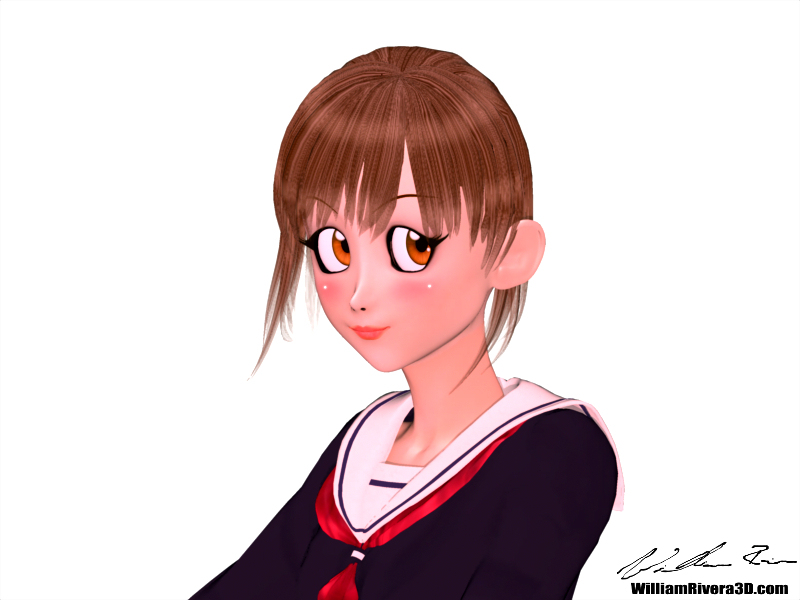
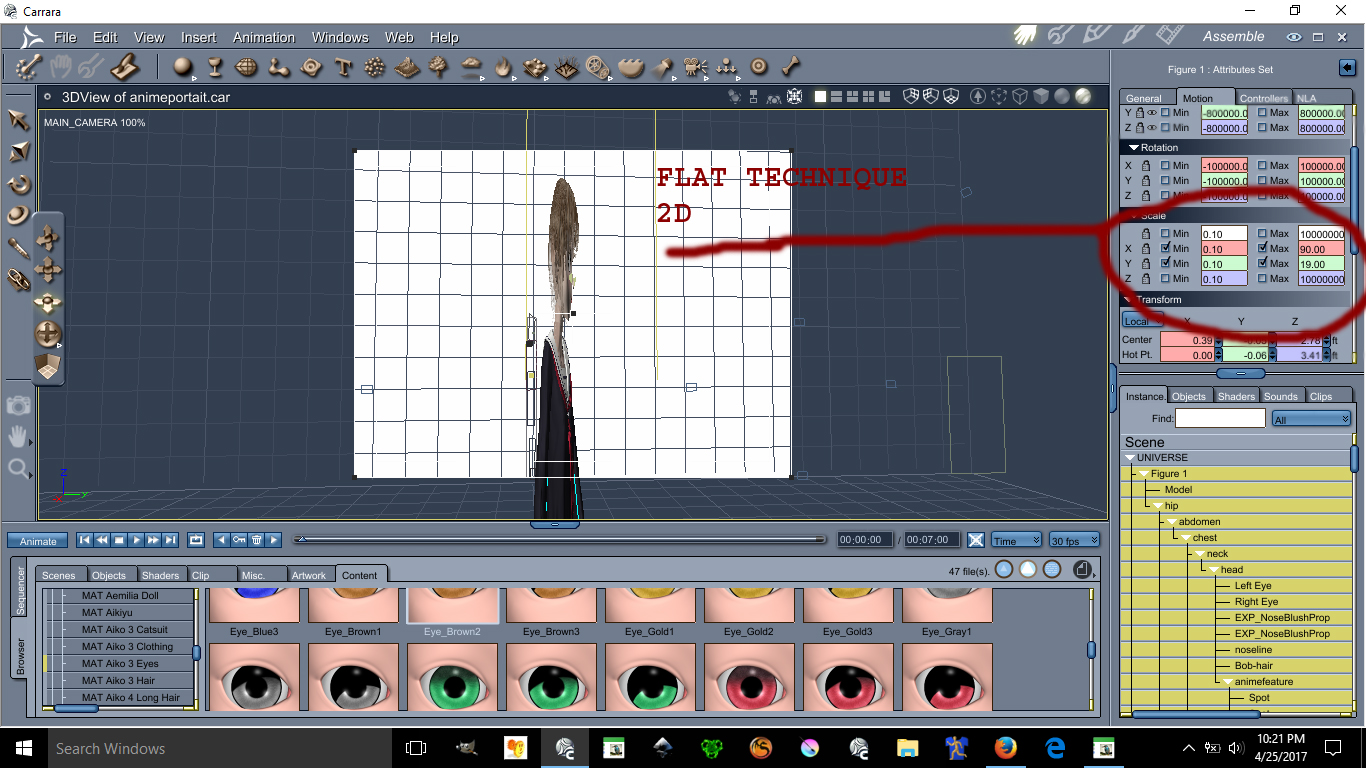
This image has been resized to fit in the page. Click to enlarge.
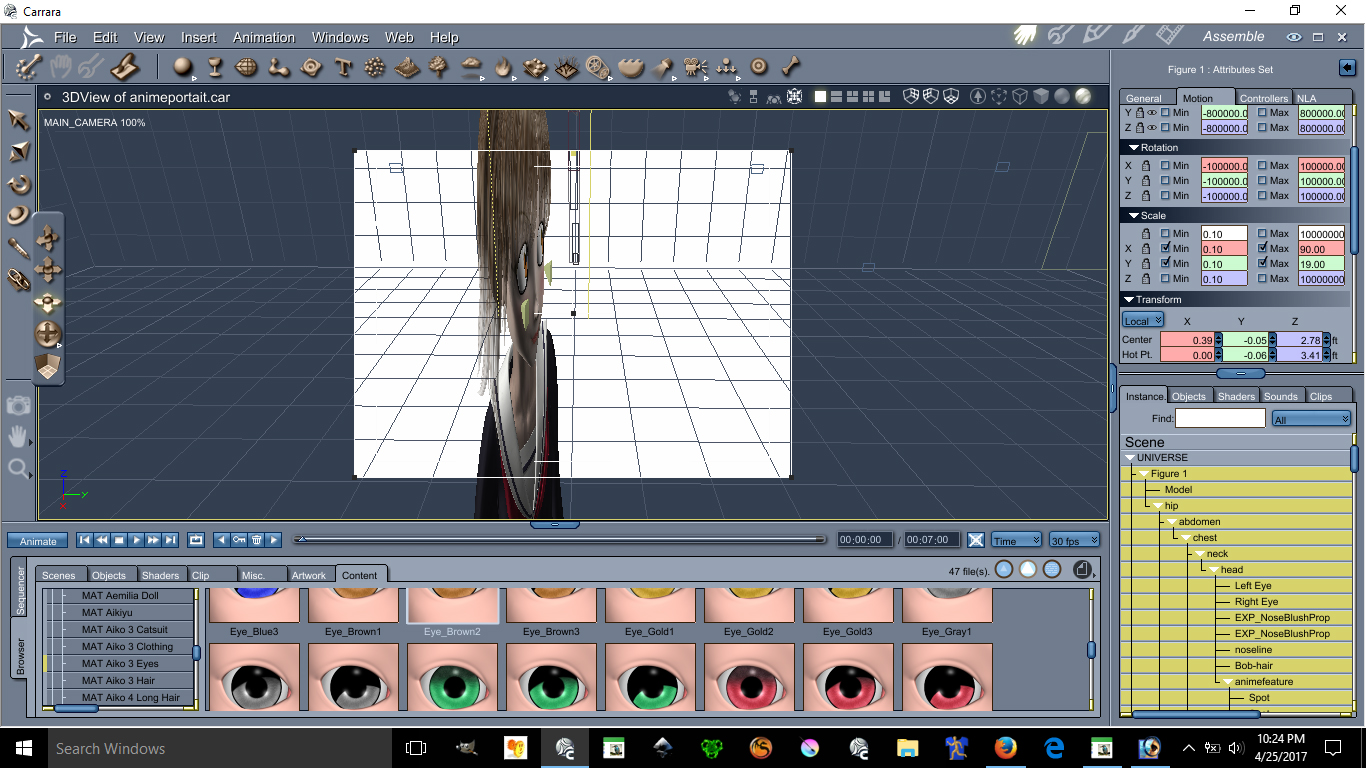
This image has been resized to fit in the page. Click to enlarge.
Using the scale X and Y can make possible the flatten of a character you can make her as flat as you want.
Ear Pulled, Square big eyes, small mouth, unrealistic skin and light bulbs on the cheek are all anime features.
Lets start with lightings
See images below please:
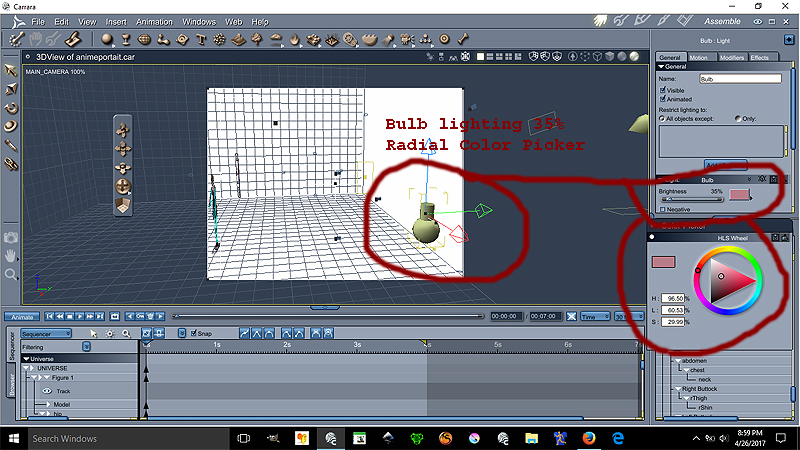
Ok the Bulb is at 35% lighting at the color on the radial is
H= 96.50%
L=60.53%
S=29.99%
This bulb gives proper anime skin lighting unrealistic notice that the bulb is over by the edge the character is centered
Now we go for the Distant light settings see image below please:
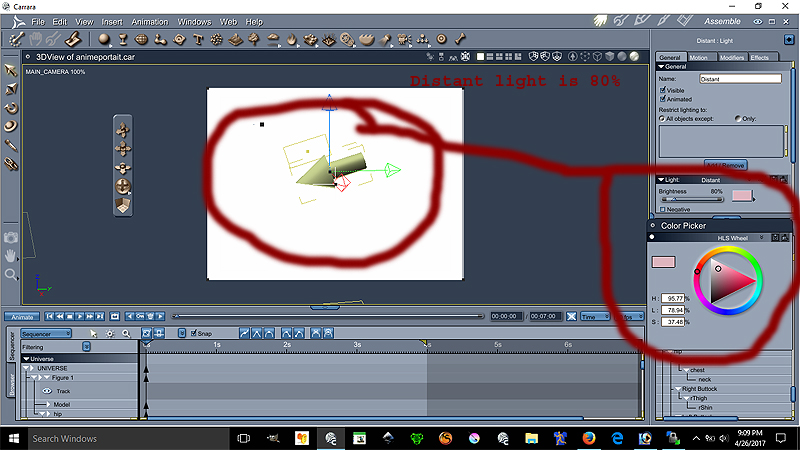
Ok the Distant light is at 80% lighting at the color on the radial is
H= 95.77%
L=78.94%
S=37.48%
The location of the distant light can be seen on image 1. Both lights are set to best settings - raytraced under the effect tab
This conclude the lesson on the environmental light settings is more of a pinkish lights.
The following lesson will focus on the Ear Pulled a very important anime feature disregarded by many :P
We will place our lovely model facing forward for better teaching.
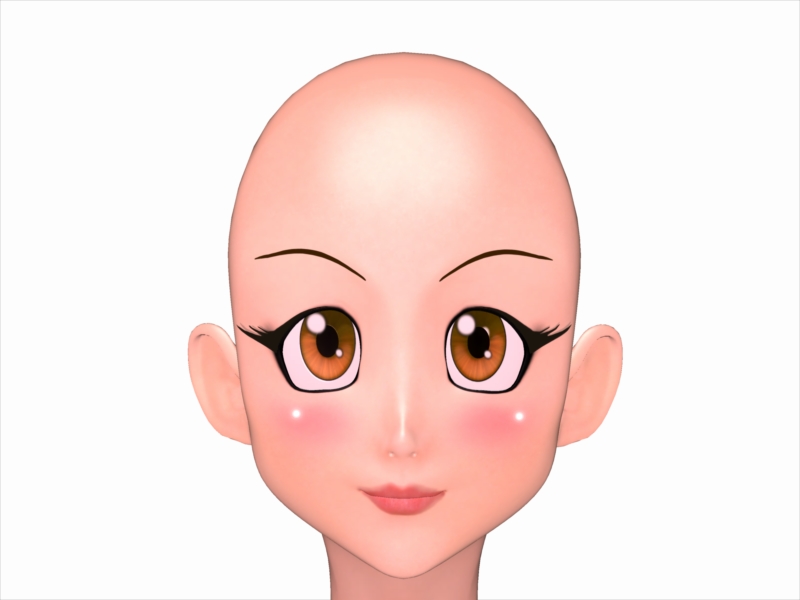
This model is Aiko 3 with kioki morph, This character has many morph and lots of clothes. Aiko 3 is widely supported in the Japanese Community including pixiv.net PoserClub.net.
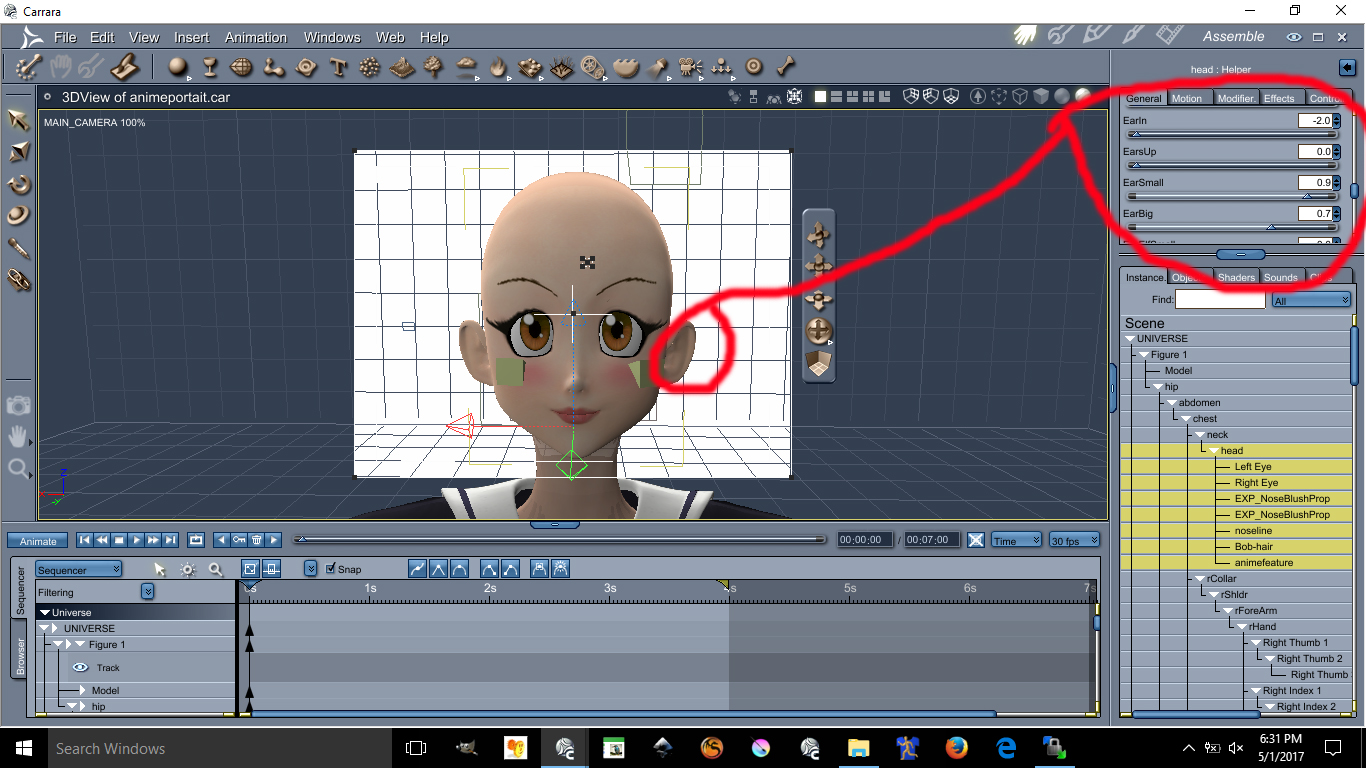
In order to pull the ears on Aiko 3, see the images below:
This image has been resized to fit in the page. Click to enlarge.
The values are as follow
Earin= -2.0 (thats minus 2.0)
EarBig= 0.7
EarSmall= 0.9
I doubt you can do these with Aiko 4 or up. I always recommened Aiko 3 for your anime needs.
Next Lesson we will talk about Triangular Chin
This next lesson focuses on her Triangular Chin. The triangular chin cannot be done using Aiko 3 alone. You need to have Kioki for Aiko 3 to make this triangular chin, without Kioki I do not think you can create such a perfected Anime Chin. Kioki by Capces can be purchased here at Daz. at https://www.daz3d.com/kioki and Kioki Requires Aiko 3 morph and map located here https://www.daz3d.com/aiko-3-0-morphs-and-maps now on to the lesson.
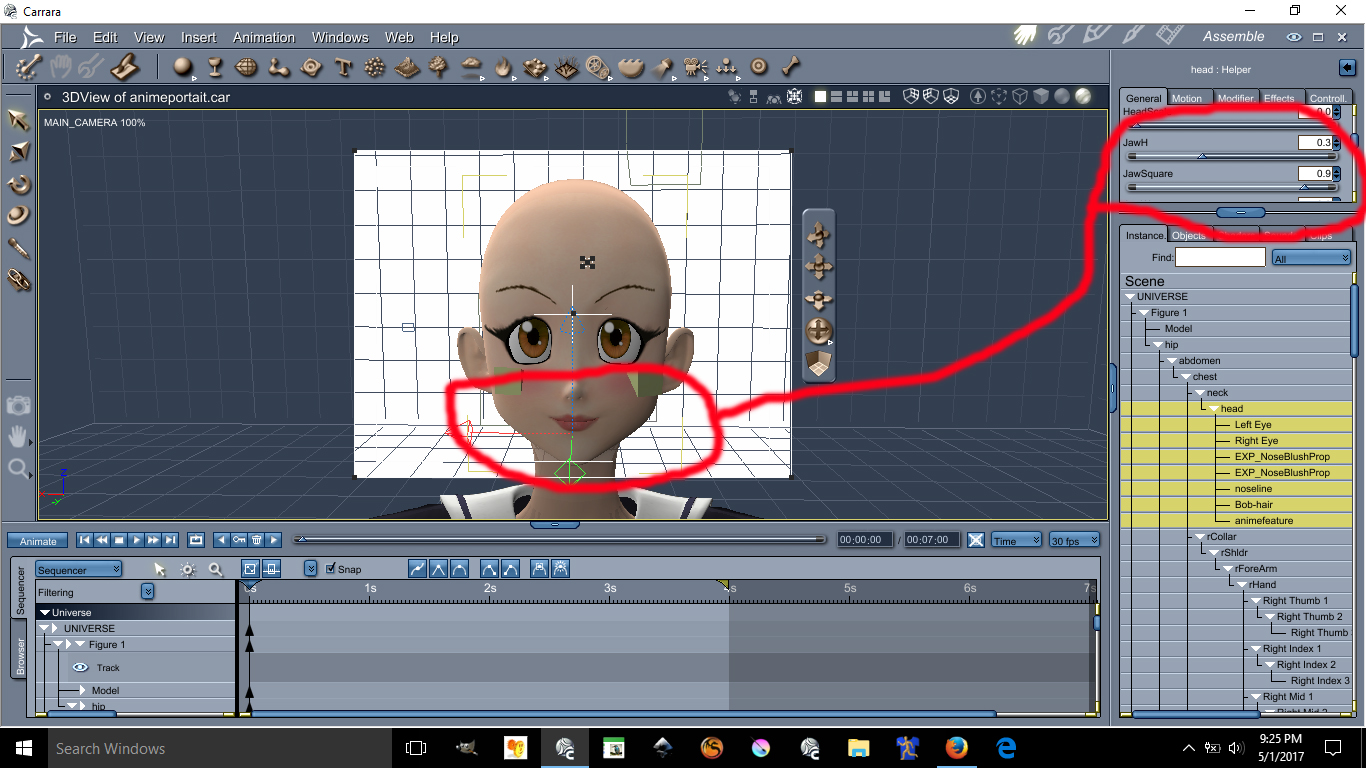
This image has been resized to fit in the page. Click to enlarge.
The values are as follow:
JawH=0.3
JawSquare= 0.9
Here are the eyes lesson, possibly the hardest and tedious part is morphing these eyes in an anime style shape. First you need to darken the eye socket materia, by making the eyes socket material dark it will create a dark outline all around the eyes. Again, the morph I used on these requires the Kioki Morph. Here are the values of the Anime Eyes Shapes along with links.
I recommend Dumb or Anime Eyes for Victoria 3 (Victoria 3 Eyes fits on Aiko 3) @ https://web.archive.org/web/20060925192216/http://jjdelpy.free.fr/Poser/doaeyes.html
The values for the eyes are as follow:
EyesScale 0.5
EyeSpace 0.5
EyeAngle Up 0.2
EyeGumDrop 0.3
EyeinSquare 0.3
Eyelwrflat 0.3
EyeOutDwn 0.4
EyeShape1 0.8
EyeUpFlat 0.1
EyeDepth -0.1
EyeHeight 0.1
EyeWidth 0.1
Eyelidshllw 0.1
Eyelidshvy 0.1
Lasheslong 1.0
Lashlofull -9.0
Headshape and nose is as follow:
HDstylized 0.8
ThroatThin 1.0
Nosepointed 0.4
MouthSmall 0.2
MouthNarrow 0.2
Doing the HDStylized will automatically make the nose small and will also give the head an anime style. This are the basics of making an anime head using Aiko 3 with Kioki morph in Daz Studios it may be possible to do all this but I am not 100% sure if Kioki will work in DazStudios, I assume it does because is sold here. The above was all done in Carrara Studios.
About the Cheek Lights and Skin will required some photoshop and some advance lighting in carrara. I am not going to discuss these here if you are still interested in those send me a email [email protected]
Are we (daz/poser, virtual photography, stories, comics) such a niche today?I was working in Adobe Photoshop and Illustrator & Flash , I only found poser6 when i was looking for a way to create a illustrations I just could not do in Photoshop and started with poser for a 3d software, I shortly found daz studio about a year later because of Victoria & Micheal 4 So I bought the daz 3a software I think back then it was like $99 in 2009, I have a tried a bunch of other 3d new software and apps but I just stuck with daz studio ever since. All I use daz for now is making animations . I hardly render stills unless its for testing lighting for a animated scene
This was my newest animation I have released so far. kind of corny but still fun to watch.
Click pic to play . Best viewed in 1080HD
 Deepsea Adam HD for Genesis through Genesis 8?
There have been 8 generations of Daz figures so far.
- For generations 1 to 4 "Michael" and "Victoria" were the actual base figures.
- Generation 5 introduced Genesis, a single base figure which could become male or female. All the "Name 5" core characters like Michael and Victoria 5 are characters for Genesis.
- Generation 6 went back to separate male and female base figures but didn't call the base figures Michael and Victoria again. Rather they chose to create more generic "Genesis 2 Female" and "Genesis 2 Male" base figures, and all the "Name 6" core characters are characters for either G2F or G2M.
- Generation 7 is Genesis 3, all the "Name 7" core characters are characters for either G3F or G3M.
- Generation 8 is Genesis 8 (they chose to not call it "Genesis 4" because Generation 4 is still in use and people could be confused as to why V4 is not a character for Genesis 4, for example). All the "Name 8" core characters are characters for either G8F or G8M.
Contrary to Adam, various incarnations of Michael don't look the same, they're various interpretations of the general idea behind the character.
Adam is provided as a set of characters for Genesis, G2M, G3M and G8M who all look the same. That enables you for example to use the one based on G2M when you want to use G2M clothes and the one based on G8M when you want to use G8M clothes, but still have the figure look like Adam in all those scenes.
Each version can be combined with other morphs and characters for the corresponding Genesis version. So you could combine Adam for G8M and Michael 8, for example.
Anime and Manga with CarraraI'd like to share some skills I use to render anime characters, I flatten the character making it look 2D. I use carrara but it might be possible in Daz studios.
Please see the images below for better understanding.
This image has been resized to fit in the page. Click to enlarge.
This image has been resized to fit in the page. Click to enlarge.
Using the scale X and Y can make possible the flatten of a character you can make her as flat as you want.
Ear Pulled, Square big eyes, small mouth, unrealistic skin and light bulbs on the cheek are all anime features.
Lets start with lightings
See images below please:
Ok the Bulb is at 35% lighting at the color on the radial is
H= 96.50%
L=60.53%
S=29.99%
This bulb gives proper anime skin lighting unrealistic notice that the bulb is over by the edge the character is centered
Now we go for the Distant light settings see image below please:
Ok the Distant light is at 80% lighting at the color on the radial is
H= 95.77%
L=78.94%
S=37.48%
The location of the distant light can be seen on image 1. Both lights are set to best settings - raytraced under the effect tab
This conclude the lesson on the environmental light settings is more of a pinkish lights.
The following lesson will focus on the Ear Pulled a very important anime feature disregarded by many :P
We will place our lovely model facing forward for better teaching.
This model is Aiko 3 with kioki morph, This character has many morph and lots of clothes. Aiko 3 is widely supported in the Japanese Community including pixiv.net PoserClub.net.
In order to pull the ears on Aiko 3, see the images below:
This image has been resized to fit in the page. Click to enlarge.
The values are as follow
Earin= -2.0 (thats minus 2.0)
EarBig= 0.7
EarSmall= 0.9
I doubt you can do these with Aiko 4 or up. I always recommened Aiko 3 for your anime needs.
Next Lesson we will talk about Triangular Chin
This next lesson focuses on her Triangular Chin. The triangular chin cannot be done using Aiko 3 alone. You need to have Kioki for Aiko 3 to make this triangular chin, without Kioki I do not think you can create such a perfected Anime Chin. Kioki by Capces can be purchased here at Daz. at https://www.daz3d.com/kioki and Kioki Requires Aiko 3 morph and map located here https://www.daz3d.com/aiko-3-0-morphs-and-maps now on to the lesson.
This image has been resized to fit in the page. Click to enlarge.
The values are as follow:
JawH=0.3
JawSquare= 0.9
Here are the eyes lesson, possibly the hardest and tedious part is morphing these eyes in an anime style shape. First you need to darken the eye socket materia, by making the eyes socket material dark it will create a dark outline all around the eyes. Again, the morph I used on these requires the Kioki Morph. Here are the values of the Anime Eyes Shapes along with links.
I recommend Dumb or Anime Eyes for Victoria 3 (Victoria 3 Eyes fits on Aiko 3) @ https://web.archive.org/web/20060925192216/http://jjdelpy.free.fr/Poser/doaeyes.html
The values for the eyes are as follow:
EyesScale 0.5
EyeSpace 0.5
EyeAngle Up 0.2
EyeGumDrop 0.3
EyeinSquare 0.3
Eyelwrflat 0.3
EyeOutDwn 0.4
EyeShape1 0.8
EyeUpFlat 0.1
EyeDepth -0.1
EyeHeight 0.1
EyeWidth 0.1
Eyelidshllw 0.1
Eyelidshvy 0.1
Lasheslong 1.0
Lashlofull -9.0
Headshape and nose is as follow:
HDstylized 0.8
ThroatThin 1.0
Nosepointed 0.4
MouthSmall 0.2
MouthNarrow 0.2
Doing the HDStylized will automatically make the nose small and will also give the head an anime style. This are the basics of making an anime head using Aiko 3 with Kioki morph in Daz Studios it may be possible to do all this but I am not 100% sure if Kioki will work in DazStudios, I assume it does because is sold here. The above was all done in Carrara Studios.
About the Cheek Lights and Skin will required some photoshop and some advance lighting in carrara. I am not going to discuss these here if you are still interested in those send me a email w[email protected]
Genesis 8 Anatomical LogoI apologize, I have another question to ask on this topic and honestly, I would like to avoid opening a new topic.
I have never bought a "Bundle" with Genesis 8 products such as Victoria 8, Olympia 8 etc .., but I noticed that in each of these bundles, especially the pro version, has a file called "AnatomicalElements".
I would like to know if this file is different for each of these bundles or is it always the same.Thanks again!
Was the V4 Era the Golden Age of Creativity?Time for me to drop in as a contrarian. I think there are a few differences between the heyday of the Gen 4 Millenium characters and the Genesis 8 characters. The first and most important difference is that there are fewer stores around for products. I think the period of Victoria and Michael 1 through 3 was pretty comparable to now with both highs and lows in terms of quality. During the great V4/M4 period, the numbers of stores blossomed which allowed for more niche products. One example is the wonderful AS people whose products I have collected off and on through the various name changes. Though i still have and enjoy their V3/M3 output, it was nowhere near as sophisticated as their V4 stuff and they continue to improve to this day. However, I am old enough to remember when many of the vendors had their own stores as well as selling at Daz3d, Renderosity, Content Paradise, RuntimeDna, PoserPros, PoserAddicts, etc... Thus, there were niches for those people looking for half animal/half human Vickies, naughty Vickies, etc... The second thing that changed was the growing divide between Poser and Daz Studio. We went from a community of numerous hobbyists, semi-pros, and pros, as content makers who shared the same skilll sets to pros who either specialize in Daz Studio or Poser. Thus, there are less makers and those who do are under more pressure to make a profit. Next, people guard their IP much more now so there is less of that knockoff stuff. There was a lot of crap made in the past that is now forgotten.
Anatomy Rendering Error (NSFW)Can anyone help me figure out why this is happening? Genesis 8/Victoria 8 with Genesis8FemaleAnatomicalElements. No matter what skin I apply, it doesn't work. Even using SkinBuilder doesn't correct the problem. The genital mesh also appears to not be connecting properly. Using Daz Studio Pro 4.12.1.118 64 bit. NVidia GTX 2070. Everything was working correctly than mysteriously just stopped. Video card drivers are up to date.
Mod edit:- Image removed
Rigging of V3 & V3 clothingThanks Catherine. I confess at first reading I think I understand about 50% of what you said. I shall study it again and research what I'm not sure about. Thank you for taking the time to describe a way to do it to me.
GV3 when fiddled about for iRay looks as below:

A bit tall, leggy, excessively slender and not apparently wildly life-like, but.. actually pretty close to the shape of the young lady who became my wife Tracy. OK, my wife had only unintentionally achieved that shape shortly before I met her having had a quite debilitating dose of gastroenteritis and she filled out a fair bit within the next 8 months before we got married, but she was close to that shape when I met her. Her figure made me want to get to know her, and having done so, her figure became unimportant because the whole of her was important, not just her figure. Anyway, I am fond of GV3's shape because I am reminded of my wife every time I see her. Sorry maundering a bit here, I shall stop forthwith.
It is my aim, one day, to transfer the whole GV3 shape to G8F, but I thought I'd take a baby step first of getting more clothes to fit the slightly oddball version of V3 she represents. I know the figure transfer from V3 to G3F then G8F is not always reliable and I am preparing for a long slog on that side.
Regards,
Richard.
V3 to G3F:
https://www.daz3d.com/legacy-uvs-for-genesis-3-special-edition-victoria-3 [for the skins - although more recent skins tend to be much better quality]
https://www.daz3d.com/wear-them-all-autofit-clones-expansion-for-genesis-3-male-s-and-genesis-3-female-s
Auto-fit clones including for V3....................
If at all interested in the still much loved Genesis figure:
https://www.daz3d.com/gen-3-iconic-shapes-for-genesis is the bundle which includes
https://www.daz3d.com/v3-and-m3-shapes-for-genesis
With this "You get Victoria 3 and Michael 3 body and head shapes as well as the clone shapes that allow you to "auto-fit" your existing Victoria 3 and Michael 3 wardrobes to Genesis."And of course once any of the Genesis clan have a full figure morph, it is technically possible to transfer morphs to others in the clans.
{n.b. these all quite possibly could come on sale sometime next month}
Character used in new Nirv Fashion Stylized Bob Hair?It looks like their Goluk skin and also this:
https://www.daz3d.com/margot-for-victoria-8
Like they used a combo or 2 different chracters.
Was the V4 Era the Golden Age of Creativity?Just a personal observation: such questions or discussions should almost have two forks - one for content creators, and another for users. The two perspectives are rarely coincident. I am not a PA, have never been a PA and probably never will be. So my perspective on the subject of a "Golden Age" of creativity is probably very different from that of a content creator producing content during various times gone by. As an ordinary user I can only answer the question in terms of what I have seen others doing, going all the way back to the original Victoria and the Poser figures. For a long time the limitations imposed by the technology of the day forced people to be more creative with what they had (again, users not commercial content creators, although they needed to be creative in order to stretch the technology, too). So, in terms of having the solutions provided, rather than needing to devise our own solutions, yes, the old days tended to enforce creative use of the resources moreso than today. As for the quality of the products offered in the store, yes they are more advanced today than they were when the 3D community was much smaller and everybody was still figuring things out. But I also believe that there was more risk-taking then, with not a united focus on more of the same because it sells. That's not creativity, thats just marketing.
...+1
Daz 3D is part of

Connect
DAZ Productions, Inc.
7533 S Center View Ct #4664
West Jordan, UT 84084Licensing Agreement | Terms of Service | Privacy Policy | EULA
© 2026 Daz Productions Inc. All Rights Reserved.