-
Ice Dragon Art WIP's
Taisha - Half Elf
Genesis - Rapture Morph and Mats
Mitsu Hair - UHT2 Hair Salon
MFD - Reign
She is a character for the story I am putting together - I will be posting the pictures with the very short stories that go with them on my deviant art account.
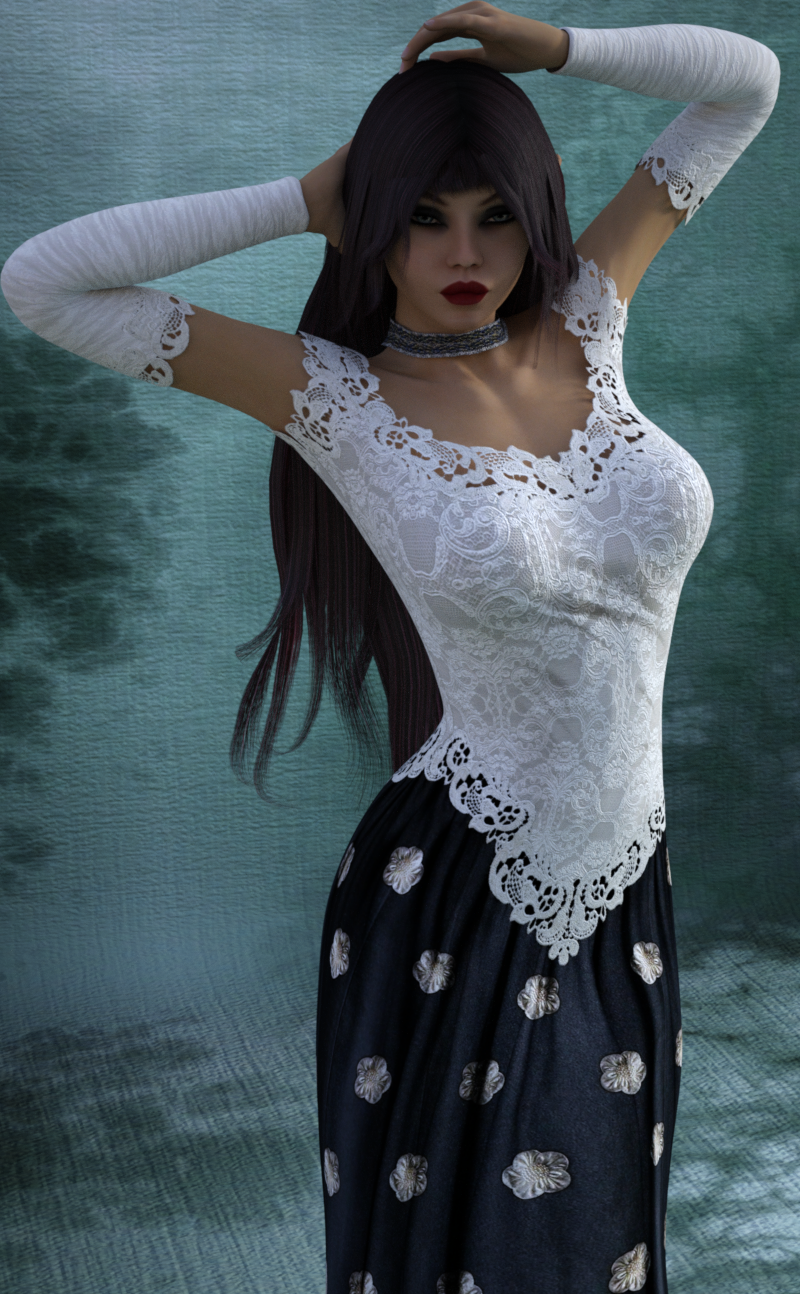
That looks lovely! What a pretty character and outfit! :D
What are the stories about?
Star FigureShareCG has Star to Genesis 2 auto fit file.
Where is it? I can only find the morph for Gen2 to Star!
Aerdis created the female autofit clones for Star: http://www.sharecg.com/pf/full_uploads.php?pf_user_name=aeridis
Make sure you grab Comet (DS version), the male morph for Star too. The download contains autofit clones for male clothes, H3, M4 and G2M.
Oh. I don't have Star, was looking for a script to fit Star clothing on regular G1 or G2 figures.
Ice Dragon Art WIP'sTaisha - Half Elf
Genesis - Rapture Morph and Mats
Mitsu Hair - UHT2 Hair Salon
MFD - Reign
She is a character for the story I am putting together - I will be posting the pictures with the very short stories that go with them on my deviant art account.
FM Gym: Sit-Up Benches & Poses [addon] [Commercial]The dumbbell handle between plates seem a little too long though. But I can scale it down along the axis in Daz Studio so no big deal.
This bugged me, so I added a "scale handle" morph for the smart props. That`s a bit more elegant than scaling the whole thing imo.
(It got updated about an hour after the set released, so if you grabbed it very early you may have to update)Thanks. The extra effort is appreciated.
GenX2 Update / Genesis 3 Add-On [Commercial]A perhaps not-so-quick question about transferring assets from computer to computer. I'm looking at upgrading my computer in the next year, but I have a LOT of custom characters that I've built up using GenX and GenX2, and the assets that they're based on are spread out over several content folders.
If I want to save the characters I've created and transfer them to a new computer, what is the best way to pull out just all those files and resave them on a new machine?
Have you looked at Content Gatherer? You would have to add the characters to a scene and then Content Gatherer should find all the dependent content files and zip them up in a handy file to move to the other computer. It worked well for me, but I wasn't specifically moving GenX custom stuff.
Star FigureShareCG has Star to Genesis 2 auto fit file.
Where is it? I can only find the morph for Gen2 to Star!
Aerdis created the female autofit clones for Star: http://www.sharecg.com/pf/full_uploads.php?pf_user_name=aeridis
Make sure you grab Comet (DS version), the male morph for Star too. The download contains autofit clones for male clothes, H3, M4 and G2M.
Ultimate Natural Bend Morphs for Victoria 7 - user adjustable?The extreme appearance of the promos is because the bends are at the extremes of the ability of the figure. At lesser values, the JCM's will be lesseened.
In addition, if you use "Show Hidden", you'll likely find the morph dials, and if so can manually dial them down.
Recommendations for Skin maps G3 female?Lyoness does a few characters with a no brow option, so you could do the shape you want; also you could morph the brows for the shape too.
Ultimate Natural Bend Morphs for Victoria 7 - user adjustable?Is the level, or intensity, of the morphs in this set:
http://www.daz3d.com/ultimate-natural-bend-morphs-for-victoria-7
user adjustable in some way? Either by a control dial in the set, or via some tweakery in Studio?
The reason I ask is that, to me, some of the morphs in the promos look a bit strong / basic and would benefit from toning down a little. Maybe this appearance is due to the lower res G3 mesh, what with the product not being HD. Previous Ultimate Bend Morph sets didn't have this issue, at least not as obviously.
Star FigureShareCG has Star to Genesis 2 auto fit file.
Where is it? I can only find the morph for Gen2 to Star!
virtual penny 4 yor carrara thoughts ?If you have Hexagon, I have a great workflow for adding morphs to conforming item and/or the figures themselves:
1 - Load the original item into Daz Studio
2 - With the item selected, go File > Send to Hexagon
3 - In Hexagon, make at least some small adjustment to the mesh. If you like, you could go ahead and start the first morph you wish to make - that's what I do, but I like modeling in Carrara better, so I don't work very much on it - just give it a start.
4 - Go File > Send to Daz Studio........... this will bring up a dialog window
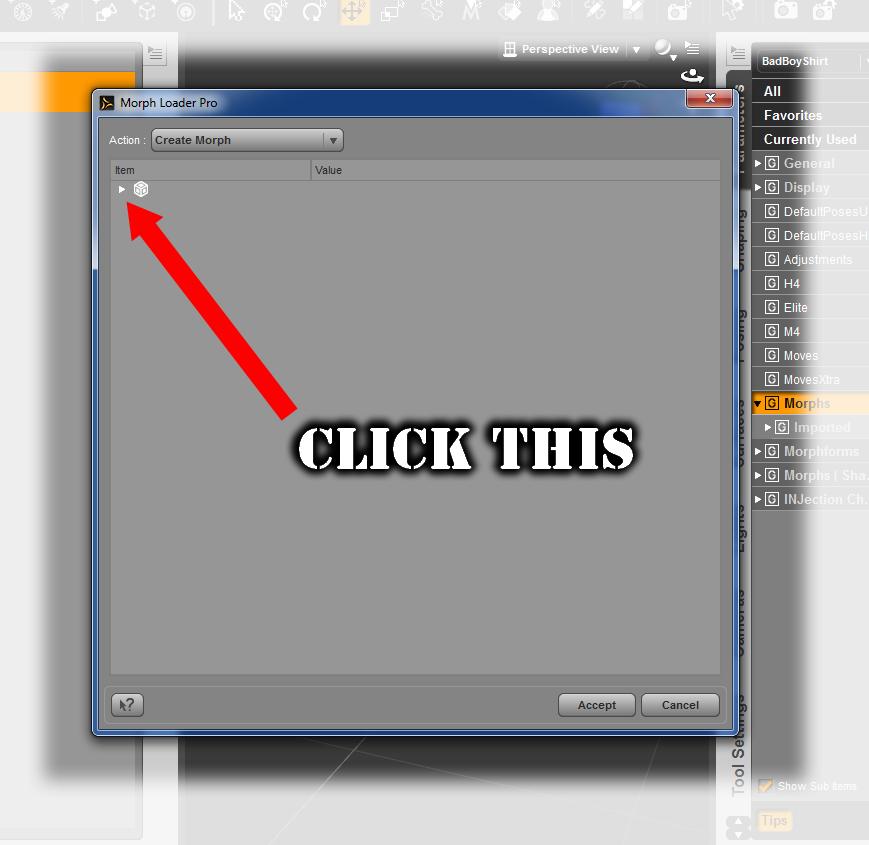 5 - The window looks blank with a button saying that the action will create a morph. Just below that, there's a little cube icon with and arrow. Click the Arrow to open the panel. (At first, this list of stuff look confusing. It's not once you get the hang of what to do)
6 - Leave the defaults the way they are, except for where it says: "Property Group:" > "Morphs/MorphLoader" (disregard the extra window in my screen shot which has "Actor" highlighted - we're not using that)
7 - Right-click on "Morphs/MorphLoader" to change the name of the Property group. This is the name that the morphs will be under when the Figure (Like Victoria 4, for example) is selected, so name it whatever you want - I call mine "dBFX", for example. This is the real reason for doing all of this in the first place, because it will give us a selection in the Vertex Modeler that we can select for making morphs on ANY part or ALL parts of the model, instead of only being able to model the morph on Neck, Head, Abdomen, etc., separately, which is a pain! So in my example, in Carrara, when I want to make a morph that spans the neck, chest, and abdomen regions, and may even pull on a collar or two... I go into the morph region selection and choose: dBFX and ADD my morphs to that!
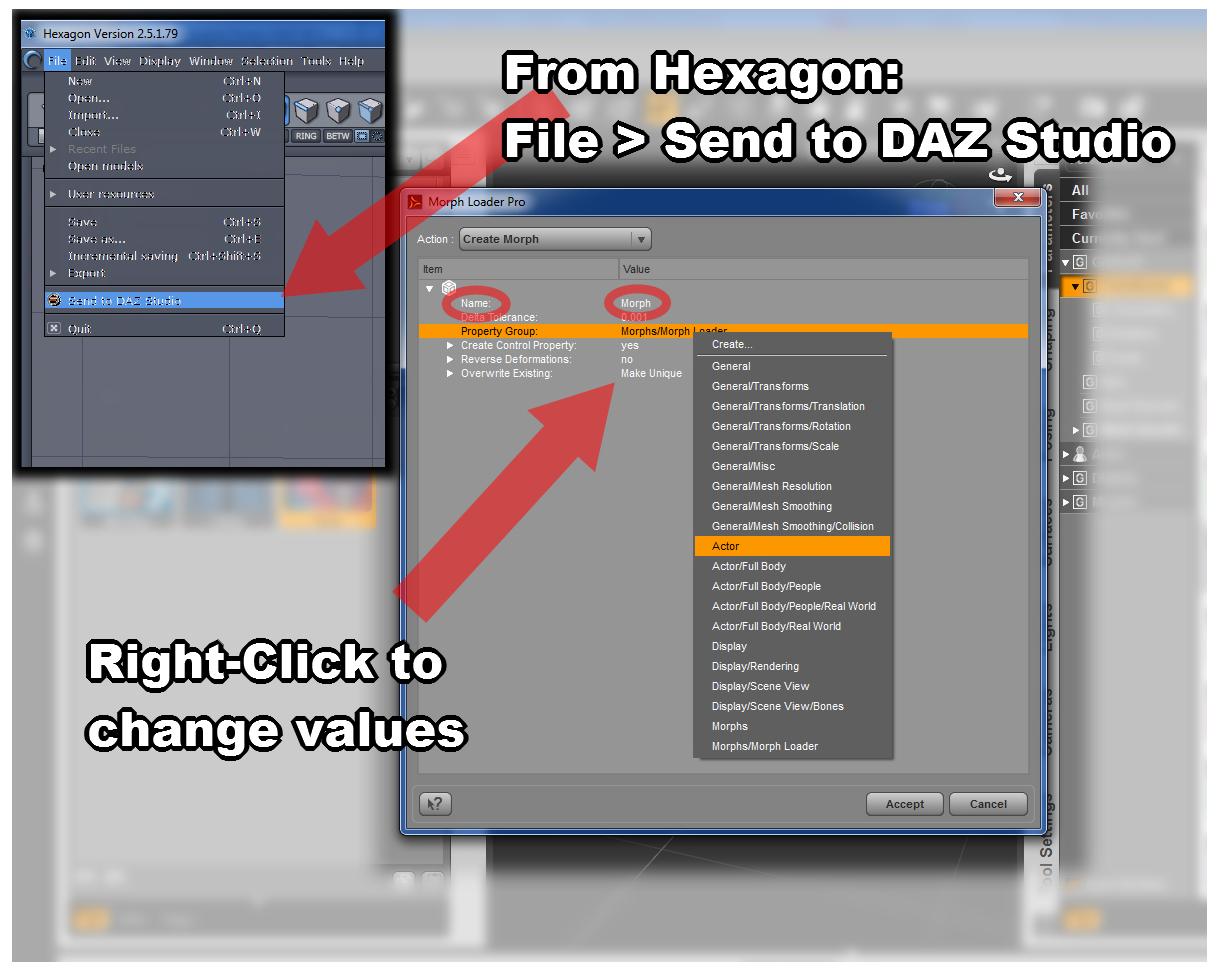 8 - When you're done changing the name of the morph's properties group, click "Accept"
Now, from Daz Studio, I always turn the new morph dial down to 0.00
Then export the item as CR2, if that's what it is - or whatever type it was to begin with.
GenX2 Update / Genesis 3 Add-On [Commercial]The transfer Shape selection defines what morph you want to use as the base morph to turn Genesis into the shape of the source figure. While the clone morphs are very close to the original shape, GenX also supports some dedicated legacy morphs (sold at DAZ by other vendors), which may use a different base pose, so the transferred morphs need additional corrections to work.
Thanks. I'm gonna have to make my own manual from this thread and the other one.
GenX2 Update / Genesis 3 Add-On [Commercial]A perhaps not-so-quick question about transferring assets from computer to computer. I'm looking at upgrading my computer in the next year, but I have a LOT of custom characters that I've built up using GenX and GenX2, and the assets that they're based on are spread out over several content folders.
If I want to save the characters I've created and transfer them to a new computer, what is the best way to pull out just all those files and resave them on a new machine?
GenX2 Update / Genesis 3 Add-On [Commercial]TheKD: Do you have all the basic figures (i.e. Genesis, Genesis 2 F/M, and Genesis 3 F/M) installed? Because the clone morphs are defined only for the previous generation of figures, GenX needs them all to transfer from Poser figures to Genesis 3.
Ah darn, I will have to grab genesis 1 figures, I didn't know I needed them installed as well. Thanks :)
At least they are free.
Creating Morphs in HexagonHi, I have a problem by creating and saving morphs between DAZ and Hexagon. Here is my problem, what I did and what I want to know.
I made a pair of shoes for G3F. I created a basic model and sent it to DAZ. It worked fine. Later I made morphs for the shoes the following way:
-Sent the model to hexagon
-Created the morph (used UV-Brushes and changed the position of the polygones, did not ad or delate polygones)
-Save the morph as a hexagon file
-Sent to DAZ
-Save the morph
I found a mistake in the morph. I load the morphfile in hexagon, changed the mistake and saved it again. In the forum I found following tip -when the conection between DAZ and Hexagon was cut, go to DAZ sent the model to Hexagon, load the morph and sent it back to DAZ and you could save the morph again.
I tried it but it did not work. Everytime I sent the morph to DAZ it created a new model instead to open the "save it as..." dialog.
What do I wrong?
How could I save the change as a morph again?
How could I creat a morph over a few days with breaks so there would be no stady connection between DAZ Studio and Hexagon ?
GenX2 Update / Genesis 3 Add-On [Commercial]TheKD: Do you have all the basic figures (i.e. Genesis, Genesis 2 F/M, and Genesis 3 F/M) installed? Because the clone morphs are defined only for the previous generation of figures, GenX needs them all to transfer from Poser figures to Genesis 3.
Ah darn, I will have to grab genesis 1 figures, I didn't know I needed them installed as well. Thanks :)
GenX2 Update / Genesis 3 Add-On [Commercial]The transfer Shape selection defines what morph you want to use as the base morph to turn Genesis into the shape of the source figure. While the clone morphs are very close to the original shape, GenX also supports some dedicated legacy morphs (sold at DAZ by other vendors), which may use a different base pose, so the transferred morphs need additional corrections to work.
Star FigureStar is a stand alone figure from RDNA. Think of Star as similar to Victoria 4, but for people who like toon renders - such as me.
 Thus the clothes for Star are just for Star, not for a line of Genesis 1,2,3 morphs. Someone could make a morph for the genesis figures to mimic the Star model mesh shape. The toon flash sale includes quite a few stand alone toon figures, including Chip, Cookie, Sadie, the wolf, turtle, and other animal toons, more figure from 3DUniverse, and much more. There may be utilities to convert star clothing for other figures, or vice versa, such as Phil Cooke's Wadrobe Wizard, which is included in many versions of Poser. (EDIT: note that PhilC's wardrobe wizard would require purchasing the add-on pack for igures that you want to convert clothing between).buying base character vs the pro bundle
I've always thought it "un-natural" to make characters without their genitals. I've always insisted on getting Pro bundles so the characters would be "complete." But I haven't used nudes in my art for over a decade, and I never use their genitals.
It's the same gens figure in every set, so you only have to buy one pro bundle for each sex of each generation of figures and you're covered. The appropriate textures and maps come with the base figures. Where they've really messed things up with this generation, however, is that the G3F gens can't use a torso's base texture as the gens did with past figures, so if you relied onnly on DAZ product, you could only use the gens when a PA has specifically makes a gen map set for them. And there are quite a few who don't. That's pretty clearly an arbitrary decision DAZ made, as the gens sold at Renderotica DO work with all the adult G3F textures, while Cayman Studio's legacy UV sets for G3F and G3M (sold both here and at Renderosity) will also let you use the older skins on the G3 gens. CS also has a freebie that let's you do the torso trick with most G3F based skins, though I've found a number of skins that it just won't work with for some unknown reason.
Back to the main subject - I used to always buy the Pro bundles as the outfits and hair items that I liked used to mainly show up in those. These days, though, it seems like a lot of the Pro bundles are grabbing a bunch of random items, so I'm buying a lot more of the starter sets. Bascially I divide the price of the bundle by the number of items that I actually want and whichever is the better price per item is what I go with. What I won't buy, however, is just a base figure, as the price is pretty outrageous for a glorified morph set and a UV skin/set that will almost certainly end up being unique to that figure and never used again by any PA. If the base figures came out with a base price of $15-20 or so, I might buy them, but a $45 base price for a product that doesn't even come with poses anymore is crazy.
GenX2 Update / Genesis 3 Add-On [Commercial]xyer0: Usually, all you have to do is to load the original M4 CR2 into GenX, and then apply the PZ2 that injects morphs and sets morph values. Saving as a new CR2 should be required only in rare cases (e.g. for binary morph injections, which are not supported by GenX).
Dialing the base morph (in your case M4) and the transferred morph to 1 should give you the closest result. Also, you need to start a new scene after transferring morphs, otherwise DS may use a cached version of the Genesis figure without looking for new morphs.
Thanks for your response. I did not consider loading the M4 base into GenX. Thanks for telling me. I've never had to do that before. Perhaps that is why dialing my transferred morph in at 1 produced a grotesque caricature. What are the criteria for choosing between Michael 4, Clone, and the other option (I forget what it was) during transfer?
Daz 3D is part of

Connect
DAZ Productions, Inc.
7533 S Center View Ct #4664
West Jordan, UT 84084Licensing Agreement | Terms of Service | Privacy Policy | EULA
© 2026 Daz Productions Inc. All Rights Reserved.