-
Novica & Forum Members Tips & Product Reviews Pt 7
I'd love a 200 morph set for men. I suspect the morphs could be genxd over but I will wait until that product is on sale to purchase and try it.
Help needed with Dformers....Thank you, Richard; that made it quite easy; another tool I have never used...............

Now I have a linked question; I know that the HD plugin for DS is only available to Daz PA's - is this why, when I try to morph my Zbrush edited G3F into a character that just happens to be in HD, DS crashes?
I can understand Daz not wanting to release this software to the masses (don't agree - but that's another thing and unrelated), but it seems kind of silly preventing users from actually using their purchased HD assets................
Novica & Forum Members Tips & Product Reviews Pt 7BTW, why don't we have those 200 as a product for the Genesis 3 males? For the males, the HSTW is this product line (kit 1, 2 and the purple sliders.) And there are female products/sliders as well.
Can I use your models as inspiration or base to build my own models?If you create a new morph using Daz figures, can you give it away for free?
Transfer Gen 2 model to Gen 3With the appropriate add-ons you canb use GenX 2 to do this, although it can also be done with the Transfer Utility (kerya, I think, has a loing thread on the manual process).Textures can be handles with the Cayman studio add-ons, or via Blender (also discussed in the thread on using the Transfer Utility)
Novica & Forum Members Tips & Product Reviews Pt 7(Sorry, I really think Ivy is overused ...)
Yep, there's that too! Totally agree.
Okay, two questions, because I'm trying to help people by listing morphs that I use, in case they like the results I'm getting or want to tweak from where I got my results:
1. how the heck do you tell what product is giving you what morphs? I'm looking at different colored sliders but that's not helpful. They're not all labeled in Parameters in the breakdown (the Aiko 7 ones are, for example. In the Actor>Head section, those are neatly listed as HSTW Aiko 7. ) Most the morphs are just there once you click on Head>Real World for example.
2. When you right click, you can add a morph to Favorites. Where the heck does Favorites show up? (Nice to find this my THIRD year of using the Studio, sigh. Am I the only one finding things so late in the game?)
Jeans Outfit for G3M: Sunglasses Morph w/ Expressions SOLVEDThe sunglasses included in the Jeans Outfit for Genesis 3 Male(s) by Blue Rabbit morph with each incremental change to facial expressions. Does anyone know of a fix or workaround? Used on G3M in DS 4.9.2.70 on Windows 10 PC.
Props and figures lose position while parenting or fittingI have a Genesis 1 that was receiving very well of all type of morphs maded in Hexagon, including wear and body morphs. But since few days all new props lose the position at the moment of parent or fit them to Genesis.
For example:
- I export the Genesis morphed or not to Hexagon.
- I model the object.
- I export it to DAZ and appears at the correct location.
- I change the prop to figure. All right.
- But I parent it to Genesis or Fit to Genesis, and at that moment the object goes up or down out of control. And don't let me change the location beeing attached to the character.
This happens too using the Transfer tool, using parts of body or body clones as support for these attachments. The same situation using the polygon faces tool for attach an object to the skin of the character.
The question is that this happens only since a few days but I can't understand why.
Javier
Transfer Gen 2 model to Gen 3I have been using a Genesis 2 female model for some time now, using morphs I am happy with the shape.
I want to transfer this model shape to Genesis 3 to be able to apply better textures, poses etc.
Is it possible to apply the Gen2 mesh to a Gen3 model and retain the same morphs/shapes etc?
Cheers in advance
Sharing shaping/morph presetsBut in this case, if I understood correctly, you are talking about modification to the preset (information) that is not yours, so saved modified preset would partially contain information that is not "made by you" or not yours. Which usually means "no-no" to distribution.
That's also what I was thinking, and why I asked. But it's a grey area I think, for how far can you go in copyrighting DAZ Morph settings? If I, instead of making a preset, write down the settings of the dials and give the numbers to someone else, is that then a copyright breach?
Another scenario: I use the "remove morphs" button that comes with the character so the artist's morphs won't be included in the preset, but before that I write down the settings for those morphs the artist have used and which I have changed. Then I dial them back to the settings I have made. Who have actually created those morphs, me or the artist?
Its time for new Cat and Dog models!quick question! I don't supose anyone knows of a decent English Bulldog morph for the milldog? I need one for a commissioned render and I was hoping to save myself some time before attempting to mash one together from scratch. Any suggestions are greatly appreciated :D
https://www.renderosity.com/mod/bcs/mildog-improved-remapped/115572
Or, if you don't need a rigged character, there is a free prop: http://www.most-digital-creations.com/bulldog.htm
thanks! I do need rigged :) I have seen that one in Renderosity, actually. Does anyone know if it actually works in daz, though? The description says that's it's poser only, but I know that doesn't always mean anything
Very good question - I am not sure either. It could be that Lyrra used P10/P11 weightmapping - in that case it will NOT work in DS.
Post Your Renders - Happy New Year yallI am impressed! There are at least a few products out there that support htese morphs too. I know that I already own one of them, Raiver, which looks kind of like Hiro's Steampunk Cowboy, but black leather (several texture expansion packs available) but I think I can tweak some M4 clothing to fit easily enough.
looking forward to see how you go with this
if you have poser you can transfer your morphs to any clothing set I think
Not a new copy (Poser 7), but if I'm not mistaken, we can do that in DS with their Content Creation Tools as well.
I simply conformed some clothes and edited them to fit - works really well for the t-pose... we'll see how they hold up when posed/animated. I'm already loving the control I have over this figure - and I like the shoulders better too. I don't have nearly as much male shaping options, but plenty enough for Dart. He breathes nicely and can really demonstrate muscle strain too... so he's pretty much rockin'!
He also reminds me a LOT of the G2M verion of Dart that I made.
He uses a few of Stephanie 4's detail morphs for some of those extra action/strain shapes. Otherwise he's mostly just the V4 base (comes with Male Morphs built in) and a small selection of Morph++ dials.
Post Your Renders - Happy New Year yallI am impressed! There are at least a few products out there that support htese morphs too. I know that I already own one of them, Raiver, which looks kind of like Hiro's Steampunk Cowboy, but black leather (several texture expansion packs available) but I think I can tweak some M4 clothing to fit easily enough.
looking forward to see how you go with this
if you have poser you can transfer your morphs to any clothing set I think
Infinite Insanity - There's ALWAYS Another Sale! (Daily Sale Talk)I'm kind of teetering on Sunny 7. There's nothing explicitly *special* about the figure and the skin textures aren't appealing to me. For reference, I have Vic 7, Karen 7, Arabella 7, Olympia 7, Aiko 7, and Star 7. I suppose she'll fit the petite look, but size usually doesn't show up as a significant factor in my renders.
Weird. I randomly happened onto this: The PA Sharktooth is actually on sale as a featured PA, as he/she put out the Tween Julie expressions product... but the PA isn't actually listed as a featured PA on the sale page.
Hm. I'm not sure whether to go through with my purchase. It's not a large one by any means, but I don't *need* any of it.

I didn't buy anything. I REALLY wanted the Gen 3 Iconic Shapes for Genesis and being able to get that for $10 sounded "ok" -not great but ok. But then I realized that I was only getting it to be able to wear V3 and A3 clothes on the newer figures -and since I don't use Genesis 1 I'd have to use the clone to get the A3 and V3 clothes to G1, then autofit it to G2F, then autofit it to G3F ...and that sounds like a pain in the bottom to me (not to mention you'd probably be getting a lot of distortion of the clothes by the time it gets autofited three times. lol So I decided to pass on the sale since that's the only thing I really wanted.
I'm hoping there is a similar product (a V3 and A3 clone) for either G2F or G3F.
From my own experiences, exporting as OBJ and re-importing it actually fits MUCH better than those iconic shapes. :) So you saved money!!
Whao! Ok, what now? Is there a tutorial on that?
I feel like I should get a leg up on posting my tutorials, but I have so many side projects on the go... :)
I'd love a tutorial on that! (for what it's worth - which probably isn't much. lol) :)
Export > Wavefront / OBJ
Then I believe you want settings something like this: http://www.daz3d.com/forums/uploads/FileUpload/de/11e176e19ed8534169b4847c5c4666.jpg
Load figure you want, Import > pick your file, then with it selected go to Edit > Transfer Utility. Tell it to copy FROM the figure you've loaded, TO the clothing object you imported.
Might need to readd textures and things.
There might be a better way someone can be bothered doing but there's my 2 minute tutorial~
I actually find that I don't need to import using the transfer utility :) I'll try to upload a document to here and elsewhere something by the end of this week; I have a bunch of marking coming up so I want to get that out of the way first.
edit: As a side note, are we ever going to get some of the rarer PAs on sale? I haven't seen Billy-T or Uzilite yet.
PAs that do not release any new items during the PA sale will only go on sale during the handful (1-2) of days when all PAs are on sale. These sometimes occur at the center of the sale, and again at the end, but nothing is guaranteed. I believe Billy-T has not released anything new (at this store) for many years, so is likely to be one of the PAs that are only on sale during the everything on sale period.
I believe they had at least 4-5 days total on last year's PA sale with all the PAs, two of which coincided with the middle of the sale I think. I could be wrong though, because last year had multiple sales with all PAs... even March Madness IIRC?
Indeed, March Madness, PA Sale, and Black Friday are the only times when the whole site regularly goes on sale, but I am sure there are a few adhoc days scattered through the year when it also happens.
OH I forgot about the blink sales last year, when they went "PAs from (Letter) to (Another Letter)" :D
Post Your Renders - Happy New Year yallI was looking through my Genesis 2 Male content to begin working on a new Dartan character and realized that I'm still not quite there yet as far as having enough stuff to make the switch. So I started browsing through the store - knowing that I cannot buy anything just now,,, I wanted to begin wrapping my head around which items could help to reach a complete character setup.
While I was browsing, I ran a few searches in the store. Well, when we do a search, things that we already bought can show up in the search - and I ran across the Bundle of Male textures for the Male morphs of V4 - reminding me that I have one, made by ARTCollaborations - Victoria 4 GW3 Male Texture
I bought that way back when with the idea of trying a version of Dart made using V4, so that:
- I could still make use of my M4 animated pose files - perhaps some small degree of tweaking required
- I could make use of the several morph-dial expressing packs I have for V4
- I could benefit from the unlocked nature of V4's mesh
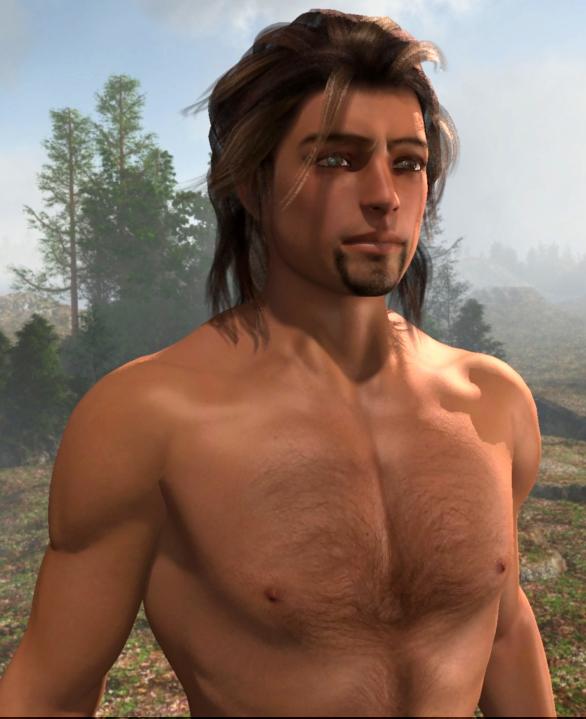
So I started build a new Victoria 4.2 version of my Dartanbeck character, which just sounds odd, right from the start! LOL
I am impressed! There are at least a few products out there that support htese morphs too. I know that I already own one of them, Raiver, which looks kind of like Hiro's Steampunk Cowboy, but black leather (several texture expansion packs available) but I think I can tweak some M4 clothing to fit easily enough.
With my Rosie character, I have to be a little careful with the expression morph dials - which makes me like the dials a lot better than expression loader pose files from the runtime - s I can dial them up as I need to. Well I don't have to be careful with this guy... his face works with all of them - even cranked wide open!
I have very few Expression morph dials for M4 - I don't think nearly as many were made for him.
For V4 I have Morphs++ (I have the M4 version for M4 - but that's all I have for him), Facial Expressions for V4, Girl 4 (tons of expressions!) Aiko 4, and Reby Sky - all of which (though I'm not using A4's) work wonderfully on the Male Morphed version! And I really like the Male shape that comes out of V4!
I tweaked the image map for his face a bit to make the goatee almost the same as mine. I'll tweak it the rest of the way soon. The texture maps are 4K x 4K and look pretty darned nice! It doesn't have and Spec maps, but I don't mind - I just made my own by moidfying the color map - I like a bit of color in the Spec anyways.
Here are some sample renders of various expressions. We can see which are used by the names of the images:
- Base is the figure using no expressions
- G = Girl 4
- MP = Morphs++
- RS = Reby Sky
- V4FE = Facial Expression for V4 pack
Morph Loader Pro?Edit > Object > Morph Loader Pro or Edit > Figure > Morph Loader Pro
Yep, it is there. Thanks. Now to learn the Blender interface.....
Morph Loader Pro?Edit > Object > Morph Loader Pro or Edit > Figure > Morph Loader Pro
Morph Loader Pro?It's included in DS Pro -- do you have the Pro serial number for DS?
I have serial numbers for the following versions of studio:
Daz Studio 2.3.3.146
Daz Studio 3 Advanced
Daz Studio 4.x
Daz Studio 4.x Pro [Free]
When I load studio, it does have "DAZ Studio 4.9 Pro" on the window bar. Morph Loader Pro is not under the edit menu.
Released!-William for Genesis 3 Male (Commercial)William is made with Genesis 3 Male Body and Head morphs and the Genesis 3 Male UV maps.
His morphs include a face and body morph set, as well as a mature version of the two. Materials include two brow options for both morphs (Dark and Reddish blonde), and a no brow option. There is also a Glasgow Smile option for both morphs.
William will have 7 eye colors, an alternate sclera option as well as a lighter eye lash material to better match the second brow option. His tattoos include a chest, a right arm and right leg option.
There is also an anotomical material preset for him as well.
GENERAL FREEBIE REQUESTS Part 2I was afraid of that. Like I said my Poser is very unhappy at the moment. So I suggest, use Studio to export out the hair with the morph turned on and then import into Poser as a Morph target. Sorry about it not working. Yes deformers are an art in and of themselves. Think small.
Daz 3D is part of

Connect
DAZ Productions, Inc.
7533 S Center View Ct #4664
West Jordan, UT 84084Licensing Agreement | Terms of Service | Privacy Policy | EULA
© 2026 Daz Productions Inc. All Rights Reserved.