-
Freebie Challenge April/May 2024 - "Soft as Plush, Smooth as Silk" - Main Thread
My soft Penguin
My soft, fluffy and cuddly penguin is my best friend forever.
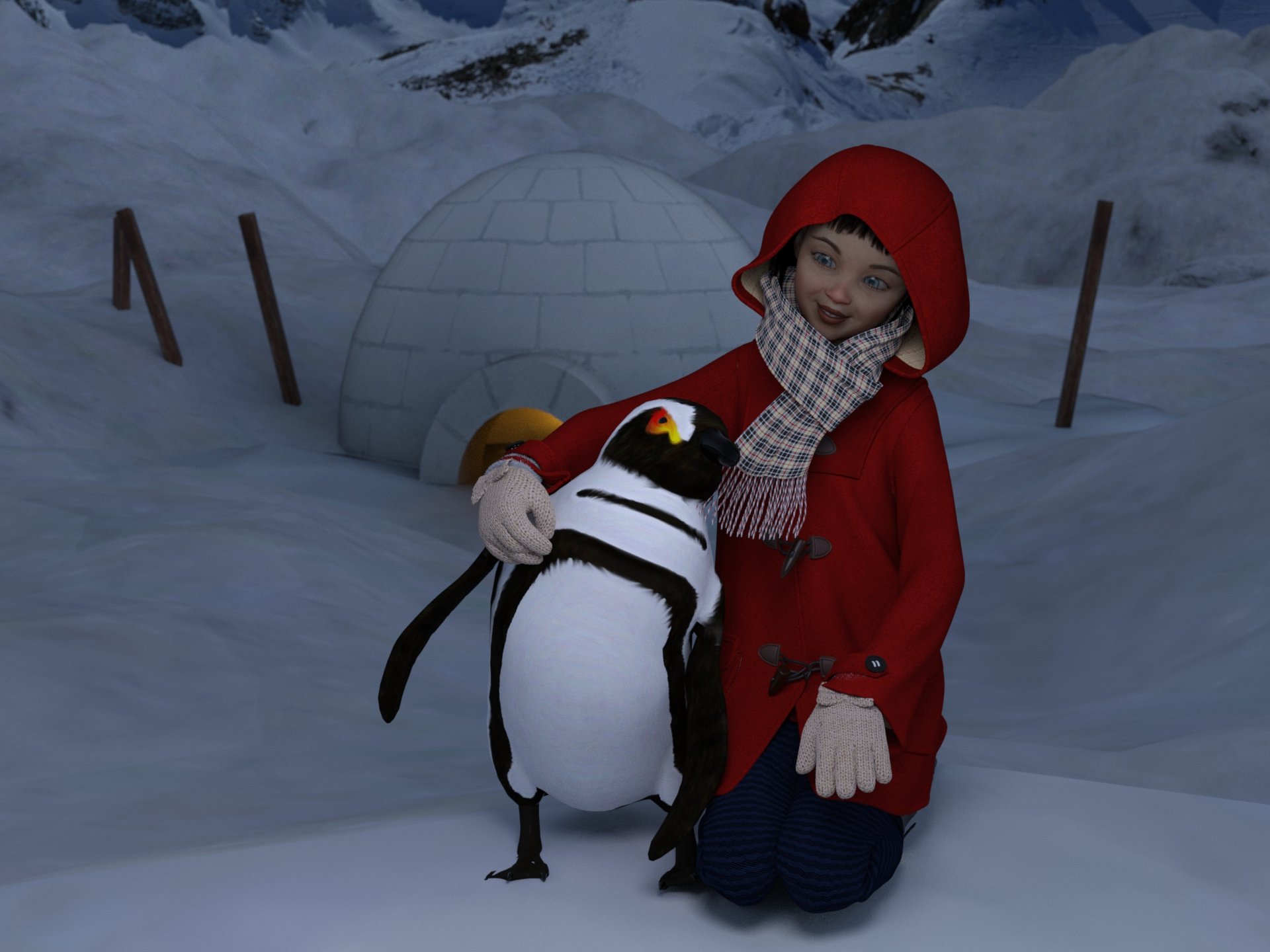
Freebies
Penguin (Daz freebie , may 2024)
https://www.daz3d.com/penguin"Toon-styled Igloo" (https://skfb.ly/oCopM) by OfficialBytes is licensed under Creative Commons Attribution (http://creativecommons.org/licenses/by/4.0/).
https://sketchfab.com/3d-models/toon-styled-igloo-0508e630619541919346d1baf9b1d5e7Snow Terrain For DAZ
https://www.renderhub.com/shredder/snow-terrain-for-dazhdri: sky0044.hdr
https://evermotion.org/articles/show/7928/free-hdri-cd-collection-from-evermotionNanami Genji
1 link
https://www.cgtrader.com/free-3d-models/character/fantasy-character/nanami-genji-anime-charachter-for-genesis-8-female
2 link
https://www.renderhub.com/humanxystudio/nanami-genji-anime-charahter-morph-for-genesis-8-femaleDuffle Coat for G8F
https://sharecg.com/v/94702/gallery/21/DAZ-Studio/Duffle-Coat-for-G8FUpdate Sailor Uniform Winter Set Part 1 (muffler)
https://sharecg.com/v/94617/gallery/21/DAZ-Studio/Update-Sailor-Uniform-Winter-Set-Part-1Xmas Bundle by Leilana (leggins)
https://www.renderosity.com/freestuff/items/84013/xmas-bundleFree: Bob haircut for Genesis 8 by perlk
https://www.deviantart.com/perlk/art/Free-Bob-haircut-for-Genesis-8-887913550Leather Boots for G8F by yomiuri
https://sharecg.com/v/94464/gallery/21/DAZ-Studio/Leather-Boots-for-G8FTwizted Character Creation Kit by TwiztedMetal
https://www.renderosity.com/freestuff/items/81217/twizted-character-creation-kitGenesis 8 Female Makeup Kit 1 - Lips and Eyeliner (Lips)
https://sharecg.com/v/92017/gallery/21/DAZ-Studio/Genesis-8-Female-Makeup-Kit-1-Lips-and-EyelinerGenesis 8 Female "Just Sitting" Pose 05 by BBarbs (adapted to the scene)
https://www.renderosity.com/freestuff/items/85472/genesis-8-female-just-sitting-pose-05Paid:
Iray Ghost Light Prop Kit
https://www.daz3d.com/iray-ghost-light-prop-kitAbout head and outfit combine (have picture)Yes, normally the hood on such a garment has been rigged with the general weight of figure's head... If the hood is on the head, it'll move with the head node, but if the hood is down, it'll still move with the head. So that brings you such an issue.
Firstly, you may check if there's any "reset hood" or "move hood" morphs on this garment, then try dialing it...
If there's no such morphs, there're still some tricks to fix it but it'll depend on the surface definition of the hoodie garment. Which product is this garment ?
In general, you export the garment with default hood position to OBJ file. Then import the OBJ back to update the Hood surface (create a selection set for it if there's no separate Hood surface) with Attenuate as a "fix morph".
Figure foot issue.Bluejaunte has included morphs for most (all?) of his characters, that neutrulizes the body morph, for the same reason.
Look in Parameter > Actor > Feet
Coming soon: Mesh Grabber 4.0 [Commercial]ManFriday said:
Elor said:
What was shown looks useful

A couple of questions:
- Will the tools added by the current version addons be included with Mesh Grabber 4 or will the addons still be required ?
- Are the changes created with the new version compatible with the current version ? I'm asking because I currently only have Mesh Grabber for Mac but I'm also using a Windows machine and I'm thinking about buying the new version for Windows initially, to get Mesh Grabber here too (right now, I'm using the saving morphs function to get the changes to the Windows machine).
The add-ons are going away. There will be only one Mesh Grabber product any more. It will include both the Mac and the Windows versions. (The only reason that they were separate is that when I made the original Mesh Grabber I didn't know how to make Mac plugins yet, so Mesh Grabber for Mac was added at a later time.)
The changes are compatible. The data format hasn't changed. All the changes are in the "tool" part of Mesh Grabber (how the vertex deltas are created: there are now new ways like a sculpting brush), but they are still saved to scene files the old way. And the Daz Studio morph data format hasn't changed either, of course.
So if I already have Mesh Grabber and the add-ons will this version replace it or work with it?
AIUTO...CHI CONOSCE L’ITALIANO? PARTE QUATTORDICIvangelrise said:
Buondì gentile supporto tecnico.
Approfitto del non essere a casa a renderizzare come un pazzo per un altro paio di domande.
1) La prima è: ma esiste un metodo veloce per cambiare il colore della pelle di un personaggio? Non intendo farlo diventare africano di colpo (cioè, perché no, anche), ma magari una tinta più abbronzata o cose così.
Ho notato che cambiare il base color dell'intera figura dal tab Surfaces funziona, ma c'è sempre il rischio di scegliere un colore che poi renderizzato fa schifo, o comunque è poco realistico, su alcuni personaggi colora loro anche la sclera e le iridi, ecc. Ho provato ad acquistare un pacchetto che si chiama Wet & Tanned se non sbaglio, ma è complicato da matti da usare, non sono riuscito a farci niente, cioè boh. Avete qualche dritta?
2) La seconda è un po' stupida ma tant'è: ma è mai per caso possibile che alcuni personaggi siano refrattari alle luci peggio di Nosferatu? Ieri sera volevo provare a illuminare il volto di un personaggio che spia da una porta semiaperta. Ci ho messo vicino una point light a 15k di intensità: niente, a malapena un minuscolo cambiamento di lucore. L'ho anche resa luce rettagolare nella Shape e l'ho allungata perché sembrasse proprio la luce che filtra dalla fessura della porta: niente, non cambia nulla. Anche mettendogliela sulla faccia.
Ma possibile? Con questo personaggio è tutto così, illuminarla è una sfida incredibile (ma sicuramente sono io che continuo a sbagliare qualcosa).

1 - Per il colore di pelle ti consiglio di usare dei personaggi appositi.. ci sono in vendita molti personaggi di diverse gradazioni (ogni personaggio ha morph+materiali, a te serve solo i materiali). Per cui carichi il tuo G8 e poi applichi i soli materiali del personaggio comprato.
Si può anche modificare manualmente.. ma visto che non hai esperienza la cosa si fa un po' particolare.. riassumendo: più hai la pelle chiara e più la luce tende a viaggiare all'interno del corpo (mostrando vene, ecc..). Più la pelle è scura e meno c'è questo effetto. Dunque non basta cambiare solo colore di pelle ma bisognerebbe anche "aggiustare" come la luce viene assorbita e riflessa (pelli grasse sono più riflettenti). Se ti compri un personaggio di colore (a spendere poco oviamente) vedrai come a parità di materiali i settaggi sono diversi.
Nel pannello surface occhio a cosa selezioni.. ci sono diversi pezzi del corpo e i personaggi sono divisi in più parti (se ti si colora un occhio ha selezionato per sbaglio anche l'occhio)Wet & Tanned funziona coi G8.. dunque usa i G8 se vuoi usare il prodotto. Nella pagina dello store https://www.daz3d.com/wet-and-tanned-skins-for-genesis-8-females trovi dei video in basso: guardali che ti spiegano come usarli.
2 - Per la luce posta un'immagine così magari si capisce qualcosa in più... Comunque controlla che:
a. la serratura sia trasparente (e dunque possa passare luce)
b. la luce sia di adeguate dimensioni e collocata fuori dalla porta
c. che tipo di ombre vuoi ? Luci piccole e distanti creano ombre nette, luci grandi e vicine creano ombre morbide.
Why does transfer utilitly offset my custom mesh from daz base mesh?I can't figure it out. No matter if its a full body shape or small shape everytime i Use the TU it raises my custom items on the Y axis. Any help would greatly be appreciated.
(Image removed by mod. Please review https://www.daz3d.com/forums/discussion/3279/acceptable-ways-of-handling-nudity and post again)
Transfer Utility Not WorkingTransfer Utility for transfer morphs from any Genesis figures to another stopped work, I think
Dalila hair issueDrunkMonkeyProductions said:
Turn the character's morph(s) in the hair off, and adjust to fit the character's head.
Parameters(tab)>tab menu>Preferences>Show hidden properties, then select currently used, and move the slider to 0%.
There are some sliders under Adjustments you might be able to use to correct the issue, but my results didn't fully remove the problem.
Thank you very much for the tip. It alleviated the problem, but as you mentioned, it doesn't completely fix it. I will keep trying more slider combinations with these adjustments to try to reach a satisfactory result. It would be great if the developer could provide a definitive solution to this problem.
The Sky is Falling Complaint ThreadI understand the fear of heights, and I'm not terribly fond of falling, but heights don't bother me much, as long as I feel in control of my safety.
I've stood on the 38th floor of the Vehicle Assembly Building(VAB) at the Kennedy Space Center and looked down over the edge of the unguarded naked floor slab overlooking the main "Transfer Aisle" at the seemingly little toy cars and airplanes and ant-like people on the ground level.
I've stood on the roof of the VAB and climbed out over the edge of the building onto a metal girder support structure that was used to hold the detached Apollo/SaturnV capsule escape rocket while the SaturnV was in the building(escape rocket was too tall to get through the door).
I've drifted through clouds over a thousand feet above the ground in a balloon and watched a mob of kangaroo hop through a pinapple plantation below us. But as long as I held onto the basket's rope, higher than my center of gravity, I was OK and wisely decided to not jump out in a panic.
I love to watch out the window of an airplane, even when it is flying.
But in all of those instances I had control of my center of gravity and felt "safe".
HOWEVER, one time a friend took me mountain climbing in the Rockies near Denver, really simple stuff, no equipment, but there was one place where we had to walk along a narrow ledge over a near vertical cliff, and I chickened out. Not sure I could maintain my balance or not slip on a stone, and the fall would have been positively fatal, i.e. I chickened out because I didn't feel in control of my own safety.
I had the opportunity to climb Uluru (the big red rock in the center of Austraiia) but after about 50 feet I chickened out. The rock was smooth and hard, and slippery. And there was another 50 feet of rock without a guide chain to get through from a place called "Chicken Rock" to the bottom of the guide chain that went up the rest of the way another eleven hundred feet. I know now why it's called "Chicken Rock". I didn't feel in control of my safey. So, I decided to come down and just take the alternate tour, a couple mile walk around the base of Uluru. That turned out to be the more scenic route. Lots happening around the base, and from what the other people in the bus said, nothing was happening on the top, and the view was unchanging and boring after 10 minutes of it. "Oh look dear..., desert to the east, west, north & south, and smooth hot rock surface underfoot and not an inch of shade."
Coming soon: Mesh Grabber 4.0 [Commercial]Elor said:
What was shown looks useful
A couple of questions:
- Will the tools added by the current version addons be included with Mesh Grabber 4 or will the addons still be required ?
- Are the changes created with the new version compatible with the current version ? I'm asking because I currently only have Mesh Grabber for Mac but I'm also using a Windows machine and I'm thinking about buying the new version for Windows initially, to get Mesh Grabber here too (right now, I'm using the saving morphs function to get the changes to the Windows machine).
The add-ons are going away. There will be only one Mesh Grabber product any more. It will include both the Mac and the Windows versions. (The only reason that they were separate is that when I made the original Mesh Grabber I didn't know how to make Mac plugins yet, so Mesh Grabber for Mac was added at a later time.)
The changes are compatible. The data format hasn't changed. All the changes are in the "tool" part of Mesh Grabber (how the vertex deltas are created: there are now new ways like a sculpting brush), but they are still saved to scene files the old way. And the Daz Studio morph data format hasn't changed either, of course.
Coming soon: Mesh Grabber 4.0 [Commercial]Loony said:
Mart1n71 said:
This looks like such a great update. Will I be able to save any edits to strand based hair as a morph? Something I think is currently a PA only tool.
When you can edit it, this should be possible. Btw. @MF why is it still not released? Does Daz3d plan to include it into a bigger announcement or are you still working on it?All I know is that it's in the queue at Daz. The queue is rather long at the moment, so I don't know when it will be released. Might be another couple of weeks.
Custom blender morph breaks PowerPosemade a morph in Blender. It seems to work well but breaks posing when posing.


Ever seen something like this? Can I still save this morph?
Issue with some poses after creating a new face morphIt's surely possible to fix it in Wrap but mostly like you have to use a VertexMask since the eyesocks are tiny for being moved with a Brush, so a bit cumbersome. If you proficient in Blender, personally suggest you fix it in Blender.
Don't make a corrective morph for Eye Side-Side, instead, just create a "fix morph" for eyesockets, dial it and lock it, before Adjust rigging to shape...
Dalila hair issueTurn the character's morph(s) in the hair off, and adjust to fit the character's head.
Parameters(tab)>tab menu>Preferences>Show hidden properties, then select currently used, and move the slider to 0%.
There are some sliders under Adjustments you might be able to use to correct the issue, but my results didn't fully remove the problem.
more....Wacky Modelling ~ In Carrara ~Stezza said:
whilst waiting around in the que we got the que qube and turned into an alien with Carrara hair
boned and just one morph that shuts his mouth
you'll find it sneaking around in the zip file.... to do with what you please

Cool, now for some "Take me to your leader earthling" renders !!!
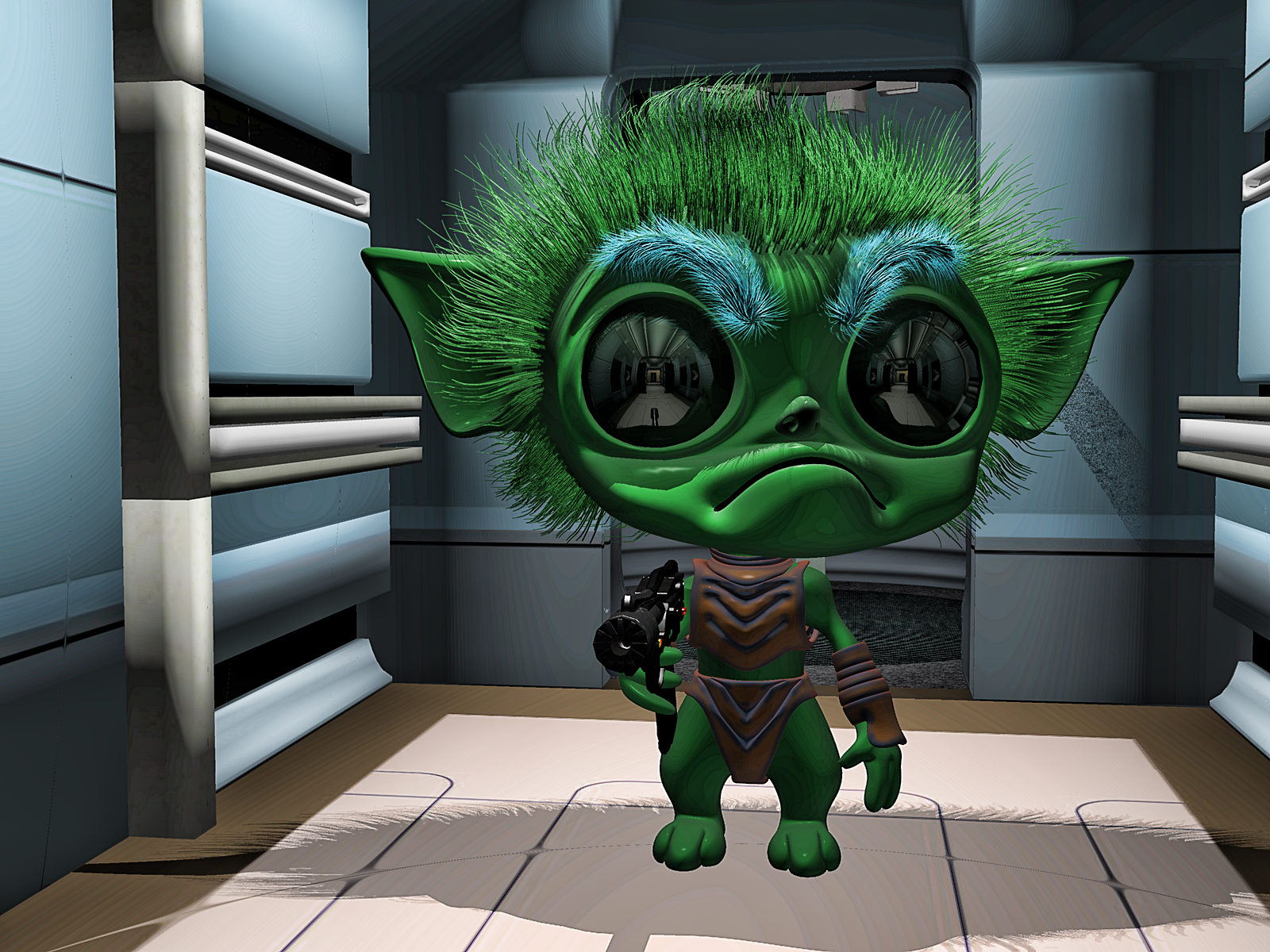
Thanks Stezza !!!
Diffeo ignoring neckupper and abdomenupperNow try it with 8. I've got a handful of characters with custom made grafts that don't want to transfer over properly so they're stuck on Gen8 with missing bones. Here's a stock Gen8 imported with all default settings.
Issue with some poses after creating a new face morphHi, everyone! I haven't posted on this topic for long because I was very buisy and I have no many time to use DS or Wrap, but I just fixed a part of the issu encountered in my first post:
I used Wrap to fix the lids that desapeared behind eyes, but, I see the eyesockets desapear too, when I use the Eye side-side pose. Here an example of the G8 male base, on which we can see the eyesocket is still visible.
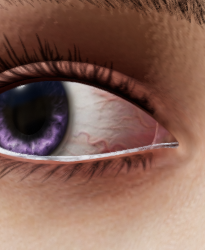
So, I would like to have some advice to fix that. Do you think it would be possible to fix that in Wrap? Would it be better to use Blender?
On the neutral pose, the eyesockets are correctly visible, so I am not sure what would be the better way to fix that...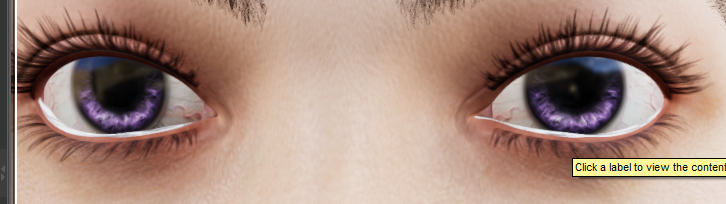
Do you think the better way would be to create a neuw morph to fix what happen whith the Eye side-side, or would it be relevent to try to improve the neutral eyes I created?
Thank you in advance for your advices!
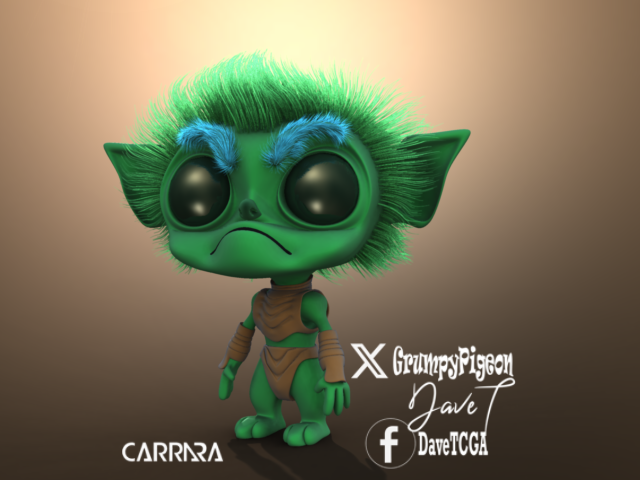
more....Wacky Modelling ~ In Carrara ~whilst waiting around in the que we got the que qube and turned into an alien with Carrara hair
boned and just one morph that shuts his mouth
you'll find it sneaking around in the zip file.... to do with what you please
 Facial expressions have been bad for a long time
Kadaj777 at Rendo has a character named Deiydra. I like the smile on that one and the smile morph is included. I think including a few custom expression morphs is a good idea, good selling point - especially for a smile.
Ext3nd Studio Presents: The WolfridersLast time I've read Elfquest has been 20 years ago, I will find some hand morph for the fingers.Daz 3D is part of

Connect
DAZ Productions, Inc.
7533 S Center View Ct #4664
West Jordan, UT 84084Licensing Agreement | Terms of Service | Privacy Policy | EULA
© 2026 Daz Productions Inc. All Rights Reserved.

















