-
Save dForce result as a Puppeteer Preset?
Ye ~ Puppeteer doesn't work for dForced garments, and dforce2morph doesn't work for the case in which your figure's XYZ value is not zero ~ If so, the only way out is to export the dForced garment to obj, import with Reverse Deformations + Deltas.
Diffeomorphic importing animation from blender to daz issuesWhile tinkering around, I realized changing only IK leg and not the FK leg allows this to happen.
And If I "transfer IK => FK" it fixes it a little bit, she bends, but the feet still moves into the ground a little bit.Now I'm trying to find out how to import the animation pose with only IK legs, or figure out a way to keep the feet on the ground while using both IK and FK legs.
Any help appreciated.
Diffeomorphic importing animation from blender to daz issuesHere's a little animation in blender using MHX system.
As shown the attachments the animation just consists of gen 8 bending her legs then back up looped.
If I import this animationm back to daz, it looks as if she's just floating up and down. No bending of legs.
I used "Save Pose Preset" to export animation in posing tab of diffeomorphic. Why is it doing this?
DazToHue 1.0 is out now!1044083166 said:
Crazy! I'm dong same thing in Blender. Looking forward to your script!
I've opened up Blender a few times and tried to import a simple fbx from Daz but it came in all messed up so I quickly gave up on Blender :) I've no doubt there are workaround or perhaps I'm just not doing it right. I'm all for technical challenges but I feel like step 1 (import fbx into application) should just work without too much hassle. I do wish the Blender devs would import the fbx support.
There's actually not a lot of scripting in this tool. A bit of python and vex here and there, but it's mostly just a lot of nodes in a network.
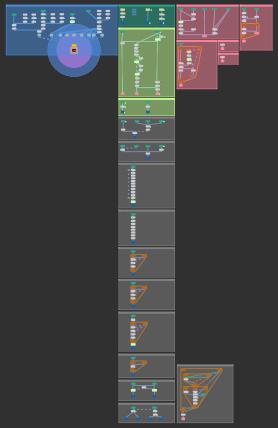
The asset will be black-boxed on release but feel free to PM me if you want to chat about how I've approached different things under the hood.
Diffeomorphic: locking bones in place MHX and RigifyI just recently got into diffeomorphic for animations so I'm a total novice, including blender.
My plan: For gen 8.1, finish basic posing in DAZ > transfer model and said pose to blender > make an animation > transfer the animation back to daz > tweak facial expressions > render animation from DAZ.
My animations will at most be 4 seconds long and looped (you probably have an idea of what I'm trying to do)
I have several questions regarding Mhx and Rigify.
I read rigify is not so much compatible with daz animation so it could mess up the animation when importing it back to DAZ from blender. (Correct me if I'm wrong. I do prefer using rigify over MHX, or if there is a way to make it work with rigify.)
1. (MHX) I'd like to keep the feet in place when I move the hip but I'm not sure how to do it. How can I lock certain bones in place? (Like pinning translation/rotation of body parts in DAZ)
2. (Rigify) seems to keep other bones in place EXCEPT when I import a pose, moving hips starts moving the whole lower body unlike before I set a preset pose. Why or how can I fix this?
3.I'd like to know if my plan (from above) is actually doable and not inefficient. If there is a better way of doing this, I'd like to know that as well. I searched everywhere but I couldn't find a clear answer to how people actually do them.
Thanks!
What happened to the split-up outfits?Sevrin said:
joanna said:
Hylas said:
I liked the split items, and I don't see how it would hurt folks who didn't like them. You could still buy the entire garment if you wanted to.
And have a huge mess in Daz Central and Smart Content as every single piece was counted as separate item. Same for the store, for that matter, scrolling past countless "piece of outfit" items was somewhat annoying.
Makes me wonder what the sales results were for full outfit vs. pieces, but I doubt Daz will share any ratios/percentages.
The extra items in Smart Content were my only problem with this. If Daz could some how ship outfits like outfits for people who bought the whole thing, I'd like to see separates come back.
Smart Content is kind of a mess generally right now, what with Lost & Found overflowing with items. It's a feature I use a lot, and hope that it will get some attention.
That is a matter of getting the metadata corrected, Smart Content and Categories are just reporting what that says.
Daz Studio on a new computerIn that case the issue is the database not getting updated by the Install Manager process, or Daz Studio not reading the database correctly (since you are seeing greyed out product thumbnails it is at least able to access the database, but it has - as far as I know - to convert the old-style DIM entries to the current tables). So, are you starting DIM after closing Daz Studio? That can, if the timing comes out wrong, lead to the database being closed when DIM does the actual installation.
One possible fix is to open the Content Library option menu (the lined button in the top corner or right-click the tab)>Content DB Maintenance, check Reimport Metadata, and then use the master checkbox above Products to select everything - that should update the database with all of the missing metadata and enable you to see and access things through the database-dependent views, like Smart Content.
OFFICIAL DazToBlender Bridge 2022 (SEPTEMBER UPDATE): What's New and How To Use ItI seem to have installed and got everything working and transferrring, but i see all the videos show a neutral pose, and although there is an import pose button, i cant find anywhere to say where you import that pose from?
any help appreciated thanks
is there an easy way to tell if a texture is Iray?Thank you. This also reminded me that it is wise to look at the 'Info' tab in Smart Content when first checking our a new product's materials. I have found the occasional item where the Iray or 3DL products are in the code, but they are marked as the opposite property in the metadata. Which means fixing the metadata and maybe a submission to DAZ Customer Service if a newish item.
Can't get dson importer anymore?you can probably import FBX exports
How to apply Genesis 8.1 skin on Genesis 8?...yes I remembered to do that step after I applied all the surfaces first. .
As to the morphs/shapes it was the fact that some (like the head morphs I mentioned) originally were for G3F but transferred via Zev0's XTransfer utility.
One thing I did notice that seems a bit different in the operation is when I export the 8.1F UV, a folder is opened in Carrara (?) to send the obj to. I don't notice that happening in your video Likewise when I import the UV set to the 8F Devload,, that same folder is opened again.
I think I found the issue. For some reason the saved asset is not showing up in the UV Set Channel even though I followed all the steps exactly as they are on your video (even named the UV Asset the same) Again I think the issue is because it is exporting to a Carrara 8.5 instead of wherever it needs to go in Daz, but I don't know where that .obj is supposed to export to in Daz so it can be applied to the G8F Devload.
It seems your setup a bit different than mine in that I see no folders pop up on the screen when you export, import, or save.
Need to turn it as it's late (after 02:00), I'll check for a response after I get up.
The Marvelous Designer ThreadMD to DS is killing me :)
I'm creating a clothing in MD and import as OBJ.
For each pose, I create a new MD project to adjust clothes to the pose, export again, import into DS as morph on my clothing.
No change on the geometry (particle distance, etc.).
But yet, I get (but not always) differences in the vertex counts and DS refuses to use the OBJ as morph.
Is that a "normal" problem?
I'd be ok to not use morphs but to import each OBJ for each pose separately.
However, MD appends unique numbers to the surface groups upon each export, which makes it impossible to use material presets.
So basically, you then have to copy paste each material from each surface to the newly imported OBJ's surfaces, which can be time consuming...
Thanks for help!
Problem using Marvelous Designer to fix poke through.I used Marvelous Designer to fix a poke through issue and it worked fantastic. The result was just what I wanted so I purchased MD to simulate all my clothing and poses in Daz. But now I am finding that any clothing with a buckle, button, or strings or belts, break apart in MD and fly away and the geometry will never match to import even the base clothing object back into Daz from MD. I am finding that most of the garments I have break apart and I have no idea how to stop it, if you can. MD is not cheap, and is totally useless to me for what I was hoping to accomplish if all of the Daz clothing just breaks apart. If anyone knows of a solution or a work around, I would be very appreciative to hear it.
Help with moving files to a new drive: Figures won't load morphs anymoreNorthOf45 said:
Check the log file to see what it says after you load a character. If the morph files are where they are supposed to be, they are available, and their controllers are created. I don't think missing morph files at load time will trigger an error, they are just not available, as you have noted. Do you have some utility to disable morphs, like Turbo Loader?
Somehow I ended up getting it to work 2 seconds ago. I reinstalled Daz from scratch, and just started adding tons of folders to the Content Directory Manager (under Other Import Formats), didn't set up the cloud content sync feature, and it started working again. I loaded a character up like you said and for the first time in days every morph properly loaded.
Daz Studio Content SuggestionRichard Haseltine said:
You can add any additional categories you like, and there are also tags on most things (that have metadata at all) - click to expand the set of tabs at the bottom of Smart Content to get at, and edit, tags, right-click on a file or folder to categorise it.
I appreciate the suggestion... and it's clear that this might be a solution... but after tinkering with Daz Studio last night, I have no idea how to do what you are suggesting here.
New to daz 3d2-can i make changes to the model after i import itto blender changes to shape, color and meterial?3-what exactly do i need to make a hyper realistic character in daz i want to make a 4k res character
2. If you want to bring your model back to Daz, let's say to add clothing or hair, you probably want to think in terms of Morphs. Look for tutorials on the Daz youtube channel about that.
If you want to stay on Blender, of course, you can change the materials. But in that case, do not just export as Obj, use the Daz 2 blender bridge. That will make some shader materials with different nodes. You will need to tweak them on Blender.
There is another option, it is a Blender Importer from Daz. I think the shader nodes are easier to tweak because it uses standard nodes. http://diffeomorphic.blogspot.com/p/daz-importer-version-14.html Look for some youtube videos about it.
3. I am not sure what you mean by 4k res character. Probably you are referring to the size of the texture maps. That is a really broad question. You probably need a lot of skills in sculpting and painting, not only diffuse maps but also normal or bump maps. You need to add imperfections, probably even to deform them a bit the teeth. Etc. you probably need some months (or years) of practice. Probably it is better to find some starting points in the Daz store. There are some things like face transfer or other utilities to start.
[SOLVED] Texturing for DAZ (be it Substance or Blender), importing map.UPDATE :
Found it. I was expecting a section similar to the import map option available for normals or displacement. But in fact there are also options available in the little preview square icon. My mistake.
[SOLVED] Texturing for DAZ (be it Substance or Blender), importing map.That's where I have a problem, among the options the only things I can import are normal maps, bump maps and displacement masp, everythings else are only sliders.
Using Daz for comics - Q-32Hi mindsong, thanks for your feedback. I must say I'm pleased I posted here. I've been working solo and it's great to be able to express my thoughts technically with like minded people. Your points about Hi-rez, I'm old school web and I'm not about to go changing to the 50% mobile gadget users, who can't even use the web, they can't even say application, too many syllables, they can only say "app". Leave the politics alone. Talk tech. 4 times oversize means exactly what I say. Suppose I do a full screen image (width 1920 px), I then do a render at 4 x 1920 which comes to 7,680 px wide RIP, save as TIFF and that renders and comes out at about 32M at system resolution 96 dpi, MS Windows, my system. I then work on the TIFF at that size, doing "inking" at 700 x magnification in Photoshop. The "inking" can become laborious sometimes if I've got a lot to do. Otherwise I don't mind the work. Sometimes I enjoy it and I'm starting to get a bit bold with it and creative after a lot of experience. I see it as a comic skill I need to develop. I'm OK with it and it's working well. If I was going to change anything I'd go with a vector program such as Adobe Illustrator. Vector drawing is so much better than doing it in raster. Alas, I don't want to spend the money and then I've got to learn how to drive the dang thing. Also there'd be a change in style and I want everything to remain fairly consistent in standard. Thanks for suggesting other programs, but for now I'll stick with what I've got.
Now here's what I didn't describe before, and this came as a big surprise to me, I discovered by accident, when going from 4 times oversize back to correct size for use in Flash I discovered that instead of saving the smaller (1920 px) size from the original Daz TIFF render in Photoshop as I did, I now reduce size in believe it or not, truth, I use MS Paint! Yep, old clunky MS Paint. Believe it or not, modern MS Paint has been improved. I discovered that it's default resolution is 144 dpi, excatly twice the standard MAC and web standard 72 dpi. I also noticed that it increased contrast very slightly increasing drama in the graphic and comics thrive on drama, as well as sharpening and defining the "inking" better. IMO, Photoshop tends to give a softish look which is appropriate to photography. So now, I render 4 times up, do Photoshop work at that size, save the TIFF, reduce the size in MS Paint, save as PNG, import to Flash, do the text etc, then export finished PNG from Flash at 72 dpi, then put it through TinyPNG for web use and bingo, high quality useable web graphic. Sounds complicated but when you do it as much as I do when in full production it's just an easy standard procedure. I'm going to stick with it. I also keep all the files carefully at the big size, because one day, probably never, maybe I might go see you print guys for doing a book and I've got almost high quality print ready material. Also to add, there is some spin-off graphic work from the comic which I can market as wall art done at 300 dpi, which I do.
I won't be putting up my links here because I don't think Daz will appreciate me doing self promotion through their forum. Regards.
[SOLVED] Texturing for DAZ (be it Substance or Blender), importing map.Download is the wrong word - I guess you mean import or apply.
Which shader is being used on the model - top-left of the Editor tab of the Surfaces pane, with the surfaces of interest selected..
Daz 3D is part of

Connect
DAZ Productions, Inc.
7533 S Center View Ct #4664
West Jordan, UT 84084Licensing Agreement | Terms of Service | Privacy Policy | EULA
© 2026 Daz Productions Inc. All Rights Reserved.