-
Texture (UV) and morph compatibility: DAZ Gen(eration) 1 to 4; Gen(esis) 1, 2, 3, 8 and (beyond ?)
Generation 1: Victoria, Michael, (Stephanie?), (Aiko?), (Millennium Boy?), (Millenium Girl?), (Millenium Baby?)
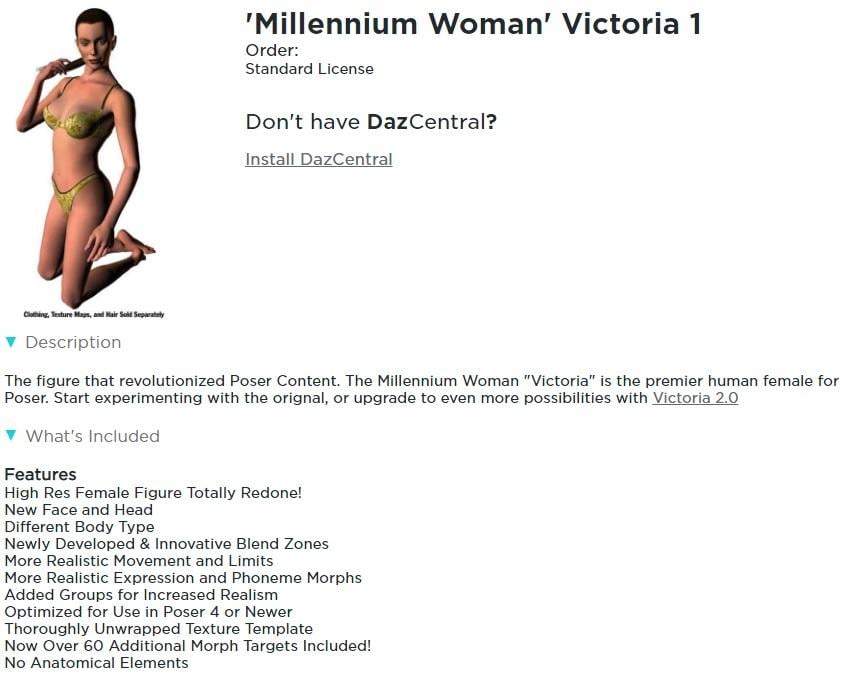
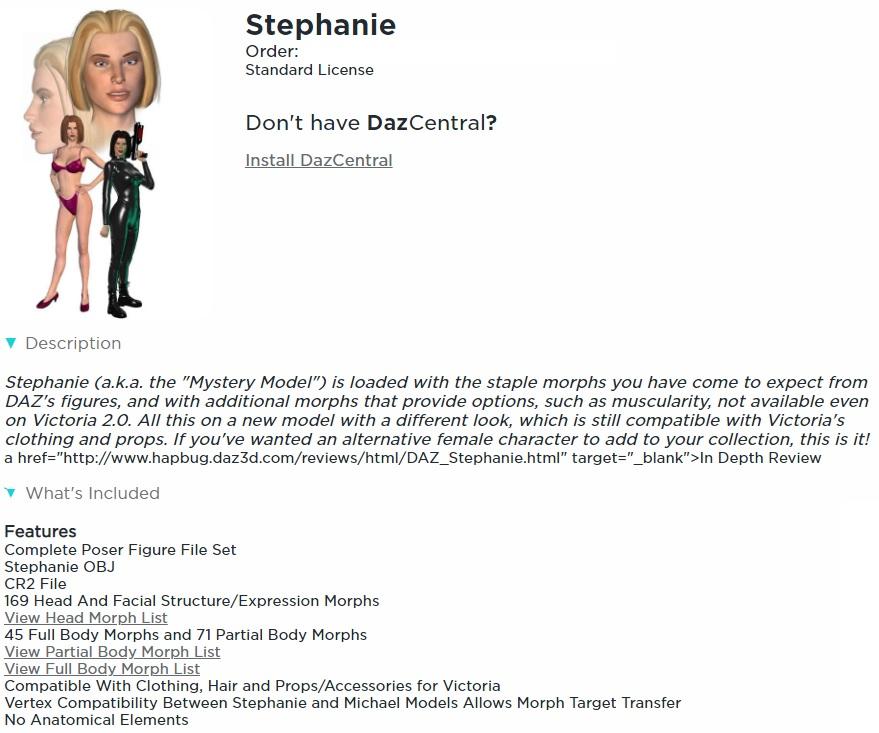
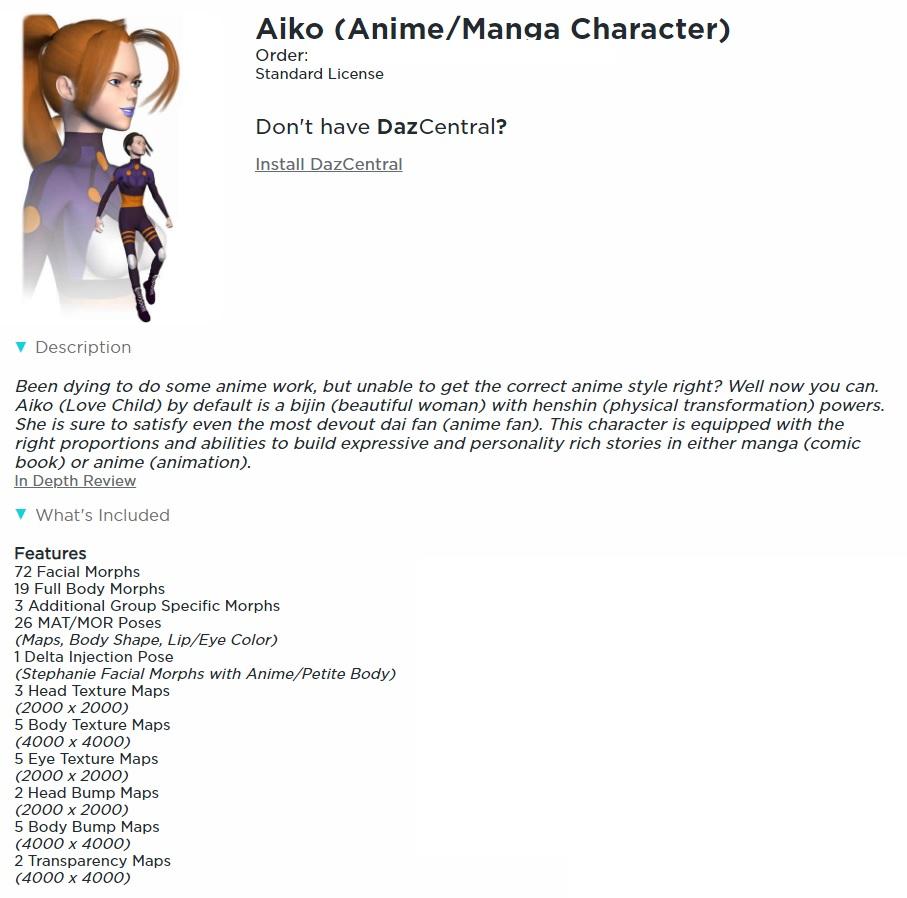
I've taken the liberty of posting screenshots of the details pages from my product library for the generation 1 characters that I have (mostly from my other account) Victoria, Stephanie, and Aiko.The product pages for these three lassies no longer seem to exist.
I'm not actually sure whether Stephanie, Aiko, Millenium Boy/Girl/Baby belong to generation 1 or 2.
Aiko doesn't have a distinct geometry - she uses the same OBJ as Stephanie. (discovered this while looking through my newly re- installed files)
 Texture (UV) and morph compatibility: DAZ Gen(eration) 1 to 4; Gen(esis) 1, 2, 3, 8 and (beyond ?)
I've always been confused about which figures within a particular generation can use each others textures and/or morphs straight out of the box, i.e. without the need for any conversion utility.
I'm currently reinstalling all my DAZ and Poser content, so now seems an ideal time to get to the bottom of this.
I plan to be editing the following posts, one for each generation, on and off for quite a while. Initially there'll be lots of empty space, some questions, and lots of statements about my understanding of this, much of which may be incorrect. But I hope that it'll gradually become more accurate.
Thanks to Lissa_xyz for the link to the official DAZ Compatibility Matrix: What Works With What . It only covers generations 4, 5 and 6, and the formatting appears to be screwed up (it's just a huge scrolly list at present).
Links to the posts below for specific generations:
- Generation 1
- Generation 2: Victoria 2, etc
- Generation 3: Victoria 3, etc
- Generation 4: Victoria 4, etc
- Generation 5: Genesis
- Generation 6: Genesis 2
- Generation 7: Genesis 3
- Generation 8: Genesis 8 (the genesis suffix being set to match the generation)
Further posts on specific things:
Transfer a taller morph of G8F to G3FI've been trying to transfer a body morph (Leah) from G8F to G3F. The character is taller than G3F, and I am getting wonky arms after transfer. I have replicated this with Victoria 8 (who is also taller)
I assume I am missing the combination of settings in the Transfer Utility to do this.
I am using this transfer process, starting at PART 2, from @Sickleyield: [Tutorial] Transferring Character Morphs G1G2G3G8 by SickleYield on DeviantArt
I have tried a lot of combinations of 45 degrees down and legs at 6 degrees out/in, or clones of A pose or T pose...but I still get wonky arms as I dial it into G3F after transfer.
Here is what I am talking about using the V8 body morph...it is much, much worse with the Leah morph. Any ideas?
 Slim Man Export to Reallusion Character Creator 3
I absolutely love the variety of Daz products but I find the user interface less than intuitive for my horror and scifi creature designs. My workflow so far has been to create a creature or creatures in Daz Studio, export to Character Creator, combine the assets I want for my model, and then export through the various reallusion pipelines to Unreal Engine. This has worked great and has let me combine male and female assets from any generation of products into one finished model with ease. Unfortunately, I am now attempting to create a Lovecraftian Night-Gaunt for a new project and the Slim Man base with assets from Victoria 4.2 Creatures should let me create this faceless monster with leathery wings, pawed hands and feet, and horns that curve back and to the center as per Lovecraft's description. My problem is that I can get the Slim Man model to export just fine but on attemting to import to Charector Creator I get an error message that reads "Failed to load character: No suitable setup profile found." I've gone back over my entire setup and the only thing I can think that might pose an issue would be the faceless part of the Slim Man model. Any ideas on how I can get around this issue or possibly do what I am describing in Daz Studio itself would be greatly appreciated.
learning Aniblocks...is there a way to "superimpose" a few blocks at once?I guess I was wrong it looks like Daz has updated the gyro hip-hop dancing aniblocks for genesis8 .too
https://www.daz3d.com/animate-hip-hop-moves-1-for-victoria-8
JCM doesn't work in Blender!jeff_someone said:
acdum1857 said:
jeff_someone said:
TheMysteryIsThePoint said:
Yes, you need to actually load the JCMs. I'm not at my computer right now, but the option on the N-Panel is pretty obvious once you know to look for it. I also remember that once, I had to set some option to allow Python to run, but interestingly, it only bit me one time.
Yes, there's a Load Standard JCMs in the Morphs panel on Diffeo. Also, not sure what the problem is on official DTB, all the JCMs work fine for me out of the box.
Thank you for your answer.
I ran 'Load Standard JCMs' in Diffeomorphic.
Fortunately, the upper body JCMs worked, but still the calves and thighs did not.
I am now having the same problem with both Bridge and Diffeomorphic, and I don't know what is causing it.
A separate question, is there a way to load Subdivision 2 figures in Diffeomorphic?What character are you moving over to Blender? Is it a standard Genesis 8 version character?
It's a Victoria 8 model with morphs applied.
In Diffeomorphic, only subdivision 1 or less is imported.
So did the other models.Did G8F Have Separate Eyebrows Or... :/The Hierarchical materials came with my Victoria 8 too...
Did G8F Have Separate Eyebrows Or... :/They are just in the Victoria 8 product.
Did G8F Have Separate Eyebrows Or... :/Richard Haseltine said:
I have Hierarchical Materials for the brow materials in the Victoria 8 product.
Where did you get these from? For me, it's the same as @Bejaymac. Even using the premade V8 char preset, she's using a diffuse overlay for her eyebrows, as are her iray brow materials. The fibermesh attachment is under Anatomy > Victoria 8 Eyebrows, and never load by default.
Did G8F Have Separate Eyebrows Or... :/I have Hierarchical Materials for the brow materials in the Victoria 8 product.
AIUTO...CHI CONOSCE L’ITALIANO? PARTE DODICIÈ vero che è diverso come tipo di approccio ma molti strumenti di Zbrush sono usati per fare i props che vedi nello store.
Ad esempio molti capelli, barbe ecc.. sono realizzati con Fibermesh in Zbrush.
Alcuni morph sono stati realizzati scolpendo i modelli base di Genesis/Michael/Victoria poi reimportati in DAZ e convertiti in morph.
Perfino i vestiti sono stati realizzati in Zbrush e poi esportati in DAZ.In Zbrush non si rigga, se lo si fa è solo per mettere personaggi in pose plastiche (il software non permette di editare le aree di influenza dei joint e dunque non permette un rigging accurato). Se è necessario il rigging, si esporta il modello e lo si fa con altri software (Maya, Blender, ecc..)
3D Comic Book Tips And PicturesShadowSkillz said:
Good day folks,
Since everyone here is focused on Comics I'm hoping you can help me with something. Where can "Anime/Manga style" hair, meaning big hair strands, no need for realistic millions of strands no transparency required, that works with genesis 8?
I can relate to your problem. Even though I work in Poser, I've had the same issue with trying to get comic-style hair, rather than realistic hair in my work. I found the best solution is to go back in time and look at OLD hair products that are based more on geometry than on transmaps. Now, this solution means you will need to custom fit your hair, but once you get the hang of the process it's not all that troublesome.
I suggest you look for hair for these figures:
- Chip (https://www.daz3d.com/chip-mix-and-match-shagmop-hair)
- Cookie (https://www.daz3d.com/cookie-mix-and-match-feathered-hair)
- Star! (https://www.daz3d.com/violet-hair-for-genesis-3-female-s) And make sure you look at the older version of Star!
- Dennis, and any of the old Michael 3 and Victoria 3 figures.
And have you looked at these?
Did G8F Have Separate Eyebrows Or... :/nemesis10 said:
The eyebrows are part of the Victoria 8 package; the Genesis 8 esentials only comes with eyelashes.
Dangit. Okay, thanks for the heads up. :)
Did G8F Have Separate Eyebrows Or... :/The eyebrows are part of the Victoria 8 package; the Genesis 8 esentials only comes with eyelashes.
DAZ Gen(eration) 4: running the DzCreateExPFiles-###.bat files - figures in multiple Poser runtimes.Thanks both.
The following's mainly for my own reference. I've redownloaded the manual install zip files for all the basicGen(eration) 1-4 figures, morphs, etc. As a quick test I unzipped just V4 base and V4 Morphs ++ to a new runtime that I called 3) V4++, duplicated that runtime and named it 4) V4++ - Ran ExP, ran the batch file from the duplicate (4) runtime, and then did a file compare (WinMerge). Only the PZ2 files in Runtime/libraries/!DAZ/Victoria (not subfolders) were changed, all except the Eye and tongue ones (screenshot attached).Reminder to self: It took a while to remember how to use the Morphs++ because the last time I did this was many years ago. I was surprised that when I loaded V4 from my 4) V4++ - Ran ExP runtime the Morphs++ groups were present, but there were no actual morphs (second attached image). Of course I had to apply the INJ Morphs++ pose. I must have been using a V4 with morphs pre-injected as my base figure.
I was pleased to see that Vicky's eyes open and close correctly, so it would seem like that particular bug was actually fixed some time over the past several years.
Kitbashing Hair, What might I have Forgotten?I have fitted the new hair to G8F, and it's shown in the 3 renders below. The blonde hair is Jim Burton's original Las Vegas hair on Glamorous Vicki 3 (a 16+ year old Victoria 3 based character) the dark version is the converted one on FWSA'S McKayla for G8F, including the Toulouse Hair skull cap and all the Las Vegas morphs applied. So far as I can tell, it works as a native G8F hair, shrinking and growing, twisting and bending as you'd expect a conforming hair to do as you change the character and pose.
Regards,
Richard.
DAZ Gen(eration) 4: running the DzCreateExPFiles-###.bat files - figures in multiple Poser runtimes.3dcheapskate said:
I'm about to reinstall all my DAZ generation 4 muppets for use in Poser 11.
While digging out the fixes for the Freak 4 arm dent and V4 eyes not closing problems I was reminded not only that I mustn't forget to run these batch files, but that it's actually one of these batch files that causes the V4 eye problem. But that's for later.
One oft-repeated piece of advice is to make sure, before running the batch file, that you only have one runtime containing the relevant figure. E.g Richard Haseltine gave the following advice (back in 2015) for running the V4 batch file "Make sure you don't have two \Runtime\Libraries\!DAZ\Victoria 4 folders, especially if you've recently added a library to Poser. Go to \Runtime\Libraries\!DAZ and run the DzCreateExPFiles-v4 file."
But I have two:
- My old "DAZ Figures" runtime which contains all my DAZ gen(eration) 1 to 4 figures, plus accrued junk from over a decade.
- My new single figure runtimes, e.g "/DAZ/V4"
I'm assuming from Richard's wording that it's Poser mapped runtimes that are important,
So as long as I only have the second runtime mapped to Poser, then I should be okay ?
Yes, you just don't want to have two active /Runtime/Libraries/!DAZ/ folders for a given figure, and of course only products installed to the active folder will be available to load.
Kitbashing Hair, What might I have Forgotten?I wonder if someone might be able to help me.
I am kitbashing an old Victoria 3 hair model and trying to get it to work with G8F as if a newly modelled hair. The hair is the now unavailable Las Vegas hair by Jim Burton. It doesn't attach well to G8F which is why I'm trying this idea.
The process I am following is this:
- Save Toulouse Hair as an .obj file.
- Load into a modeller (my own one in this case)
- Delete all the hair, but leave the hair cap.
- In DS save the Las Vegas hair as an .obj file. This hair has no skull cap.
- Merge the obj file in the modeller with the Toulouse Hair skull cap and translate the hair strands as needed while leaving the skull cap in position.
- Export the hair as an .obj file from the modeller
- Import the hair model into DS, load in Toulouse Hair.
- Use the Transfer Utility from Toulouse Hair to rig the hair.
- Load each morph into the figure using stages 4-6 and then load as a morph using Morph Loader (the simpler one).
- When fitted to a character, specify that the original base figure is 'Unsupported'.
Right, having told you what I did, now can I ask what I did wrong, or could do differently? Should I have changed facet group names to match the G8F facet group names or does the Transfer Utility do it all? Or is it better to specify a compatibility base figure? Victoria 3 has a 'Neck', while G8F has an upper and lower neck. Unlike modern hair, the rigging of the original hair starts with the 'Chest', with the left and right shoulder being rigged off the head... It's all a bit odd by comparison with modern hair.
If I have done it not too badly, I may try doing some hair totally from scratch at some point. I wanted to start with something where I knew it should work if I get it right rather than start with something that may be impossible from the beginning. I forgot to mention the result of the process above - it seems to follow the character shape quite well, but I am not sure whether it's a fluke or whether I have followed a sensible process to cover all that I need to cover.
Regards,
Richard.
DAZ Gen(eration) 4: running the DzCreateExPFiles-###.bat files - figures in multiple Poser runtimes.I'm about to reinstall all my DAZ generation 4 muppets for use in Poser 11.
While digging out the fixes for the Freak 4 arm dent and V4 eyes not closing problems I was reminded not only that I mustn't forget to run these batch files, but that it's actually one of these batch files that causes the V4 eye problem. But that's for later.
One oft-repeated piece of advice is to make sure, before running the batch file, that you only have one runtime containing the relevant figure. E.g Richard Haseltine gave the following advice (back in 2015) for running the V4 batch file "Make sure you don't have two \Runtime\Libraries\!DAZ\Victoria 4 folders, especially if you've recently added a library to Poser. Go to \Runtime\Libraries\!DAZ and run the DzCreateExPFiles-v4 file."
But I have two:
- My old "DAZ Figures" runtime which contains all my DAZ gen(eration) 1 to 4 figures, plus accrued junk from over a decade.
- My new single figure runtimes, e.g "/DAZ/V4"
I'm assuming from Richard's wording that it's Poser mapped runtimes that are important,
So as long as I only have the second runtime mapped to Poser, then I should be okay ?
An Attempt of a "Limited Time Freebie" Message Only Email Alert ThreadAlthough not strictly free if you add the "cyber sidekick stack-up" and the "HOLIDAY-GOODIES" coupon together the Gen 8 female body morphs, head morphs and expressions come to about a dollar each with a list price of 20 dollars each. (and 2 more slots for the coupon)
Although the coupon is one time only and depends if you are saving it for something else. like i got victoria 8 and 2 morph packs for 6ish dollars with correct stacking.
Daz 3D is part of

Connect
DAZ Productions, Inc.
7533 S Center View Ct #4664
West Jordan, UT 84084Licensing Agreement | Terms of Service | Privacy Policy | EULA
© 2026 Daz Productions Inc. All Rights Reserved.