-
Buy Something That Doesn't Work in Carrara? Post your Questions and Workarounds here. (please)
Dragovinian for Ravager Parasite for Genesis 8.1 Male - https://www.daz3d.com/dragovinian-for-ravager-parasite-for-genesis-81-male
Dragon Warrior Poses for the Dragovinian - https://www.daz3d.com/dragon-warrior-poses-for-the-dragovinian
Both of these had a few issues in Carrara
First of all it needs freebie Misty's preset - https://www.renderosity.com/freestuff/items/88523/carrara-presets-for-genesis-81
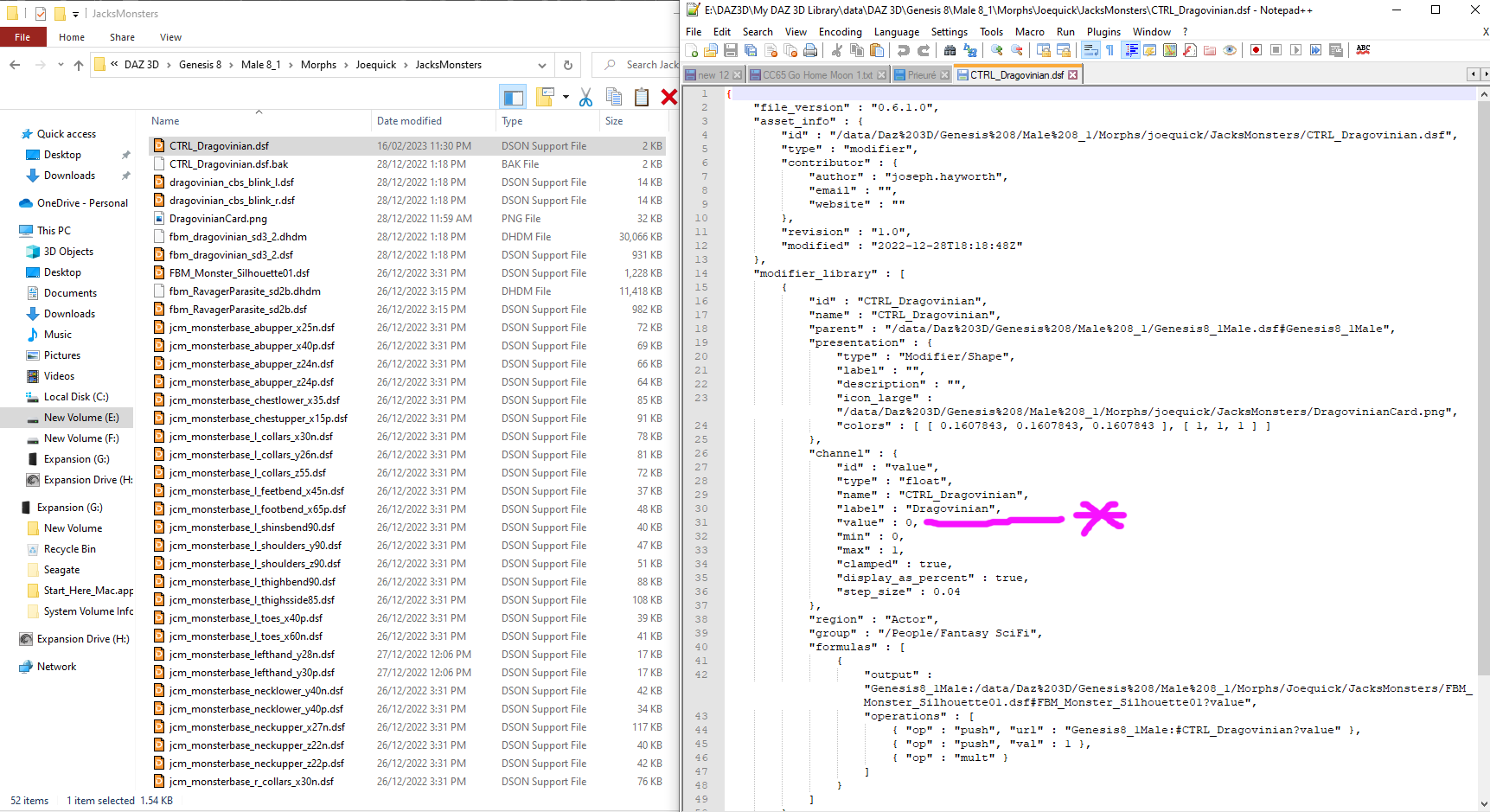
For the Dragovinian install when the data file is loaded it has the morph set at 1 when it should be 0, so the data file needs to be adjusted otherwise the Genesis 8.1 figure will load with Dragovinian fully on. Edit - Joe has issued an update
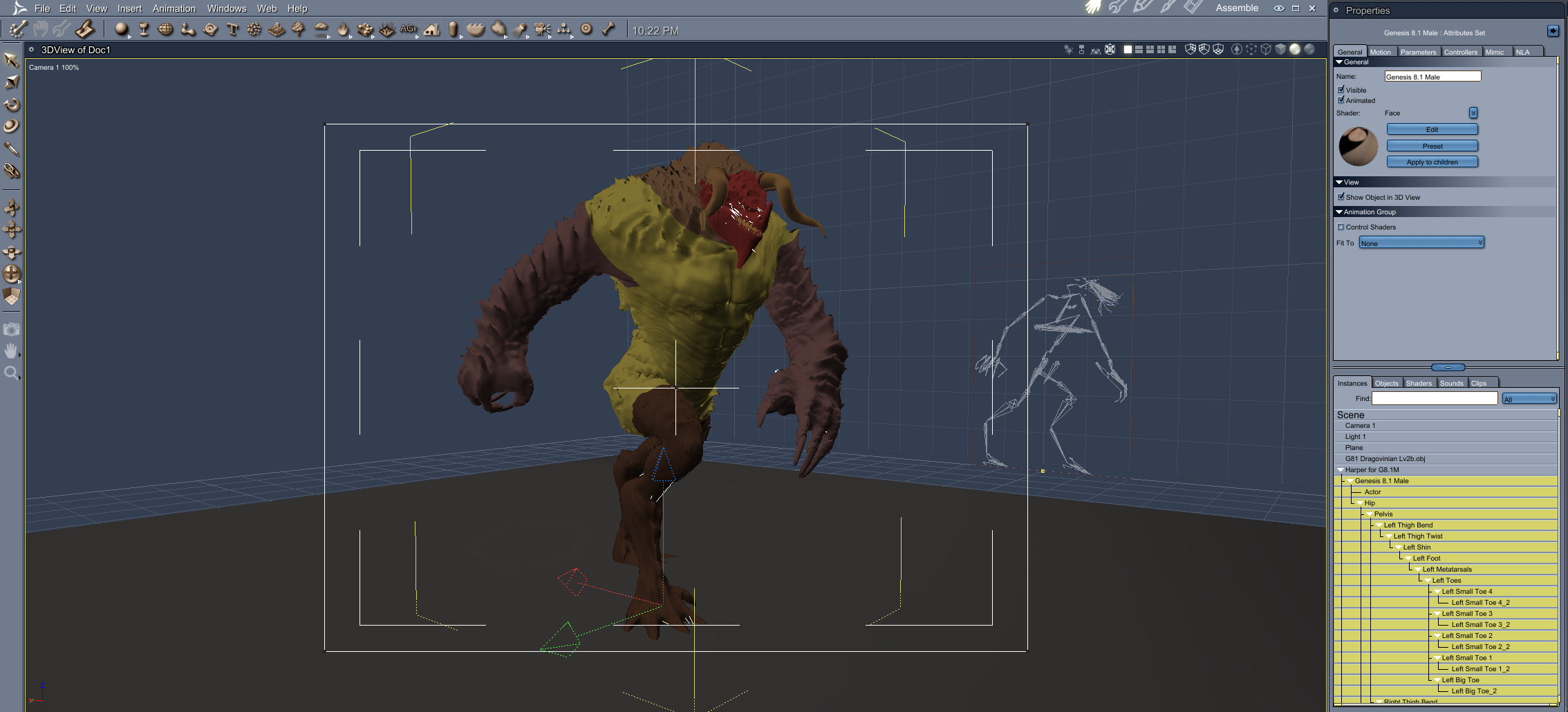
Dragovinian for Ravager Parasite has Horns/Teeth and a Tail that need to be converted to blended weight in DAZ Studio.
When the material file DUF is used it will come up with a Warning notice and then figure not found, so you will need to save the DUF files as Material Presets in DAZ Studio.
Dragon Warrior Poses - when the poses are applied they come up with an error message, poses will need to be saved as Pose Presets in DAZ Studio
When the blended weight horns/teeth are applied to the default pose they look to be in the correct spot, after the figure has been posed the horns/teeth are skewif from the correct position. Will need to be rotated/moved to match the pose position. EDIT - When I applied the HD Morph to the figure I was getting the Horns/Teeth skewif when posed, found a fix, when you export the obj of the figure for the HD Morph include the Horns/Teeth, poses work if they are included in this step !!!
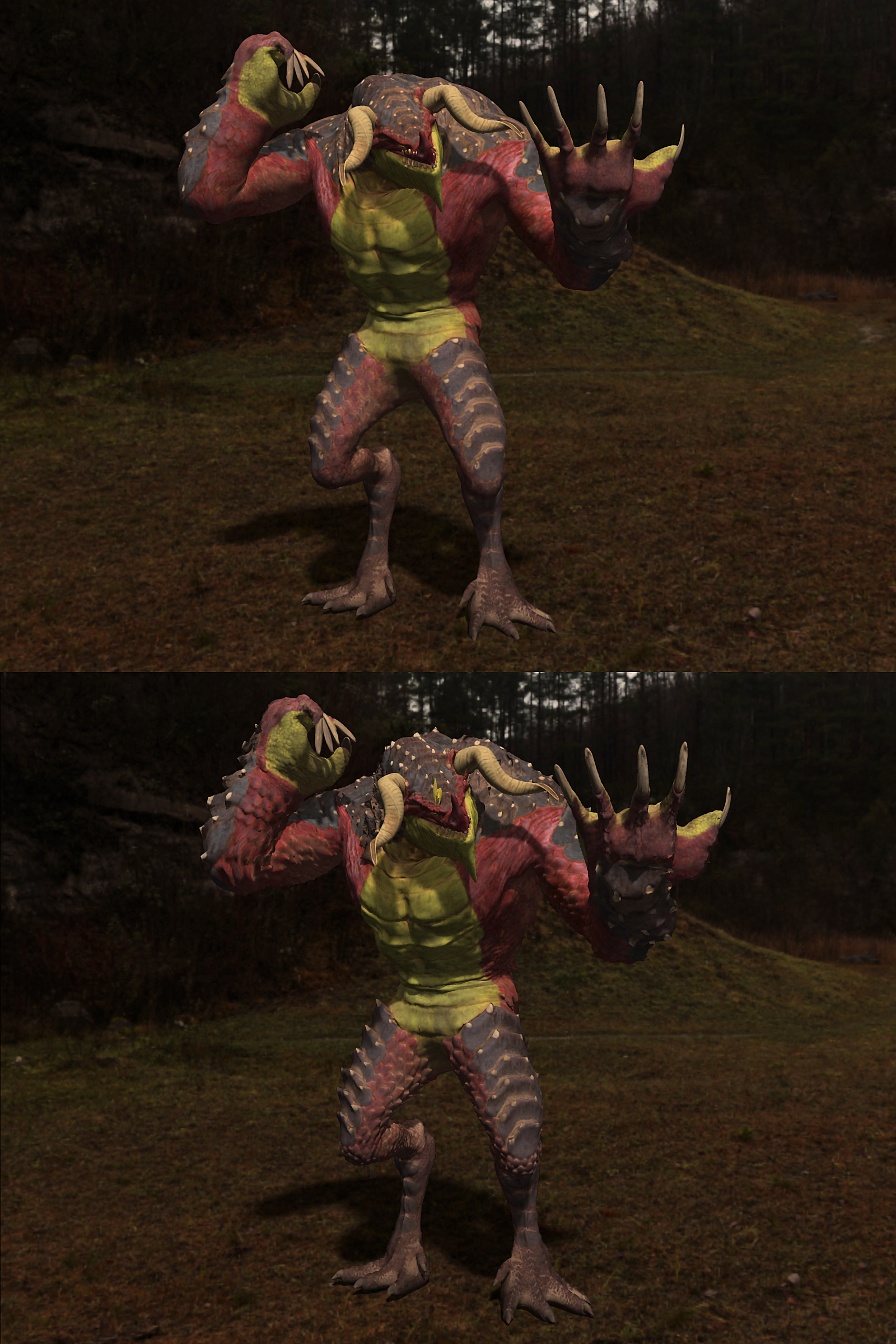
Dragovinian for Ravager Parasite - has detail subdivision in DAZ Studio set to 2, when opened in Carrara it defaults to one, losing some of the default detail. I used Philemos excellent HD Morph plugin to bring in Level 2 subdivision. Note don't use Level 4 as I got an obj file larger than 700MB which refused to import into Carrara on my computer.
Also when the HD Morph is applied to the figure and poses where applied some severe distortion was occurring to the figure.
Apply the HD Morph after you apply the Material and Horns/Teeth to the figure.
Philemos HD Morph plugin - https://www.daz3d.com/forums/discussion/comment/4532031/#Comment_4532031
 Crashing Issue
I wrote a short python program to solve this problem:
import json
import re
import tkinter as tk
from tkinter import filedialog
import gzip

def getFileName( **kwargs ):
    '''
    #    parent - the window to place the dialog on top of
    #    title - the title of the window
    #    initialdir - the directory that the dialog starts in
    #    initialfile - the file selected upon opening of the dialog
    #    filetypes - a sequence of (label, pattern) tuples "typeName {extension ?extensions ...?}, '*' wildcard is allowed
    #    defaultextension - default extension to append to file (save dialogs)
    #    multiple - when true, selection of multiple items is allowed
    '''
    root = tk.Tk()
    root.withdraw()

    return filedialog.askopenfilename( **kwargs )

def removeTabsEtc( m ):
    # print( m )
    # return re.sub( r'[\r\n\t]*', '', m.group() )
    return m.group().replace( '\t', '').replace( '\r', '').replace( '\n', ' ')

def prettyPrint( dazObj ):
    # print(dazObj)
    x = json.dumps( dazObj, indent='\t', sort_keys=False )
    x = x.replace( '":', '" :')
    RE = re.compile( r'\[[a-zA-Z0-9,"\.\-\s\n\t\r]*?\]' ) # in almost everything included in [] (non-greedy) ...
    return re.sub( RE, removeTabsEtc, x ) # ... tabs and newlines will be removed
    # return x

def readDazZipFile( path ):
    print( "reading: " + path )

    try:
        dazr = gzip.open( path, "rb" ).read()
        return json.loads(dazr)
    except gzip.BadGzipFile:
        print( "this is not a zipped file - try to open directly" )
        try:
            dazr = open( path, "r" ).read()
            return json.loads(dazr)
        except:
            print( "can't open file - seems not to be a daz file")
            return None

def writeDazZipFile( dazObj, path ):
    print( "writing to zipfile: " + path )
    dazw = gzip.open( path, 'w')

    orderedObj = {}
    properties = [ "file_version", "asset_info", "geometry_library", "node_library", "uv_set_library",
        "modifier_library", "image_library", "material_library", "scene" ]
    for p in properties:
        if p in dazObj:
            orderedObj[p] = dazObj[p]

    dazw.write( prettyPrint(orderedObj).encode('utf-8') )
    dazw.close()

path = getFileName( initialdir="S:/_DAZ_G3+8F/People/Genesis 8 Female/Hair/", filetypes=["DAZ-User-File {*.duf}"]  )
dazObj = readDazZipFile( path )

if "material_library" in dazObj:
    for mat in dazObj["material_library"]:
        if "extra" in mat:
            for obj in mat["extra"]:
                if obj["type"] == "studio_material_channels":
                    if "channels" in obj:
                        for ch in obj["channels"]:
                            if ch["channel"]["id"] == "Transmitted Color":
                                # obj["channels"].pop(ch) # seems not necessary
                                pass
if "scene" in dazObj:
    if "materials" in dazObj["scene"]:
        for mat in dazObj["scene"]["materials"]:
            if "extra" in mat:
                for obj in mat["extra"]:
                    if "type" in obj and obj["type"] == "studio_material_channels":
                        for ch in obj["channels"]:
                            if ch["channel"]["id"] == "Transmitted Color":
                                if "image_file" in ch["channel"]:
                                    ch["channel"]["image_file"] = None
                                # obj["channels"].pop(ch) # radical solution, seemingly not necessary

writeDazZipFile( dazObj, path.replace(".duf", "+.duf") )
Change the initialdir so that it points to your Daz Content where the OOT Hair .duf files are.
Then start the python program. Choose the original .duf file; this will be loaded and a file with a "+" in the filename will be written into the same location. This file will cause no crashes (I hope so)..
Auto Rig Pro quick rig - any DAZ video tutorials?Disclaimer - I am very much a newbie with all this so I need guidance.
I want to make simple rotoscope animations in Blender using DAZ characters (the end goal is sending the animation back to DAZ for use later).
I have gotten the base G8 into Blender using Diffeomorphic, but it's hard to pose the rig. I've seen a lot of posts about Auto Rig Pro and its Quick Rig addon, but I haven't seen any video tutorials on how exactly I would set up my character with the Quick Rig (and maintain the DAZ armature). I have a general idea how the remapping works, but from my understanding the quick rig would streamline alot of this for me as there is a preset for DAZ already. It's critical to maintain compatibility with the original armature as I intend to import back to DAZ.
Anyway, before I buy the Auto Rig Pro and Quick Rig, I want to be sure I can get things setup as needed. Can anyone provide guidance on this?
Sagan: A DAZ Studio to Blender Alembic ExporterHi,
I don't know of any product, but I can't believe that this doesn't exist... maybe ask a general DS question in one of the other forums?
But if you've got modeling skills, you could just export the character at base res, select the faces you want for the cap, and import that back into DS with the Transfer Utility.
Or in C4D you can you somehow parent the hair cap geo to the Head bone, and use something like Blender's Shrink Wrap modifier?
In any case, "extract hair cap" seems like a perfect example of a simpler, more specific applet I should write. I'll put that on the list.
Import hair through Blender BridgeHello
I have several hair files in my DAZ library and most of them are compatible with the Daz to Blender Bridge.
I have a male human figure for Blender with no hair and would like to apply one of these hairstyles right on this figure.
Is it possible to ONLY import the haircut through the Blender Bridge and place it on the head of this male character?How do you transfer daz studio custom workspace layout and customizations from a PC to another?paul_ae567ab9 said:
I've tried this but even choosing that custom workspace on another PC it is not applied.
Is there an "Import" now inf V.4.21?
Import what? The feature has not chnaged - if it isn't showing you may need to use Window>Workspace>Update and Merge Menus.
I copied the entire folder user_workspace from PC 1 to PC 2 and this option does nothing.
Sagan: A DAZ Studio to Blender Alembic ExporterTheMysteryIsThePoint said:
jerjer said:
Hello guys,
I have 2 questions regarding the Sagan Alembic Exporter script.
- On the Export dialogue there is a Hair tab (see attached pic). I do not understand what is the purpose of this tab, I have done some testing to try to create a scalp for my figure but when I import in C4D the scalp object is exploded and messed up. Maybe I misunderstood this feature?
My goal was to export a scalp (or hair cap) object so that when I export my alembic animation I can grow hairs on it.
- If I do not use the Hair tab and just export a default Alembic animation, my figures that have a dForce hair do not import with the hairs in C4D. Even if I set the Alembic to import curves as Splines. Is there a way to make it work? Because there are some nice dForce hairs that I'd love to use with animation outside of Daz.
Thanks for your time! :)
Hi @jerjer
1. The purpose of the tab is to create a Blender Hair Particle System from the DAZ hair object. But Blender hair is sort of in a transitionary period where the old method of making a hair particle system doesn't work anymore, and the new way is not implemented by the Blender devs yet. The idea, as you said, was to create a scalp object to grow the hairs on. Since I haven't been able to use it in so long, the scalp object code may be broken.
2. And SBH doesn't export via the normal methods because of the way SBH it works in DAZ Studio; The hair isn't geometry until it is tesselated, and turned into strands. Again, Blender doesn't yet have a Python API to create hair curves, and the old way crashes the latest Blender builds.
But when its implemented in Blender, I'll figure out how to export SBH and various other transmapped hairs as Alembic curves, which I think will work in C4D as well. I think they'll get around to it soon. Agree that there are a lot of nice SBH assets out there, so this is a high priority feature for me as well.
Edit: If you want to keep an eye on it, check out the Blender Issues. When "Add/remove curves and points" or "Alembic import (D11592)" is checked, then I can work on it. I know you said you're using C4D, but it working in Blender marks when I can implement/test it with my setup.
Thank you for this detailed answer! I may have a workaround for the moment wich would be to just apply a simple hair cap on my daz character, which geometry would be exporting well in Alembic keeping the animation, and I could grow hairs on this specific hair geo in C4D (while reducing its opacity to 0 to hide it). The problem is that I don't know where to find a simple hair cap product on the marketplace. I can do same with a full hair set but it is a bit heavy to have all the polygons for nothing (because they will end up being hidden). Do you know how I could find such simple hair cap geo somewhere?
Looking forward to see the further development of your plugin!
J.Genesis 9 EyesAngells said:
If you have a custom face morph , how do you get the eyes to match if you are using vendors morphs mix and match, and exporting the obj and using morph loader to import the morph back into ds. How do you work to make they eyes match, will rigging to shape work or do you have to use a deformer to match the custom face morph?
Genesis 9 eyes are a separate figure from the main body, in the same way that clothes are separate from the main body, so you have to make a separate morph for the eyes too. Give it the same name as your morph on the head (notice i said same 'Name' and not same 'Label')
When eye morph has same name as the head morph, it will be automatically dialled in on the eyes whenever the head morph is dialled in on the body.
When saving out morph asset, remember to save both the body morph and then separately the eye morph.
There is a youtube video im too lazy to link to
Genesis 9 EyesIf you have a custom face morph , how do you get the eyes to match if you are using vendors morphs mix and match, and exporting the obj and using morph loader to import the morph back into ds. How do you work to make they eyes match, will rigging to shape work or do you have to use a deformer to match the custom face morph?
How do you transfer daz studio custom workspace layout and customizations from a PC to another?I've tried this but even choosing that custom workspace on another PC it is not applied.
Is there an "Import" now inf V.4.21?
I copied the entire folder user_workspace from PC 1 to PC 2 and this option does nothing.
SBH Length Interpolation Discussion. Need some advice please.I've been working in both Zbrush and SBH for hair recently. I'd love to try blender too but I seem to be too stupid to work diffeomorphic properly. I have a test scene that someone else made that works so perfectly but none of my scenes will import properly. IDK, just another frustrating thing I'm dealing with and not the topic of the discussion, sorry just had to rant for a second.
OK SBH, I gave up on this for anything other than fur, male hair, eye brows, etc. because long hair seemed too damn impossible.
Well, I'm giving it another go and you know what, some of my results haven't been terrible except for the interpolation algerithm doesn't want me to style hair I guess. The interpolation of spaces between hairs is decently aggressive but I have tamed that to a point that I'm somewhat ok with.
The length though, I have been fuming for about 6 hours now trying to make this hairstyle. As I style, the interpolated hairs keep getting longer and longer, well past the guide hair length. Issue with this is any hair that is longer than the guide hair will not follow the guide line and is stricken with rigor mortis.
I've messed with everything SBH offers to try and resolve this. So, I am giving it a long shot and posting this to see if anyone out there maybe willing to help easy the suffering a little. If you are able to help, a thousand thank yous and a lovely snack basket will be sent to your place of dwelling.
Have a blessed day everyone!
Daz to maya not exporting environments and props?danielbui78 said:
@davegv Krys Kryngle is correct: the options are currently greyed out because that functionallity has not been fully implemented in the Maya plugin side yet.
@videoninja719 Although environments are not seamlessly supported yet, you can still import most props and environments by selecting their sub-components. Here is an example with the Hacienda Kitchen environment:
1. Load the "Hacienda Kitchen With Accessories and Lights" Set
2. In the Scene panel, open the "Hacienda Kitchen With Accessories" node to show the child nodes. Notice that this node's icon is a cube with missing sides/edges. This is a Group Node which is not yet supported by the DazToMaya bridge.
3. Select "Hacienda Kitchen".
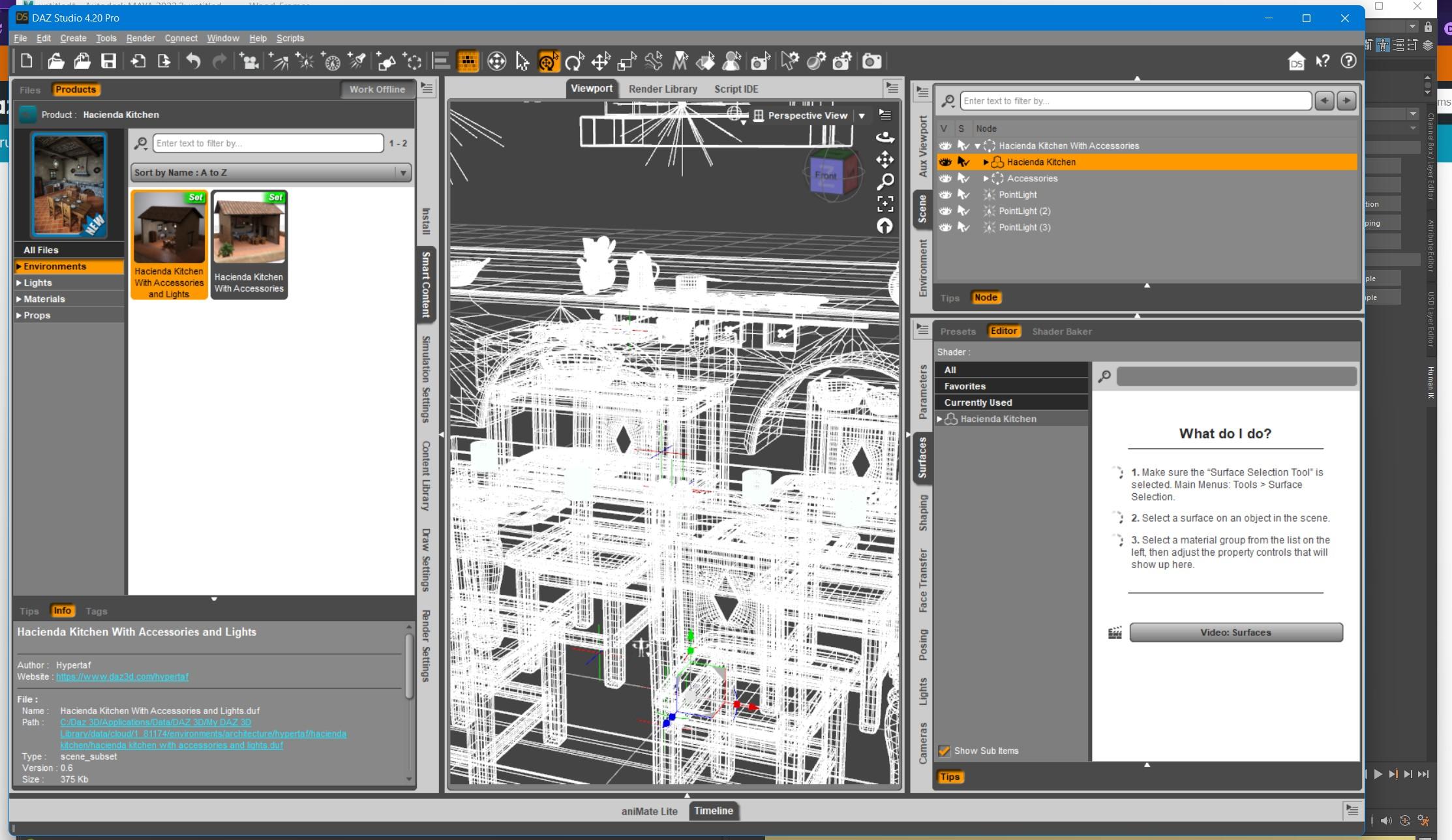
4. Click File -> Send To -> Daz to Maya. Click Accept.
5. Open Maya. Click the "DAZ IMPORT" icon in the DazToMaya shelf tab. Click "Auto-Import" in the DazToMaya dialog.
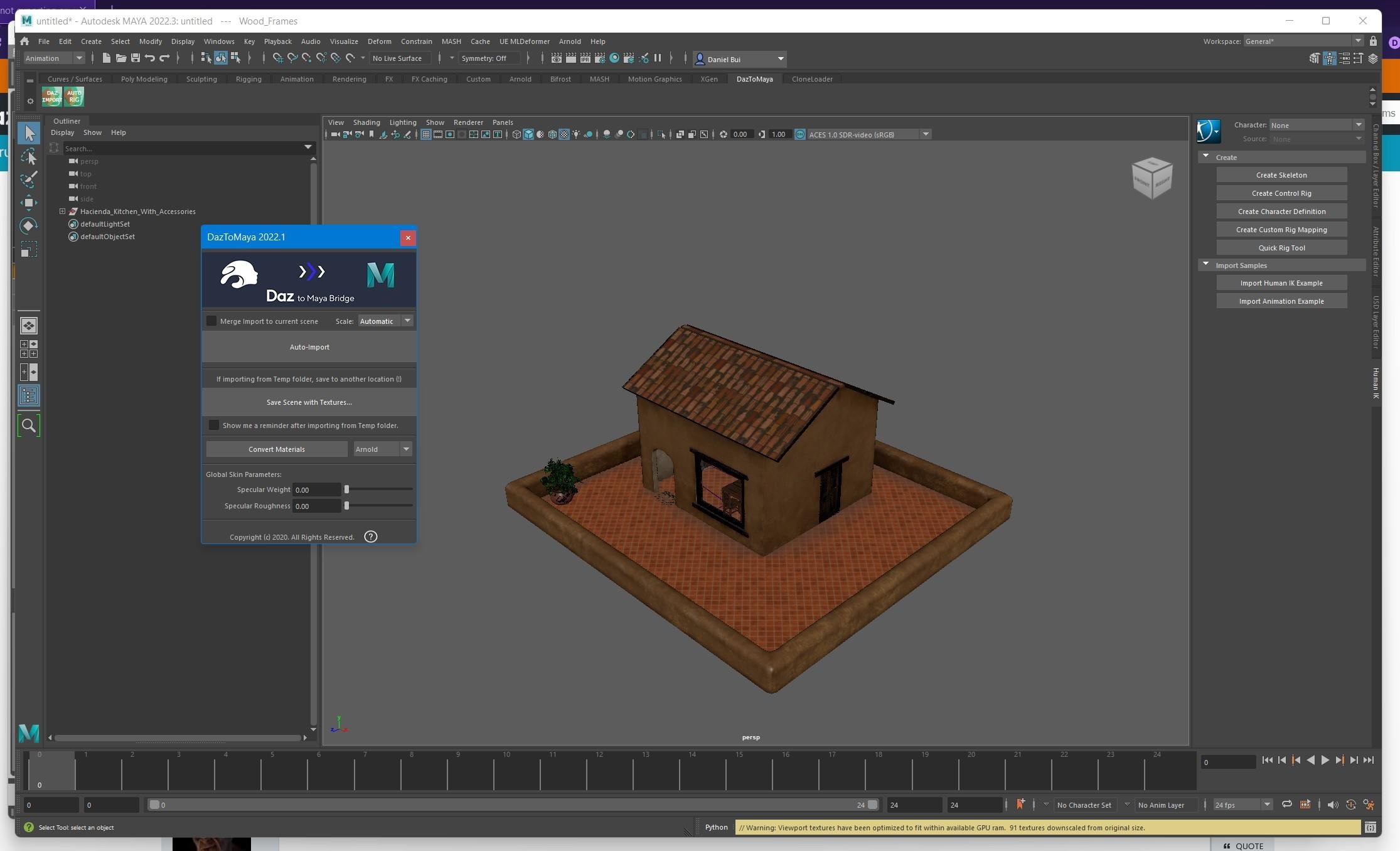
Repeat the above steps for other child nodes with props that you wish to export that are nested inside Group Nodes.
everyting looks good in viewport. but when render in arnold everything becomes colorless-black and white
Daz to maya not exporting environments and props?danielbui78 said:
@davegv Krys Kryngle is correct: the options are currently greyed out because that functionallity has not been fully implemented in the Maya plugin side yet.
@videoninja719 Although environments are not seamlessly supported yet, you can still import most props and environments by selecting their sub-components. Here is an example with the Hacienda Kitchen environment:
1. Load the "Hacienda Kitchen With Accessories and Lights" Set
2. In the Scene panel, open the "Hacienda Kitchen With Accessories" node to show the child nodes. Notice that this node's icon is a cube with missing sides/edges. This is a Group Node which is not yet supported by the DazToMaya bridge.
3. Select "Hacienda Kitchen".
4. Click File -> Send To -> Daz to Maya. Click Accept.
5. Open Maya. Click the "DAZ IMPORT" icon in the DazToMaya shelf tab. Click "Auto-Import" in the DazToMaya dialog.
Repeat the above steps for other child nodes with props that you wish to export that are nested inside Group Nodes.
everyting looks good in viewport. but when render in arnold everything becomes colorless-black and white
Import AlembicFSMCDesigns said:
yeah, the import formats and functions for DS are very lacking. I would love to be able to import .FBX and have it keep the rigging. Carrara does this perfectly, but not DS, go figure.
Daz Studio will, as far as I know, import FBX fiels from Motion Builder. Unfortunately FBX is a format much subject to variation in its implementation.
Import Alembicyeah, the import formats and functions for DS are very lacking. I would love to be able to import .FBX and have it keep the rigging. Carrara does this perfectly, but not DS, go figure.
Error opening file - json parser: syntax errorHello!
Up until recently I have had no problem opening a .duf file of mine called After the Game.
Now I am getting an error message and I am unable to open the file.
I did some detective work on Google and have cleared the log file and attempted to open the After the Game file.
Attached below is the content of the log file. While my knowledge of computer programming is limited, the way I'm reading this is that something called the "Json parser" is looking for an apostraphe or comma that it is failing to find.
How do I read this, and what can I do to recover the file?
2023-02-14 10:33:23.250 [INFO] :: Error loading asset: C:/Users/third/Documents/DAZ 3D/Studio/My Library/Scenes/After the Game/After the Game.duf
2023-02-14 10:33:23.250 [INFO] :: Operation failed
2023-02-14 10:33:23.633 [INFO] :: Unlocking viewport redraw...
2023-02-14 10:33:23.633 [INFO] :: Viewport redraw unlocked.
2023-02-14 10:35:09.753 [INFO] :: Prepare asset load (open): /Scenes/After the Game/After the Game.duf
2023-02-14 10:35:09.753 [INFO] :: Locking viewport redraw...
2023-02-14 10:35:09.753 [INFO] :: Viewport redraw locked.
2023-02-14 10:35:09.801 [INFO] :: Native format content directories: 3
2023-02-14 10:35:09.801 [INFO] :: Poser format content directories: 3
2023-02-14 10:35:09.801 [INFO] :: Other import format content directories: 0
2023-02-14 10:35:09.801 [INFO] :: Begin asset load (open): /Scenes/After the Game/After the Game.duf
2023-02-14 10:35:10.247 [INFO] :: Json Parser (1178734,7): Syntax Error - expected ',' or ']'
2023-02-14 10:35:10.251 [INFO] :: Error loading asset: C:/Users/third/Documents/DAZ 3D/Studio/My Library/Scenes/After the Game/After the Game.dufImport AlembicPlease add the ability to import Alembic files into Daz Studio. Daz currently does not have the ability to animate particles and it does not appear that such functionality will be added anytime soon. However, if you add the ability to import Alembic files into Daz Studio, we can do this through other programs. Moreover, most modern 3D programs have had a similar function for a long time.
Irritating power pose issue.. (SOLVED - but no explanation for orignal problem)Richard Haseltine said:
RTry reimporting metadata - Content Library option menu (the lined button in the top corner, orr ight-click the tab), select Content DB Maintenance, check reimport Metadata, and in the enxt window check Genesis 8 Starter Essentials (I guess you are doing this anyway if you install manually).
Unfortunately this does nothing to eliminate the problem. I guess I will have to keep trying "stuff" - worst case scenario do a complete re-install with clean content directories as well. Dread this though, as I have A LOT of non-Daz assets :(
Sagan: A DAZ Studio to Blender Alembic Exporterjerjer said:
Hello guys,
I have 2 questions regarding the Sagan Alembic Exporter script.
- On the Export dialogue there is a Hair tab (see attached pic). I do not understand what is the purpose of this tab, I have done some testing to try to create a scalp for my figure but when I import in C4D the scalp object is exploded and messed up. Maybe I misunderstood this feature?
My goal was to export a scalp (or hair cap) object so that when I export my alembic animation I can grow hairs on it.
- If I do not use the Hair tab and just export a default Alembic animation, my figures that have a dForce hair do not import with the hairs in C4D. Even if I set the Alembic to import curves as Splines. Is there a way to make it work? Because there are some nice dForce hairs that I'd love to use with animation outside of Daz.
Thanks for your time! :)
Hi @jerjer
1. The purpose of the tab is to create a Blender Hair Particle System from the DAZ hair object. But Blender hair is sort of in a transitionary period where the old method of making a hair particle system doesn't work anymore, and the new way is not implemented by the Blender devs yet. The idea, as you said, was to create a scalp object to grow the hairs on. Since I haven't been able to use it in so long, the scalp object code may be broken.
2. And SBH doesn't export via the normal methods because of the way SBH it works in DAZ Studio; The hair isn't geometry until it is tesselated, and turned into strands. Again, Blender doesn't yet have a Python API to create hair curves, and the old way crashes the latest Blender builds.
But when its implemented in Blender, I'll figure out how to export SBH and various other transmapped hairs as Alembic curves, which I think will work in C4D as well. I think they'll get around to it soon. Agree that there are a lot of nice SBH assets out there, so this is a high priority feature for me as well.
Edit: If you want to keep an eye on it, check out the Blender Issues. When "Add/remove curves and points" or "Alembic import (D11592)" is checked, then I can work on it. I know you said you're using C4D, but it working in Blender marks when I can implement/test it with my setup.
Why do user-made morphs erode the teeth? It is preventable?presumably you can clear any morph deltas from teeth using geometry editor vertex mode within Daz. Then export to fix your teeth/mouth position in some other program, and then import back into Daz as morph, and save over the offending morph.
I noticed some G8 expression morphs had changes to teeth shape on them, which is pretty annoying, but for most part expression and head morphs dont result in teeth issues.
This will likely be less of an issue with G9 mouth because PA's will probably be more conscious of changes they make when supporting mouth shape. G9 mouth seems to have rigidity group or something that prevents the G9 figure head morph projections messing up the mouth and teeth. Correct if wrong.
Daz 3D is part of

Connect
DAZ Productions, Inc.
7533 S Center View Ct #4664
West Jordan, UT 84084Licensing Agreement | Terms of Service | Privacy Policy | EULA
© 2026 Daz Productions Inc. All Rights Reserved.