-
chatbot? not clicked to find outMKDAWUSS said:
Victoria 1, 2, 3, 4, 5, 6, 7, 8, or 9?

This will be Victoria 10. Obviously newer, better and more highly featured than any previous Victoria to date. To see her (as opposed to talking to her), you're going to need a load of accessories AND the full version of DS6. Regards, Richard
chatbot? not clicked to find outvwrangler said:
Not only AI Search, but AI Support (the black dingbat that's now in the lower right corner of the screen, at least on full-size monitors). Victoria herself wants to help! (And, if I'm reading it correctly, if Victoria the AI Chatbot can't help, there may actually be a live person that she transfers you to, which seems odd, given that Daz turned off phone support ages ago.)
I think you are refering the the first post in this thread. https://www.daz3d.com/forums/discussion/741341/chatbot-not-clicked-to-find-out
I don't see it on my desktop firefox.
chatbot? not clicked to find outMKDAWUSS said:
Victoria 1, 2, 3, 4, 5, 6, 7, 8, or 9?
Poor Victoria 8.1 gets forgotten, I see.
chatbot? not clicked to find outNot only AI Search, but AI Support (the black dingbat that's now in the lower right corner of the screen, at least on full-size monitors). Victoria herself wants to help! (And, if I'm reading it correctly, if Victoria the AI Chatbot can't help, there may actually be a live person that she transfers you to, which seems odd, given that Daz turned off phone support ages ago.)
chatbot? not clicked to find outVictoria 1, 2, 3, 4, 5, 6, 7, 8, or 9?
chatbot? not clicked to find outSorel said:
Why do we apparently need these chat bots?
Here is Victoria's answer
Why do we need a chat bot?
Great question! Chatbots like me can provide immediate assistance when you need quick answers or help with common questions, rather than waiting for forum replies which can sometimes take days.
We're here to help you get faster support for urgent issues, guide you through troubleshooting steps, and provide information about our products and services right when you need it. This way, you can get back to creating amazing 3D art without delays!
Of course, for complex technical issues or account-specific matters, our human support team is always available when you need that extra level of assistance.
chatbot? not clicked to find outWell, as an experiment, I thought I'd ask the AI Victoria this question:

My expectations were that I'd either get a "No, you can't" answer... which is probably the useful answer for most people, but not strictly true when it's me asking the question...

... or a canned "Yes, Daz Studio has an auto-fit function that allows [...]" answer that would be unhelpful to anyone, because you can't autofit like that (there's no clone, and even if you make one there's technical problems).
I wasn't really expecting this answer, which implies a lot about how the AI has been trained:
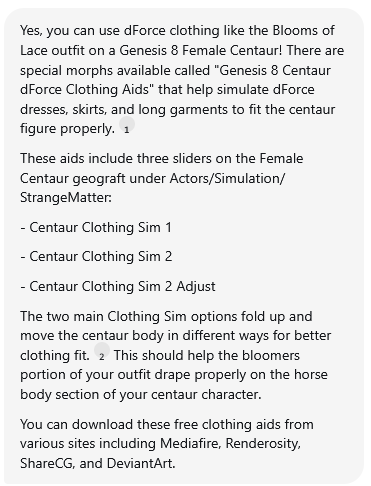
Firstly, it's wrong; You cannot use the Genesis 8 Centaur dForce Clothing Aids to fit bloomers to the centaur - I know, because I made them. (Drape skirts, cloaks or coats over the horse body, yes. Won't work on other things).
Secondly, parts of the answer are a near-verbatim quote from my forum freebie thread:

... which to me sounds a lot like it's been trained using forum posts, and in this case a pretty obvious regurgitation has come out because of how little training data would exist for a niche question like this.
chatbot? not clicked to find outWendyLuvsCatz said:
forum has gained a help agent
presumably a little Ai to replace Richard
not tried it yet

turned my ad blocker off to see it...
gave it a try and found out that:
1. Carrara isn't getting updated
2. Victoria isn't dating Michael
3. Victoria doesn't get annoyed.
make of that what you will
 Render your buys! ALL TIME Challenges
Elor said:
joanna said:
It seems that I'm hogging this thread. No one else rendering older buys? ;)
Your covers look very nice. I'll read your blog latter :)
Otherwise, it's just that real life was a bit hectic for me and I slept on the following render for a week (I didn't find the time to answer your previous answer, but I'll try, in the meantime, thank you for that), which was not a bad thing in the end: it gave me time to tweak the cup a little with Blender (by default the bottom is empty and while it was not that visible, I knew and it was enough) and to remove the glassy part of the coffee machine (because I didn't know how to add some coffee at its bottom).
One regret: I don't have breadcrumbs and didn't find either a way to create them myself or a product with them.
I think there is 7 items I never used before (in a render published in the gallery).
Two for Lacey's poses:
Her pajamas was also the first time I used it. As I said in the description, it's from Nelmi on Renderosity.
Four (five if Elleque's nice freebie counts) as part of the decors:
- Dream Kitchenware Collection (really nice to feel a kitchen)
- PT Modern Apartment Props
- Market Stall and Props (I created two crude morphs to change the level of the jam in the jar)
- ROG Red Crow Inn
Other items should be linked in the gallery (the ones visible at least: Victoria is fully clothed to take care of unwanted reflection but I don't think she visible at all outside of her arms and hands).
So, 'Morning routine', an entry for the 'Llola Lane’s RENDER A MONTH Challenge 2025' (theme of August, shape and I have chosen to use a rectangle):
Every morning it’s the same routine: Lacey wakes up, makes herself a cup of coffee and spend a bit of time revealing in the smell of hot coffee.
Victoria find it both cute and funny, not that she would ever explain to Lacey the why of the later.
The truth is, as a non-believer in coffee, she thinks that coffee smells nice but doesn't taste great.
So, each time she saw Lacey’s doing her morning routine, she could not avoid imagining that the first step of that routine was saturating Lacey’s nose’s smell receptors, to make her brain unable to process the taste of coffee.
Not that she was willing to test her theory, of course, especially because in the end, it didn’t matter: after all, coffee did put a smile on both her faces.

That is all kinds of adorable.
Render your buys! ALL TIME ChallengesElor said:
Every morning it’s the same routine: Lacey wakes up, makes herself a cup of coffee and spend a bit of time revealing in the smell of hot coffee.
Victoria find it both cute and funny, not that she would ever explain to Lacey the why of the later.
The truth is, as a non-believer in coffee, she thinks that coffee smells nice but doesn't taste great.
So, each time she saw Lacey’s doing her morning routine, she could not avoid imagining that the first step of that routine was saturating Lacey’s nose’s smell receptors, to make her brain unable to process the taste of coffee.
Not that she was willing to test her theory, of course, especially because in the end, it didn’t matter: after all, coffee did put a smile on both her faces.
Oh my gosh this is adorable and gives me such warm fuzzies. :) Thank you for sharing! <3
Render your buys! ALL TIME Challengesjoanna said:
It seems that I'm hogging this thread. No one else rendering older buys? ;)
Your covers look very nice. I'll read your blog latter :)
Otherwise, it's just that real life was a bit hectic for me and I slept on the following render for a week (I didn't find the time to answer your previous answer, but I'll try, in the meantime, thank you for that), which was not a bad thing in the end: it gave me time to tweak the cup a little with Blender (by default the bottom is empty and while it was not that visible, I knew and it was enough) and to remove the glassy part of the coffee machine (because I didn't know how to add some coffee at its bottom).
One regret: I don't have breadcrumbs and didn't find either a way to create them myself or a product with them.
I think there is 7 items I never used before (in a render published in the gallery).
Two for Lacey's poses:
Her pajamas was also the first time I used it. As I said in the description, it's from Nelmi on Renderosity.
Four (five if Elleque's nice freebie counts) as part of the decors:
- Dream Kitchenware Collection (really nice to feel a kitchen)
- PT Modern Apartment Props
- Market Stall and Props (I created two crude morphs to change the level of the jam in the jar)
- ROG Red Crow Inn
Other items should be linked in the gallery (the ones visible at least: Victoria is fully clothed to take care of unwanted reflection but I don't think she visible at all outside of her arms and hands).
So, 'Morning routine', an entry for the 'Llola Lane’s RENDER A MONTH Challenge 2025' (theme of August, shape and I have chosen to use a rectangle):
Every morning it’s the same routine: Lacey wakes up, makes herself a cup of coffee and spend a bit of time revealing in the smell of hot coffee.
Victoria find it both cute and funny, not that she would ever explain to Lacey the why of the later.
The truth is, as a non-believer in coffee, she thinks that coffee smells nice but doesn't taste great.
So, each time she saw Lacey’s doing her morning routine, she could not avoid imagining that the first step of that routine was saturating Lacey’s nose’s smell receptors, to make her brain unable to process the taste of coffee.
Not that she was willing to test her theory, of course, especially because in the end, it didn’t matter: after all, coffee did put a smile on both her faces.
Llola Lane’s RENDER A MONTH Challenge 2025 (ALL are welcome to join)The shape I have chosen is the rectangle, and it's front and center (sort of :o) in 'Morning routine':
Every morning it’s the same routine: Lacey wakes up, makes herself a cup of coffee and spend a bit of time revealing in the smell of hot coffee.
Victoria find it both cute and funny, not that she would ever explain to Lacey the why of the later.
The truth is, as a non-believer in coffee, she thinks that coffee smells nice but doesn't taste great.
So, each time she saw Lacey’s doing her morning routine, she could not avoid imagining that the first step of that routine was saturating Lacey’s nose’s smell receptors, to make her brain unable to process the taste of coffee.
Not that she was willing to test her theory, of course, especially because in the end, it didn’t matter: after all, coffee did put a smile on both her faces.
As usual, paid products from Daz3D are linked in the gallery. One was bought on Rendersoty, created by Nelmi.
----
sueya > The doors in the backgroud looks a bit like they are from West Park Ward :D
Nice render and I like how even the light is casting a squared shadows around the saxophonist :)
stezza > Nothing to add except 'mmm pie' indeed :D
SimonJM > I like the way the rule was twisted with star :D Lights feel better in the second version :)
acb > Poor Cupidon, forced to work longer because Zeus decided to raise the retirement age :D
Genesis 2 Appreciation Threadpaulawp (marahzen) said:
I downloaded this week's new freebies and bought Victoria 6 to put them on.

https://www.daz3d.com/victoria-6
https://www.daz3d.com/ronya-hair
https://www.daz3d.com/actual-eyes-4
https://www.daz3d.com/battle-kimono-for-genesis-2-femalesI'm using the original Victoria 6 textures with 1-Click PBRSkin. The eyes are significantly modified from the original freebie, as that product was presumably intended for 3DL.
Paula, that render is so nice! And thanks for the tip with the mandalas, I'm putting them on my wishlist. I'll also try 1-click-PBR skin next time with the older models, that seems to work much better than my manual conversion to Iray Uber.
Genesis 2 Appreciation ThreadI downloaded this week's new freebies and bought Victoria 6 to put them on.
https://www.daz3d.com/victoria-6
https://www.daz3d.com/ronya-hair
https://www.daz3d.com/actual-eyes-4
https://www.daz3d.com/battle-kimono-for-genesis-2-femalesI'm using the original Victoria 6 textures with 1-Click PBRSkin. The eyes are significantly modified from the original freebie, as that product was presumably intended for 3DL.
Can someone please identify the character?Head shape of Victoria 9 as the base + skin textures of other characters from... e.g. mousso, P3D...
Live In Store Now! - Ivy Scatters for Ultrascatter 2 (Commercial)felis said:
HowieFarkes said:
Richard Haseltine said:
Martinjfrost said:
felis said:
@Martinjfrost have you seen in the Ultrascatter Pro thread that Ultrascatter Pro under certain conditions crashes Daz Studio?
I am aware that there are crashes sometimes,. but these have been quite well tested and should be ok, as with everything to do with scattered objects, its always best to use the fewest possible instancees that helps avoid freeze ups and crashes.
The issue is that importing Victoria 4.2, and possibly other ExP figues, crashes DS if Ultra Scatter 2 is installed. This has been posted to the US 2 thread.
An update for UltraScatter2 (v2.0.0.19) that fixes this problem should be available for download now.
Installed update, and confirmed not crashing Daz Studio when loading Victoria 4.2

Thank you for the update, and for the confirmation that it works.
Live In Store Now! - Ivy Scatters for Ultrascatter 2 (Commercial)HowieFarkes said:
Richard Haseltine said:
Martinjfrost said:
felis said:
@Martinjfrost have you seen in the Ultrascatter Pro thread that Ultrascatter Pro under certain conditions crashes Daz Studio?
I am aware that there are crashes sometimes,. but these have been quite well tested and should be ok, as with everything to do with scattered objects, its always best to use the fewest possible instancees that helps avoid freeze ups and crashes.
The issue is that importing Victoria 4.2, and possibly other ExP figues, crashes DS if Ultra Scatter 2 is installed. This has been posted to the US 2 thread.
An update for UltraScatter2 (v2.0.0.19) that fixes this problem should be available for download now.
Installed update, and confirmed not crashing Daz Studio when loading Victoria 4.2
Live In Store Now! - Ivy Scatters for Ultrascatter 2 (Commercial)HowieFarkes said:
Richard Haseltine said:
Martinjfrost said:
felis said:
@Martinjfrost have you seen in the Ultrascatter Pro thread that Ultrascatter Pro under certain conditions crashes Daz Studio?
I am aware that there are crashes sometimes,. but these have been quite well tested and should be ok, as with everything to do with scattered objects, its always best to use the fewest possible instancees that helps avoid freeze ups and crashes.
The issue is that importing Victoria 4.2, and possibly other ExP figues, crashes DS if Ultra Scatter 2 is installed. This has been posted to the US 2 thread.
An update for UltraScatter2 (v2.0.0.19) that fixes this problem should be available for download now.
I might eventually buy it now

I do use Ultrascatter 1 quite a lot but also use V4 quite a lot and when I saw this issue mentioned I held off
Live In Store Now! - Ivy Scatters for Ultrascatter 2 (Commercial)Richard Haseltine said:
Martinjfrost said:
felis said:
@Martinjfrost have you seen in the Ultrascatter Pro thread that Ultrascatter Pro under certain conditions crashes Daz Studio?
I am aware that there are crashes sometimes,. but these have been quite well tested and should be ok, as with everything to do with scattered objects, its always best to use the fewest possible instancees that helps avoid freeze ups and crashes.
The issue is that importing Victoria 4.2, and possibly other ExP figues, crashes DS if Ultra Scatter 2 is installed. This has been posted to the US 2 thread.
An update for UltraScatter2 (v2.0.0.19) that fixes this problem should be available for download now.
How do I export Gen9 w high heels to Blender to .glb?Geo-shells should also work as expected with glb... and the process is all the same but just make sure you check Include Props when exporting to blend file.
Here's an example of using Victoria 9 + shell make-ups... and the imported glb figure.
Daz 3D is part of

Connect
DAZ Productions, Inc.
7533 S Center View Ct #4664
West Jordan, UT 84084Licensing Agreement | Terms of Service | Privacy Policy | EULA
© 2026 Daz Productions Inc. All Rights Reserved.