-
Regarding Photoshop
Gimp works well, though, as Richard says, not with the Photoshop bridge. Me, I use GIMP almost exclusively unless I'm using Filter Forge. And, GIMP will use most, if not all, of the .abr PS brushes. If you are willing to try the beta version of GIMP 2.9 then you can also combine the .exr files that the Iray canvases produces. There is also a build for GIMP beta 2.9 that is set up to use the NIK collection recently released for free. Do a Google search for Partha and GIMP 2.9 and you'll find it.
YEEEEEE
Oh my goodness you don't know how excited I am about that. I use the GIMP for everything and have been since 2009 (I loathe Adobe in general) and I have coveted the Nik collection forever. There have been Python script add-on solutions but I've never gotten them to work. Thank you thank you thank you!!
Oh, and with what Fisty said, I use 3d Coat for 3D painting, in case that should be a question that OP might have. It did cost money, and I used Blender for that up until I could afford it. Blender is not the very best at 3D painting but it's certainly capable of doing it when your other options are lacking. Blender remains my anchor for base modeling, simple morph sculpts and UV.
3D Art Freebie Challenge -- October: Double Bubble Toil and Trouble -- Main ThreadFinally I was able to create an entry.
My picture shows a rather "classic" witch brewing a potion.Title: Brewing Witch
Rendered in Daz 4.8 with 3DLight. No postwork.
Items used:
(*indicates that registration is needed)
Environment:MCJ Corner Room
Pixar Textures (for the walls and floor, book stand, table)Cauldron by Mystic Nights
*Space Bones Liquid converted for DS4.5 for the content of the cauldron
*Fisty's liquid shaders on almost all flask contents
*Apothecary Cabinet
*Corked Jar
*Winebottle
*Glass with morphing liquid by dexterdoodle for the content of the pouring flask
*Magic Wand
*Mortar & Pestle
*Torch ( Fackel)
*FX Daz Studio for the torch fire
Raven
Toad
Black Cat
*RDNA Spellbook
and Textures for Spellbook by Aelin
*Cloth Basket (bowl on the table) FBX-file
*Witches Broom
Morphing Web
I am not sure if it is visible, but the Disparate Spider is sitting on the web.
Witch:
*Warlock/Witch Head (DVL-LVD)
*Aged Hands
*Tempest's V4 Aging Morphs for Genesis by wancow
*Tear Dress by Wilmappaid items:
Robe from Medieval Cloaks
Skin Overlay for Genesis
AOA Advanced Ambient Light
Not availiable anymoreMeuble Etagere by Internetmoi
It was on sharecg but it looks like it was removedOld Fashioned Jar by AllenArt
(was http://www.sharecg.com/v/52004/View/11/Poser/Old-Fashioned-Jar)(link is dead)
Found it on the wayback machine but no link anymore
https://web.archive.org/web/20140714141838/http://allenart.yolasite.com/props.phpNo Count
Genesis (Female with Male skin texture)
Book Stand~ Sigrid
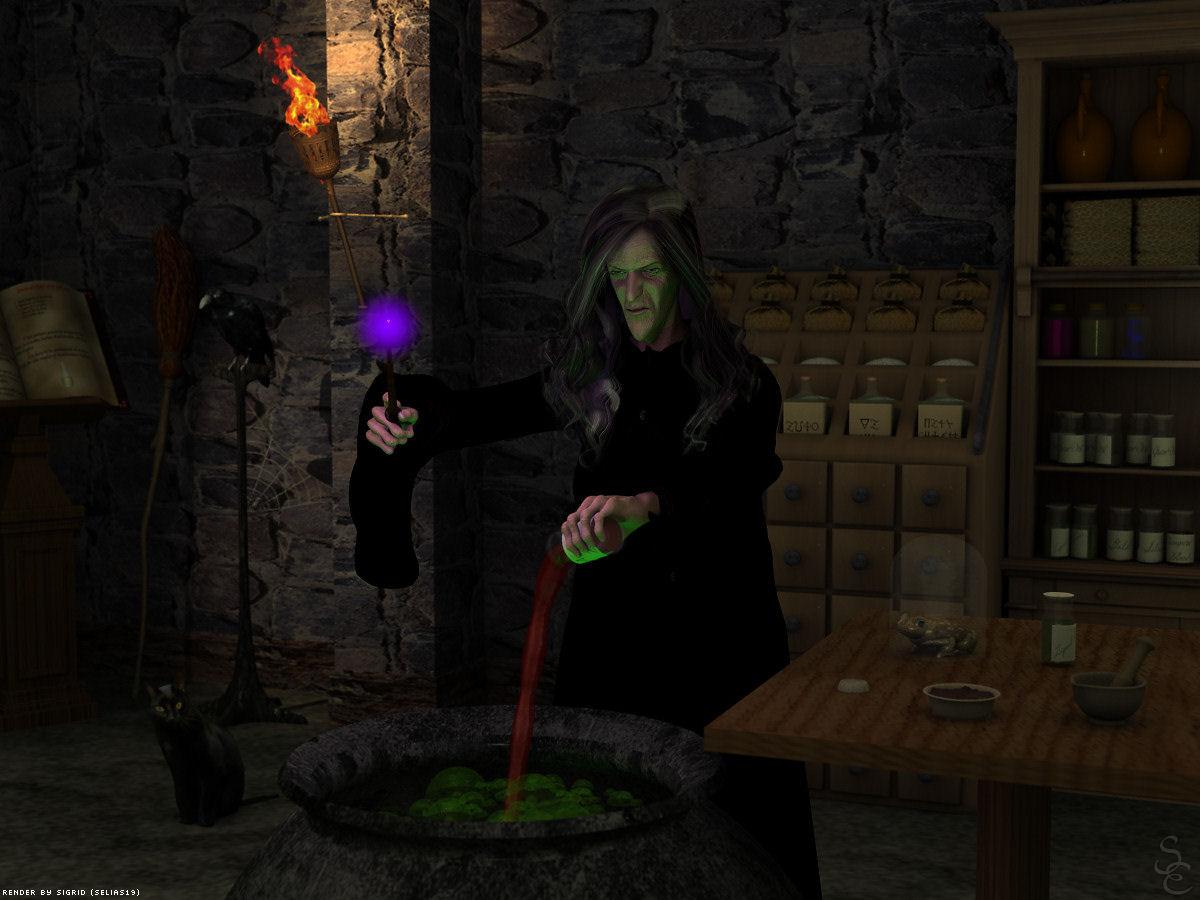
Dark and moody! I always wondered...why such a big batch for probably use on one person? How long does this stuff last in storage?

Dana
3D Art Freebie Challenge -- October: Double Bubble Toil and Trouble -- Main ThreadFinally I was able to create an entry.
My picture shows a rather "classic" witch brewing a potion.Title: Brewing Witch
Rendered in Daz 4.8 with 3DLight. No postwork.
Items used:
(*indicates that registration is needed)
Environment:MCJ Corner Room
Pixar Textures (for the walls and floor, book stand, table)Cauldron by Mystic Nights
*Space Bones Liquid converted for DS4.5 for the content of the cauldron
*Fisty's liquid shaders on almost all flask contents
*Apothecary Cabinet
*Corked Jar
*Winebottle
*Glass with morphing liquid by dexterdoodle for the content of the pouring flask
*Magic Wand
*Mortar & Pestle
*Torch ( Fackel)
*FX Daz Studio for the torch fire
Raven
Toad
Black Cat
*RDNA Spellbook
and Textures for Spellbook by Aelin
*Cloth Basket (bowl on the table) FBX-file
*Witches Broom
Morphing Web
I am not sure if it is visible, but the Disparate Spider is sitting on the web.
Witch:
*Warlock/Witch Head (DVL-LVD)
*Aged Hands
*Tempest's V4 Aging Morphs for Genesis by wancow
*Tear Dress by Wilmappaid items:
Robe from Medieval Cloaks
Skin Overlay for Genesis
AOA Advanced Ambient Light
Not availiable anymoreMeuble Etagere by Internetmoi
It was on sharecg but it looks like it was removedOld Fashioned Jar by AllenArt
(was http://www.sharecg.com/v/52004/View/11/Poser/Old-Fashioned-Jar)(link is dead)
Found it on the wayback machine but no link anymore
https://web.archive.org/web/20140714141838/http://allenart.yolasite.com/props.phpNo Count
Genesis (Female with Male skin texture)
Book Stand~ Sigrid
Body Shaping Morphs for Gen 3 and SupersuiteI'm hoping you guys are working on body shaping morphs for Genesis 3... I use to have massive sets for Gen 2... I'm thinking the Dental one was pretty awesome.. you could make fangs and missing teeth.. good stuff when you added teeth dacay.. scary too. Then you had the many head morphs and I remember having collections that you really could morph every aspect of those chacters and they gave you a lot of power to make your characters resemble what you want.. One of my favorite was the Pregnant morph.. Man.. I want pregnant morph for Genesis 3 famales.... Elf ears.. just bring on the morphing tools please...
Then while your at it.. do an update for the Supersuite so that it works with Iray. To date, that is still the most flexible and amazing product Daz has ever made.. I know everybody would love to have a update for the super supersuite to go with Genesis 3...Novica & Forum Members Tips & Product Reviews Pt 7I do not have Lune Nails, but I have several FW girls. The "FW Nails" morph is there for me in the path you specified, so I guess it came with one (or more) of the FW girls (I have about 16 of them, so it's not easy to say which one or ones it came with).
I see what you mean about shortening the nails - you can get one of those ex-nailbiter-hand looks really easily.Yes, it's perfect for the Growing Up kids and for people without the ultra long nails!
DAZ to FBX - Morph issuesDid you remember in export to change morph export type to export (Default is Bake).
Legacy UVs for Genesis 3 [Commercial]How does legacy uvs work with unique morphs like Star? Also is there a way to give the characters pointed ears and such with the legacy uv sets? Not at computer right now but I remember that the ears were an issue.
I can't make a specific point about Star, which I don't have, but in so far as Star is just a morph of Genesis 3 then it should take any texture which the Genesis 3 surfaces hold. They may look a bit peculiar on Star, but that's another matter.
Re the Ears: the geograft ears should take any non-HD Genesis 3 ear morphs. I had to include PHMs for the two Elf ear morphs which come with Genesis 3 because they had not been set to Auto Follow in the Parameters setting. But any 3rd party ear morph which has Auto Follow checked should work OK. If the Auto Follow is not checked you should check it and then reload the geograft.
Novica & Forum Members Tips & Product Reviews Pt 7Need someone to check something- I have FW Nails (Fred Winkler) in Parameters>Actor>Hands>Real World>FW Nails (it's near the top, only three down for me) and I have, as mentioned, Lune Nails. I'm not sure if that is the Lune Nails or nails from one of the Fred girls. Can someone who does not have Lune Nails, who has an FW gal, check to see if they have that? It works GREAT to shorten nails (you undo the limits.) I want to show this to you, but we need to know what I'm using.
I do not have Lune Nails, but I have several FW girls. The "FW Nails" morph is there for me in the path you specified, so I guess it came with one (or more) of the FW girls (I have about 16 of them, so it's not easy to say which one or ones it came with).
I see what you mean about shortening the nails - you can get one of those ex-nailbiter-hand looks really easily.Saving characters with lots of morphs is too longbut from genesis on figures included all the morphs in the data file which is getting rather large.Terminology check here — do you mean "data file" as in the individual morph files stored in the /data/ folder, or do you mean the figure's subfolder inside the /data/ folder itself, which contains all the mesh, UV and morph data files? It might not seem much of a difference, but it can cause confusion.
snip
I will admit I am approaching it as a Carrara user where the saved car file result is a vast file over 2GB for a single figure as it carries self contained all the morphs as read from the data folder with all the UV information as well, in fact loading new from duf format every scene has become a necessity if using these figures ( not Genesis 3 as that does not work in Carrara), I also occasionally use Poser, probably it is less of an issue in D|S and with Genesis 3.
New User Contest Revamp DiscussionI am coming to the new user contest to learn Studio, which I have not really opened except to use the transfer utility. This challenge is great as it is. Even just lurking for a week or two I have learned a lot. However, I support any changes that y'all think will provide encouragement to participants. I intend to try a Studio project for the next new user challenge. I can already tell that I will want to experiment wth the bridges to Hexagon and Bryce - so I'll have questions for those programs as well. Therefore, I like the idea of promoting all of Daz's software, not just Studio. And I really mean "promoting," not just permitting.
Thanks.
Saving characters with lots of morphs is too longThank You all for your interest in my question. SpottedKitty, your mentioning of morph support assets is exactly the way Daz Studio should work... But, my impression is that most vendors do not work that way. I really would like to load a light G3F and "insert" the saved character. How can one regain this "virgin" G3F or avoid polluting one with unnecessary morphs ? Should I reinstall Studio (oh no...) and rebuild my whole complex file system (I use only manual install with specialized folders). I understand now that my habit of saving characters in scene presets is bad but maybe due to my bloated G3F... I also wondered if compressing the saved files (automatic by default) had an impact ?
Ice Dragon Art WIP'sFound a few videos on YouTube for Carrara Morph Targets.
Carrara Morph Targets. First try. This is very short. It shows the effect of adding a morph to a wall, a vertex object, only.
Making Morph Targets This shows how to actually create a morph to a figure or clothing. Any object AFAIK can have a morph... A DAZ figure, props etc. or any object that you create. Once a morph is created it can be turned on when needed.
Saving characters with lots of morphs is too longbut from genesis on figures included all the morphs in the data file which is getting rather large.Terminology check here — do you mean "data file" as in the individual morph files stored in the /data/ folder, or do you mean the figure's subfolder inside the /data/ folder itself, which contains all the mesh, UV and morph data files? It might not seem much of a difference, but it can cause confusion.
Remember what I said upthread — if a morph applied to a figure has a default value of zero, the morph data will not be loaded into your scene unless the morph dial is adjusted, and the dial data is much smaller than the morph data. Loading a completely zeroed G3 figure should take about the same time, no matter how many morphs you have installed.
Exactly the same thing happened in pre-Genesis days, the difference was that the morph data was stored in separate folders that were almost never alongside the figure data. The current arrangement of keeping everything in the /data/ folder together as much as possible is much more logical, simplifies some D|S functions, and is less accident-prone.
Morphs not working after merging fitted geometryI remember this prolbem, I has seen same thing,,, actually it worked after merged figures, untill you save and re-open it.
but Actually I can not expect ,loaded scene , merged figure, keep all morphs data. and can not call morphs from morph directory of genesis3 (and genetaria)
because when I merge Figure , geometry should change already. (vertex count) , morphs data were stored for each figures (geometry) morph directories as DSF.
if DS save all morphs geometry data in the saved scene.duf,,, the scene is too large enough .
At leaset,, you may need to save the merged figure as new figure, to keep all morphs , then need to save each morphs for the merged figure directories.
though if you save the merged figure as new figure, I can not confrim it actually work or not. but once you save the merged figure, as figure,,
you can transfer morphs by transfer utility , I believe.
New User Contest Revamp DiscussionYou know, DAZ_ann0314, I like this idea very much. I have learned considerable over the months that I have been participating in these contests. More importantly, I have really had fun with the opportunity to both give and receive feedback.
I think that participation is important to encourage, especially from the contestants. There are always a few entries during the contest where the artists posted the finished work without asking for any feedback in the WIP thread. I would have loved to make some comments/suggestions to these individuals, but as the Entry thread doesn't allow comments, I wasn't able to.
Also, the change in the rules allows for other individuals to be recognized who don't have the perfect render - I really like the Most Improved and Most Revisions idea. Best Answer/Comment/Suggestion is a great way to encourage feedback participation.
Here are some category suggestions (yours are included):
Most Improved
Most Revisions
Best Question
Best Answer. There were some great tutorials in the October contest.
Best Encouragement. (I say this because someone once commented that he/she wouldn't bother with entering because some renders were so good. I encouraged him/her to enter anyway because the point of the contest is to learn).
Most Unique/Unusual. Something for a really cool idea that you just don't see everyday.
Best Shader Replacement. This is for replacing materials that are designed for the software/render engine you are using.
Best Kit-Bashing. This could be an outfit/props or environment - but the idea is combining items into a unit and making them look like they belong together.
Best Background. You will need to decide if this includes photos. But there is definitely a challenge to make the subjects look like they belong in a photo (lighting, etc), and making a seamless transition from the render to the photo.
Best Material Conversion. Daz Studio: 3Delight to Iray and vise versa. Poser has 2 render engines as well. Items originally designed for Daz Studio used and optimized in other software (Vue, Bryce, Poser, etc), and items designed for other software and converted to Daz Studio or other application. It's always a challenge to convert items and make them look good in your software/render engine and I feel this is a good category to be recognized.
Best Problem-Solving. If there is a problem in a render that requires more work to fix, like deforming or importing a piece of clothing into a modeling program to create your own morph when there isn't one available.
I like several of these categories. Kit-bashing, material conversion and deforming wouldn't be among beginning skills though, would they? I would have also said that about shader replacement but I just bought shaders in the store today.
Ice Dragon Art WIP'sThank you! It is Daz Dragon three. I have no idea how to add a morph but I clearly need to set a weekend aside and go check out the links in your thread for Carrara. I keep trying to get to it and then get interupted. Need to just take like a whole Saturday from morning coffee to dinner time and just do it.
I am almost done with my second entry into the newbie contest so that will clear up a bit of time as well. So much to learn, so little time!
Saving characters with lots of morphs is too longReally I hope I have missed an important step somewhere.My first guess would be that all those G3F morphs have been saved directly into the G3F figure, instead of saving properly as a Morph Support Asset.
The difference is that leaving the morph data in the base G3F figure will bloat the files used to load the figure into your scene. If you save as a Support Asset, then the morph data is saved properly into the /data/ folder (the same way as morphs you buy in the DAZ store, or the ones built into the figure) — in this case, only the morph dial is added to the figure when you load it, the morph data is not loaded unless the morph's default value is non-zero. This allows a base Genesis figure with lotsandlotsandlots of morphs... like mine... to load quickly, because the morph dials have a tiny storage overhead compared to the actual morph data.
New User Contest Revamp DiscussionYou know, DAZ_ann0314, I like this idea very much. I have learned considerable over the months that I have been participating in these contests. More importantly, I have really had fun with the opportunity to both give and receive feedback.
I think that participation is important to encourage, especially from the contestants. There are always a few entries during the contest where the artists posted the finished work without asking for any feedback in the WIP thread. I would have loved to make some comments/suggestions to these individuals, but as the Entry thread doesn't allow comments, I wasn't able to.
Also, the change in the rules allows for other individuals to be recognized who don't have the perfect render - I really like the Most Improved and Most Revisions idea. Best Answer/Comment/Suggestion is a great way to encourage feedback participation.
Here are some category suggestions (yours are included):
Most Improved
Most Revisions
Best Question
Best Answer. There were some great tutorials in the October contest.
Best Encouragement. (I say this because someone once commented that he/she wouldn't bother with entering because some renders were so good. I encouraged him/her to enter anyway because the point of the contest is to learn).
Most Unique/Unusual. Something for a really cool idea that you just don't see everyday.
Best Shader Replacement. This is for replacing materials that are designed for the software/render engine you are using.
Best Kit-Bashing. This could be an outfit/props or environment - but the idea is combining items into a unit and making them look like they belong together.
Best Background. You will need to decide if this includes photos. But there is definitely a challenge to make the subjects look like they belong in a photo (lighting, etc), and making a seamless transition from the render to the photo.
Best Material Conversion. Daz Studio: 3Delight to Iray and vise versa. Poser has 2 render engines as well. Items originally designed for Daz Studio used and optimized in other software (Vue, Bryce, Poser, etc), and items designed for other software and converted to Daz Studio or other application. It's always a challenge to convert items and make them look good in your software/render engine and I feel this is a good category to be recognized.
Best Problem-Solving. If there is a problem in a render that requires more work to fix, like deforming or importing a piece of clothing into a modeling program to create your own morph when there isn't one available.
Lucille (AKA Zombie Livinia)While I like the look of both, I really can't see getting either as the use vs the cost is prohibited for me since I can only see a couple of uses in my workflow
I got Lavinia and Lucille. Ill probably get the creature morph packs as well. I figured that I had made enough of an investment into G3 to warrant the seperate purchases. HOWEVER... (i say that alot:)) I wont be repeating this for G4. Since the daz marketing strategy seems to be to cut up complete packs and sell them in bites and pieces for G3, I can only assume that G4 will be the same if not worse. To be perfectly honest, G3 might be it for me. As ive indicated in other posts, its going to take a major advance in the technology to get me interested in another model. That goes for hair and clothing as well. If G4 is still using the same autofit, then forget it.
By the way, if anyone wants to see comparisons between the Lavinia and Lucille, just let me know.
Agreed. I get really put off by a released product with limited textures also selling additional textures for it as a seperate product when it could easily have been included. I rarely purchase any additional textures for any product, that is what photoshop is for, LOL.
Yep, G4 will have to be a HUGE step forward for me to invest what i am investing in G3 right now for me to jump on that bandwagon.
Lucille (AKA Zombie Livinia)I got Lavinia and Lucille. Ill probably get the creature morph packs as well. I figured that I had made enough of an investment into G3 to warrant the seperate purchases. HOWEVER... (i say that alot:)) I wont be repeating this for G4. Since the daz marketing strategy seems to be to cut up complete packs and sell them in bites and pieces for G3, I can only assume that G4 will be the same if not worse. To be perfectly honest, G3 might be it for me. As ive indicated in other posts, its going to take a major advance in the technology to get me interested in another model. That goes for hair and clothing as well. If G4 is still using the same autofit, then forget it.
By the way, if anyone wants to see comparisons between the Lavinia and Lucille, just let me know.
Daz 3D is part of

Connect
DAZ Productions, Inc.
7533 S Center View Ct #4664
West Jordan, UT 84084Licensing Agreement | Terms of Service | Privacy Policy | EULA
© 2026 Daz Productions Inc. All Rights Reserved.