-
Genesis 3 a workaround
So I'm not sure I follow your initial instructions.
Are you making a Genesis 3 morph for Genesis 2? Or using Genesis 3 mesh as clothing for Genesis 2? It's kinda vague what we're supposed to do there.
Either way, if you can get facial morphs working in Carrara, Mimic Pro for Carrara should work. Just make your own adjustments as NLA and it should work - I'd think.
Teen Princess Leila..so anyone who has her, have you tried using morphs like Breasts Smaller, Breasts Gone, or using special morphs like Dogz Natural Breast Shapes or Zev0's Growing Up?
Breasts Small seems to work decently over its full range; Breasts Gone and the Youth Morph cause problems past about 50-60%.
That said, it was not difficult to take her into Hexagon and create a corrective morph for Breasts Gone. (Liberal application of the Soften tool, and a light touch with the Displacement tool.)
An extra benefit of this is that if you dial up the corrective morph without using Breasts Gone, it gives her a chest shape similar enough to base G3F that you can use many breast morphs that work on the base figure.
...looking to not have to do so as my modelling skills are atill pretty bad. Just asking to make sure I can use her as a base for some of my characters before plunking down the zlotys. A young character should allow for better breast sizing for petite to flat. This has been one of my banes with Daz female characters.
If you have "modeling skills", even if they're pretty bad, you're ahead of where I was when I started doing these morphs. Creating a Breasts Gone correction morph (for another character) was literally the first thing I ever did in Hexagon.
Knittingmommy's LaboratoryI've been busy on a couple of projects. Just finished up my entry for the VR contest last night/early this morning. Here is the link if anyone wants to take a look. I'll post it to my thread when the contest is over because I have a little mini tutorial on how I did a couple of things in the render. Finishing up the LAMH hair and beard tutorials this week and should have them posted to the thread over the weekend. I had to finish those up in Windows because for some reason I can't get LAMH to install in Linux yet. I've had some install issues with a few scripts and Carrara only products. No idea why. They just fail to install and sit in the Ready to Install tab in DIM. I hate having to keep going back into Windows for things like this so I hope to get this fixed and have everything permanently working in Linux soon. In the meantime, I'm switching back and forth to that little temp Windows drive for some things still.
I've been following along a tutorial I found for making mdl shaders inside Substance Designer. Expensive program, but they have a 30 day trial which works out perfectly for working through the tutorials. So far, it doesn't look to bad and I think I can transfer what I've learned to be able to make my own Iray shaders in the Shader Mixer. If I can figure that out, I'll work out a tutorial because there are practically no recent tutorials for the Shader Mixer and I haven't found any at all for making Iray shaders in the Shader Mixer even though it is capable of doing so.
I've gone through several old tutorials that are sadly outdated for making 3DL shaders. Things have moved and changed over the years with updates to DS, but no one seems to have updated any of the Shader Mixer tutorials which is very frustrating when you are trying to learn how it works. So, my frustrations will benefit you guys soon.
Acronym definitions - looking for concencousA glossary would be a wonderful resource. I still don't know what an ERC is and when to "freeze" it, and it took me a while to catch on that FBM and PBM are "full body morph" and "partial body morph"... I think.
Yes, FBM = Full body morph and PBM = partial body morph.
ERC = Enhanced Remote Control. Basically it refers to having a master parameter which automatically controls other parameters.
For example if you have "close left eye" and "close right eye" morphs on your figure you could create a "close both eyes" master dial which would apply both morphs at once.
Another typical example is JCM (Joint Controlled Morph): you define a corrective morph which is applied automatically when you bend a particular joint, so the joint "pilots" the morph.
Here's the doc page about ERC : http://docs.daz3d.com/doku.php/artzone/wiki/user/rbtwhiz/technotes/content/erc/start
Teen Princess Leila..so anyone who has her, have you tried using morphs like Breasts Smaller, Breasts Gone, or using special morphs like Dogz Natural Breast Shapes or Zev0's Growing Up?
Breasts Small seems to work decently over its full range; Breasts Gone and the Youth Morph cause problems past about 50-60%.
That said, it was not difficult to take her into Hexagon and create a corrective morph for Breasts Gone. (Liberal application of the Soften tool, and a light touch with the Displacement tool.)
An extra benefit of this is that if you dial up the corrective morph without using Breasts Gone, it gives her a chest shape similar enough to base G3F that you can use many breast morphs that work on the base figure.
Ill tell you a trick, if you want to use any Breast Morphs with Zev0s Youth Morph,
First, Locate The 'Youth Cheast Adjustment' morph included with Youth Morph,
Second, Edit its parameters so that its negative value limit is set to -100%
Third, Now dial it to a minus percentage to match the Value you have Youth morph dialed up.
(E.g using 25% Youth Morph, Dial Youth Chest Adjustment to -25%)
Now dial in the Desired Breast Morph, it should work much better. :)
...that sounds much more feasable for me. I'll give that a try.
Teen Princess Leila..so anyone who has her, have you tried using morphs like Breasts Smaller, Breasts Gone, or using special morphs like Dogz Natural Breast Shapes or Zev0's Growing Up?
Breasts Small seems to work decently over its full range; Breasts Gone and the Youth Morph cause problems past about 50-60%.
That said, it was not difficult to take her into Hexagon and create a corrective morph for Breasts Gone. (Liberal application of the Soften tool, and a light touch with the Displacement tool.)
An extra benefit of this is that if you dial up the corrective morph without using Breasts Gone, it gives her a chest shape similar enough to base G3F that you can use many breast morphs that work on the base figure.
...looking to not have to do so as my modelling skills are atill pretty bad. Just asking to make sure I can use her as a base for some of my characters before plunking down the zlotys. A young character should allow for better breast sizing for petite to flat. This has been one of my banes with Daz female characters.
Lucian!Guy definitely has a case of resting... grumpy face. But yeah, He's certainly the closest thing to a David we've got in the last 2 generations, so I'm going to be dialling him into a lot of my gentlemen, (and maybe I'll really go full david with him and start dialing him into my ladies too)
Wait, you dial men into your ladies? O_o lol What part? Head? body? Both? how much? For what purpose? What features are you looking to add? Also, how? Is there a tool that can convert morphs from male to female figure? I'm always looking for different ways to create characters. This sounds really cool.
Through gen 2 I transferred via the transfer utility (I had to get more creative to get a good transfer to gen 3). I mostly use the body, David 5 had nice definition in areas like the shoulders and ribcage. Also wider feet and just generally a bit knobby. It was great for getting characters less smooth, without making them super skinny or muscle-y
@Serene night
The Eyebrows is a materials settings thing, frankly with the default settings the eyebrows look positively green to me (positive note, some of the other sss settings look a lot better than previous figures) If you turn down the Translucency weight to .5 and set the SSS reflectance tint way less cyan, like .85/.95/1.0 then eyebrows will turn a color more likely to be found in nature (They're actually a sort of medium brown)
I haven't checked but nails may be a settings thing too
How does Headshop function??This is great to know. I've been hand sculpting meshes to make custom characters from photos. It's OK, but I'm not the best artist in the world. Hoping Headshop will help me get more accurate character meshes. It's not cheap though. Oh well....
It will be much cheaper ($39.95) when OneClick will publish at DAZ:-)
Is there any way to get rid of the texture that One Click creates? I just want the mesh. I want to use standard Daz textures.
DAZ textures fit on DAZ figures. If you change the mesh, the textures may not fit. However, there's a work-around...
Headshop doesn't change the mesh, does it? It's just creating a morph.
another flakey G3M conversion to G2M question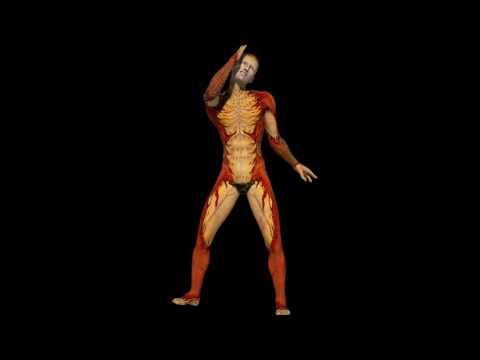
video of what I have so far working in Carrara
What works
I can autofit G3M to G2M and save as support asset and it will work in Carrara
I can add visemes using GenX as the G3M control morphs will not work as use bone riging not there I assume the other morphs do and so do genX visemes
now the bits I need to solve
Mimic needs the viseme morphs on the head
I can in edit mode use property clone and move them
I can drag them to the base of the tree
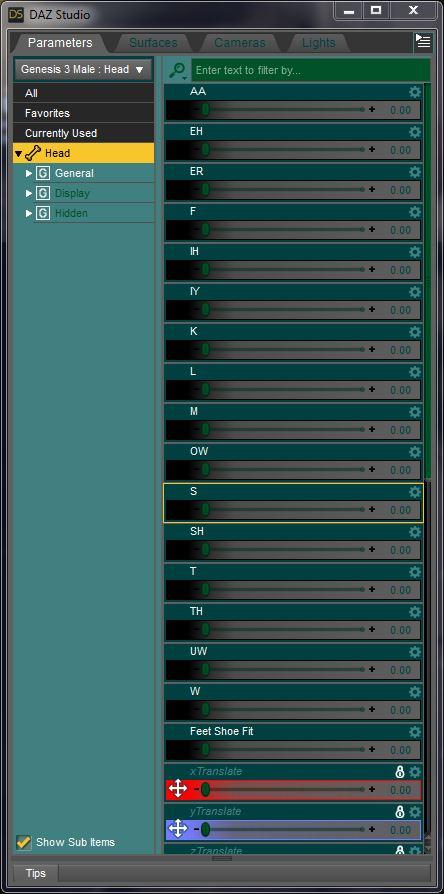
but it still is not seen by the configuration file
I can save a cr2 in DAZ studio of from a DSON loader import in Poser
I can see and assign the visemes from body not head in the object tree in mimic pro
but the ones in body will not be driven by the exported dmc configuration file in Carrara and it will not see the head ones
they are visible under head in Poser.
why??
I can get a working G3M in Carrara that will wear G2M clothes
is all I have, as G3M will crash Carrara
so work around as best I can
what I want help with
someone who actually knows how morphs work in regard to mimic to give some suggestions and imput as I have hit a roadblock

oh the shoe feet morph was an accidental addition before anyone asks
I posted this in the D|S section as what needs to be done has to be done in D|S, the result should then work in D|S as a Genesis 2 male with a diferent mesh too so relevent.
Poke through in crotch area Gen 3 femaleQuickest fix, Since her legs are not seen... Hide them.
Quick fix is to throw a D-Former ball on each upper leg, and shrink her leg a bit there...
Or, put them on the pants-bones, and move the pants further away from the skin.
Only takes a slight adjustment to do that. I assume that there is a morph which is altered, with no equal correction on the outfit.
Saving morphs made in Hexigon G3Now I feel Like a Heel! LOL ,
OK for anyone else who has had this problem, If you have multiple hard drives like myself, On the first step, save as morph asset, Make certain you select the proper hard drive where your G3 daz files are located. It automaticly defaults to C:/ Drive, you have to select the right drive every time.
So issue fixed Operator error
 Jepe's Jonah M4
Only the Material Presets are compatible with Genesis and G2M, not the morphs. To transfer the morphs you also need http://www.daz3d.com/genesis-generation-x2 and http://www.daz3d.com/genx2-addon-for-genesis-2
Why is the Skin way darker compared to the Product Promo?Vendors should test their charactors with the default empty HDRI scene (i think it's called RUINS-500 it's what loads when you choose dome). The default iso is 100. make sure your charectors work at this setting.
No.
We're not going to make a character to look decent in the worst lighting possible, we're going to make it look its best period. That means good lights, and good lights mean not the default empty HDRI scene with the camera headlamp on. It's not hard for a user to learn how to use tone mapping and light skin at its best for Iray. I have like three video tutorials and two written ones that go into this at some length.t happerns
I'm not a vendor and i've been doing this long enough to be able to correct things. But for arguements sake please, please hear me out.
You typical new user will go through these steps.
They will download Daz, and the free content. They'll do a few renders and curse as to why it's takeing 3 hours and why iray doesn't work on their 10 year old nvidia card. So once they selltle on that, they might decide to buy a product. They see a charector and they buy it, they hit render and guess what, the charector looks like they spent 60 hours in a tanning salon.
So after putzing around a bit they figure they can just increase the iso, maybe play with the gamma, the charactor the spent $20 looks better now, but hold on, their HDRI back ground is all washed out and supper bright.
So what now, hey they deicide to go on the forums. Maybe other people have had the same problem. They find some totorial from daz 4.6, they watch them but then they relaize they have studio 4.9 and the meus are all different.
In the end they just give up and move on.
No loss for me, but if i was a vendor, I'd make sure customers don't give up and move on.
Vendors should test their charactors with the default empty HDRI scene (i think it's called RUINS-500 it's what loads when you choose dome). The default iso is 100. make sure your charectors work at this setting.
No.
We're not going to make a character to look decent in the worst lighting possible, we're going to make it look its best period. That means good lights, and good lights mean not the default empty HDRI scene with the camera headlamp on. It's not hard for a user to learn how to use tone mapping and light skin at its best for Iray. I have like three video tutorials and two written ones that go into this at some length.
I'm not a vendor and I’ve been doing this long enough to be able to correct things. But for arguments sake please, please hear me out.
Your typical new user will go through these steps.
They will download Daz, and the free content.They play with studio for a while and if they haven’t lost interest because of some bug or lack of documentation, they decide to buy a character they like. They hit render and guess what the character looks nothing like the promo, but like they spend way too much time at the tanning salon.
So after playing around a bit they figure they can just increase the iso, maybe play with the gamma, the character the spent $20 looks better now, but hold on, their HDRI back ground is all washed out and very bright.
So what now they decide to go on the forums. Maybe other people have had the same problem. They are told, they need morph packages, add-ons, a new video card, a new computer, a new monitor, more memory and probably a new job to pay for all this!!
In the end they just give up and move on.
No loss for me, but if I was a vendor, I'd make sure customers doesn't give up and move on.
I'm not expecting vendors to render their promo images with the default lighting, but they should at least test it with the default lighting. Becuase some useres, that's all they will use for the first couple of weeks.
saving morphs and sliders?Hi,, If it work well for you, I suggest keep your setting.
 To save morphs with each Figure Contents directories is most recommended, I think.
Then to talk more detail, "morph files (dsf)" can be saved in separate Library/data from library which "Figure(dsf)" installed to.
Because dsf should be loaded as" relative path" from "each library root" (root directories).
But to DS recognize root directories path, you need to set these "Root Contents directories" by Content Directory Manager in daz studio. after that all DSON files will load correctly. then morphs saved different library will load with Actor too. (when you change value, these morphs data will be loaded )
But it is Not about Carrara (may be different with each verision , but before ,it not worked about genesis figure morphs I reported,, then some beta work, some not),
or some plug in (eg generation X) will not find morphs which saved different library (root DAZ contents directories) from the Actor.
I do not know how Generation X manage DAZ connect package,, but may be need to keep same root directories for Figures and Morphs.
Though I only Use DIM, then I often save morphs with diffrent Library from genesis3,, it seems work .
(but old ds 4 version can not load moprhs which save as different Content Directory from Actor too, then not recommend to save morphs different directory from Figures)
Questions regarding the EULAThank you for your answear :) Sorry for all theese stupid questions but I want to make sure I don't do anything illegal. I have a few more:
1.Does that meen I have copyright of my renders?
2.Do I need permission from the vendors behind the characters and morphs I used in making my character morph if I send him my morph?
3.Is there any way to know how many polygons my character have
1. Yes, you own the copyright to your renders.
2. If your morph is a preset no...but the person you send it to needs all the content/morph packs you used to make it. Otherwise it won't work.
3. There is a Scene info tab you can call up Windows > Tabs > Scene Info and if nothing is selected, it will show everything. If a specific item is selected, it will show the info for that item.
Also quick question about the developer rig. I understand stripping the morphs and all the channels. So the Eula would also cover being not able to share a stripped developer rig too, correct? I'd have to point someone to the Daz site, get them to download one of the rigs, then explain step by step how to strip all the morphs and channels (and extras) so they'd have a rig to make content for, correct? Because that's what I'm thinking I need to do.
Yes...even stripping out all the morphs it's still the same mesh or derivative.
Genesis 3 questionok so are the GN3 figures just a morph for the M7 and V7 figures? I took a long break from 3d art and now see all this hype over the GN3 series. Do i need M7 and V7 to start using them?
Questions regarding the EULAThank you for your answear :) Sorry for all theese stupid questions but I want to make sure I don't do anything illegal. I have a few more:
1.Does that meen I have copyright of my renders?
2.Do I need permission from the vendors behind the characters and morphs I used in making my character morph if I send him my morph?
3.Is there any way to know how many polygons my character have
Change size and shape of Shaping Tab dial icons?Hi all,
Is there a way to change the shaping tab morph dial icons from the large square icons to the more compact, rectangular icons like the ones displayed in the perameter tab?
Bluebird 3D TV - NEW PA Insider: How Else Do People Make Money With Daz Studio?https://www.facebook.com/charlene.eaton/videos/10154630793107200/
I was having way too much fun with Snapchat filters last night. ^^ That is an example. :D
But today I had a thought:
Wouldn't it be cool if we could use Daz Studio to create our own custom snapchat filters? Not just the silly ones (although those are my favorite, especially the ones that change my voice. I don't know why it is so funny but IT IS!)
What if we could get the skin painters and figure creators to do things like: Prop snapchat filters. You want to be a spartan warrior? Well snap a selfie and now you are!
I've looked into it and it appears Snapchat only allows what they call geofilters so far. Those are designed to work around a specific event and geographical location. I will be submitting a ticket later on to see if they will share any insights to whether they will eventually allow custom filters without a geographical requirement.
Here is what it could look like for a Daz PA:
- Make your skin and figure
- Sell it at Daz
- Use your own skin to make a Snapchat filter and submit it there - with links back here to your Daz store and biz name.
- Now you have more traffic. Cool!Here is what it could look like for someone using Daz Studio for their own work:
- Make a comic/still image/animation (whatever your thing is)
- And again turn one of those assets into a filter for your family and friends.
- Or… maybe use the filter to drive traffic to your clients business?I don’t know. You tell me!
Feels like it could be something.
One last thought:
I can’t get it out of my head. What if we somehow tied Snapchat filters into quick change avatars for Morph 3D? Thats way in the future. I know. But hey… what if?
~Charlene
Bluebird 3DCan't remember how to do this...Thank goodness I have unlimited internet at work. If I had to download 323Gb at home it would be a nightmare! haha
Must be nice! I work for a national company with our own network and if we use the internet for any personal use outside of it we are repremanded. I always laugh when i see posts about content being non friendly to view in the work place when I have never worked for a company that allowed that in the first place, LOL.
Agreed! All I need to do is let it download overnight, bring a 500Gb hard drive from home and use one of our external hard drive bays to transfer the data. There has to be some kind of benefit to working for the government!
Daz 3D is part of

Connect
DAZ Productions, Inc.
7533 S Center View Ct #4664
West Jordan, UT 84084Licensing Agreement | Terms of Service | Privacy Policy | EULA
© 2026 Daz Productions Inc. All Rights Reserved.