-
Separated and Symetry
It really depends on the details. For instance, when you say "morphs" do you mean that you will apply them as a morph in DS/Poser? If so, when you weld them, you're going to destroy the UV map, so you'll have to reapply it outside of Hex. (ie: Using something like UVMapper (free version) to save the old UVMap as a .uvs file and then import that map back into the object(s) file after you're done. I don't know if DS attempts to preserve UV mapping or how it handles that, by the way, with different sorts of morph practices.) You may also end up resetting the vertice order, which will render one/both morphs unusable as a morph target. If so, you can, if the original earrings are separate objects, you can reapply the original vertice order using FixHexMT.py. Original thread here: http://www.renderosity.com/mod/forumpro/index.php?thread_id=2704761 and I've linked/posted the script in this forum, somewhere, as well. (Try a search with my user-name or fixhexmt.py and you might find it. I've probably linked it in other on-topic forums, so you can try google, too.)
I assume both earrings are simply the same geometry, except mirrored. If not, it all depends on some particulars, like if one includes added geometry, but still has mirrored geometry, and how it was done, etc.
For personal use, I'd import one earring, morph that, export that to be used as a morph target, then use the Symmetry function to duplicate the morphed geometry along the x axis, move the new object to where it needs to be, then export it to be used as an MT for the other earring, provided it was, indeed, simply a mirror of the original geometry. That may or may not work. However, if the mats/UVs of both earrings are shared, then the difference won't be noticed in this mirrored copy (should be able to be copy/pasted in your app) and you can just import it as a new object and put it where it needs to be.
PS - When making morph targets, never alter the original geometry by adding or deleting vertices. When you "weld" something, this also can cause issues with vertice reordering, which tells your program how to create your object and how to apply materials, groups, etc, since it basically creates a brand new object from the objects you have selected to be welded. Welding can also remove vertices if they occupy the same space when welded. Vertices occupying the same space are common in many DS/Poser items since vertices along Group borders are often duplicated, particulars depending upon the app and the version, IIRc.
PPS - If you're using the DS bridge, I have no idea how it handles pretty much... anything. So, I'm not qualified to comment on that. :)
Post Your Toon Generations 2 rendersAww, that's adorable, barbult! Love the expression and emotion here!
Thanks, Llynara, I think the toons are cute and quite expressive. I'm really surprised I like them as much as I do. I never rendered toons before, but now I am hooked on them. The mega bundle is a fun product to play with.
That Santa suit is hard to work with, though, because it has almost no adjustments and doesn't pose well. I had to make my own sitting morph. I'm not a skilled morph creator, so it is not very good, but passable in this circumstance, I think.
Custom thumbnails, geometry files and appending in zBrushFour unrelated questions from a poser user who is using DazStudio:
Question 1: I have tried to created custom thumbnails for the ones generated within DazStudio, but they aren't recognized when I go back into DS. I usually take the original one, import it into Photoshop, edited it and resave it over the original "filename.png.duf". I have noticed that the file size changes -- it gets bigger. Do I have to change the image format when I export it from Photoshop? What am I missing to make a workable/recognizable custom thumbnail?
Question 2: I have made quite a few props for DazStudio; after importing the .obj and adding its materials, I save it as a prop asset. Coming from a poser background, most people save the .obj somewhere in their runtime folder, but I see that products for DS don't have separate .obj files. I'm guessing that they are embedded in the duf file, saved in the data folder, or does DS make a external call to the original .obj file that is stored elsewhere on my harddrive when it loads the prop?
Question 3: When using zBrush to make JCM for clothing, do I export the posed clothing to zBrush and then come back to DS and export the posed figure? Once in zBrush, I then append the posed figure to use as the reference for making the morph. Is this the correct way of doing this?
Question 4: What is the proper method to parenting a character prop? For example, if I have a model of handgun that has the slide and tigger rigged with bones to the main body of the gun frame and then I want to parent to G3M/G3F's hand, do I pose it (from a zeroed position) within DS and then save it as an Actor asset? I could also pose it in an external program such as Hexagon or Blender, but then I would have to re-rig it from the posed position!?
Thanks for any answers or advice!
CONTENT wishes for 2017Time for wishes. Lets jump in this wagon. And I hope release in early 2017? May this thread also gives some ideas to Daz3D staf and PAs
So, let’s play this game with Daz3D CONTENT (no studio 5 feature wishes, no genesis 4 etc…) just content for our runtime.
I’ll engage:
- Freak 7 pro bundle. there is a huge room left here in G2 and more important G3. Those chars can be used in many ways (fantasy, sci-fi, super heroes etc...), they can have what we call in France une GUEULE (a strong face), some scary and/or strong skins and there are many good (selling) argument for them. The same goes to their outfit, wich should be kinda extrem. If daz3D is doubting about a Freak7 sale, just watch the huge success of Georges!
- G3 transfer: an EASY TO USE and “one click transfer” TOOL to convert v4&co, G1 or G2 to G3 (actually, you need several products for the morphs and several products yet several transfers to go from V4 to G3 with not so close results to the original character)
- DAZ Monstrosities for G3: Undead Fiend, for example was my fav. It’d be great to see him & his friends in the G3 family (with iray skin, etc…)
- G3 creature creator: more of them, more skins.
Morphing Freak 4 character into a Toon character and high school senior.RawArt! Thanks! I need a whole series of human monster like characters and RawArt seems to have many that I could adapt. And I like your morph! The character is a bit young, but I get the point. I may need some help once I get started.
Thanks everyone for the great ideas!
Morphing Freak 4 character into a Toon character and high school senior.This has a Freak 4 morph for G2M http://www.daz3d.com/generation-4-legacy-shapes-for-genesis-2-male
Morphing Freak 4 character into a Toon character and high school senior.I think that since there are Massisve char/morph for both G2 and G3 male/female, Daz3D decided not to do a freak 6/7 (or it seems to).
I can't disagree more because there is a huge room left here in G2 and more important G3. Those chars can be used in many ways (fantasy, sci-fi, super heroes etc...), they can have what we call in France une GUEULE (a strong face), some scary and/or strong skins and there are many good (selling) argument for them.
If daz3D is doubting about a Freak7 sale, just watch the huge success of Georges!
EDIT: and about swole, I don't think that he fits in that freak role very well. He's more a body builder (under steroids). The freak is more....a freak. a monster, muscled, but with a personality, a strang face, a skin which can tell a story by itself
 Morphing Freak 4 character into a Toon character and high school senior.
A morph pack for genesis 2 (Michael 6 and friends) won't work with 4th generation (M4, Freak 4 and friends)
There isn't a Freak 6 for Genesis 2 Male. Growing Up for G2M will work combined with any Genesis 2 male.
Genesis 3 Male can use RawArt's 'Massive' morphs to be Freak-like (and there's a Growing Up for G3M).
http://www.daz3d.com/massive-morphs-for-genesis-3-male-s
http://www.daz3d.com/massive-morphs-for-genesis-2-male-s <- Genesis 2 Male version of Massive in case you're set on using Genesis 2 and Michael 6
Morphing Freak 4 character into a Toon character and high school senior.I need a character that is like the Freak 4 morphs shown in the attached image (Freak1). But I want to use the Toon Generations characters for my story. The main character is a younger boy (shown in attached image (MainCharacter1). I like the stylization (look and feel) of the Toon Generation characters and objectsand want the Freak character to have that look and feel.
I also want the Freak character to be a teenager (senior in high school). What products would I need to do this? I know there are products that morph different ages, but I am not sure which one would work best with the Freak 4 character.
I also am wondering where the Freak 5 and Freak 6 characters are? They are listed when I do a Search on the Freak, but when the thumbnails are displayed, I do not see a Freak 5 or Freak 6 product. Do they exist?
M4 Anatomical Elements as a Genesis 1/2/3 propOk, I was under the impression that you wanted textures for Genesis 2 or Genesis 3 that could work with M4 genital starting with base M4 textures. Texture Converter will only work for converting Main M4 skin that has a genital matching skin already created. It will make you a Genesis 2 or 3 torso conversion but not a genital conversion. This program does not work in reverse. If you want to use G3 and G2 skins and have M4 genitals you will have to use the torso and face texture to create the genital textures from scratch in either Photoshop or GIMP.
I'm probably not explaining myself well so I'll try once again:
1. I have a prop based on the M4 genitals which I usually parent to G1/G2 and possibly G3 in future.
2. The prop comes with skin tone textures ranging from very light to very dark but it is difficult to match perfectly.
3. Genesis 1 Male, G2M and G3M all have several characters which provide AE textures.
So,
4. I want to be able to transfer those AE textures on to the prop. They are already AE textures so I would not need to use the face or other body parts.
As I mentioned in the OP, I don't have access to my computer at the moment so all I'm asking is whether it is possible and perhaps a tip on how to do it in either Photoshop or Blender.
Oh, yeah that is a photoshop or gimp project. It should not be too much work if they already come with premade genital textures just make a UV map for that M4 genital prop and take the new genital textures onto it and make corrections and it should work just fine.
Growing Up for Genesis 3 [Commercial]I guess this is as good as any place to ask, as I don't see a shapeshift thread floating around, and the questions are in line with the going discussion. First off I hope you start feeling better, I know I'm a bit dismayed by the news of Draagonstorm,
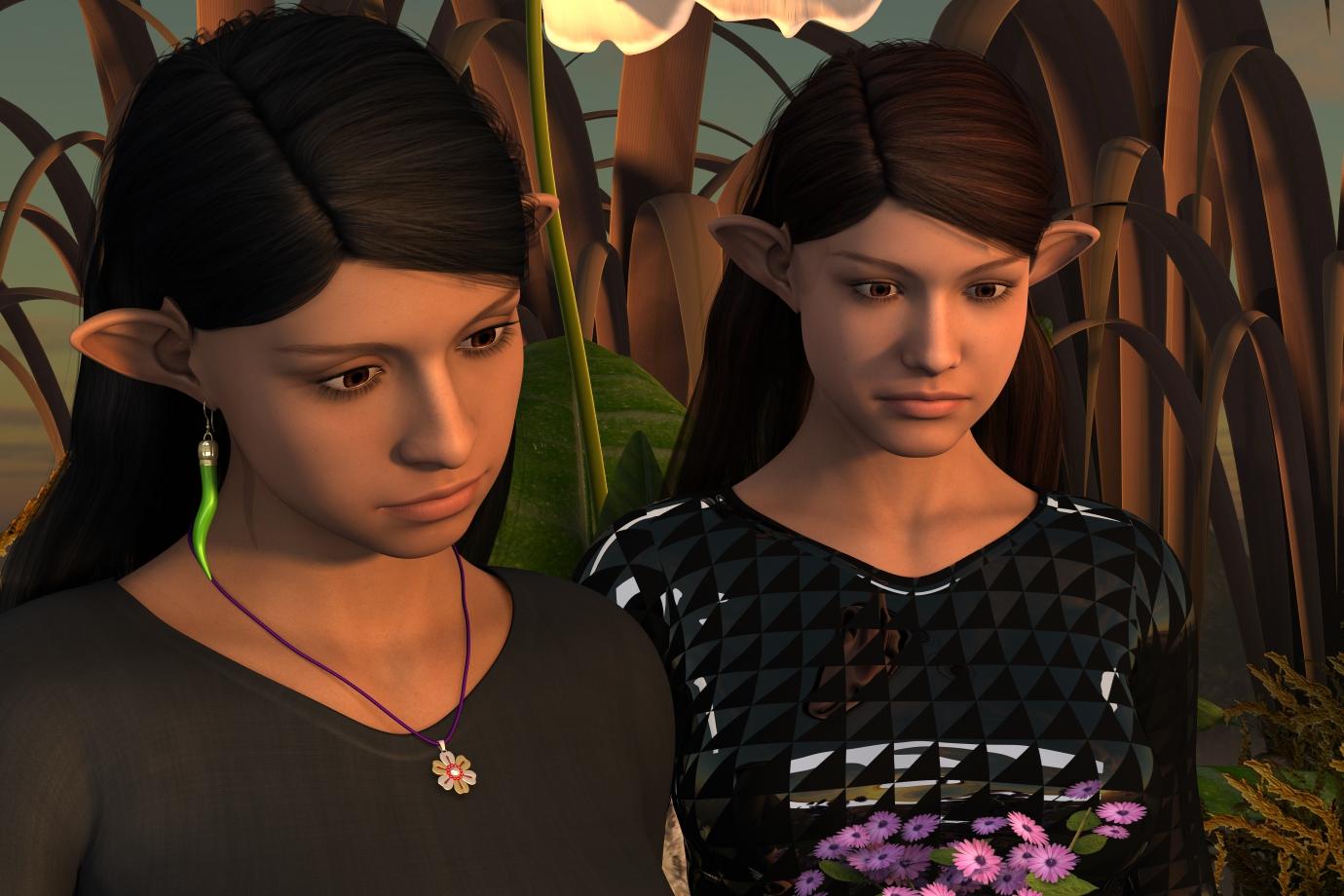
I know she would hav a fix for my second Q.

First off, I have a few ERC freeze dials (Dials that controls other dials) that I am sharing along with a few Hexagon made shape dials. The Control dial also uses Shapeshift and Growing up dials (Not included in the zip) that I want it to be clear the stuff not in my zip is not for 'Giving away'. The custom shapes I made in Hexagon I do intend to be CC0, so I worry that there may be potential for confusion. Is there an easier way to say it then the following that will not be confusing, or is that sufficient?
There are some morph sets used by the figures that are Not public domain, and such those morph sets are the property of there associated creators. I do not care what you do with the figure dials in the ZdgCrew folder, just keep in mind that some shape morph components of them are not free to give away without express permission from the creator. That would be Daz3d and Zev0 by the way.
The other thing, well, I'm not sure there is an easy fix from where I am.
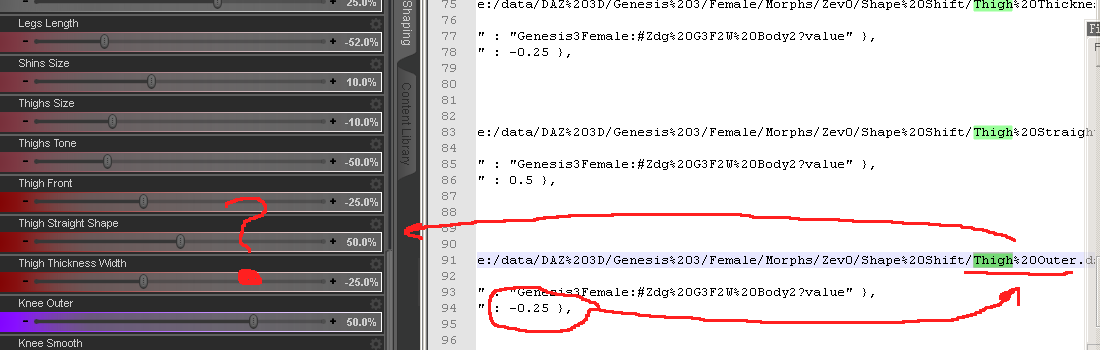
The DSF is not making that dial do anything that I can tell because of a limit in the shapeshift dial, and that is indeed the way I wanted that dial to go for the figure shape. Thoughts, suggestions, (cringe)?
what hair is this?I did not know that about the character. I haven't been around that long. I think it is interesting that they've kept the same basic morph and move it up through the generations. Very cool.
ZDG random Daz Studio discoveries and questions.Yes, that did escape me, Happy new year y'all.
I just finished uploading two more (I think) shape dials made in hex, along with another figure combo G3F2W2.
She is a tad sorter at 5ft 3in, yet not quite 4ft 8in. I'm sure some measurements may be way off, I didn't have a lot to work with. Some text with missing diagrams, some broken links, etc, lol.
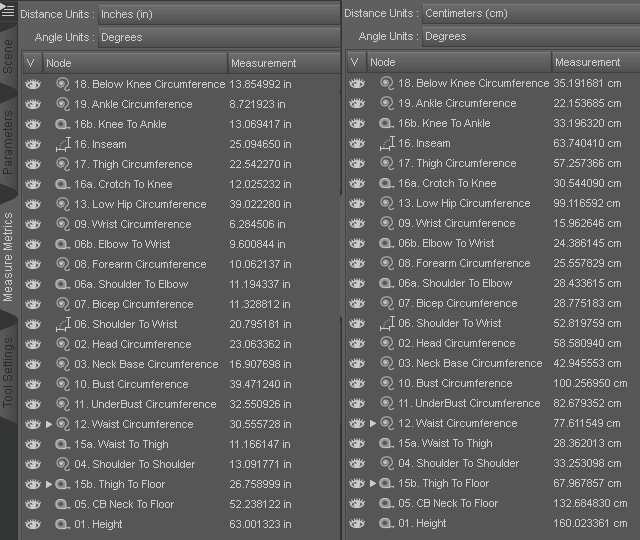
OK, so that measure tape angle is correct, works for me.
Oh, I did think of starting from an Asian face dial and going from there. There isn't such in the base four morph sets, and I was not going to tack on another requirement.

There is some similarities, that much is true.
As for shoulder width, I may deviate on that 17inch suggestion for the next one. And I think I found some evidence to back up that decision. The fella on the right is 6ft 1in according to his blog.

I don't think the fella on the left has shoulders quite that wide. So perhaps some people shorter then six feet may have narrower shoulders.
Genesis 2 Male conforming figureHere is a tutorial on the Transfer Utility (https://youtu.be/7abESLvn0yg) which is located on the Scene tab > Assets > Transfer Utility
ElebeastAh - thank you - have it working now.
I think I may not have had Troll for Genesis 'installed' the first time I tried Elebeast (I had it in my content library, but may not have right click installed - so didn't work that first time i simply tried the EleBeast morph.
Thanks for the help.
ElebeastI do have 'Troll for Genesis' and that works fine. (also looks to be a permanent morph built into the Genesis figure, where I can either adjust a slider to set 'Troll' up to 100% or I can navigate to Troll for Genesis and apply the morph.No, the "Requirement: Troll" doesn't mean you manually apply the Troll shape, the Elebeast preset does that automatically — you only need to have the Troll installed. That might be part of your problem, if you end up with the wrong amount of the Troll shape (the Elebeast might not need it at 100%) the head shape will be wrong and the tusks and trunk might not fit properly. Always start from a base Genesis, then add the Elebeast (or any other) morph preset.
BTW, the "permanent morph" thing is how all Genesis shapes work; they are all permanently installed on the Genesis figure, but they don't actually get loaded into any Genesis you have in your scene unless the parameter is set to a non-zero value. This saves loading time, and reduces the amount of memory needed to hold the figure in your scene.
[SOLVED]Transfer K4 textures to V4Sickleyield has a tutorial on how to use the Map Transfer Utility in her DA account...it could be used (I believe Genesis has both the K4 and V4 UVs included) to do it.
[SOLVED]Transfer K4 textures to V4I noticed I have some K4 textures, any way to transfer them to V4?
ElebeastHi SpottedKitty -
Yes, this is the correct EleBeast Character (the one for Genesis not Genesis 3)
I do have 'Troll for Genesis' and that works fine. (also looks to be a permanent morph built into the Genesis figure, where I can either adjust a slider to set 'Troll' up to 100% or I can navigate to Troll for Genesis and apply the morph.
Once I do that, I can apply the Mat files to make Genesis Troll pink, blue, or tan. I can also attach the trunk - which gets grafted in the right place, and leaves an empy area (or invisible polygons) at the attachment point if I hide the trunk. The trunk appears too small, however, maybe 1/2 to 1/3rd size shown in promo images.And the tusks are set a small ways away from the face, though in roughly the correct position.
When I double click or drag the EleBeast morph onto Genesis/Troll nothing seems to happen. have tried both the .duf and .pz2
Not sure what to try next.
Thanks.
Help wit DAZ TreantNot sure if I had - but I now see a Morph option at the bottom (which works fine) as well as the All category at the top, which works fine too.
Thank you.
Daz 3D is part of

Connect
DAZ Productions, Inc.
7533 S Center View Ct #4664
West Jordan, UT 84084Licensing Agreement | Terms of Service | Privacy Policy | EULA
© 2026 Daz Productions Inc. All Rights Reserved.