-
Please make better jeans/pants for men
would like jeans with unzip poses or morphs, saw 1 for m4 once on ros'y
http://www.daz3d.com/jeanz-for-genesis-3
This product has an open jeans morph.
ty

didnt have luck finding the m4 jeans on rmp, but found the m4 promo i saw em on, - HRD-Simon for M4
Genesis 4 wishlist!1. I'd like to be able to create clothing for a particular figure and have the option to apply the reverse of the existing morphs on the figure to bring it back to G3F base (or G4F in this case).2. Similar to #1, I'd like to be able to create clothing on a figure with non-zero pose and have the option to apply the reverse of that pose to the clothing.
Higher bend limit on the feet would be nice too. Reason being that the rigging is impossible to deal with beyond the current limit. Some bones acutally end up going backwards on certain footwear.
1. Reverse Source Shape from Target in Transfer Utility
2. Bake rotations, rig the clothing from the baked posed figure, apply the inverse pose to the newly rigged item, Bake Rotations.
How does a person make an inverse pose?
Just reverse the signs
Genesis 4 wishlist!1. I'd like to be able to create clothing for a particular figure and have the option to apply the reverse of the existing morphs on the figure to bring it back to G3F base (or G4F in this case).2. Similar to #1, I'd like to be able to create clothing on a figure with non-zero pose and have the option to apply the reverse of that pose to the clothing.
Higher bend limit on the feet would be nice too. Reason being that the rigging is impossible to deal with beyond the current limit. Some bones acutally end up going backwards on certain footwear.
1. Reverse Source Shape from Target in Transfer Utility
2. Bake rotations, rig the clothing from the baked posed figure, apply the inverse pose to the newly rigged item, Bake Rotations.
How does a person make an inverse pose?
How to create V4 figure morphs from V4 morphsSo I have a with Victoria 4.2.
In the scene I have used morphs to create a character shape. I want to save that V.4 shape into a file/morph that I can then inject into Genesis via
the G2 transfer plugin. How can I turn this Victoria 4,2 scene/ character into a morph that I can use in the Gen2 tranfer utility??
Thanks so much for any help or direction to a video/ tutorial!!!!
Please make better jeans/pants for menwould like jeans with unzip poses or morphs, saw 1 for m4 once on ros'y
http://www.daz3d.com/jeanz-for-genesis-3
This product has an open jeans morph.
Is there any artist working on a real anime figure?As I mentioned before the Kioki and Aiko 3 morph combo can make some excellent anime morph. Here Kioki A3.
Features include anime ear pull which is an anime feature, big circular eyes and triangular chin. The render was made with Carrara with
Yatoon latest plugin that offers shadow reference shaders (lines shadows).
 Morph help?
Exported Genesis as Obj.
Took it into Carrara, yanked the nose a bit, saved it as a new obj
Daz Studio, created new Genesis figure, Morph Loader Pro, selected new obj file, accept (or create, tried it through both Edit Object and Edit Figure)
WARNING: Geometry did not match, failed to create morph.
Tried it a bunch of different ways. Um. What gives?
Transfer utility doesn't transfer everythingAre you trying to replace the old mesh for the new mesh? If so, you need to tick on the Replace Source with Target and DS will swap the mesh out for you. And it should behave like the old mesh. (Caveat, depending on how much you changed, of course, there are situations where it won't work exactly. But on the whole it will do pretty close to the original mesh in terms of rigging.)
How does that transfer utility method differ from Edit>Object>Geometry>Update Base Geometry? Does transfer uttility do more?
Godin's GDN Kelly for G3FI installed through DIM when the update first appeared, with the results described above. I uninstalled again last night, deleted the package, and downloaded it again. Everything's fine now. I see that the eyelid morph files have recent timestamps now, so maybe there was a glitch in the initial update. Anyway, everything looks good now. Thanks, Valery!
Jaderail is looking down on the STUPID THREAD XCan having two different brands of RAM cause it not to work?
Sometimes but not usually. Memory type is most important. Memory speed is less critical but if the memory slots are organized as banks of two or more slots per bank and there is more than one bank, then the memory chips in both slots of a bank should be the same type and speed. If the two banks of memory have different speeds then a well designed system will use the slower of the two speeds for at least that bank of memory.
Older machines could sometimes be quite picky about the type and subtype of memory being used. There was a subtype of some older memories that depended on the number of clock cycles to complete a data transfer. I forget the details but the classification looked something like 2 or 2.5 or 3.
However, failure because of a differing manufacture among chips was usually not a problem for me BUT I did ONCE encounter an issue on a cheap machine (a %%##@$ ACER) that was extremely picky about memory chip type and uniformity and manufacturer.
To make a long reply short (too late) ... if you have a cheap brand machine (like ACER) the answer might be yes. Also if you have more than two memory slots and they are not carefully populated with same type, speed, and manufacturer in each bank (usually the two banks of slots are distinquished by differing colors, often blue and black, or lettering on the motherboard) then it's possible that you can run into problems.
My approach to that issue is to carefully and systematically test the memory chips. Starting out one memory chip at a time. The primary bank of slots is almost certainly the slot closest to the CPU chip. But sometimes the two banks alternate (check the color of the slot or motherboard lettering) turn the computer on make sure it boots then turn off and remove the memory chip. Test all four memory chips one at a time to make sure they all work separately. Then using matched pairs put them into the proper slots according to the specifications for your computer (get the specificaton documents from the Internet preferably from the manufacturer). Start with one pair then remove them and test the other pair in the same sockets. The whole purpose of this exercise is to identify malfunctioning chips or malfuctioning slots or memory incompatabilities.
What brand desktop is it, how old is it, what type of memories do you have, who manufactured them?
If your desktop doesn't even get to the BIOS screen but just beeps at you then you need to determine the beep code. But if your power supply is good and your motherboard is good and you have a known good single memory chip in the primary memory slot you should get some beep or keyboard light code to indicate how far it gets into the startup process.
If absolutely nothing happens, take two aspirin and call me in the morning.

Oh, and of course make sure the contacts on the memory slots are not damaged and the contacts on the memory chips are not damaged or dirty with finger oil. If dirty, use a soft lintless cloth and alcohol to clean them. Blow dust out of the empty memory slot.
 Dynamic cloth + related Carrara plugins - Best Practices, Tips and Renders
RE: I could learn this program directly in Carrara ?
Yes.
Actually, sort of for all three programs (Poser, Carrara, and Studio).
VWD runs along side of Poser, Studio and Carrara. Philemo's plugin exchanges the files between the programs and VWD. It is true that VWD looks like it is running inside these programs. For example, you can run Carrara and then model a simple cloth object around a figure or prop. Within Carrara, you use the file menu to initiate the plugin which provides a dialog box. This box allows you to pass objects from Carrara through the plugin to VWD, which is also running. You provide VWD with the cloth object and whatever it is supposed to collide with. VWD calculates the interactions, and it allows a lot of cool additional features, such as wind and manually tugging at corners.

 Philmo's plugin then passes a copy of the draped cloth back to Carrara. It includes a morph for each frame of the animation. Best of all, in Carrara you can edit each of these morphs in the posed position using the vertex modeler in animation mode. . In Carrara, you can also attach the new object to the figure skeleton if you want to change the pose a little. The object already has a morph that can be edited in the new pose position.
 Because of Carrara's ability to vertex model in animation mode and in the assemble room, this program fills me with some awe. It is awesome!
 Is there any artist working on a real anime figure?
You can actually morph your way around and make your original anime morph.
OT: A Versatile New Tool for Art, Music, or Whatever...I didn't see anything about this in the forums so far, so I thought I'd mention it. I just saw some info on the Sensel Morph, a touchpad controller that looks like it should be really good tool for those of you who can draw (I can't) and it looks like a good alternative to the Wacom products. One of the video demos shows an artist using a brush rather than a stylus to do painting in Photoshop. The tablet can have different overlays put on it to customize the tablet for different uses. My main interest is in using it as an interface for some of the softsynths I use in music, but it looks like this has great potential for artists, too.
I'm hoping putting in a link to the company isn't a problem, since they aren't selling 3d content; http://sensel.com/
Problem exporting an FBX file with face key from iclone.Has anyone had recent problems again with exporting from daz and bringing that FBX file with iclones face key into 3DXchange? I know this was a problem several months ago but with Daz new update it was fixed. But just recently as of about 2 weeks ago it started happening with me, where everytime I tried to open an FBX file with a face morph ( exported from Daz ) 3DX crashes. I've wiped Daz from my computer several times, reinstalled as per their techs suggestions and the problem persists. I have a second computer with Daz and when I export from there into my main computer ( the one with the problem ) it works just fine. So obviously there is something the older program from Daz has left behind that's interfering with a smooth transition. But I don't know what. Anyone have any suggestions?
Selbsthilfegruppe DAZ Studio - Beispiele, Fragen, Diskussion und sonstiges GequatscheHallo ihr Lieben :)
klasse, dass es endlich mal ein deutschsprachiges Forum gibt! Um ehrlich zu sein, geh ich bei manchen englischen Beiträgen auf Standby und bin hinterher oft genauso schlau wie vorher. Zumal ich noch nicht viel Erfahrung mit DazStudio hab... vor Jahren mal ein bißchen damit rumgespielt und hie und da mal was als Vorlagen für Illustrationen gerendert. Ich bin also eigentlich Anfänger. Anfang des Jahres wollte ich es aber wissen und hab mir die neuste Version des Programmes runtergeladen, nach einiger Zeit hab ich mich grob zurecht gefunden und ein paar Szenen gebaut. Ich hab mir G2F und G3F-Figuren rumexperimentiert und war wirklich baff, wie gut sie gerendert wurden. Jetzt hab ich nur ein Problem: Wie bekomme ich meine alte Victoria4 auf eine Genesis3?
XoechZ hat ja schon den Transfer von Kleidung, Frisuren, etc. von den klassischen Modellen auf Genesis2 angesprochen (über http://www.daz3d.com/morphs/victoria-4-for-genesis-2-female), dafür schon mal vielen Dank! Für Genesis 3 scheint es dieses PlugIn aber noch nicht zu geben, oder? Wird V4toG2 auch für die Figuren benötigt oder wie? Kann mir das evtl. jemand genauer erklären? Sozusagen idiot-proof? ;o) Oder habt ihr nen Link, wo das halbwegs verständlich erklärt wird? Ihr merkt's ja, hab keine Ahnung, aber ich dachte, wenn ich nicht hier Hilfe bekomme, wo sonst... Wär euch also für jeden Tipp dankbar.
Achja, hier meine Naomi (Genesis2) vom letzten Wochenende :)
Also... ArnoldC hat ja im letzten Post auf der vorherigen Seite schon alles zu G3 beantwortet.
Die Werkzeuge habe ich ja ein paar Posts weiter oben schon mal aufgeschrieben.
Die "Schritte" für einen Morphtransfer sind im FAQ beschrieben (Link siehe in meiner Signatur, im ersten Post des Thread is ein Inhaltsverzeichnis).
Die Haut kannst Du von V4 bis nach G2 entweder "direkt" verwenden (mit dem V4 to G2 Werkzeug), wenn das Material als "duf" Datei abgespeichert wurde. Liegt es als "pz2" Datei vor, dann musst Du einen kleinen Umweg machen.
Schritt 1:
Du lädst zuerst einmal V4, und gibst ihr die gewünschte Haut. In meinem Beispiel ist das AK_SF Lilithai Strigoia. (in meinem Beispiel ist V4 auf der linken, und G2 auf der rechten Seite; für dene rsten Schritt brauchst du aber G2 noch nicht in der Szene haben.). Dann speicherst Du die Haut: File-->Save As-->Material Preset.
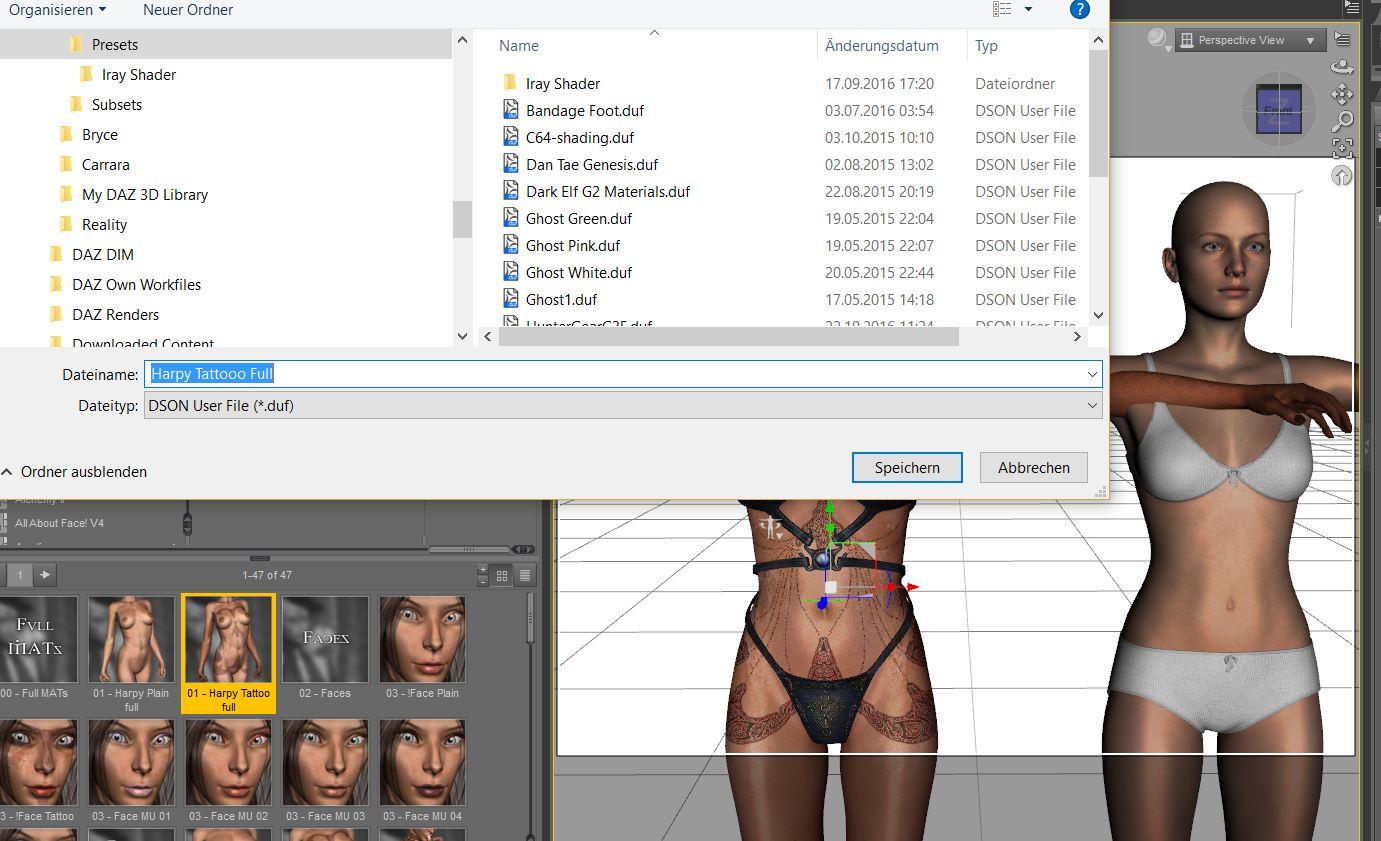
Schritt 2:
Stelle sicher, dass alle Materialzonen ausgewählt sind, und klicke "Accept".
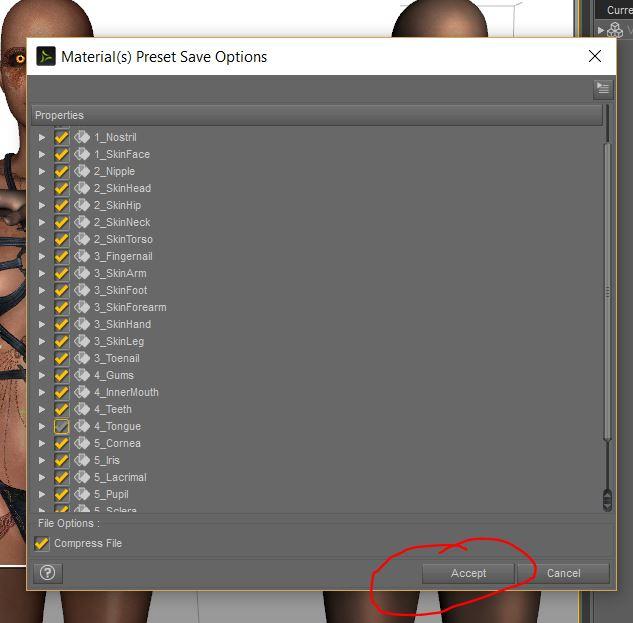
Die Haut sollte jetzt in deinem Presets-Verzeichnis gespeichert sein.
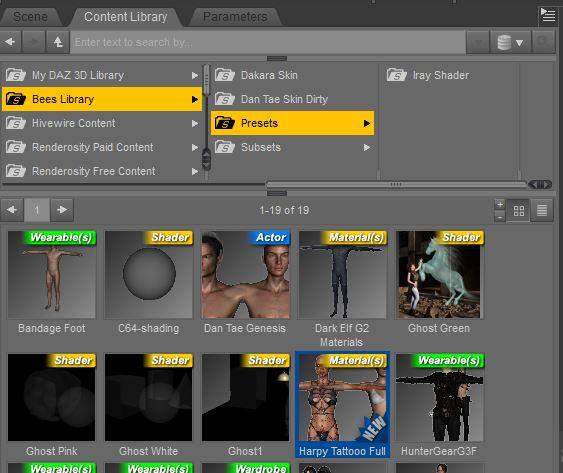
Schritt 3
Hierzu muss V4 jetzt nicht mehr in der Szene sein, aber Du muss G2 laden. Wenn die Haut berits als duf-Datei vorliegt, und du sie direkt anwenden kannst, geht es ebenfalls hier ab Schritt 3 weiter.
Wähle im Surface-Tab Genesis 2 aus. Wende dann dein vorhin abgespeichertes Material-Preset bei Genesis 2 an. Das erste Ergebnis sieht nicht sehr schön aus, ist aber so korrekt. Im Material-Tab (die oberste Ebene sollte ausgewählt sein, damit Du es nicht für jede Materialzone machen musst) suche nach dem "UV-Set". Dieses sollte bei G2F auf "Base" stehen. Wenn Du Victoria 6 verwendest, steht da "Victoria 7" als UV Set.
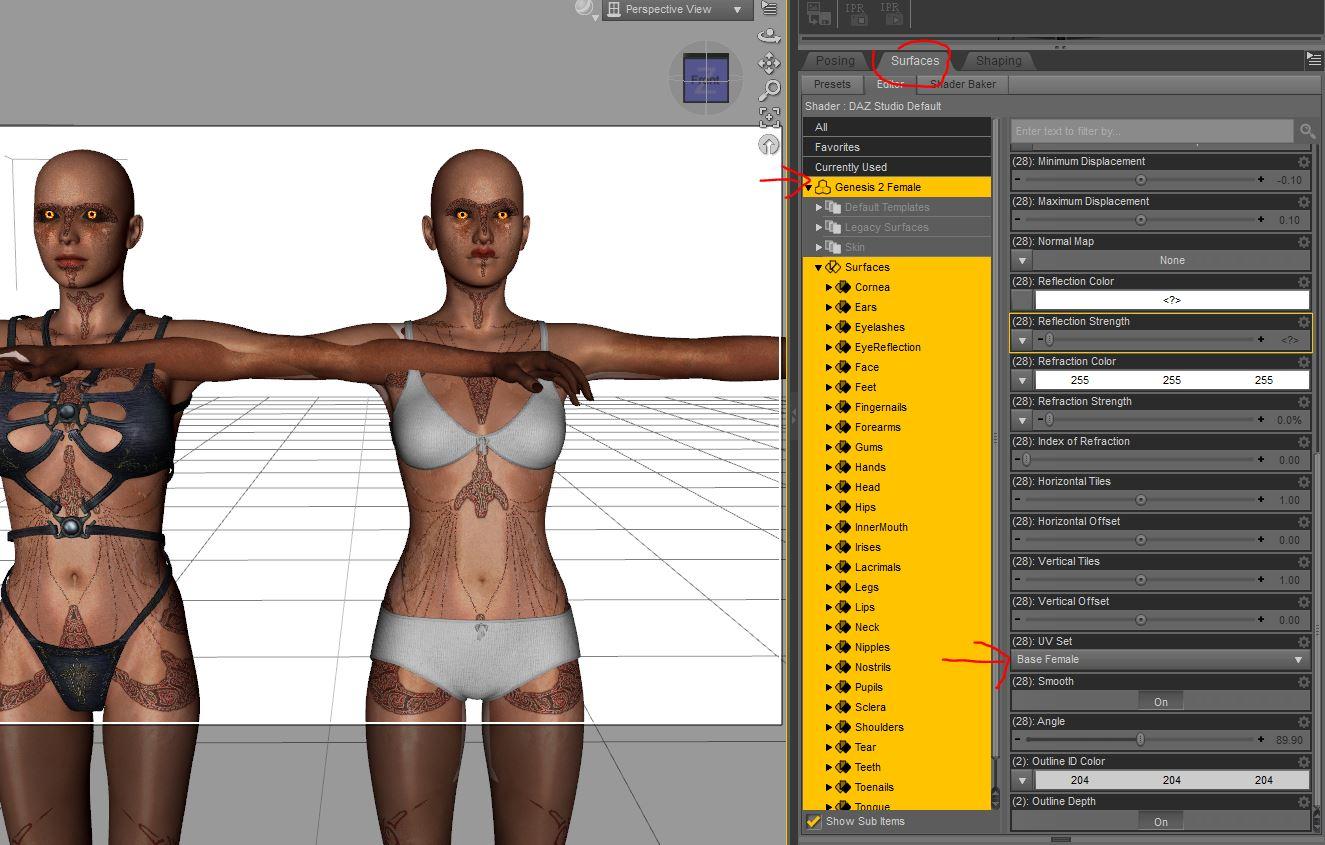
Schritt 4
V4 to G2F stellt bei G2F das Haut-Template (die UV) von V4 "zur Verfügung". Wenn Du das kleine Dreieck an der rechten Seite von "Base Female" klickst, wird dir hier nun neben anderen G2F UVs auch die V4 UV angeboten. Du wählst diese aus, und die Haut "sitzt" wieder korrekt. Das ganze kannst Du dann nochmal zur schnelleren Verwendung als Material-Preset abspeichern.
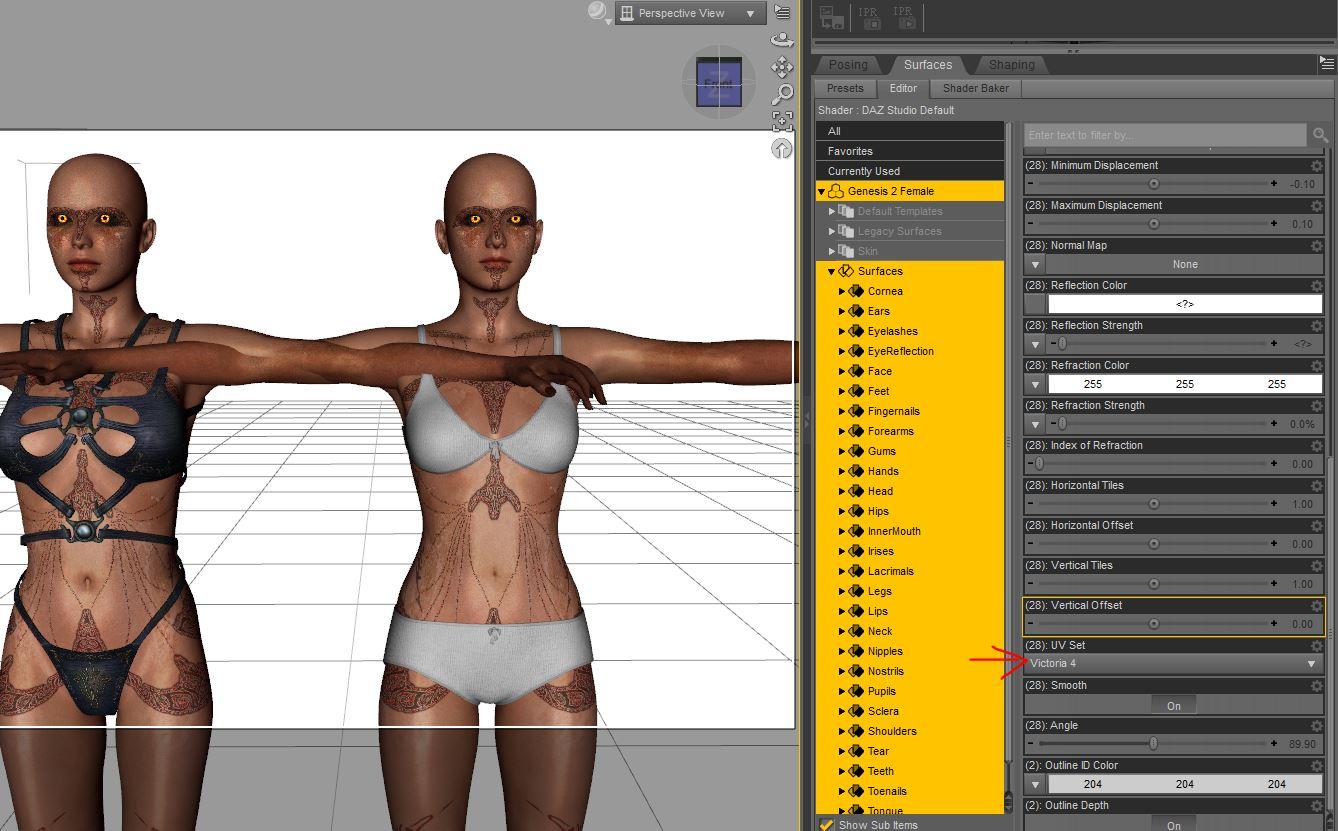
Das musst Du dann für jedes Makeup und so für die Haut wiederholen. Da das nervig ist, gibt es in der obigen Liste den Batch-Konverter, der die Schritte 1 bis 4 für Dich durchführt.
Ich hoffe, das war verständlich.... falls ich was nicht gut erklärt habe, melde Dich gerne.
Ach ja, und G3 spielt nicht gerne mit den anderen Generationen, daher geht das da bei den Skins nur über den Umweg mit Caymans Geografts.
Zeroing out teethOne of Thorne's morph sets http://www.daz3d.com/aiko-7-head-morph-resource-kit-1 has some handy morphs that will move the mouth parts back/forth and up/down. Handy if you don't want the bother of taking the model into a modeller after you zero out the teeth and mouth morphs with the geometry editor.
Hair style & choker requestHi Kermorgan, By "thick bang" do you mean the depth of hair from outside to forehead? If so then I wonder whether a morph would be very effective? It might look a bit blocky or plastic. Perhaps an alternative strategy to thicken the bang would be to add another layer of mesh which would have its own surfaces including transparency/opacity. The complication is that the extra layer of mesh would probably also need it's own set of morphs; length, partings etc. That could mean a lot of extra work, but again would give extra versitality. This could be a never ending project lol.
Selbsthilfegruppe DAZ Studio - Beispiele, Fragen, Diskussion und sonstiges GequatscheHallo ihr Lieben :)
Jetzt hab ich nur ein Problem: Wie bekomme ich meine alte Victoria4 auf eine Genesis3?
XoechZ hat ja schon den Transfer von Kleidung, Frisuren, etc. von den klassischen Modellen auf Genesis2 angesprochen (über http://www.daz3d.com/morphs/victoria-4-for-genesis-2-female), dafür schon mal vielen Dank! Für Genesis 3 scheint es dieses PlugIn aber noch nicht zu geben, oder? Wird V4toG2 auch für die Figuren benötigt oder wie? Kann mir das evtl. jemand genauer erklären? Sozusagen idiot-proof? ;o) Oder habt ihr nen Link, wo das halbwegs verständlich erklärt wird? Ihr merkt's ja, hab keine Ahnung, aber ich dachte, wenn ich nicht hier Hilfe bekomme, wo sonst... Wär euch also für jeden Tipp dankbar.
Hallo Karin,
willkommen im Club. Nein, so ein "Alles-in-Einem" Produkt gibt es leider derzeit nicht für Genesis 3. Es gibt aber ein paar kommerzielle Produkte, die miteinander verwendet den gleichen Zweck erfüllen.
Um Kleidung für die alten Millennium-Figuren (Victoria 4, Michael 4, etc) auf Genesis 3 zu transferieren, brauchst Du als erstes einen sogenannten "Autofit-Clone". Für Genesis 3 ist das m.A.n. am besten funktionierende Produkt valzheimers Wear Them All. Mit dem kann man die Kleidung von den Millennium Figuren, Genesis und Genesis 2 auf Genesis 3 übertragen. Wie alle Autofit-Clones funktioniert das recht gut mit Hemden und Hosen und dergleichen, bei Schuhwerk gibt's aber leider weiterhin das altbekannte Problem, dass die Geometrie besonders bei Schuhen mit hohem Absatz unschön verzerrt wird. "Wear Them All" komt mit einem Handbuch im PDF Format, zu finden im Verzeichnis "ReadMe's" im Content Library. Ist zwar in englisch, aber reich bebildert.
Damit Genesis 3 ausschaut wie Victoria 4 benötigt man dann noch einen "Clone" oder "Shape". Wenn Du lediglich Victoria 4 in ihrer Grundform verwenden willst, dann bist Du mit "Wear Them All" bestens bedient. Das beinhaltet nämlich schon einen, allerdings ist der versteckt. Um den anwählen zu können, linksklickt man auf das Optionsmenü Symbol des "Parameters" Tab und klickt dann erneut auf den Unterpunkt "Show Hidden Properties". Unter den Parametern "Actor" und "Clones" werden dann die für Genesis 3 verfügbaren Clones angezeigt. Einfach den Schieberegler für den Victoria 4 Clone auf 100% setzen, und schon schaut G3F aus wie die gute, alte Vicky 4, inklusive ihrer Standard T-Pose. (Siehe Bilder im Anhang).
Von Haus aus werden mit den Genesis 3 Basis-Figuren lediglich die Clones für die vorhergehende Generation, also Genesis 2, und der Clone für den weiblichen bzw. männlichen Gegenpart der gegenwärtigen Generation mitgeliefert, mit "Wear Them All" bekommt man die Clone für Michael 4, Victoria 4, Genesis und Genesis 2 Male. Okay, letzteren haben wir eigentlich schon. Valzheimers Klon ist möglicherweise etwas weiterentwickelt.
Wenn man andere Victoria 4 Charaktere als die Grundfigur nach Genesis 3 transferieren möchte, benötigt man dazu das Genesis Generation X2 Tool, und zusätzlich noch das GenX2 AddOn for Genesis 3.
Damit kann man aber lediglich die äußere Form transferieren. Um die Texturen von Victoria 4 mit Genesis 3 verwenden zu können, benötigt man noch das passende "UV-Set". Obwohl Cayman Studios im DAZ Shop vertreten ist, gibt es das für Victoria 4 seltsamerweise nur bei Rendo: Legacy UVs for Genesis 3: V4.
Cyclopstrich 2 Questions on Morphs and Rigging in StudioHave the revised cyclopstritch with wings. Preparing to rig in Studio.
Have named the polygon groups. Exported as an obj with the morphs and skinning option checked. I loaded in Studio but I can't find the morphs to open and close the eyes, etc.
Am I doing something wrong?
The normal way to add morphs to a figure in Daz Studio is by importing a new obj of the shape change and using morph loader pro to add the obj information to the figure. Yeah... PITA compared to just adding them directly in Carrara, but....
Trying to follow the rigging instructions but the menu never appears. The instructions say to select all of the bones in the hierarchy then right click in the pane to bring up a menu of weightmapping options. I have tried but no menu appears.
Make sure you're in Edit Mode
Just trying to help. I've never made my own rigged figure like this. But I think we have to be in weight map edit mode. You should see options for painting and manipulating weight maps. Wow... It's been a while since I've played in DS.
Zeroing out teethZeroing the teeth, at least for a non-HD morph, is fairly simple now - the potential issue is that the zeroed teeth may not fit the moprhed head if it's wider or narrower.
To zero the teeth you need to switch to the Geometry Editor tool, and you need to make the morph you wish to zero a favourite by clicking the heart icon on its slider (or moprhs - this can be done to multiple morphs in one operation).
With the Geometry Editor active the Tool Settings pane will show a list of groups and surfaces - for this it should be enough to click the + next to the teeth surface to select all its polygons.
Morph editing works on vertices, not polygons, so now we need to convert our selection to a vertex selection. Right-clck in the viewport and then go to Geometry Selection>Convert Selection>Convert to Vertex Selection.
Now to remove the teeth from the morph(s) right-click in the viewport again and then Morph Editing>Clear Selected Deltas from Favourites.
Daz 3D is part of

Connect
DAZ Productions, Inc.
7533 S Center View Ct #4664
West Jordan, UT 84084Licensing Agreement | Terms of Service | Privacy Policy | EULA
© 2026 Daz Productions Inc. All Rights Reserved.