-
Art & Animations By Ivy Summers
Fishtales said:
Ivy said:
the whole thing took me 4 months to complete. in between flying drones :D
Wow! That is dedication :) Weren't you trying to make a living at drone flying? How is that going?
Yes I have a full time job flying UAV's for County. Its one of the reasons why its taken so long to get this animation done..haha
I have over 250 flight hours now on my pilot license and am ready to get certified to fly heavy lift drones for search and rescue, unfortunately because of the and privacy regulations, I am not allowed to share to many of the images I take with the drones when working. But I do have a fair amount of drone footage i need to upload. and I do have a few search and rescue videos I have done with my drone that I have premission to upload that I need to get done as well
so yea UAV's flying has become a huge part of my life now
Weird 'hole' in clothing - Genesis 9crosswind said:
I think the culprit comes from the body shape / morph you dialed on this figure... if you find no issue after fitting jeans on Base figure. And you used auto-fit by the way? Yes, I used autofit
Yes, I used autofit but I get the same result when applying Genesis 9 clothing. The character is extensvely morphed, including my custom morphs but it was fine the day before. The other issue is that the problem is with the clothes not the body. Yet I have not done anything to the clothes....so I'm at a loss as to what the problem is...which is why I posted on this forum. I will try to recreate a duplicate figure using the same morphs to see which is causing the problem.
Having trouble Importing expressionsPadone said:
In your example, since you use the CXCM morphs to make an expression, then you save that in the daz preset. Thus in blender you have to import the CXCM morphs for your poses to work. The CXCM morphs can be imported as "daz favorites" in easy import, or as "custom morphs" after easy import, if this is what you miss.
Be aware that, if you want in blender the exact same deformations as daz studio, then you also have to import jcms and the figure custom morphs. The easy way to do this is to use "baked correctives" in easy import.
https://bitbucket.org/Diffeomorphic/import_daz/wiki/Import/Easy Import DAZ
p.s. Another way, if you don't want to import morphs, is to bake to bones in daz studio, with edit > figure > bake to transforms, this way you can save a pose preset using bones instead of morphs. But this will only work for expressions using bones, it will not work for expressions using shapes as FACS for example. This basically means this works for G8, but not for G81 G9 which use FACS.
Ook, thank you! I think I'm finally following. Honestly though, you might consider adding the feature to import the pose with expression ontop of the character without use of morphs. Clearly Diffeo is capible of doing this as I can import a character from easy importer with the pose AND expressions. If you're not using an expression on your a-pose but want to later it's such a hassle to go back and search for all the sliders you used and then import each one.
I appreciate your help with all of this!
"Mature Content" images blurredAndrewJJP said:
Richard Haseltine said:
AndrewJJP said:
it's so odd that I think that's very likely.
But whatever the case, nobody has yet showed me an image that should be mature. And by that I mean something we wouldn't see in our everyday lives.
- It's not people in underwear - walk past Victoria's Secret, Boux Avenue, Ann Summers, or even Marks and Spencer, and you see such things in the windows. Nobody thinks anything of it.
- It can't be bare midriffs, Almost all young women here seem desparate to show off their bare midriffs, so that doesn't count.
- Legs? Well no, the same applies.
- And if i go swimming, I see swimming costumes and bikinis so that doesn't count.
This is 2024, not 1824. Which items for sale here should be hidden by default in 2024? Maybe there are.a few, they are exceedingly rare.
I think they need to get out more!
Is anyone going to speak up in favour of this, just to provide some balance? Does anyone actually want it? Anyone???
I don't know about your everyday life, but for most people https://www.daz3d.com/cgi-secret-details-for-genesis-9-masculine-and-merchant-recourses
In that case, I agree that it's a sensible decision.
Even so, people don't ket kicked out of the swimming pool if they turn up like that. Admittedly, most of us don't look that way!
I agree!
To the DAZlings who decided this AI solutionI suggest ou really should revisit the think tank. This course leads to a dead end, suicide mission. If you, DAZlings, are trying to retain customers and not drive them nuts away, stop blurring pg 13 content with R rated content. Stop using AI because whoever programmed this model you are using, is an embicile. But if you are headstrong to ride this route,be inclusive. Implement this mature filter for stuff we post in the forum. If we can't post it neither should you. Why not give us this filter in the forum. If you can, we can. That is the hypocritisy. No alternative filter for those in the forum who want to post nude examples, but the PAs are exempt and can post this under a mature filter but we cannot? PAs do not bring in the money that pay you and them. We the buyers do. And we should be able to post mature filtered content too. But you really need to get what mature filtered content because your AI filter seems to be suffering a meltdown.
Wonder Woman outfit neededThere are some great one's out there. A google search should pull up some viable results.
Can't find the morphs for SickleYield's Natural Body HD for Genesis 9 [SOLVED]They should already be in the parameters tab. Put Genesis 9 into the scene, then search for the word "Natural" under Parameters. All the sliders are bright green, looks like. The sliders are nested under the affected body part under Actor. So, for example, there's a section called "Natural Body" that's underneath Actor/Head, another under Actor/Head/Neck, and so on.
No idea if anything more should be visible under Smart Content, since I don't use that. I don't think it's quite that sort of product.
Hot New (Northern) Season, New Sales Thread: Report Issues Here "Reporting Only"joanna said:
Crossposting from Daz+ forum: it seems that the related items don't show on Daz+ page, and they don't discount properly (except for one) when paired up with one of the new releases. (It's being discussed and reported in Daz+ weekly releases thread.)
Looks like both issues are now fixed.
Hot New (Northern) Season, New Sales Thread: Report Issues Here "Reporting Only"Crossposting from Daz+ forum: it seems that the related items don't show on Daz+ page, and they don't discount properly (except for one) when paired up with one of the new releases. (It's being discussed and reported in Daz+ weekly releases thread.)
Realistic Deer antlers ideally wearbleDifferent species of deer have different shape antlers, so I don't know what the "right shape" means for you, but here are some antler options:
https://www.daz3d.com/muelsfell-frost-wight-hd-for-the-genesis-8-male
https://forum.daz3d.com/winter-caribou-headdress-and-ruff-kit-for-genesis-9-8-and-81
https://www.daz3d.com/wendigo-for-genesis-81-male
You'd have to remove the extra stuff from the second one.
Render your buys! Use buys from the current month and the previous month of salesI'm glad everyone's keeping the thread alive! I haven't been commenting much, but I love coming in here and seeing all the new renders. (And adding stuff to my wishlist as a result.) Keep posting, please!
Here's my contribution. (Crossposted from Daz+ forum)
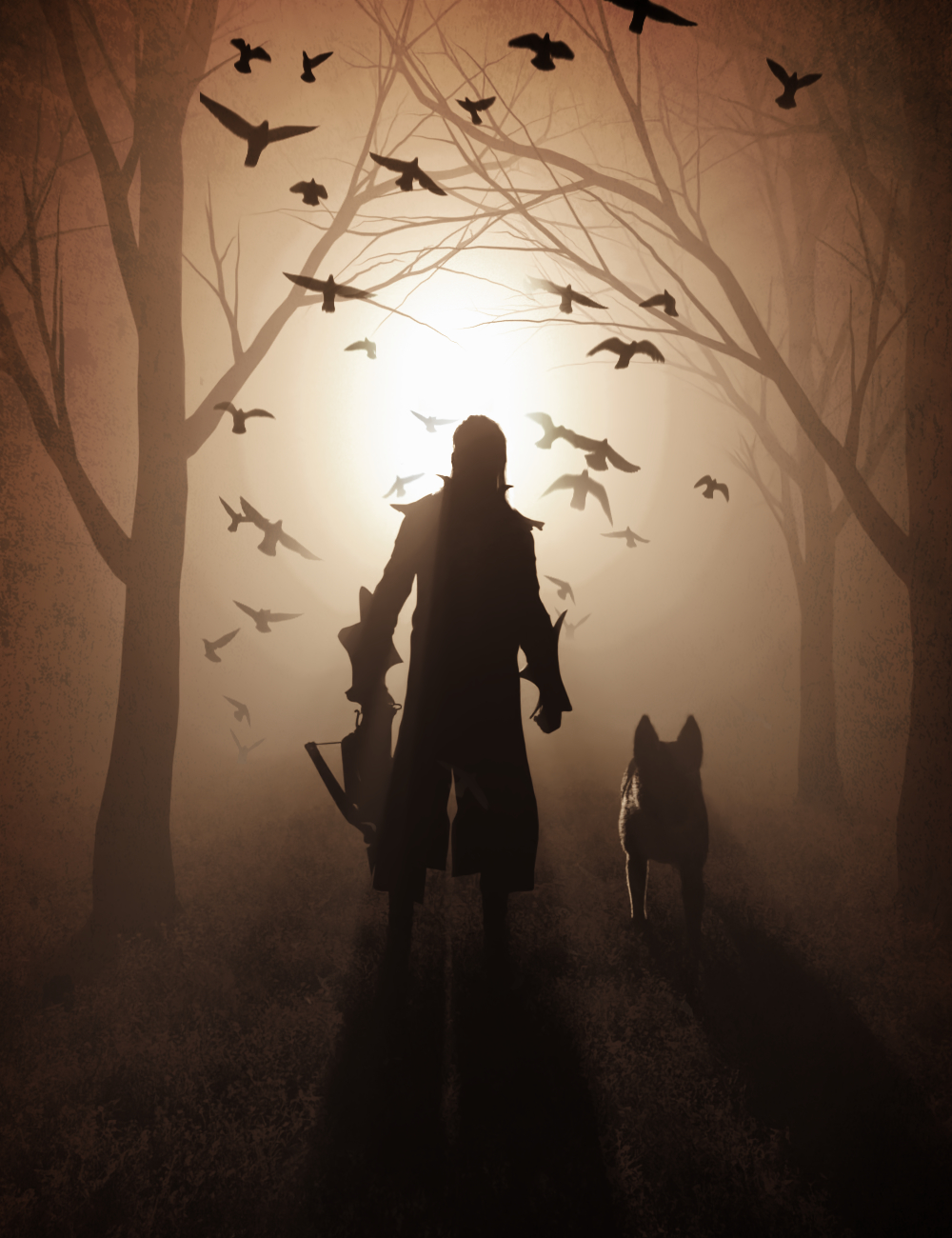
The Hunter
This image was inspired by all the stuff I bought: Wolfgang, German Shepherd, Render Studio 2.0 Volumetric Plus and Render Studio 2.0 Production Scenes. The rest of the items is in the gallery.
 Converting V4 textures to Genesis 3,8,9 Methodology
I know, this has been asked a million times before and there are a few threads I've found on the forum, but they're out of date. Many of them call for the Blacksmith3D texture converter, the easiest and fastest way to convert, but it is no longer available. Another calls for Blender, which is more practical. There is also the methodolgy that uses Ultimate Unwrap 3D, but both Blender and UU3D both utilise morphs that arrange G2 and G3 in UV space so they're overlapping, so without knowing what's going on under the hood of those morphs, I don't know how to easily recreate them for V4.
I was wondering if anyone knew of a methodology or what exactly I need to have overlapping for a V4 to G3, G8, G9 texture conversion to work the same way with either Blender or Ultimate Unwrap. Will it be enough to just hide the eyeballs, eyelashes, teeth and inner mouth, everything I don't need, leaving only the body surfaces visible and overlapping? It's only the body textures that I want to convert. Namely, the fantasy characters by Maddelirium. They're too amazing not to use now my pipeline is 100% Daz.
I know there are scripts that put a V4 UV on the Genesis figures, allowing the textures to be used, but what I want to do is an actual texture conversion - taking V4 textures, projecting them on to a G3 or G8 figure and having the textures assigned to the new character's UVs.
Any help would be appreciated.
Thanks
Australian common brushtail possumdruc said:
I can't find Alessandro in the forum contacts but their facebook page is https://www.facebook.com/alessandromastronardi.wildlifeartist/ Do a search in the store and you will get an idea of the type of product they produce.
https://www.daz3d.com/forums/profile/1342301/Alessandro Mastronardi
Australian common brushtail possumI can't find Alessandro in the forum contacts but their facebook page is https://www.facebook.com/alessandromastronardi.wildlifeartist/ Do a search in the store and you will get an idea of the type of product they produce.
Australian common brushtail possumMight I suggest sending Alessandro_AM a message through the forum to ask if they are considering producing this animal. They are my go to for animals and they seem to enjoy producing animals from the land down under. Their web site gives great insight into them.
A Plea to Pose CreatorsRon Knights said:
Here is my perspective of how Poses and Expressions should be labelled. We have a folder that describes the conents of the pose set. (It might also inclue the PAs name), Under the folder, the poses should be named by the poses themselves. (Sit, stand etc.) Because the poses are under a designated folder, we don't need to worry about mixing them up with poses from another set.
All items should be set up so we can easily find the poses in alphabetical order by their intended function. We lose that convenience when there is a "PA" name or other info in front of the Pose name itself.
Here is an example of a set that is useless to me because the PAs name is at the beginning.
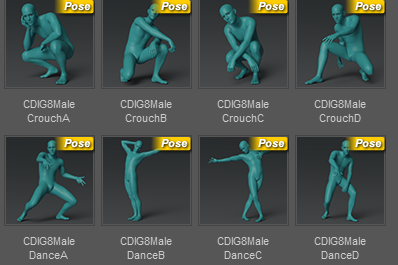
One of the worst things is having to search for the pose "sit 01" or "sitA" when you have several dozen poses named "sit 01" or "sitA". Putting the PA ID in front of the file names is one of the most convenient and effective ideas to search quickly and not end up with duplicate files.
Possibly another solution could be to come to the convention of putting the name of the PA at the end: "SitA - XXX". Where XXX is the ID of the PA.
Sharing my experience of customising my favourite Stonemason sets.Fire Angel said:
OK, it will be hard to even visit this forum for a few days, and making anything worth posting will be essentially impossible. I have a temporary near-complete paralysis of my right hand, and I am (very) right-handed. Typing this is taking an age, so using Blender is just out of the question until this heals.
Good news is that I am told to expect full fuction of my right hand to return within a week, so I should be back soon.
Sorry to hear that FA. Hope you recover soon.
Website Navigation Update/Testing 2023brainmuffin said:
DAZ_ann0314 said:
This thread is to discuss any issues you may notice or any thoughts you have on the new website navigation launched today.
Navigation is still difficult and search is still very weak. Products cannot be grouped by filters. I find things on accident more than on purpose.
It is still too busy and too many overlays get in the way.
Daz is aware of the issue
The [Disco Chives] Misplaced Parrot Complaint ThreadRichard Haseltine said:
DanaTA said:
A tracker just insinuated itself on my computer. While I was reading the forum messages! This is the only page that could have done it. I have only one other tab open, and they don't use trackers or ads of any kind!
A tracker meaning what? A cookie, or actual executing code? A cookie might come from an ad.
All I know is what you see in that image...it was the warning from Norton. After I saved the screen capture, it went away.
An ad is one thing, but placing anything on my computer that tracks my activity is troubling. And there is already far too much of that going on already.
Sharing my experience of customising my favourite Stonemason sets.OK, it will be hard to even visit this forum for a few days, and making anything worth posting will be essentially impossible. I have a temporary near-complete paralysis of my right hand, and I am (very) right-handed. Typing this is taking an age, so using Blender is just out of the question until this heals.
Good news is that I am told to expect full function of my right hand to return within a week or two, so I should be back soon.
The [Disco Chives] Misplaced Parrot Complaint ThreadDanaTA said:
A tracker just insinuated itself on my computer. While I was reading the forum messages! This is the only page that could have done it. I have only one other tab open, and they don't use trackers or ads of any kind!
A tracker meaning what? A cookie, or actual executing code? A cookie might come from an ad.
Daz 3D is part of

Connect
DAZ Productions, Inc.
7533 S Center View Ct #4664
West Jordan, UT 84084Licensing Agreement | Terms of Service | Privacy Policy | EULA
© 2026 Daz Productions Inc. All Rights Reserved.