-
Untitled
blue_ said:
Now I’m even more confused. So, is the Clothing rigged exactly the same way as the Genesis Figure?
Nope, not the same as Leana said above. The clothing for V4.x are rigged in Poser AFAIK (I've never been a Poser user...) but the clothing for Genesis figures are rigged in DS with Transfer Utility... and its approach is fairly different from the one in Poser.
That’s how I understand your Explanation, I load the Genesis Figure, then I load a Piece of Clothing. It fits the Base Figure perfectly. If I were to scale the Genesis Figure up or down significantly, the Clothing would scale along with it to the same extent. Is that roughly correct?
That's correct... a sort of "conforming" (that's why the rigged wearables are also called "conformers")... because the clothing has "skin binding" to the figure's bones. No matter you change the figure's shape or merely the Scales of bones (Node...), the clothing will follow.
I need a bit more explanation now, are "Morph" and "Shape" the same Thing? If I change the Size of a Body Part, that is a Morph? I apologize in advance for the Example, but I think it should make it clear to everyone what I mean, if I enlarge the Breasts from size A to size F, is that a Morph or a Shape?
Not the same thing. A Morph is defined as a group of vertices that can deform a mesh. It's also called a Delta so as to move the vertices along a certain direction. In DS, Morphs are literally shown as Properties in Parameters pane. A Shape is just a general term to describe a Geometry of a figure / prop etc. in DS. So, in other words, a Shape is just a geometry of whatever an object / figure that can be seen in DS' Viewport, Morphs are used to deform the Shape(s).
Just a quick Point about the Victoria 4 Figure again, does that mean it makes no difference to the Clothing whether the Figure has a "Weight Map" or not?
As for V4.x, correct, it makes no difference since both of V4.x figure and its clothing have no General Weight Mapping. Be noted, there's also a "way of weight calculation" when rigging the clothing to V4.x in Poser...as "spherical data" to define the falloffs as Leana mentioned.
When working with a Victoria 4 Figure, if Body Shape changes are manually loaded onto the Figure, do these count as Morphs as well? For instance, I have a Problem where a Piece of Clothing fits the Base Shape perfectly, but once I load a Character with specific Body Shape adjustments, the Clothing no longer fits the Body correctly, it doesn't quite adapt to the new Shape. Why does this work with the Genesis Figure but not with the Victoria 4 figure?
Yes, they're called Partial Body Morphs (PBMs). You can find them in Parameters pane accordingly. For Genesis figures in DS, there's a mechanic of "Auto Follow", so all PBMs (with Auto Follow enabled...) can be automatically transferred from the figure to the conformers (clothing, accessories, etc.). But for non Genesis figures, there's no Auto Follow triggered, so you have to use the function of Transfer Active Morphs so as to make the clothing a "perfect fit" on V4.x.
I might have assumed there would be backward compatibility Features in Daz Studio, like those allowing older Figures to utilize some of the capabilities of the Genesis Figures.
There ARE backward compatibilities in DS especially across Genesis generations as well as their Assets, but the "compatibilities across the assets from DS to Poser" is a different thing...
I have a Question out of curiosity, Victoria 4 was released back in 2006 for both Poser and Daz Studio, and Daz Studio itself must have been released around that same time. Was the decision made then to stop focusing on the Victoria 4 Figure and develop the Genesis Figures instead? Does the development of a previous Figure cease completely whenever a new one is released?
Though the first version of DS was released in 2005 and it supported Poser assets from very beginning, Victoria figures were still developed in Poser... they're still Poser figures. In other words, Poser figures and Daz3D Genesis figures belong to "different product lines".
However, even after V4.0 was released, V4.2, an add-on, was then released as a part of V4's lifecycle. So to me, the "development" was not really ceased... though I have zero idea about how Zygote Daz3D thought of their strategy at that time...
How can I reduce tank top wrinklesWhich shirt is it?
Have you tried simulating it?
If simulation doesn't work, my suggestion would be to make a morph that smoothes out the wrinkles. Best done in a modeller, but if you are Premier, you should have acces to "Sculpture" (I think it is called), which has a smoothing function.
Untitledblue_ said:
Hello, I need a bit of an explanation regarding an older Figure. First of all, I’d like to know how Clothing works with Genesis 8 Figures. When I load the Base Figure and then load a piece of Clothing, it fits the Body Shape perfectly. When I load a Character onto the Base Figure, the Base Shape is modified using "Shapes and Morphs" and the Clothing changes right along with it. I would like a somewhat detailed explanation of how this works.
When a morph is set with the "autofollow" parameter, then when you use it DS will look for matching morphs (ie a morph with the same technical name) in any item "fit to" the figure,
- If it finds an existing morph, it will link it to the figure morph, so that it is applied automatically when the figure morph is used.
- If there's no matching morph, DS will automatically create a temporary one, by projecting the deformation on the mesh of the fitted item. Once that temporary morph is generated, it is linked to the figure morph.
Just a quick word on the Genesis 8 Figures again. I don't want to ask about the Structure this time, but rather focus on what "Weight Mapping" actually is. I think I’ve grasped that a Genesis Figure is built around a Bones. I don't want to go into too much Detail about the Rigging itself, I already know how to move the Figure.
Now for my actual Question. My understanding so far is that Victoria 4 Figures do not use "Weight Mapping". Could someone explain to me how this Figure is structured, then?
V4 indeed uses a different rigging system, which is usually called "parametric rigging".
From memory you define a skeleton with hierarchical bones (linked to a group of vertices in the mesh) and joints where bones meet and will bend (typically you have Side-Side, Front-Back and Up-Down rotations, but you can limit how the joint bends if required)
You then assign spherical falloff zones that use inner and outer spheres of influence to determine which vertices move when a joint is rotated, and the amount of movement the vertices move. IIRC inner sphere is "no influence", outer sphere is "100% influence", and influence is computed linearly between the spheres.A weight-mapped figure uses influence maps to define how vertices are affected by joint movements, which give you more control than the fallof spheres.
In that case, I’d be interested in knowing a bit more about the Clothing for Victoria 4 Figures. How is this Clothing structured?
The clothing has the same kind of rigging as V4. Bones with the same name as a V4 one will follow the one from V4 when it's posed.
I’ve noticed that when I load Clothing for a Victoria Figure, it fits the Base Figure quite well, however, when I then load a specific Character onto that Base Figure, the Clothing only adjusts roughly to the new Body Shape. Why doesn't this work as well as it does with the Genesis Figures?
V4 predates the Genesis line, she was released in 2006, long before Daz studio 4 and the first Genesis. So a lot of features which were added in Geneis figures later didn't exist yet.
With V4 you have the same system of "if there's a matching morph in the clothes it will be applied automatically" but there is no automatic creation of morphs if there's no matching one.
You can however use a DS feature called "transfer active morphs" to generate matching morphs for all the morphs currently in use which don't already have a match.Finally, a Question, can Clothing designed for Victoria 4 Figures be re-rigged in Daz Studio so that it behaves like Genesis Clothing? Is there a Function in Daz Studio that allows me to use Victoria 4 Clothing just like Genesis Clothing? Is there perhaps a Product that offers such a Feature?
No, there's no way to make it follow all morphs automatically when used with V4, only the transfer active morphs command.
[Released] Turbo Loader for Genesis 9 [Commercial]PoshTentacle said:
RiverSoft Art said:
PoshTentacle said:
So I tried using Turbo Loader recently to improve my figure loading speed, and unfortunately, it broke my most-used character preset. Basically, in any scene that I have created that contains that character, one of its most important morphs defaults to 0%. According to the logs, the morph itself is loading, but the morph value is not.
Unfortunately, due to the fact that when loading a scene, morphs are loaded and then poses, I can't just load the broken scene and move the morph sliders back to 100% because it will distort the pose. The only way I have found to keep the exact pose is for me to re-create the broken character preset, load a fresh copy into the scene with the broken figure, and then copy the pose from the broken figure to the one with the correct morph. This will take a huge amount of time by reloading the character into every one of my broken scenes.
I tried resetting all the changes made by Turbo Loader using the "Reset Morph Directory" and "Reset Content Directories" buttons, but this did not resolve the issue.
Edit: Also, I haven't re-saved any of the scenes since the issue appeared in hopes that if I didn't save it, the scenes would still be fixable
Have you searched your HDD for *.tlOff files? That is what TL changes the extension to in order to turn off the morph. Reset Content Directories renames all morphs back to their .dsf extension. If you cannot find any .tlOff files, then the scenes should work as far as what TL did.
I did not find any .tlOff files. Is there maybe a cache or something that I need to refresh/empty after I reset all the morphs to their original state? Also, here are the error lines in the log that may help shine a light on things.
2026-05-11 11:01:50.533 [WARNING] :: \src\sdksource\fileinput\dzassetdaz.cpp(595): Formula output property not found:
File: /data/Daz 3D/Genesis 9/Base/Morphs/Jepe/JP Sandor HD/JP Sandor HD.dsf
URI: Genesis9:/data/Daz%203D/Genesis%209/Base/Morphs/Jepe/JP%20Sandor%20HD/JP%20Sandor%20Head.dsf#JP%20Sandor%20Head-0xa95d2ce?value

2026-05-11 11:01:50.533 [WARNING] :: \src\sdksource\fileinput\dzassetdaz.cpp(595): Formula output property not found:
File: /data/Daz 3D/Genesis 9/Base/Morphs/Jepe/JP Sandor HD/JP Sandor HD.dsf
URI: Genesis9:/data/Daz%203D/Genesis%209/Base/Morphs/Jepe/JP%20Sandor%20HD/JP%20Sandor%20Body.dsf#JP%20Sandor%20Body-0xa95d473?value
Just to repeat for clarity, the morph itself is loading, but the value of the morph is now missing.
Edit: Idk why that quote block is so hard to read, so here is the same message in regular text form:
2026-05-11 11:01:50.533 [WARNING] :: \src\sdksource\fileinput\dzassetdaz.cpp(595): Formula output property not found:
File: /data/Daz 3D/Genesis 9/Base/Morphs/Jepe/JP Sandor HD/JP Sandor HD.dsf
URI: Genesis9:/data/Daz%203D/Genesis%209/Base/Morphs/Jepe/JP%20Sandor%20HD/JP%20Sandor%20Head.dsf#JP%20Sandor%20Head-0xa95d2ce?value

2026-05-11 11:01:50.533 [WARNING] :: \src\sdksource\fileinput\dzassetdaz.cpp(595): Formula output property not found:
File: /data/Daz 3D/Genesis 9/Base/Morphs/Jepe/JP Sandor HD/JP Sandor HD.dsf
URI: Genesis9:/data/Daz%203D/Genesis%209/Base/Morphs/Jepe/JP%20Sandor%20HD/JP%20Sandor%20Body.dsf#JP%20Sandor%20Body-0xa95d473?value
Once the .tlOff files are gone, TL effects are gone. Did you install products lately?
Let's appreciate/discuss today's new releases - ongoinger still further threadbarbult said:
memcneil70 said:
daveso said:
Sevenly HD looks nice but it appears there is no morph for realistic human ears?
https://www.daz3d.com/sevenly-hd-for-genesis-9I can confirm that, no ear morph and I couldn't find one in my morph library that would do it either.
I made a morph to remove the elf ears from CHT Sevenly. I'm not a PA, so I can't modify the HD morphs, but they make only tiny alterations to the ears anyway, so it still works pretty well with Sevenly HD. The morph is called CHT Sevenly Remove Elf Ears. It only works if you have CHT Sevenly Head dialed in, because otherwise it would make a real mess of the ears. You can drop this zip file into your DIM downloads folder. Then in DIM, you will find it in the Ready to Install tab. Just install it. There are no "user facing files". You will find the morph dial in the Parameters pane. If you prefer, you can unzip the file and install it manually, just like any other Daz manual download.
The attached image is just for reference. It is the image you will see on the morph dial after installation. You don't need to download this png file.
Thank you !
Let's appreciate/discuss today's new releases - ongoinger still further threadbarbult said:
memcneil70 said:
daveso said:
Sevenly HD looks nice but it appears there is no morph for realistic human ears?
https://www.daz3d.com/sevenly-hd-for-genesis-9I can confirm that, no ear morph and I couldn't find one in my morph library that would do it either.
I made a morph to remove the elf ears from CHT Sevenly. I'm not a PA, so I can't modify the HD morphs, but they make only tiny alterations to the ears anyway, so it still works pretty well with Sevenly HD. The morph is called CHT Sevenly Remove Elf Ears. It only works if you have CHT Sevenly Head dialed in, because otherwise it would make a real mess of the ears. You can drop this zip file into your DIM downloads folder. Then in DIM, you will find it in the Ready to Install tab. Just install it. There are no "user facing files". You will find the morph dial in the Parameters pane. If you prefer, you can unzip the file and install it manually, just like any other Daz manual download.
The attached image is just for reference. It is the image you will see on the morph dial after installation. You don't need to download this png file.
Thank you @barbult for the morph. This is very kind of you.
Mary
[Diffeomorphic] Facial morphs not showing up during import.The anime head is probably a geograft or a parented prop. The addon imports the standard morphs for the genesis figure, but then extra morphs are to be imported apart. You can try with the daz favorites or custom morphs tools.
https://github.com/Diffeomorphic/import_daz/wiki/Setup_Morphs
p.s. Also be aware that G1 G2 are not ideal in blender because they use triax, we made some support for triax trying to get the main features working but it is approximated nonetheless. What works fine is G3 to G9 using general weight.
p.s. For G2 figures you may also try to transfer the character to G3 then import in blender.
Let's appreciate/discuss today's new releases - ongoinger still further threadmemcneil70 said:
daveso said:
Sevenly HD looks nice but it appears there is no morph for realistic human ears?
https://www.daz3d.com/sevenly-hd-for-genesis-9I can confirm that, no ear morph and I couldn't find one in my morph library that would do it either.
I made a morph to remove the elf ears from CHT Sevenly. I'm not a PA, so I can't modify the HD morphs, but they make only tiny alterations to the ears anyway, so it still works pretty well with Sevenly HD. The morph is called CHT Sevenly Remove Elf Ears. It only works if you have CHT Sevenly Head dialed in, because otherwise it would make a real mess of the ears. You can drop this zip file into your DIM downloads folder. Then in DIM, you will find it in the Ready to Install tab. Just install it. There are no "user facing files". You will find the morph dial in the Parameters pane. If you prefer, you can unzip the file and install it manually, just like any other Daz manual download.
The attached image is just for reference. It is the image you will see on the morph dial after installation. You don't need to download this png file.
What character is used in this promo page? Thanks.Given that Luna3D sells morph only characters, it's probably a combination of her morphs with other skin/eye textures.
daz 6 did not cms so no content How to fix?I used "inheritance" as in "got it from a previous generation", not as in "class inheritance".
The various channels of DS don't share preferences and that was a deliberate design choice from Daz (which has actually been useful in the past when some beta versions introduced major changes). And again, the alpha didn't have "code to get the directories" that the general release doesn't. There is however a sample script available in the wiki to transfer settings from one version of DS to another, maybe you used that.
And for the record, the list of content directories is not stored in the CMS database (likely because when the core DS was built it didn't have an external CMS database).
[Released] Turbo Loader for Genesis 9 [Commercial]RiverSoft Art said:
PoshTentacle said:
So I tried using Turbo Loader recently to improve my figure loading speed, and unfortunately, it broke my most-used character preset. Basically, in any scene that I have created that contains that character, one of its most important morphs defaults to 0%. According to the logs, the morph itself is loading, but the morph value is not.
Unfortunately, due to the fact that when loading a scene, morphs are loaded and then poses, I can't just load the broken scene and move the morph sliders back to 100% because it will distort the pose. The only way I have found to keep the exact pose is for me to re-create the broken character preset, load a fresh copy into the scene with the broken figure, and then copy the pose from the broken figure to the one with the correct morph. This will take a huge amount of time by reloading the character into every one of my broken scenes.
I tried resetting all the changes made by Turbo Loader using the "Reset Morph Directory" and "Reset Content Directories" buttons, but this did not resolve the issue.
Edit: Also, I haven't re-saved any of the scenes since the issue appeared in hopes that if I didn't save it, the scenes would still be fixable
Have you searched your HDD for *.tlOff files? That is what TL changes the extension to in order to turn off the morph. Reset Content Directories renames all morphs back to their .dsf extension. If you cannot find any .tlOff files, then the scenes should work as far as what TL did.
I did not find any .tlOff files. Is there maybe a cache or something that I need to refresh/empty after I reset all the morphs to their original state? Also, here are the error lines in the log that may help shine a light on things.
2026-05-11 11:01:50.533 [WARNING] :: \src\sdksource\fileinput\dzassetdaz.cpp(595): Formula output property not found: File: /data/Daz 3D/Genesis 9/Base/Morphs/Jepe/JP Sandor HD/JP Sandor HD.dsf URI: Genesis9:/data/Daz%203D/Genesis%209/Base/Morphs/Jepe/JP%20Sandor%20HD/JP%20Sandor%20Head.dsf#JP%20Sandor%20Head-0xa95d2ce?value 2026-05-11 11:01:50.533 [WARNING] :: \src\sdksource\fileinput\dzassetdaz.cpp(595): Formula output property not found: File: /data/Daz 3D/Genesis 9/Base/Morphs/Jepe/JP Sandor HD/JP Sandor HD.dsf URI: Genesis9:/data/Daz%203D/Genesis%209/Base/Morphs/Jepe/JP%20Sandor%20HD/JP%20Sandor%20Body.dsf#JP%20Sandor%20Body-0xa95d473?valueJust to repeat for clarity, the morph itself is loading, but the value of the morph is now missing.
Edit: Idk why that quote block is so hard to read, so here is the same message in regular text form:
2026-05-11 11:01:50.533 [WARNING] :: \src\sdksource\fileinput\dzassetdaz.cpp(595): Formula output property not found:
File: /data/Daz 3D/Genesis 9/Base/Morphs/Jepe/JP Sandor HD/JP Sandor HD.dsf
URI: Genesis9:/data/Daz%203D/Genesis%209/Base/Morphs/Jepe/JP%20Sandor%20HD/JP%20Sandor%20Head.dsf#JP%20Sandor%20Head-0xa95d2ce?value
2026-05-11 11:01:50.533 [WARNING] :: \src\sdksource\fileinput\dzassetdaz.cpp(595): Formula output property not found:
File: /data/Daz 3D/Genesis 9/Base/Morphs/Jepe/JP Sandor HD/JP Sandor HD.dsf
URI: Genesis9:/data/Daz%203D/Genesis%209/Base/Morphs/Jepe/JP%20Sandor%20HD/JP%20Sandor%20Body.dsf#JP%20Sandor%20Body-0xa95d473?value
added jcms driving me crazy!!barbult said:
Some of the right side Finger Focus correction morphs also affect vertices on the left side. Using 3DU's own Scene Tools 4 morph utilities shows this clearly. I don't know if this is related to the other errors about the right index1 bend morph not having it 1st and 2nd stage controllers and keyed attributes set, or whether this is just another error in the same morph. It is as though the development of these right side morphs was started and not finished before release.
I'm thinking about returning this. It is just too frustratingly broken. I've never had much luck getting 3DU product errors fixed in any reasonable (or ever) timeframe.
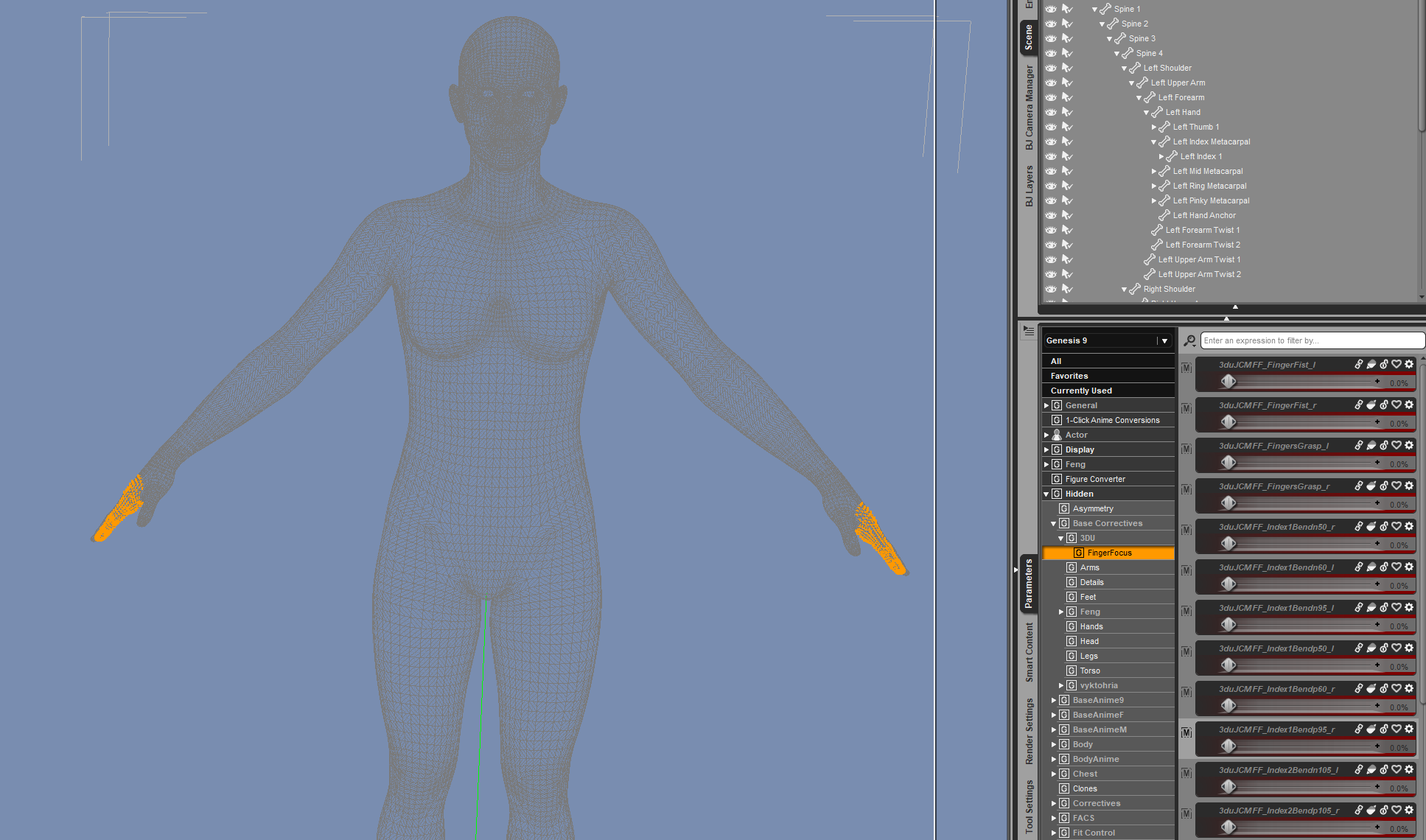
Yep I see exactly what you are saying when I right clicked the "3duJCMFF_Index1Bendp95_r" parameter,and chose "Select Morph Vertices (with Geo Editor in Vertex mode) . So it looks like the morph itself is bad too and will need to be updated as well as KEYED correctly, as and example I put both hands in "Grasp 100%" and the "3duJCMFF_Index1Bendp95_l" for the Left Index did not fire (ie remained zero) while the "3duJCMFF_Index1Bendp95_r" fired at 100% and turned both the left and right index fingers into "Hooks". I left a warning in my post above too.
@Elor As Richard mentioned, I've had some "Unintend Consequenses" with saving that way (due to similar to what is being discussed here where morphs were active that should not be, and not necessarily just JCMs) so it is the safest way to know that you are saving ONLY what you have modified.
Celebrity Look-a-Likes for 3D figures Part 4magikhs said:
That Charlie Cox is a snack and a half. Ooof
I wish JP Darrow had Cox's actual build instead of the short and stocky build Jepe seems to always use, but I suppose one could mix the head morph with a different body morph to achieve this
DazStudio To GLB exporter Testers WantedSo i'm creating a DazStudio dsa script that exports from daz to glb formate nothing extra is needed for it to work just the single script and DazStudio which I currently have it running in Daz4.2X and Daz6.0 I have no other versions on my end to test. and what this can do so far is pretty huge in itself, why I need a couple testers I have stuff mainly for G8 and don't use 8.1, 9 or any of the others and i'm curiuse how it will work for other users
I included a list of everything it's currently capable of but the main thing that made me want want to build this is that Daz does not really support exporting merged anatomy with full moph support and this does it really well check out the list below for all the features
This exporter can:
* **Export DAZ models to GLB/glTF**
* `.glb` single file
* **Export character geometry**
* body mesh
* clothing
* hair
* eyelashes
* accessories
* fitted items* **Export props and environments**
* rooms
* furniture
* scene props
* static environment meshes
* grouped/null-parented scene objects* **Export rigging**
* bones
* skeleton hierarchy
* skin weights
* inverse bind matrices
* skinned meshes* **Export morph targets**
* figure morphs
* clothing morphs
* attachment morphs
* anatomy/geograft morphs* **Export animation**
* BVH skeletal animation
* root/hip translation
* DAZ morph animation
* environment mesh animation as morph-cache targets* **Handle geografts/anatomy**
* export grafts separately
* merge grafts/anatomy into the body
* remove hidden/overlapping body faces
* smooth seams
* harmonize skin-like materials* **Handle clothing/body cleanup**
* remove body polygons under clothing
* reduce poke-through
* repair or rebuild fitted clothing weights* **Export materials**
* DAZ/Iray-to-glTF PBR conversion
* base color
* roughness
* metallic
* normal maps
* emissive maps
* opacity/cutout materials
* glass/wet/eye material handling* **Export and process textures**
* embed textures in GLB
* resize textures
* bake opacity maps into PNG alpha
* include or skip character/environment textures separately* **Exclude specific content**
* exact-name exclusion for nodes, meshes, objects, shapes, geometry, materials, and surfaces
* wildcard exclusions when wanted* **Generate helper lists**
* mesh/node/surface name list
* morph target list
* bone hierarchy tree* **Save presets**
* full exporter settings
* morph lists
* exclusion lists
* anatomy merge lists
* environment animation listsUpdated with link to anyones who wants to try it
https://drive.google.com/drive/folders/1bSCZKy6I030F71l56IRMQ7j8qA9FPGnY?usp=sharingadded jcms driving me crazy!!Some of the right side Finger Focus correction morphs also affect vertices on the left side. Using 3DU's own Scene Tools 4 morph utilities shows this clearly. I don't know if this is related to the other errors about the right index1 bend morph not having it 1st and 2nd stage controllers and keyed attributes set, or whether this is just another error in the same morph. It is as though the development of these right side morphs was started and not finished before release.
I'm thinking about returning this. It is just too frustratingly broken. I've never had much luck getting 3DU product errors fixed in any reasonable (or ever) timeframe.
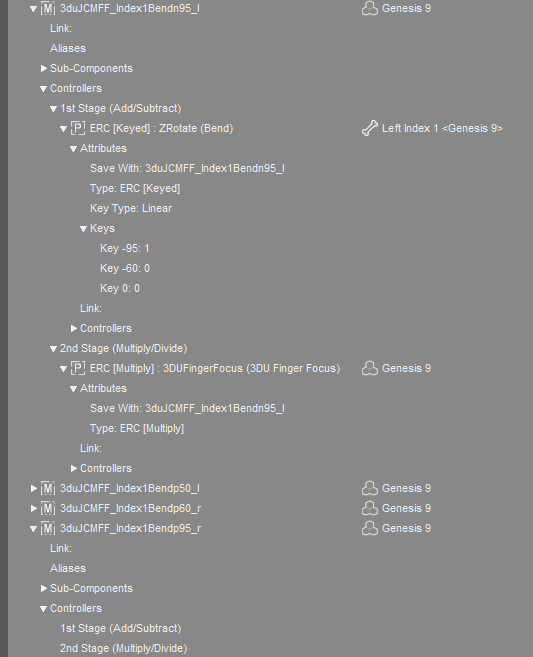
added jcms driving me crazy!!@mrpenguin76 The Finger Focus problem appears to be actually worse that just missing 1st and/or 2nd stage controllers. The keyed attributes are missing, at least on some. Here is a comparison of you the left and right Index1Bend95 are set up. The right morph doesn't seem to be setup at all as delivered in the product. I think this is getting beyond what I know how to fix myself.
 Daz Studio 6.25[.0.x], General Release!
crosswind said:
Jack of Spades said:
One more viewport issue I haven't seen reported anywhere else: the handling of transparency in anything other than Iray preview has changed for the worse. I'm trying to pose characters holding drinks, and the glass and liquid inside are both entirely invisible unless I'm in hidden line or wireframe modes or running Iray preview. This makes it very difficult to both pose the fingers correctly and to see how to morph the fluid appropriately (the glass creator provided appropriate morphs). The transparency here is refractive, not cutout.
Are others seeing this?
More options were added to Draw Settings to control how materials look in Viewport....
So, with Texture Shaded, load Draw Settings pane, then you can either set Max Refraction Weight to non 1.0 value, e.g. 0.99... or brutally turn off Enable Opacity.
If you choose to turn off Enable Opacity, but see no change in Viewport, you have to move your mouse cursor or Zoom In/Out to refresh Viewport... (It looks like a bug to me...)
You can also use the Universal Drawstyle to mix different modes, which may help (e.g. have the glass in wireframe and the figure in a solid mode so that you can see when the wires start to clip).
May 2026 - Daz 3D New User Challenge - Using Props and Push Modifiers/DeformersHi! I don't know if I may answer again, sorry I was too buisy...
Elor said:
Did you try to pose the sword in a way that would only hide half the character nose? It's usually how this kind of framing is done.
If you tried and hit a wall trying to pose the sword while keeping it in the character's hand, as you're not showing either hands, you can cheat and place the sword where you want
 (within reason of course, but moving it a couple of centimeters to reveal the character's nose should not make the overall pose look weird)
No, I didn't try, but I will, good idea!
Thank you very much!For the cape, what cape did you use?
I used the cape from the "old" version of the Wise Wizard, the one for G8M (I think it is not commercialized anymare). I didn't know how to lower his hood (I am not even sure if it's possible), so I set the hood cutout opacity to 0 in order to hide it.
If the brooch is an independant object, you should be able to move it where you want.
Another possibility if the brooch is not an independant object but if the brooch has independant surface(s):
- Duplicate the cape
- Hide everything except the brooch on the duplicated non simulated cape setting Cutout Opacity to 0 on the surfaces not related to the brooch.
- Hide the brooch on the simulated cape, setting Cutout Opacity to 0 on the surfaces related to the brooch.
Note: Don't simulate them both at the same time: you should either fully hide the duplicated cape during simulation or simply set Visible to simulation to Off.
Without having the cape, I don't know if it'll look good or not, but this way, the brooch will stay at its starting position because it's on another cape.
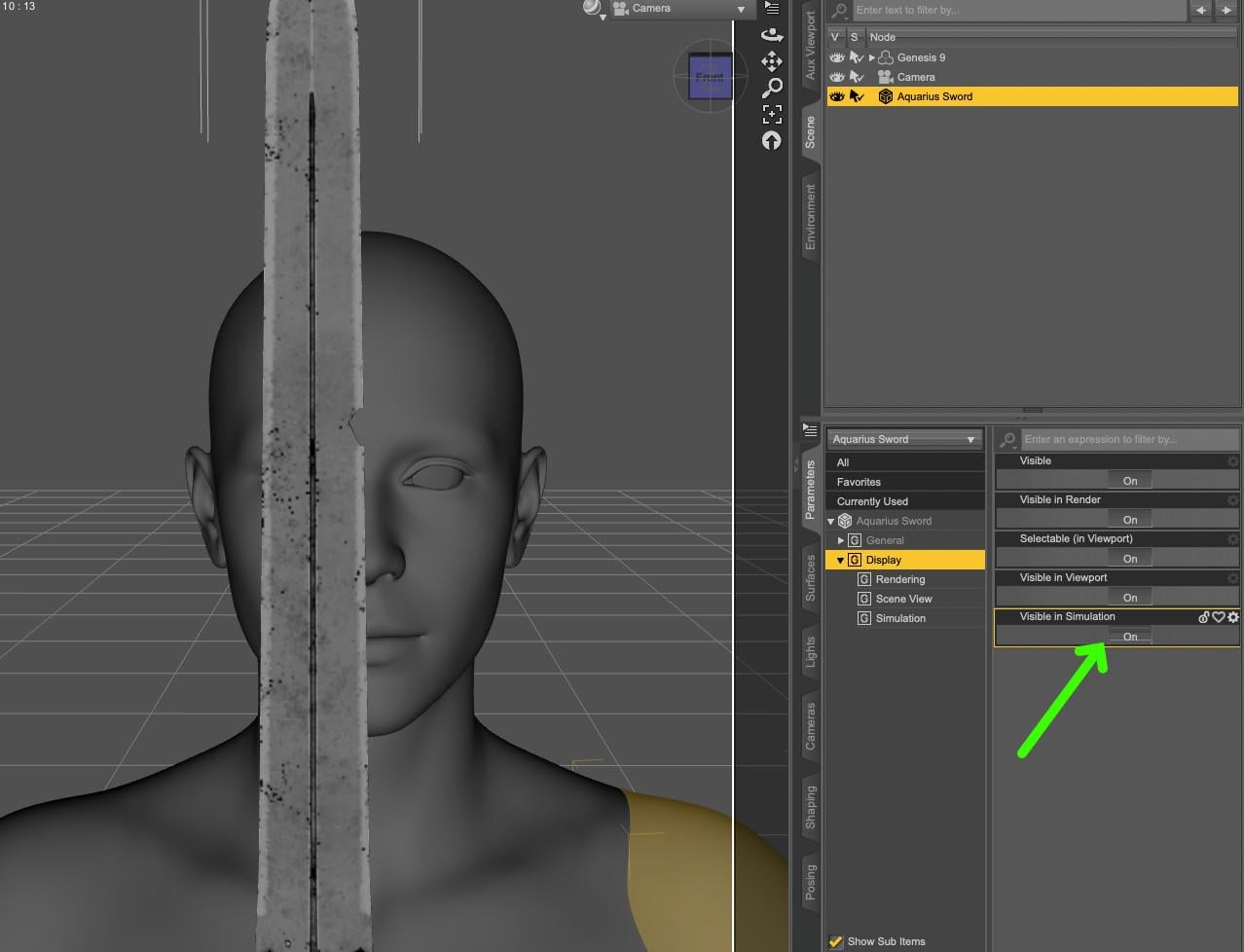
To show you want I mean with the first suggestion, and where to find the Visible to Simulation setting:
Possible solutions, if you want to tackle an intermediate challenge, either use a push modifier to push the non simulated cape toward the character's body (using a negative value) or maybe a D-Former could help move the brooch (if it's not an independant object), with a pivot point placed at the correct position, whose influence is controlled by a weight map (100% on the brooch's geometry, 0% on the rest of the cape's geometry).
For completion sake (at least to list all ideas I know about), it's always possible to create a morph using an external modeller like Hexagon, Zbrush, Blender, etc but if you don't know how to use one, learning to use either of them takes time.
Thank you ery much!
May 2026 - Daz 3D New User Challenge - Using Props and Push Modifiers/DeformersHi! I don't know if I may answer again, sorry I was too buisy...
Elor said:
Did you try to pose the sword in a way that would only hide half the character nose? It's usually how this kind of framing is done.
If you tried and hit a wall trying to pose the sword while keeping it in the character's hand, as you're not showing either hands, you can cheat and place the sword where you want
(within reason of course, but moving it a couple of centimeters to reveal the character's nose should not make the overall pose look weird)No, I didn't try, but I will, good idea!
Thank you very much!For the cape, what cape did you use?
I used the cape from the "old" version of the Wise Wizard, the one for G8M (I think it is not commercialized anymare). I didn't know how to lower his hood (I am not even sure if it's possible), so I set the hood cutout opacity to 0 in order to hide it.
If the brooch is an independant object, you should be able to move it where you want.
Another possibility if the brooch is not an independant object but if the brooch has independant surface(s):
- Duplicate the cape
- Hide everything except the brooch on the duplicated non simulated cape setting Cutout Opacity to 0 on the surfaces not related to the brooch.
- Hide the brooch on the simulated cape, setting Cutout Opacity to 0 on the surfaces related to the brooch.
Note: Don't simulate them both at the same time: you should either fully hide the duplicated cape during simulation or simply set Visible to simulation to Off.
Without having the cape, I don't know if it'll look good or not, but this way, the brooch will stay at its starting position because it's on another cape.
To show you want I mean with the first suggestion, and where to find the Visible to Simulation setting:
Possible solutions, if you want to tackle an intermediate challenge, either use a push modifier to push the non simulated cape toward the character's body (using a negative value) or maybe a D-Former could help move the brooch (if it's not an independant object), with a pivot point placed at the correct position, whose influence is controlled by a weight map (100% on the brooch's geometry, 0% on the rest of the cape's geometry).
For completion sake (at least to list all ideas I know about), it's always possible to create a morph using an external modeller like Hexagon, Zbrush, Blender, etc but if you don't know how to use one, learning to use either of them takes time.
Thank you ery much!
added jcms driving me crazy!!barbult said:
3DU Finger Focus has a similar error. I had to add the Controllers 2nd Stage (Multiply/Divide) to 3duJCMFF_Index1Bend50_r.
Thanks for the Heads up on this, after I fixed that one, on a hunch I decided to look at the rest of the "3djuJCMFF's" because if one is broke.....
I found these are missing both the 1st AND 2nd stage Controllers:
3duJCMFF_Index1Bendp95_r
3duJCMFF_Mid1Bendp95_r
These are missing the 1st Stage Controller:
3duJCMFF_IndexBend_r
3duJCMFF_MidBend_r
3duJCMFF_PinkyBend_r
3duJCMFF_RingBend_r
To fix those last four you need to have the Right Hand Bone Selected on the G9 as the [A] Attributes you need to drag for each finger are under Pose Controls, so you will not see them in parameters with just the G9 Selected. (Example: Label "Right Index Finger Bend" Name"body_ctrl_rIndexBend", Drag that to the 1st Stage of "3duJCMFF_IndexBend_r" in Property Hierarchy Pane (edit mode on in parameters of course to be able to drag it, Then do the same for the other 3 fingers... IF you want to fix them yourself.)
Also while saving make sure to set Author to 3DU, and Product to FingerFocus, (and the correct Drive where your G9 Base is if you are using multiple drives) then scroll down to "Hidden/Base Correctives/3DU/FingerFocus" and select the ones you fixed. I'm not trying to explain this to you specifically Barbult, as you clearly already know how to correctly save modified JCM's, this is for others who don't, and might just save them under their own author name and "product".
************************WARNING ADDED LATER********************
Trying to manually fix "3duJCMFF_Index1Bendp95_r " mentioined above will actually make the JCM Destructive as the Morph itself is not correct as Barbult points out below, thus MORE steps are required for a true fix...
Daz 3D is part of

Connect
DAZ Productions, Inc.
7533 S Center View Ct #4664
West Jordan, UT 84084Licensing Agreement | Terms of Service | Privacy Policy | EULA
© 2026 Daz Productions Inc. All Rights Reserved.