-
There's Always Another Sale Thread -- Discussions Only Pt 6
joanna said:
SilverGirl said:
Guessed wrong on the punchcard. Sorry folx.
To be honest, I would have almost preferred a punchcard, seeing as it gave one a choice what to get for a $+1 deal. Having to choose between only 2 products, neither of which interests me even at the $1.99 price... Well, it's going to be easier to not play and keep the purchases up, I suppose.
On the other hand, the "buy or own" is a better deal as you don't have to buy ahead of time. If there's some really good deal, you can just put 2-3 daily deals in your cart and shop instantly.
I was never a fan of the punchcards, but certainly were better than this $1.99 (or more) low selection.
Today's Special started with offering only the (imo) overpriced morphs.
"New code every day", a slap in the face for members of Daz+/Premier that can't combine.
Price floors looks too high all over the place.
There has been no decent Gift Card sale in months.
Since last year we saw very little 'daz+ related stuff' during the Daz+ sale (compared to how it used to be), it looks like Daz decided to rename it and completelly and avoid the original 'theme'. Considering how very slow things are in Daz+ forum and without new contest formart after more than 2 months, I just hope Daz didn't decide to replace Jack with an AI.
I will keep an eye to see if some of the $1.99 is actually something i really need/want or if something of the daily stuff is really good for a one off. But keeping up with the sale in hopes one day i can make a juicy big purchase under those conditions is not worth it for me. And here is where having regular good GC sales would had worked in favor of Daz. If one has already money ready, the barrier to hit 'purchase' is always lower.
Rendo and Renderhub are likely rejoicing over this (miss)DealZ sale.
UltraScenery - new(er) territory [Commercial]Xandyr78 said:
barbult said:
As I recall, the problem had to do with UltraScenery2 referencing some texture files from the original UltraScenery. If someone did not own the original UltraScenery, those files would turn up as missing in UltraScenery2. If you have both products installed, you should not run into this issue. It would take some time to find that message again in the forum. I found it not too long ago for someone else, so it may be referenced again not too far back in this thread. But since you own everything, i don't think you need to worry about it, and it would likely be a waste of time to go looking for the info.
Even better. Time to dive in, and to keep an eye on Country Ford for pickup later. LOL. Thanks again!
If you haven't put Country Ford on your wishlist, do it immediately. It might have become available in the sale today or soon in another at a great price.
Freebie Challenge June 2026 - "INVASION!" - Main Thread
Freebie Challenge June 2026 - INVASION!
!VIDEO!
Denizens, i know what you're thinking. "A flashy video, Higher prize amounts, a hacky theme that you've done before ... this looks like an april fools competition?". Well, that's where you're wrong. This was always meant to be an april June comeptition, and has nothing to do with the fact that i was totally unprepared for April, and had to cobble together a random competition to cover my tracks. Anyway, they're back! An invasion like no other (aside from the last one). A terrible hoard of creatures have invaded earth and brought chaos in their wake. It's time gather talent from the farthest reaches of the Daz3D freebie forum area to battle this foe with power of rendering. We must capture any alien encounters, and comit them to the boards so a crack squad of talented investigators can pour over the evidence.
TL:DR - Render alien invasion images and post them here.
It's not just saving the earth that's at stake either, take a look at these spiffy prizes....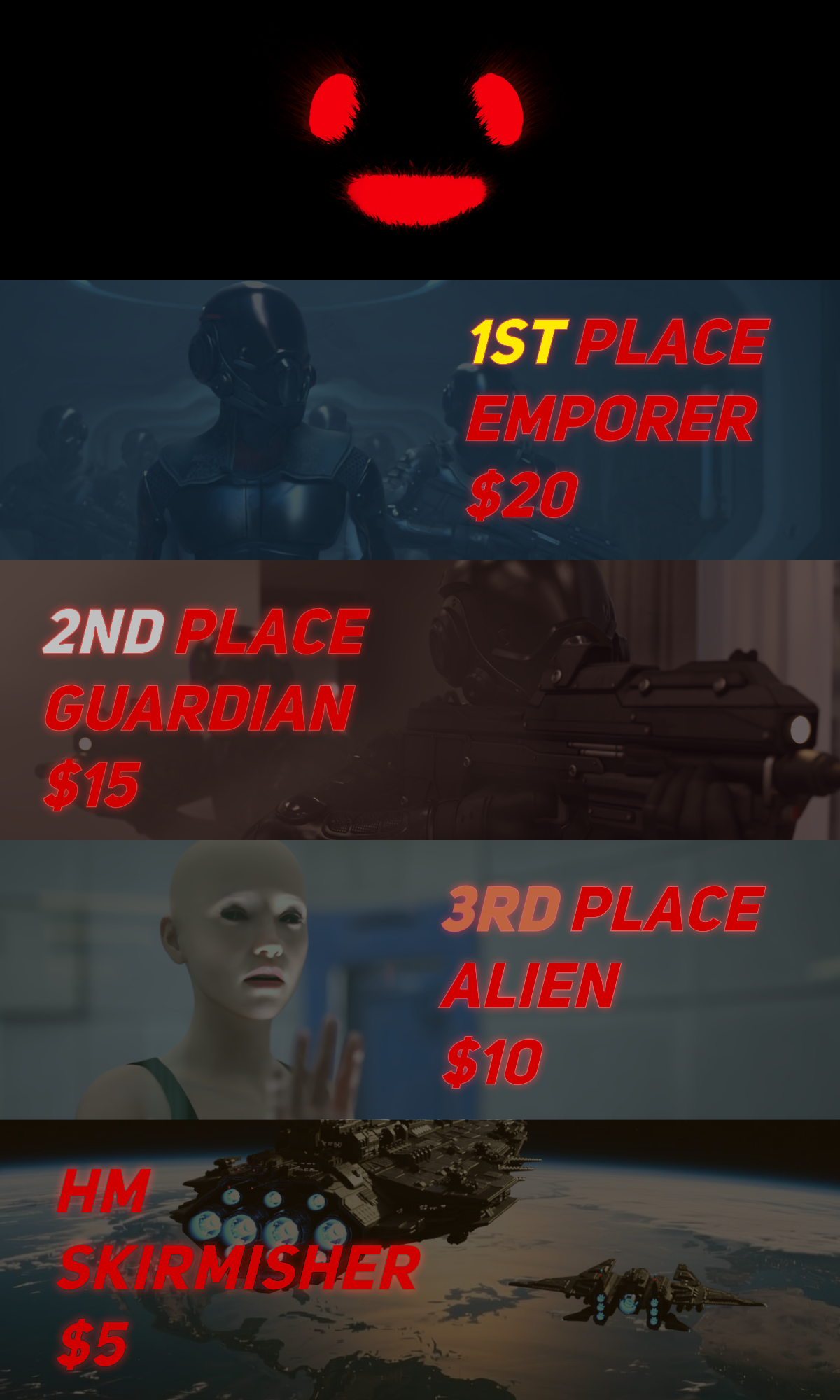
Spiffy indeed. Good luck denizens, the stakes have never been higher!Rules:
-
Minimum of 3 freebies.
-
A Maximum of 5 purchased items.
-
Genesis and its standard morphs are fine.
-
If you postwork your images, provide the base image.
-
You can use AI for post-work, upscaling, colour work etc, just go easy and stick with the spirit of the competition.
-
All Daz ecosystem programs are allowed – Bryce, carrara etc (Even poser, If you behave yourself)
-
Images pictures are subject to Daz TOS.
-
No max Entries on this one. I can't count. Do as many as you want.
This Freebie Challenge will end June 30th, 2026 @ 23:59 Daz time.
First Place: $20 store credit from KindredArts
Second Place: $15 store credit from KindredArts
Third Place: $10 store credit from KindredArts
HM: $5 store credit from KindredArts
Please post your entries in the entries thread below...
ENTRIES THREAD
A LOVELY LIST OF FREEBIES YOU CAN USE!
Creating Animations on Blender then exporting to Daz3DPadone said:
In your video it is not clear how you animate the feet, as the ik controls don't move. If you animate mixing ik and fk controls then bake ik to fk I guess the addon is trying to preserve your fk animation, possibly altering the end result. This looks like a bug. If you can explain the steps to reproduce your animation I can try it myself and eventually prepare a bug report for Thomas.
However, if you use the IK controls to animate the feet, as it's usually done, then everything works fine here. I attached the videos for IK and baked FK, where you can see I use the IK controls to animate the feet. Just remove the zip extension to watch the mp4 videos, as the forum doesn't allow to upload mp4 directly.
note. important. If you imported the figure with locks and limits, then the daz FK limits may come in the way when switching IK or baking, as IK has different limits than FK. To prevent this it is best to import the figure without locks and limits, so just disable them in the global settings. May be this is what happens in your example if you didn't animate the feet on purpose.
https://github.com/Diffeomorphic/import_daz/wiki/Setup_Rigging
Ty for the video example and explination, so far things are working fine atm, I have to pay attention to where the shins are postioned terms of rotation, if they aren't placed properly they will be gittery. Luckily after I figured that out the animations are not gittering and it's working really well especially after I export to daz, it's 1:1, previous tool i used looked like it worked properly but it didn't after daz export, great work you two! I intentionally have strechness to 0, because I want to have things exported to Daz, I haven't planned to move to Blender yet, from what I've seen however when I ported my models it worked quite flawlessly.
But my question is which might be difficult. What would you recommend that I do before importing my model and settings I should go for if I want to import back to Daz animations? Also if I pose in FK, I can't seem to find a bake option, at least with IK I can just do IK transfer to FK and it bakes, but there isn't one where FK just bakes unless I'm missing something. I've been trying to go through the wiki here but sadly no clue https://github.com/Diffeomorphic/mhx_rts/wiki/Animation
I'll try and recreate it again the issue for you today or tomorrow then share steps on how I did it!
UltraScenery - new(er) territory [Commercial]barbult said:
As I recall, the problem had to do with UltraScenery2 referencing some texture files from the original UltraScenery. If someone did not own the original UltraScenery, those files would turn up as missing in UltraScenery2. If you have both products installed, you should not run into this issue. It would take some time to find that message again in the forum. I found it not too long ago for someone else, so it may be referenced again not too far back in this thread. But since you own everything, i don't think you need to worry about it, and it would likely be a waste of time to go looking for the info.
Even better. Time to dive in, and to keep an eye on Country Ford for pickup later. LOL. Thanks again!
UltraScenery - new(er) territory [Commercial]Xandyr78 said:
barbult said:
This same sort of thing often happens to me. When I am testing software, the very first thing I try, fails. Everything else might be fine, but I magically hit immediately on the one thing that doesn't work. I'm always happy to help people with UltraScenery problems.
You mentioned workarounds and such for USC1 scenes in USC2. I'm not sure how best to search for those within this thread. Is there a "master post" with links or something that would be helpful?
As I recall, the problem had to do with UltraScenery2 referencing some texture files from the original UltraScenery. If someone did not own the original UltraScenery, those files would turn up as missing in UltraScenery2. If you have both products installed, you should not run into this issue. It would take some time to find that message again in the forum. I found it not too long ago for someone else, so it may be referenced again not too far back in this thread. But since you own everything, i don't think you need to worry about it, and it would likely be a waste of time to go looking for the info.
Hitchens: A DAZ Studio to Blender Live Linkas a singer/guitarist... i gotta say that song in your forum sig kicks friggin butt! (hey Dartanbeck, go check it out - you'll be way-impressed!)
Lyrics and production both, it cracks me up and inspires me to go play some more, and/or figure out how to make any one of the zillion AI tools let me tell my stories with that kind of substance. Bravo! (I'd be curious about the back story/mechanisms employed - it's truly an impressive and fun piece!)
i am not worthy, sir! (bowing like the boyz on 'Waynes World')
cheers, and mo mo more!
--ms
PS - and congrats on your Hitchens breakthrough - much as I'm loving lurking in the nearby animation/ai forum topic (Dart/Wsterdan/and crew), I'm also still digging the hands-on part of it all and excited to run your new masterpiece through some paces (no pressure!).
UltraScenery - new(er) territory [Commercial]barbult said:
This same sort of thing often happens to me. When I am testing software, the very first thing I try, fails. Everything else might be fine, but I magically hit immediately on the one thing that doesn't work. I'm always happy to help people with UltraScenery problems.
You mentioned workarounds and such for USC1 scenes in USC2. I'm not sure how best to search for those within this thread. Is there a "master post" with links or something that would be helpful?
UltraScenery - new(er) territory [Commercial]Xandyr78 said:
barbult said:
@Xandyr78 The files that you are missing are part of the Country Ford product, not the UltraScenery - Country Ford product. When you look at the product page for UltraScenery - Country Ford you will see that Country Ford is a required product. Do you own Country Ford ? If not, that is the reason you are missing those files. UltraScenery - Country Ford is just a product that allows the previously released stand alone product Country Ford to also be used within UltraScenery products.
If you do own Country Ford and have it installed,we need to dig deeper to solve the problem. Keep in touch here. I'm confident I can help you resolve the issue.I could have sworn that I'd purchased it at one point, but my library doesn't seem to contain it. And that makes perfect sense. I hadn't realized I'd need to check that (I've owned the USC elements for a WHILE). Guess that one goes onto my Wishlist! Thanks, @barbult, for helping me troubleshoot this!
In what has to be the ultimate in irony, after you brought this to my attention, I went back and did a search through the store...Country Ford is literally the only USC element that I don't own. SOMEHOW I managed to choose the ONE set of ecology elements that I hadn't yet purchased.
Murphy's Law sometimes is helpful, I suppose. LOL. Thanks again for your help!This same sort of thing often happens to me. When I am testing software, the very first thing I try, fails. Everything else might be fine, but I magically hit immediately on the one thing that doesn't work. I'm always happy to help people with UltraScenery problems.
UltraScenery - new(er) territory [Commercial]barbult said:
@Xandyr78 The files that you are missing are part of the Country Ford product, not the UltraScenery - Country Ford product. When you look at the product page for UltraScenery - Country Ford you will see that Country Ford is a required product. Do you own Country Ford ? If not, that is the reason you are missing those files. UltraScenery - Country Ford is just a product that allows the previously released stand alone product Country Ford to also be used within UltraScenery products.
If you do own Country Ford and have it installed,we need to dig deeper to solve the problem. Keep in touch here. I'm confident I can help you resolve the issue.I could have sworn that I'd purchased it at one point, but my library doesn't seem to contain it. And that makes perfect sense. I hadn't realized I'd need to check that (I've owned the USC elements for a WHILE). Guess that one goes onto my Wishlist! Thanks, @barbult, for helping me troubleshoot this!
In what has to be the ultimate in irony, after you brought this to my attention, I went back and did a search through the store...Country Ford is literally the only USC element that I don't own. SOMEHOW I managed to choose the ONE set of ecology elements that I hadn't yet purchased.
Murphy's Law sometimes is helpful, I suppose. LOL. Thanks again for your help!
You mentioned issues and workarounds...has anyone posted tutorials for how to do those?UltraScenery - new(er) territory [Commercial]Xandyr78 said:
This may have been asked/answered somewhere in this or another forum, but I've not been able to find it:
I have UltraScenery, USXT, and US2 all installed on my system, on the same drive. I tried to generate a landscape in US2 using the Country Ford ecology option that (I think) originally was created for USC1. I get error messages for every. single. .jpg file that's part of that. Is the Country Ford ecology just not compatible? Am I doing something wrong? All the USC, USXT and USC2 content is on the same drive. I'd really like to start learning to use this plugin/script, but if nothing will load...- To use USC1 ecologies in USC2, you need to us the Classic Ecologies section. Is that what you are doing?
- What files are giving you errors? You said every single .jpg file, but please give a few specific examples, because there are some known issues with USC1 files in USC2 (issues and workarounds posted earlier in the commercial thread). Those problems are not specific to Country Ford, though.
- Make absolutely sure you have NEVER installed or updated any UltraScenery related content from inside Daz Studio (i.e. using Daz Connect). It simply will not work.
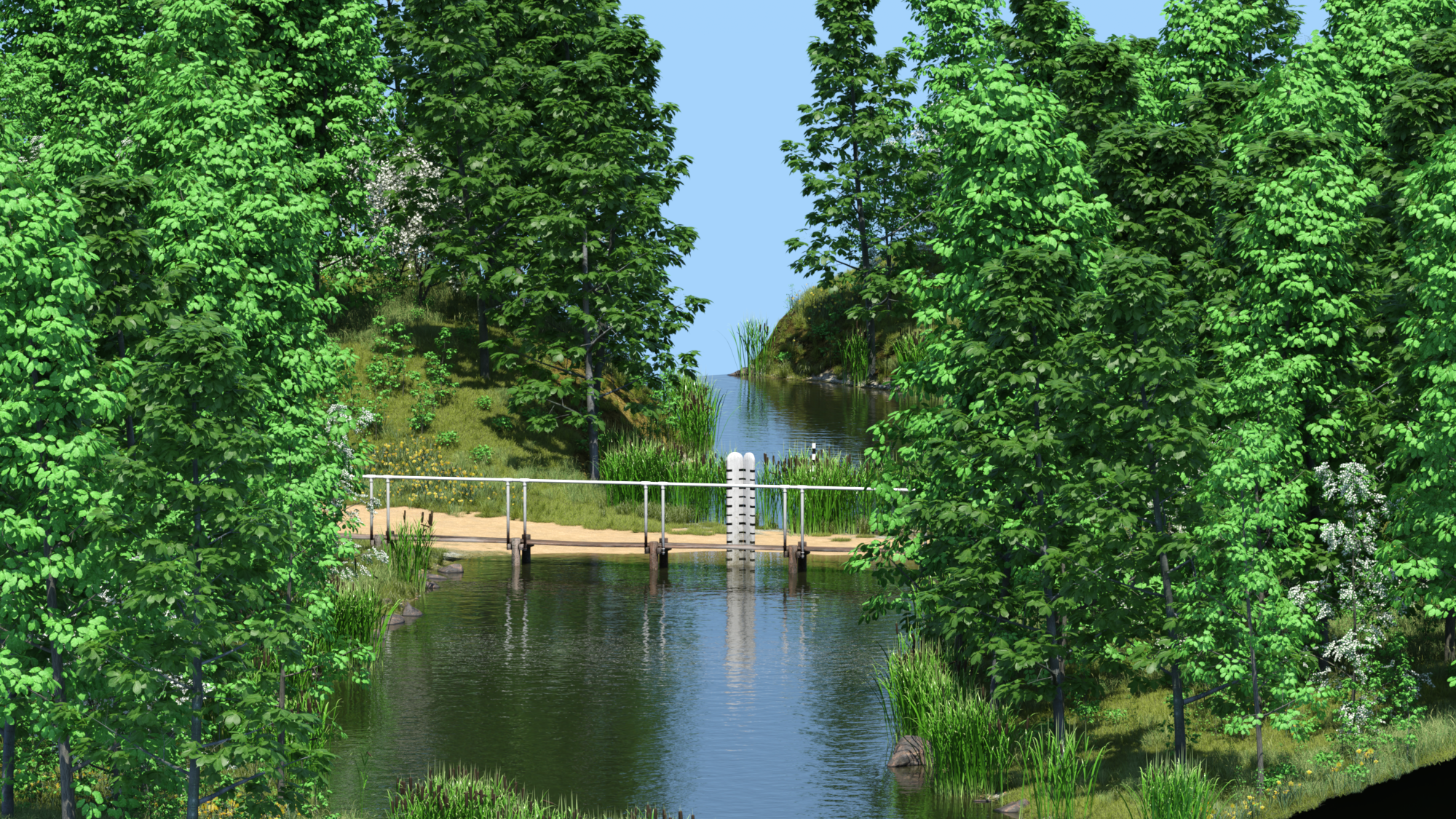
- I am attaching a render of Country Ford 1 built and rendered in UltraScenery2 just now. I also have all of my UltraScenery 1,2 and XT installed in the same Content Library onthe same drive. That is not a problem. Let's try to resolve your specific issue, starting with the specific missing file messages.
 June 2026 - Daz 3D New User Challenge - Scenes, Landscapes, and Working Modularly
Beginner Challenge - June 2026
Sponsored by DAZ 3D
"Scenes and Landscapes"
This month's focus will be scenes and landscapes. If you haven't noticed when you look at images made by the various 3D software some of the packages do a lot better then others in treating an expansive scene or a magnificent landscape. Ones that come to mind are software such as Bryce or Vue. Both have some built in features that make those wonderfully big expansive images come true. DAZ Studio on the other hand does not have some of these features built into it but if you know the tricks there is no reason why you can't get those same kinds of results. For this contest we will be exploring the principles of how such scenes and landscapes are built and how to control the environment to create the sense of expansiveness a scene or landscape creates for the viewer.
There are some key elements that should be considered when creating a landscape, they are the inspiration, lighting, perspective and depth of focus. I have gathered some links for you that talk about each of these elements.
Inspiration:
Photos and Art:
Perspective and Depth of Focus:
Things to consider when setting up your landscape:
As stated by Jon A. Bell in his book, 3ds max 6 Killer Tips, "For more realistic outdoor scenes, especially if you're seeing a distant horizon, you should always add a slight amount of atmospheric haze.... If you look at a distant mountain range (or if you don't have one right outside your window, just grab a travel magazine or pretend), you'll notice how colors become muted and washed out with distance. You can use just a slight amount of atmospheric fog (it depends on the scale of your scene), and the colors will determine the clarity or quality of your "atmosphere." For clear outdoor settings, using a slight bit of white fog is desirable; for sunset or urban settings (where the air might be more polluted), a slight yellowish or reddish cast makes your horizons look better." In DAZ Studio you have a couple of options in getting that affect. The first would be to add just a tiny bit of Depth of Field so that the objects become a bit more blurred and muted. Another way is to have a volumetric camera that will add the fog feature to the render.
Lighting:
Approaching Realism in DAZ Studio and Gamma Correction Demystified
http://www.daz3d.com/forums/discussion/54913/
Using HDR Files In DAZ Studio 3delight renders
https://www.youtube.com/watch?v=okaYS1jeAewhttp://www.daz3d.com/forums/discussion/37753/
and for Iray
https://www.youtube.com/watch?v=L5FZ5gS9v50
https://thinkdrawart.com/how-i-light-my-daz-studio-iray-scenes
Handy tools for DAZ Studio ( note: these can help but are not in any way necessary):
https://www.daz3d.com/terradome-3-iray
https://www.daz3d.com/ultrascatter-advanced-instancing-for-daz-studio
https://www.daz3d.com/modular-cove-landscape-creator
https://www.daz3d.com/digital-kit-bashing--cities-landscapes-and-structures
https://www.daz3d.com/ultrascenery--realistic-landscape-system
https://www.daz3d.com/ultrasceneryxt--expansive-landscape-system
https://www.daz3d.com/ultrascenery2-realistic-landscape-system
Bryce 7.1
I will be checking in as will the rest of the Community Volunteers to try and help with anything you all may need.
UltraScenery - new(er) territory [Commercial]This may have been asked/answered somewhere in this or another forum, but I've not been able to find it:
I have UltraScenery, USXT, and US2 all installed on my system, on the same drive. I tried to generate a landscape in US2 using the Country Ford ecology option that (I think) originally was created for USC1. I get error messages for every. single. .jpg file that's part of that. Is the Country Ford ecology just not compatible? Am I doing something wrong? All the USC, USXT and USC2 content is on the same drive. I'd really like to start learning to use this plugin/script, but if nothing will load...Yet another category talk.There is a way. You can greate a custom Group (like New, or None, which are system reserved). All you need to do is create an icon overlay with the group name, and place it in two folders under the Daz Studio folder in Program Files. See the link below for proper syntax and file placement. Once you have that in place, use the Advanced Filtering option in Content Library or Build Filter in Smart Content to filter for that particular group name.
For example: For Renderosity, I made an icon overlay using the "R" from their store name to be easily recognized. Copy it to your favourite graphics program and place it in the bottom left (or right) corner, resized accordingly (maybe 20 pixels high) on a 91x91 pixel .png file with a trasparent background. Name it 1.Renderosity (following the rules) and place it where it should go (again, following the rules). You will need to restart Studio to load up the new info.
Now, go through your library and select your Renderosity products (yeah, manually, maybe a few at a time) in the Product view, right -click and select "Group Product and Assets as..." and select Renderosity (which should appear under the New and None entries). Your new icon overlay should show up on top of any Product and Asset that you selected. Once that is done, you can now filter for the new group. In Content Library, click the button to the left of the search box, and select Advanced. Type in Group::Renderosity and your new group products/assets will show in the search results.
In Smart Content, click the magnifying glass to the left of the search box, and select "Build Filter". In the ensuing dialog, select a Scope (group::) and enter Renderosity in the Pattern field. Accept, and your results will be displayed. (Files or Products).
I have just done this myself, and can say it works. (I keep making more work for myself...). You can make as many groups as you want, obviously only one can be applied at a time, or you can make a composite overlay.
Works in DS 4.24 and DS 6.25
Tutorial: Making TriAx Figures from Old Parametric CharactersI do upload most of my freebies here as well as at Renderosity. The zip file attachment limitation of around 5Mb on the forum here means that the bigger items can't be repeated here. Rendo has another advantage, it's actually much easier to find the older freebies than here because the search facility is a fair bit better. Regards, Richard.Yet another category talk.jjoyner said:
For several years, in the Tags tab of an item I have been adding Keywords to products, as needed, to help me find content via a keyword search. Sometimes I may add a unifying genre keyword (such as scifi so that I don’t have to depend on the variations used by vendors such as SciFi, Sci-Fi, or Sci Fi; or medieval, etc.), a vendor and/or store name (usually for products from third party sites), etc. I don’t need to assign keywords to every item in a product. I assign a keyword to just one item in a product. A keyword search brings up entire product packages that contains the keyword.
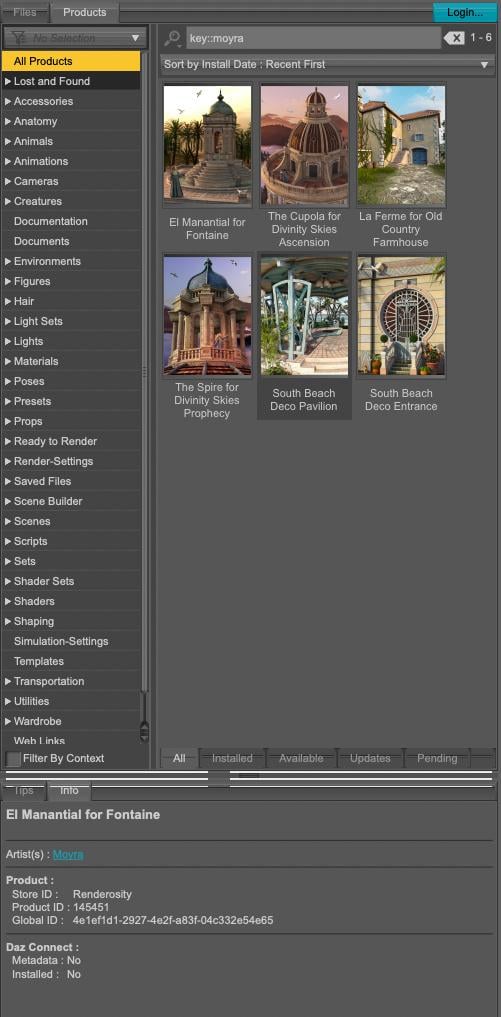
If Moyra is set as the artist of your version of the 'La Ferme for Old Country Farmhouse' product, typing key::Moyra should get you every product with 'Moyra' as the artist without the need to add a tag:
I don't use tags, but I think I will add at least a Renderosity tag because I don't know if you can get only items from a specific store (the Renderosity store was created by Content Wizard, no idea how to create one myself, the metadata were created using Daz metadata editor though) because key::renderosity only shows me a list of products with a link to the Renderosity store of an artist.
Yet another category talk.I find Categories to be mostly helpful, but, yes, there are cases where they can be confusing. On a case-by-case basis for products, I try to reassign one or more assigned Categories. Sometimes, that works, and sometimes not because the Category assignment is baked more deeply into the content and my attempts results in items being assigned to two categories.. That’s usually even more confusing and I delete the Category that I tried to assign.
For several years, in the Tags tab of an item I have been adding Keywords to products, as needed, to help me find content via a keyword search. Sometimes I may add a unifying genre keyword (such as scifi so that I don’t have to depend on the variations used by vendors such as SciFi, Sci-Fi, or Sci Fi; or medieval, etc.), a vendor and/or store name (usually for products from third party sites), etc. I don’t need to assign keywords to every item in a product. I assign a keyword to just one item in a product. A keyword search brings up entire product packages that contains the keyword.
Also, you can leave Notes to yourself in a product but they are not searchable.
Creating Animations on Blender then exporting to Daz3DIn your video it is not clear how you animate the feet, as the ik controls don't move. If you animate mixing ik and fk controls then bake ik to fk I guess the addon is trying to preserve your fk animation, possibly altering the end result. This looks like a bug. If you can explain the steps to reproduce your animation I can try it myself and eventually prepare a bug report for Thomas.
However, if you use the IK controls to animate the feet, as it's usually done, then everything works fine here. I attached the videos for IK and baked FK, where you can see I use the IK controls to animate the feet. Just remove the zip extension to watch the mp4 videos, as the forum doesn't allow to upload mp4 directly.
note. important. If you imported the figure with locks and limits, then the daz FK limits may come in the way when switching IK or baking, as IK has different limits than FK. To prevent this it is best to import the figure without locks and limits, so just disable them in the global settings. May be this is what happens in your example if you didn't animate the feet on purpose.
https://github.com/Diffeomorphic/import_daz/wiki/Setup_Rigging
Wallet Prop (rigged)A search for 'wallet' on the Forums just led to lots of posts about how Daz's sales keep emptying ours.

But a search for 'wallet' on the store brings up only one item (and it's a purse). I know of a few sets that include a static wallet/card holder prop (such as Junk Drawer), but what I'm hopefully looking for is a wallet that is rigged to open, and has morphs (or simply enough room) to accommodate cash, cards, license, etc.
Buy Something That Doesn't Work in Carrara? Post your Questions and Workarounds here. (please)oh I already knew its the DAZ TCB v Linear
been whining about that for years in D|S forum
and my lack of success at fixing it esp in FBX exports
(not hand keyframed, just have keyframes as opposed to aniblocks)
G9 just is extra! and using that script seems to bring out the worse
I posted this a while back
deleting twist bones etc helps
never use Aniblock importer on G9 also
Daz 3D is part of

Connect
DAZ Productions, Inc.
7533 S Center View Ct #4664
West Jordan, UT 84084Licensing Agreement | Terms of Service | Privacy Policy | EULA
© 2026 Daz Productions Inc. All Rights Reserved.