-
Morphs from G3 to G8
I think someone should be amused... I did this via tutorial (and also GenX2 to get things over to G3F, plus some Normal generation to capture HD details and Map Transfer to get a G3M skin on G8F)
He looks pretty mad that his fingers are broken ;)
Laurie
Victoria 8After testing Victoria 8 for a day, I have to conclude that there really isn't enough difference between her and Victoria 7 for V8 to be called V8. More like V7.3.
We gain HD expressions. Way cool. We gain geografted eyelashes. Okay. Why? We gain a base figure who is three inches taller than V6 and V7. Isn't 5'11" tall enough? We gain a figure with a masculine face and one hell of an ugly mouth. Well, I fought V7's ugly mouth, but I don't want to do it again. We gain a more primitive mesh that is even further removed from natural human topology than V7.
And I can't convert my custom V7 characters to V8 without major effort. A 22 year old V7 looks 40 in V8.
So, I dropped $40 on an experiment. It was money well spent, really. It told me to wait for Victoria 9. Hey, I bought a Hyundai in 1986! I'm 6'4". You do the math on that. I've spent more on less.
Where to start with untangling this. Oy! First, V8 is a definite step forward and more than worthy of it's own figure line. The bends are much better, muscles follow the pose shape better, skin texture improvement, anatomy improvment, the skin actually moves with the expressions, improved eyes, nails, and feet, etc.
Second, converting characters from V7 to V8 is suprisingly easy. Redz has a tutorial on how to do it and made a post on how to do it here on the forum - and it's pretty fast and painless.
Third, "masculine face and one hell of an ugly mouth" I totally disagree. I think she's quite lovely and a lot more realistic looking than some of the past Victorias which trend to have unnaturally large eyes and faces that are too artificial looking. We still have a ways to go to hit total photo-realism, of course, but V8 is definitely a step forward.
Really, Diva? I'm with Nathanomir on this one. I think there is a stiking resemblance between a certain Ms Versace and V8 at least before the cosmetic surgery (see attached pic). However, I accept that beauty is in the eye of the beholder. Nevertheless, I think that the majority of people would agree that V8 has a significantly masculine face structure.
No idea who Donatella Versace is (I assume one of the people who design the clothes of that name) but wow, I'd be hard put to find a person with a long, angular face and a vaguely similar skin tone who looked *less* like V8. And I'm not one who thought V8 was all that attractive. (not *hideous* certainly, just not particularly attractive. Like the hypothetical sister of Rene Russo who wasn't pretty enough to make it in the movies or something.)
I tried Redz method of transferring morphs but have issues with the hands on Bethany7, Karen7 and Lilith7. Can anyone alse confirm?
I had that problem with Bethany and a couple of PA characters (maybe Priya) but switching to the joint editor tool, right clicking on the character and selecting "Adjust rigging to shape", and then saving out the morph asset seemed to fix it. If you pose the character to see if there are joint problems, be sure to zero her before adjusting rigging to shape and saving the morph asset!
Morphs from G3 to G8I think someone should be amused... I did this via tutorial (and also GenX2 to get things over to G3F, plus some Normal generation to capture HD details and Map Transfer to get a G3M skin on G8F)
Very cool!
Morphs from G3 to G8V8 with a little Raiya's Sapphire, Monique 7 and Ophelia plus a few dial spins ;). The skin is Lydia's that I tanned slightly. LOVE those clothes by OOT. So nice :).
Laurie
That look as if the alignment is not adjusting - were you working on Geensis 8 Female, and what options do you have in Adjust Rigging to Shape?
What options do I have in rinnging to shape ?. I did not know it could be configured .. I'm a newbie
In between importing the morph and ERC Freeze, you need to "Adjust Rigging To Shape" as outlined in the tutorial.
Laurie
It's like I did the Rigging to shape first but it happens in the bones. :-(
What exactly did you do?
Follow the tutorial step by step. But seeing the result ... I think something failed. I do not know if it is for me the truth. Becuase that is the result of rigging to shape. When it connects the joint editor came out the pose in basic T of G3F not the one of G8F the morph was active to 100% and was perfect it had transferred it perfectly. But something I did wrong.
Ah. I begin to see.
Please start over. Follow the steps until you export the G8 morph.
At that point, close studio. Open Studio again. Load ONLY G8. Nothing else. Continue the steps from here to import the morph and adjust rigging. Report results. I think I know what you did. I need you to do this to confirm.So I did but I think now I do not remember if I'm in charge of the G8. But there was only the G8.
I don't understand what you mean.
In Redz's file there is a G8 and a G3. The G3 is hidden. Either something in your computer is broken, or you are doing something wrong. We can't help you unless you try to help yourself.
Anyway, I figured I'd render something with G8 while I waited.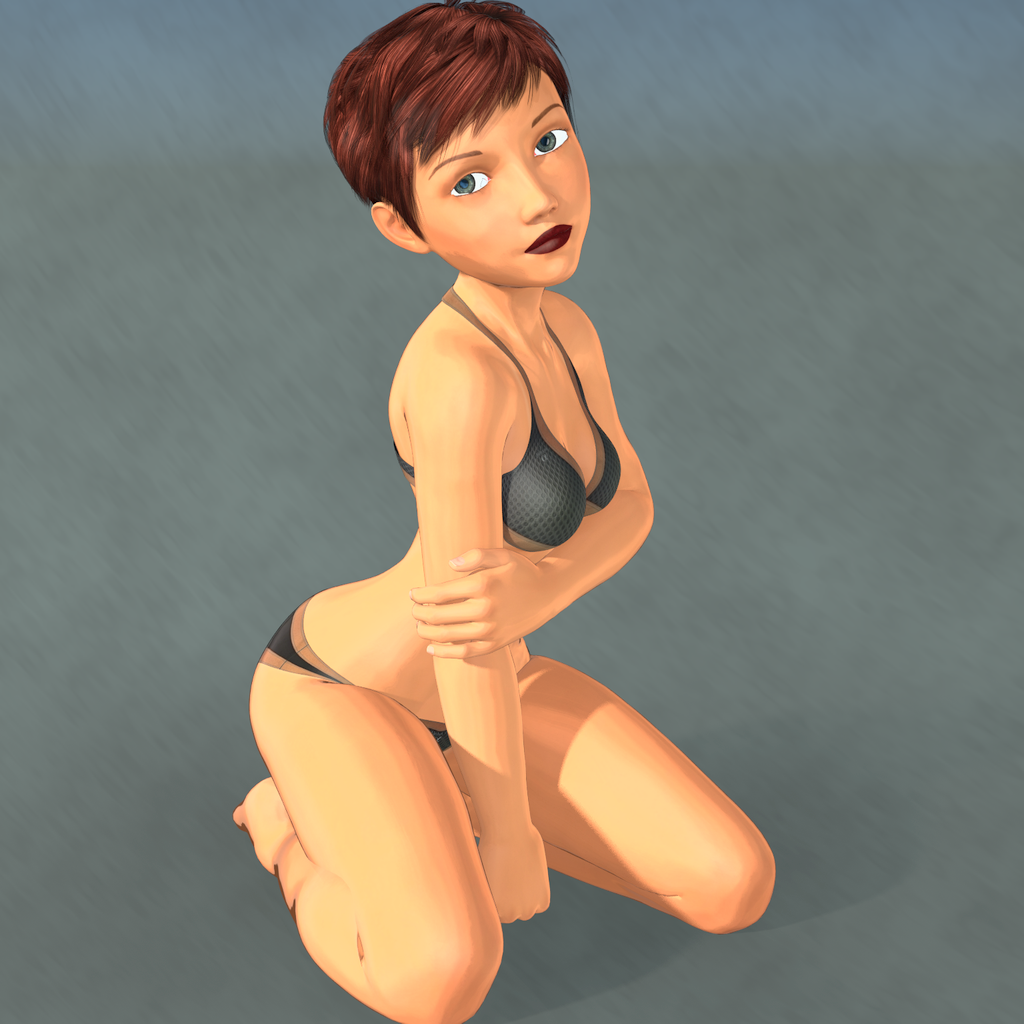 Morphs from G3 to G8
V8 with a little Raiya's Sapphire, Monique 7 and Ophelia plus a few dial spins ;). The skin is Lydia's that I tanned slightly. LOVE those clothes by OOT. So nice :).
Laurie
That look as if the alignment is not adjusting - were you working on Geensis 8 Female, and what options do you have in Adjust Rigging to Shape?
What options do I have in rinnging to shape ?. I did not know it could be configured .. I'm a newbie
In between importing the morph and ERC Freeze, you need to "Adjust Rigging To Shape" as outlined in the tutorial.
Laurie
It's like I did the Rigging to shape first but it happens in the bones. :-(
What exactly did you do?
Follow the tutorial step by step. But seeing the result ... I think something failed. I do not know if it is for me the truth. Becuase that is the result of rigging to shape. When it connects the joint editor came out the pose in basic T of G3F not the one of G8F the morph was active to 100% and was perfect it had transferred it perfectly. But something I did wrong.
Ah. I begin to see.
Please start over. Follow the steps until you export the G8 morph.
At that point, close studio. Open Studio again. Load ONLY G8. Nothing else. Continue the steps from here to import the morph and adjust rigging. Report results. I think I know what you did. I need you to do this to confirm.So I did but I think now I do not remember if I'm in charge of the G8. But there was only the G8.
Morphs from G3 to G8V8 with a little Raiya's Sapphire, Monique 7 and Ophelia plus a few dial spins ;). The skin is Lydia's that I tanned slightly. LOVE those clothes by OOT. So nice :).
Laurie
That look as if the alignment is not adjusting - were you working on Geensis 8 Female, and what options do you have in Adjust Rigging to Shape?
What options do I have in rinnging to shape ?. I did not know it could be configured .. I'm a newbie
In between importing the morph and ERC Freeze, you need to "Adjust Rigging To Shape" as outlined in the tutorial.
Laurie
It's like I did the Rigging to shape first but it happens in the bones. :-(
What exactly did you do?
Follow the tutorial step by step. But seeing the result ... I think something failed. I do not know if it is for me the truth. Becuase that is the result of rigging to shape. When it connects the joint editor came out the pose in basic T of G3F not the one of G8F the morph was active to 100% and was perfect it had transferred it perfectly. But something I did wrong.
Ah. I begin to see.
Please start over. Follow the steps until you export the G8 morph.
At that point, close studio. Open Studio again. Load ONLY G8. Nothing else. Continue the steps from here to import the morph and adjust rigging. Report results. I think I know what you did. I need you to do this to confirm.Genesis 8: Some Stats and our ThanksIs there any easy/cool thing G8 has to transfer image maps from pre Genesis 3, or do you need the same tools needed to get older textures on G3F?
Morphs from G3 to G8I think someone should be amused... I did this via tutorial (and also GenX2 to get things over to G3F, plus some Normal generation to capture HD details and Map Transfer to get a G3M skin on G8F)
Morphs from G3 to G8It's like I did the Rigging to shape first but it happens in the bones. :-(
I'm not exactly sure how you could possibly have done that.
Are you saying this happens every time you attempt to do the transfer?
All I can recomend at this point is reloading and staring over.
Anyway, what version of Studio are you using?
For others, you have to take a look at the screen shot provided. The rigging is completely destroyed, with bone orgins sitting where their end points should be, and orientations seemingly random. This is somewhat unusual, to say the least, and not likely a result of a missed step.
My Version of Daz Studio is 4.9.7.117Morphs from G3 to G8V8 with a little Raiya's Sapphire, Monique 7 and Ophelia plus a few dial spins ;). The skin is Lydia's that I tanned slightly. LOVE those clothes by OOT. So nice :).
Laurie
That look as if the alignment is not adjusting - were you working on Geensis 8 Female, and what options do you have in Adjust Rigging to Shape?
What options do I have in rinnging to shape ?. I did not know it could be configured .. I'm a newbie
In between importing the morph and ERC Freeze, you need to "Adjust Rigging To Shape" as outlined in the tutorial.
Laurie
It's like I did the Rigging to shape first but it happens in the bones. :-(
What exactly did you do?
Follow the tutorial step by step. But seeing the result ... I think something failed. I do not know if it is for me the truth. Becuase that is the result of rigging to shape. When it connects the joint editor came out the pose in basic T of G3F not the one of G8F the morph was active to 100% and was perfect it had transferred it perfectly. But something I did wrong.
Show Us Your Iray Renders. Part VIThat's G3M -> G3F -> G8F, using GenX2 for first step and Redz tutorial thing for second step, and conventional Map Transfer for the textures. Also some Normals I developed in Substance Painter 2 to capture HD details that you can't transfer.
Oh, I also used the freebie Dual Lobe script to convert the glossy.
V8 out this month, who are you expecting next ?I'm guessing maybe Fane, as there's a fit for her in the Voss hair.
ETA the morph doesn't say "8" so she may not even be an official figure.
There's a fit for Fane in the Karissa hair as well. (They're both AprilYSH hairs.) And I'd swear I saw her in something else, but I can't remember what.
V8 out this month, who are you expecting next ?I'm guessing maybe Fane, as there's a fit for her in the Voss hair.
ETA the morph doesn't say "8" so she may not even be an official figure.
DigiSprawl's Victoria 8 ReviewI've used Power Pose on previous generations' figures and it does a pretty good job as a supplement to the other posing tools. I like using it. However, the biggest improvement, I think, was the face template. Not only does it do posing but it also does morphs. I was playing with it a bit today and had a really good morph for a face punch impact morph. Awesome stuff! I'm really liking the new facial rigging for V8. I think it's really stellar and we've needed something like this for a very long time. As someone who loves posing but is horrible at posing facial expressions, I'm having a blast because I've had some of the best facial expressions I've managed to make on my own to date.
RedactedThe one that bugs me the most is Leo 7.
What's the Leo7 problem, again? I remember there was a discussion here on the forum, but it had petered out by the time I bought L7 recently.
His body morph slider alters the figures height, and Y translation.
Morphs from G3 to G8V8 with a little Raiya's Sapphire, Monique 7 and Ophelia plus a few dial spins ;). The skin is Lydia's that I tanned slightly. LOVE those clothes by OOT. So nice :).
Laurie
That look as if the alignment is not adjusting - were you working on Geensis 8 Female, and what options do you have in Adjust Rigging to Shape?
What options do I have in rinnging to shape ?. I did not know it could be configured .. I'm a newbie
In between importing the morph and ERC Freeze, you need to "Adjust Rigging To Shape" as outlined in the tutorial.
Laurie
It's like I did the Rigging to shape first but it happens in the bones. :-(
What exactly did you do?
Show Us Your Iray Renders. Part VIGirl 7 morph transferred to Genesis 8. I don't think I'll be bothering with G8 until someone comes out with a decent foot clone since every single pair of shoes I've tried to load on G8 are broken. G2 to G3 shoes worked MUCH better, I'm not impressed with "the most backward compatible" G8 at all. About the only thing I see a use for at the moment is the ease of creating facial expressions with puppeteer. Aaaaaaand lookie there, I'm on a rant...
Never mind, enjoy the render :)

Thats cute. I really like the look of The Girl even though i dont use her.
Morphs from G3 to G8could be all three options at the bottom of the transfer utility were checked. only the first two are on by default and I've been leaving it at the default and have had no problems. Someone earlier who WAS checking that last box (orientation I think it is) was having similar problems.
Laurie
I dunno. Like I said, I can't imagine how that happened. Sometimes adjust orientation is necessary, so I've used it in the past. Most of time it isn't, and certainly you should never just check it. Best to pick the specific bones you need to adjust orientation, and uncheck everything else (or right click, uncheck all from the context menu, then check only those bones you need to change).
But like I said, based on the sceen shot, the center poins have moved to the end point location, and that shouldn't happen for any reason, at all. Obviously, it has, but I'm stumped as to how. The only guess I have is that somehow the weight maps of the figure are corrupt. As long as bu_es_d66e03e3c8 hasn't saved over the G8 figure, closing studio and restarting it would solve any kind of corrupting of the figure.
EDIT: I just tested it out on a morph I transfered but did not rig. Adjust orientation didn't cause any obvious issues. All of the bones were lined up properly, at least by eyeball. Nothing flying off in od directions or center points swapped with end points. Maybe it's something to with the shape bu_es_d66e03e3c8 is trying to rig, but again, stumped.Day 4 of Generation 8 and...The morphs from G7 transfer so easily (even extreme ones) that I plan to get thru them all eventually ;)
This is Josh Crockett's Hag morph for Genesis 7 Female. Love ;).
Laurie
How are you using G3 (or G7 as you said) morphs on G8? When I select G8 figure, I can't see any of my older morphs?!
It's a hack, nothing official or added. See this thread for more info
https://www.daz3d.com/forums/discussion/176271/morphs-from-g3-to-g8#latest
Show Us Your Iray Renders. Part VIWas messing around with G8 to see if I could get Satine's morphs manually instead of having to go through that (GROAN!) morph transfer routine. Still some morphs I need (Aging for G8) and some I want for other purposes (Massive Muscle Morphs) but this took the transfer of Satine's textures really well.
Daz 3D is part of

Connect
DAZ Productions, Inc.
7533 S Center View Ct #4664
West Jordan, UT 84084Licensing Agreement | Terms of Service | Privacy Policy | EULA
© 2026 Daz Productions Inc. All Rights Reserved.