-
Victoria 8
I keep hearing that you can transfer G3 morphs to G8. Can anyone direct me to that tutorial? Thanks, I'm so glad they brought back power power and hope they expand to past figures.
I recommend this tutorial: https://www.daz3d.com/forums/discussion/comment/2532336/#Comment_2532336
I've found it to be really easy to follow and once you get the steps down it goes really quick. :)
Morphs from G3 to G8A couple of experiments.
First, showing Izabella 7's head morph using first the Transfer Utility, and secondly the Morph Import method. Tween Julie similarly fares better. Thus, for some of these more extreme eye shapes, the morph import method may be better, though not necessarily perfect.
Second test using Anneka Demon's HD Body morph. Neither method transfers the HD detail, so that is sadly lost. The current morph import method ignores much of the hand and all of the nail detail.
The transfer utility does better, but distorts the nails.
So I made a G8F Clone for G3F using Singular Blues method on page three of this thread. Once I had this clone, I was able to reverse the process to make a new clone of Genesis 3 Female for G8F.
With this clone dialled in rather than the default G3F clone provided, the fidelity of the morph transfer is much better. (See last image)
Dialling in this new G3F clone on top of the Transfer Utility also produces the same result (whereas the default G3F clone provided with Daz Studio does not).
So I'm concluding that it is probably worth the extra effort of making a new G3F Clone using Singular Blues Method, regardless of which method you prefer to use.
Let me know if a step by step tutorial to make the new clones would be helpful. Singular Blues' description is fairly clear. Then once the G8F clone for G3F is saved, you can use it the same way to 'fit' a copy of G8F to G3F and create a new alternate G3F clone for G8F. It adds a bit to the workflow, but for some morphs may give a significantly improved result.
I'm confused, @Redz.
1) I don't understand what "Transfer Utility method" and "Morph Import method" are. I tried your revised tutorial, but it seems to use both the transfer utility and morph importing with morph loader pro, so is it one of those methods, or something else?
2) Does your revised tutorial already have this change to the Singular Blues type clone incorporated or do I hae to change the files you provided?
Thanks for all the tips in this forum thread.
When I say Transfer Utility method I mean the method described by Sickleyield whereby you load a G3F and a G8F, then you favourite the G3 morphs you wish to transfer and use the transfer utility selecting the G3F clone and unchecking all but the morphs-favourites options. It's really fast but the default clone messes up the hands badly on body morphs and you can't transfer whole characters unless you make a full body morph for them on G3F first.
By the morph import method, I refer to the tutorial I posted. I'm don't want to claim ownership as it's directly pulled from methods posted here for previous generations, just packaged a little easier to follow.
No the current tutorial file has the default Genesis 3 Female clone dialled in on G8F. Making a new clone using Singular Blues method and dialling that in instead of the default clone would give better transfer results, but involves a few extra steps to make the clone.
hope that helps
Morphs from G3 to G8Hey guys, that vertex stuff sounds a bit too heavy for me. Successfully transferd my first morph. Noticed that whereas it was a morph for a body part the posture changed a bit once I applied it to G8F. So maybe this is that vertex/vertices thing? Would not mind if one of you Guru's might add that to Redz tutorial.
But for the moment thanks to everyone exploring or documenting the necessary steps for transfering morphs enabling even a noob like me to do it.
You don't need to be a guru to do that. In fact, I didn't even know, this "Geometry Editor" exists, before Redz mentioned it. To create a partial morph (head morph for example) without affecting the other parts of G8, try this:
- Follow Redz's manual until you have loaded and dialed in your transferred G3 morph into G8 ("If all went well your morph imported and will be in the parameters tab. Dial it in and check that G8F has morphed correctly." in "Part two").
- Go to your morph in the Parameters tab and click on the heart in the top right of the morph to mark it as a "favorite".
- Activate the Geometry Editor:
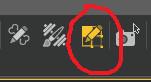
- Right click on your Genesis 8 in the Viewport and select Selection Type - Vertex Selection.
- Right click again on G8 and select Selection Mode - Lasso Selection.
- Drag the lasso around everything of G8, that should NOT be part of your morph. For a head morph, select the entire body, for example. It should look like this:
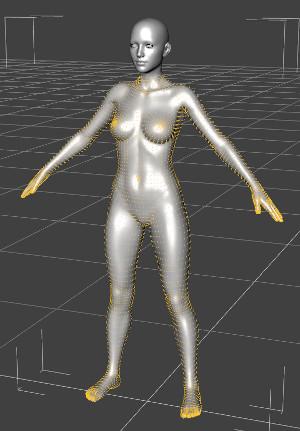
- Right click a 3rd time on G8 and select Morph Editing - Clear Selected Deltas from Favorits.
- Continue with Redz manual.
Here's the description for removing unwanted vertices from your morphs
Morphs from G3 to G8So far, good luck with many tranferring via Redz tools. I am having odd issues in that while some will transfer to the G8 obj, some won't affect it at all. I haven't any idea what the cause of that might be, since if I make the G8 invisible and the G3 visible, I can see that the G3 is morphing as expected. But, the G8 is unaffected.
Any ideas about that?
Here a render of Alietta Sprite on G8F...worked perfectly on her. Skin is using NGS2 shaders as well.

Has anyone had any luck transferring facegen morphs over, when I load them on G3f nothing changes on g8f but it will Change G3f so I'm not sure if I'm missing something or if it's just not possible
The most likely reason is that auto-follow is disabled for the morphs you are trying to transfer. The solution would be to enble auto-follow for the morph in the parameters tab. I think you would then need to refit your G8 Morph object to G3 before it will work.
Morphs from G3 to G8Argh, can anyone remind me how to remove parts of a body from a morph?
I'm trying to bring over some facial morphs and for some reason it insists on adjusting the shoulders and hips (badly)
I believe you have to bring the morph over, mark it as a favorite then go into the Geometry Editor and remove the polys you don't want in the morph (which in your case would be the whole body except the head). Then do the rest as normal.
Laurie
V8 out this month, who are you expecting next ?I'm guessing maybe Fane, as there's a fit for her in the Voss hair.
ETA the morph doesn't say "8" so she may not even be an official figure.
Hiya, Fane is my own promo girl for G8, not a Daz original character, so you don't waste energy thinking that way :)
I do a promo girl for each generation and they are usually luminous pale pinup types - custom character creation is fun in the midst of wig making lol! I started making Fane lips, nose and eye morphs for G3 and then G8 came along so had to restart and make it for G8, it will hit the store soon.
I also packaged her with Fane Hair version for G8. I did the rig from scratch before I found out how to do it the easier way by transfer utility on the G3 version lol - so those folks who have the G3 version probably won't need this product and that's great :) At least my Fane promo girl will be out there hehe, I don't expect it to be a big seller, she was for love, of fun ;)Gah... sorry, really didn't mean this to be a plug for my Fane girl *sigh* I might as well share a preview pic since I've wasted your time blabbing so much already lol
Mystery solved, thank you :) She's lovely, got a Vivienne Leigh vibe about her. Are you saying the G3 character comes with Fane hair? I don't see that in the product description.
V8 out this month, who are you expecting next ?I'm guessing maybe Fane, as there's a fit for her in the Voss hair.
ETA the morph doesn't say "8" so she may not even be an official figure.
Hiya, Fane is my own promo girl for G8, not a Daz original character, so you don't waste energy thinking that way :)
I do a promo girl for each generation and they are usually luminous pale pinup types - custom character creation is fun in the midst of wig making lol! I started making Fane lips, nose and eye morphs for G3 and then G8 came along so had to restart and make it for G8, it will hit the store soon.
I also packaged her with Fane Hair version for G8. I did the hair rig from scratch before I found out how to do it the easier way by transfer utility on the G3 version lol - so those folks who have the G3 version of the hair probably won't need this product and that's great :) At least my Fane promo girl will be out there hehe, I don't expect it to be a big seller, she was for love, of fun ;)Gah... sorry, really didn't mean this to be a plug for my Fane girl *sigh* I might as well share a preview pic since I've wasted your time blabbing so much already lol
Genesis 8: Some Stats and our ThanksOne more that wouldn't want the three merged. I would like small pieces of Hexagon in DS tho...at least so far as a morph brush-type thing. Otherwise the software would get really bloated, really quick. I'm also learning Blender, but as anyone that uses it can tell you, it's a leviathan. It's nice to have a program that does everything...until you want to do something and have to wade thru tons of other stuff just to find it or have gobs upon gobs of tabs and panels ;).
+1 - a morph brush would be great, but leave it at that.
Genesis 8: Some Stats and our ThanksAs someone who only has "Sculptris" and no other 3D sculpting program, I'd love to be able to sculpt morphs in Daz Studio. But having the option to disable/uninstall it for those who don't want Daz to be a "heavier" program would be a good option. :)
Blender can sculpt too and there is the Diffeomorphic 'bridge of sorts' mentioned in this thread earlier:
http://diffeomorphic.blogspot.com/p/export-character-from-daz-to-blender.html
Blender, imo, isn't very user friendly. After bumbling around in the program for a while and unable to figure out how to do even the most basic things I Noped it. I need a program that's easy to understand and pick up, like Sculptris.
Hexagon has sculpting tools too, and if you don't have a pen tablet they're a bit easier to control than z-brush. Of course z-brush is much better at handling high poly meshes so as a PA with the HD morph ability z-brush wins for fine details anyway, but for base mesh manipulation (especially smoothing) I use it all the time.
Victoria 8I keep hearing that you can transfer G3 morphs to G8. Can anyone direct me to that tutorial? Thanks, I'm so glad they brought back power power and hope they expand to past figures.
Here is the thread they discuss it in. There are a couple of tutorials in the thread.
https://www.daz3d.com/forums/discussion/176271/morphs-from-g3-to-g8/p1
Victoria 8I keep hearing that you can transfer G3 morphs to G8. Can anyone direct me to that tutorial? Thanks, I'm so glad they brought back power power and hope they expand to past figures.
DigiSprawl's Victoria 8 ReviewThanks for this review - it fills in some gaps that I hadn't picked up from the forum discussions. I'm still on the fence, however, because I'm not sure that the gains over G3 are worth the losses due to transfer of content from G3 to G8 (and I really don't intend to re-stock a whole new wardrobe/hair collection/morph set any time soon). Contrary to many opinions here, I actually like the more natural look of G8/V8 but then I never used G7/V7 in her default form either so that doesn't sway me. I'd be interested to know what is the best way of applying the improvements in IRay skin surfaces to G3 characters so a blog entry on that would be most welcome if you have any ideas.
Anyhow, G8 is stil waiting in my DIM for download - all I'm really dithering about is whether to open my wallet for the morph packages while they still have the "New" discount.
I think you looking for more problems than there are.
I've not had issues with clothes or hair yet; heeled shoes do take a bit or work.
Morphs do transfer, although I'll be happier with the 'real thing' when they appear.
Poses work, so far very well; minor adjustment that seems to be down to the A-pose; tbh, I'd at least consider G8 for that alone. :) Coupled with the eyebrow and eyelash changes.
I for one wont buy any characters that don't have an eyebrowless option - sure I can do it myself, but why should I? (Not impressed that the two additional characters in the pro bundle didn't include them.)
I've finally installed her AND I bit the bullet and bought the morph packs (body and face - not expressions). I also downloaded DavidGB's pose-correction scripts which seem to work very well. Now I'm trying to figure out what to do with the REDZ helper that I just downloaded. I'll busy myself reading the PDF and see if I can understand it. I also found a script for applying the New IRay features (double-lobe, whatever) to G3 so it has been a busy day so far.
ANIMATING THE GENESIS 8 FEMALE?? ... WHY BOTHER??"DAZ 3D workers have stated that the animation retargeting will be fixed for both G3F/G3M and G8F/G8M (when G8M comes around).
How much they improve theanimation past that is anybody's guess though.
There is a script made by the OP of this thread
https://www.daz3d.com/forums/discussion/176126/g3f-pose-to-g8f-correction-fix-adjust-script#latest
that corrects the Genesis 3 poses for use on Genesis 8 Female."Thanks however the only thing I have read in the forums is Daz claiming
to be "fixing" is the broken BVH import of G3 Data into studio.Great!! but this only helps those us who have access to external
professional motion creation tools Like Iclone or Autodesk Motionbuilder
and desire to import Motion data back to Daz studio.Lovely..Bloody good for us!!

But what about those who can only afford Daz studio and perhaps Keymate
aniMate an GraphMate??
"Gofigure" is MIA
So animating G8 in DS alone leaves one with the options
I have already listed.Ths is becoming like going to a fine dining establishment
and ordering one full perfectly edible plate of food... and two empty plates.Now imagine taking your utensils and forking all of the food
over to the second empty plate.
repeat process transferring the same food to the third empty plate
and clean up the bits that fell to the side during the transfer.Does this sound rational to anyone??
when you could just eat from the first plate(ie Genesis 2 M/F).Well as part of that I am thinking they will also fix all those aniblocks which are quite extensive, quite good, but need two versions and both versions need be included with the original products.
It's been stated things are coming to DAZ in the 2nd half of the year that will address some long standing complaints - and I've read enough in the forums to know those are:
1) animation in DAZ
2) hair in DAZ
3) dynamics - at the very least hair & clothing dynamics
Of course I am guessing so well...at any rate I am tired of doing still renders with DAZ and am moving on to Blender. I am confident by the time I finish the Blender sets of tutorials DAZ will have some big improvement to help me make fun animations and still scenes that don't look naturally dynamically composed.
Dare we Specul8oops left the ambient default (doh)
testing out her bending, focused on her shoulders
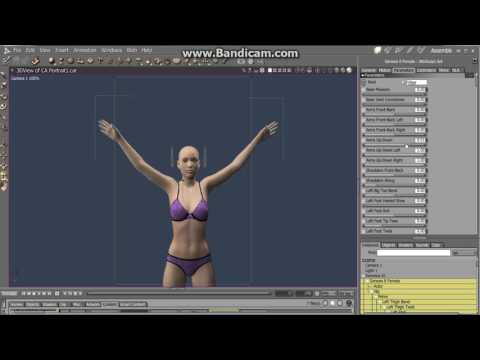
i ended up buying the morph expansions and the V8 base >.<
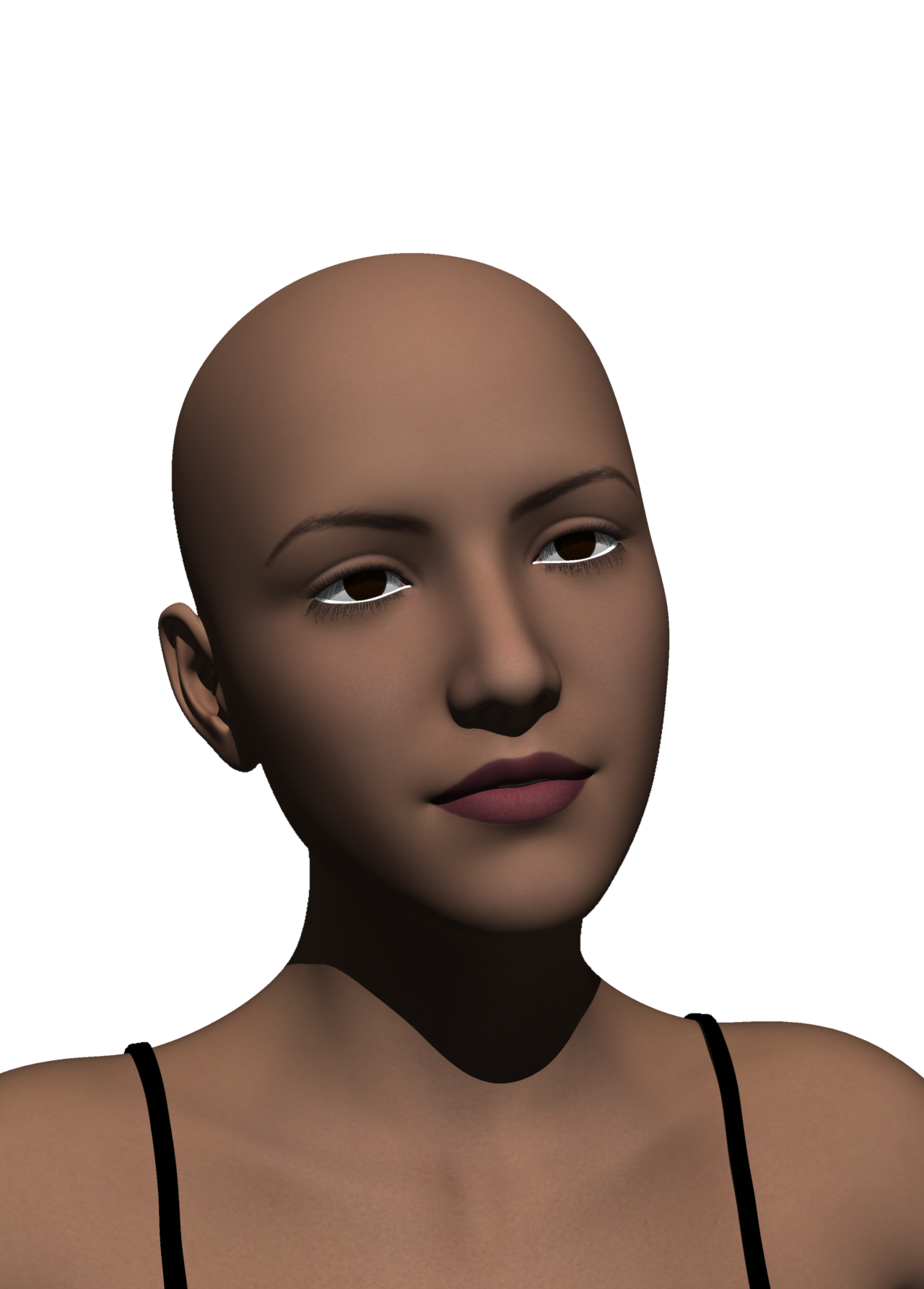
tried the xolani g3f skin. the 'drunk' expression
 inner eyelid not quite right
 Morphs from G3 to G8
So far, good luck with many tranferring via Redz tools. I am having odd issues in that while some will transfer to the G8 obj, some won't affect it at all. I haven't any idea what the cause of that might be, since if I make the G8 invisible and the G3 visible, I can see that the G3 is morphing as expected. But, the G8 is unaffected.
Any ideas about that?
Here a render of Alietta Sprite on G8F...worked perfectly on her. Skin is using NGS2 shaders as well.
Victoria 8I had to take a stab at the guy thing, especially when I figured out that I could use SkinBuilder3 to create skins for Genesis 3 Male. So here's my Genesis 8 (fe)Male. He's just a bunch of morphs using the basic G8F morphs here and I found another morph pack over at Rendo. Idt has some more sizing morphs and creature/fae type morphs. But to get his skin right, I spent quite a bit of time with Photoshop and the Warp Brush, basically pushing parts into place where the G3M UVs differ from G8F.
How to reduce Genesis file sizes in Carrara?Any ideas to fix this? Eg stripping out uneede morph data?
thanks in advance
also does Fenric's Shader fixer work in Carrara 8.5 ?
get a bigger faster, stronger PC with an even bigger faster hard drive
yes it does.... did I answer that before.....
G3 Hair Misfits on G8 whose height is changed.I had been having good luck autofitting G3 hair to G8, to the point I hadn't been buying G8 hair during early experiments. Then I wanted a short G8 character, and used the Actor / Real World / Height morph. Autofit failed big time. As G8's head went closer or further from the gound, the hair seems to shift twice that distance. Below, you have a short base G8 with G3 Olenna Hair. The shorter the G8, the lower Olenna Hair gets. I got the same result with two other G3 hairs. I shifted to a G2 hair and got good fit results. Anyone else see this?
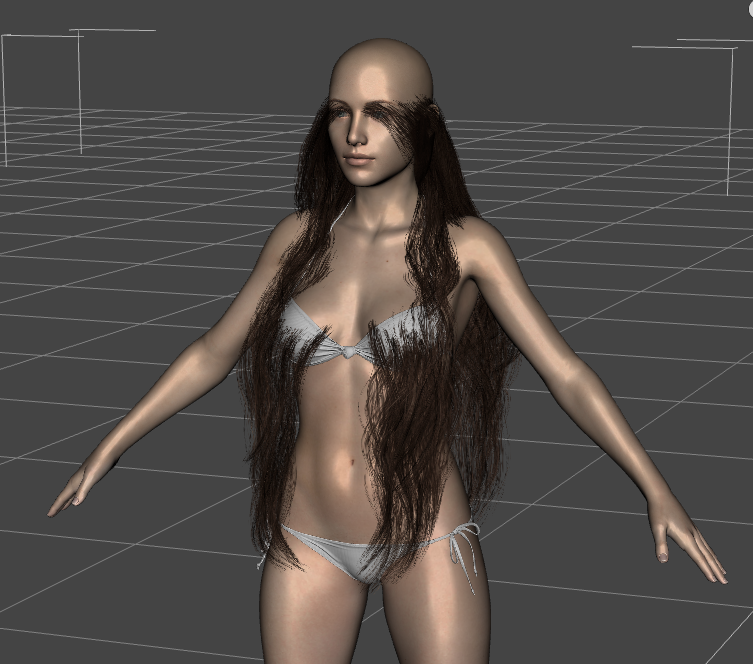 Probably stupid map transfer question - be gentle. Finding uvs to load - how?
I'm trying to follow a tutorial on youtube, but when it comes to loading uvs I'm coming up totally dry. How does one find them? I'm looking in data/Daz 3D/Genesis 2/Female/UV Sets and there is ZILCH inside that folder in the way of .obj or .obz. I'm stumped. There's not much in the way of useful info on the Daz Wiki either. I think I'm really missing something but I have no idea what.
Please help :P.
Thanks a bunch :D
Laurie
Morphs from G3 to G8Argh, can anyone remind me how to remove parts of a body from a morph?
I'm trying to bring over some facial morphs and for some reason it insists on adjusting the shoulders and hips (badly)
I'm not sure, I've never done it. But this tutorial: https://www.daz3d.com/forums/discussion/comment/2544901/#Comment_2544901
sounds like it might work?
Daz 3D is part of

Connect
DAZ Productions, Inc.
7533 S Center View Ct #4664
West Jordan, UT 84084Licensing Agreement | Terms of Service | Privacy Policy | EULA
© 2026 Daz Productions Inc. All Rights Reserved.