-
How to save new character morphs?
Give a Path to the morph before saving morph asset.. don't leave it in the path or Morph Loader. Then it'll be easy to locate and manage the morphs you made.
Besides, you also can directly Save Modified Assets...
Camera Magic (Commercial)I'm having a problem. When in one of the magic cameras, say I do a hair blow morph, then I switch to the Perspective View camera and tweak other things, then I return to the magic camera, but the dialed hair blow morph is gone. Please tell me how to fix this cos it's really going to affect whether I can continue using this product. I need to switch to the Perpsective view every now and then to make adjustments. EDIT this also happens when a switch to another magic camera when i apply the hair blow morphs from the previous magic camera.
Blender to Daz head morph!?Um.... there are a lot of steps to that workflow. The eyelashes and hair could be simple or it could be difficult and you should just treat that step as a separate endeavour to be honest.
Therefore, I will just focus on the head morph.Ultimately, just use the software R3DS Wrap (now called Faceform) and save yourself the trouble. Briefly, Faceform lets you wrap the G9 or G8.1 mesh to your random Blender mesh. There are numerous videos online of people doing this with Daz models and if you expect me to google which exact video i think is best i am too lazy for that, and trust you have the intelligence to type in the words into the youtube search bar yourself. From memory, WP Guru and SHinteo have videos about this workflow.
After you go through the wrapping process, your output will be your custom head on the G9/G8.1 mesh, which you can load into Morph loader Pro. Faceform should also be able to transfer the texture from the custom Blender mesh to the wrapped G9/G8.1 UV space, so your output should also be a useable texture. Getting the head texture useable should just be a matter of blending that with existing genesis body figure textures in something like photoshop or substance painter.
For loading the morph into Daz, the workflow consists of the following (and thus the things you need to google/youtube are):
- Morph loader pro
- Adjust rigging to shape
- ERC Freeze/ERC Link (to link the adjusted rigging to your new morph)
If eyelashes and hair are just a basic mesh, you can export from Blender and Import to Daz Studio and use tranfer utility and hope for the best. Things to google:
- Transfer utility
Use G9 skin on G8Not sure what you were doing... that process of Map transfer in the tutuorial is for G9 not for G8...
Blender to Daz head morph!?Richard Haseltine said:
You can't expect people to do a custom video just for you, rather you need to watch the videos that cover the steps and stitch them together.
You say that, but yet I've seen many videos where they start off saying...
Someone requested that I show how to bla, bla, bla.
Richard Haseltine said:
However, I am not following the initial question - what is your starting point, a non-Genesis head model?
- Yes. A (non-daz) head converted to a head morph, without having wonky eyes.
- Then make a body texture that matches the original head texture.
- Then bring over the hair & lashes from blender to daz [the proper way].
Just like the 1s you buy online.
Asked a Million Times but I Still Need HelpIf you ignore the morphs (which you can do, either by applying a Rigidity group to the jacket with the Geometry Editor - which will block all morphs - or by creating an empty morph with the same name, not label, as each morph you wish to block - which will block only selected morphs) then the jacket won't move to accomodate them at all, and you will get poke-through. Using dForce is one option that may work, another is to use a Rigidity Group and apply it to the area from the mid-point of the breasts down, tapering off to the dsides, and select areas at the peak of the breasts as the reference group (which may, if it works, move the area below the breasts uniformly while still applying the projected shape above the breasts, where you probably want it).
How to save new character morphs?In general I would say, for the last, use the one that has your files and that you back up - that way you won't lose your work. DS doesn't mind loading Genesis X morphs across different content directories (morphs for the older figures, certainly the ExP system used in the fourth generation Daz figures, such as Victoria 4, do have to be in the same content directory).
You select your new morphs, not any thrid-party morphs or properties. So, your head morph and any new CBS/JCM shapes you cretaed to use with it but not the standard body morphs you used.
If you want separate head and body morphs then that is what you must create - you can't split them at the saving stage.
The Vendor Name and Product name fieds are used to name fiolders in /data/daz 3d/genesis 8/male/morphs/ for your saved files.
I am looking fot this 3D modelHello! I am looking for this model or the head morph for it in the Daz Store. Apart from the hairstyle, I can't get any further details. I also love the facial expression and the background. Who can help me?
ALO Lyra Hair for Genesis 9, 8 and 8.1 Female | Daz 3D
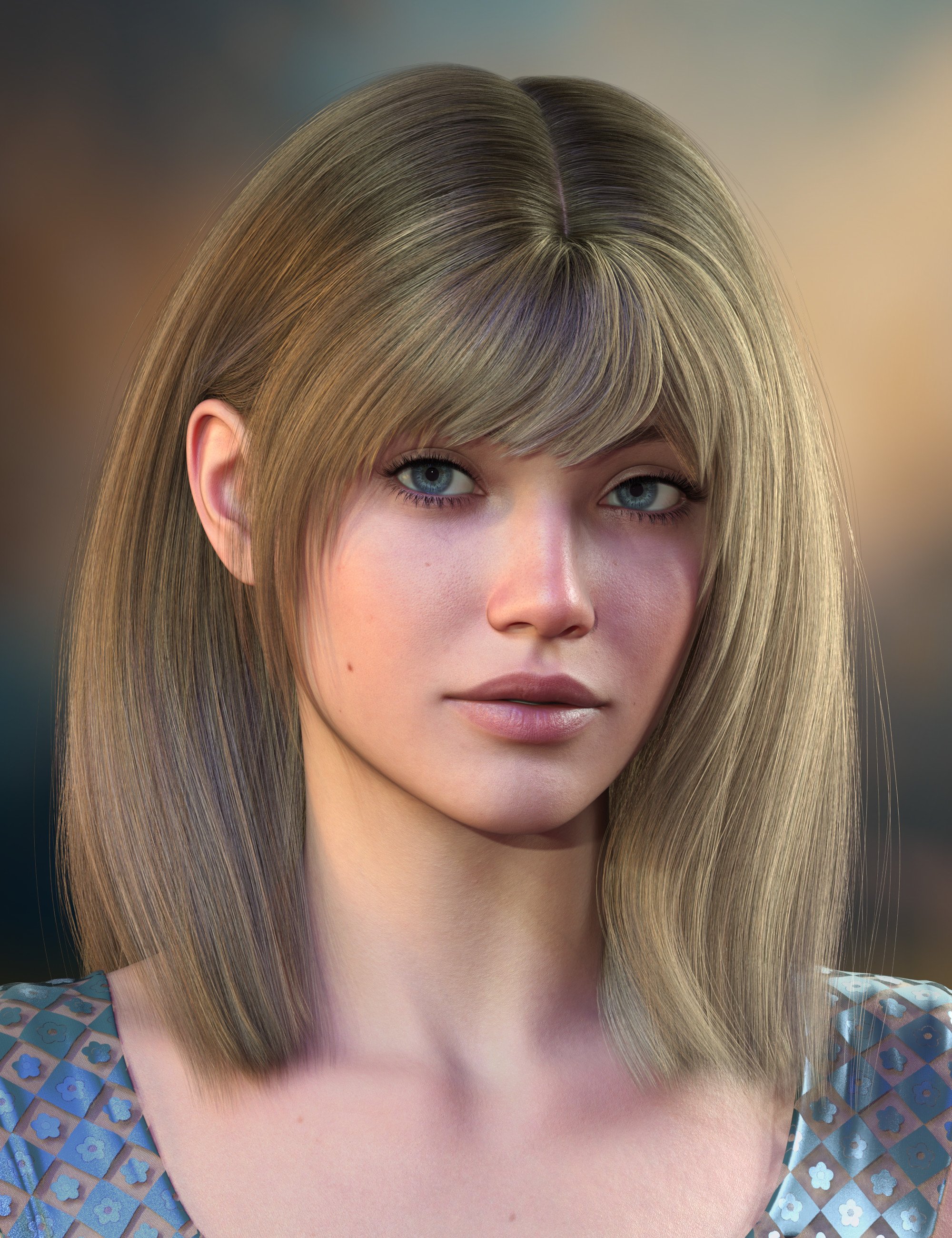 Asked a Million Times but I Still Need Help
Hello Everyone,
I would first like to say I am 55 years old and not a computer guy, in that I have never taken any courses. I realise the problem of "clingwrap" clothing has been an ongoing issue for years. I have tried to use many of the after-the-fact solutions to fix the problem, to no avail.
I tried to make an Inrvin jacket for a pinup calendar I am creating. Besides being a novice at using Hexagon and modelling in general, I am getting there. There are numerous problems including not being able to map textures properly, but I can fix those in post using Photoshop.
My question is this, please forgive me if I get the terminology wrong. I used the transfer utility in Daz after importing the jacket. I used another garment as the source. I think I did that correctly. My question is this, is there a way to get Daz to ignore the breast morphs, so they do not transfer them to the jacket?
I simply want the body of the jacket to hang straight.
Surely fixing the problem after the garment has become deformed is missing the point.
Any advice would be appreciated.
Thank andbest regards,
Peter
Use different morphs for a geograft than what is used on the base figure?Mouth Open / Closed properties on Base figure are Pose Controls rather than morphs...so there shouldn't be AutoFollow morphs projected on the geograft...unless you're using some unique "morphs" of Mouth Open / Closed.
You want to make corrective morphs (eJCM on G8 / cbs on G9) for the expressions of Mouth Open / Closed. Just make the corrective morphs in external modelling / sculpting software. Import them as a corrective morphs on the geograft, set Mouth Open / Mouth Closed as the 1st Stage Controllers of the corrective morphs, in Property Hierarchy.
In case there're AutoFollow morphs of sort of Mouth Open / Close morphs that you use, on the geograft, you just need to create corrective morphs to update the AutoFollow ones by using Morph Loader Pro, just like fixing a partial head morph.....
How to save new character morphs?Hello! I created my own G8M character and loaded his morph by using Morph Loader Pro, but I have a few questions about saving it as a new asset:
- when I open the Morph asset Save Options pane, I apm not sure about what I have to select:
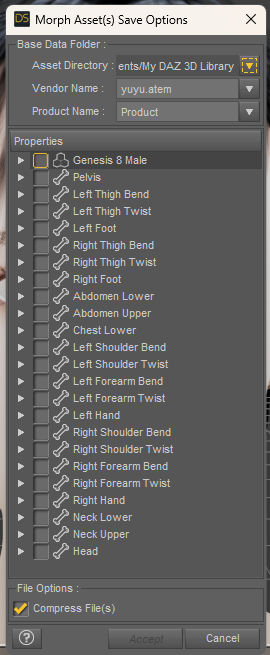
I created a morph for the head, and I used existing morphs to shape the entire body. Have I to select only the Genesis 8 Male, or also every bones?
- I would like to obtain 3 morps, as there are on other existing characters: one for the head itsel, one for the body itself, and one which activate the head and body morps together... Could you tell me how to do that, please?
- on the Base Data Folder tab, I see I have two possibilities. Which is the best one for saving a new morph? What is the difference? Does a specific folder will be created for my new morph(s) or will my morph(s) be actually in the Base Data Folder?
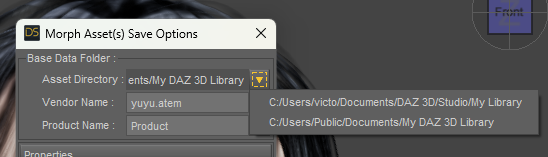
Thakk you in advance for your help!
How to use hair on another character?Hi! I would llike to use the Beach hair (https://www.daz3d.com/beach-hair) on a G8M character. I tried to use transfer Utility to "attach" the hair to the character by using these settings:
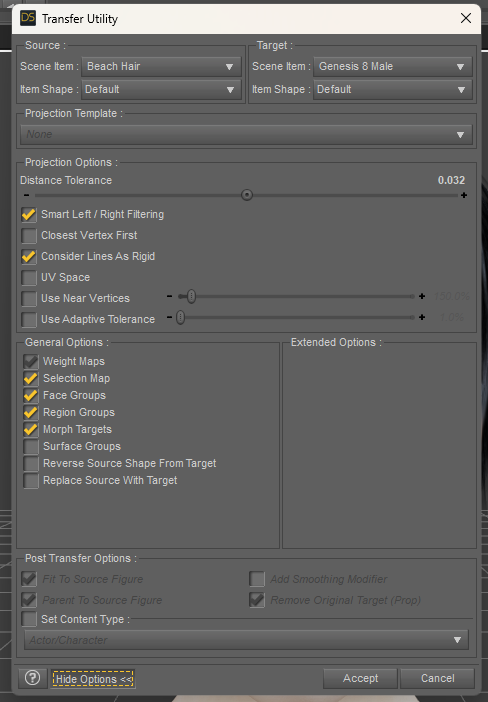
But after acccepting, when I apply a pose to the G8M, the hair doesn't follow the character:
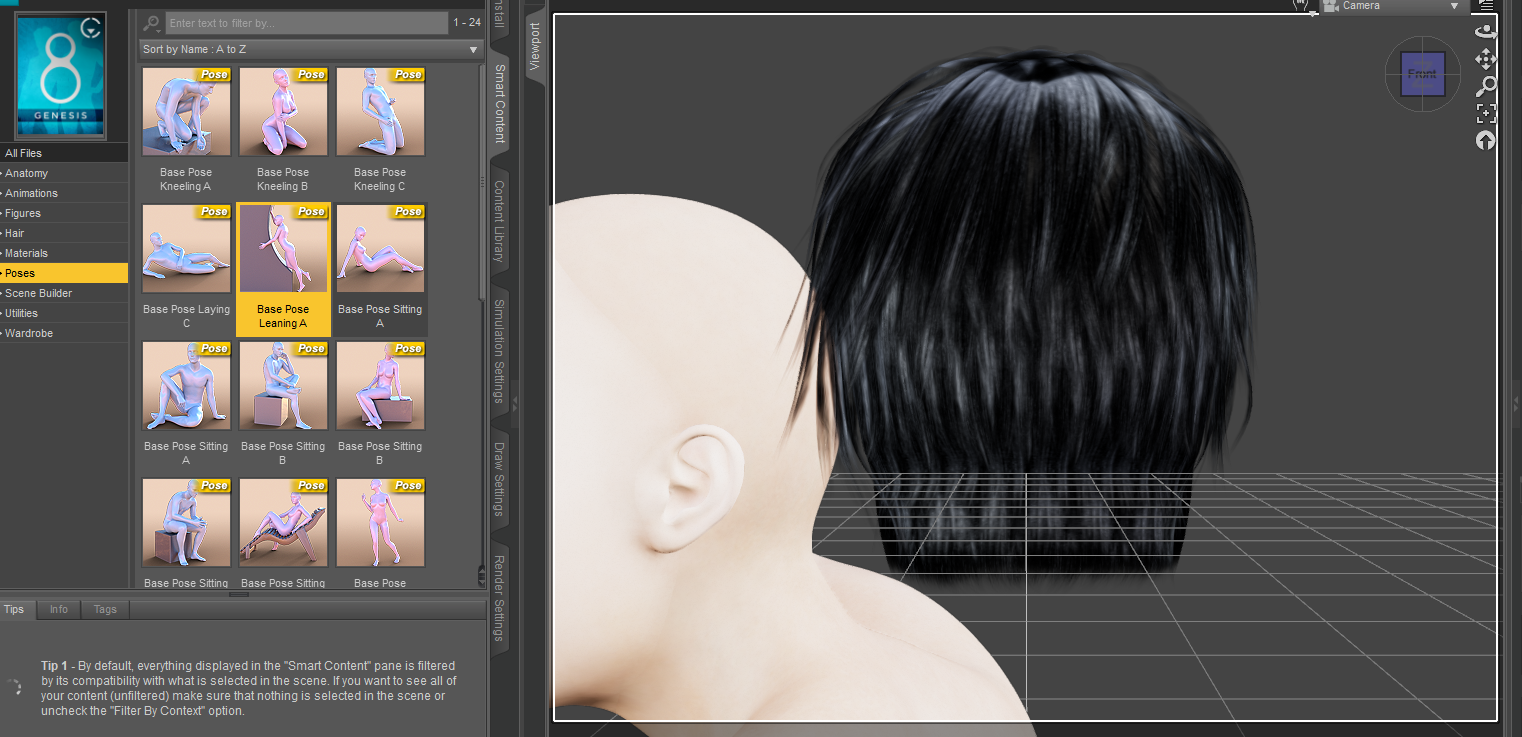
I guess I have misunderstood something... Could you help me, please?
Thank you in advance!
Blender to Daz head morph!?How to convert a full head (with hair and everything) from blender to daz, and have the body texture match the head.
Basically I need a full video on how to do this for either 8.1 or 9 female. With [No Steps Skipped, and what Keys are being pressed]! I've tried watching multiple videos on youtube, and they only [partially] helped!
Use different morphs for a geograft than what is used on the base figure?I might be wrong, but I think you might be able to do that in the same way that you can make a custom fit morph to replace a projected morphs in clothes, ie you create your custom morph with the same internal name as the morph you're replacing.
Use different morphs for a geograft than what is used on the base figure?I made a geograft, replacing part of a mouth, specifically, but when I use the mouth open and close morphs on the base figure, I don't like the results it gives me.
What I would like to have happen is, for example, I make an open mouth morph and that's the only thing that affects the geometry when the base model's open mouth morph is affected.
So, if Base model open mouth is 1, then custom geograft model open mouth is 1, while it does NOT use that projected morph that gets automatically generated on the geograft.
How would I go about doing this?Why did they remove Brow Inner Up/Down But Kept Inner Brow Up??Hylas said:
I recommend this, having 8 and 8.1 expressions at your disposal really gives you a lot of possibilities!
Except that the first post gives the wrong instructions (talks about deleting stuff in the FACS folder)
Making the G8 base expressions (and any expressions that are using them) work on G8.1 requires removing dummy/placeholder expressions that are installed to G8.1 morph folders - These dummy/placeholder expression files have no other function than to prevent the base G8 expressions from loading.
The dummy/placeholder files are located in;
...\Data\DAZ 3D\Genesis 8\Female 8_1\Morphs\Daz 3D\Base Pose Head\ (255 files, can be more if you have additional DAZ expression packs)
...\Data\DAZ 3D\Genesis 8\Female 8_1\Morphs\Daz 3D\Expressions\ (24 files, can be more if you have additional DAZ expression packs)
...\Data\DAZ 3D\Genesis 8\Male 8_1\Morphs\Daz 3D\Base Pose Head\ (255 files, can be more if you have additional DAZ expression packs)
...\Data\DAZ 3D\Genesis 8\Male 8_1\Morphs\Daz 3D\Expressions\ (24 files, can be more if you have additional DAZ expression packs)Please make sure you are removing the files from G8.1 morph folders and not G8 morph folders.
Note 1; If you are logging in to DS and letting DAZ Connect (within DS) to install/update your content, you may have these also in an other location that has "\Data\Cloud\" in it's path
Note 2; Do not remove any files from "FACS" or "FACSExpressions" foldersHow do I use Skin Folds & Creases HD for Genesis 3 & 8 MaleIf you mean Bullwarg, firstly activate SFHD Controller, then give Bullwarg a pose, and freely dial SFHD partial crease / folds morph as you wish. Then send the frog to Blender via Diffeo or DTB bridge to Blender, the former support importing Favorites / custom morphs as well as HD morphs... I believe you've known how to make them work...
Stange Skin Indentations after clothes removal.Those are morphs that the vendor made to show skin pressures (creases) on body when clothing fit on the figure. You can check ReadMe, and load Wearables with or without special morphs as you wish, and/or Zero morph properties as Gordig said.
How to create pose from morph?Right, it's just a shape ~ You know what... I guess that the author first of all posed the figure to such a "shape" (also plus some partial body morphs...), export the figure to OBJ, zeroed the figure and import the OBJ file as a morph with MLP.
So I afraid if you do need to "convert it to a Pose", you have to align both figures to the world center, pose G8.1F according to that shape AMAP... and you might not get a 100% same result as you never know what posing data / PBMs the author used...
How to create pose from morph?That's the thing, I don't think it's a pose per se. The morph changes the positions of the arms, legs and head to a significant degree though. My hope was to create a pose from those changes, that could be applied to the g8.1F base mesh without changing the shape as the morph dose. I attached some screens. Left side figure is g8.1F with morph applied, right side is g8.1F base mesh. Basically I want the g8.1F base mesh in the same alignment as the figure on the left. I want them to overlap as much possible.
Daz 3D is part of

Connect
DAZ Productions, Inc.
7533 S Center View Ct #4664
West Jordan, UT 84084Licensing Agreement | Terms of Service | Privacy Policy | EULA
© 2026 Daz Productions Inc. All Rights Reserved.










