-
Morphs from G3 to G8
1. I noticed Ears didn't work. I need my elf ears. I've got dozens of elf ears, all the way back to V3. I've already pulled my favorites from V4 into G3F but I couldn't even morph my clone with Izabella's ears. How do I get the ears in?
2. There's been some discussion about head morphs and how you have to use the vertex editor in order to save them. Does that apply to head-only morphs? Like SickleYield's Faces of Asia, etc.?
3. If I create a custom G3F with a whole bunch of partial morphs, you know - dial the eyes, the nose, the mouth, pear shaped hips, give her fangs, whatever. Can all that be transferred as a complete morph?
4. How do I save Favorites? I'd love to have to the morphs that I use the most available with one click every time I load a character (or at least the base characters).
By the way, Dimension-3D has some awsome DUF editor tools - one's called DSON Edit and the other is Morph Organizer. You'll probably want to wait for a sale on those but they're super useful.
It's usual for ear morphs that autofollow is disabled (so the hair doesn't deform around them.) In this case you'll need to enable autofollow on the morphs you wish to transfer. The autofollow won't apply until you unfit your G8 clone (right click and fit to none) then refit the clone to the donor figure and the ears should work.
This method is ideal for transferring custom dialled characters because you are basically transferring the entire shape as a single morph. That's also why you may get some unwanted vertex changes when transferring individual head/body part morphs.
You may find the transfer utility method better for individual head/body part morphs, as the transfer utility doesn't transfer the base figure shape. In fact if you use the transfer utility method, to get the exact shape of a character, you would need to dial in the donor figure's clone. (though that has it's own problems)
I don't think there's a way to save favourites. I wish there were.
Ack! I think it's time to crank up my source-code editor and other tools and just hack all the files at one time. This could get time-consuming.
And, of course, they're compressed. Google said something about a batch decompress tool in DS? I can't find anything except DSF Toolbox in the store. The OP made it sound like something built into DS.
Do you have an unzipping tool? I use 7zip - you can run it on a compressed .dsf or .duf and it will uncompress it for you - it won't work on encrypted files like .dse (for obvious reasons) and I've run into a few other files it won't do, but for morphs files it's generally fine.
Show Us Your Iray Renders. Part VIFor this render I tweaked the lighting and tone mapping settings a little.
And my Kalea is actualy a slightly custom shape. Shortened her to about 5'3" and 65% on the body size morph. JamesJAB's Art Studio Full of Renders and Incomplete Projects!
For this render I tweaked the lighting and tone mapping settings a little.
And my Kalea is actualy a slightly custom shape. Shortened her to about 5'3" and 65% on the body size morph.What do you have to turn off to morph Genesis 8?Ok, that explains it. I misstated the error message in my first post, the morph was failing to create, dispite the resolution, due to too many vertices. Any way to set the default to load without the lashes?
What genre of content do you want to see a lot more of?More functional clothing items... clothing locked into a single shape or morph, is a bit boring. Wouldn't mind more dynamic clothing though... or at the very least update the ones that are there and make them fit and work with the newer figures.
What do you have to turn off to morph Genesis 8?I figured out the three things that have to be turned off/dialed back to zero to successfully create a working morph for Genesis 3 (Female), but what the heck does one have to kill to get a morph to work for G8? I set the resolution to base and I get the an error telling me I have too few vertices. I leave resolution at HD and the usual error about too many vertices occurs. So far I can't even get off the ground, any help would be appreciated.
Super Bodysuit + Superhero Addon for G3F on G8F?Okay, seems like the transfer keeps the morphs but it doesn't keep the HD morphs, that's an issue with this set minorly, and quite a bit with my stuff.. I tried substituting my Leotard for G3F and it fits fine, but all the trim and wrinkles don't work 'cause they're HD morphs. =/
HD morphs not transfering via autofit is a bug or part of the by design DAZ HD morph monopoly?
Morphs from G3 to G81. I noticed Ears didn't work. I need my elf ears. I've got dozens of elf ears, all the way back to V3. I've already pulled my favorites from V4 into G3F but I couldn't even morph my clone with Izabella's ears. How do I get the ears in?
2. There's been some discussion about head morphs and how you have to use the vertex editor in order to save them. Does that apply to head-only morphs? Like SickleYield's Faces of Asia, etc.?
3. If I create a custom G3F with a whole bunch of partial morphs, you know - dial the eyes, the nose, the mouth, pear shaped hips, give her fangs, whatever. Can all that be transferred as a complete morph?
4. How do I save Favorites? I'd love to have to the morphs that I use the most available with one click every time I load a character (or at least the base characters).
By the way, Dimension-3D has some awsome DUF editor tools - one's called DSON Edit and the other is Morph Organizer. You'll probably want to wait for a sale on those but they're super useful.
It's usual for ear morphs that autofollow is disabled (so the hair doesn't deform around them.) In this case you'll need to enable autofollow on the morphs you wish to transfer. The autofollow won't apply until you unfit your G8 clone (right click and fit to none) then refit the clone to the donor figure and the ears should work.
This method is ideal for transferring custom dialled characters because you are basically transferring the entire shape as a single morph. That's also why you may get some unwanted vertex changes when transferring individual head/body part morphs.
You may find the transfer utility method better for individual head/body part morphs, as the transfer utility doesn't transfer the base figure shape. In fact if you use the transfer utility method, to get the exact shape of a character, you would need to dial in the donor figure's clone. (though that has it's own problems)
I don't think there's a way to save favourites. I wish there were.
Ack! I think it's time to crank up my source-code editor and other tools and just hack all the files at one time. This could get time-consuming.
And, of course, they're compressed. Google said something about a batch decompress tool in DS? I can't find anything except DSF Toolbox in the store. The OP made it sound like something built into DS.
Do you have all of your ears morphs on Genesis 3? If so the transfer utility will port them over without having to alter the autofollow. You need to favourite them and check only morphs favourites when performing the transfer.
Morphs from G3 to G81. I noticed Ears didn't work. I need my elf ears. I've got dozens of elf ears, all the way back to V3. I've already pulled my favorites from V4 into G3F but I couldn't even morph my clone with Izabella's ears. How do I get the ears in?
2. There's been some discussion about head morphs and how you have to use the vertex editor in order to save them. Does that apply to head-only morphs? Like SickleYield's Faces of Asia, etc.?
3. If I create a custom G3F with a whole bunch of partial morphs, you know - dial the eyes, the nose, the mouth, pear shaped hips, give her fangs, whatever. Can all that be transferred as a complete morph?
4. How do I save Favorites? I'd love to have to the morphs that I use the most available with one click every time I load a character (or at least the base characters).
By the way, Dimension-3D has some awsome DUF editor tools - one's called DSON Edit and the other is Morph Organizer. You'll probably want to wait for a sale on those but they're super useful.
It's usual for ear morphs that autofollow is disabled (so the hair doesn't deform around them.) In this case you'll need to enable autofollow on the morphs you wish to transfer. The autofollow won't apply until you unfit your G8 clone (right click and fit to none) then refit the clone to the donor figure and the ears should work.
This method is ideal for transferring custom dialled characters because you are basically transferring the entire shape as a single morph. That's also why you may get some unwanted vertex changes when transferring individual head/body part morphs.
You may find the transfer utility method better for individual head/body part morphs, as the transfer utility doesn't transfer the base figure shape. In fact if you use the transfer utility method, to get the exact shape of a character, you would need to dial in the donor figure's clone. (though that has it's own problems)
I don't think there's a way to save favourites. I wish there were.
Ack! I think it's time to crank up my source-code editor and other tools and just hack all the files at one time. This could get time-consuming.
And, of course, they're compressed. Google said something about a batch decompress tool in DS? I can't find anything except DSF Toolbox in the store. The OP made it sound like something built into DS.
Super Bodysuit + Superhero Addon for G3F on G8F?This is with my leotard.. had to pose G3 like G8 and export it as OBJ, import and run transfer utility to get the trim and wrinkles but it looks okay. Tried it out with some old (new) shaders I have almost done. =)
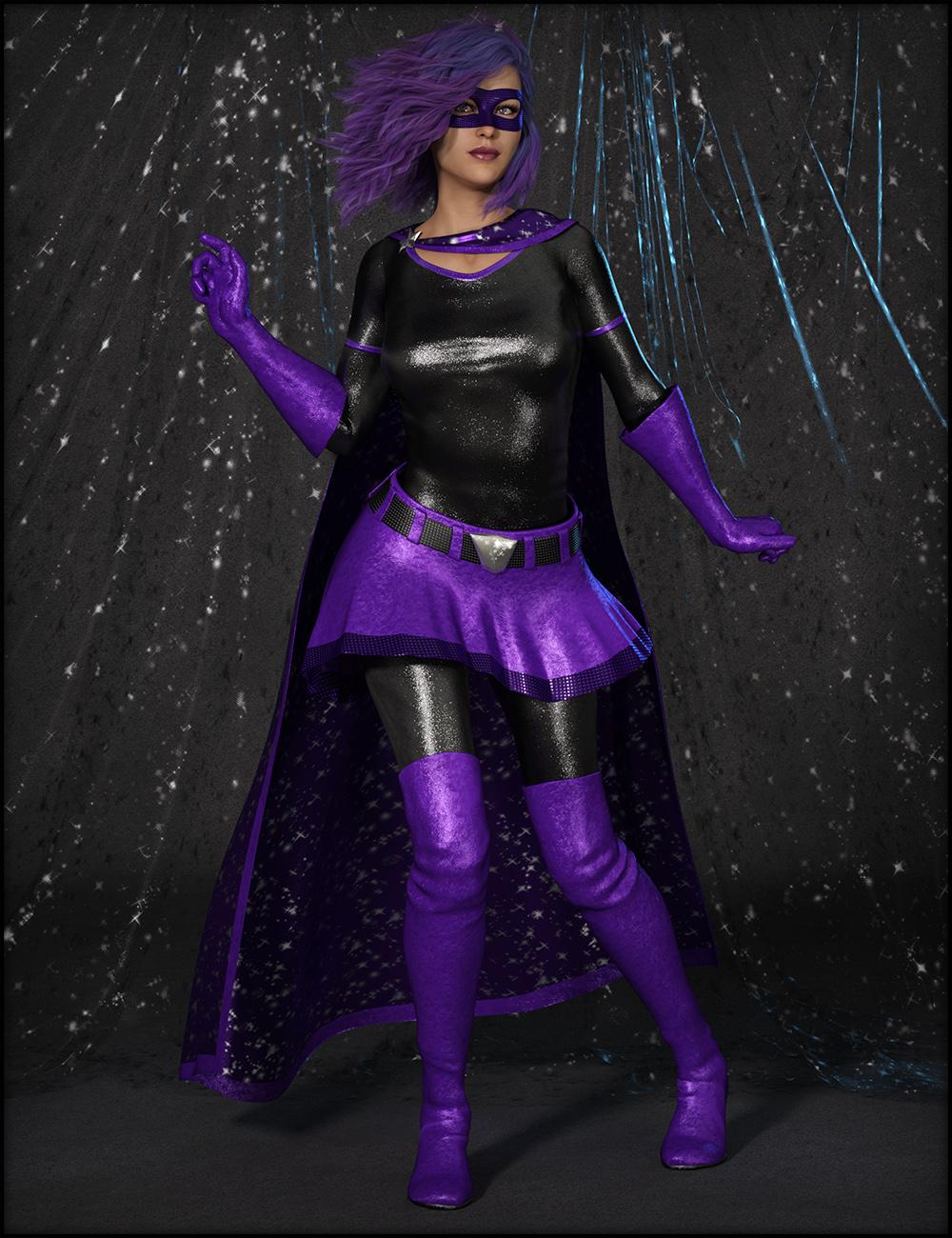 Reasons not to rush into Genesis 8
If, like me, you're trying to think of reasons to not drop a hundred + bucks on V8, here are the reason's I've come up with for myself, so far...
1 - The launch promo is aimed at newbs rather than exisiting customers. Buy V8, get V7, V6 and V5 pro bundles free? Too bad I bought those when THEY came out. Maybe I should wait for V9 so I can get the V8 Pro Bundle free. Best to wait and see what they offer tommorrow, in any case..
EDIT - I just got the Orange Bar offer adding an additional 30% off the initial price for those who've already purchased the previous sets.
2 - Once again, no bundle for the basic Genesis 8 morphs which are required to use any of the new characters, so to actually buy in on V8 with full functionality and all her working bits is over a hundred dollars even if you're in PC+. Wait two months and that price'll drop to around $70 for the whole enchillada. Come on DAZ, how about a little kindness towards the people who've already been supporting you?
EDIT - As part of the above offer, there's now an ADDITIONAL 30% off on G8 add ons. Guess what the price of the Pro Bundle + moprh packs is now? $72.34 after tax. Big Brother is watching!
3 - V8 has dead eyes. Seriously, there's something funny about her eyes in all the promos. Shje kinda creeps me out.
4 - The rest of the DAZ world needs upgrading first. So, V8 has better bending? Too bad most of the clothing that she can wear and all of the hair available for her doesn't. Her muscles may now flex automatically, but can that be switched off for a natural unconcious or sleeping pose, or, as the prmos seem to indicate, does she always look tense and on edge? Do her soft parts actually move like they're affected by gravity? And can she be touched by two different objects and have her skin be indented by both?
5. Have to upgrade to the new DS. When you move to a new DS, things that were working fine stop working, or don't work quite the way they did before.
6. Draagonstorm and Dimension 3D have both passed away, so no new GenX2 extensions for Genesis 8, and a new Pose Builder will probably be delayed as ZevO works with new scripters.
EDIT- Zev0 has now confirmed that there is a new pose builder on the way for G8, which will convert G3 poses to g8 poses AND vice Versa.
7. - Nothing exciting in the pro bundle.. Really, if the Pro Bundle didn't HAVE to be bought to get the gens, would I buy most of this stuff? The skin/character sets eventually. The two real world outfits as well. The hair... when it goes on super sale, as I've got other items that look almost identical already. The rest of it... no, not really. I'll wait for Irinman13 to start cranking out the pose sets, and the other outfits don't grab my eye at all. Although it's not the worst bundle DAZ has ever produced, it's certainly the most lackluster launch bundle I've yet seen.
- Gens and morph's should be in the basic bundle as you buy the figure, not a pose, hair, clothes. (i find there is nothing of interest in the pro bundle actually)
upgraded to 8, but now 'm holding off and see what the big surprise is that we can expect soon.#4 - Do her soft parts actually move like they're affected by gravity? And can she be touched by two different objects and have her skin be indented by both?
>> If there will be no realtime interaction like softbodies and included collisions anno 2017, 'm done
>> if daz don't get there animation setup in the main program right and IK system fixed, 'm done here- MarvelousDesigner support as replacement to optitex.
so no new gen8 figures or content here before i've seen above happen first.
Genesis and Victoria 8 Improvements?From G3 to G8:
- You can redial the morphs that come by default and you get the same character very accurately.
- You can transfer G3 custom morphs one by one as detailed in a SickleYield tutorial on DA with close to perfect result. Don't bother with methods that transfer full characters, they are not efficient and will cause deformity in the hands and/or feet.
- Shoes are an issue if they are heels, as it's always been between generations. I can't get why Daz doesn't come up with a tool for this, heels are an important item in a model wardrobe and V8 is launching without any. Maybe it's to drive sales?
- You can copy your dedicated G3 UVs to the G8 UV folder, they'll usually work quite well (can't remember the path ATM).tl,dr: G8 IS very compatible to G3, but this compatibility is not very end-user friendly. If you want to use it you need to read some documentation, experiment and sometimes come up with your own solution. Or, you might wait for the old products to be rereleased for G8 and complain about breaking your bank (this is a mild joke, Daz and the PAs live on D|S and are supposed to make things easier earning money in the process).
Morphs from G3 to G8Hey guys, that vertex stuff sounds a bit too heavy for me. Successfully transferd my first morph. Noticed that whereas it was a morph for a body part the posture changed a bit once I applied it to G8F. So maybe this is that vertex/vertices thing? Would not mind if one of you Guru's might add that to Redz tutorial.
But for the moment thanks to everyone exploring or documenting the necessary steps for transfering morphs enabling even a noob like me to do it.
You don't need to be a guru to do that. In fact, I didn't even know, this "Geometry Editor" exists, before Redz mentioned it. To create a partial morph (head morph for example) without affecting the other parts of G8, try this:
- Follow Redz's manual until you have loaded and dialed in your transferred G3 morph into G8 ("If all went well your morph imported and will be in the parameters tab. Dial it in and check that G8F has morphed correctly." in "Part two").
- Go to your morph in the Parameters tab and click on the heart in the top right of the morph to mark it as a "favorite".
- Activate the Geometry Editor:
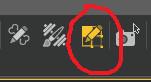
- Right click on your Genesis 8 in the Viewport and select Selection Type - Vertex Selection.
- Right click again on G8 and select Selection Mode - Lasso Selection.
- Drag the lasso around everything of G8, that should NOT be part of your morph. For a head morph, select the entire body, for example. It should look like this:
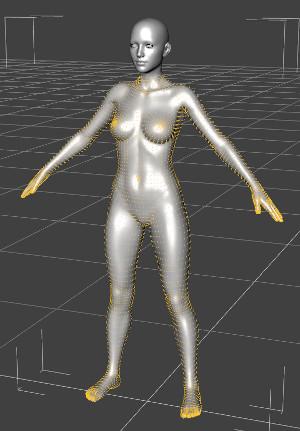
- Right click a 3rd time on G8 and select Morph Editing - Clear Selected Deltas from Favorits.
- Continue with Redz manual.
Here's the description for removing unwanted vertices from your morphs
If you plan on creating separate head and body morphs, you can save yourself a lot of time by saving a scene with a G8F with Selection Sets. After Step 6, in the quoted instructions above, (still in the Geometry Editor,) right-click in the viewport and from the popup menu, select Geometry Assignment->Create Selection Set from Selected. Name your selection something you'll remember—like Fullbody, Head, Ears, etc.—in the next popup window. Continue from Step 7. (I set up both FullBody and Head on mine, each set being the inverse of the other.) Be sure and save the scene with a name that will make it easy to find later, too.
To access the Selection Sets in the future, open your saved scene and click on the Geometry Editor Tool. Right-click in the viewport and select Selection Type - Vertex Selection from the popup menu. Right-click in the viewport again and select Geometry Selection->Select By->Selection Sets->[name_of_selection_Set]. You can do this before or after loading the morphs. (Don't forget to favorite the morph before continuing to Step 7 above.)
capes/cloaks --wrap around, for sci-fi.we could use different cloaks/capes, that wrap around and can morph longer than the feet for drag, and gliding capibilities, the way bat-mans cape does. they could be under the shoulder an out of the back, instead of around the neck area, to be a little more realistic, so that the throat getting jarred or pulled, wouldin't be an issue. also having them fold up into armor, like on a small thin roller could be nifty. iv'e seen several capes, but none wrap around the entire body, for a dramatic effect. or can asume different morphs. capes with bladeded edges, and spines could do damage.
Is it possible to autofit clothing to make it look as if it is too small for figure's frame?1. I just set Actor with posing, and some prop. then I plan to shrink swimwear, and adjust shape for current posed Actor. pic1

2, First hide all in scene tab, then select swimwear, un-parent item, (just to check node easy), and select children of swimwear and set it visible.
then I can export only swimwear mesh. I check resolution, in parameter tab,, and remove sub-D. (I usually keep smooth modifer, if it is used, with interective up-date on,then I can export smooth modifier applied mesh as obj with zero base resolution)

3 select swimwear, then export as OBJ . my setting is different , I set scale 1 % ,keep all axis cordinate for blender. it work for me. (each user like their way,, about setting) , check "ignore invisible node" is important. (your pic setting is almost same I think,,)

4 Open blender,, then import obj first. my setting is keep blender default about size, and Forward , UP . but Keep vertex order, and check Polgy groups.(these two is important)

5 After import mesh only, you can compare, poligon and vertex counts with ds scene tab.

6 then I import actor with neck accessory as template to adjust swimwear. (it is not need to keep vertex count,, just I export them at same time) I need not export hair at this time..

7 play with tools,, then quick deform as I like.
8 after defrom swimwear mesh, export as morph target, form, blender. I just select the mesh witch I need to export. (then if you use shape key,, select current shape with pin) my setting is like that, just keep scale as 1.00


9 return daz studio,, then select swimwear (root node) in daz scene tab. open morph loader, I export mesh as 1% then need to import as 10000% (or use template )
keep axis conversion as same as before. I hope to make morph from current shape (swim wear) then "reverse defomation Yes"

10 finish. when I set this morph 100% it show same shape in blender, I may save this morph,, (if I hope to keep it)
 Morphs from G3 to G8
1. I noticed Ears didn't work. I need my elf ears. I've got dozens of elf ears, all the way back to V3. I've already pulled my favorites from V4 into G3F but I couldn't even morph my clone with Izabella's ears. How do I get the ears in?
2. There's been some discussion about head morphs and how you have to use the vertex editor in order to save them. Does that apply to head-only morphs? Like SickleYield's Faces of Asia, etc.?
3. If I create a custom G3F with a whole bunch of partial morphs, you know - dial the eyes, the nose, the mouth, pear shaped hips, give her fangs, whatever. Can all that be transferred as a complete morph?
4. How do I save Favorites? I'd love to have to the morphs that I use the most available with one click every time I load a character (or at least the base characters).
By the way, Dimension-3D has some awsome DUF editor tools - one's called DSON Edit and the other is Morph Organizer. You'll probably want to wait for a sale on those but they're super useful.
It's usual for ear morphs that autofollow is disabled (so the hair doesn't deform around them.) In this case you'll need to enable autofollow on the morphs you wish to transfer. The autofollow won't apply until you unfit your G8 clone (right click and fit to none) then refit the clone to the donor figure and the ears should work.
This method is ideal for transferring custom dialled characters because you are basically transferring the entire shape as a single morph. That's also why you may get some unwanted vertex changes when transferring individual head/body part morphs.
You may find the transfer utility method better for individual head/body part morphs, as the transfer utility doesn't transfer the base figure shape. In fact if you use the transfer utility method, to get the exact shape of a character, you would need to dial in the donor figure's clone. (though that has it's own problems)
I don't think there's a way to save favourites. I wish there were.
Is it possible to autofit clothing to make it look as if it is too small for figure's frame?I am now tweaking Gen3character in blender,, with swimwear ,, , then if you need I show some pic,,and setting, how I adjust swimwear shape in blender, for my character with posing in daz scene.
I plan to make shirink morph for swimwear, to show tan line , which I made from the swimwear,, then return it as new morph for swimwear in current scene.,
(though I use G3F,,) from DAZ scene,, it seems almost same step which you need to know...
Is it possible to autofit clothing to make it look as if it is too small for figure's frame?Please confirm it. You make morph for pants, not genesis2female mesh. then you need to set resolution lever as zero for pants. (if it sub-D), to make morph.
did you already load pants in your start scene with your genesis2female actor?
and when you export pants (only), the pant mesh need to be visible. (though I believe you could export pants only, but from your pic, if you hide all,, then export, I just afraid so)
Then I do not know, why you need to scale Figure large, when you export pants,, and you may need not , load new pants.. (though it may work,)
to be simple,, you keep Gen2Figure scale , but you can just re-size Pants after you export pants, , and no need to load new scene and new pants,,
you can keep current scene, just select pants of current scene,, and open morph loader pro.. then import morph target obj, which you exported (and you will re-size
or modify, as morph target obj )
though load new scene, and new pant should work,,but it not morphed for current shape actor at all,, ,, then it make delta morph from non character shape. but I suppose you need to make delta morph for current shape pants which fit for your actor. (character shape will be auto generated)
Morphs from G3 to G8I love the examples people are sharing! I'm having more fun transferring my characters to G8F than I ever did using them on G3F. I think it is the sense of accomplishing a technical challenge that thrills me.
Here is a combination of Brita, Frida, and Girl 7 (and a bunch of individual morphs dialed in by the randomizer). I transferred the whole shape as a single morph. The skin is Haven for Girl 7 with surface changes. The eyes were borrowed from V8. The hair is Reyna.
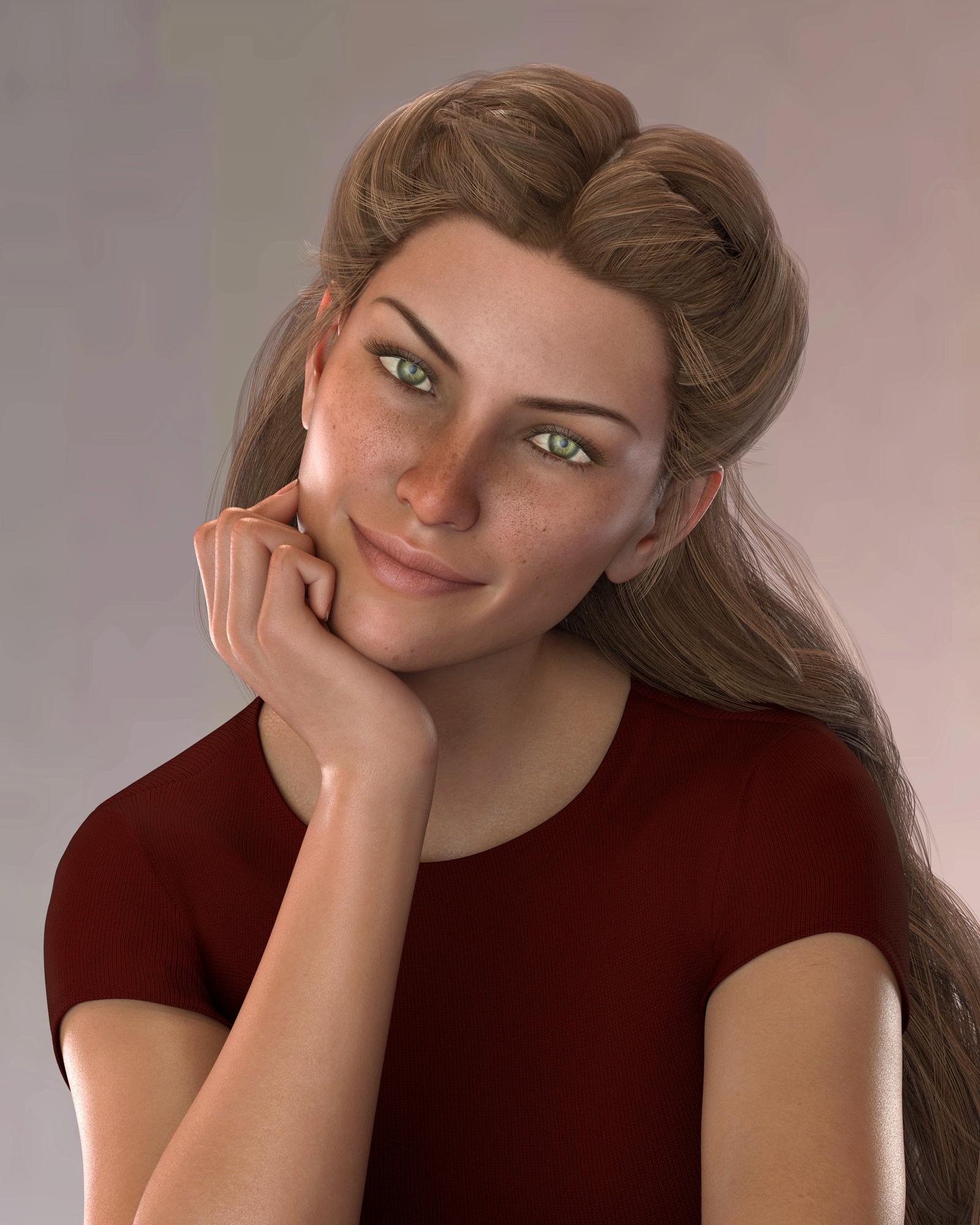
So pretty :)
Morphs from G3 to G82. There's been some discussion about head morphs and how you have to use the vertex editor in order to save them. Does that apply to head-only morphs? Like SickleYield's Faces of Asia, etc.?
Not sure I can clearly answer the rest of your questions, but this one, I can.
In a word, yes. Yes it does.
Basically, G3 and G8 need helper morphs to deal with the way a person should be shaped when they lower their arms vs when they raise them. The T pose requires a lot more help than the A pose, so you end up with slightly different placement of the shoulder areas, even if you line up the bones exactly. This different placement carries through to the morph, even if all you do is a head morph. To get rid of it, on a head morph, you need to exclude the body with facet or vertex selection.Daz 3D is part of

Connect
DAZ Productions, Inc.
7533 S Center View Ct #4664
West Jordan, UT 84084Licensing Agreement | Terms of Service | Privacy Policy | EULA
© 2026 Daz Productions Inc. All Rights Reserved.