-
Morphs from G3 to G8
I'm having a problem. The fingers distort when I try to pose them.
I thought this was mentioned earlier in the thread, but I can't find it.
After I created the morph, I exited D/S, then opened a new scene and added G8F. I used Morph Loader pro to create the morph dial. I also completed the Adjust Rigging to Shape and ERC Freeze steps.
What am I missing?
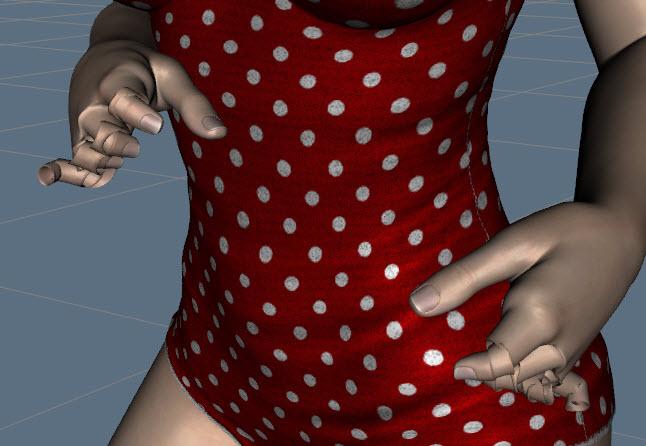
That's a new one on me. Did you, per chance, check "Adjust orientations" when you adjusted the rigging?
Because if you did, that would be the problem. I'm really asking, not being a smart ass. Usually that problem looks different, but you never know.
Generally, adjust orientation is best not used, except in extreme cases. Obviously it might not be the issue, but I can't think of anything else that would happen only when you posed the hands.
Maybe take a look at the bones in rest pose and see where they are pointing.It wasn't the Adjust Rigging step and Adjust Orientations is not checked.
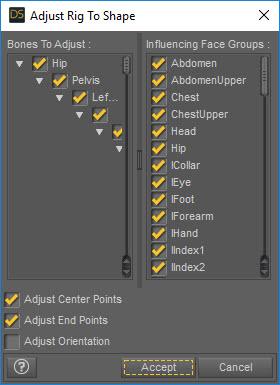
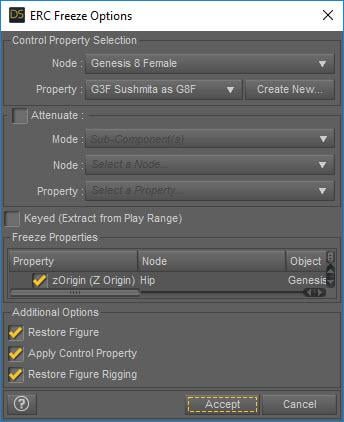
Here is a screen print for ERC Freeze.
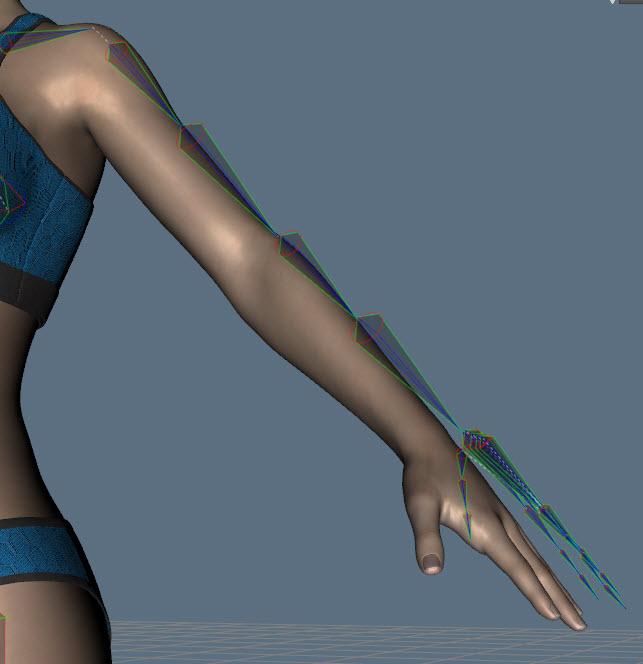
Here are the bones with the morph dialed in. Here's my problem, but I don't know how to fix it.
Which transfer method did you use?
Here are my notes from Redz' tutorial. Maybe I missed something.
CREATE THE TRANSFER MORPH
You will only need to do this once, then save it out and use it as the basis to transfer every morph.Load Morph Transfer Helper.
Categories / Utilities / Morph Transfer Helper
- Click on G3F to G8F Morph Transfer
Also located under
My Daz3D Library / People / Genesis 8 FemaleLoad this into your scene.
- A Missing Files error will pop up. Don't worry about this. I have loaded the most current version of this transfer utility.
Click OK.
- The Transfer figure looks like a base G8 without any materials.- Open the Scene tab. You will see G3F (visibility off), and G8F. G3F will be selected.
- File, Export. File type will be Wavefront Object (*.obj).
- Name it as _G8F_G3Morphs. Click Save.
[I put the underscore here so it will be at the front of the list].
- The OBJ Export Options box will show up.
- For To: click the drop down and choose Daz Studio.
- Uncheck Write Groups (middle right).
- NOTE! This will make the "To" selection change back to Custom. This is OK.
- Click Accept.- Scene Tab
- Delete Genesis 8 Female.Import the Morph
- File, Import. Click on _G8F_G3Morphs, then Open.
- In the OBJ Import Options box, set FROM to Daz Studio.
Click Accept.Transfer Utility
With the scene tab open (don't need anything selected), click on the hamburger menu and click on Assets, then Transfer Utility.
- In the Transfer Utility dialog, set Genesis 3 Female as the Source and _G8F_G3Morphs as the Target. Leave the other settings as they are. Click Accept.
Now _G8F_G3Morphs is in the A pose.Save the Morph
- The morph has been created and is now ready for transfering.
- Save this as a scene file. Mine is located here:
G:\DAZ3D\Studio\My Library\Scenes\Test\_G3F Morph Transfer to G8F
and is called:
_G3 to G8 Morph Transfer MASTERCREATE THE MORPH
Open the scene
_G3 to G8 Morph Transfer MASTER
- Select Genesis 3 Female (visibility should be set to off).TRANSFTER FULL CHARACTER MORPH
- Open the Shaping Tab and click on Actor.
- Scroll down to the Full Character and dial the morph to 100%.Save the Morph
- File , Export, save in my morph folder and name it.
=================================
LOADING G8F MORPH DIAL
- Exit Daz Studio and reopen it.
Load Genesis 8 Basic FemaleMorph Loader Pro
Open the scene tab and with G8F selected, click on the hamburger menu.
- Choose Assets, Morph Loader Pro.
- In the Morph Loader Pro dialog, set FROM to Daz Studio.
- Click on the Choose Morph Files button, and open your morph object file and click open. Click Accept.
- At the dialog which tells that the morph has been created successfully, click OK.ADJUST THE RIGGING
- With G8F selected in the Scene tab, click the hamburger menu, and select Edit, Rigging, Adjust Rigging to Shape.
- Click Accept without doing anything. This aligns the bones.FIND THE MORPH
- Open the Parameters tab.
- Just below Pose Controls is Morphs.
- Open it and click on Morph Loader to find the morph.
DON'T USE IT YET - Rigging must be set here.FREEZE THE RIGGING
In the Parameter tab:
- Click on the hamburger menu and click Edit Mode.
- Right click on the new morph dial and click ERC Freeze.
This prevents the need to adjust the rigging every time the morph is dialed.
- Click Accept without making any changes.Now you can dial the morph.
This has given me a confuse.
Take your failed file, if you still have it open. Switch the bone editor. Dial your broken morph back and forth. Do the bones move?No, the bones do not move at all. In fact, only G8F gets bigger/smaller, but the bones do not follow her. When I first reopened the file, the basic wear didn't fit, either, until I dial the morph to zero.
Should I just start over and see what happens?
Morphs from G3 to G8I'm having a problem. The fingers distort when I try to pose them.
I thought this was mentioned earlier in the thread, but I can't find it.
After I created the morph, I exited D/S, then opened a new scene and added G8F. I used Morph Loader pro to create the morph dial. I also completed the Adjust Rigging to Shape and ERC Freeze steps.
What am I missing?
That's a new one on me. Did you, per chance, check "Adjust orientations" when you adjusted the rigging?
Because if you did, that would be the problem. I'm really asking, not being a smart ass. Usually that problem looks different, but you never know.
Generally, adjust orientation is best not used, except in extreme cases. Obviously it might not be the issue, but I can't think of anything else that would happen only when you posed the hands.
Maybe take a look at the bones in rest pose and see where they are pointing.It wasn't the Adjust Rigging step and Adjust Orientations is not checked.
Here is a screen print for ERC Freeze.
Here are the bones with the morph dialed in. Here's my problem, but I don't know how to fix it.
Which transfer method did you use?
Here are my notes from Redz' tutorial. Maybe I missed something.
CREATE THE TRANSFER MORPH
You will only need to do this once, then save it out and use it as the basis to transfer every morph.Load Morph Transfer Helper.
Categories / Utilities / Morph Transfer Helper
- Click on G3F to G8F Morph Transfer
Also located under
My Daz3D Library / People / Genesis 8 FemaleLoad this into your scene.
- A Missing Files error will pop up. Don't worry about this. I have loaded the most current version of this transfer utility.
Click OK.
- The Transfer figure looks like a base G8 without any materials.- Open the Scene tab. You will see G3F (visibility off), and G8F. G3F will be selected.
- File, Export. File type will be Wavefront Object (*.obj).
- Name it as _G8F_G3Morphs. Click Save.
[I put the underscore here so it will be at the front of the list].
- The OBJ Export Options box will show up.
- For To: click the drop down and choose Daz Studio.
- Uncheck Write Groups (middle right).
- NOTE! This will make the "To" selection change back to Custom. This is OK.
- Click Accept.- Scene Tab
- Delete Genesis 8 Female.Import the Morph
- File, Import. Click on _G8F_G3Morphs, then Open.
- In the OBJ Import Options box, set FROM to Daz Studio.
Click Accept.Transfer Utility
With the scene tab open (don't need anything selected), click on the hamburger menu and click on Assets, then Transfer Utility.
- In the Transfer Utility dialog, set Genesis 3 Female as the Source and _G8F_G3Morphs as the Target. Leave the other settings as they are. Click Accept.
Now _G8F_G3Morphs is in the A pose.Save the Morph
- The morph has been created and is now ready for transfering.
- Save this as a scene file. Mine is located here:
G:\DAZ3D\Studio\My Library\Scenes\Test\_G3F Morph Transfer to G8F
and is called:
_G3 to G8 Morph Transfer MASTERCREATE THE MORPH
Open the scene
_G3 to G8 Morph Transfer MASTER
- Select Genesis 3 Female (visibility should be set to off).TRANSFTER FULL CHARACTER MORPH
- Open the Shaping Tab and click on Actor.
- Scroll down to the Full Character and dial the morph to 100%.Save the Morph
- File , Export, save in my morph folder and name it.
=================================
LOADING G8F MORPH DIAL
- Exit Daz Studio and reopen it.
Load Genesis 8 Basic FemaleMorph Loader Pro
Open the scene tab and with G8F selected, click on the hamburger menu.
- Choose Assets, Morph Loader Pro.
- In the Morph Loader Pro dialog, set FROM to Daz Studio.
- Click on the Choose Morph Files button, and open your morph object file and click open. Click Accept.
- At the dialog which tells that the morph has been created successfully, click OK.ADJUST THE RIGGING
- With G8F selected in the Scene tab, click the hamburger menu, and select Edit, Rigging, Adjust Rigging to Shape.
- Click Accept without doing anything. This aligns the bones.FIND THE MORPH
- Open the Parameters tab.
- Just below Pose Controls is Morphs.
- Open it and click on Morph Loader to find the morph.
DON'T USE IT YET - Rigging must be set here.FREEZE THE RIGGING
In the Parameter tab:
- Click on the hamburger menu and click Edit Mode.
- Right click on the new morph dial and click ERC Freeze.
This prevents the need to adjust the rigging every time the morph is dialed.
- Click Accept without making any changes.Now you can dial the morph.
This has given me a confuse.
Take your failed file, if you still have it open. Switch the bone editor. Dial your broken morph back and forth. Do the bones move?Morphs from G3 to G8I'm having a problem. The fingers distort when I try to pose them.
I thought this was mentioned earlier in the thread, but I can't find it.
After I created the morph, I exited D/S, then opened a new scene and added G8F. I used Morph Loader pro to create the morph dial. I also completed the Adjust Rigging to Shape and ERC Freeze steps.
What am I missing?
That's a new one on me. Did you, per chance, check "Adjust orientations" when you adjusted the rigging?
Because if you did, that would be the problem. I'm really asking, not being a smart ass. Usually that problem looks different, but you never know.
Generally, adjust orientation is best not used, except in extreme cases. Obviously it might not be the issue, but I can't think of anything else that would happen only when you posed the hands.
Maybe take a look at the bones in rest pose and see where they are pointing.It wasn't the Adjust Rigging step and Adjust Orientations is not checked.
Here is a screen print for ERC Freeze.
Here are the bones with the morph dialed in. Here's my problem, but I don't know how to fix it.
Which transfer method did you use?
Here are my notes from Redz' tutorial. Maybe I missed something.
CREATE THE TRANSFER MORPH
You will only need to do this once, then save it out and use it as the basis to transfer every morph.Load Morph Transfer Helper.
Categories / Utilities / Morph Transfer Helper
- Click on G3F to G8F Morph Transfer
Also located under
My Daz3D Library / People / Genesis 8 FemaleLoad this into your scene.
- A Missing Files error will pop up. Don't worry about this. I have loaded the most current version of this transfer utility.
Click OK.
- The Transfer figure looks like a base G8 without any materials.- Open the Scene tab. You will see G3F (visibility off), and G8F. G3F will be selected.
- File, Export. File type will be Wavefront Object (*.obj).
- Name it as _G8F_G3Morphs. Click Save.
[I put the underscore here so it will be at the front of the list].
- The OBJ Export Options box will show up.
- For To: click the drop down and choose Daz Studio.
- Uncheck Write Groups (middle right).
- NOTE! This will make the "To" selection change back to Custom. This is OK.
- Click Accept.- Scene Tab
- Delete Genesis 8 Female.Import the Morph
- File, Import. Click on _G8F_G3Morphs, then Open.
- In the OBJ Import Options box, set FROM to Daz Studio.
Click Accept.Transfer Utility
With the scene tab open (don't need anything selected), click on the hamburger menu and click on Assets, then Transfer Utility.
- In the Transfer Utility dialog, set Genesis 3 Female as the Source and _G8F_G3Morphs as the Target. Leave the other settings as they are. Click Accept.
Now _G8F_G3Morphs is in the A pose.Save the Morph
- The morph has been created and is now ready for transfering.
- Save this as a scene file. Mine is located here:
G:\DAZ3D\Studio\My Library\Scenes\Test\_G3F Morph Transfer to G8F
and is called:
_G3 to G8 Morph Transfer MASTERCREATE THE MORPH
Open the scene
_G3 to G8 Morph Transfer MASTER
- Select Genesis 3 Female (visibility should be set to off).TRANSFTER FULL CHARACTER MORPH
- Open the Shaping Tab and click on Actor.
- Scroll down to the Full Character and dial the morph to 100%.Save the Morph
- File , Export, save in my morph folder and name it.
=================================
LOADING G8F MORPH DIAL
- Exit Daz Studio and reopen it.
Load Genesis 8 Basic FemaleMorph Loader Pro
Open the scene tab and with G8F selected, click on the hamburger menu.
- Choose Assets, Morph Loader Pro.
- In the Morph Loader Pro dialog, set FROM to Daz Studio.
- Click on the Choose Morph Files button, and open your morph object file and click open. Click Accept.
- At the dialog which tells that the morph has been created successfully, click OK.ADJUST THE RIGGING
- With G8F selected in the Scene tab, click the hamburger menu, and select Edit, Rigging, Adjust Rigging to Shape.
- Click Accept without doing anything. This aligns the bones.FIND THE MORPH
- Open the Parameters tab.
- Just below Pose Controls is Morphs.
- Open it and click on Morph Loader to find the morph.
DON'T USE IT YET - Rigging must be set here.FREEZE THE RIGGING
In the Parameter tab:
- Click on the hamburger menu and click Edit Mode.
- Right click on the new morph dial and click ERC Freeze.
This prevents the need to adjust the rigging every time the morph is dialed.
- Click Accept without making any changes.Now you can dial the morph.
Morphs from G3 to G8I'm having a problem. The fingers distort when I try to pose them.
I thought this was mentioned earlier in the thread, but I can't find it.
After I created the morph, I exited D/S, then opened a new scene and added G8F. I used Morph Loader pro to create the morph dial. I also completed the Adjust Rigging to Shape and ERC Freeze steps.
What am I missing?
That's a new one on me. Did you, per chance, check "Adjust orientations" when you adjusted the rigging?
Because if you did, that would be the problem. I'm really asking, not being a smart ass. Usually that problem looks different, but you never know.
Generally, adjust orientation is best not used, except in extreme cases. Obviously it might not be the issue, but I can't think of anything else that would happen only when you posed the hands.
Maybe take a look at the bones in rest pose and see where they are pointing.It wasn't the Adjust Rigging step and Adjust Orientations is not checked.
Here is a screen print for ERC Freeze.
Here are the bones with the morph dialed in. Here's my problem, but I don't know how to fix it.
Which transfer method did you use?
Morphs from G3 to G8I'm having a problem. The fingers distort when I try to pose them.
I thought this was mentioned earlier in the thread, but I can't find it.
After I created the morph, I exited D/S, then opened a new scene and added G8F. I used Morph Loader pro to create the morph dial. I also completed the Adjust Rigging to Shape and ERC Freeze steps.
What am I missing?
That's a new one on me. Did you, per chance, check "Adjust orientations" when you adjusted the rigging?
Because if you did, that would be the problem. I'm really asking, not being a smart ass. Usually that problem looks different, but you never know.
Generally, adjust orientation is best not used, except in extreme cases. Obviously it might not be the issue, but I can't think of anything else that would happen only when you posed the hands.
Maybe take a look at the bones in rest pose and see where they are pointing.It wasn't the Adjust Rigging step and Adjust Orientations is not checked.
Here is a screen print for ERC Freeze.
Here are the bones with the morph dialed in. Here's my problem, but I don't know how to fix it.
V8 powerpose or new V8 Expressions, etcWell, I think it's a bit of both. The expressions provide sliders that you can use to quickly mix expressions from the provided set. That part can certainly also be achieved by using the new PowerPose interface (You can also further modify them with PowerPose which is useful to make them asymmetric for example). Hower the expression morphs also add an HD component that adds small folds and creases which significantly add to realism in my view.
So, overall I find them well worth it.
Ciao
TD
thank you. I've had them and the morph packs in my cart for a couple of days, wondering if I should buy them or not.
Morphs from G3 to G8I'm having a problem. The fingers distort when I try to pose them.
I thought this was mentioned earlier in the thread, but I can't find it.
After I created the morph, I exited D/S, then opened a new scene and added G8F. I used Morph Loader pro to create the morph dial. I also completed the Adjust Rigging to Shape and ERC Freeze steps.
What am I missing?
That's a new one on me. Did you, per chance, check "Adjust orientations" when you adjusted the rigging?
Because if you did, that would be the problem. I'm really asking, not being a smart ass. Usually that problem looks different, but you never know.
Generally, adjust orientation is best not used, except in extreme cases. Obviously it might not be the issue, but I can't think of anything else that would happen only when you posed the hands.
Maybe take a look at the bones in rest pose and see where they are pointing.Carrara vs. DAZ Studioin celebration of G8s' release I went to another lesser known site and bought a just released morph package for M4 ..

 V8 powerpose or new V8 Expressions, etc
Well, I think it's a bit of both. The expressions provide sliders that you can use to quickly mix expressions from the provided set. That part can certainly also be achieved by using the new PowerPose interface (You can also further modify them with PowerPose which is useful to make them asymmetric for example). Hower the expression morphs also add an HD component that adds small folds and creases which significantly add to realism in my view.
So, overall I find them well worth it.
Ciao
TD
EDIT: Here is a quick untextured example of the "Pain" expression. Most of the finer features, folds etc. are part of the HD morph and cannot be achieved with the PowerPose alone which only manipulates the facial bones.
Morphs from G3 to G81. I noticed Ears didn't work. I need my elf ears. I've got dozens of elf ears, all the way back to V3. I've already pulled my favorites from V4 into G3F but I couldn't even morph my clone with Izabella's ears. How do I get the ears in?
2. There's been some discussion about head morphs and how you have to use the vertex editor in order to save them. Does that apply to head-only morphs? Like SickleYield's Faces of Asia, etc.?
3. If I create a custom G3F with a whole bunch of partial morphs, you know - dial the eyes, the nose, the mouth, pear shaped hips, give her fangs, what wever. Can all that be transferred as a complete morph?
4. How do I save Favorites? I'd love to have to the morphs that I use the most available with one click every time I load a character (or at least the base characters).
By the way, Dimension-3D has some awsome DUF editor tools - one's called DSON Edit and the other is Morph Organizer. You'll probably want to wait for a sale on those but they're super useful.
It's usual for ear morphs that autofollow is disabled (so the hair doesn't deform around them.) In this case you'll need to enable autofollow on the morphs you wish to transfer. The autofollow won't apply until you unfit your G8 clone (right click and fit to none) then refit the clone to the donor figure and the ears should work.
This method is ideal for transferring custom dialled characters because you are basically transferring the entire shape as a single morph. That's also why you may get some unwanted vertex changes when transferring individual head/body part morphs.
You may find the transfer utility method better for individual head/body part morphs, as the transfer utility doesn't transfer the base figure shape. In fact if you use the transfer utility method, to get the exact shape of a character, you would need to dial in the donor figure's clone. (though that has it's own problems)
I don't think there's a way to save favourites. I wish there were.
Ack! I think it's time to crank up my source-code editor and other tools and just hack all the files at one time. This could get time-consuming.
And, of course, they're compressed. Google said something about a batch decompress tool in DS? I can't find anything except DSF Toolbox in the store. The OP made it sound like something built into DS.
Do you have an unzipping tool? I use 7zip - you can run it on a compressed .dsf or .duf and it will uncompress it for you - it won't work on encrypted files like .dse (for obvious reasons) and I've run into a few other files it won't do, but for morphs files it's generally fine.
Yes, I have 7Zip. Do I need to rename the files to .zip?No. I suppose it doesn't hurt.
Assuming a windows computer (no knowledge of Macs). Find the compressed dsf/duf. Right click. In the context menu, you will get a 7zip option with submenu. Select Extract Here from the submenu. 7zip will think about it, then a new file will appear with the same name as the dsf, but no extention. So you'll see Filename.dsf and Filename If you change Filename to Filename.txt you can open it in notepad and read all the glorious insanity of the Daz asset structure. (You can also just right click without renaming and choose open with, and find a text editor in the list). If you delete the compressed dsf and rename Filename to Filename.dsf (or Filename.duf, what ever it was originally) it will just work the next time you load it.
Now, I'd like to ask you a favor. Please to go to \data\DAZ 3D\Genesis 3\Female and test this knowledge on Genesis3Female.dsf. No need to replace or delete or anything. Just open the text version, and tell me what the "id" block says."id" : "/data/DAZ%203D/Genesis%203/Female/Genesis3Female.dsf",
Thank you. That's helpful :)
I edited one G3F Elf Ear morph and copied it over to the G8/Female morphs folder, loaded G8F and... it did nothing. Of course, I didn't finish following along with the rest of the tutorial, so I'm not too surprised. But I have a burning question at this point... Why bother? If I still have to manually load each one and save it off, it doesn't seem like manually editing the dsf files really speeds things up. So how is this different, better than any of the other techniques? You said something about not overwriting the ERCs (which doesn't mean anything to me ).
ERC is Enhanced Remote Controls. Which is technospeak for, "If I move this, that also happens."
No weight map could possibly be perfect for moving both G3F's arm and Star 2.0's Yet both figures live on the same mesh/model. This is done through the magic of JCMs. Joint Controlled Morphs. Joints Controlle Morphs work through ERC. Thus a method to transfer a character with ERC intact transfers both the character's shape and the character's improved bending.
I think I've said this more than once. No matter what your reason for using the concept of moving a file, and then performing the transfer, you still have to do the transfer before it will work. This is ansolutely something you should not do until you are prepared to do the transfer of the morph, because the original file is not properly setup to work on G8. If it works at all, it will be broken. The only point to it is to preserve the ERC links, for things like eye closure and joint bending. It's doesn't change the fidelity of the transfer. As far as your ears issue, I believe Redz pointed out to you the problem. You need to set autofollow to on.
That's not really enough info though for someone unfamiliar with Autofollow. Say you had a morph. You dialed it and it did not transfer to the figure or clothing item you targeted. Now you know Autofollow is set to off. You now have start over. Completely. You have to delete the target figure or clothing from the scene, set autofollow to on in the morph, and then reload the target figure. Because the moment you moved the silder for the non-autofollow morph, Studio flagged it as autofollow = off for the target item and you can't undo that. You may even have start over even more. Because sometimes Studio persists setting even though you've deleted and reloaded a figure. The only way to clear that for sure is to close Studio.
If you want to transfer a whole bunch of ear morphs all at once ... Well you have to wait until I write my tutorial. It's a some what involved process, because, as I've alluded to, doing it wrong can actually break G8.
Honestly, I regret bring it up, now. I didn't recognize the danger. That is, I'm used to converting things by whatever means I can, (because I'm not made of money, and I have stuff back to Generation 3. Also, because I've got a sideline of making things for my personal use, and those things end up needing conversion because I never seem to finish one before a new figure comes out. In one case, I took so long it was rendered obsolete) so I'm comfortable with the risk of fatally breaking a figure. Reinstalling it might be tedious, but it will work again.
The thing is, even these more benign methods of transfer have some element of risk, and seeing the gusto with which people dive in without a clear idea what they're doing, and why, has led me to regret saying what I did about the ERC.
On the flipside, it does what I said it does on the tin. I have pretty much a full custom G3 character. Custom body, custom head, body JCMs, custom controllers for the expressions. Essentially, equivalent to a Daz flagship character (sans custom maps, shaders, and products design around that theme. I actually I have more than one, but the rest are toons. This the only "real world" character that I both want to transfer and is suitable to illustrate how on might transfer, say Sunny 7. Like I said, not made of money. I don't have much in the way of flagship characters outside G1). The last few days I've transfered her 3 times. Not because it didn't work the first time (though I made one mistake and left a piece out. That bit isn't part of her. It was something I made much earlier, and it gets recycled a lot). I'm going to transfer her again tonight. A) because I thought of an improvement to her head mesh, and B) for the same reason I did it the other 3 times. I'm trying to refine the clearest, simplest method for actually transfering a full character with ERC intact.
While the final result won't have speed and simplicity of GenX, it will have all of the utility at least between g3 and g8.
As I mentioned in my original post about ERC way back on page 3 or 4, you do not individually edit files. The use of FAR (or similar mass file editor) is implied to be mandatory. I admit, it isn't, but who wants to manually edit 40 files? The head and body morphs alone have something like 1000 items that have to be changed. (FAR tells you how man edits it makes to each file when you run it.) So, I suppose you can edit files by hand, but why?
So, to summarize. I never said this was better. I did say my clone method was better because it is simpler and gives more accurate results than any other. I'll plead guilty to that bit of hubris. The only thing this method has that sets it apart is does something no other method I'm aware of can: Preserve JCMs and MCMs. Beyond that, the fidelity of the transfer is still going to be a matter of the methods you use to actually transfer the morph. This method isn't about transfering morphs, per se. It's all about the Enhanced Remote Controls.Genesis8 tear problemIf you did not ask it,, I might ask same thing , I usually use reverse defomation, then have not found such problem ^^;
the hidden expand eye lash morph is not be shown as currently used. it is cheat morph I think,, (I could not find it before)
Genesis8 tear problemUse "reverse defomation" option. because Eye lash already morphed by Hidden parameter "Eye lashed expand" as 100%
it is locked, and limited, then can not change value. but if you use morph loader without reverse defomation, morph make delata from zero.
I happend to be found same thing when I try to import tear morph (not eye lash)
Thank you, I will try that.
edit: Yess it works!
 Genesis8 tear problem
Use "reverse defomation" option. because Eye lash already morphed by Hidden parameter "Eye lashed expand" as 100%
it is locked, and limited, then can not change value. but if you use morph loader without reverse defomation, morph make delata from zero.
I happend to be found same thing when I try to import tear morph (not eye lash)
Morphs from G3 to G8This is my alternative method, but I've found it better than the transfer utility for body morphs especially
Tutorial and helper scene/morphs included
Updated the tutorial file that (hopefully) sorts out those fingernail issues. Let me know how you get on with it. And huge thanks to everyone providing ideas and feedback, We'll get there together :)
I have tried this without complete success. I have een especially confused by the tranference of the textures etc., as you may note from the attachment. I have tried manually matching the G8 figure parameters (left) to the G3F (Molly tewaked, right) of the torso, but as is obvious I have something not working. Is there a simple way to transfer them without having to laboriously enter every parameter by noting its details on G3F and entering them on G8? The eyes also have not carried over, which is a pest because I have no idea which eyes I chose for Molly - probably not her originals. I haven't tried to match the face colouring etc.
Shaping is reasonable but not absolutely right, but I can live with that.
If you're just trying to transfer textures from G3F to G8F, just load and select the G3F character who's texture you want to us, go to File>>Save As>>Material Preset then name it what you want and save. You can then find it under your Library >> Presets >> Materials.
You can then select the G8F character that you want the materials/textures on and double click on the Materials Preset you just made. That transfers those textures and settings to the new figure.
Morphs from G3 to G8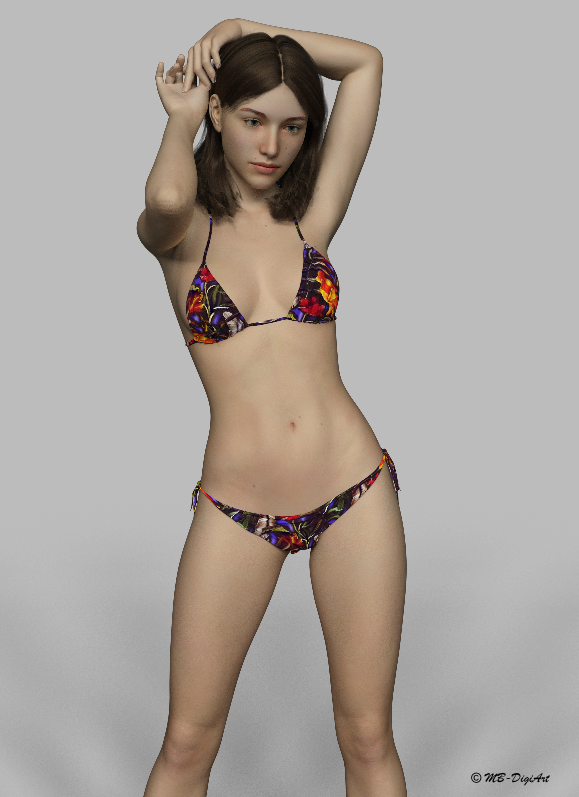
Here is the latest model by FWSA Melinda for Genesis 3 Female with bonus morph and textures for G8F. (Renderosity)
This is G8F with the Melinda bonus morph and texture.
Lighting is by DimensionTheory https://www.daz3d.com/iradiance-hdr-mesh-lights-volume-2-for-iray
Clothing by Powerage Hot Summer 2017 for G3F (Renderosity) with texture by 3-DArena 7th Ave Hot Summer 2017 (Renderosity)
Hair: https://www.daz3d.com/georgia-hair-and-oot-hairblending-2-0-for-genesis-3-female-s
Pose : https://www.daz3d.com/i13-perfect-pink-pose-collection-for-the-genesis-3-female-s
I used pose 09 and transfered it to G8 using Redz's Morph Transfer Helper. Many thanks Redz for making such a useful tool available to us.
I must admit that I was very sceptical like some others in the forums about spending more money to buy yet another 'New' shiny Genesis model. I couldn't see what all the fuss was about, until I saw the HD expressions, and started to play with G8 and Redz's morph transfer helper. This along with some great realistic renders of G8 in the forums, plus a great Daz discount, finally persuaded me.
I don't usually do a great deal of female renders, but with G8 I think this is about to change. Now looking forward to see how the G8 male will turn out when he is finally released.
 Morphs from G3 to G8
I'm having a problem. The fingers distort when I try to pose them.
I thought this was mentioned earlier in the thread, but I can't find it.
After I created the morph, I exited D/S, then opened a new scene and added G8F. I used Morph Loader pro to create the morph dial. I also completed the Adjust Rigging to Shape and ERC Freeze steps.
What am I missing?
Genesis 8 Characters I'd Like to SeeI would also love to see a gymnast. Short, but muscled and honed.
Slightly over-weight and less than perfect "normal" people would be great too but I do not think they would sell as well. Maybe as a set.
I use George for G3M a LOT! There are just some things you can't do with morphs. I'd like to see more varied muscle types -- a boxer is not the same as a bodybuilder!
DAZ has separate "Fitness" and "Bodybuilder" morphs for at least the last two generations of figures included in the body morph pack. Are they not different enough for you to start with.
Morphs from G3 to G81. I noticed Ears didn't work. I need my elf ears. I've got dozens of elf ears, all the way back to V3. I've already pulled my favorites from V4 into G3F but I couldn't even morph my clone with Izabella's ears. How do I get the ears in?
2. There's been some discussion about head morphs and how you have to use the vertex editor in order to save them. Does that apply to head-only morphs? Like SickleYield's Faces of Asia, etc.?
3. If I create a custom G3F with a whole bunch of partial morphs, you know - dial the eyes, the nose, the mouth, pear shaped hips, give her fangs, what wever. Can all that be transferred as a complete morph?
4. How do I save Favorites? I'd love to have to the morphs that I use the most available with one click every time I load a character (or at least the base characters).
By the way, Dimension-3D has some awsome DUF editor tools - one's called DSON Edit and the other is Morph Organizer. You'll probably want to wait for a sale on those but they're super useful.
It's usual for ear morphs that autofollow is disabled (so the hair doesn't deform around them.) In this case you'll need to enable autofollow on the morphs you wish to transfer. The autofollow won't apply until you unfit your G8 clone (right click and fit to none) then refit the clone to the donor figure and the ears should work.
This method is ideal for transferring custom dialled characters because you are basically transferring the entire shape as a single morph. That's also why you may get some unwanted vertex changes when transferring individual head/body part morphs.
You may find the transfer utility method better for individual head/body part morphs, as the transfer utility doesn't transfer the base figure shape. In fact if you use the transfer utility method, to get the exact shape of a character, you would need to dial in the donor figure's clone. (though that has it's own problems)
I don't think there's a way to save favourites. I wish there were.
Ack! I think it's time to crank up my source-code editor and other tools and just hack all the files at one time. This could get time-consuming.
And, of course, they're compressed. Google said something about a batch decompress tool in DS? I can't find anything except DSF Toolbox in the store. The OP made it sound like something built into DS.
Do you have an unzipping tool? I use 7zip - you can run it on a compressed .dsf or .duf and it will uncompress it for you - it won't work on encrypted files like .dse (for obvious reasons) and I've run into a few other files it won't do, but for morphs files it's generally fine.
Yes, I have 7Zip. Do I need to rename the files to .zip?No. I suppose it doesn't hurt.
Assuming a windows computer (no knowledge of Macs). Find the compressed dsf/duf. Right click. In the context menu, you will get a 7zip option with submenu. Select Extract Here from the submenu. 7zip will think about it, then a new file will appear with the same name as the dsf, but no extention. So you'll see Filename.dsf and Filename If you change Filename to Filename.txt you can open it in notepad and read all the glorious insanity of the Daz asset structure. (You can also just right click without renaming and choose open with, and find a text editor in the list). If you delete the compressed dsf and rename Filename to Filename.dsf (or Filename.duf, what ever it was originally) it will just work the next time you load it.
Now, I'd like to ask you a favor. Please to go to \data\DAZ 3D\Genesis 3\Female and test this knowledge on Genesis3Female.dsf. No need to replace or delete or anything. Just open the text version, and tell me what the "id" block says."id" : "/data/DAZ%203D/Genesis%203/Female/Genesis3Female.dsf",
Thank you. That's helpful :)
I edited one G3F Elf Ear morph and copied it over to the G8/Female morphs folder, loaded G8F and... it did nothing. Of course, I didn't finish following along with the rest of the tutorial, so I'm not too surprised. But I have a burning question at this point... Why bother? If I still have to manually load each one and save it off, it doesn't seem like manually editing the dsf files really speeds things up. So how is this different, better than any of the other techniques? You said something about not overwriting the ERCs (which doesn't mean anything to me ).
Converting to G1, G2, G3, G8 & G9Converting to Genesis 8
G3 to G8
G3F to G8F
Shape:
Associated shapes: ???
Clone: In Genesis 8 Starter Essential (Free with DS4)
Clothes:
Using Autofit
Using dforce
Not mandatory but can be helpful
SY Ultra Templates Genesis 8 Female(s) SY Ultra Templates Genesis 8 Male(s) 

Hair: Using Autofit
Shoes/Heels: Using Autofit
Morphs:
Genesis3 to Gen8 morph converter 1.1 (in another site)
Expressions:
UVs:
Genesis 3 Character UVs for Genesis 8 Female Genesis 3 Character UVs for Genesis 8 Male 
 (A7/Ara7/Bet7/Eva7/Gev7/Gia7/Kal7/Kar7/Lit7/ML7/Moq7/Oly7/Oph7/R7/Sun7/TJs7/G7/TJl7/V7) (Dan7, Dar7,Eli7,Gnn7/Guy7/I7/Ken7/Kim7/L7/Leo7/Luc7/M7/TRya7)
Skins:
G8F can use G3F skins directly
Poses:
Genesis 3 to Genesis 8 Pose Converter
Batch Converter + Metadata
Poses Relaxing + convertion
Pose Mixing
Assembly Line Pose Automation Kit 


G3F G8F pose adjust scripts - Legs, Arms and Full 
Animation:
Morphs from G3 to G81. I noticed Ears didn't work. I need my elf ears. I've got dozens of elf ears, all the way back to V3. I've already pulled my favorites from V4 into G3F but I couldn't even morph my clone with Izabella's ears. How do I get the ears in?
2. There's been some discussion about head morphs and how you have to use the vertex editor in order to save them. Does that apply to head-only morphs? Like SickleYield's Faces of Asia, etc.?
3. If I create a custom G3F with a whole bunch of partial morphs, you know - dial the eyes, the nose, the mouth, pear shaped hips, give her fangs, what wever. Can all that be transferred as a complete morph?
4. How do I save Favorites? I'd love to have to the morphs that I use the most available with one click every time I load a character (or at least the base characters).
By the way, Dimension-3D has some awsome DUF editor tools - one's called DSON Edit and the other is Morph Organizer. You'll probably want to wait for a sale on those but they're super useful.
It's usual for ear morphs that autofollow is disabled (so the hair doesn't deform around them.) In this case you'll need to enable autofollow on the morphs you wish to transfer. The autofollow won't apply until you unfit your G8 clone (right click and fit to none) then refit the clone to the donor figure and the ears should work.
This method is ideal for transferring custom dialled characters because you are basically transferring the entire shape as a single morph. That's also why you may get some unwanted vertex changes when transferring individual head/body part morphs.
You may find the transfer utility method better for individual head/body part morphs, as the transfer utility doesn't transfer the base figure shape. In fact if you use the transfer utility method, to get the exact shape of a character, you would need to dial in the donor figure's clone. (though that has it's own problems)
I don't think there's a way to save favourites. I wish there were.
Ack! I think it's time to crank up my source-code editor and other tools and just hack all the files at one time. This could get time-consuming.
And, of course, they're compressed. Google said something about a batch decompress tool in DS? I can't find anything except DSF Toolbox in the store. The OP made it sound like something built into DS.
Do you have an unzipping tool? I use 7zip - you can run it on a compressed .dsf or .duf and it will uncompress it for you - it won't work on encrypted files like .dse (for obvious reasons) and I've run into a few other files it won't do, but for morphs files it's generally fine.
Yes, I have 7Zip. Do I need to rename the files to .zip?No. I suppose it doesn't hurt.
Assuming a windows computer (no knowledge of Macs). Find the compressed dsf/duf. Right click. In the context menu, you will get a 7zip option with submenu. Select Extract Here from the submenu. 7zip will think about it, then a new file will appear with the same name as the dsf, but no extention. So you'll see Filename.dsf and Filename If you change Filename to Filename.txt you can open it in notepad and read all the glorious insanity of the Daz asset structure. (You can also just right click without renaming and choose open with, and find a text editor in the list). If you delete the compressed dsf and rename Filename to Filename.dsf (or Filename.duf, what ever it was originally) it will just work the next time you load it.
Now, I'd like to ask you a favor. Please to go to \data\DAZ 3D\Genesis 3\Female and test this knowledge on Genesis3Female.dsf. No need to replace or delete or anything. Just open the text version, and tell me what the "id" block says."id" : "/data/DAZ%203D/Genesis%203/Female/Genesis3Female.dsf",
Thank you. That's helpful :)
Daz 3D is part of

Connect
DAZ Productions, Inc.
7533 S Center View Ct #4664
West Jordan, UT 84084Licensing Agreement | Terms of Service | Privacy Policy | EULA
© 2026 Daz Productions Inc. All Rights Reserved.