-
Question about Character Selection
However, if depends on how the figure was built. Some may require you to load G3F first then apply the morphs. It will be easy to tel . If you need to load G3F first and your double click the figure morph on an empty viewport, you'll get an error.
Question about Character SelectionSince I never use any of the default character morphs that come with a package, let me understand better. Just clicking the character icon and loading the full characater at once, correct? If so, no, you don't need to load V7. V7 is just a morph in the list you have for genesis 3 female and that morph will usually activate when you load the character.
Transferring Arabella 7 character to Arabella HD: How?Take your character, and dial up the Arabella HD morph. If you like how it looks, great. If you don't, there's nothing you can do to change the HD details, so just stick with what you already had.
Transferring Arabella 7 character to Arabella HD: How?There's nothing to transfer - the HD morph just adds details to the basic shape, it applis to the same figure. HD morphs modify the virtual vertices created by sub-division, they asren't using a figure with a higher base resolution.
moving content to another disk: can my scenes still load?As I said above, DIM won't update products if you move them to split locations but you can install diffrent products to different folders - the only restriction is that fourth geenration Daz figures (Victoria 4 etc.) have to have their bases and all morph expansions in the same content directory.
DAz studio 4.9 - Old content genesis morphsYes, using Morph Loader pro (or Advanced) or manipulating the mesh inside DS with a dForm.
Anyone else problems with 4.9.4 version?Double-click has never been a supported behaviour in PowerPose, so that isn'ty an issue with 4.9.4 - I thought you had already posted on that in the beta thread. Perhaps it is being read as two single clicks?
DS can take a while to close, especially if you've had a morph-heavy figure loaded (or anything that uses a lot of resoruces).
For rendering, make sure that your CPU is checked in the Advanced tab of Render Settings.
Skin builder for Genesis 2 Female (Eyebrows)SB3 has a slider to adjust Brow Height. Is that not working? I can't say I've had any issues with it, but the brow builder is the one SB3 feature that I rarely use since I aready owned Wow Brow, Real eyebrows and a large collection of fiber mesh brows. If you just can't get it low enough you might want to check your figure's shaping morphs and see if there's some kind of raise eyebrow morph going on there.
I have wow brow for gensis 3 female do they make one for genesis 2 female?
DS 4.9.4?Autofit & Transfer Utility updates, huh? I hope this means better footwear support.
How Do I Make a Morph that Correctly Effects an Already Morphed Figure?clear step when I make new character morphB from vendor character set A . of course I can not up-load and distribute morph which made from vendor.
1 export mesh of Character set A applied to blender. (with base resolution and posing If I need so) . Keep current scene in daz studio. not close it.
2 tweak mesh and save (export) it as MorphB obj. in blender, then return daz studio, keep current character as same as before, select mesh, then launch morph loader pro
3 select MorphB as morph, then set name or group etc,, then set reverse defomation "on". it make delta morph from current shape pose actor in daz studio.
4 n I apply MorphB value to 100%, actor in the scene change to shape which I saw in blender. Of course I need to keep all " Vendor character set A" parameter values, to see same shape (and pose) + MorphB 100%
Export a Genesis 3 movement in FBXHi everybody,
I'm working mainly on cinema 4D but I need to animate a figure on a very simple movement. I've choose a genesis 3 figure for this sequence. The best way I've found is to make this animation in DAZ, beacause of the powerful tools animation in DAZ.
There is an add-on call "animation gen2 ti gen3" in the store. So let's check my work-flow :
I make an animation on a Gen2 figure
I use "animation gen2 to gen 3" to transfer the animation to my character
I export the animation in an FBX format
Is that correct ? Have you an idea fort a better and more simple workflow ?
(sorry for my poor english ! I'm note a native !)
How Do I Make a Morph that Correctly Effects an Already Morphed Figure?No, deltas only only have meaning for morph which you already imported and show in parameter as same name. (it is for overwrite option)
but About your case, you need to paly with "reverse defomation" option . talk when you import morph B shape (which you modified in blender) for your Actor.
if reverse defomations option iis on,, DS make morph as delta, from current shape in daz studio.(morphA applied and posed) then to see same effect, you need to keep current morphA value and pose, then set morphB value to 100.
if ireverse defomations option set OFF DS make morph as delta from zero base figure shape, (DS perfectly ignore, which morph you currently applied or posing etc,
then, to see imported shape, you need to set zero figure, then apply morphB value.
How Do I Make a Morph that Correctly Effects an Already Morphed Figure?SITUATION:
1. I load a vendor figure.
2. I use morphs on the vendor figure. Call these “Morph Set A”.
3. I want more changes. So I export and change the figure in an external sculpter (Blender).
4. The difference between “Morph Set A” and this new shape I made in Blender I will call “Morph Set B”.
5. I import the new shape back into DS as a morph.
6. I apply the new morph to the figure.
7. The morph slider over-effects the figure, applying both “Morph Set A” and “Morph Set B”, meaning I get the effect of “Morph Set A” re-applied to the figure that already has “Morph Set A” applied to it.
QUESTION:
So. How do I get my custom morph to apply only “Morph Set B” to my figure that already has “Morph Set A” applied to it?
I watched a YouTube tutorial video a few days ago (before I discovered this problem) where someone mentioned a setting called “Deltas Only” having something to do with making morphs for previously morphed figures. I have since then lost that video.
How do I select geometry for the D-former to adjust?Thank you so much, kitakoredaz and SpottedKitty. That was precisely what I was failing to understand. Ok. So a part of a figure does not have any geometry, unlike the correspondingly named part of a figure’s clothing, which for some reason DOES have geometry.
Unfortunately, I still fail to understand how to use the D-Form tool. Here’s my problem:
With the figure selected in my scene tab, I add the new D-Former. The new D-Former is now parented to the figure.
The field encloses the whole figure. When I move the D-Former, the whole figure is effected, more so in the middle of the field, of course.
I then shrink the field and position it to effect only one of the breasts.
I then move the D-Former. It fails to effect many of the vertices that are included in the field.
I noticed that while the field included vertices from both the “Right Pectoral” and the “Chest Lower” parts of the figure, but the D-Former effect only worked on the vertices in the “Right Pectoral” part. Contrary to my expectations, it seems that the field does not actually select all the vertices within it’s shown boundaries. If the field’s shown boundaries span more than one part of the figure (such as spanning the “Right Pectoral” and “Chest Lower”) then vertices from only one of those body parts get selected.
I was hoping the D-Former tool could apply it’s effect to vertices from two neighboring parts of the figure at once. Perhaps it can. But I certainly don’t know how, and so far the video tutorials on YouTube don’t reveal how.
------------------------------------------------------------------------------
I have given up on the D-Former tool.
I have decided the real solution for my purposes is to create a morph in Blender.
Issue with GeoGraft + SubDI test with current rpoduct build 4.9,, it seems work for me,, maybe there should be some step, which cause difference I feel. (not test with beta at current)
1. I make geo grafte breast accessory, in blender for zero morphed zero pose, zero sub-D genesis3 female, t I do not set UV map etc,at current. but just keep same vertex positon, about attached grafted faces.
Then,, I know, old version ds need to keep same vertex postion about all graft facet polgions.. but most of recent version ds , I only needed to keep same vertex positon about outer edge, of grafted facet.
but I hope to make it work clearly, then about this test, I set all grafted face keep same vertex positon with Actor mesh. (both, inner edge, and outer edge) in my pic, those selected poligons keep same vertex positon with Genesis3 mesh vertex. (I use snap tool, then it should work)
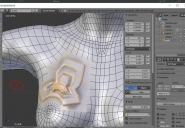
2. export it to ds, then check grafted faces keep same vertex psiton, then I use TU and transfer rig and weight. for zero base resolution figures. I do not use template, about this graft items. Actually I still do not know clear,, wthich transfer option (use near vertices, or use adaptive,,) work good or not, then just keep default.
3 now grafted item fit to genesis3 . keep fit to, select genesis3female, go to geometry editor, and set this loop gfated part of genessi3female mesh, as graft faces for attachment.
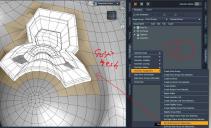
4 next, I need to set auto hide faced when graft item fit to, Then I select grafted part poligons + all mesh which I want to hide from actor mesh when graft item fit to.I think, auto hide faces need to include grafted loop attached faces .
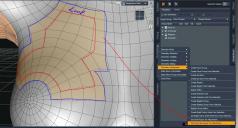
5, after set graft and hide faces,, I can not clearly see difference. but once I un-fit item, and fit to again, then change tool from geometery editor, I can clear see, attach item work as grafted item.
6 when I trun actor sub-D ,graft item auto sub-d applied. and no vertext show me, gap, when posing, and morphing.
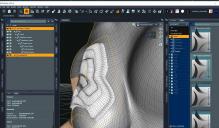
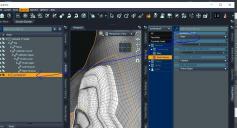
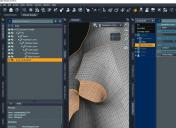
7 if I hide attach mesh, genesis3femlae show , empty mesh, which I set hidden. and attach mesh have not applied sub-D, keep resolutiion lever as base. in parameter. but auto-appy sub-D, when fit to, and actor mesh set high resolution.
I seggest, after set graft part, once un-fit, and re-fit again for actor,, then must change tool. and see sub-d will be applied or not,, if sub-D auto applied for graft item,
that usually means, it suceed, if it not work,, it fail I think.
Issue with GeoGraft + SubDI created a piece at the shoulder where there is more rotation and tension.
Into DS with transfer utility run. http://prntscr.com/fj40nr
I raised the collar and bent the shoulder. http://prntscr.com/fj42kc
A bit of separation. http://prntscr.com/fj4152 and with both items with subd of 1. http://prntscr.com/fj436d
Maybe we can get Sickle Yield to take a peek as she does hers in Blender as well.
Daz Studio 4.9.4 Pro, General Release!Daz 3D is pleased to announce Daz Studio 4.9.4 Pro General Release!
- Version: 4.9.4.122
- Date: August 14, 2017
!! IF YOU HAVE NOT UPGRADED TO THE GENERAL RELEASE OF 4.9, IT IS HIGHLY RECOMMENDED THAT YOU BACKUP YOUR CONTENT DATABASE IN DAZ STUDIO 4.x (E.G., 4.6, 4.7, 4.8) BEFORE LAUNCHING DAZ STUDIO 4.9 !!
How do I backup my User Data in Daz Studio?
!! IF YOU HAVE NOT ALREADY MIGRATED FROM THE OLDER VALENTINA DB BASED CMS TO THE POSTGRESQL BASED CMS, IT IS HIGHLY RECOMMENDED THAT YOU DO SO BEFORE LAUNCHING DAZ STUDIO 4.9!!
Has the Content Management Service (CMS) changed?
Highlights:
- Rendering
- NVIDIA Iray
- Integrated Iray 2016.3.2 (278300.12584); see below for more details.
- Uber Iray Material
- Added support for chromatic subsurface scattering color
- Added a "Scatter & Transmit Intensity" option to the "Base Color Effect" property
- Added support for dual lobe specular
- Node
- Fixed an issues where the "Visible in Render" property was not being respected in OpenGL renders
- Group Node (3D Layer)
- The "Visible in Render" property now controls whether or not child nodes are considered visible in a render
- Fixed an issue where the "Visible in Render" property was not being respected in OpenGL renders
- NVIDIA Iray
- General Use
- PowerPose
- Improved configuration abilities via (version 3+) templates; see the Change Log for more detail
- The layout of the pane has been changed
- The encompassing tab widget has been removed; in preparation for replacing it with a combobox that provides easy access to all templates in the set
- The "Reset Pose" button has been removed; use actions in the pane's option menu and/or action accelerators (keyboard shortcuts)
- Added an InfoDivider with a Tips page
- Dynamic scaling of a template is now supported (for version 3+ templates)
- Scales up to the dimensions of the background image; if the widget/pane is larger than the background image for the template, it will be centered
- Scales down to a minimum of 300h x 200w
- The pane option menu has been updated
- Fixed various usability issues; see the Change Log for more detail
- Fixed various bugs; see the Change Log for more detail
- Auto-Fit
- Added support for applying pose data in clones to morphs that are not removed
- Added support for clone asset ERC links
- Optimized pose corrective morphs
- Now provides cursor feedback while busy
- Transfer Utility
- Now supports clone assets with embedded pose data
- Added support for applying pose data in clones to morphs that are not removed
- Optimized pose corrective morphs
- Added support for clone asset ERC links
- Fixed a skin binding issue with the "Replace Source With Target" option
- Shader Mixer
- Added translation support for new features of Uber Iray Material
- Map Transfer
- The alpha channel of a texture is now supported when using GPU
- Content DB Editor
- Sending the "LOCAL USER" product to the editor no longer displays the "Product" page within the dialog; the "LOCAL USER" product is a special case catch-all product of which the product specific details should not be modified
- The "LOCAL USER" store is now explicitly listed in the store selector on the "Product" page of the dialog instead of displaying an empty value
- Now checks that a file is not user-facing (loadable) before it allows that file to be listed in the support files list
- Editing a file listed in the Support File(s) list and choosing a user-facing file removes the edited entry from the list
- Root categories now use a path combobox dialog instead of root categories menu; prevents the menu from becoming so large that it cannot fit on the screen
- Database Driven Asset Views
- Dragging and dropping an asset onto a category when the "Filter By Context" option is checked and an object in the scene is selected will now ask whether or not the user would like to mark the asset(s) as being compatible with the compatibility base of the selected object
- Database Driven Product Views
- When the path of an icon for a product cannot be determined from a database entry (e.g., installed/imported vs created), an attempt is made to locate an icon in the mapped Daz Studio/Poser Format directories where the path/name matches the pattern ./Runtime/Support/<StoreID>_[<ProductToken>_]<Product_Name>.<Ext>; the PNG extension is attempted followed by the JPG extension if not found
- Menus
- Updated default menus; recommend running the "Update and Merge Menus" script
- Color Widgets
- Added an ability to invoke a screen color picker from any color widget by pressing the AltModifier on the keyboard while initiating a left-click + hold from the area of the color-well between the numeric values; the cursor will change to a cross and the color will update as the cursor is moved; releasing the left-click + hold commits the color of the pixel currently under the center of the cross cursor; right-clicking while the left-click + hold is still active cancels the operation
- Preferences
- Added a Log Size preference (and a Default button) to the General page in the Preferences dialog
- PowerPose
- Saving/Loading
- Character Presets
- Added support for setting a post-load script to the Save Options dialog
- Clone Assets
- Replaced the message box and node selection behavior with a dialog that presents options for choosing which figure represents the base and which figure represents the clone
- Now suggests a filename based on the clone figure name in the file save dialog
- Now provides an option within the dialog to select the destination base path; this is automatically set/updated when the Base Figure is selected/updated
- Now provides a property selection view within the dialog for selecting which properties to remove from the target figure when projecting using the clone via Auto-Fit or Transfer Utility
- Animation
- Current animation range is now saved/read to/from a scene file
- Current play range is now saved/read to/from a scene file
- FPS is now saved/read to/from a scene file; FPS is no longer written to the startup script
- Clearing the scene (e.g., File > New) now resets FPS to the default (30)
- Character Presets
- Scripting
- Many API additions and/or resolved issues in various areas; see the Change Log for more detail
- Fixed bugs and/or made improvements in various areas; see the Change Log for more detail
Important Notes:
- The first time you launch Daz Studio 4.9, any data that exists in Daz Studio 4.8 tables of the content database is migrated so that it can be used in Daz Studio 4.9.
- The amount of time the database migration operation takes is proportional to the amount of data to be migrated.
- The database migration operation does not delete the data that it migrates from the previous location so that it remains accessible by earlier versions and other applications, such as Carrara.
- Daz Studio 4.9 uses the same PostgreSQL database as Daz Studio 4.6 and later, and/or other applications, such as Carrara.
- A portion of the data contained within the database is shared amongst versions but not entirely. For example:
- Creating a category in either Daz Studio 4.9 or 4.8 will cause that category to exist in the other version
- Assigning a file to that category in Daz Studio 4.9 will NOT cause that file to be assigned to that category in Daz Studio 4.8
- Assigning a file to that category in Daz Studio 4.8 WILL cause the file to be assigned to the category in Daz Studio 4.9
- Reseting the database in any version of Daz Studio that uses PostgreSQL (e.g., 4.6 or later) will purge all of data in the database, including any data that may be used by earlier versions or other applications, such as Carrara.
- After the initial migration operation, edited metadata in Daz Studio 4.8 will not be migrated to Daz Studio 4.9.
- A workaround is to export User Data from Daz Studio 4.8 and reimport User Data in Daz Studio 4.9.
Known Issues:
- On OS X, selecting a point within a PowerPose template that controls a property which has a range of zero (i.e., its min and max limits are the same value) causes an error to occur that ultimately causes the application to crash. An example of this occuring can be seen when using the default template set (true if the selected figure does not have a template set that was built for it specifically—e.g., Genesis 3) and an attempt is made to click + drag a node point that has certain transform properties limited in order to prevent certain rotations on that node (e.g., Left/Right Shoulder Twist or Left/Right Thigh Twist).
Frequently Asked Questions:
Public Beta Threads:
- 4.9.4.122
- 4.9.4.117
- 4.9.4.115
- 4.9.4.113
- 4.9.4.110
Previous General Releases:
Victoria 8 Launch This month?Well, I don't see why DAZ couldn't write an exporter
to export 'standard HumanIK rig format' for
MotionBuilder, iClone, and so on and another
export format that includes all the DAZ technical
embellishments."What technical embellisments??
Millenuim figures 1,2,3,4
Genesis figures 1,2 were much more
motionbuilder& Iclone friendly as
demonstrated here...Kind of funny vid:

"It's time AutoDesk, iClone, Unity and others
also improve what their rigs can do although
I expect it from Unity before the others.
I don't want stuck exporting to
FBX2006 or whatever that old
'standard' is while DIsney and
others move on to more advanced
techniques. Learning animation is
difficult enough without having to
stick to antiquated techniques."The cross application rig transfer technique
has nothing to do with process of learning character
animation itself .
The problem with the Genesis 3 rig is that it added
an unnecessary layer of difficulty to just getting the rig
Characterized to accept the motion editing Data in other
applications
It still works in Motionbuilder(with some extra steps) and Reallusion
has updated their Character templates to recognize Genesis 3.
I am not keen to go thru this again with Genesis4 howeverDaz claims the new extra limb bones are vital
"because using a single weight map for each bone means that twists
(spread along the length of the limb) and bends (at the hinge point)
have separate requirements This is how other engines handle bends, "I dont debate this claim, but clearly the Daz implementation
was buggered up somehow as it did not improve the
user experience for that 98 percent that only renders stills.
and it broke the previous level of compability with not only those"other engines"
But with Daz's own internal software such aniMate2 and Carraraand G3 BVH Data created in those "other engines"
DOES NOT Work on G3 when imported back to DAZ studio.
I believe it is no coincedence that the MCS figures for Unity
,being sold at daz Morph3D, are based on Genesis2 .Well the way I understood it Genesis 3 added definitions so that one could properly pose and animate people to walk pigeon-toed or crow-footed, something that the unfortunate acrobat didn't demonstrate during her tumbling routines.
Yes, I know about the unfortunate usuability problems of Genesis 3 outside of DAZ Studio poses only and DAZ Studio should begin by fixing Carrara and DAZ Studio plugins to animate with it's Genesis 3 improved articulation configurations.
And there is still no reason why DAZ can't add to Genesis 3 and Genesis 4 dual rigging articulation definations and bones structures and have the exporter prmpt the user which rigging to export. Programmers do that all the time with polymorphisms and overloading class definitions for their code.
can i use GenX2 to transfer G3M character to G3FI transferred George to G3F, so I think you should be able to transfer your custom character, as long as you have a morph or morphs for him.
Where are the guys?The thing is, Serene, while that sounds awesome... on what do you base the notion that it will do better, or better enough?
As I said this is my perception, so no one can say for sure.
We are sort of in a holding pattern with men's content. Even sinking a bit, as I don't think the latest men's pro bundles have been really good sellers.
I think any categorization will quite frankly improve sales by making stuff easier to find. And presumably as the store expands and grows it will set a better foundation for how content is marketed and displayed. Having a distinct category will provide the simple function of making it somewhat easier to find amidst the sea of Vicky content.
Right now status quo is not doing much if at all for men's category stuff.
I don't know. Really there's not much you can do with men's clothing like in real life. We already have polo shirts, a tux, shoes, jeans and some underwear. That generally covers each generation, everything beyond that becomes a risk. To be honest, most of the male renders posted here the males have just basic clothing or next to nothing, so that translates into not a big need to fill the store with male content. Really the only thing I'll quickly drop into my basket is male underwear, but even my promos can't have the sexy items I used to use. That's why i repurpose old items from previous generations.
Most of my products focuses on unique body shapes and morphs, with the appropriate JCMs that aren't in the base G3M or some of the other male morph products. Most guys that you buy will have wonky bends in their arm raises and thigh/pelvis/glute areas along with gens morphs and other anatomical "elements" that will help with your renders if you're rendering your men next to nothing. That's my niche, but i know i could make more money if i did a female shape with all those bend corrections in them... but the curious thing is i'll see things people ask for be released days before their post, and it's not because it's not being advertised; it's people aren't paying attention to daily releases for this content.
Daz 3D is part of

Connect
DAZ Productions, Inc.
7533 S Center View Ct #4664
West Jordan, UT 84084Licensing Agreement | Terms of Service | Privacy Policy | EULA
© 2026 Daz Productions Inc. All Rights Reserved.














