-
Culprits or Fixes for Teeth Issues on G8.1F?
crosswind said:
In short, yes, the issue comes from a combined auto-follow morph when you (or a content creator) customize or convert a character, especially with Mouth Realism set as 100%. They're sort of baked rather than hidden, so you have no way to find them from Parameters pane. Therefore better always zero Mouth Realism first of all when customizing especially converting characters ~~
If you get such an issue on G8 and want to fix it, the common ways can be:
1) Clear all morphs / deltas from the geometry of mouth (incl. teeth), re-rig it and update Full Head Morph or create as a fix morph
2) Or, zero Mouth Realism 1stly, then fix the teeth by using some products, e.g.
https://www.daz3d.com/easy-teeth-for-genesis-8-female-s-and-merchant-resource
https://www.daz3d.com/teeth-master-control-for-genesis-8-femaleoof, right in the wallet. wishlisted for now thanks
Gentleman Poses Compatibility HelpThey're from this: https://www.daz3d.com/dforce-mi-two-piece-business-suit-for-genesis-8-and-81-males, as listed on the product page. Aeon Soul might have made their own morph to open the pocket, I cannot recall if those pants have a morph for that by default, and I cannot check right now as I'm not on my computer.
Culprits or Fixes for Teeth Issues on G8.1F?In short, yes, the issue comes from a combined auto-follow morph when you (or a content creator) customize or convert a character, especially with Mouth Realism set as 100%. They're sort of baked rather than hidden, so you have no way to find them from Parameters pane. Therefore better always zero Mouth Realism first of all when customizing especially converting characters ~~
If you get such an issue on G8 and want to fix it, the common ways can be:
1) Clear all morphs / deltas from the geometry of mouth (incl. teeth), re-rig it and update Full Head Morph or create as a fix morph
2) Or, zero Mouth Realism 1stly, then fix the teeth by using some products, e.g.
https://www.daz3d.com/easy-teeth-for-genesis-8-female-s-and-merchant-resource
https://www.daz3d.com/teeth-master-control-for-genesis-8-femaleFace Transfer failed to generate. Try a different source imageJust as the subject displays, this is the error/message that I am receiving when I try to apply the following images
Before somone asks - Windows 11 Pro - 12th Gen Intel(R) Core(TM) i9-12900K, 3200 Mhz, 16 Core(s), 24 Logical Processor(s) - Asus ProArt Z690-CREATOR WIFI - Daz Studio 4.20
I am trying to apply this to G8M. I have also tried on G8F but the same notification appears
I have also loaded the CC Avandrael character, which is literally a female devil and I still receive the same notification in trying to use Face Transfer
As some of you probably know from my renders on Insta, I have been doing face transfers for a while, so why isn't this one working
I would appreciate any insight on this issue
Thanks in advance
Culprits or Fixes for Teeth Issues on G8.1F?I've reset the figure of my G8.1F and tried again but for some reason the teeth reduce themselves, and I'm not using teeth morphs. I've attached what it looks like and what some of the other morphs I'm using are, like toon shapes burn face, and volume muscles. I've set them all the zero though and that does not fix it, so I'm not sure the problem even is a morph? Thoughts or fixes? Thank you.
POS Terminal3WC said:
Without any context, my brain thought of something else that "POS" stands for.
But I guess it means "Point of Sale."
same
we call it EFTPOS down here but I realised what was meant by the context
Electronic Funds Transfer Point of Sale
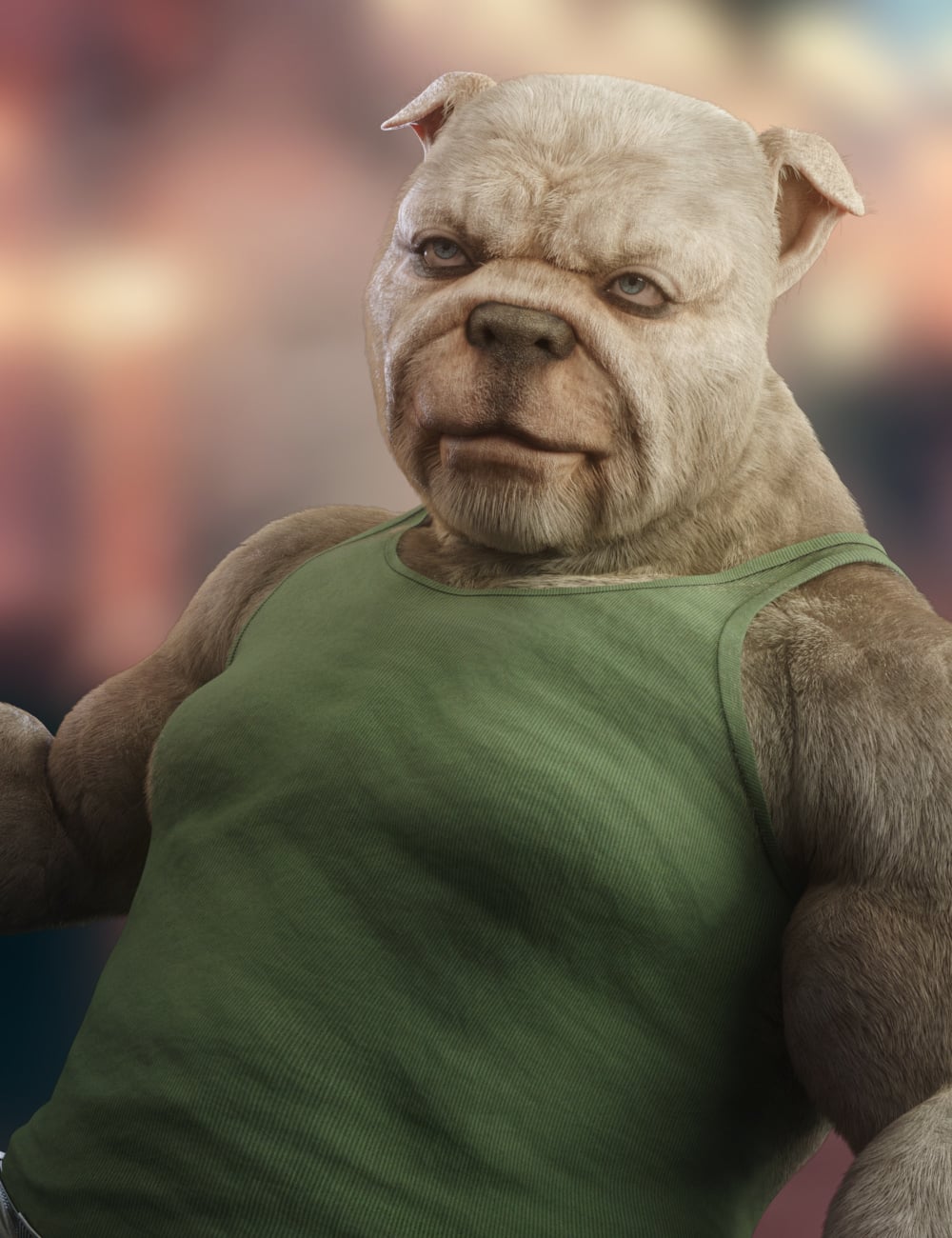
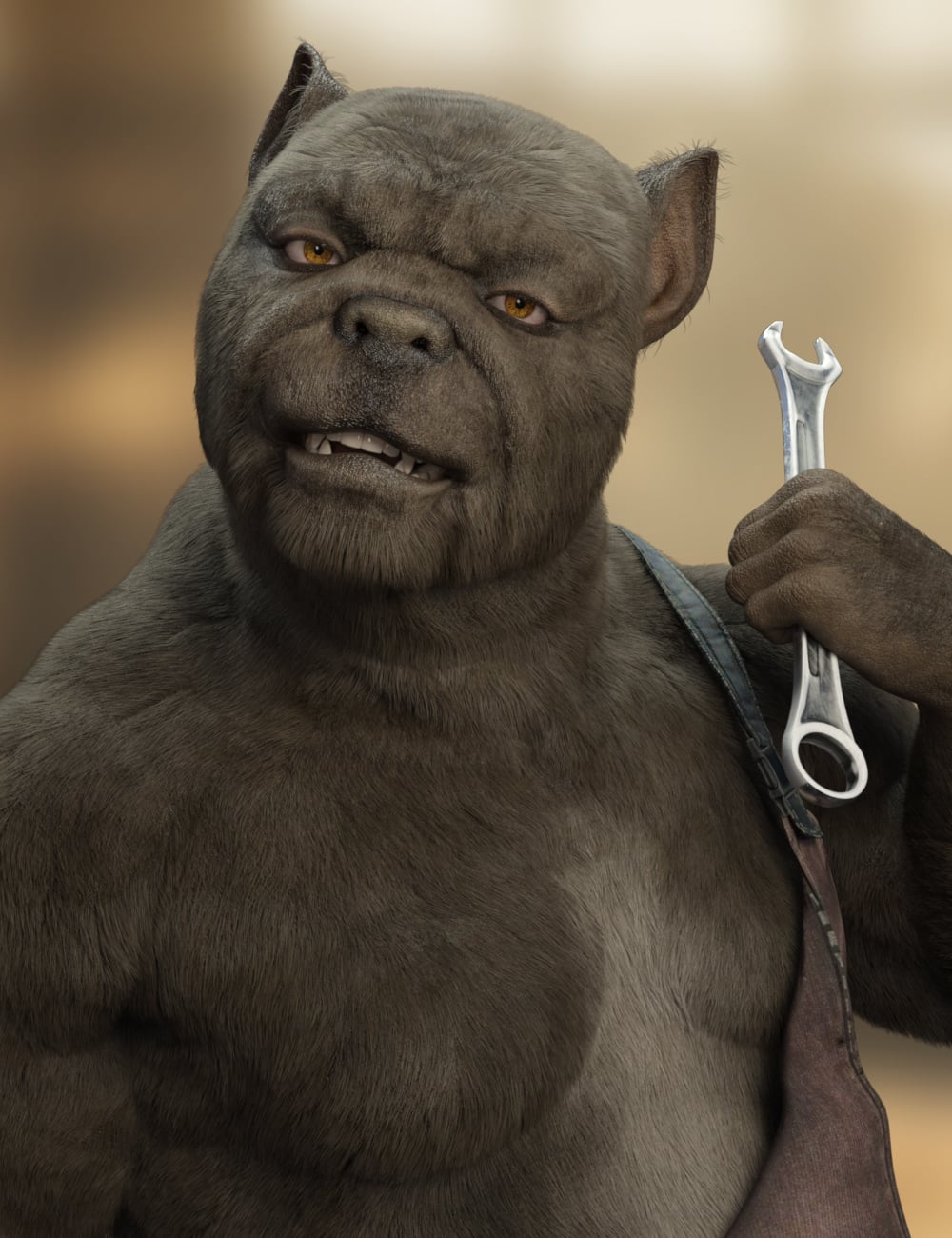
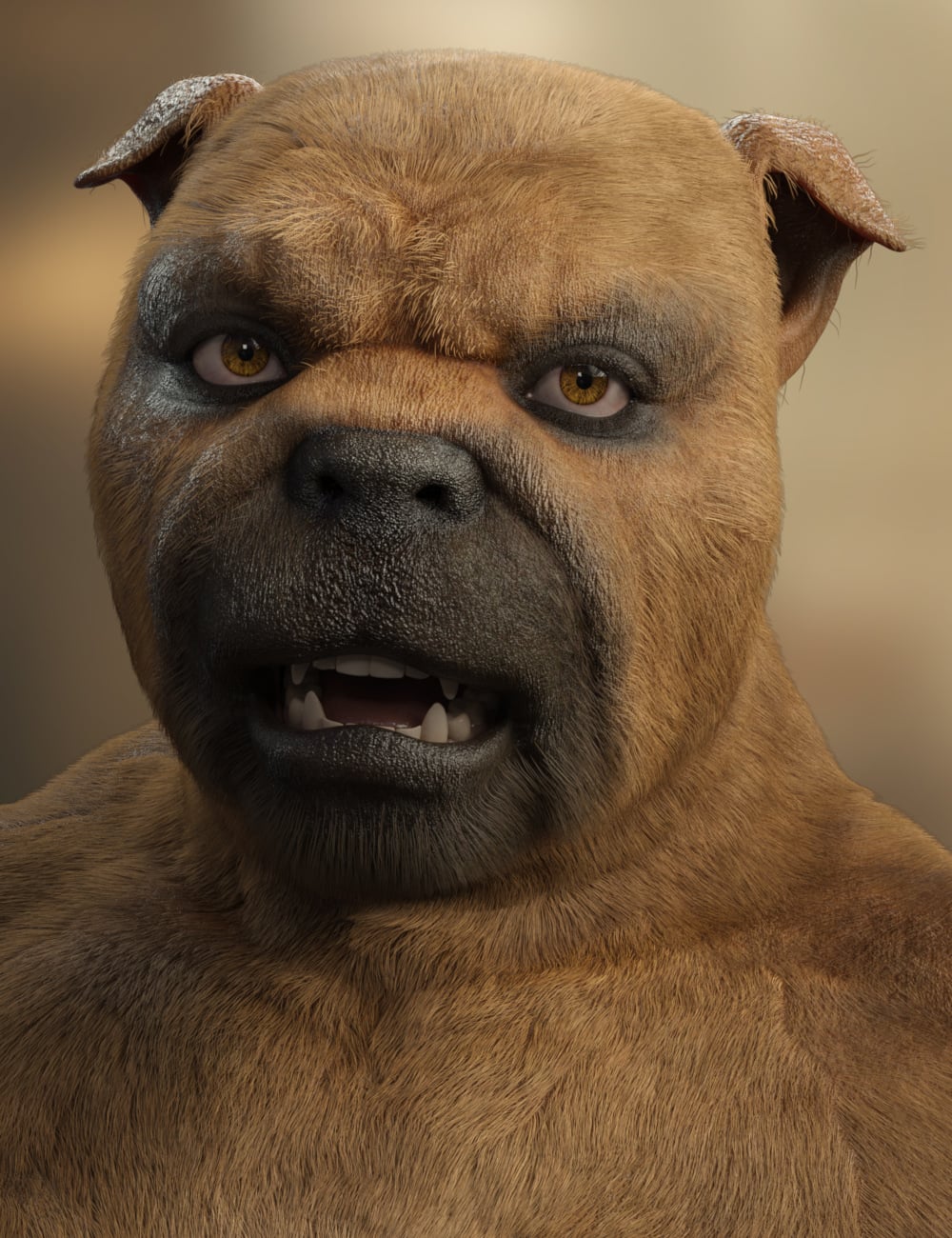
Burgess Bully for Genesis 9 [commercial]Burgess Bully for Genesis 9
https://www.daz3d.com/burgess-bully-for-genesis-9
Burgess is a stout, broad-shouldered bulldog character with a personality as big as his heart. Whether he's a hardworking mechanic, loyal bodyguard, tavern keeper, neighborhood tough, or an entirely new anthropomorphic race, Burgess brings warmth, strength, and unmistakable character to every scene.
Featuring a highly detailed full-body morph inspired by the iconic bulldog physique, Burgess includes four full-body material presets: Black, White, Tan, and Brown, along with five eye color options for even greater variety. An optional dHair fur system adds an extra layer of realism, while the detailed skin shaders ensure he looks equally impressive with or without fur.
From modern city streets and fantasy kingdoms to distant sci-fi worlds, Burgess is a dependable companion who's always ready to lend a hand or stand his ground.
What's Included and Features
- Burgess Bully for Genesis 9
- One Burgess Character Preset
- One Burgess Shaping Preset
- Material Options:
- Base Mat
- Four Full Body Base Skin Material Presets (with Male Genital Maps)
- Five Eye Material Presets
- Addons:
- One Set of dHair Body Fur
 Convert OBJ to Daz3D rigged
if its bipedal and in a Tpose there are many options that can be FBX imported into D|S
Mixami, Reallusion Actorcore AccuRIG, Blender has some options, are many paid programs too, some using AI and Browser based
I too found Accurig difficult,
Honestly if imported sized and A posed to Genesis 9 the Transfer utility treating it as clothing works pretty well and poses will work on the result
Convert OBJ to Daz3D riggedRigging a mechanical prop (where there is no bending of the model, and joints are sliding or rotating) in DS can take a good length of time. Rigging a figure not based on a Genesis base figure is going to take a huge time in DS. Vyusur, now at RenderHub, did it a few times with a human - the unique character Lyra is one I remember. Vyusur's characters had bone names similar to, but not the same as, G8F's and I suspect after she did the first character, using the 'Transfer Utility' tool allowed the rigging to be copied to the next unique character more easily.
Blondie9999 wrote a way of doing it with this tutorial: Rigging Original Figures in DS4 Pro. It is old, and only refers to TriAx weight mapping (Used for Genesis & Genesis 2), but I'm sure you could use the same concepts with General Weight Mapping (used for G3. G8 & G9 may have additional guide curves, not sure). The tutorial shows everything you need to do and how to do it. It can't, and doesn't, make it quick & easy.
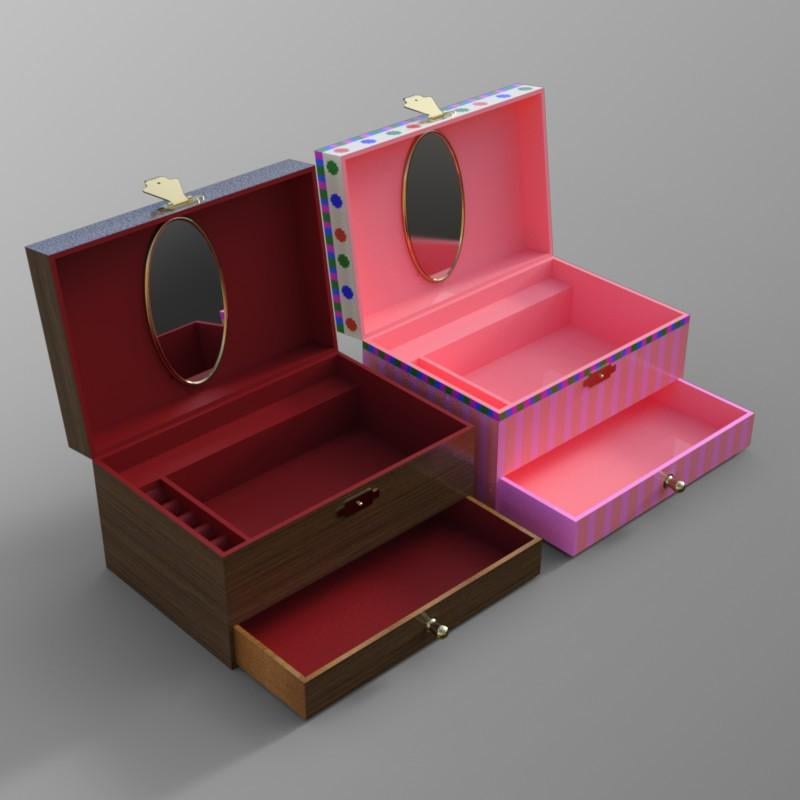
I have not rigged a character from scratch, but I have rigged a little jewellery box prop, as shown below with the lid, drawer & catch open from the default position:
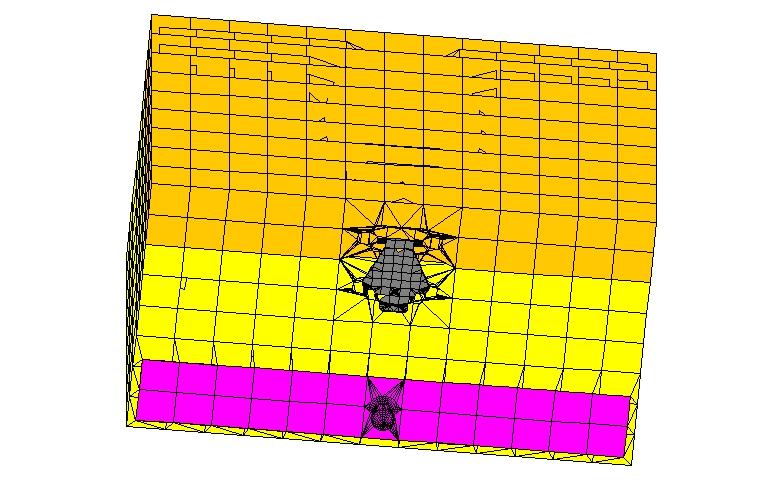
In my modeller I created different groups, the body, the lid, the catch and the drawer. These are shown in different colours in my modeller below.
The material zones have different boundaries from the groups and are coloured in my modeller differently, as below:
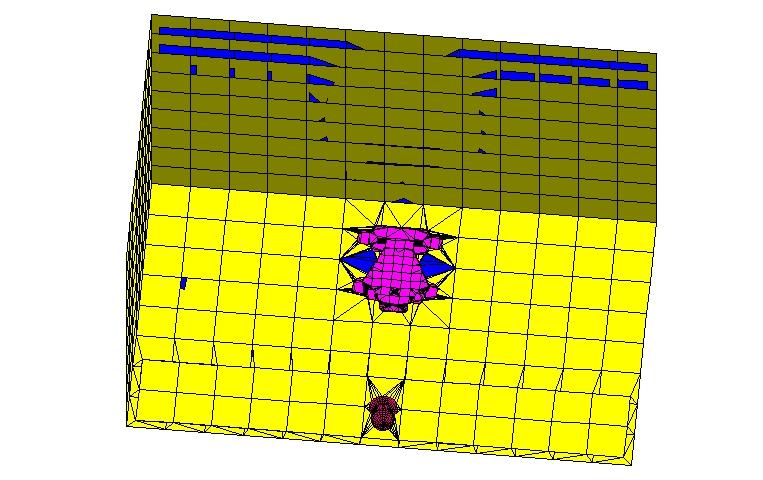
The yellow is the main material, the blue is the interior, magenta is the goldish catch fitting and the darker magenta is the knob. You need to control both in the obj file imported into DS.
Regards,
Richard
AIUTO...CHI CONOSCE L’ITALIANO? PARTE QUATTORDICIScusate, sapete come si fa a modificare la posizione di un Bone con un morph, tipo quando si crea un piede plantigradoPolish Summer Jeep?According to the product description, there is a morph for the steering wheel, while more logycally it should have been rigged.
There is nothing about the seat.
So your only option for that is the rig or nake a morph. Might be duable with a dFormer, if the seat is one connected geometry without connection to the rest, which also would make it doable to rig without to much issues.
Convert OBJ to Daz3D riggedxavierator said:
Which is the best way to convert a fix OBJ character to a full Daz 3D rigged character ?
In most cases, you probably do not actually want to rig the OBJ, you probably want to create a morph for a Genesis base so that it has compatibility for clothes/poses/etc, which would generally be done by "wrapping" it in an external application.
For example, this version of Serana from the Elder Scrolls series is one where I extracted her head shape and texture tints using modding tools, then converted that to a Genesis 8 Female head morph. (The hair, however is an edit of a very similar store hair).

You would only generally want to rig a new model if for whatever reason the character is far enough from human that it's not practical to morph Genesis for the job.
Archery Products ResourceThe outfit comes with a pose labeled "Shooting." The "StringShooting" morph then draws the string back to the fingers, at 135.2% in this case. There is no flex in the bow.
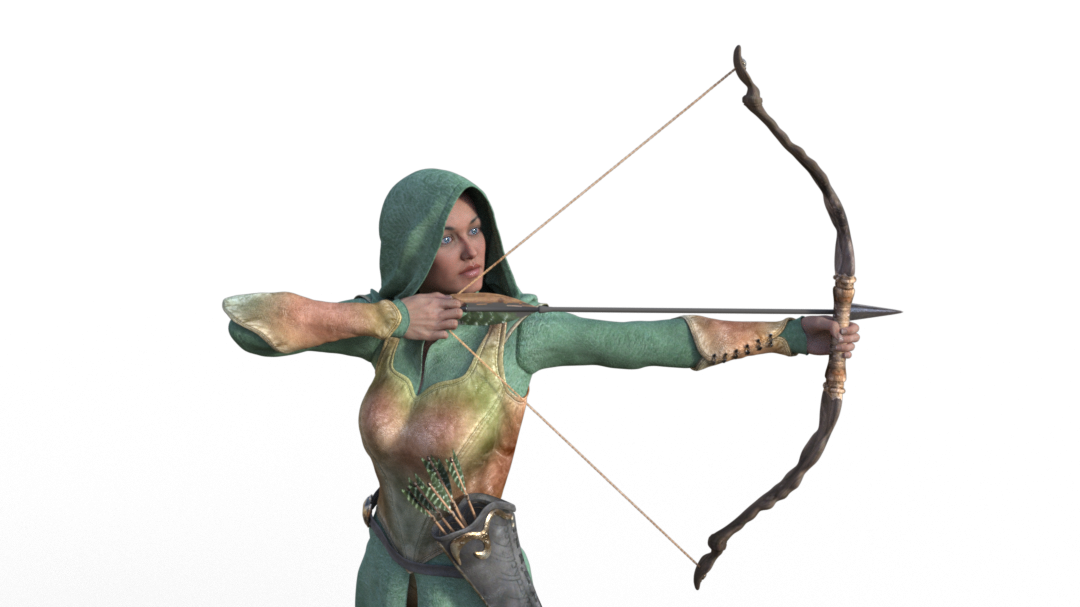 dForce Crimson Widow Outfit for Genesis 9
[dForce Crimson Widow Outfit for Genesis 9] Looks fantastic. 1 change though. The veil should have a forward morph, covering the face. Like ba bridal veil. That way she can wear white in the morning for her wedding and black in the evening for the funeral and what could our girl have done inbetween?
Reminder To Myself: Never again SBH HairExcept most hairs are truly unuseable, as this discussion is about.
It's pretty standard for hairs to be like 1mil+ poly. In attached, Left is a Metahuman hair i converted (and simplified), middle is a hair from Artstation i converted (and simplfiied), right is one of my hairs made for Daz. They are all in same vert count ball park. The critique that most daz hairs are unusually "unuseable" because they are too high poly to render doesnt really make sense.
Or are you saying they are unuseable because they cannot be simulated? There is a place for static hairs in my opinion that can be animated with rigging or morphs rather than simulation.
Anyways, one of the things that is great about hair in Unreal is the hair grooms can be simulated as strands and also auto-converted to hair cards for better performance and LODs. Perhaps a solution like that in Daz to complement the Daz SBH system would be very useful. Basically every hair would then be "useable" in some capacity as either a groom or as lower poly hair cards and vendors would not need to compromise on their vision for the hair looking a certain way. Of course, vendors can still convert grooms to cards anyway, but that is asking a lot of them to remake their product.
Padone said:
However, for interested PAs, it may not be difficult to provide two versions of the same hair, one regular and one with reduced guides, the difference would be limited to filling in with PR, whatever this "downgrade" means at least it would be useable for common users.
If PAs wanted to avoid doing the dforce hair generation in Daz, then they could still provide a "light" and a "heavy" version as options yes. But it depends on the hair as to how much effort would be involved, as some hairs also have rigging like rigged ponytails and other props added like hair ties etc, and all of that would need to be done twice.
And even in more simple cases, it does mean factoring that into their pipelines/workflow. Some PAs probably do not see that as necessary if they consider the hairs to already be optimised and fit for purpose.
For the record, I would see the steps of the workflow to involve creating two copies - a sparse and a dense version - for each morph, either directly in the software used to author the hairs or by resampling/processing with geometry nodes or equivalent. One complication comes with material presets though, because two versions of material presets may be required because heirarchical mat presets have many limitations. Communicaing that to end user and ensuring end user understands there are two versions of the product and two material presets, in my opinion, overcomplicates the situation.
p.s. Or as also suggested here, DAZ could unlock the dForce tools to all users, so we could finally fix the hairs without having to rely on willing PAs.
Fixing such hairs would mean exporting and resampling in Blender etc and then bringing back into Daz to regenerate with Dforce and it would never look the same and it would involve going through the content creation pipeline from scratch, losing all morphs and anything PA added. So it's not like having access to Daz tools would enable end user to edit or fix easily.
Archery Products ResourceThe bow has one morph called StringShooting, so maybe there is one (no idea, I don't have the product):
/data/Ravenhair/Elven/Bow/Morphs/Ravenhair/Base/StringShooting.dsf
Archery Products Resourcerichardandtracy said:
The G3 Elven one is a bit of an oddity, none of the promo images show the bow drawn, despite the fact the arrow is in the knocked release position. Is there a 'String Drawn' morph, I wonder? If there is, it's not mentioned.
Regards,
Richard
Pretty sure there is no morph.
But making a quick one where you just stretch the string is simple. If you both want to stretch the string and curve the bow is sligthly more complicated.
Archery Products ResourceThe G3 Elven one is a bit of an oddity, none of the promo images show the bow drawn, despite the fact the arrow is in the knocked release position. Is there a 'String Drawn' morph, I wonder? If there is, it's not mentioned.
Regards,
Richard
Male character ID in promoSilas3D said:
@Virtual_World is this a custom character and skin or one available in the store? Many thanks :)
Hi!
Sorry for the delay in replying.I’m certain the skin is from Teen Tyler, but I don't recall how I created the face morph—whether it was custom-made in ZBrush or a blend of morphs from other characters.
When I bought my new computer, I transferred my Daz3D library over, but I didn't move the scenes I used for the promotional images. If I’m able to reconnect the old computer to a monitor and keyboard at some point in the future, I’ll check and let you know.
 Nvidia shelves 2026 new card releases
Padone said:
As I understand it, using AI locally requires at least 16G vram and 64G ram, a powerful cpu, better if it's a nvidia gpu. Just to have basic results not comparable with those data centers can provide. Not something everyone can afford with the actual market prices.
Please correct me if I'm wrong, I'd like to.
I have 48G RAM and 8G VRAM. I can run moderately capable LLMs in LM Studio or Ollama.
Useful stuff so far:
- They've managed to tell me about some recent science I wasn't aware of (for writing science fiction), and have managed to usefully summarize some stuff I fed them.
- They sometimes can partially make up for the growing gross deficits of Google search, in that they might be able to identify information on the basis of a description. That's helpful if you can describe what you want but don't know the right terms of art to call it up.
- I've managed to get one satisfactory science fictional image out of the image generators at Nightcafe (because I haven't gotten around to setting up any local image generation, and probably won't try that for a while yet).
- I got a handy summary of one batch of literary information I fed it.
Not so useful:
- I haven't yet managed to get one to take over some text transfer and editing (too bad, it's a nuisance job that mostly involves putting back together English-and-tables jigsaws from some badly constructed PDFs. Time-consuming but not very interesting).
- Neither LLMs or image generators actually understand how the world works, or what anything means. Online image generators, last time I tried, could not be made to make a successful image of science fictional objects rarely represented in existing art.
- Processing time and heat generation wasted flattering the user.
The LLMs' ability to write grammatical English is impressive.
The most capable LLMs I can run start losing track of the logic of a conversation at somewhere between 5-8 pages, give or take. That means LLMs often don't turn out to be a great timesaver, because if you're poking at something of much complexity, you have to keep stopping to make sure you have summaries that will allow the LLM to keep going a little farther. Comes a point where it just loses track of what it's supposed to be trying to do.
Sometimes it never lands in the right quadrant and then it doesn't do much good even in short form.
So far for me it's an interesting toy, but mostly not yet a particularly efficient tool for many purposes. Maybe it will soon become so; I don't think it would need too much improvement to get over the hump, for me. From what I've seen so far, I am expecting it to be pretty interesting for post-processing.
The only kind of question I'll ask a publically accessible AI is a question I don't care if everyone, including radically untrustworthy giant entities, knows I asked.
Daz 3D is part of

Connect
DAZ Productions, Inc.
7533 S Center View Ct #4664
West Jordan, UT 84084Licensing Agreement | Terms of Service | Privacy Policy | EULA
© 2026 Daz Productions Inc. All Rights Reserved.