-
Using dformers on specific faces
eeyun said:
You're selecting parts of the mesh either way. I think Crosswind's suggestion of using the weight map tool allows for softer edges (instead of a hard in-the-group/not-in-the-group boundary) and less chance of messing up the original mesh.
I had a boss who reworked an electric timer system for greenhouses. The technician who sold the timers dropped by to see how we were doing with the new system and was blown away by all the bypasses that Matt (manager) had done to the timer to get results he wanted. The technician was blown away because Matt was doing things that the company had no idea you can even do with that system. Technician took pictures and went his way.
This is what some person did here in this program, the end result was faces and it's vertices on a body were singled out and the dformer now only could be applied to them and only them. It would still pull on vertices directly connected outside that "group" (lacking a better term for it) but the end result is if you need to adjust areas, say a single tooth, that could now be done without having to make a morph in blender and that movement is now keyframable. That keyframability is the real party trick. So yeah I remember there was nothing about weight maps involved in this proces and hunting anything down in the daz forums is like trying to find a needle on mars. Oh well, I will figure something out.
Ireal Animated Clouds gigantic Ram UsageRichard Haseltine said:
https://www.daz3d.com/ireal-animated-clouds
I don't have thiss et so I am not sure what is animating, but potentially if it has a separate value for each element on each frame that is a lot of data even with low resolution models.
It's some planes with opacity maps.The animation seems to be just moving the planes and changing sizes via the various morph sliders on it,of which there's 1000.
While i'm not getting the same ram usage, there is a massive jump when i reload, but only if i convert to timeline.
Working in studio, seed 1 with the aniblock applied, uses ~600MB total for studio per task manager.
If i save then reload, there's no increase in ram.
Bake to keyframes, then reload and my usage jumps to over 12GB.
Looking at the timeline, it's just a solid line of T from begining to end with no gaps on all 1000 morphs and 1000 keyframes of the particula aniblock.
I'm thinking this is the problem, but i'm not sure on why OP might be seeing that much ram usage compared to what i'm getting.
Diffeomorphic Add-ons Version 5.0.0 ReleasedIt it not clear what your bug report means, can you elaborate please. The addon should work fine on mac as it is a simple python script so it relies on blender to execute it, there should be no differences on mac as long as blender runs fine.
As for saving figures, the blog refers to saving a figure morph, that you can do just the same with the morph loader in daz studio. There's no way to export a blender rig in general if this is what you hope for.
Handsome guys?Of course it has to be said that "handsomeness" is highly subjective, but G9 guys that I personally enjoy using are:
Daz men:
- Toshi 9
- Calum 9*
- Ivar 9
- John 9 Muscular Shape add-on*
- Michael 9
- Lawrence 9
- Julius 9*
- Carter 9*
- Julian 9*
- Nathan 9
*Typically used for mixing with other shapes or their skin
PA men:
- Faber Inc's guys (Nahuel, Menfis, Cairo)
- Kooki99 has a great collection of distinguished chaps
- Color Galeria has some very nice G9 men
I could go on but I'd be here forever hehe - there are many more that I highly appreciate. Quite often I'll combine the skin of one character with the morph of another, which can create a completely different look.
DAZ House Cat expressionsDon't forget that besides grabbing / moving, you also can rotate cat's eyes, cheeks, brows as well as mouth corners / lips with Mesh Grabber ~~ kinda like what I roughly made it as one of the emojis ~~
Edit: Then save a morph for it ~
Hello how much will it cast for a bull's Head Morph for genesis 8.1 male?With the Classical Minotaur that FenixPhoenix recommended, if you know some sculpting software like Blender or have Geometry Sculptor with Primier membership, you can make it by just keeping the bull's head on G8.xM by:
1) Clear Selected Deltas of Minotaur's body morph with Geometry Editor;
2) Smooth the back of his Head region a bit with Blender or Geometry Sculptor just in DS ~
3) Remove the HD morph link from Minotaur's DSF file if you don't need it.Then you also can easily deform the horns / ears to reshape them as needed.
EZFinder - Advanced Content Manager for Daz Studio [released]fibyken said:
I install my DAZ Studio content to a custom directory rather than the default one. I also installed EZFinder into that same custom directory. After running a scan, EZFinder reported that it found around 400,000 items. However, when I browse the results inside EZFinder, it only seems to display items that were installed in the default DAZ content directory, not the ones in my custom location.
Has anyone run into this, or know what might cause EZFinder to ignore non‑default content paths?EZFinder uses a single consolidated library path by design. It scans the first library it encounters in DAZ Install Manager, so if you have multiple content directories configured, make sure the library you want EZFinder to scan is at the top of the list in DIM.
Every item in your scan results, virtual folders, and compartments is stored as a portable relative path — so if you move your library to a new drive or transfer it to another machine, everything works without rescanning. Supporting multiple library roots would break this, since two libraries can contain identical folder structures, making it impossible to resolve a relative path back to the correct file. While DAZ Install Manager allows multiple content directories, DAZ Studio itself works best when content and its supporting data live together under one root. When files are spread across drives, it's not uncommon to encounter missing morphs, broken material presets, metadata that's out of sync with what's actually on disk or scripts not finding their content.
The practical reality is that a large DAZ library needs to live on a single drive big enough to hold it. For users whose libraries have grown to several terabytes, that often means investing in a large NVMe drive. Many of us have been through the process of outgrowing a drive and migrating to a bigger one — sometimes more than once. The alternative is manually reinstalling less-used products to a secondary path through DIM one at a time, which can take weeks for a large collection. EZFinder chose to be straightforward about the single-root requirement rather than offer multi-library support that would sacrifice the portability and reliability users depend on.
Geometry Sculpture Helpright-click>Morph Editing>Save Curent Deltas as Morph
Geometry Sculpture HelpRichard Haseltine said:
It should have all the features of the original mesh grabber, with some enhancements in the UI for the DS 2026 version. Mesh Grabber legacy versions are not going to be updated, though Geometry Sculptor in DS 2026 can import their modifiers.
Thanks for the reply, it does not have the same things as Mesh Grabber, you can highlight an area and use sculptor to lift cloth, but there is no ease of use like Mesh Grabber, to save it as a morph?
Are there any tutorials to show how it all actually works?
unable to active pluginsHello, i'm having a problem, i'm unable to active some publisher plugins (Autosave, Shaping Transfer and pose converter) i tried it in daz24 and 26 doesnt works, it says that must to be registredm to active, can some one help me?
Raw Deals - Moaimir for Genesis 9 [commercial]RAW DEALS
In the face of these tough financial times around the world, I am proud to introduce a "Raw Deals" line of products that are the same high quality products you have come to expect from me, but with a smaller scope of whats included, and much cheaper prices. I will keep my current product schedule continuing as always, this will be a separate line added on top.
I hope this will help people continue to be creative in these tough times
Raw Deals - Moaimir for Genesis 9
https://www.daz3d.com/raw-deals--moaimir-for-genesis-9
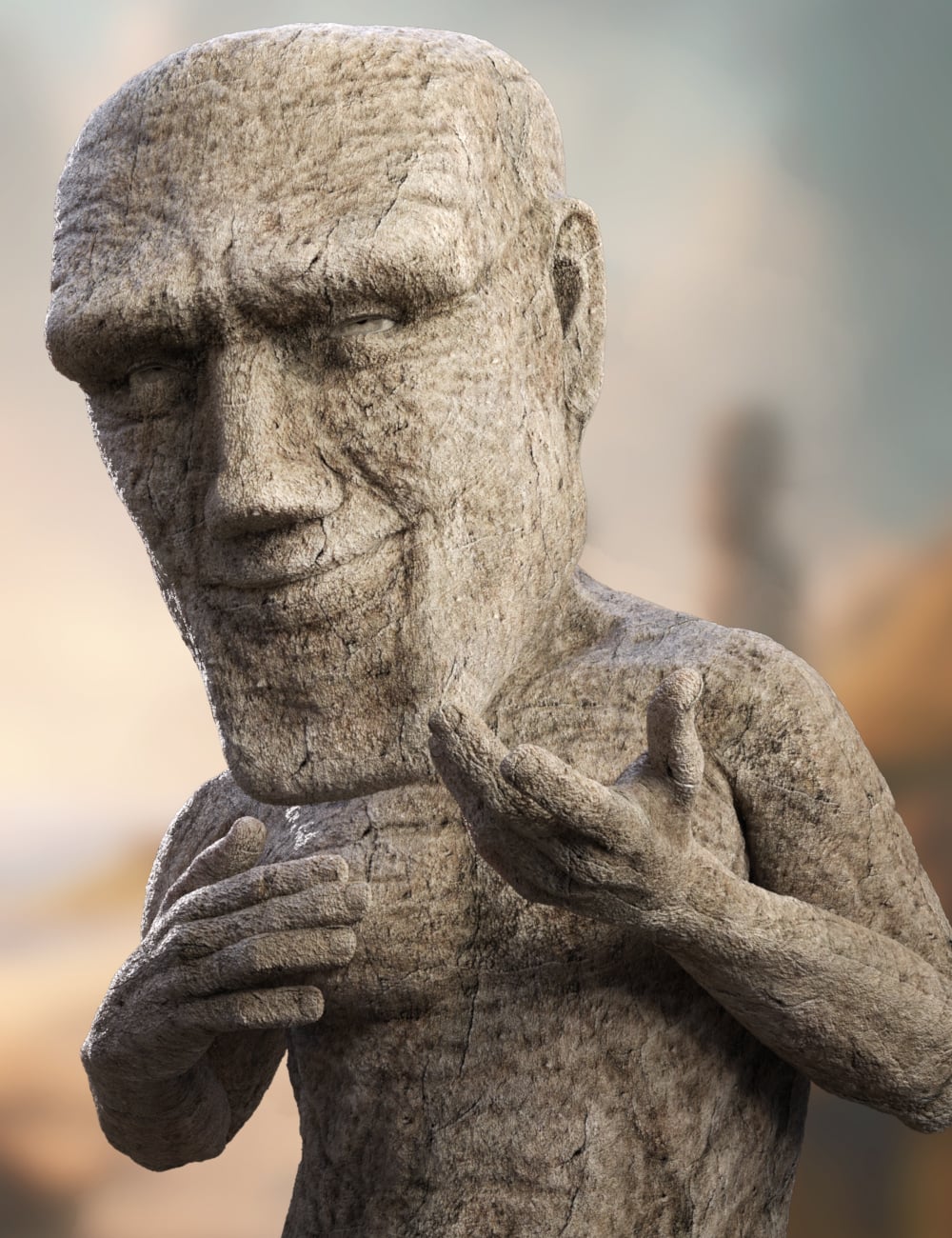
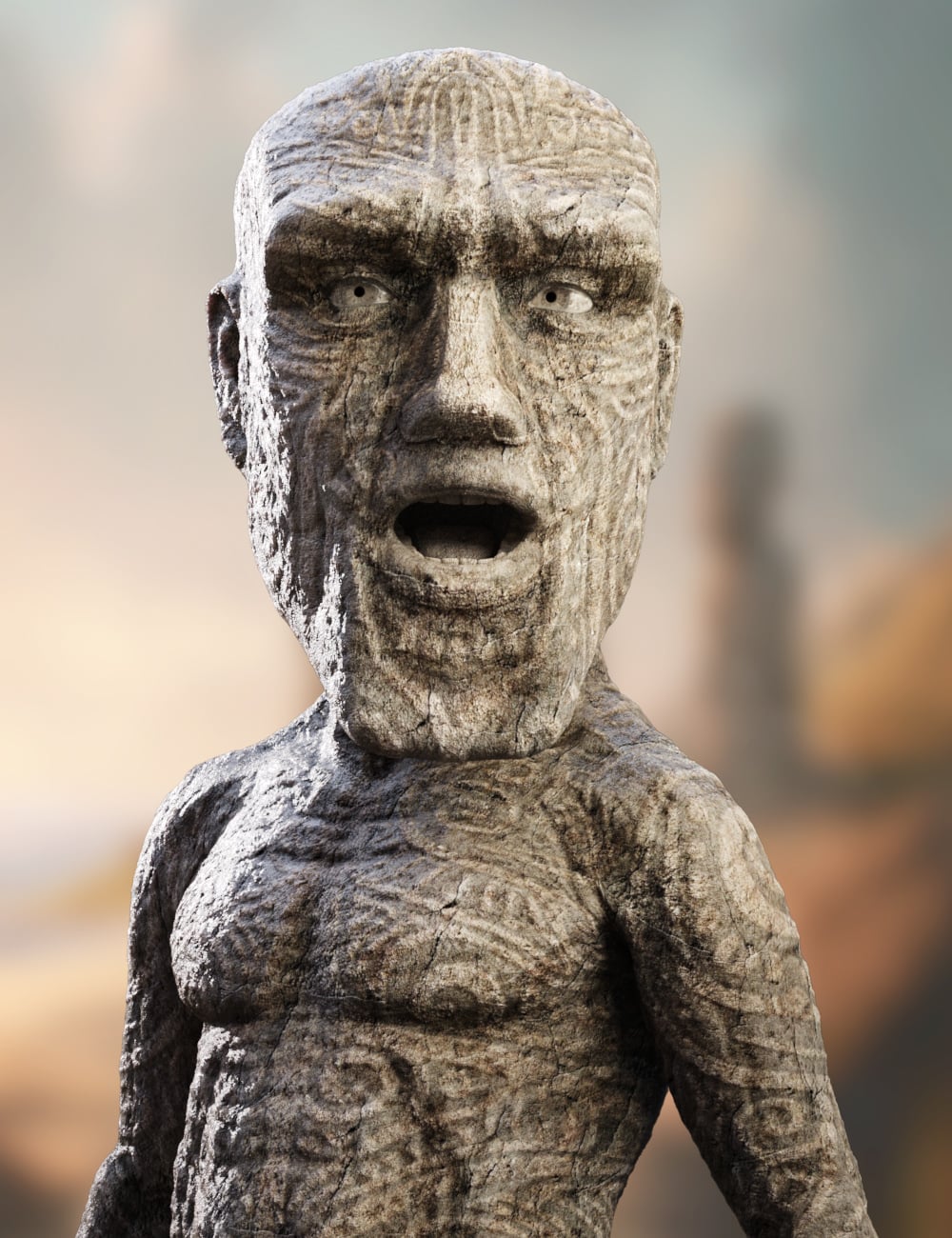
Moaimir rises from the ages as part of the Raw Deals line, a value-driven series designed to deliver hero-quality characters without the overwhelming clutter of endless options. These sets are streamlined for creators who want striking results fast while still enjoying premium craftsmanship where it matters most.
This package features a high-definition sculpted morph that brings Moaimir’s monumental Moai-inspired form to life, paired with highly realistic stone textures that convey the weight, age, and presence of living rock.
Included are two powerful surface looks:
Plain Stone, a raw, weathered finish perfect for ancient guardians, forgotten titans, or primal constructs.
Carved Stone, etched with bold ritual-inspired patterns that suggest lost civilizations, sacred markings, and timeless purpose.
Whether you’re building a mythic fantasy scene, a sci-fi relic world, or a supernatural powerhouse, Moaimir delivers a strong visual identity, fast setup, and exceptional value, proving that sometimes less noise means more impact.
What's Included and Features
- Raw Deals - Moaimir for Genesis 9: (.DUF)
- One Moaimir Character Preset
- One Moaimir Shaping Preset
- Material Options:
- One Stone Full Body Base Skin Material Preset (with No Genital Maps)
- One Carved Stone Full Body Base Skin Material Preset (with No Genital Maps)
 Rogue shaping/corrective morphs affecting cbs settings
Yes.
Usually rogue JCMs/CBSs are the result of a missing mutliply link to connect them to their parent morph, and you can address this using the Property Hierarchy pane and the Parameter pane (in edit mode) to drag the offending rogue controls to be a multiply sub-component of the required control property.
You then use Save As -> Support Asset -> Save Modified Assets. It *should* primarily list the JCMs/CBSs - if it lists the control morph, you need to go into the control links in the Hierarchy pane and set them to instead save under the CBS (usually DS is smart about setting up where the link should save, but it occasionally gets it wrong).
You should also report it to customer support though, as this will help fix it for everyone and will mean that the product package itself gets updated so you don't need to worry about potentially having to redo the links if you ever need to restore your library.
(Alternatively, the least technical option is to uninstall the product and report the error, and wait for the update to come through. I tend to find most CBS links I report as broken get an update within a relatively few days).
Rogue shaping/corrective morphs affecting cbs settingsI just ran across a morph set that I bought recently that appears to be active when you haven't selected it. It would seem that more extreme poses can result in cbs settings that cause freakish, ugly deformations. I get that I could just uninstall it and solve the problem but let's say I want to keep it (and don't want to constantly have to manually fix the settings). What, if anything, can be done to manually prevent it from being active when you haven't applied the morphs? Can the problem be fixed by manually updating files?
Hello how much will it cast for a bull's Head Morph for genesis 8.1 male?I need just the bull's head morph for genesis 8.1 male
The knife selection could use some switching upI was trying to do a 1950's rumble-style piece and couldn't find a single switchblade. I decided to go looking for a standard pocketknife, but all I could find was a single Swiss Army knife multitool. With so many styles of pocketknives available, from switchblades and double-ratcheted claw blades, old-fashioned stag handled triblades, coin style claw blades, butterfly knives, to spring-loaded double-edge blades, there are multiple products here—a forgotten niche in a very popular category. With a single morph and/or joint, I don't see this adding much difficulty for you, knife modellers out there.
Hello how much will it cast for a bull's Head Morph for genesis 8.1 male?I just need the Bull's Head Morph for Genesis 8.1 Male
How do I Apply the New Content I Got From Renderotica (or from anywhere for that matter)?turmanidzeoto said:
WendyLuvsCatz said:
depends if you are a Mac or Windows user
I cannot help with Mac
in Windows you unzip it
copy or
if you do not want delete the original afterwards
(studio may find it as an unneeded confusing extra directory in a content search)
cut
the folder called runtime and paste it in your Daz studio content folder under library in documents usually, there will already be a folder named runtime in there.
Windows will ask if you want to merge it
click yes, same with any folders
when it comes to files you may have to chose whether to replace, save as duplicate or ignore do not copy, if it is a readme,a duplicte is handy if it is a different size as it may have other information, otherwise ignore do not copy the safest, it should not happen with anything but readmes.
if it does, you will still have that uncopied file in your original unzipped folder to see what it was and why.seems so simple reply but i had early issues from renderhub to apply,for footjob poses it worked kinda was easier for expectancy as for posses but when comes to models of characters to apply that..
Poses are probably self-contained files, they just list settings to be applied to the figure, so they will work from anywhere. Models, materials, scenes etc. will ususally include a liist of external files (the figure and morph files, the textures that wrap around the model) and for those to work they must be in the correct position relative to the base content directory (My Library or whatever you use).
Convert dialed expressions to bone expressions.So I want to use Genesis 8 characters in a game engine. I am able to export them with different tools, including Daz's own Unity Export tool with no issues.
However, the problem is that right now, if I want my character to have some facial expressions, I have to export a lot of morphs and that is bad for memory.
I want to have a set of animations instead. I can manually create expressions via Blender and save them as animations, but that's a very long process.
Is there a way to just go through some dialed expressions, set the bones to match that expression and then export an animation file? Something fitting the rig after you morph it?
"Adjust rigging to shape" doesn't work.
Or... If someone already has a collection for Genesis 8 and 9 and I can buy it (with the license, of course) please point me to it.
Many thanks in advance, folks. Have a great day.
Is Moltbook, an AI only Social Platform Pandora's box?kyoto kid said:
...one of the arguments we've heard about the 3D work we do is we are using assets designed by others. However we can morph and kitbash those assets (something I often do with sets props nd characters) into our own original ideas.
Granted it is somewhat like building, customising, and kitbashing physical display models of cars or aeroplanes that are assembled and detailed by hand (something I did in my "youth")
AI however draws on original artworks done by others that is puts in its "learning pool" for generating an image hence the many "stylised" AI pieces that resemble a specific artist's style and technique.
Sort of...ish. The problem is that all art and all art styles are shaped by other's works. If you like Art Nouveau, for example, it is important to realize that it was a reaction to a previous style, and it drove the reaction that produced Art Deco for example. There is a phenomenon of art where several artists produce work on the same subject using David as an example from Donatello's David, Andrea del Verrocchio’s David, Gian Lorenzo Bernini’s David, or Michelangelo’s David. Art has never existed in a vacuum driven only by an artist's creativity. I suspect the issue with much AI is the difference between a rumba and a professional yielding a Hoover; they both will clean the rug but differently. The question is when do you want precision (AI) and when do you want accuracy (the human artist). Be prepared that a human artist guiding AI may give you accuracy and precision though.
Is Moltbook, an AI only Social Platform Pandora's box?...one of the arguments we've heard about the 3D work we do is we are using assets designed by others. However we can morph and kitbash those assets (something I often do with sets props nd characters) into our own original ideas.
Granted it is somewhat like building, customising, and kitbashing physical display models of cars or aeroplanes that are assembled and detailed by hand (something I did in my "youth")
AI however draws on original artworks done by others that is puts in its "learning pool" for generating an image hence the many "stylised" AI pieces that resemble a specific artist's style and technique.
Daz 3D is part of

Connect
DAZ Productions, Inc.
7533 S Center View Ct #4664
West Jordan, UT 84084Licensing Agreement | Terms of Service | Privacy Policy | EULA
© 2026 Daz Productions Inc. All Rights Reserved.