-
How to re-populate LOCAL USER folder with old saved content?
I think if you categorize them in some way, they will return to LOCAL USER. The database seems to need to know which product an asset belongs to categorize it. Use something like "Lost and Found" to start, or a new Custom category. When saving, assets get categorized as "Saved Files", but I do not see that in the list of Default categories using the Content DB Editor, so it might be hidden. It is visible using the "Categorize" option (right-click on assets), unfortunately it isn't recursive through folder structures. I recall something like that when I had to re-import metadata (several years ago, and never repeated, so the memory is dim).
How to re-populate LOCAL USER folder with old saved content?I recently had to re-build my CMS metadata, as it would no longer load properly (I'm assuming it got corrupted somewhere.) One effect of this is that my LOCAL USER product in Smart Content with all my old saved scenes, characters, wearables, etc. are all now missing from this folder.
My content directories haven't changed. All of my old files are there, Daz is still pointed to them properly, and I can save new files which show up in the proper folder and in the LOCAL USER category. It's just a matter of re-populating all my old saved data. Thank you all in advance for the help!Recently Purchased Items in Lost & FoundElor said:
I could be mistaken, but the Touchable products were initially sold at Renderosity before being transferred here and products who moved from another store usually don't have metadata and will end in Lost and found once installed.
Edit : just one warning, but as far as I know, Touchable products are not hair products but alternatives textures for existing hair products.
Yeah, I eventually figured that out. lol Lesson learned, I guess. Turns out I already owned one the actual hairstyles, so money not wasted, at least. I'm able to use the ponytail now. Thanks! :)issues reimporting wearables modified in blender, eyebrowsI wanted to change the shape of and location of the eyebrows for my character, i imported the character into blender, modified the brows but after i export the brows from blender and import into daz the transform are lost and the size is super [...] tiny, I tried the different unit measurement conversion options on the import obj screen in daz and tried both blender and daz for the metric units but its still dislocated and tiny when i import the brows.
Smart Content "Greyed Out" after fresh installRichard Haseltine said:
Open the Content Library option menu (the lined/hamburger button in the top corner, orr ight-click the tab)>Content DB Maintenance, check Reimport Metadata, click Accept, a dialgue will open, check to import all products (and user data, if any) then click Accept.
Thank you Richard, this worked for me. Now I don't have to go reinstalling everything but rather continue where I left off.
The New Mac FAQElor said:
Why not sync DIM download folder (and only that one) then use DIM on one computer to download and install, then the other one only to install?
You won't get a perfectly synchronised database (saved files will only appear as such on the computer used to save them), but two different databases that will have the same metadata (at least as long as you don't change them on one computer of course).
I did this for a couple of years carrying my assets drive back and forth between my home and work computers.
The home computer had the files downloaded to an external drive with the DIM files on the home computer. I copied the DIM Manifest folder to the external drive and synced to that with the work computer where I'd installed DAZ 3D and DIM.
Whenever I downloaded new files on the home computer, I updated the Manifest folder on the portable drive by copying over only the new files to that it saw the updates at the other end.
The only issues I ever had were with a small set of files that downloaded some files to the DAZ application folder (like PW Toon, if I remember correctly). Anytime I found something that worked on the home computer but not the work computer, I simple used DIM on the work computer (linked to the Manifest folder on the portable drive) to uninstall it at work and re-install it. This didn't affect the home computer at all.
EZFinder - Advanced Content Manager for Daz Studio [Commercial]I thought I would clarify things for you all, Daz Studio only needs to be open when you are doing a full compartment scan, append compartment scan or the new fast compartment scan, other than that, Daz Studio can be closed and the program works just fine in every way. At some point in the future, I will make an update where Daz Studio does not need to be open but for now it uses Daz Studio to extract metadata online for products. If Daz Studio is not open during these scans, some metadata points in the info shelf will be missing.
The New Mac FAQElor said:
Why not sync DIM download folder (and only that one) then use DIM on one computer to download and install, then the other one only to install?
You won't get a perfectly synchronised database (saved files will only appear as such on the computer used to save them), but two different databases that will have the same metadata (at least as long as you don't change them on one computer of course).
Thanks Elor, that seems a good idea!
The New Mac FAQWhy not sync DIM download folder (and only that one) then use DIM on one computer to download and install, then the other one only to install?
You won't get a perfectly synchronised database (saved files will only appear as such on the computer used to save them), but two different databases that will have the same metadata (at least as long as you don't change them on one computer of course).
Why is this in Lost and Found?I haven't installed anything through Daz Connect, except for the premier shapes which require Daz Connect. I also try and use default categories when I edit metadata any wierd categopries you might see were put there by Daz products. I've opened several tickets for misspelled categories.
At any rate the issue seems to have resolved itself. I started up Daz Studio 6 this morning and it was no longer in the Lost and Found. Must have been a database glitch.
Concerned - old user using Mac SiliconOf course one option for Apple users is to export to blender, which works fine on Apple Silicon, among other advantages. Unfortunately the daz bridges don't work on DS6, but personally I'd recommend Diffeomorphic anyway, or use DS4 if you got it baked up.
p.s. But this requires Rosetta 2 anyway to run DS. Otherwise Diffeomorphic has a feature which can import directly from the daz library, thus DS is not required, however this workflow is more complicated than using dbz, thus not recommended.
https://diffeomorphic.blogspot.com/2021/03/importing-morphed-character-without-dbz.html
Recently Purchased Items in Lost & FoundI could be mistaken, but the Touchable products were initially sold at Renderosity before being transferred here and products who moved from another store usually don't have metadata and will end in Lost and found once installed.
Edit : just one warning, but as far as I know, Touchable products are not hair products but alternatives textures for existing hair products.
Why is this in Lost and Found?I noticed that one (at least one) of my products is listed in Lost and Found but I can't figure out why. This first image shows the Loast and Found directory with the Burger Restaraunt higlighted.
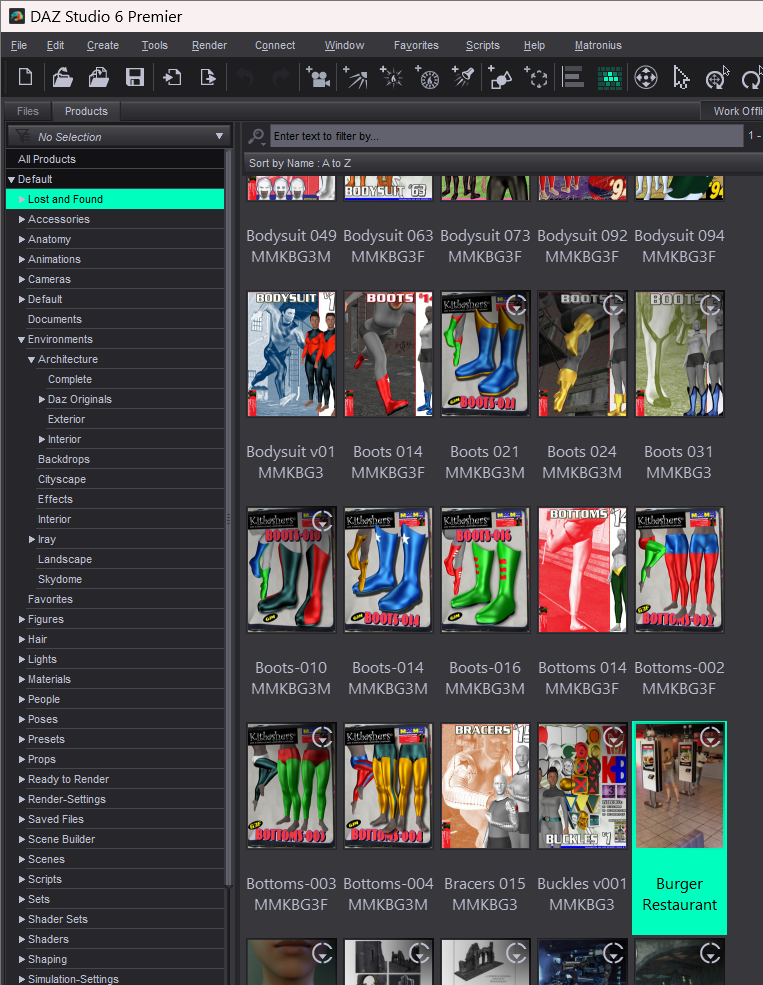
Normally when I open a product in Lost and Found I will see a "Lost and Found" category but in this case there isn't one.
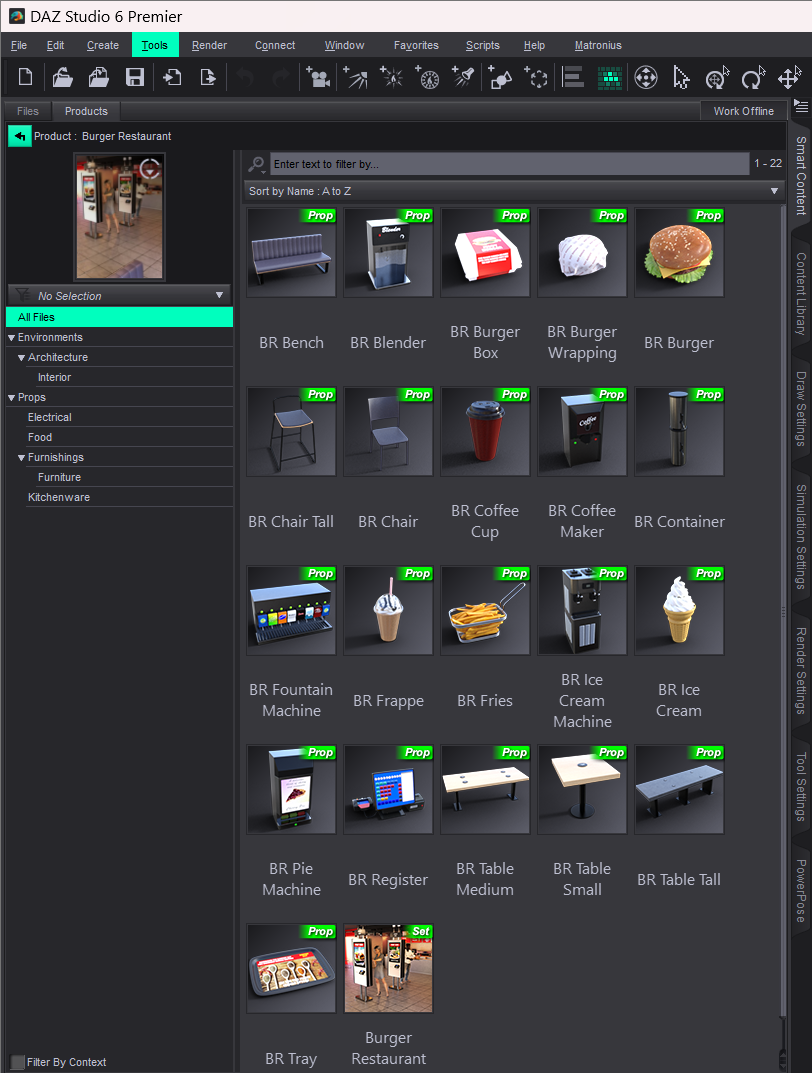
I edited the metadata and checked every item. Nothing has more than one category and none of them have a lost and found category.
So why is it showing up in the Lost and Found?
EZFinder - Advanced Content Manager for Daz Studio [Commercial]emilynoelle said:
Yay glad to come here and see v1.0.5 is out soon! I love this program so much, and can't wait to see the new pieces!
You will love the changes coming very soon Emily! Instant pagination, resizable thumbnails, tighter integration for multi-libraries, fast append scans add new products in a few minutes and organize organize organize! Very solid fixes to organization!
And EZHDRI scan will work again! This new version really completes the program in the best possible way! (HDRI scans now come with metadata for the info panel too.)
Thank you for your kind support and enthusiasm for EZFinder!
There's Always Another Sale Thread -- Discussions Only Pt 6Ron Knights said:
Richard, have you returned from Paris already?! Remember the catalympics?
The older content or characters have lower resolution and demand less computing power. (the 3delight content).
I can quickly render the old content using 3delight. I have a problem with the more complicated content that uses iRay.
My old nVidia card is deprecated. Which is a polite way of saying it will eventually be abandoned.
When it comes to printing, the lower resolution images require less ink or toner (for laser color printers).
But this isn't related to the age of the content, just the render settings (and lighting, as I said in relation to the amount of ink needed for the darkness of the pixels)
But then I thought a bright cat like yourself already knew that. (wink wink).
When it comes to the Premier content. It's all so complicated. Too many variables.
In the past others have refused to deal with Connect. A few years ago there was a heated discussion on the subject. And I believe DAZ reversed course on their plans. I think new items were "connect-only" for awhile, then went back to using DIM?!
Some content was encypted Connect-only yes, as an attempt to stop piracy. It was then set to release as regular content after (I think) a year. But Connect is not inherently related to encrypting content, and currently none is other than the Premier exclusive shapes.
I really don't want anyone sniffing around my computer. I don't want to see little messages coming up while I try to make sense out of my graphic nonsense.
Connect is passive - it asks the account what content you have when/if you log-in (and update Metadata now) and allows decryption (wheer relevant) of anything you try to load that was on that list. It doesn't send data to Daz, it is purely pulling data from Daz and then using that locally.
And I really don't care about most of the Premier Extras for DAZ Studio. You likely know I've been confused by the basic stuff for over 20 years.
**** Edited to add ****
I thought this reply was lost after a recent Cloud Flare Disaster. But here it is, along with my babbling extra words.
Anyway, I am not trying to chnage your mind - about connect or membership - just wanting to correct what looked like a couple of misunderstandings to try to stop them being picked up and repeated.
There's Always Another Sale Thread -- Discussions Only Pt 6Ron Knights said:
I had Premier for a short time, and didn't really care for it.
You can get some characters or content. But you can only keep them while you're a memberr?
So if I create a cast of characters to go along with Marlin Fingle, they will disappear when I let the Premier membership expire. Yikes.
The exclusive shapes ar tied to the membership, yes, but the free character bundle is a regular purchase that remains regardless.
You can get some exclusive scripts or DAZ Studio addons! I don't care about any of them.
You must use DAZ Connect (is that the right name?). Oh, but you need to Phone Home! I detest Connect. It is intrusive.
Connect is needed only for the exclusive shapes, and the plug-ins 9and other features) require logging in to your account every now and then, but don't require updating metadata. I am not sure what you mean about Connect's being intrusive.
I forget the other Premier benefits. But they don't appeal to me.
Now I finally realized that DAZ has this emphasis on New content. Some new content is fine.
But these sales make it feel like I'd be paying ransom to save some money on the products I really want.
My friends and neighbors love my work. But they don't have computers. I need to print out the silly cartoons I create.
The older content is more suited for printing. It uses less ink or toner (for laser color printers).
I am not following this at all - ink/toner use would be entirely dependent on the colour values across the image (darker needs more ink), it would not depend on the content's age in any way.
So here I am, with clear choices to make. I'll let the DAZ+ membership expire.
TurboMetaBot Metadata BrowserTurboMetaBot said:
bnstone_stone said:
Okay, this is good. I still have not been able to have this work with my external DB, but unless that is down the road, I'm glad this has been created. Looks like DAZ is taking note and has released something similar now.
I would say that the only difficulty I saw was understanding how to get this installed. Took some trial and error, but a happy accident surprised me and I was able to get it running.
Looking forward to any updates that you do (hint, hint, external DB access).
mmkay.
New build here https://github.com/TurboMetaBot/turbometabot-metadata-browser/releases/tag/v1.0.5.2I don't have your set-up, so I really was only able to smoke test using the loopback address. So, hopefully you don't mind being a guinea-pig.
There are new vars in the start-up:
// Optional remote CMS PostgreSQL for gallery scan/sort (Tier B SQL).
// Leave CMS_HOST empty to use Daz's own CMS connection (normal install).
// If CMS is on another machine, set CMS_HOST to that hostname/IP. Port, database,
// and user below are stock DAZ CMS values (ContentCluster listen port 17237).
// Only change those if your server differs. Password is often empty locally.
// Daz itself must already be using that same Content database.
PB.CMS_HOST = "";
PB.CMS_PORT = 17237;
PB.CMS_DATABASE = "Content";
PB.CMS_USER = "dzcms";
PB.CMS_PASSWORD = "";
PB.CMS_CONNECT_OPTIONS = "";Assuming your remote server is using all the same DB settings as the default CMS install, you should only have to put in the host.
Please let me know how you get on. If this works without issue I'll merge it into the main branch.
As an aside, I'm curious what advantages your are seeing from running a remote db server. Is it noticably faster responce? I ask because on my list of potential improvements I see for this is possibly moving a lot of the functionality into a separate service that the that the plugin would connect to. Essentailly, just another way of delegating resources, but integrating remote DB into that definitely makes sense if it gives a noticable performance increase.So does this mean I have to remove and reinstall everything?
Big shudders here
To answer your remote question, I am running on an external SSD 4tb drive since my meager 1Tb drive on my mini PC would never survive the data deluge. It has a small lag but loads pretty quickly. Additionally, I have a more powerful Laptop and it too has a storage limit but I've managed to install a lot on it's 4TB SSD drive. What I reall need is to be able to scan the additional external 6TB drive containing my downloaded items not installed by DM.
DAZ has always had this DB management issue, so much time consumed searching for externally purchased items I get nothing finished. The new Content Catalog is also a bust. I bought it in hopes of improvement, but there are several no's to using it, mainly, as far as I am understanding, it only reads from .zip DM installed items (?) not your already installed DAZ Catalog.
All the other stuff you included in you post shot way above my head. I'm for a simple 'here is where my stuff is, please create a simpler catalog manager' installation format... with an option to catalog said additional external databases too.
TurboMetaBot Metadata Browserbnstone_stone said:
Okay, this is good. I still have not been able to have this work with my external DB, but unless that is down the road, I'm glad this has been created. Looks like DAZ is taking note and has released something similar now.
I would say that the only difficulty I saw was understanding how to get this installed. Took some trial and error, but a happy accident surprised me and I was able to get it running.
Looking forward to any updates that you do (hint, hint, external DB access).
mmkay.
New build here https://github.com/TurboMetaBot/turbometabot-metadata-browser/releases/tag/v1.0.5.2I don't have your set-up, so I really was only able to smoke test using the loopback address. So, hopefully you don't mind being a guinea-pig.
There are new vars in the start-up:
// Optional remote CMS PostgreSQL for gallery scan/sort (Tier B SQL).
// Leave CMS_HOST empty to use Daz's own CMS connection (normal install).
// If CMS is on another machine, set CMS_HOST to that hostname/IP. Port, database,
// and user below are stock DAZ CMS values (ContentCluster listen port 17237).
// Only change those if your server differs. Password is often empty locally.
// Daz itself must already be using that same Content database.
PB.CMS_HOST = "";
PB.CMS_PORT = 17237;
PB.CMS_DATABASE = "Content";
PB.CMS_USER = "dzcms";
PB.CMS_PASSWORD = "";
PB.CMS_CONNECT_OPTIONS = "";Assuming your remote server is using all the same DB settings as the default CMS install, you should only have to put in the host.
Please let me know how you get on. If this works without issue I'll merge it into the main branch.
As an aside, I'm curious what advantages your are seeing from running a remote db server. Is it noticably faster responce? I ask because on my list of potential improvements I see for this is possibly moving a lot of the functionality into a separate service that the that the plugin would connect to. Essentailly, just another way of delegating resources, but integrating remote DB into that definitely makes sense if it gives a noticable performance increase.Content Catalog - Windows/macOS (Commercial) - Out nowDoctorJellybean said:
Kersey said:
If you have both versions (PC/Mac), is it possible to export/import your own notes and tags between them? I use a PC at home, and a Mac when I'm away. Just wondering if there is any sense to buy both versions.
The notes\tags are saved in the database. However, I'll let the macOS expert answer that.
Maybe some sort of Export/Import function could be added in an update. or add-on product, to support transferring from one OS version to another. I know several Daz customers use both types of computers, but probably not a large percentage of customers. You'd have to estimate whether the sales volume would recoup the effort that it would take to implement something like that.
Content Catalog - Windows/macOS (Commercial) - Out nowKersey said:
If you have both versions (PC/Mac), is it possible to export/import your own notes and tags between them? I use a PC at home, and a Mac when I'm away. Just wondering if there is any sense to buy both versions.
The notes\tags are saved in the database. However, I'll let the macOS expert answer that.
Daz 3D is part of

Connect
DAZ Productions, Inc.
7533 S Center View Ct #4664
West Jordan, UT 84084Licensing Agreement | Terms of Service | Privacy Policy | EULA
© 2026 Daz Productions Inc. All Rights Reserved.