-
How to make dforce not holding on the initial fabric folds?
James said:
I have a problem.
I make a hijab.
The front part is up to covering the breastThen I make a morph to anticipate bigger breasts by making the front hovering in the air a bit, as the initial position for dforce.
In doing so the fabric has more folds initially.
When I simulated, the result is, the fabric has a bit of unnatural folds/creases when draping. As if dforce trying to hold on to the initial folds.
What is the solution for this?
While sometimes it can work, dforce isn't meant for making morphs. Make the morph in the hijab by sending it and the figure with larger breasts dialed in, over in the modeller. Then dial out the morphs in D/S and select the clothing. Then either via the bridge or via import, bring the morphed hijab back into D/S via Morph Loader Pro [advanced bridge setting in D/S if using Hexagon bridge]. Reverse shape, yes. If the morph looks to be good, then zero it and save it. Then load a fresh clothing piece, restore the figure to high res [goes to base when using Hexagon], and try the simulation again.
It's also possible to adjust the simulation settings, i.e. for thicker, heavier cloth, or lighter fly away cloth. And of course one can put a weight map on it and freeze the portions that are not to be affected, or only affected a little bit, when simulated.
Opulent Bathing Vignette can't be found after installation in DSdaveso said:
PerttiA said:
I have the installation file I downloaded on Wednesday at 3AM Daztime
The Manifest refers to the original locations and the only change I see, is Daz adding "Daz Originals" after "Environments".
Should not prevent one from using the set from the Content Library -> Daz Studio Formats -> Environments -> Daz Originals -> Opulent Bathing Vignetteit dies noit ven show up in content library for me ... I only have 1 product listed under DAZ Originals and its not this one. I tried installing manually and that did not help.
Just installed it (manually) and it works just fine.
The Daz Studio Formats -> [Your Content Library] is showing everything you have installed in your Content Library as it can be seen in Windows Explorer, no matter if the metadata or manifests are wrong
Opulent Bathing Vignette can't be found after installation in DSWell, I first uninstalled on my Win10 laptop the DIM installation. Then I did a manual download and I manually added the files into the appropriate areas as I would if I had purchased the product from Rendo. The environments showed up, but when I tried to load a scene, I got a warning it couldn't find the textures. Additionally, there was no metadata for any files.
I am no way an expert, but I would think this is an issue caused by Daz, and needs to be fixed by them and released to everyone who purchased the product. It is a gorgeous set and deserves the best Daz can do for it.
Mary
Add note: I allow DIM to download and install files as it will does. The most I do is add metadata for old files, add additional metadata for my sub-categories, but file structure where it is downloaded I leave alone totally. And until I had seen this thread I hadn't had a chance to look at this product this morning. Those thunderstorms have been wicked around Denver and I didn't want a computer to fry.
Which generation(s) of poses work with standalone figures?tubbesing said:
Is there an easy way to tell which generation(s) of poses work with standalone figures?
F’rinstance, Lil Alien Guy is a standalone figure. Will he/it work well with Genesis 3 poses, or G8, or G9? Put another way, Ultimate Pose Master by V3Digitimes works with Genesis 3, 8, and 8.1. Will it work with a character like Lil Alien Guy? Is it just a matter of tweaking constraints, or are there more fundamental conflicts?
Thanks.
Another possibility to consider is importing/exporting BVH files (basically a look-up table of bone names and rotations). DS allows for the creation of maps that can be saved/loaded. These maps translate certain bone names from one figure to the other.
So, for example, you could export a BVH file with a posed g9 selected and accept the default mapping. Then, select your custom figure and import the BVH file. When the dialogs pops up, make sure you click Show Details. Adjust the settings to map the transfer between the two. Save it for future use.
HTH.
- Greg
Daz Studio 4.21[.0.x] Pro, General Release!Pakmule said:
bishbosch said:
Is there up-to-date documentation for the new (and old) FBX export settings? The environment I'm trying to transfer to Unreal as an FBX is exploding, with parented things like windows and doors scattering, which wasn't happening before.
I can't export anything to Character Creator 4 anymore. I have tried all sorts of combiations in the new FBX dialog and CC4 still blows up on import.
Did you find a solution? I too am trying relentlessly to get CC4 conversion from Daz G8M? Think I might roll back to 4.20 as I only use Daz now for exportation of assets.
Post Edit - Should anyone encounter problems when exporting to CC3+, I found a solution to lock all the morphs before exporting to .fbx. I was getting my character into the software ok, but I discovered all the body morphs etc. were being dropped at the conversion stage. By locking the morphs prior to export I now have my character looking as it should. This is just my hack for now, so if anyone has another method or workaround, please let me know.
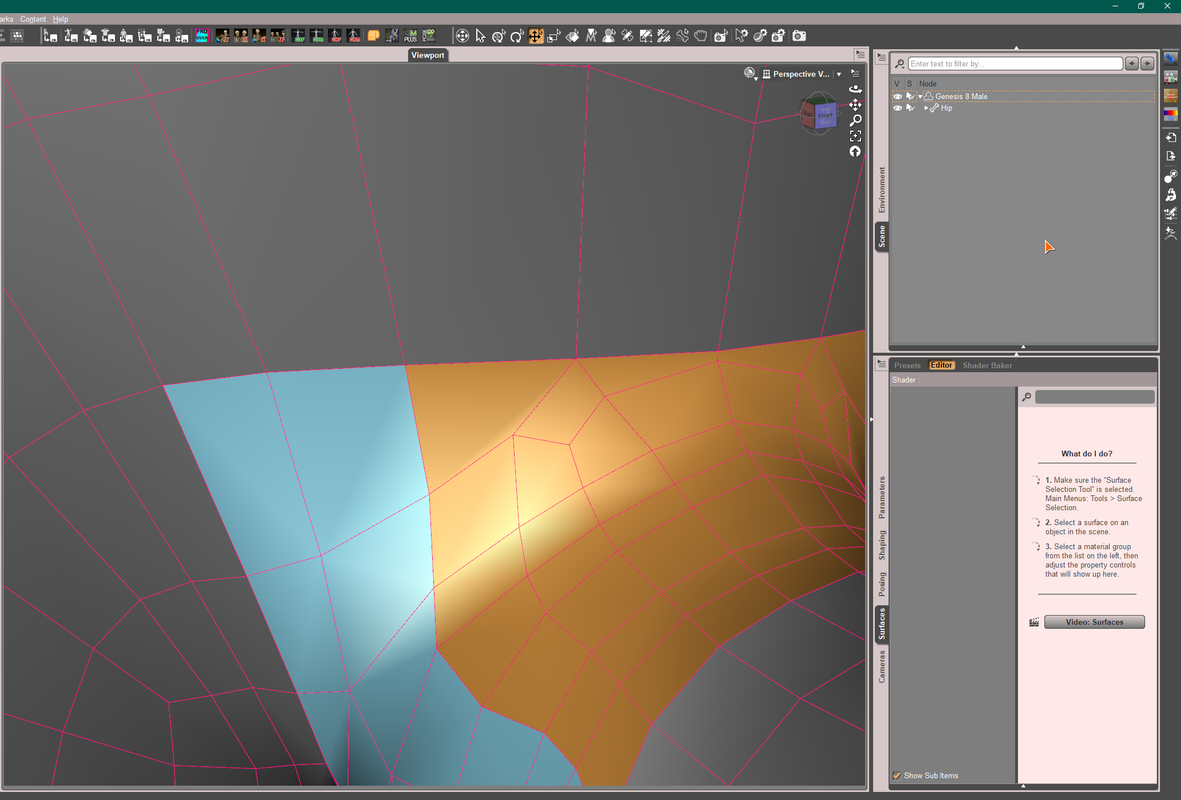
Something wrong with geometry editor's merge graph?Even using the base G8 character with no morphs whatsoever, I get the same result.
Diffeomorphic inblender does a real good job of merging the graft to the character, the only issue I have with that route is the obj size when importing back to DS to transfer the rigging. If I can get that scaling number down for the import, then I can continue with the blender route.
Manually welding in hexagon results in a beautiful character that transfers easy and the bends look fantastic (as fantastic as the bends can look without JCMs and corrective morphs being used) but the UV is obliterated.
I was just seeing if there was an easier method to take in doing this and am surprized DS's merge graft in the geometry editor has this issue (at least in this region of the character).
Hot New (Northern) Season, New Sales Thread: Report Issues Here "Reporting Only"tombraider4ever said:
I just bought this: https://www.daz3d.com/opulent-bathing-vignette but I can't find it either at my smart content filtered by most recent purchases or where the read me says it's supposed to be. Searched Daz for Opulent, nope. Please, if someone knows where it is can you tell me? Need help w finding it, downloaded through daz dim. Updating the meta data for smart content now, hope that will solve it.
Metadata updated, still no Opulent bathing thing. Would be fun to actually find what I buy at where it's supposed to be..Or anwhere.
Edit: I was looged out in daz studio, looged in to find this at smart content, under enviroments, architecture, BUT there is noting there when I click on it!! Downloaded through daz dim, looked through installed in dim to check as I always do, it was there. In daz: NOPE!! I get no such file exist message when I cl the smart content pick! Helpe needed w this, thanks in advance.
Edit 2: Downloaded manually, and the product at smart content enviroment, architecture is still broken, says no file exist but I found it under environments, daz originals normally in daz, outside the smart content. I still want to download it in dim so I get updates on it, so I still need this fixed, thanks. I re imported the meta data after downloading manually and now it's under smart content enviroments and the link works, but doesn't show under all files, recent bought sorting.
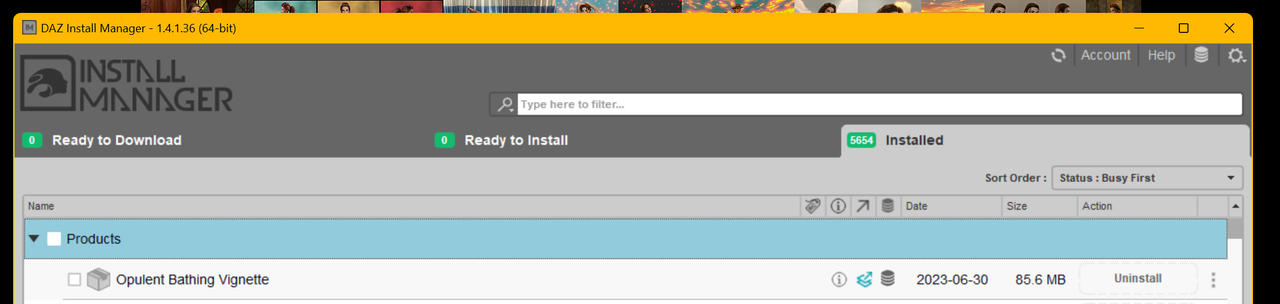
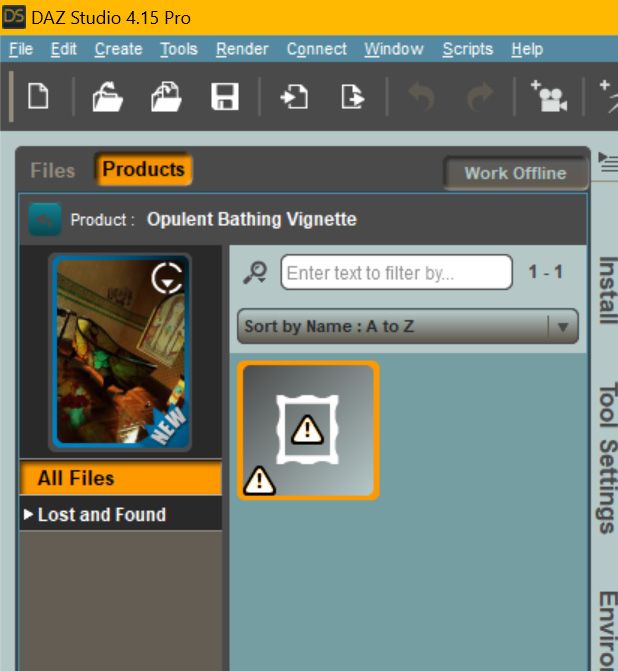
I am having the same problem and started a thread about it as this seems more of a technical issue than a sales issue. You are welcome to join the convesation.
 Diffeomorphic: Bendy Buttocks & Swollen Thighs (Vice Versa)
Sure, you can import jcms with morphs > import standard morphs, then to transfer the jcms to the outfit you use morphs > transfer shapekeys, the vendor morphs will be used when available. Or just select the options in easy import for a new figure.
https://bitbucket.org/Diffeomorphic/import_daz/wiki/Setup/Morphs
Hot New (Northern) Season, New Sales Thread: Report Issues Here "Reporting Only"I just bought this: https://www.daz3d.com/opulent-bathing-vignette but I can't find it either at my smart content filtered by most recent purchases or where the read me says it's supposed to be. Searched Daz for Opulent, nope. Please, if someone knows where it is can you tell me? Need help w finding it, downloaded through daz dim. Updating the meta data for smart content now, hope that will solve it.
Metadata updated, still no Opulent bathing thing. Would be fun to actually find what I buy at where it's supposed to be..Or anwhere.
Edit: I was looged out in daz studio, looged in to find this at smart content, under enviroments, architecture, BUT there is noting there when I click on it!! Downloaded through daz dim, looked through installed in dim to check as I always do, it was there. In daz: NOPE!! I get no such file exist message when I cl the smart content pick! Helpe needed w this, thanks in advance.
Edit 2: Downloaded manually, and the product at smart content enviroment, architecture is still broken, says no file exist but I found it under environments, daz originals normally in daz, outside the smart content. I still want to download it in dim so I get updates on it, so I still need this fixed, thanks. I re imported the meta data after downloading manually and now it's under smart content enviroments and the link works, but doesn't show under all files, recent bought sorting.
Diffeomorphic: Bendy Buttocks & Swollen Thighs (Vice Versa)Thanks for the tips! I re-imported the G8.1 figure with JCM option set and loaded the pose. This time the figure morphed well. My question now: is there a way to import the JCMs for a figure I previously imported from Daz without JCMS? I've gone on to customize the figure in Blender and I'd like to avoid having to repeat the work with a freshly imported one.
Related to all this, the Diffeo blog talks about JCMs specific to the Genesis figure. Looking through the Daz application file system, I found many wardrobe DUFs with the "JCM" label in their file names. When we instruct DIffeo to import from DBZ with the JCM option set, does DIffeo gather the JCMs for the wardrobes as well?
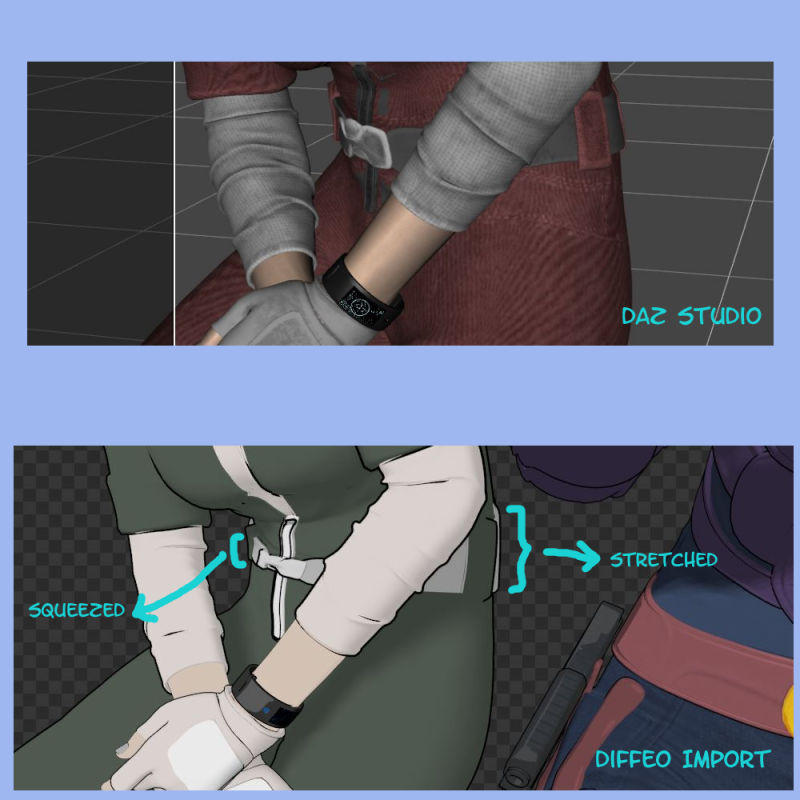
I ask this because I see the wardrobe belts squished in a way I do not with the same figure and pose in Daz Studio. My thoughts are that if we can import JCMs for a figure into Blender, why not the JCMs for wardrobes too.
Cheers!
New RTX 4070ti Can’t RenderAt the bottom of the log it says it can't find a useable device. I only tried to render a bird. No environment.
--
2023-06-28 08:24:03.034 [INFO] :: Loading Layout: C:/Users/User/AppData/Roaming/DAZ 3D/Studio4/layout.dsx
2023-06-28 08:24:13.822 [INFO] :: Prepare asset load (open): /Props/Stuffed Animals/Polygonal Miniatures/PM-Stuffed Animals/PM-Rode_Ibis.duf
2023-06-28 08:24:13.822 [INFO] :: Locking viewport redraw...
2023-06-28 08:24:13.822 [INFO] :: Viewport redraw locked.
2023-06-28 08:24:13.853 [INFO] :: Native format content directories: 2
2023-06-28 08:24:13.853 [INFO] :: Poser format content directories: 2
2023-06-28 08:24:13.853 [INFO] :: Other import format content directories: 0
2023-06-28 08:24:13.853 [INFO] :: Begin asset load (open): /Props/Stuffed Animals/Polygonal Miniatures/PM-Stuffed Animals/PM-Rode_Ibis.duf
2023-06-28 08:24:13.862 [INFO] :: *** Scene Cleared ***
2023-06-28 08:24:13.862 [INFO] :: Determining missing assets...
2023-06-28 08:24:13.889 [INFO] :: Setting textures...
2023-06-28 08:24:13.890 [INFO] :: Scanning for addons...
2023-06-28 08:24:13.892 [INFO] :: Creating node geometry...
2023-06-28 08:24:13.894 [INFO] :: Creating UV sets...
2023-06-28 08:24:13.894 [INFO] :: Creating materials...
2023-06-28 08:24:13.897 [INFO] :: Resolving legacy figures...
2023-06-28 08:24:13.897 [INFO] :: Sorting property groups...
2023-06-28 08:24:13.897 [INFO] :: Setting up follow targets...
2023-06-28 08:24:13.897 [INFO] :: Finished asset load (open): 0m 0.43s - /Props/Stuffed Animals/Polygonal Miniatures/PM-Stuffed Animals/PM-Rode_Ibis.duf
2023-06-28 08:24:13.927 [INFO] :: Unlocking viewport redraw...
2023-06-28 08:24:13.927 [INFO] :: Viewport redraw unlocked.
2023-06-28 08:24:14.291 [INFO] :: Loaded image: Rode_Ibis-N.jpg
2023-06-28 08:24:14.335 [INFO] :: Loaded image: Rode_Ibis-T.jpg
2023-06-28 08:24:32.708 [WARNING] :: QColor::setRgb: RGB parameters out of range
2023-06-28 08:24:32.750 [INFO] :: Rendering image
2023-06-28 08:24:32.768 Iray [INFO] - IMAGE:IO :: 1.0 IMAGE io info : Loading image "C:\Users\Public\Documents\My DAZ 3D Library\Runtime\Textures\Polygonal Miniatures\Stuffed Animals\Rode_Ibis-T.jpg", no selector, pixel type "Rgb", 8192x8192x1 pixels, 1 miplevel.
2023-06-28 08:24:32.769 Iray [INFO] - IMAGE:IO :: 1.0 IMAGE io info : Loading image "C:\Users\Public\Documents\My DAZ 3D Library\Runtime\Textures\Polygonal Miniatures\Stuffed Animals\Rode_Ibis-N.jpg", no selector, pixel type "Rgb", 8192x8192x1 pixels, 1 miplevel.
2023-06-28 08:24:32.777 Iray [INFO] - IMAGE:IO :: 1.0 IMAGE io info : Loading image "C:\Program Files\DAZ 3D\DAZStudio4\shaders\iray\resources\DTHDR-RuinsB-500.hdr", no selector, pixel type "Rgb_fp", 512x256x1 pixels, 1 miplevel.
2023-06-28 08:24:32.806 Iray (Scene Update) : Updating LPE labels
2023-06-28 08:24:32.807 Iray (Scene Update) : Updating geometry
2023-06-28 08:24:32.807 Iray [INFO] - IRAY:RENDER :: 1.0 IRAY rend info : Updating geometry.
2023-06-28 08:24:32.807 Iray (Scene Update) : Retrieving geometry
2023-06-28 08:24:32.807 Iray (Scene Update) : Updating motion transform data
2023-06-28 08:24:32.807 Iray [INFO] - IRAY:RENDER :: 1.0 IRAY rend info : Updating motion transforms.
2023-06-28 08:24:32.807 Iray (Scene Update) : Updating section objects
2023-06-28 08:24:32.807 Iray [INFO] - IRAY:RENDER :: 1.0 IRAY rend info : Importing scene graph.
2023-06-28 08:24:32.808 Iray [INFO] - IRAY:RENDER :: 1.0 IRAY rend info : Auto instancing compression ratio 1.00 (Full instancing compression ratio 1.00)
2023-06-28 08:24:32.809 Iray [INFO] - IRAY:RENDER :: 1.0 IRAY rend info : Importing geometry for motion time 0
2023-06-28 08:24:32.810 Iray [INFO] - IRAY:RENDER :: 1.0 IRAY rend info : Geometry import (1 triangle object with 21924 triangles, 0 fiber objects with 0 fibers (0 segments), 1 triangle instance yielding 21924 triangles, 0 fiber instances yielding 0 segments) took 0.002 s
2023-06-28 08:24:32.810 Iray [INFO] - IRAY:RENDER :: 1.0 IRAY rend info : Updating section objects.
2023-06-28 08:24:32.811 Iray (Scene Update) : Updating materials
2023-06-28 08:24:32.811 Iray [INFO] - IRAY:RENDER :: 1.0 IRAY rend info : Updating materials.
2023-06-28 08:24:32.813 Iray [INFO] - MATCNV:RENDER :: 1.0 MATCNV rend info : found 2 textures, 0 lambdas (0 unique)
2023-06-28 08:24:32.813 Iray (Scene Update) : Updating volumes
2023-06-28 08:24:32.813 Iray [INFO] - IRAY:RENDER :: 1.0 IRAY rend info : Updating volumes.
2023-06-28 08:24:32.813 Iray (Scene Update) : Updating environment
2023-06-28 08:24:32.814 Iray [INFO] - IRAY:RENDER :: 1.0 IRAY rend info : Updating environment.
2023-06-28 08:24:32.820 Iray (Scene Update) : Updating lens data
2023-06-28 08:24:32.820 Iray [INFO] - IRAY:RENDER :: 1.0 IRAY rend info : Updating lens.
2023-06-28 08:24:32.821 Iray (Scene Update) : Updating lights
2023-06-28 08:24:32.821 Iray [INFO] - IRAY:RENDER :: 1.0 IRAY rend info : Updating lights.
2023-06-28 08:24:32.821 Iray (Scene Update) : Updating instance topology
2023-06-28 08:24:32.821 Iray (Scene Update) : Updating flags
2023-06-28 08:24:32.821 Iray [INFO] - IRAY:RENDER :: 1.0 IRAY rend info : Updating object flags.
2023-06-28 08:24:32.821 Iray (Scene Update) : Updating backplate
2023-06-28 08:24:32.821 Iray [INFO] - IRAY:RENDER :: 1.0 IRAY rend info : Updating backplate.
2023-06-28 08:24:32.823 Iray (Scene Update) : Updating portals
2023-06-28 08:24:32.823 Iray [INFO] - IRAY:RENDER :: 1.0 IRAY rend info : Updating caustic portals.
2023-06-28 08:24:32.823 Iray (Scene Update) : Updating decals
2023-06-28 08:24:32.823 Iray [INFO] - IRAY:RENDER :: 1.0 IRAY rend info : Updating decals.
2023-06-28 08:24:32.836 Iray [INFO] - IRAY:RENDER :: 1.0 IRAY rend info : Using iray core convergence estimate.
2023-06-28 08:24:32.837 Iray [INFO] - IRAY:RENDER :: 1.0 IRAY rend info : Allocating 1-layer frame buffer
2023-06-28 08:24:32.844 Iray [INFO] - IRAY:RENDER :: 1.0 IRAY rend info : Using batch scheduling, caustic sampler disabled
2023-06-28 08:24:32.844 [WARNING] :: ..\..\..\..\..\src\pluginsource\DzIrayRender\dzneuraymgr.cpp(369): Iray [ERROR]
- IRAY:RENDER :: 1.0 IRAY rend error: Cannot render: found no usable devices. Please update your NVIDIA driver (www.nvidia.com)
to at least 471.41, or enable CPU-only rendering.
2023-06-28 08:24:32.844 [ERROR] Iray :: Invalid parameters (NULL pointer).
2023-06-28 08:24:32.927 [INFO] :: Saved image: C:\Users\User\AppData\Roaming\DAZ 3D\Studio4\temp\render\r.png
2023-06-28 08:24:32.932 [INFO] :: Finished Rendering
2023-06-28 08:24:32.957 [INFO] :: Total Rendering Time: 0.26 secondsDiffeomorphic DAZ Importer version 1.6.0 releasedIt depends. Poses in daz studio are quite complex and they may include morphs too. If the pose only affects bones then it should import fine. If the pose also affects morphs then you have to import the needed moprhs or the pose will not work, in this case you should get a warning for missing morphs in the console.
Please note that body morphs are not compatible with ik so you can only load them on the daz rig.
Then if you're sure you did it all right and that's a bug you can report it at bitbucket for Thomas to check.
Diffeomorphic DAZ Importer version 1.6.0 releasedHi! I have some problems with genesis 9 pose imorting. It doesnt imort poses properly. It kind a impors but pose is wrong and it goes weirdly. Should I tick the option called ''optimise pose for IK in'' in import menu?
Something wrong with geometry editor's merge graph?I'm a Blender user and using Diffeomorph Daz Importer (DDI) as well. However, if you just use Blender to make morph, fixing pJCMs, etc., suggest not use DDI but just standard OBJ export / import.
I post a merged one (G8M figure + DK Anatomy), flawless...
 Diffeomorphic: Bendy Buttocks & Swollen Thighs (Vice Versa)
From your picture it seems you didn't import jcms, or not all of them. Most figures provide additional jcms that you can load with "import baked correctives", or as custom morphs. If you load jcms in rest pose you should get the same deformations as daz studio. Then to adjust deformations that you don't like you may try with a smooth modifier masked by a vertex group to only affect the parts you want.
Another way is to use a corrective smooth instead of jcms, eventually prebending the figure. Works fine enough if you don't need too much realism.
https://diffeomorphic.blogspot.com/2023/01/using-pre-bended-figures-also-works-for.html
Diffeomorphic: Bendy Buttocks & Swollen Thighs (Vice Versa)I've noted distortions in the thigh and buttocks areas of the G8.1 I import from Daz via Diffeomorphic. With exteme poses, the mesh becomes bloated. In the Daz store I've seen Bend Control for Genesis 8 Female(s) which I believe remedies the problem in Daz. Can anyone suggest any quick and easy technique to do the same in Blender?
Cheers!
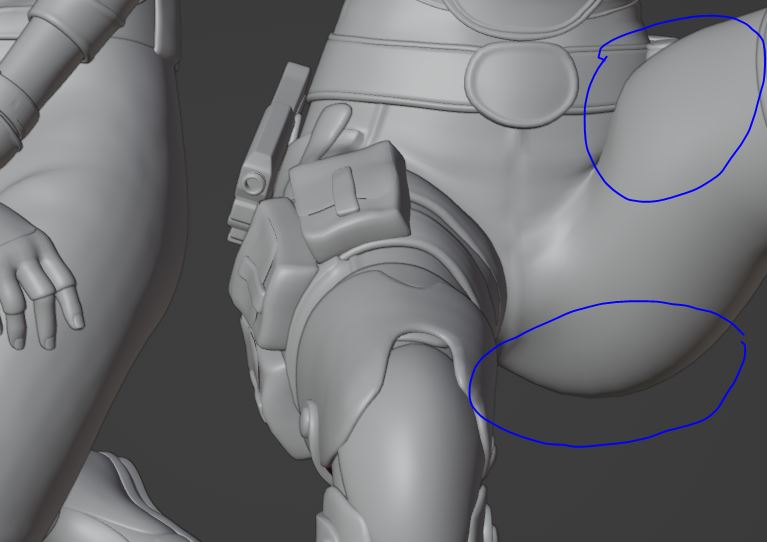 Struggling with Weight Mapping for rigged ArtStation clothing [solved]
If go for resimulation in MD with a G8F default A-Pose , more or less is as above steps by using Morph Target. Then export the garment to obj, import into DAZ for fitting to the figure with Transfer Utility (no need to set Current / Reverse Deformations in this way) . Lots of tutorials could be found on youtube.
Well since you're familiar with Blender, you may export the garment (in Pic 2) to blender, smooth the armpits with smoothing brush, then export to obj file. In DS, use Edit - Figure -Geometry - Update Base Geometry to change the Vertex Positions with the obj file. Done ~ Most of the time I myselft go for this way as it's faster...
~ I simulated your case as below, the mechanism is almost the same ~
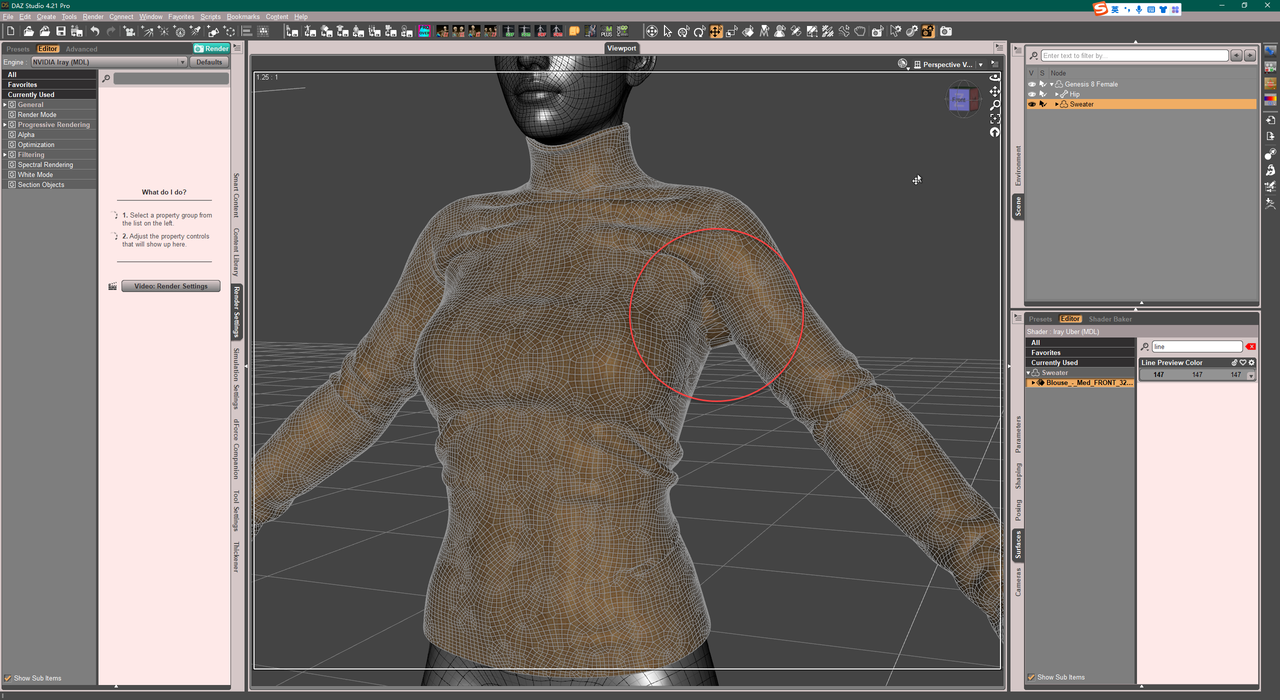
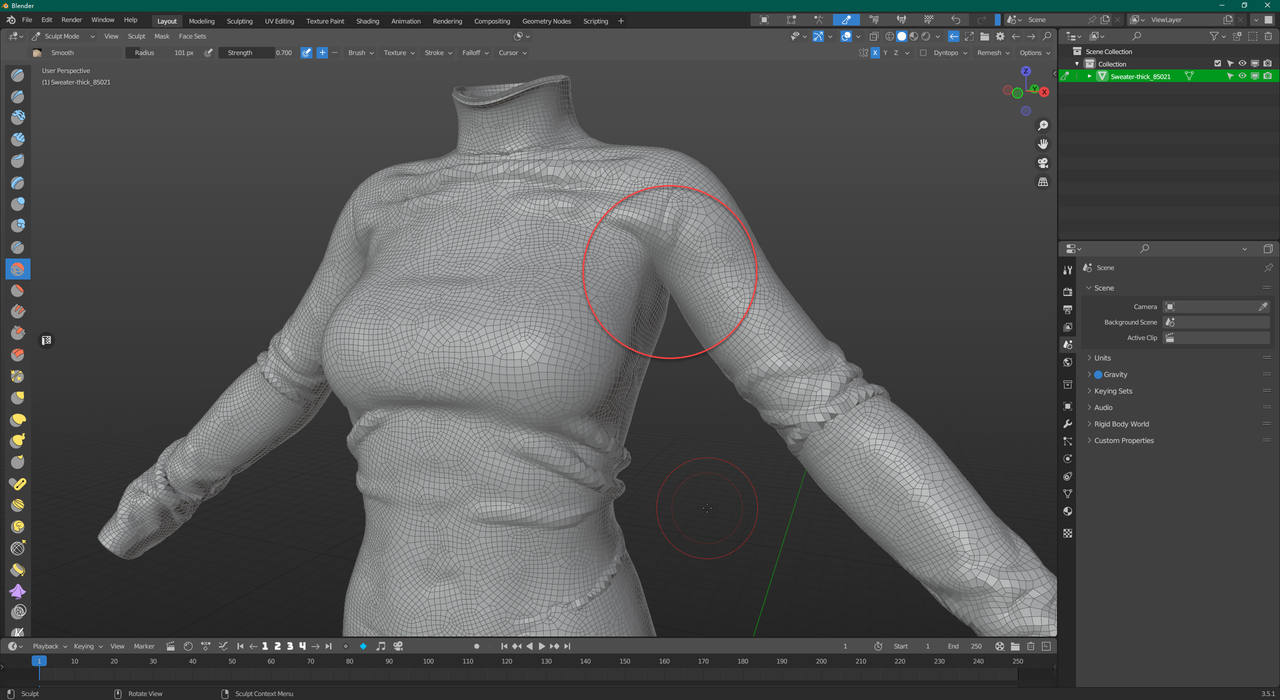
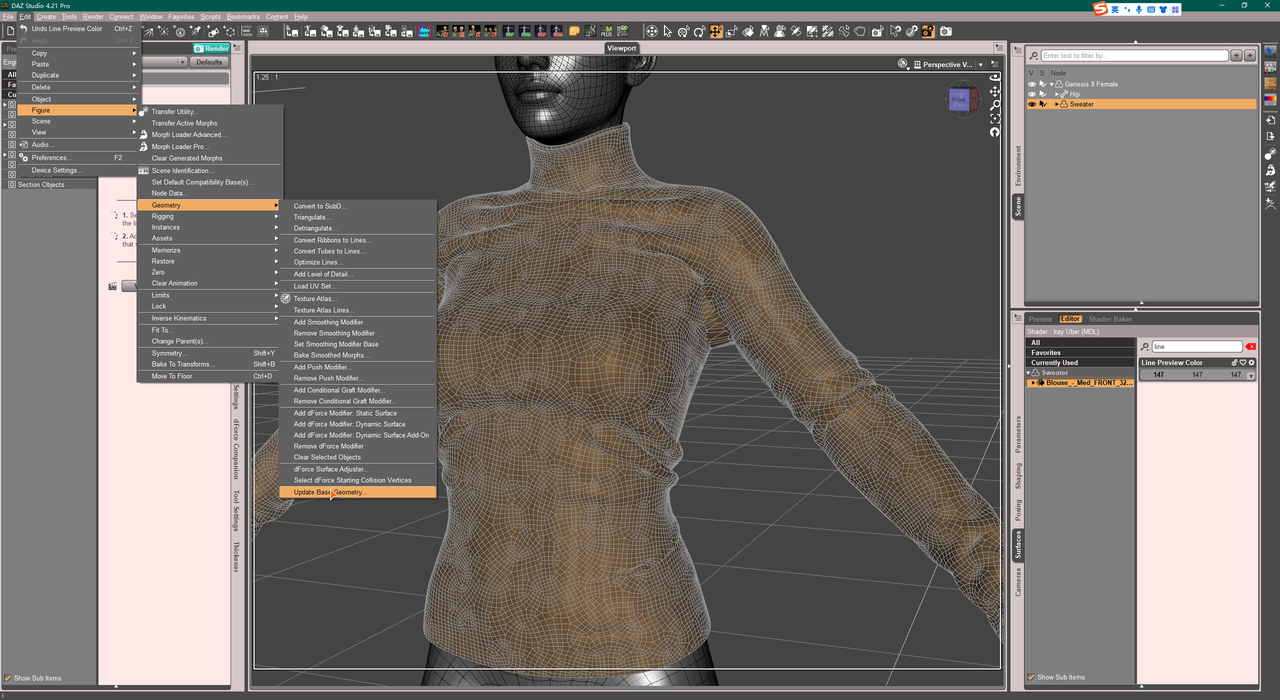
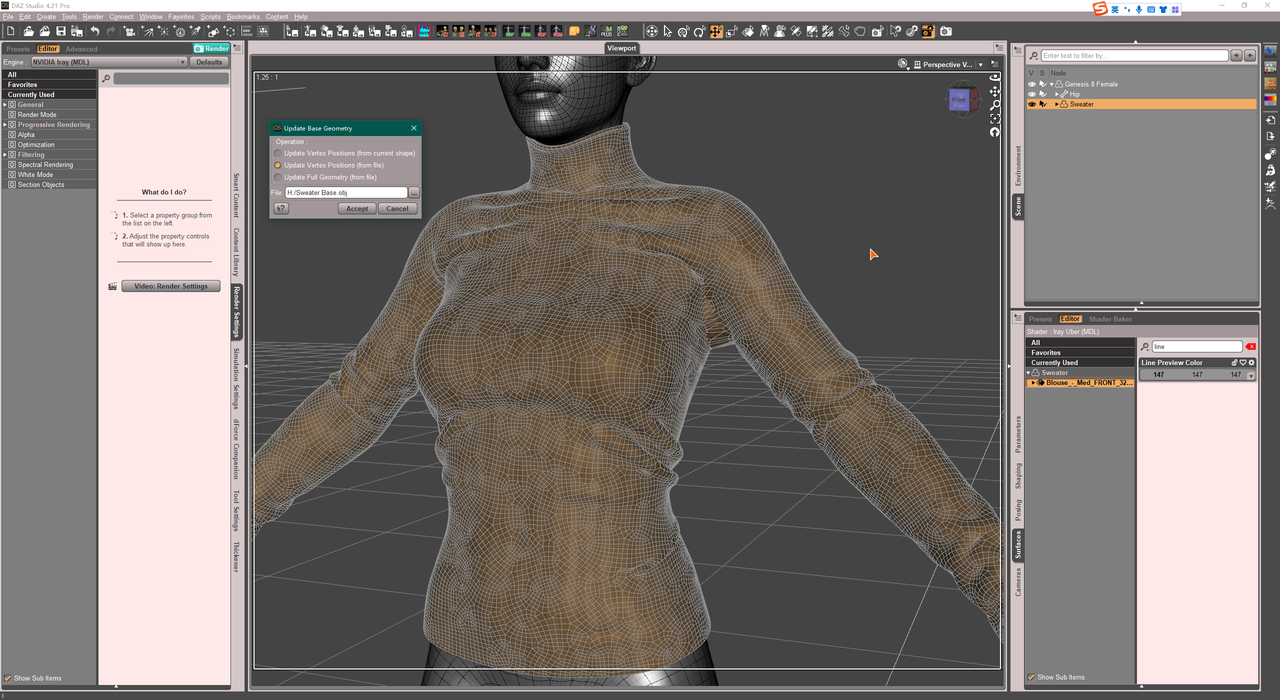
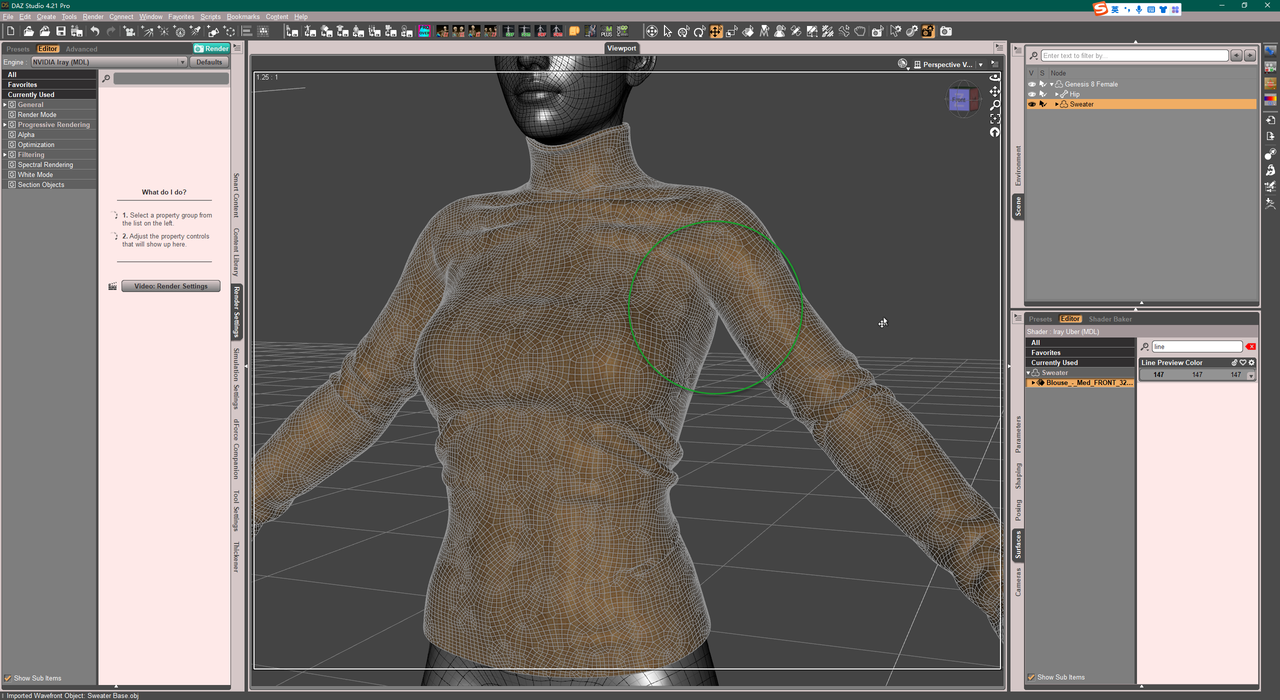
PS: You better do Quadrangulate in MD...
Struggling with Weight Mapping for rigged ArtStation clothing [solved]arstropica said:
For whatever reason, the suit does not retain its basic shape when simulated in marvelous designer with a correctly posed avatar. But TBH, having just gotten MD, I am not very knowledgeable with that software so I am not sure if this is due to a flaw in the clothing design, or if it's something else.
MD is a very basic program and easy to brush up on how to use it in a few hours.
It will probably give a petter result to just simulate in MD to the correct default pose than do anything else to get it into that pose.
The fille you purchased presumably comes with a .zprj file.
- Open that in MD.
- Select all pattern pieces in the 2D Viewport
- in the pattern properties window, put the Particle Density to something high, like 10 or 15 or 20 to start with. Having Particle Density too low is hard to simulate as too high poly. Highpoly (low Particle Density) should only be used for final simulation.
- Import/add obj of avatar with the pose that lines up with garment.
- Simulate so garment settles on avatar.
- Resimulate to correct Daz default pose by either
- (1) load avatar as morph target (your transition is likely small, so this is probably good option)
- (2) delete current avatar and load a short pose transition animation in alembic format (check out Sagan alembic exporter on forums for a good animation exporter for Daz Studio), recording the simulation in the Animation window
- Resimulate again so garment settles on new pose
- Change Particle Density of all pattern pieces again to desired poly count, maybe something like Particle Density = 10. Possibly need to go lower to something like PD = 5 for some parts. Do final sim.
- Select all pattern pieces and click Remesh, if you want better topology
- Select all pattern pieces and export as obj selected.
Important concepts when exportting:
- Fabric names become new Surfaces in Daz (anything after a space is ignored so a fabric named Fabric 1 and Fabric 2 will collapse into single Surface called Fabric)
- Checking Unified Coordinates will use the UV Mapping from the UV Editor window, while leaving it unchecked will use any repeating textures set up in MD
Environment prop (car) morph issue - affecting pose controlsOK I seem to have solved the problem of the doors opening and closing. I did this by setting all the pose control values to zero before I exported to .obj. I re-imported my morph and now the doors don't open and close when I adjust the morph percentage. The only thing left are the wheels. When I adjust the value of my morph, the wheels scale in size. The higher I set my morph, the smaller they get. There is a pose control that can be used to spin the wheels, and it's default value (clean import into a new scene) is -100.0%. I set this to zero as well before I exported, but the problem still remains.
Animation messed after importingAre you attempting this in DAZ 4.21? There has been major changes to the FBX import/export code.
Daz 3D is part of

Connect
DAZ Productions, Inc.
7533 S Center View Ct #4664
West Jordan, UT 84084Licensing Agreement | Terms of Service | Privacy Policy | EULA
© 2026 Daz Productions Inc. All Rights Reserved.