-
Computer hung, now database "is in recovery mode"
All right, re-imported all vendor metadata. Found another hundred or so metadata files with "difficulties", mostly defunct entries, but I couldn't just leave them. A few conflicts that originally went unnoticed, a few early attempts at modifying them that I botched; almost second nature now.
Started importing User Data. So far so good, but slow (14 files to do). I'll take a few hours restoring healthy data over potentially taking literally years to reproduce it from scratch.
I do not know if it was the sheer volume of information that tripped up DAZ Studio when using the Content DB Maintenance -> Re-Import Metadata to do it all at once. Doing it in smaller steps definitely worked flawlessly. Using DIM, it is easy to select ranges of SKUs, instead of clicking hundreds or thousands of tiny boxes. I can't say I would recommend Re-Importing everything in one pass if you have a lot of stuff. I will be backing up the CMS data cluster from now on, also. I hope to never have to do this again.
Studio CRASHES after IMPORTING MIXAMO FBX binary fileHi,
Im new here and have some issue from the very beginning :(
I would be greatful for Your help.
I want to import avatar from Mixamo with Animations.
Process: Firstly i would export Gen2 avatar from Daz studio - upload to mixamo - select animation - than download the animation wiht first format FBX Binary
When i want to import that file in Daz Studio it quit unexpectedly.
Does only FBX Binary format have animation? i CAN import other formats like FBX 6 or 7 but they doesn't have animations and my avatar always imports in T-Position
Btw. Could it be Sotware issue? it doesn't work properly to me. Tabs in the viewport are crossed with some line and when i change viewport is not fluid.
Does anyone have the same problem or ideas what's going on?
Thanks!Art & Animations By Ivy SummersRichard Haseltine said:
WendyLuvsCatz said:
the camera
it cannot photograph itself
mine (360 camera not drone, don't have one) added a black circular hole at the bottom like that with the metadata details written in it
lets face it, with a drone 99% of the time above and beyond the drone you would only ever see sky, they could have been cheeky and stiched a photograph of the drone into the software (or a dragon)
Ah, I was thinking of the multiiple overlapping exposures used to make HDRis.
I have a bunch of hdr's I have created and I plan on releasing as freebies , right now I am just enjoying flying the drone and exploring
Art & Animations By Ivy SummersWendyLuvsCatz said:
the camera
it cannot photograph itself
mine (360 camera not drone, don't have one) added a black circular hole at the bottom like that with the metadata details written in it
lets face it, with a drone 99% of the time above and beyond the drone you would only ever see sky, they could have been cheeky and stiched a photograph of the drone into the software (or a dragon)
Ah, I was thinking of the multiiple overlapping exposures used to make HDRis.
Art & Animations By Ivy Summersthe camera
it cannot photograph itself
mine (360 camera not drone, don't have one) added a black circular hole at the bottom like that with the metadata details written in it
lets face it, with a drone 99% of the time above and beyond the drone you would only ever see sky, they could have been cheeky and stiched a photograph of the drone into the software (or a dragon)
DUF Prop Converter for Poser 12The resulting import is a static prop; one could do essentially the same thing by exporting from Studio as an .obj and bringing it into Poser...
Diffeomorphic - does a step by step tutorial exist?Padone said:
You can use daz favorites in easy import.
https://bitbucket.org/Diffeomorphic/import_daz/wiki/Setup/Morphs/Import DAZ Favorites
Thanks for the link. There is so much information available, but you have to find them in the huge pile
 DazToHue 1.0 is out now!
playbox1671 said:
This is really great work! I've been trying this out recently, and I've had problems with the 'Additional Animations' option. When the additional animations pass through and are exported from the 'DazToHueExport' node, they don't match, and in some cases, the arms and neck of the daz characters are severely deformed. Although I first noticed this Unreal, I checked the fbx file in Houdini, and the skeleton has the same problems before the Unreal import. I'm using the Genesis 8.1 female base character.
Has anyone else seen this? Is there a best practice for this process?
Oh darn it! Apologies playbox167 and everyone else. I left out a critical piece of information in the tutorials regarding additional information.
That is, the first frame of the animation must be the default Daz figure pose, otherwise what you describe happens.
So, I always start my animations in Daz on frame 1, leaving frame 0 as the default figure pose. Then inside Unreal engine I just trim off the first frame of the animation.
Sorry about missing that critical step in the tutorials.
Please let me know if that solves it for you.
Diffeomorphic - does a step by step tutorial exist?You can use daz favorites in easy import.
https://bitbucket.org/Diffeomorphic/import_daz/wiki/Setup/Morphs/Import DAZ Favorites
Misc questions about converting to prop and Marmoset ToolbagJust have a couple of unrelated questions.
- Is Edit->Figure-Rigging-Convert to Prop the recommended way to turn a figure or a part of one (using geometry editor) into a static object with no unnecessary bones or surfaces left over? It seems to work from the tests I've done, but I'd just like to confirm.
- I understand that Marmoset Toolbag 4 still does not recognize UDIMs. Is it possible to still import a DAZ figure into it as an OBJ and apply separate textures to each body part? I'm not really concerned with being able to paint across UDIMs like you can in Substance Painter, but I'm not even going to consider it if DAZ figures do not come over properly. Thanks very much.
DForce Clothcsteell_c2893e4ab6 said:
Can I also convert the DForce cloth I have made from a primtive to a prop or figure? If so how? Cheers
Actually you 'can't convert it' in that way, as the dForce Modifier (dynamic surfaces) and simulated result will be removed after you convert it from a Primitive Prop to a Figure (vice versa) , or after you conform it to a Genesis figure by using Transfer Utility...
For example, I used a Primitive - Cone to make a 'simple skirt'. The typical SOP should be: Create a Primitive - Cone > Geometry Editing (Cut top & botttom, Create surfaces, etc.) > Positioning > Export to obj and Import Back > Transfer Utility > Add dForce Modifier > Tweak params on dynamic surface > Add Shaders.. > Simulate it > Thicken it... (Optional: Convert to SubD, Add Smoothing Modifier...)
PS: You also can Thicken the object first before using Transfer Utility, but more tweaking on dynamic surfaces might be needed.
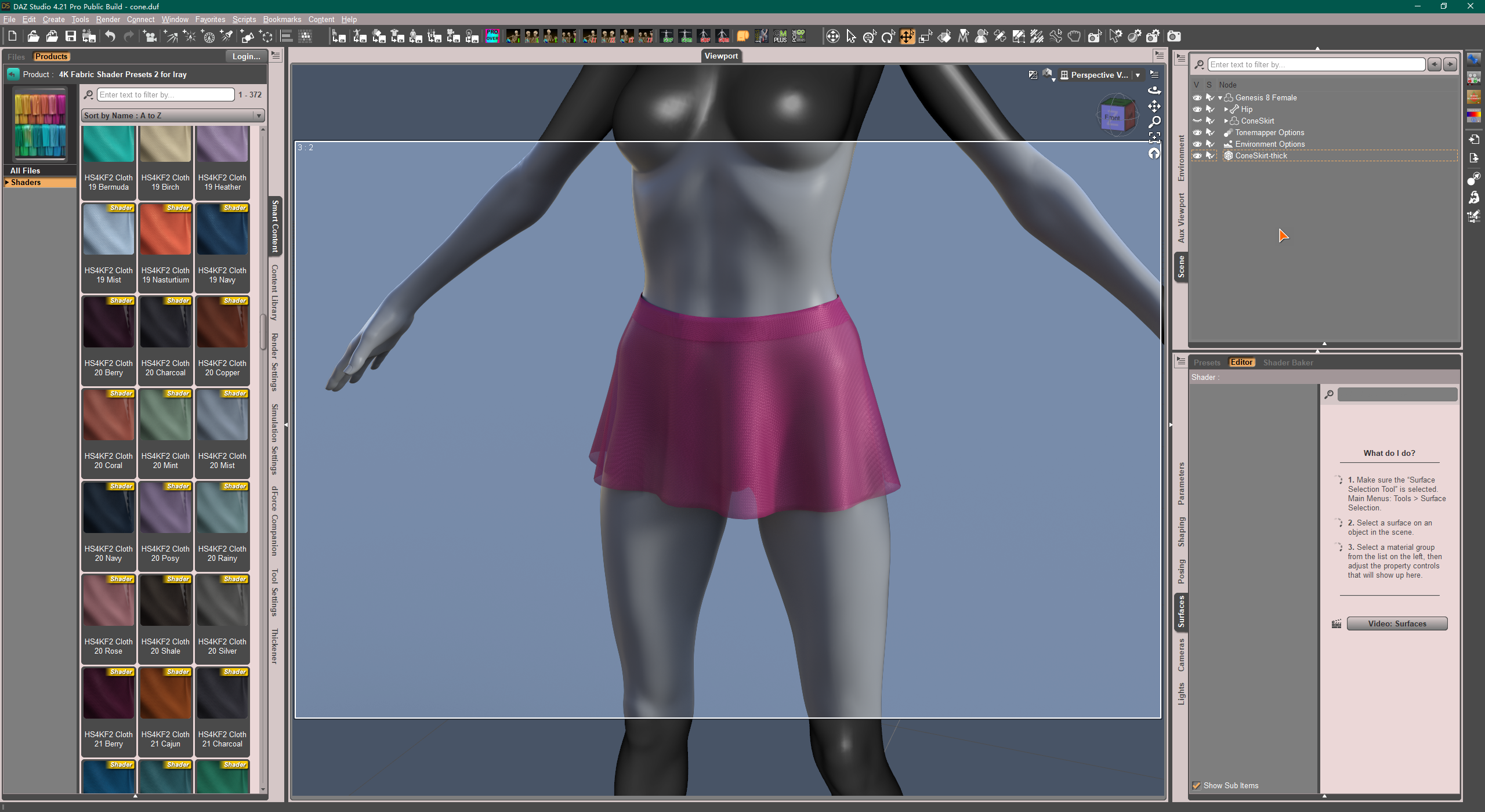 Hair messing up when rotating neck bones on blender
Ook said:
crosswind said:
Ook said:
crosswind said:
I tried this Zoren Hair but have not seen such an issue. I used the latest DDI - 1.7.1.1566 and DazHairConverter 2.1.2
You may first try Easy Import or update to latest DDI ...
Were you using the MHX rig?
I tested zoren hair and for this one keyshaped bone works fine but the head bone doesn't.
Yes, rigged...neck and head bones work all fine. And the rigging on your side seems not that correct... not sure... Have you updated MHX addon recently ?
I have the one that came with diffeo. MHX version is 1.7.0.0067...
Maybe I'm doing the process wrong? Just merge rig > convert hair > then rig to MHX right?
Yea, your process was correct, only my MHX version is 1.7.0.0069... but I found no info. related to such the issue in the Commits log of MHX runtime, not sure... Will you just update and try again?
Diffeomorphic - does a step by step tutorial exist?I am attempting to get a g8f model with geografts into blender - with Diffeomorphic 1.7.0 I am able to use the easy import with merged geografts, all of the textures transfer correctly and all of the geometry appears to be correct, I am just completely lost on the process of making morphs accessible/applying morphs and then finishing a mesh in a way which allows me to modify the morphs after. As it stands, I can see and access baked morphs, but attempting to modify them produces no visible results on my mesh, and importing morphs directly (from golden palace, for example) also results in morphs in the settings which seem to produce no visible results when adjusted. I have both downloaded the Diffeomorphic manual and read it online, and although I definitely appreciate how detailed the descriptions of each of the features are, I am still really missing a more step-by-step idiot guide and am just wondering if anyone knows if such a thing is available. Thanks!
Hair messing up when rotating neck bones on blendercrosswind said:
Ook said:
crosswind said:
I tried this Zoren Hair but have not seen such an issue. I used the latest DDI - 1.7.1.1566 and DazHairConverter 2.1.2
You may first try Easy Import or update to latest DDI ...
Were you using the MHX rig?
I tested zoren hair and for this one keyshaped bone works fine but the head bone doesn't.
Yes, rigged...neck and head bones work all fine. And the rigging on your side seems not that correct... not sure... Have you updated MHX addon recently ?
I have the one that came with diffeo. MHX version is 1.7.0.0067...
Maybe I'm doing the process wrong? Just merge rig > convert hair > then rig to MHX right?
DazToHue 1.0 is out now!This is really great work! I've been trying this out recently, and I've had problems with the 'Additional Animations' option. When the additional animations pass through and are exported from the 'DazToHueExport' node, they don't match, and in some cases, the arms and neck of the daz characters are severely deformed. Although I first noticed this Unreal, I checked the fbx file in Houdini, and the skeleton has the same problems before the Unreal import. I'm using the Genesis 8.1 female base character.
Has anyone else seen this? Is there a best practice for this process?
How do you send G9 strand based hair into Zbrush with GOZ?If an SBH is exported without line tesselation generated, ZBrush even cannot import obj file while blender can but the hair is not sculptable..only editable. At the end of the day, obj cannot be loaded back to Ds.
Hair messing up when rotating neck bones on blenderOok said:
crosswind said:
I tried this Zoren Hair but have not seen such an issue. I used the latest DDI - 1.7.1.1566 and DazHairConverter 2.1.2
You may first try Easy Import or update to latest DDI ...
Were you using the MHX rig?
I tested zoren hair and for this one keyshaped bone works fine but the head bone doesn't.
Yes, rigged...neck and head bones work all fine. And the rigging on your side seems not that correct... not sure... Have you updated MHX addon recently ?
How do you send G9 strand based hair into Zbrush with GOZ?Even if you can export an SBH to obj with Line Tessellation generated, you have no way to import the morph back to the hair... Only a PA has THE 'toolset'..
So just use a couple of D-Formers to 'reshape' it...Is it possible to "Bake to transforms" for all keyfames in animationuseful tip for those who use Carrara
Genesis 3,8,8.1&9 in Carrara using the discontinued Mimic for Carrara and Fenric's BVH exporter will bake the facial bone animations
and Carara BVH exported animations including facials import to DAZ studio for those figures
UV Mapper helpIf you don't want to go through a lot trouble making regular UV maps and just need or want a quick UV map to paint in a 3D painting program like ArmorPaint ($20), Blender's automatic UV unwrapping features are fairly easy to use and there are tons of tutorials out there... plus if you decide you like it, there are a bunch of great plugins (called "Addons" in Blender-world) that will make it even more useful.
The only drawback with most "Auto-unwrapping" programs is they tend to break the map up into lots of tiny bits instead of the more familiar "pelt map" most of us are familiar with... there are a few that do a great job of that automatically, but they are pretty expensive... Rizom UV (Virtual Spaces) is one, but the Perpetual Indy License is $167... there are others, but they are all around $200 - $300...I use 3D Coat a lot, it's auto unwrapping feature is better than Blender if you don't like messing with the unwrapping manually too much... but it's expensive (around $370... I got mine on sale for like $180 a few years back)... 3D Coat is also a modeling/sculpting program and you can do 3D painting in it too.
If you don't like Blender at all, Ultimate Unwrap ($50 - $60) is pretty good, but you need to learn how to use it to unwrap manually and there aren't a lot of tutorials and it expects you to already understand UV mapping somewhat... but it has a lot of features and if you get the pro version which is around $60, it comes with a huge import/export file conversion capability list... not that you'll need most of the formats, but it generally is pretty good with Theo one that count.
Lastly... the guy who created Ultimate Unwrap (Brad Bolthouse)... (that'd make a cool superhero name), used to have a simple UV unwrapping program call "LithUnwrap" for free on ShareCG... it was the predecessor to Ultimate Unwrap, but it disappeared from SCG a few years ago and I recently came across it again on GitHub... I haven't tried this version out and it's been years since I dabbled with the on that was on SCG... but here the GitHub link...
https://github.com/timdetering/HomeworldSDL/tree/master/tools/editors/texture/LithUnwrap
If I recall correctly, it was about the same more or less as the free version of UVmapper.
Then there is Roadkill which was a good (Free) simple mapper that was easy to use and learn, but that disappeared about 6 or 7 years ago when the site that was hosting it closed down.
Daz 3D is part of

Connect
DAZ Productions, Inc.
7533 S Center View Ct #4664
West Jordan, UT 84084Licensing Agreement | Terms of Service | Privacy Policy | EULA
© 2026 Daz Productions Inc. All Rights Reserved.