-
Convert/upgrade genesis 8 characters to 8.1?
Zilvergrafix said:
Choronzon said:
Could we clarify this process?
1-If I have a V8 figure that I want to update it to 8.1, can this be done and if so what are the steps to do it?
2-If I have a 8.1 figure and I want to apply morphs from V8, can this be done and what are the steps to do it?
in your 1st question tha answer is yes, just need to Saving as Shaping Preset.
the only move I would suggest to move on Victoria 8.1 should be the need for the new facial controls and test the HD add on and the all ready made Daz skin PBR Shader, now, this last option can be studied AND such knowledge applied to your original V8 figure, take in count that even applied to G8.0 won't be a magical task because some channels will be empty like Ambient Occlusion and Detail Channel, mainly because such maps are not created and must be. thus, changing to PBR Skin shader won't do marvels for itself and can lead to frustration when not knowing what parameter move or what workflowis needed to get it right.
if your actual G8.0 figure does not need facial controls for animation and your original textures looks good already there is no need to use, change or moving to V8.1 and remain as a standalone figure.
on the second question I can't find a valid reason why you would need to do that.
Probably I will make a video about this.
A video would be most helpful. The second question pertains to applying shapes to V 8.1 It would be nice to do but if I can apply V8,1 to V8 then it doesnt matter. So just save a V8.1 basic character as a preset and it will apply? Good news.
Convert/upgrade genesis 8 characters to 8.1?Choronzon said:
Could we clarify this process?
1-If I have a V8 figure that I want to update it to 8.1, can this be done and if so what are the steps to do it?
2-If I have a 8.1 figure and I want to apply morphs from V8, can this be done and what are the steps to do it?
in your 1st question tha answer is yes, just need to Saving as Shaping Preset.
the only move I would suggest to move on Victoria 8.1 should be the need for the new facial controls and test the HD add on and the all ready made Daz skin PBR Shader, now, this last option can be studied AND such knowledge applied to your original V8 figure, take in count that even applied to G8.0 won't be a magical task because some channels will be empty like Ambient Occlusion and Detail Channel, mainly because such maps are not created and must be. thus, changing to PBR Skin shader won't do marvels for itself and can lead to frustration when not knowing what parameter move or what workflowis needed to get it right.
if your actual G8.0 figure does not need facial controls for animation and your original textures looks good already there is no need to use, change or moving to V8.1 and remain as a standalone figure.
on the second question I can't find a valid reason why you would need to do that.
Probably I will make a video about this.
Dartanbeck's Journey - CG FilmmakingRosie 5.5 is:
- Genesis 1 Basic Female - All Basic Female turned off
- Genesis 2 Female Shape turned on (GenX2)
- Ysabeau 6, The Girl 6 and Keiko 6 with Evolution and Thorne Shaping morphs make up her face and head with a few adjusters from Genesis 3 Female
- Gia 6, Keiko 6 and Evolution Morphs make up her body with additional V4 and Genesis 2 Female morphs for animation assistance
- Reby Sky Elite for Victoria 4 texture maps - edited by Dartanbeck
- Surreality combined with V4 High Rez eye maps (will likely be adding Arki's EYEdeas 3+ eye figures)
- Classic Long Curly Hair with dForce by Linday with additional simulation assistance via Carrara Dynamic Hair
- All materials/shaders currently set up for and in use with Daz Studio Iray and Octane and Carrara's Photorealistic Ray Trace engine
Outfit shown here:
- Executioner Arm Wraps by Age of Armour
- Litsure Hair Hairband, Sisterhood Forearms and Platina Armor by Aeon Soul
- Elf Age Light Panties by 4-blueyes
- Wildenlander Wild Hunt for M3 Boots by Luthbel
Image - first frame of a promo animation:
- Human Figure 1 by BoneTech3D - edited by Dartanbeck
- Hair Simulation in Daz Studio's dForce
- Softbody tissue and Platina Armor simulated in Virtual World Dynamics Cloth and Hair
- Rendering (as I type this) in OctaneRender DS 2020 with the help of Valzheimer's ORK
Many Clone assets and Cloth adjusting morphs by SickleYield and Zev0 as well as the Generations Clones by Daz 3D
These in-figure tools along with VWD really help a character like Rosie to be as seamless as she is. She can wear nearly everything from generations 3 through 8 as well as items made for entirely different figures altogether. Not that she ever wants to wear much.
She's also very dynamic, having several lip sync options available and the ability to use motion data from generations 3 through 6 with little extra effort - one of the biggest reasons why we switched back to generation 5 from 8, right when 8.1 looks so exciting.
We'll still be working with the new, just not for Rosie!
Check out Bridging Technology for more details and information
Geoshells and repeated Genesis 8 female issueIceCrMn said:
That's not a Studio issue.It's actually caused by the New Gens for Victoria 8 3rd party addons' expansion pak.I have that one, but I don't use it much because of this type of stuff.It adds a new surface area called "genitalia" which isn't intuitive to remove to the base character.As you've already discovered, it's easier to just delete the character from the scene and load a new one.
You can try copying the gens materials from the graft to the new surface and see it that works.I got tired of dealing with the issues with UV maps and that was why I quite using that expansion pak.I still use the base product though.
It's still hasn't been updated for G8.1 or V8.1 yet either.
Aaah! That explains alot.Thank you so much for cloearing that up for me! The problem actually persists even when I remove the gens, which is what threw me off, so it's quite a problamtaic bug in that respect. And I recall now that I probably did solve it by reloading the charcater and fitting the original NGV8 gens instead of the expansion pack
.I'll try both your suggestions but, as I'm not fussed on using the expansion pack, from now on I'll stick to the original NGV8 or Daz's anatomical elements.Thank you both!
Victoria 8.1 FBM not symmetricmeipe said:
Masterstroke said
So if you are creating morphs, clothes, hair, geo grafts or any other add ons, use the Genesis 8 Female base, not Victoria 8.
If you create geografts, vicky morph will be transfered to the geograft. And if the result isn't good, you have to edit the morph to correct it. With such an asymmetric geometry you can say goobye to mirroring your sculting tool.
pardon me, now i see, about the nose tip i was thinking it was on Y axis on front view, thights zone also its clearly visible
no errors on my few g8 geografts for the moment
Geoshells and repeated Genesis 8 female issueThat's not a Studio issue.It's actually caused by the New Gens for Victoria 8 3rd party addons' expansion pak.I have that one, but I don't use it much because of this type of stuff.It adds a new surface area called "genitalia" which isn't intuitive to remove to the base character.As you've already discovered, it's easier to just delete the character from the scene and load a new one.
You can try copying the gens materials from the graft to the new surface and see it that works.I got tired of dealing with the issues with UV maps and that was why I quite using that expansion pak.I still use the base product though.
It's still hasn't been updated for G8.1 or V8.1 yet either.
Question About "Genesis 3 & 8 Face Controls" ProductHello, Forumnauts! I'm very interested in purchasing the Daz Originals product "Genesis 3 & 8 Face Controls", but is there currently an issue where, if installed, I will immediately be creating scads of duplication error warnings because of the Gen 8.1 facial controls? I haven't done anything with the default Gen 8.1 characters as yet, and I don't own Victoria 8.1 or Michael 8.1. I'd prefer to stick with good ol' Gen 8. I just want to avoid difficulties.
Also, if you own "Genesis 3 & 8 Face Controls", do you like it or not? I hate being on the fence with decisions, but you know how it is with the end of the month. =) Merci lots!
Please help - my first character importyou did it wrong;
to import character you had to drop contents of the "content" folder into "My Library" folder. "My library" is essentially synonymous with "content" as you can find it both ways in the packages you download
although before you ruined everything like the rest of us tho already are pros and have to deal with a total mess in our HDDs consider creating separate content folders for different types of content for easier management.
especially don't use Daz content folder for poser content
You can add other content folders in the edit>preferences>content>content directory manager
Probably daz developers will explain it more accurately bit I think you need to have victoria 8.0 for 8.1 to work because they are the same thing. just update is not enough
Please help - my first character importHey everyone! First a big hello to the Daz3D community, it's great to be here

Unfortunately I'm having issues trying to import my first character into Daz3D. I have set up a custom folder structure on my PC for my characters, but when I double click to import the character into my scene - I get the message:
"The Following files couldn't be found"
data/daz 3d/genesis 8/female 8_1/morphs/daz 3d/victoria 8_1/ctrlvictoria8_1.dsf
data/daz 3d/genesis 8/female 8_1/morphs/daz 3d/victoria 8_1/phmvictoria8_1_iris_hdlv5.dsf
runtime/textures/daz/characters/genesis8/victoria8_1/victoria8_1_armsao_1005.jpg
runtime/textures/daz/characters/genesis8/victoria8_1/victoria8_1_armsd_1005.jpg
+plus 20+ similar messages
As you can see by my attached screenshots, Daz3D detects my folder structure and character in the UI, but implies that the files are missing when they aren't?
This is my current folder structure:
My Documents >
> DAZ 3D
> Studio
> My Library
> Characters (I created this folder)
> Females (I created this folder)
> Victoria 8.1 (the character I'm trying to import)
> IM00080093-01_Victoria81
> Content
> Data, Runtime, and People folders etc.
I've gone into preferences and re-directed Daz to my folder structure with Victoria in, but it cannot find the accompanying files with the character :/ (I've checked that they're all there and none of the files are missing)
Another solution online said to try updating the genesis 8 female and male update that is available in the DAZ install manager - but I do not have the install manager as I'm using Windows.
I'm a complete beginner to Daz so if someone could support a noob I'd be extremely grateful!

Thanks all!
- Rich
Genesis 8.1 / Victoria 8.1One question about the PBR shader.
If i am using Victoria 8.1 the materials already use the PBR shader skin as default or i need to add it?
Thak you.
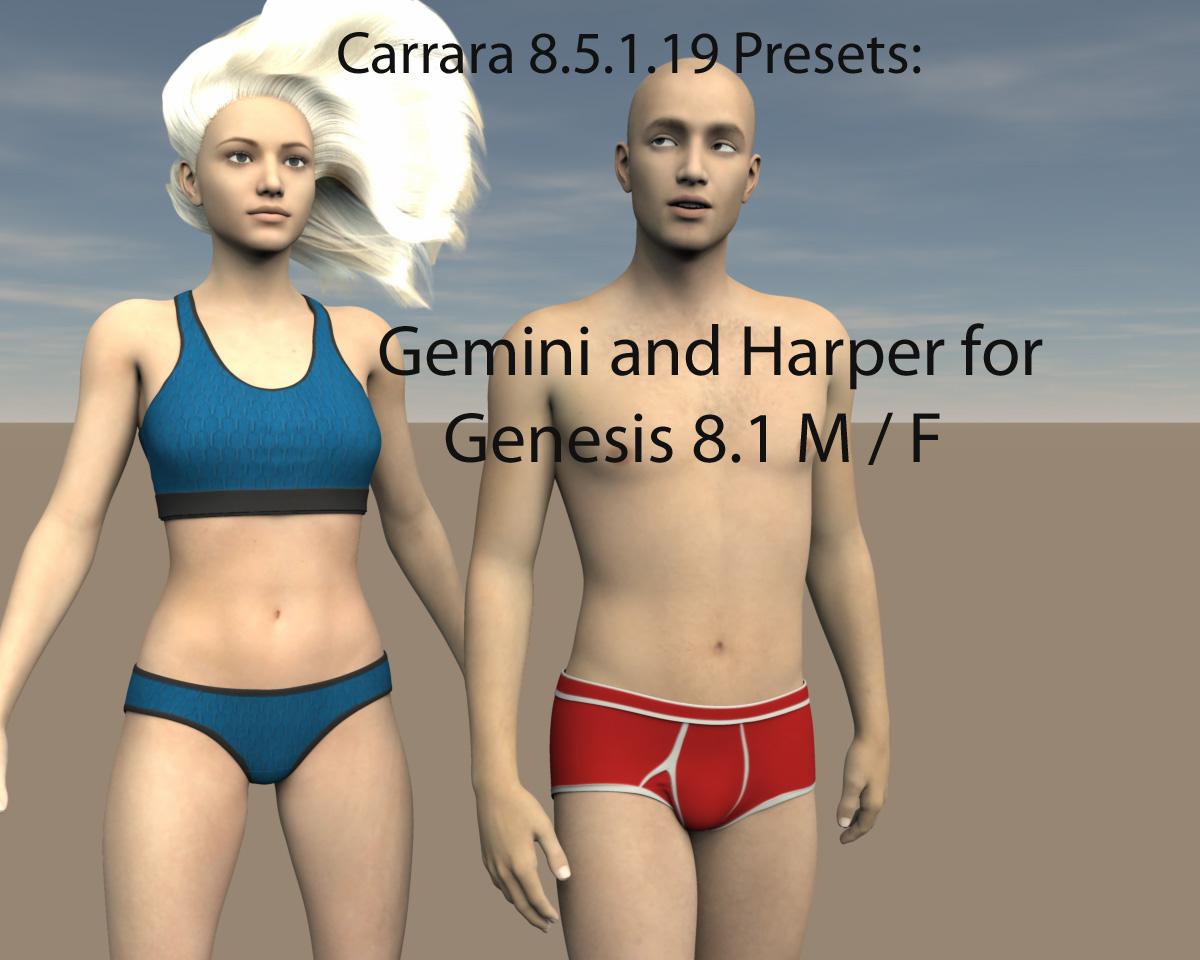
Genesis 8.1 presets(8.5.1.19) & other presetsThese presets:
Do not offer FACS posing in Carrara.
Do not link, by default, to the genesis 8.0 shapes, pose controls and visemes.
Do not include geometries or morphs. Requires Genesis 8 starter essentials
Do work with Michael 8.1 and Victoria 8.1 .
8.1 starter files include a few expressions.
The genesis 8.1 base files are bundled in the Genesis 8 starter essentials and will need to be installed before these presets will function.
Install these presets to your Daz library where the starter ressentials are installed.
Shaders are formatted in dz default, compatible with Carrara.
For clothes and hair products, use daz studio to convert weightmaps to blended weights for use in Carrara.
Support and questions thread is in the Rennderosity Carrara Forum.
Presets include
Gemini for Genesis 8.1 Female
Harper for Genesis 8.1 Male
eyelashes
a few basic wear items.
Hair shown in promo is sample hair included with Carrara Native Contenthttps://www.renderosity.com/freestuff/items/88523/carrara-presets-for-genesis-81
 Using G8 shape and material on G8.1?
Worlds_Edge said:
https://www.daz3d.com/forums/discussion/466416/genesis-8-1-victoria-8-1/p44
Somewhere in the middle of p. 44, but also on other pages.
Ok Thanks! That would have been like finding a needle in a haystack. Appreciate it!
Using G8 shape and material on G8.1?https://www.daz3d.com/forums/discussion/466416/genesis-8-1-victoria-8-1/p44
Somewhere in the middle of p. 44, but also on other pages.
Show Us Your Iray Renders. Part VIIReally enjoying Victoria 8.1. Tweaked the top coat a little to create the sweaty look. Normally I shift the transmitted color to a light peach, but in this case it works.
 Genesis 8.1 / Victoria 8.1
charles said:
Cora Regina said:
fred9803 said:
Did you buy one of the bundles, or just V8.1?
I only have G8.1 and I assumed Victoria 8.1 would come with the vellus hair, but it seems only the University Bundle has the gens and the hair like the old pro bundles.
Yep, the vellus hair is paywalled inside the $$$$$ bundles (it's included in both yesterday's and today's). I also thought that ugh, fine, it should at least come with Victoria 8.1, then. But nope, you've gotta pay the big, big bucks to get what they're still advertising as a general upgrade for the base Genesis 8.1 figures.

It's quite normal,with basic Victoria 8.1 you get just character and materials without genitals.,that's why Pro Bundles come to play.
I totally agree that this bundles can be very expensive,but with other side i think every artist knows how much time would take to make this stuff so price is actually not that bad at all.
Question about these promo imageshttps://www.daz3d.com/victoria-8-1
https://www.daz3d.com/forums/uploads/FileUpload/fd/5fee65f922f89c680d41b1c967662b.jpg
Can anyone identify these outfits and hair?
Michael 8.1j cade said:
one thing I'll say his promos reallllllllly didn't do him many favors. for most of them he seems to be rendered with a very dark bg > very very limited bounce light which probably leads to some of the toonyness (also the irises are a bit big)
if you shrink his irises and stick him in more naturalistic lighting he looks signifigantly less toony

Definitevely I agree with @j cade. The promos images, while are funny, are unfair with the character. I found that a good lightning, and this one is very classical, makes a huge difference. He is a very handsome figure. The only adjustment made in the image below was the iris and sclera. I think the eyes region on Michael 8.1 are a little bit darker and the iris texture is poor. The same occurs with Victoria 8.1. Changing the iris texture turns shrink his iris unecessary.
 Looking for the outfit from "Assassin Poses for G8F & V8"...
[Looking for the outfit from "Assassin Poses for G8F & V8"]... as you can see it here: https://www.daz3d.com/assassin-poses-for-genesis-8-female-and-victoria-8
I've searched the DAZ Shop with the term "Assassin", but no luck. Perhaps it is from another store... anyway. It would be great to get some hints on that.
Thanks in advance, Paul
Edited for Please put your question in the post body and the title - Daz 3D Forums
SereneNight’s Sci-Fi Fun Thread 3@Vwrangler I tried his skin on Boyd earlier. It has the benefit of being a sort of okay base skin. I do think it is more Base Male than M8.1 though. It is... Plain. I think its a bit dark for a redhead. Its nearly red, like a lot of the skins are.
@Hylas I know the new version of studio uses the latest IRAY which in itself is a memory user. But, I also think the base resolution is ramped up a bit with G8.1 If whatever it is that causes the load happens, and it drops to CPU, my computer is overwhelmed trying to run it. It did that with Victoria 8.1 with full HD. I can however run Victoria 8.0 with full HD and Both Owen and Boyd wtih Full HD without problem in 4.11 so your mileage will vary
Michael 8.1xyer0 said:
An accurate depiction of my feelings about Michael 8.1:
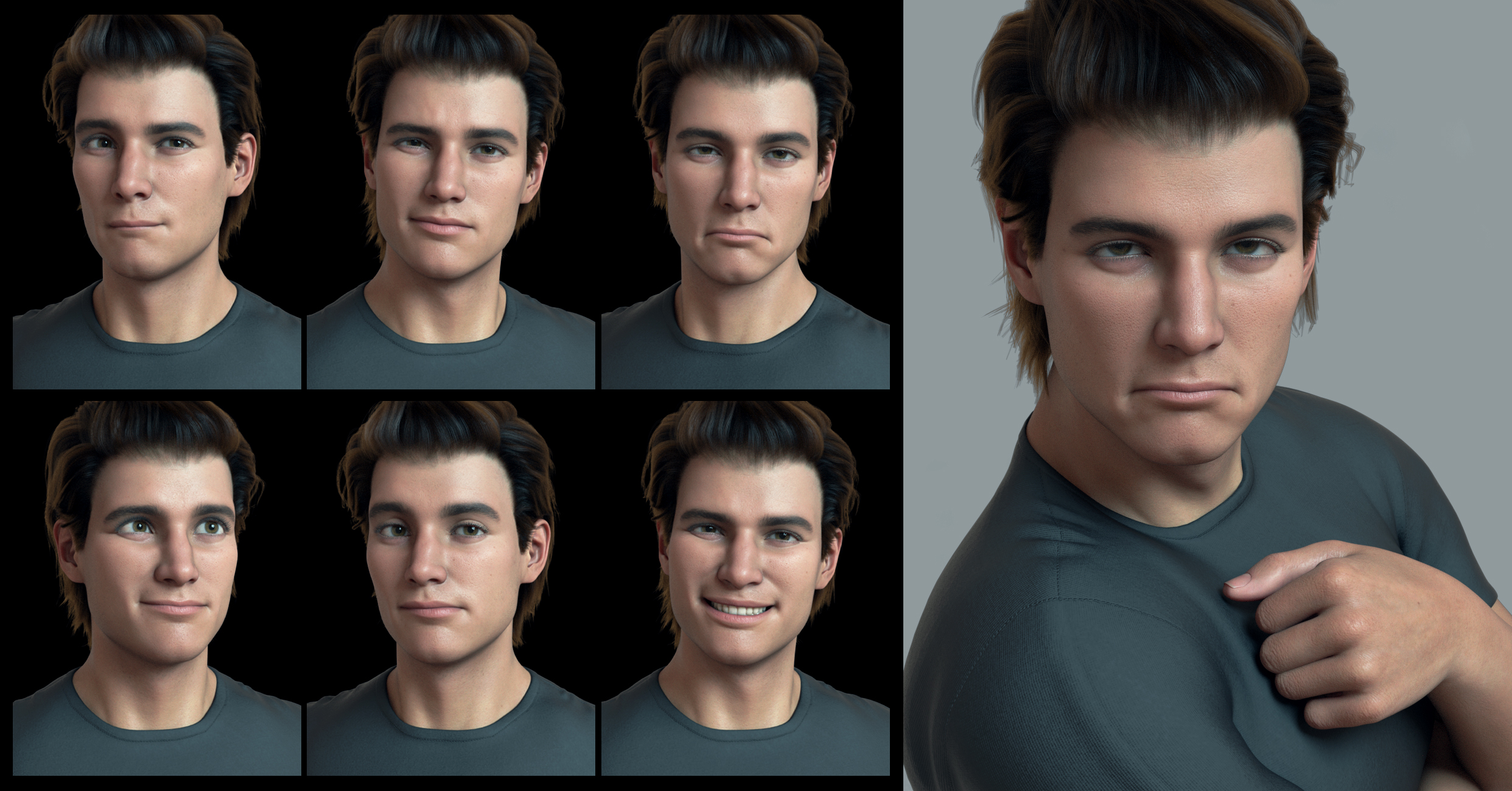
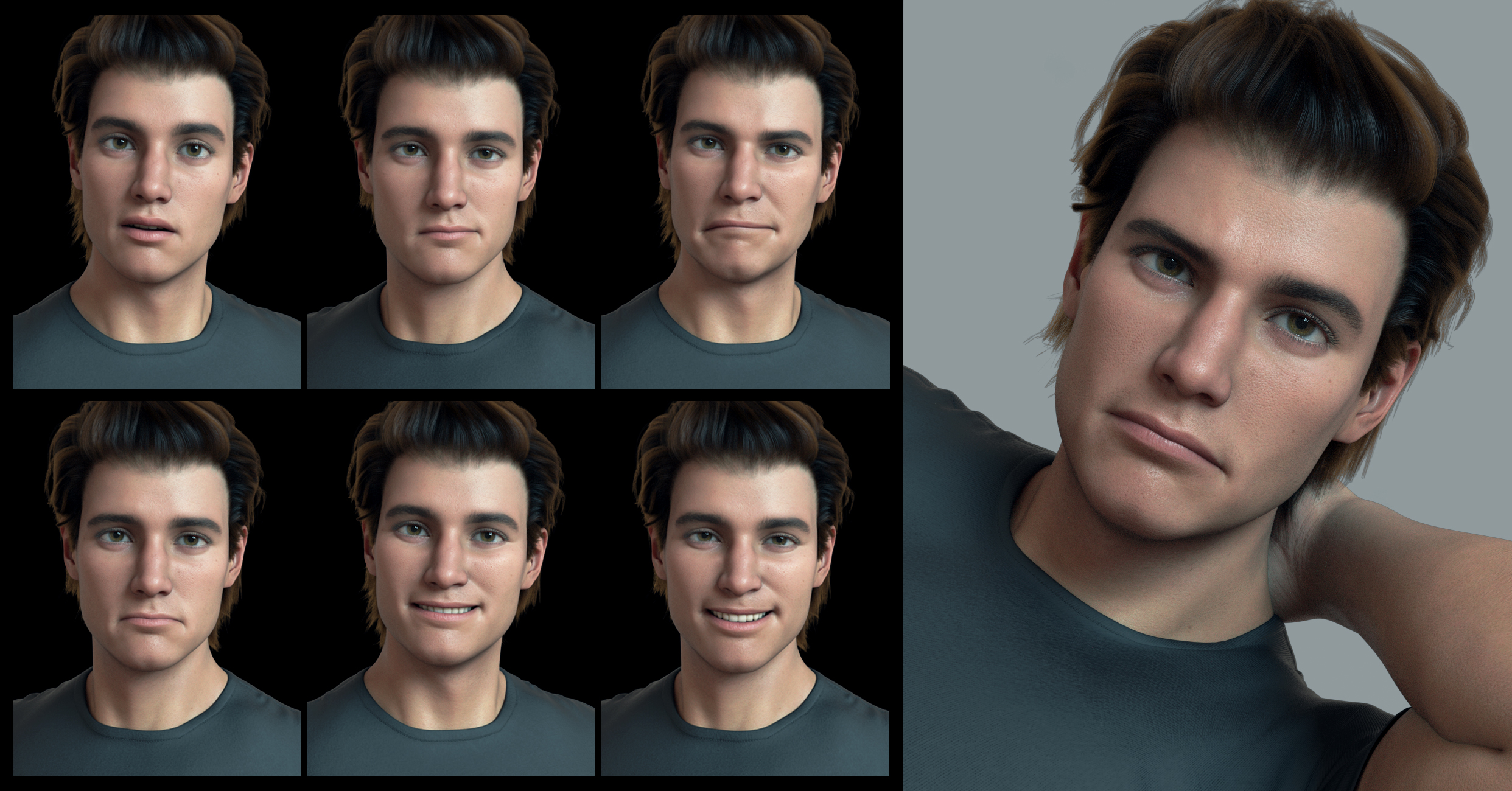
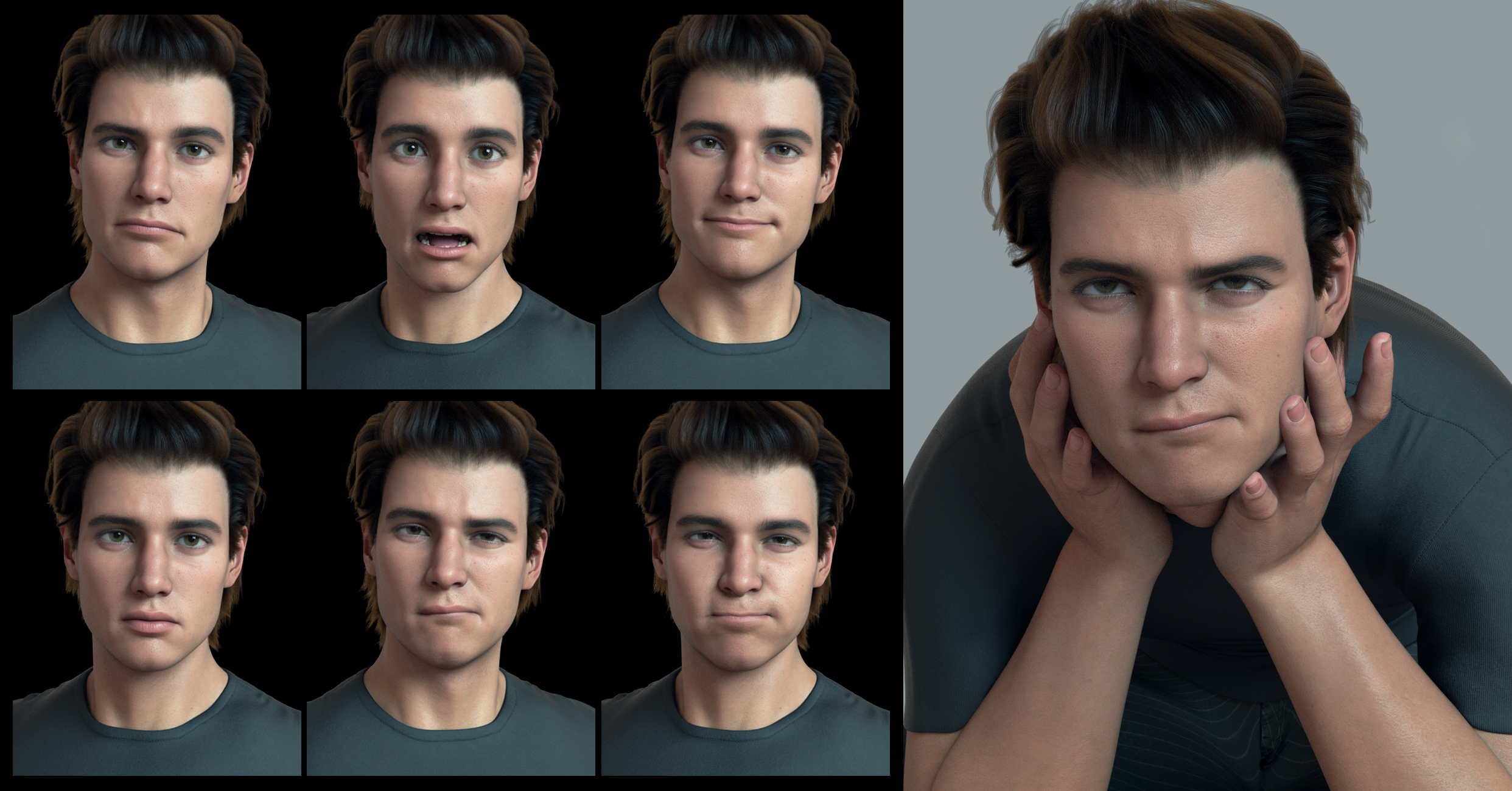
Poor Quixotry worked such wonders with her Victoria 8.1 expressions, but she obviously was outdone by Mehchael 8.1's mouth; so, she had to leave it mostly closed and give us variations on awkward dork and bashful dweeb because there was nothing to be done for his toon eyes. Rather than building off of the excellent progress that they made with Genesis 8 Male Core Figures, it appears Daz decided to scrap all that and start from scratch.
That's funny. I appreciate the humor.
Daz 3D is part of

Connect
DAZ Productions, Inc.
7533 S Center View Ct #4664
West Jordan, UT 84084Licensing Agreement | Terms of Service | Privacy Policy | EULA
© 2026 Daz Productions Inc. All Rights Reserved.