-
HowTo: Create missing Genesis 8.1 Head skin maps from Genesis 8/3 skin maps
Mine was Emmeline from Sangiart (Rendo). It's not big problem. Map transfer did produce maps for the other channels, but they were simply the correct layoput filled with black rather than the source texture. However, any of those textures plugged into the diffuse channel get converted correctly, go figure...
Anyway, I got the diffuse and SSS maps transferred in two rounds and that's all I need as I find using the Victoria maps for the rest gives nicer results.
Thanks again for the nice writeup!
Ciao
TD
Victoria 8.1 Log WARNINGI purchased 8.1 and have the same or similar problem. I can load all other versions of Genesis/Victoria by clicking image with no problem.
With 8.1 I get the message:
The following files could not be found:
data/daz 3d/genesis 8/female 8_1/genesis8_1female.dsf
data/daz 3d/genesis 8/female 8_1/morphs/daz 3d/mouth realism/phmmouthrealism8_1_hd_div4.dsf
data/daz 3d/genesis 8/female 8_1/uv sets/daz 3d/base/base 8.1 female.dsf
runtime/textures/daz/characters/genesis8_1/femalebase/g8_1eyeirisdepthnormal_1007.tif
runtime/textures/daz/characters/genesis8_1/femalebase/g8_1mouth_nm_1006.tif
I deleted 8.1 files, downloaded again and re-installed, still get same issue.
Victoria 8.1 Log WARNINGcollinsca_37_fba685a264 said:
Have you installed the Genesis 8.1 starter essentials? I think that comes with a DAZ Studio 4.15 update. You need it to use Victoria 8.1.

there anything else I need to install??
Victoria 8.1 Log WARNINGHave you installed the Genesis 8.1 starter essentials? I think that comes with a DAZ Studio 4.15 update. You need it to use Victoria 8.1.
Genesis 8.1 / Victoria 8.1empty said:
ricardoromanzini said:
We are gonna get a male version 8.1? I waaaaaaant :D
I know right!? I can see the business decision of releasing Victoria 8.1, and then her gender opposite counterpart* later down the line (*name withheld so as not to create pandemonium amongst forum users), but I cannot see the sense of not releasing both base figures at the same time? or am I completely wrong here? When G8 was released, did both sexes appear at the same time, or was G8F first, and then the other?
G8 was the same thing: G8 Essentials including G8F released alongside Victoria 8 in June 2017 (V8 was released on June 15th) , G8M added alongside the launch of Michael 8 on August 22nd. The G8 Starter Essentials ReadMe shows the addition of the male that day (although the overall release date is wrongly shown as October 2017!)
Genesis 8.1 / Victoria 8.1Richard Haseltine said:
RoseRender said:
Hi all!
my experiences so far with Gen 8.1:- The face module with all its arrows keeps crashing after seconds of use (DAZ crashes). No chance to use it so I really hope this will be fixed in the near future especially because there are other users with the same problem.
- I like the new expressions and the new eyes. Much more realistic. Can't tell about the skin as I don't own Victoria.
- how in the hell can you use the "old" geoshell clothes like underwear and stockings etc. which are not "real" clothes. Everytime when applied to the new Gen 8.1 my character looks like a white albino and nothing works. Is there a workaround?
Besides that, I really like 8.1. thank you DAZ!
You can hide the unwanted surface groups in the parameters pane - there are on/off switches for all polygon groups in the Geometry Shell property group. If you need to apply materials to the new groups then it's probably going to work best to apply the base shader and then copy/paste the settings from the Genesis 8 Torso surface.
thank you! I will try it!
Identify Genesis Outfit (Found)Could it be this Victoria 4 clothing and accessories by Bad Kitten Co on Renderosity. https://www.renderosity.com/rr/mod/bcs/apteromata-finery/110652/ and https://www.renderosity.com/rr/mod/bcs/apteromata-flight/110654/
I remember that it was used for a DAZ Studio loading picture in white being worn by V5.
 Genesis 8.1 / Victoria 8.1
RoseRender said:
Hi all!
my experiences so far with Gen 8.1:- The face module with all its arrows keeps crashing after seconds of use (DAZ crashes). No chance to use it so I really hope this will be fixed in the near future especially because there are other users with the same problem.
- I like the new expressions and the new eyes. Much more realistic. Can't tell about the skin as I don't own Victoria.
- how in the hell can you use the "old" geoshell clothes like underwear and stockings etc. which are not "real" clothes. Everytime when applied to the new Gen 8.1 my character looks like a white albino and nothing works. Is there a workaround?
Besides that, I really like 8.1. thank you DAZ!
You can hide the unwanted surface groups in the parameters pane - there are on/off switches for all polygon groups in the Geometry Shell property group. If you need to apply materials to the new groups then it's probably going to work best to apply the base shader and then copy/paste the settings from the Genesis 8 Torso surface.
G 8.1 vellus hair included or not in base character ?Anim said:
Sorry to create a new thread - I did not find a final answer in the G 8.1 thread.
Is the vellus hair included in the Genesis G 8.1 base female?
A: Yes, but not yet available in the starter essentials (you have to wait for an update of the package)
B. No, you have to buy Victoria 8.1 base package.
C. No, you have to buy the Victoria 8.1 University Bundle
Yea - just ignore the advertising.
Genesis 8.1 / Victoria 8.1vrba79 said:
Now they're charging for incremental, slight upgrades? Nah, I'm good with Genesis 1 and 2.
Genesis 8.1, like the rest are free.
Victoria 8.1, and almost all new characters are not.
Not sure why you think 8.1 is paid for.
Genesis 8.1 / Victoria 8.1Hi all!
my experiences so far with Gen 8.1:- The face module with all its arrows keeps crashing after seconds of use (DAZ crashes). No chance to use it so I really hope this will be fixed in the near future especially because there are other users with the same problem.
- I like the new expressions and the new eyes. Much more realistic. Can't tell about the skin as I don't own Victoria.
- how in the hell can you use the "old" geoshell clothes like underwear and stockings etc. which are not "real" clothes. Everytime when applied to the new Gen 8.1 my character looks like a white albino and nothing works. Is there a workaround?
Besides that, I really like 8.1. thank you DAZ!
Identify Genesis Outfit (Found)Moved to Product Suggestions as it is not a Technical Help topic.
So, for Victoria 4?
Genesis 8.1 changes compared to Genesis 8RexRed said:
My favorite part of the 8.1 characters is the improved face skin textures. Correct me if I am wrong but the face geometry had to be made finer to accommodate higher resolution face textures.
Geometry resolution and texture resolution are not connected, other than in displacement for Iray
So, I expect new Genesis 8.1 characters to come out with more and more realistic skin textures soon.
Michael 8 has great skin textures but Gen 8 characters have come out after him and eclipsed that quality quite a bit.
I expect all of my future scenes will be based upon the Genesis 8.1 and Michael/Victoria 8.1 characters (When Gen8.1 male and Michael 8.1 are released).
This is a huge new jump of realism for Daz figures. Thank you Daz for making this!
I am anticipating the new characters to go with 8.1 and I hope "all" new characters are based upon 8.1 specifications
I have most of the Gen 8 skins I need... let's see a slew of new skins for 8.1!
I am interested mostly in the new skin textures and as I have stated before, Gen 8 hand textures could use a resolution upgrade too. :)
Victoria 8.1 Log WARNINGpainterhoya said:
Masterstroke said:
Can you load G8, G8.1 or Victoria 8.1 into your scene?
If not, how do you try to load it into your scene?can into scene its a work. but error log when importing "Genesis 8.1" from "Daz studio"
and There is "facs_ctrl_Wink.dsf" facial expression
Ah, okay. I thought your problem and my problem might be somehow connected, for I cannot load G8 Females by just clicking on them. I am getting a file does not exist message. Unlike, when I drag and drop G8 Females into my editor it does work.
...weirdG 8.1 vellus hair included or not in base character ?How is G8.1 vellus hair represented? Geometry, strand-based hair, texture map, etc. ?
Feature list doesn't explain it very much:
https://www.daz3d.com/victoria-8-1HowTo: Create missing Genesis 8.1 Head skin maps from Genesis 8/3 skin mapsHowTo: Create missing Genesis 8.1 Head skin maps from Genesis 8/3 skin maps
The new Genesis 8.1 base figure has an additional material zone called Head that also is a separate UV layout compared to Genesis8/Genesis3 skin materials. This is problematic when trying to mix these skins with new skin assets designed only for Genesis 8.1. I am experimenting with converting existing skin maps with a tool included in DAZ Studio that is called Map Transfer. For a basic introduction to Map Transfer see an amazing tutorial of L'Adair here: https://www.daz3d.com/forums/discussion/184696/tutorial-from-map-transfer-to-material-presets
Here is my working process so far tested with Millawa 8. Base Mixing settings for all surfaces from Millawa 8 are PBR Metallicity/Roughness. The process seems to fail for some maps, when it is PBR Specular/Glossiness instead! However you can manually plug the required maps into the Diffuse image slot one at a time and repeat the process multiple times as a workaround.
1) Load Genesis 8.1 Female Base Character
2) Select it in your Scene tab
3) Apply any Genesis 8 (or even Genesis 3) material settings
4) Open the Surfaces pane and start the Map Transfer tool (you do this by right clicking on the Surfaces pane and selecting it)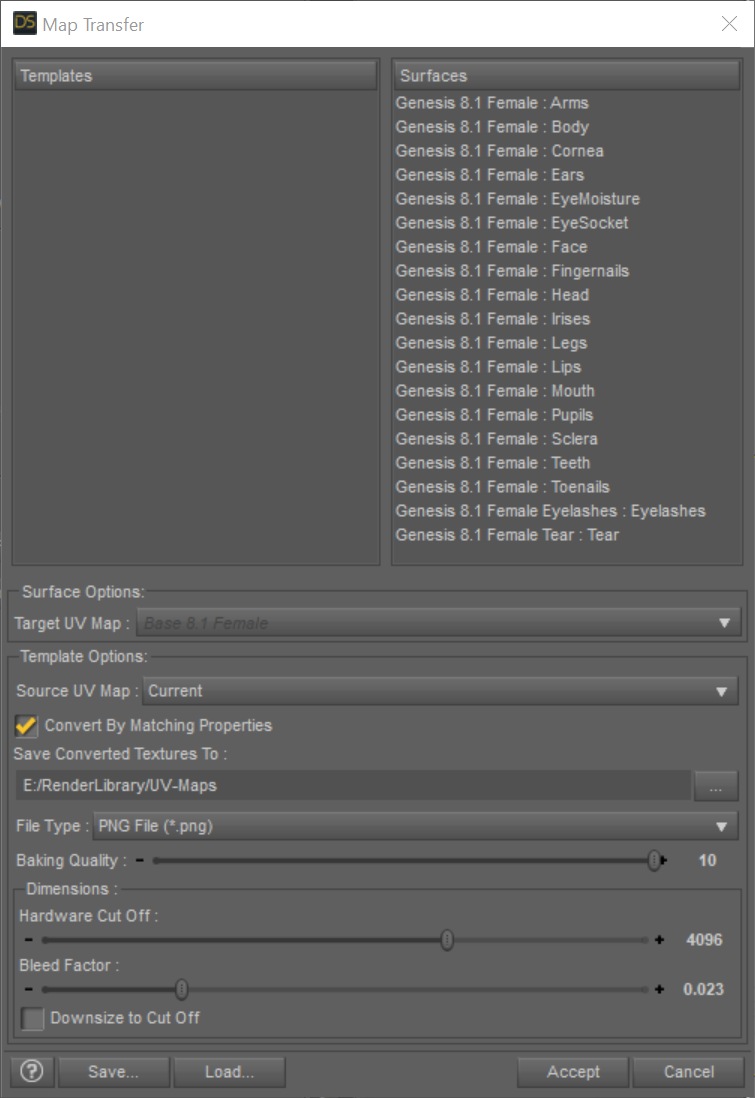
4a) Right click in the Templates area and select New Template
4b) Drag and Drop the Genesis 8.1 Female : Head from the Surfaces area on the right to the left Template1 you just created
4c) On the left select the new surface under Template1 and make sure the Surface Options: Target UV Map: say Base 8.1 Female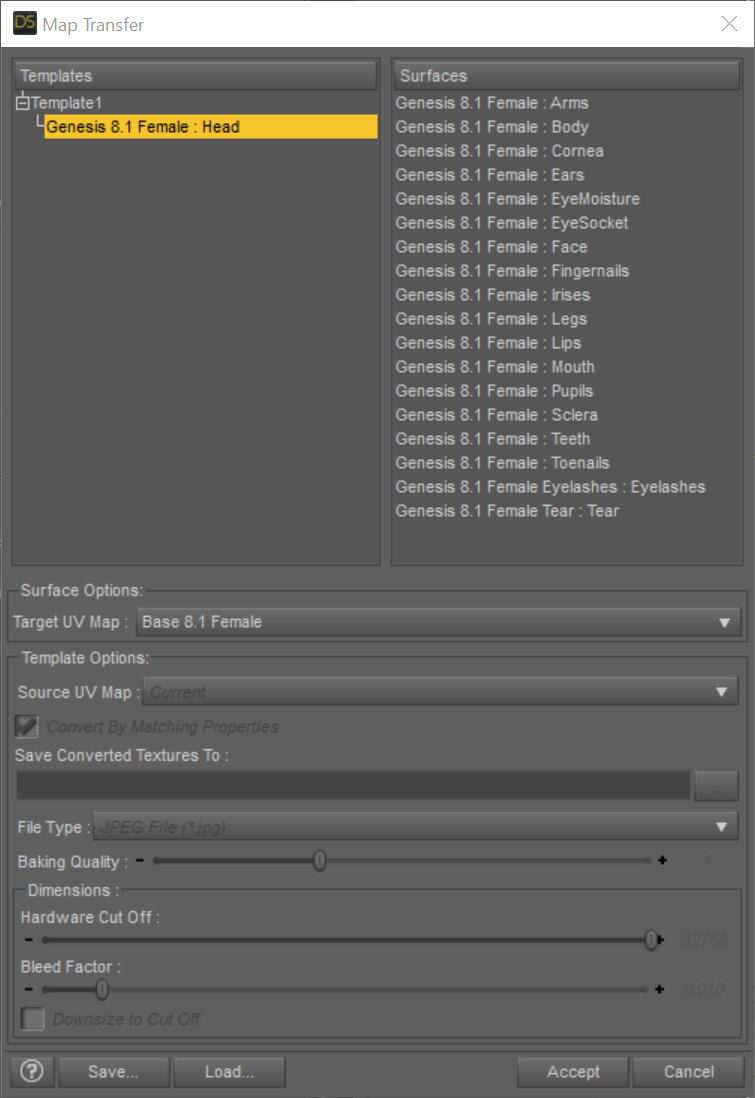
4d) On the left select Template1 and check the settings in the lower part of the dialog where it says Template Options. I used these:- Source UV Map: Current
- Convert by Matching Properties: Selected
- Choose a path where you find the generated textures later on
- File Type: PNG
- Baking Quality: 10
- Dimensions: Harware Cut Off: 4096 and Bleed Factor: 0.01
- Downsize to Cut Off: Not selected
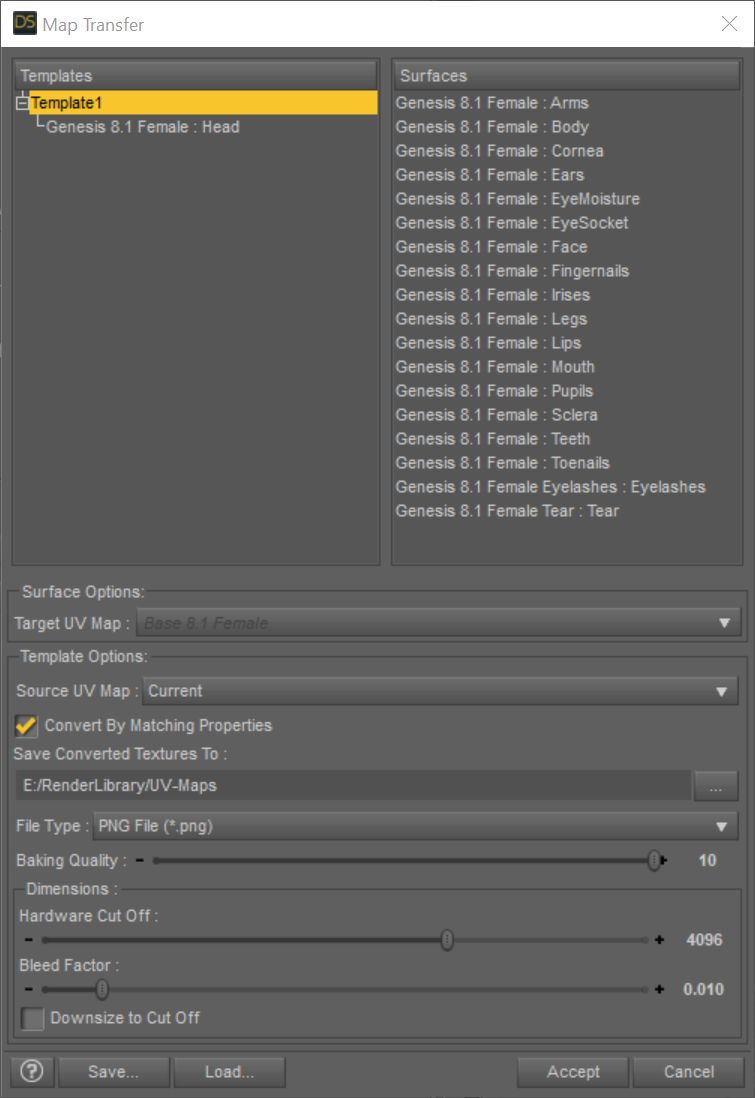
5) Optional: I saved the settings for later reuse using the Save... button
6) Hit Accept and the conversion process should start.
7) Open the Surfaces tab and open Head→Geometry. Change the UV Maps→UV Set from Base Female to Base 8.1 Female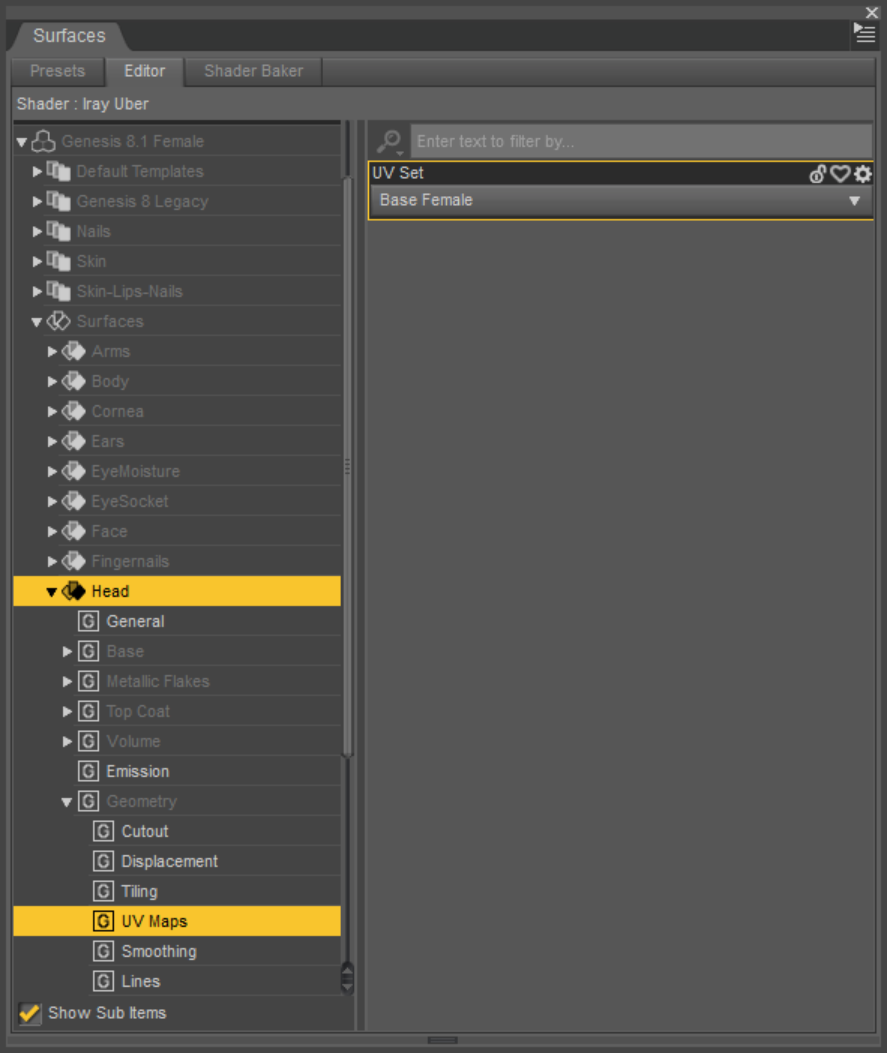
8) Apply the newly created maps to their appropriate slotsNOTE: This still uses the original shader!!!
But you are using the new UV layout and can apply LIE settings designed for the new 8.1 UV layout like the tattoos from Victoria 8.1
The following post shows the opposite process:
Victoria 8.1 Log WARNINGMasterstroke said:
Can you load G8, G8.1 or Victoria 8.1 into your scene?
If not, how do you try to load it into your scene?can into scene its a work. but error log when importing "Genesis 8.1" from "Daz studio"
and There is "facs_ctrl_Wink.dsf" facial expression
Genesis 8.1 / Victoria 8.1ricardoromanzini said:
Hello, I'm having a little trouble. I don't have a Genesis 8.1 and in my Genesis 8 folder doesnt have a 8.1 inside too. I update daz and the Genesis package. If I load Victoria 8.1 I get errors, missing pbrskin... Can someone help me please. :D thank you.
Reinstall Genesis 8 Female Essentials to get G8.1, and DS default resources to get the PBR shader.
Victoria 8.1 Log WARNINGnemesis10 said:
"I reinstalled G8.1 and basic resources today and have the same problem".....
That is Daz Studio 14.5, Genesis 8 essentials, and Daz Resources so all 3 things, correct?
yes i installed "Default DAZ Resources for 4.15" and "genesis 8 Female Starter" and "Victoria 8.1"
Victoria 8.1 Log WARNINGCan you load G8, G8.1 or Victoria 8.1 into your scene?
If not, how do you try to load it into your scene?Daz 3D is part of

Connect
DAZ Productions, Inc.
7533 S Center View Ct #4664
West Jordan, UT 84084Licensing Agreement | Terms of Service | Privacy Policy | EULA
© 2026 Daz Productions Inc. All Rights Reserved.