-
UltraScenery - new(er) territory [Commercial]
johnbuckeridge said:
barbult said:
John posted a log file in another thread. (I suggested he post his problem here to get more eyes on it and keep UltraScenery issues in one thread.) The log shows this error:
2024-08-11 09:45:52.946 [INFO] :: Loaded image: usc_grass_patch_02_512_diffuse.png
2024-08-11 09:48:41.674 [WARNING] :: Script Error: Line 933
2024-08-11 09:48:41.674 [WARNING] :: TypeError: Result of expression 'hf_app.ui.wWaterLevelAdjust' [undefined] is not an object.
2024-08-11 09:48:41.674 [WARNING] :: Stack Trace:
	<anonymous>()@F:/DAZ TRANSFER/My DAZ 3D Library/environments/landscapes/ultrascenery/ultrascenecreator.dse:933
2024-08-11 09:48:41.683 [INFO] :: Error in script execution: F:/DAZ TRANSFER/My DAZ 3D Library/environments/landscapes/ultrascenery/ultrascenecreator.dse
I searched that log file for the "usc_grass_patch_02_512_diffuse.png" file it says it is loading when the problem occurs. I found this line:
2024-08-11 06:17:50.232 Iray [INFO] - IMAGE:IO :: 1.0 IMAGE io info : Loading image "E:\My Daz Connect Library\data\cloud\1_67835\runtime\textures\howiefarkes\ultrascenery\plants\usc_grass_patch_01_512_diffuse.png", no selector, pixel type "Rgb", 512x512x1 pixels, 1 miplevel.
It appears that at some point in time, some UltraScenery files were installed with Daz Connect (from inside Daz Studio.) UltraScenery will not work with files installed with Daz Connect. Even if you later install them with DIM, that will not solve the problem. They must first be uninstalled from Daz Connect. @johnbuckeridge I think uninstalling all UltraScenery related products from Daz Connect is the first order of business to solve this problem. Then we can see if other problems still remain.
Edit: I don't know why the forum chose to make my pasted text white on black.
Good morning, Barbult. I will try that, although currently having issues with my Microsoft cloud access. Will report back.
The Daz Connect "cloud" is a folder on your E drive, as shown in the log file message I highlighted. It is not located remotely; it is on your computer. Daz simply chose to name the folder "cloud" to totally confuse users
 and it worked! The number of users confused about the Daz Connect cloud is about 90% of users IMHO. The Daz Connect "cloud" folder has nothing to do with a Microsoft cloud, unless you have allowed One Drive to offload folders from your E drive to One Drive and remove the files from your computer.
If you look on your computer in E:\My Daz Connect Library\data\cloud and the subfolders, do you see a bunch for folders and files?v8 animation to v4There's a bone minion genesis 3 to 8 converter: https://www.daz3d.com/bone-minion-for-genesis-3-poses-for-genesis-8-and-81
you typically have to buy two converters to go in both directions or a few to chain converter products together across generations.
This product is pretty expensive but it's also universal across genesis figures: https://www.daz3d.com/mocapI've used it to transfer poses and animations between all sorts of generations. I think it's the only one that seems to be able to do that as a single product, so it's actually cheaper than buying many other other products. It's not quite as simple to use, but has worked very well for me. It sort of does expressions too, but not fully. I've not tested that part beyond the superficial, but it does seem to do slight expression transfers that other products can't do. I think it calculates the bones offset by an expression morph (vendor probably adjusted rigging to shape?) rather than the morph shape itself. I was getting eye and mouth movements out of it, anyway.
UDIM Seam Genesis 8 in Substance 3d PainterOh, i can fix it. I just use the another model like shoes and use transfer utility to fit to the character with this setting.
And it's deform.
Then i use the Morph Loader Pro with this setting and choose the modeling shoes i sculpt. I follow the instructions in the video here.
The modeling shoes fit perfect with no deformation.
But the problem is when i save and exit the program, and i run the program with my project DAZ again, it don't save the morgh i was built it before, it just like deformation and break it all.
Can you help me this problem?
UltraScenery - new(er) territory [Commercial]barbult said:
John posted a log file in another thread. (I suggested he post his problem here to get more eyes on it and keep UltraScenery issues in one thread.) The log shows this error:
2024-08-11 09:45:52.946 [INFO] :: Loaded image: usc_grass_patch_02_512_diffuse.png
2024-08-11 09:48:41.674 [WARNING] :: Script Error: Line 933
2024-08-11 09:48:41.674 [WARNING] :: TypeError: Result of expression 'hf_app.ui.wWaterLevelAdjust' [undefined] is not an object.
2024-08-11 09:48:41.674 [WARNING] :: Stack Trace:
	<anonymous>()@F:/DAZ TRANSFER/My DAZ 3D Library/environments/landscapes/ultrascenery/ultrascenecreator.dse:933
2024-08-11 09:48:41.683 [INFO] :: Error in script execution: F:/DAZ TRANSFER/My DAZ 3D Library/environments/landscapes/ultrascenery/ultrascenecreator.dse
I searched that log file for the "usc_grass_patch_02_512_diffuse.png" file it says it is loading when the problem occurs. I found this line:
2024-08-11 06:17:50.232 Iray [INFO] - IMAGE:IO :: 1.0 IMAGE io info : Loading image "E:\My Daz Connect Library\data\cloud\1_67835\runtime\textures\howiefarkes\ultrascenery\plants\usc_grass_patch_01_512_diffuse.png", no selector, pixel type "Rgb", 512x512x1 pixels, 1 miplevel.
It appears that at some point in time, some UltraScenery files were installed with Daz Connect (from inside Daz Studio.) UltraScenery will not work with files installed with Daz Connect. Even if you later install them with DIM, that will not solve the problem. They must first be uninstalled from Daz Connect. @johnbuckeridge I think uninstalling all UltraScenery related products from Daz Connect is the first order of business to solve this problem. Then we can see if other problems still remain.
Edit: I don't know why the forum chose to make my pasted text white on black.
Good morning, Barbult. I will try that, although currently having issues with my Microsoft cloud access. Will report back.
UDIM Seam Genesis 8 in Substance 3d PainterNo problem ~ 1) Before conversion, DO NOT load any wearable to G9, especially these shoes that add feet pose to G9 figure. So, always convert figure with zeroed pose ! 2) After conversion, load the shoes. You should find them well fitted.
However, depending on the figure's body morph, you might see some tiny distortion on the shoes. (like the ones in below screenshot...) That's normal. Then, as an SOP, you need to fix "body morph" in shoes hidden property. That'll be another topic ~~
Just go for converting the figure with above steps 1 ~ 3. If there's distortion on the shoes, I'll show you how to fix them. You better know some modeling / sculpting software like Blender....
UDIM Seam Genesis 8 in Substance 3d Painterflorysmin03 said:
I understand, so how can i change or convert Genesis 8 to Genesis 8.1 because my character Genesis 8 use the face transfer.
Ah, you made the character with Face Transfer. Yeah, unfortunately there's no default Base figure of G8.1 for the users to choose in FT plugin... but you have options as below:
1) If you've already saved the morph assets of the generated / customized character on G8, just load a G8.1 figure and dial the morph(s).
2) If you haven't done the above, suggest you well create and save morph assets first of all with the current G8 figure...by following Jay's tutorial in here: https://youtu.be/PnPOD_d2GOs?si=CwE_txhOWHagKLI8 Then go for step 1.However, the seam issue will be more or less still there as far as I experiment with G8.1. As the examples, I've shown you the screenshots of issues coming from V8.1/V9 as above.... so it's up to you to have a go or no-go...
UDIM Seam Genesis 8 in Substance 3d PainterI understand, so how can i change or convert Genesis 8 to Genesis 8.1 because my character Genesis 8 use the face transfer.
GoZ not working when trying to send models back from Zbrush 2021.6.2- First of all, if you use both DS General Release and Public Build, do not open them both otherwise there'll be conflict when using GoZ
- So... you could send figure / prop to ZB in DS by clicking "Send to ZBrush" but could not send it back from ZB to DS, correct ? If so, you may try:
1) Close DS/ZB, Go to ZB application folder, there's a sub-folders "Troubleshoot Help", reinstall "GoZ_for_ZBrush_Installer_WIN.exe"
2) Launch ZB, Preferences > GoZ > Clear cache files, then Force reinstall.
3) Retry GoZ.
- As for "geometry did not match" issue, before exporting figure to OBJ file, select the figure in DS, Parameters pane, set Resolution Level to Base... because users are not able to import OBJ with High Res. as morphs with Morph Loader Pro.
- When exporting to OBJ, use the options in screenshot 3.GoZ not working when trying to send models back from Zbrush 2021.6.2The Morph Loader only works with the base mesh of the figure. You are probably exporting a high resolution figure. Enable the "Ignore Invisible Nodes" option when exporting if you have hidden all other objects in the scene. When exporting there should not be any other objects besides the main one, otherwise the total number of vertices will change and the Morph Loader will refuse to work with the wrong number of vertices. In this case, you get the message "Warning: Geometry did not match, failed to create morph" , and in the Log file you can see the ratio of required and available vertices.
GoZ not working when trying to send models back from Zbrush 2021.6.2When I hit GoZ in Zbrush Daz just blinks for a second and then nothing happens.
I also tried just exporting an .obj file. Even with out editing it all when I try to reimport the same .obj file it gives me the error
Warning Geometry did not match. Failed to create morph.
There's gotta be a way arround this. It used to work fine before though it was some years ago when I tried this last.
UltraScenery - new(er) territory [Commercial]John posted a log file in another thread. (I suggested he post his problem here to get more eyes on it and keep UltraScenery issues in one thread.) The log shows this error:
2024-08-11 09:45:52.946 [INFO] :: Loaded image: usc_grass_patch_02_512_diffuse.png
2024-08-11 09:48:41.674 [WARNING] :: Script Error: Line 933
2024-08-11 09:48:41.674 [WARNING] :: TypeError: Result of expression 'hf_app.ui.wWaterLevelAdjust' [undefined] is not an object.
2024-08-11 09:48:41.674 [WARNING] :: Stack Trace:
	<anonymous>()@F:/DAZ TRANSFER/My DAZ 3D Library/environments/landscapes/ultrascenery/ultrascenecreator.dse:933
2024-08-11 09:48:41.683 [INFO] :: Error in script execution: F:/DAZ TRANSFER/My DAZ 3D Library/environments/landscapes/ultrascenery/ultrascenecreator.dse
I searched that log file for the "usc_grass_patch_02_512_diffuse.png" file it says it is loading when the problem occurs. I found this line:
2024-08-11 06:17:50.232 Iray [INFO] - IMAGE:IO :: 1.0 IMAGE io info : Loading image "E:\My Daz Connect Library\data\cloud\1_67835\runtime\textures\howiefarkes\ultrascenery\plants\usc_grass_patch_01_512_diffuse.png", no selector, pixel type "Rgb", 512x512x1 pixels, 1 miplevel.
It appears that at some point in time, some UltraScenery files were installed with Daz Connect (from inside Daz Studio.) UltraScenery will not work with files installed with Daz Connect. Even if you later install them with DIM, that will not solve the problem. They must first be uninstalled from Daz Connect. @johnbuckeridge I think uninstalling all UltraScenery related products from Daz Connect is the first order of business to solve this problem. Then we can see if other problems still remain.
Edit: I don't know why the forum chose to make my pasted text white on black.
Render your buys! Use buys from the current month and the previous month of salesHylas said:
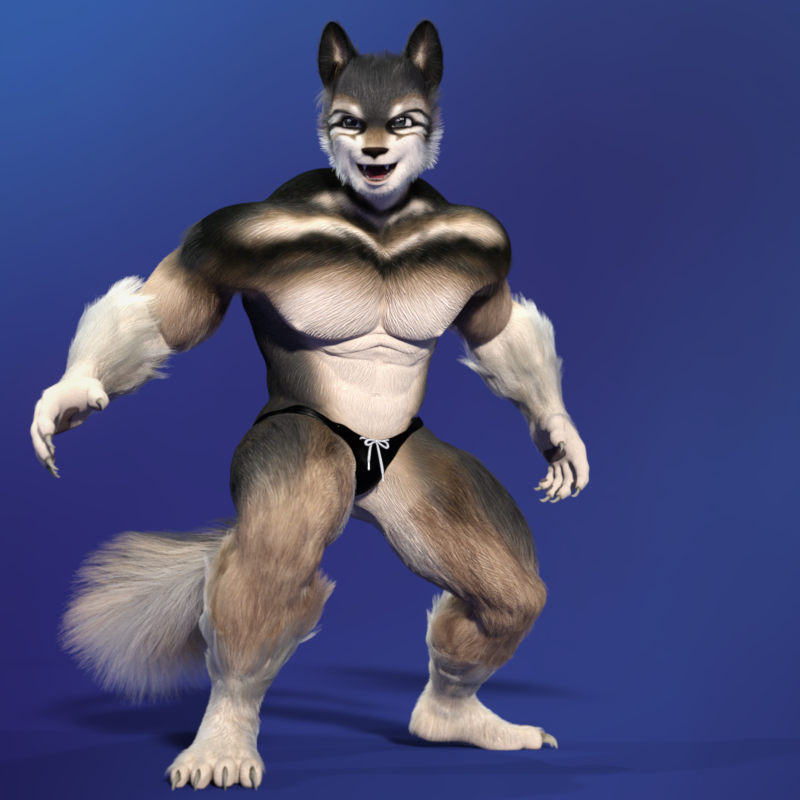
I always kinda wanted a Furry character in the style of Micah or Lycanthropos, but for G8M. The awesome sale today let me pick up 3 products that had been low-key on my radar, and this is what I've come up with so far. There's some wonkiness around the ears because the HFS Ultimate Shapes head morph clashes a bit with the Wolfie and Sly Fox geograft. I hope I'll be able to solve that with Shape Splitter, but that's a project for another day.
Awesome work! I love experiments like that.
Hylas' corner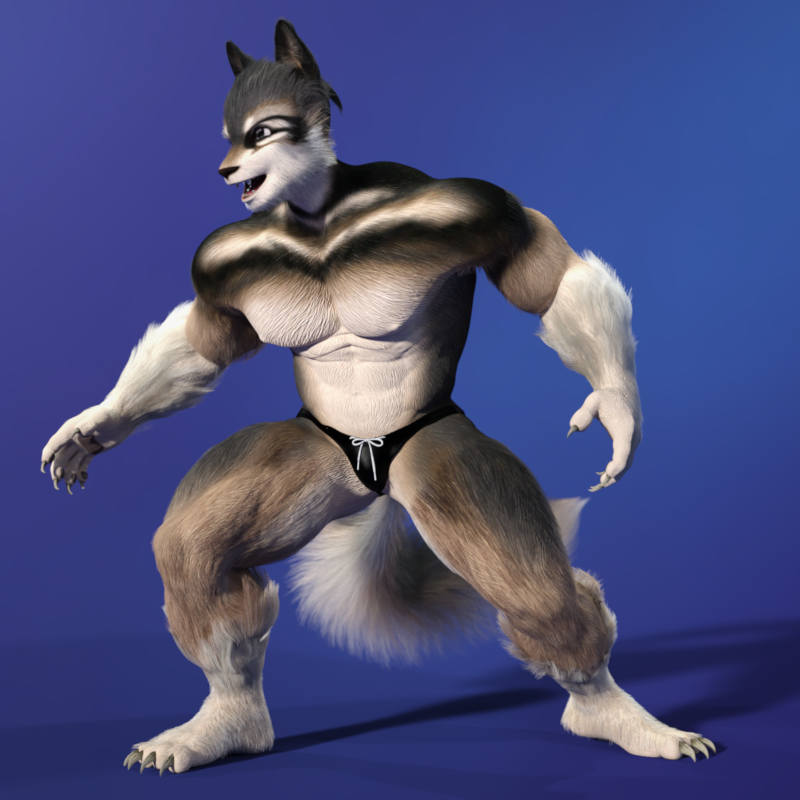
https://www.daz3d.com/wolfie-and-sly-fox-for-genesis-8-male
https://www.daz3d.com/hfs-ultimate-shapes-for-genesis-8-male
https://www.daz3d.com/briar-bramble-and-bean-for-genesis-8-maleI always kinda wanted a Furry character in the style of Micah or Lycanthropos but for G8M. The latest sale let me pick up 3 products that had been low-key on my radar for that purpose, and this is what I've come up with so far. There's some wonkiness around the ears because the HFS Ultimate Shapes head morph clashes a bit with the Wolfie and Sly Fox geograft. I hope I'll be able to solve that with Shape Splitter, but that's a project for another day.
Crossposted from "Render your buys"
Diffeomorphic clarification, please: Poses vs MorphsYes it is complicated, because daz morphs are unfortunately very complicated and don't fit to the way blender works. So it depends how the morph is done. In general however, we only export to blender the morphs we need for animation, if you can go with bone controls instead of morphs then there's no need to export the morphs.
Usually you just set the morphs you want in daz favorites, then import with daz favorites and the morphs are listed in the control panel. If this doesn't work then it means either that the morph is very complicated, or that blender can't find it for some reason. As another way you can import by hand as custom morphs, where you locate the morph file yourself, this usually always work if you select the correct morphs. Another case is presets, where the daz dial drives a group of morphs with different values, in this case daz favorites tend to break and for custom morphs to work you have to be sure to select all the needed morphs.
Ultimately, if nothing works, you can always save the figure/prop as obj and import as a shapekey in blender. I do this for some very complicated daz morphs where I don't want to import a gazillion ERCs in blender.
Clothing item ignores "Memorised Pose" when simulatingI'm having an issue with a clothing item which every time I attempt to simulate from Memorised Pose instead attempts to simulate from the posed shape.
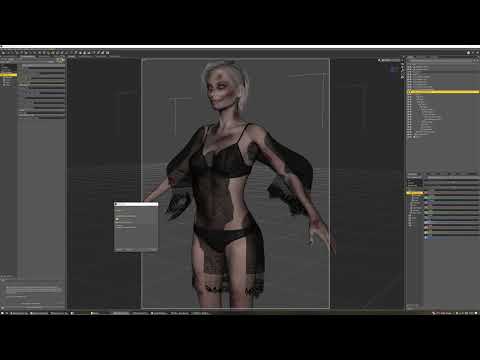
And while I've had it happen before, I cannot for the life of me remember what I have to smack to fix it.
I've checked all the parameters I can think of for the G9 version above, but none of them seem to differ from my earlier and entirely behaving G8F version:
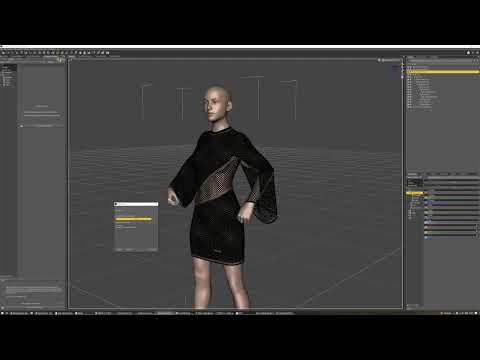
And the only difference in how I set these up is that for the G9 version I started by taking the G8F version and updating its shape (to keep things like rigidity maps) before using transfer utility, rather than starting with a completely fresh OBJ import.
~~~~~
EDIT: In this case, restarting DS has resolved the issue, but I have had it in other cases where a restart has *not* solved it, so if anyone knows an answer, I'd appreciate it.
Render your buys! Use buys from the current month and the previous month of saleshttps://www.daz3d.com/wolfie-and-sly-fox-for-genesis-8-male
https://www.daz3d.com/hfs-ultimate-shapes-for-genesis-8-male
https://www.daz3d.com/briar-bramble-and-bean-for-genesis-8-maleI always kinda wanted a Furry character in the style of Micah or Lycanthropos, but for G8M. The awesome sale today let me pick up 3 products that had been low-key on my radar, and this is what I've come up with so far. There's some wonkiness around the ears because the HFS Ultimate Shapes head morph clashes a bit with the Wolfie and Sly Fox geograft. I hope I'll be able to solve that with Shape Splitter, but that's a project for another day.
Diffeomorphic clarification, please: Poses vs MorphsMost of the content I want to get from Daz into Blender are props with pose controls: a handle or lever can move, a door can open or close, a wheel can turn. Usually in Daz, there are custom pose controls that are essentially renamed Transform controls that may or may not drive multiple transform dials, like the clamp on a vise that rotates while it moves in and out.
No matter how many times I've favorited those controls in Daz and then tried to find them in Blender after importing using every "Import pose" or "import morph" button available in Diffeomorphic, I can't ever find them. However, If the geometry has imported correctly, I can go into Pose Mode in Blender, drill down into the Outliner tree to find the Bone name that matches the Bone name in Daz, select the Bone properties in the Properties Editor, and manipulate the transform controls there. If the Daz PA has put constraints on the Daz custom dials, then I can find those same constraints in the Constraints Property for the selected Bone. But I can’t find any drivers or shape key sliders for those Bones..
Am I missing anything here? Are custom pose dials in Daz only ever available as transform properties in Blender? Or are there sliders that will carry over and I just need to find out how to get them into Blender?
Thanks!
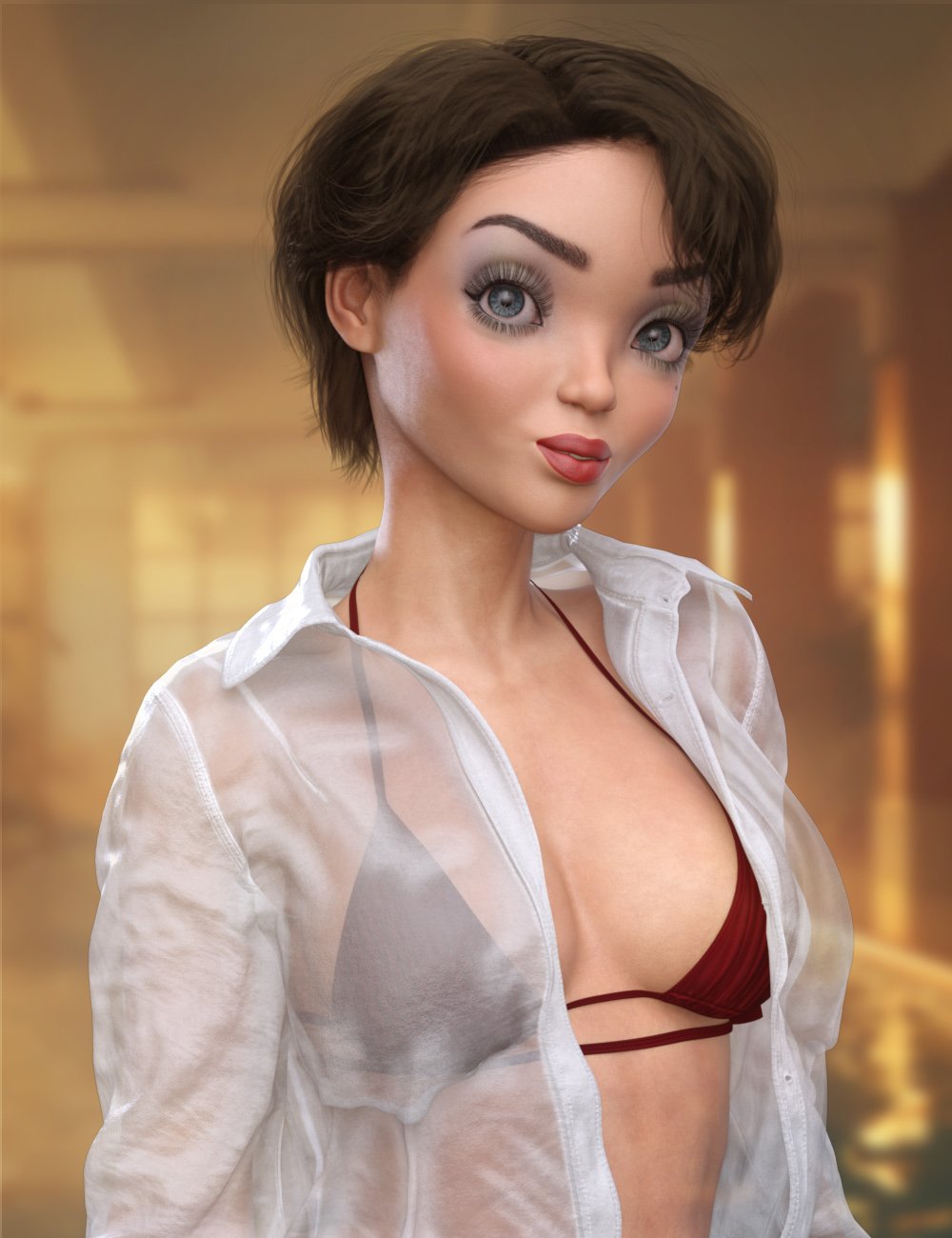
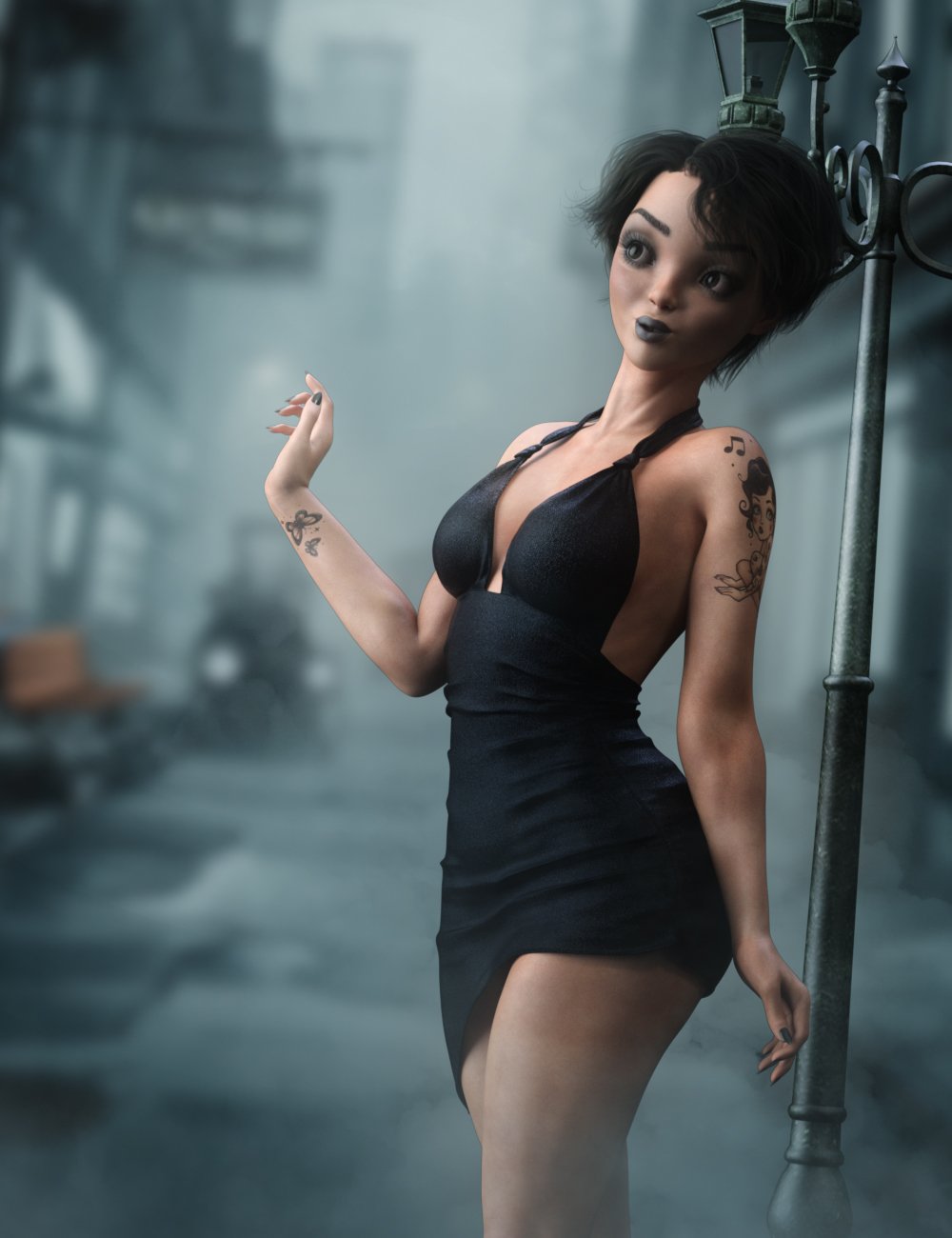
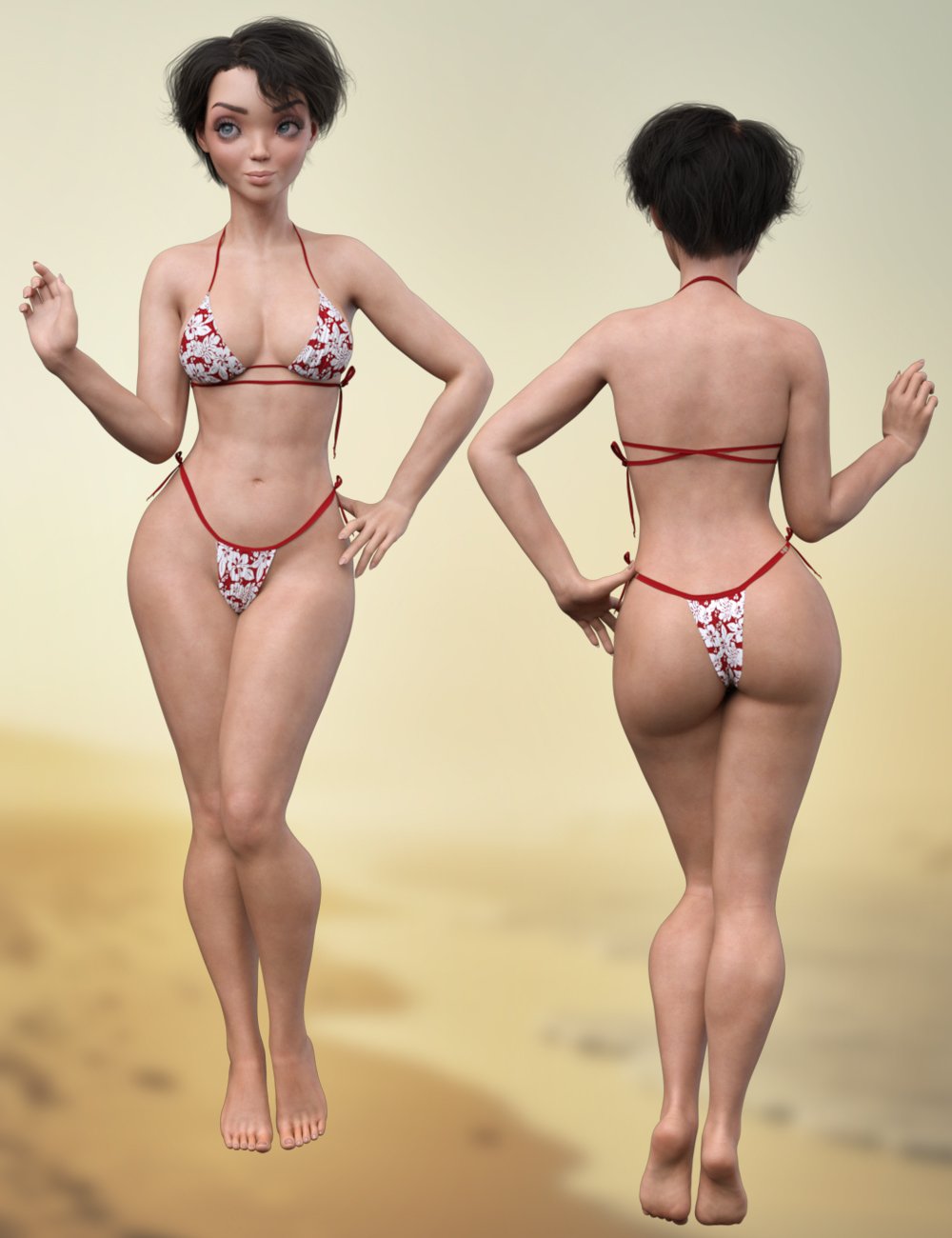
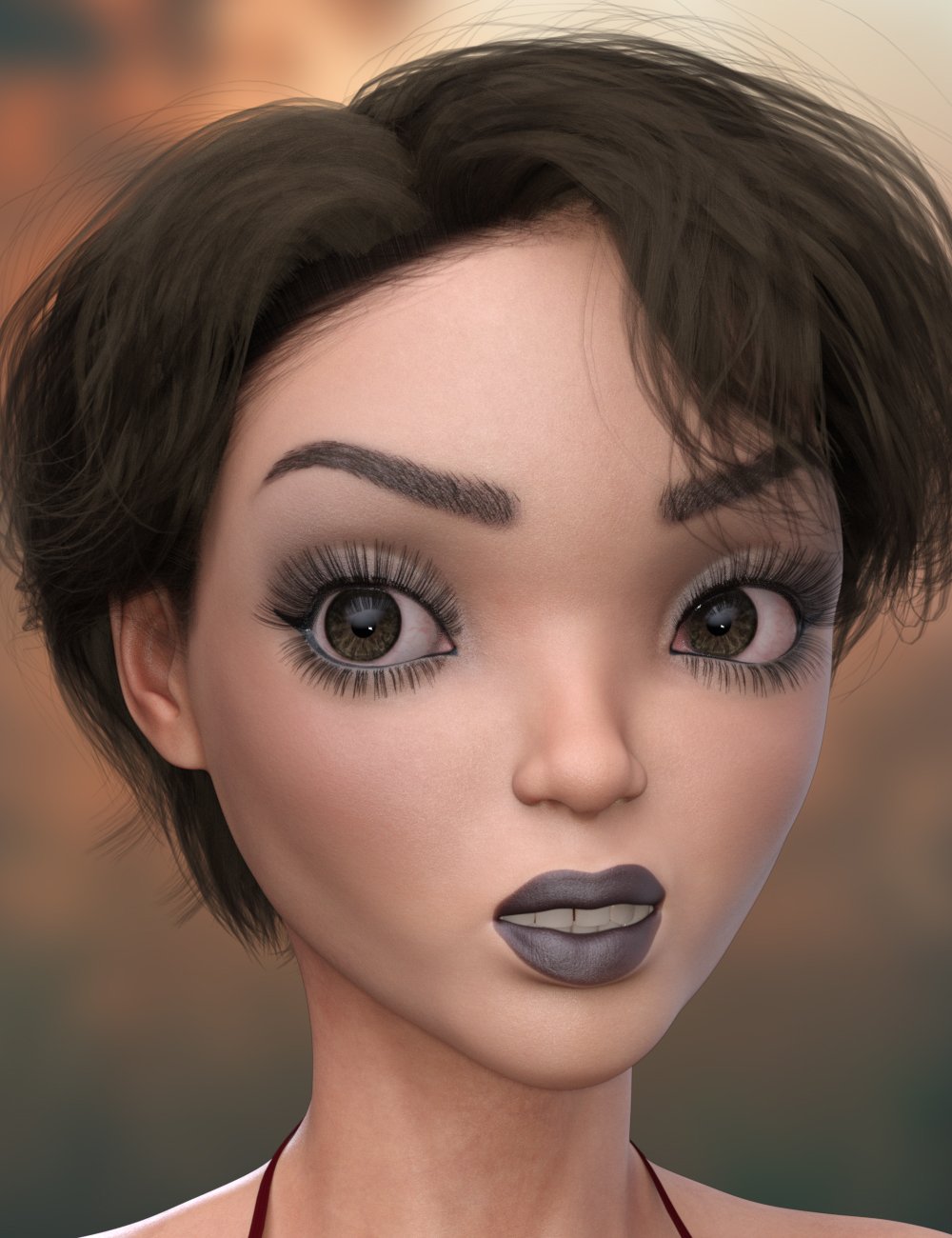
Beautiful Bettsie for G9 [commercial]Toon Girl Bettsie for G9
https://www.daz3d.com/raw-bettsie-for-genesis-9
Details
Bettsie is a beautiful curvy toon woman. She is fit and ready for adventure, or an elegant night on the town. With individual tattoo and multiple makeup options she can suit many character styles, from the sweet girl next door to powerful femme fatale.
Seperate head and body morph dials allow easy blending with other Genesis 9 characters, to create some really unique characters.
Bettsie comes with High Definitions morphs, Ultra Realistic textures and dHair Eyebrows to really bring this character to life for your rendersWhat's Included and Features
- Bettsie for Genesis 9: (.DUF)
- Bettsie Character Preset
- Bettsie Shaping Preset
- Material Options:
- One Full Skin Mat with Female Anatomical Elements
- Two Face Material Presets (with and without brows)
- Three Makeup Material Presets
- Three Tattoo Material Presets
- Five Eye Material Presets
- Five Nails Material Presets
- Bettsie Eyebrow dHair
 Trouble with shape presets.
lamoid_5f20d3e469 said:
I have several scenes with the same character in them. I extensively changed the chararcter's shape in one scene. I want to apply those same changes to the same character in the other scenes. So I selected the character, then FIle > Save as > Shaping preset. Then I load another scene with the same character, select that character, and use File > Merge to apply the shaping preset.
It does not work. Some shapes are applied and others are not. In the save dialog, I have selected the character and everything attached by default to the character, and I have tried deselecting everything under the character other than the character itself. I have also tried various combinations of the attached items. Nothing works.
What do you mean by "... others are not." ? Are they morph (shapping) properties ? Check by clicking the Gear icon on the right of the property slider... in Type field, it should be Modifier/Shape. And, if you want to completely save a Shaping Preset of the selected character, yes, you should keep all sub-nodes selected... (screenshot 1)
It is not clear to me at all what some of the items attached to the figure are, because I have not used them or they have nothing to do with the figure -- at least not obviously. But they are listed there.
1) Please point me to an accuate up-to-date explanation of how to save a character's shape, independent of its pose and without any meshgrabber morphs applied. And then how to apply that to exactly the same character with exactly the same attributes but in a different pose in a different scene. Please Don't tell me to go to http://docs.daz3d.com/doku.php. That appears to be at least 10 years out of date and I have never gotten a working explanation from one of those pages. [Insert diatribe on Daz documentation.] Not only that but current browsers say the pages are dangerous. I have to jump through several hoops just to get them to load. And then they are inaccurate.
Generically, I don't think what you did was wrong. But pls be noted:
1) Some vendors wrongly defined Type in Parameter Settings of Pose Control properties, e.g. for an Expression property which should've had "Modifer/Pose" defined in Type, but the vendor wrongly put "Modifier/Shape" there. So if you ever dialed this Expression property, it'll wrongly be saved within the Shaping Preset...
2) If you Mesh Grabbed the figure's mesh but didn't save them as morph properties, the "grabbed result" won't be saved into Shaping Preset. If you saved the grabbed result as a morph property... yes, it would be saved in the Shaping Preset.
3) If you ever dialed some Scale properties on the figure (on root node or sub-nodes... like Head, Hands, Feet, etc.), they wouldn't be saved into the Shaping Preset 'cause they're with Type - "Modifier/Pose", then you have to save a Properties Preset (save with Shaping + Scale...). (screenshot 2)
4) After saving the Shaping Preset, just dbl-click it to apply to the selected figure, no need to use Merge.... Hold Ctrl key before dbl-clicking to have more Options for applying the preset...(Replace or Additive, Obey Limits or not....)
2) Please point me to an explanation of how the shape is represented, What are all those items under / attached to the figure in the save shape dialog? Why are they there?
They're just the Path(s) that the morph (shaping) properties belong to... (screenshot 3) With them, one can choose what morph properties can be saved within a Shaping Preset...
PS, I am using studio 4.22.01 and the character is a G8 female. I could post pictures but when the shape is loaded the figure tears through its clothing and becomes a NSFW picture,
3) This is maddening.
The Sky is Falling Complaint ThreadLeatherGryphon said:
(@ Hylas) I commiserate.
 But I'm glad to see that bureaucracy frustration is global and not deliberately targeting me.
 Perhaps someday, when in a particularly retaliatory or uncharitable mood, I'll relate my experience with the DMV (Department of Motor Vehicles) in Washington, DC while trying to transfer my driving license from Florida to DC.
Non-complaint: Yesterday I read an article about the "BigLots" store franchise closing many outlets. Unfortunately BigLots is my goto place for cheap furniture, cleaning supplies & household fabrics (sheets, towels, etc.), and most importantly, snacks.

 However, this morning a followup article listed the closing stores. Thankfully, mine in Jamestown, NY is not one of them. Happy, happy, joy, joy!
 Yay, another couple years of cheap furniture, fabrics, and SNACKS!
Complaint: I re-read the article and found the phrase "...originally 40, ... now over 300, ... and more may be coming". Arghhh...

Thanks for the Big Lots list. My local store isn't closing, either. So far.
Daz 3D is part of

Connect
DAZ Productions, Inc.
7533 S Center View Ct #4664
West Jordan, UT 84084Licensing Agreement | Terms of Service | Privacy Policy | EULA
© 2026 Daz Productions Inc. All Rights Reserved.