-
Headshop 12 for G8 does not install
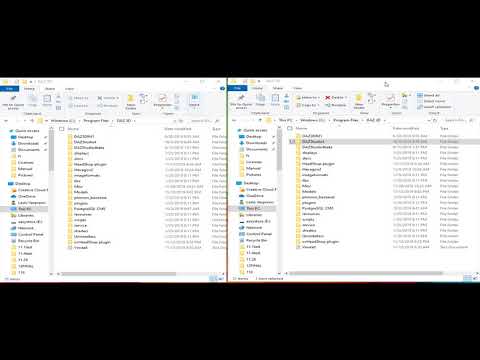
it opens 2 folders from daz3d.com
The upper one HS12forG8, has a ZIP file
The Morpers file does NOT...
As my daz studio is in the F file I have open everything in F:DAZ3D anywaybut as that did not work I also put it in c:/programfiles/daz3d folder
both has no effect
when i open Daz studio 4.12 64 bit there is no headshop in the edit file.
the ZIP from HS12forG8 works ok.. it's 3 folders (as seen in the read me file and video) are in the right placehave you watched the install tutorial?
 Headshop 12 for G8 does not install
it opens 2 folders from daz3d.com
The upper one HS12forG8, has a ZIP file
The Morpers file does NOT...
As my daz studio is in the F file I have open everything in F:DAZ3D anywaybut as that did not work I also put it in c:/programfiles/daz3d folder
both has no effect
when i open Daz studio 4.12 64 bit there is no headshop in the edit file.
the ZIP from HS12forG8 works ok.. it's 3 folders (as seen in the read me file and video) are in the right placeHeadshop 12?Do you know if problems with the seams on the neck and head has been fixed in HeadShop 12?
Below is the render of the character made with HeadShop 11.
 Headshop 12 for G8 does not install
[Headshop 12 for G8 does not install] there is no morpher zip file.. just a folder
Headshop 12?I am puzzled by the Headshop release. I thought I already had Headshop 12 with Love Child, but now there are separate Genesis 8 and Genesis 3 versions. Does this do something different?
Genesis 9 delayed until at least 2020. Will you be buying it?Honestly, from my perspective, me not investing *too* much in mostly gen 3/8 products, morphs etc, I can't wait for a new generation. Surely, genesis 8 could use some improvements, but as others mentioned - technology will only improve if there is a demand for it. I feel for the people who spent a lot $$ than most of us, but they will probably stay on genesis 3/8 for quite some time - or at least until converters come.
what I would like to see with genesis 9 is the ability for non PA to create HD morphs. And if needed, I'm prepared to pay a nice sum of money for this tool. I also like FaceTransfer, and while it's not perfect (yet), I hope it's going to get improved with the option to add side pictures, change textures etc, just like in Facegen and HeadShop. I like it because it's integrated in the program itself, but at this point I don't see myself buying the unlimited version.
apart from that, it would be awesome to get some sort of soft body physics/collision or skin bending. There is a program out there that uses Daz models and it uses collision physics. I haven't trued it myself, but in the videos, it seems quite realistic.
But anyway, I will wait as long as necessary for new generation to be released. I will, as always, probably buy about 50 or so females and start a rant about the lack of male content, but it's the way it is ????. Daz, I have set some money aside so I can cash out on Genesis 9. Please, release it soon and take my money for it. Can't wait for new gen!!
The part with HD morphs for everybody will not happen just because it's a new generation. If they wanted, they could just as easily release the G8 version but they don't.
Actually all they would need to do was to let people import a higher subD version of G8 as morph. It would be all that was needed for us to make our own morphs if we wanted to. That is something related to Daz itself and not to the figure. The part with FaceTransfer is something that I would also love but again, it is not related to G8 itself. They can improve upn face detection as much as they want, G8 is not limiting them at this point in no way.
Soft body physics is also something that would be awesome but it's not related to G8. just as dForce is not related to G8 itself. It is something that Daz would have to improve about the software itself.
I can understand why you would want a new generation if you didn't buy much of G3/G8. You already want something new, even something closely matching G8 maybe, but since G8 is already old and you expect G9 soon you want to invest in the new figure. This being said, I believe the new figure would need something really good that they can't do on the G8 itself to be worth it.
For example, maybe they want to do motion capture on the face, so you can take a photo or a video and they could replicate the expresions into a pose/animation. Maybe for that, except the software that needs improvement, maybe they realize the topology of the current Genesis doesn't fully support all the thing they need to do and so they create a new generation with a topology better suited for their new needs.
Genesis 9 delayed until at least 2020. Will you be buying it?Honestly, from my perspective, me not investing *too* much in mostly gen 3/8 products, morphs etc, I can't wait for a new generation. Surely, genesis 8 could use some improvements, but as others mentioned - technology will only improve if there is a demand for it. I feel for the people who spent a lot $$ than most of us, but they will probably stay on genesis 3/8 for quite some time - or at least until converters come.
what I would like to see with genesis 9 is the ability for non PA to create HD morphs. And if needed, I'm prepared to pay a nice sum of money for this tool. I also like FaceTransfer, and while it's not perfect (yet), I hope it's going to get improved with the option to add side pictures, change textures etc, just like in Facegen and HeadShop. I like it because it's integrated in the program itself, but at this point I don't see myself buying the unlimited version.
apart from that, it would be awesome to get some sort of soft body physics/collision or skin bending. There is a program out there that uses Daz models and it uses collision physics. I haven't trued it myself, but in the videos, it seems quite realistic.
But anyway, I will wait as long as necessary for new generation to be released. I will, as always, probably buy about 50 or so females and start a rant about the lack of male content, but it's the way it is ????. Daz, I have set some money aside so I can cash out on Genesis 9. Please, release it soon and take my money for it. Can't wait for new gen!!
Proposed workflow for V4 -> G8F migrationBut there's this from the product page:
"Please note that the only clone morphs available for Genesis 3 are from the predecessor Genesis 2, but not the initial Genesis figure or for Poser figures. Hence, Genesis 2 is always required as an intermediate figure, and thus the Genesis 3 add-on will not work without the Genesis 2 add-on for GenX2."
This means I'd have to go from V4>G2>G3>G8 in separate steps.
As nicstt said above, you can transfer the shape directly from V4 to G3F. It will use the Genesis 2 as an intermediate stage, but that is done internally by the program, so it is not something you need to worry about.
You would need this products:
https://www.daz3d.com/genesis-generation-x2
https://www.daz3d.com/genx2-addon-for-genesis-2
https://www.daz3d.com/genx2-addon-for-genesis-3
At full price the three together will seem quite expensive, but now that they are quite old they do go on very deep discount from time to time.
Whilst GenX will not give you an identical copy of your V4 character on G3F, it will be much, much closer than doing the same thing using Headshop.
Proposed workflow for V4 -> G8F migrationYou can use Headshop to create the morph, but you are going to get a much more accurate conversion by using GenX to get the morph from V4 onto G3F, and then use
https://www.daz3d.com/xtransfer--genesis-3-to-genesis-8-converter
or this
https://www.daz3d.com/character-converter-from-genesis-3-female-to-genesis-8-female
to get the morph onto G8F
This will move both the head and body morphs
Proposed workflow for V4 -> G8F migrationHaving been at this since 2010, I have tons of V4 characters and texture sets that would be nice to use on G8F, including some heavily dial spun OCs. This would also work on G2F. (Not doing much with G3F ATM.) I have the following in the toolbox:
https://www.daz3d.com/rssy-3delight-to-iray-converter and https://www.daz3d.com/iray-converter-for-generation-4 also some freebie Iray converters
https://www.daz3d.com/legacy-uvs-for-genesis-8-victoria-4 and https://www.daz3d.com/victoria-4-for-genesis-2-female
https://www.daz3d.com/headshop-oneclick2
Here's the proposed work flow:
1. Go back to the original V4 character
2. Convert texture set to Iray (already done in several cases)
3. Render a head shot in a zero pose with no hair, then close V4 scene
4. Load up G8F (or G2F)
5. Apply V4 Iray texture using appropriate UVs
6. Use HeadShop OneClick2 to create a head morph for G8F (or G2F) using the rendered head shot of V4.
7. Dial the body to a close match for the V4 model.
I spent a ton of time dial spinning the heads on some of my OCs. The body shape tends to take a lot less time. If I can migrate the heads using HS, then just apply the Iray MATs, the rest is cake. Comments? Suggestions? I know there are limitations with HS, and a few bugs, but with proper care and feeding, it can produce results. I also have a couple of V3 texture sets already migrated to V4 using the old Texture Converter 2 product no longer in the store. I actually use those on G2F now. I think this flow opens up a lot of possibilities.
Novica & Forum Members Tips & Product Reviews Pt 12So, I just wanted to see if anyone else shares this experience. I've bought quite a few of the RSSY conversion tools for hair, clothes and morphs - and overall I've been very disappointed with them. Using the legacy auto-follow auto-fit tools I've had better luck going all the way from V4/M4 to G8 (sometimes having to step through from V4 to G1, to G3, to G8, for example) than with the conversion tools. The M4/V4 conversion tools really don't work well as a batch change either - you've got to find the particular item and convert it by itself - it is especially painful if you have a large library of legacy items, like I do.
The finished conversions do not work well in my experience, especially with any extreme morphs or shapes. Auto-follow with clone fits work far better. I almost wish there were an option just to convert the icons and associate them with the newer figures, without doing any actual conversion - because THAT is a nice convenience of the RSSY tools.
But Valzheimer and Zev0's utilities give far better results when trying to use legacy content with newer figures in my experience. I waited until the RSSY tools were all on extreme discount - so I've kept them all rather than requesting a return - but these products feel a lot more like Headshop versus FaceGen Pro in terms of finish, quality and delivering what they claim to.
I hate to be so critical of a PA - and maybe if you're dealing mostly with figures that don't deviate much from their "out of the box" default configurations it could be a great solution - but for me, the RSSY conversion utilities have all been largely a bust.It's why I didn't buy those products. DAZ 3D should program ways to adapt and adjust their old human model content to newer figures in DAZ Studio and they do if you make an effort on an as-needed basis.
What I really need is to sit down and smart content catalogue my content so that I can be reminded that I even have it. Building 512x512 or 1024x1024 product preset thumbnails would be useful too.
Novica & Forum Members Tips & Product Reviews Pt 12So, I just wanted to see if anyone else shares this experience. I've bought quite a few of the RSSY conversion tools for hair, clothes and morphs - and overall I've been very disappointed with them. Using the legacy auto-follow auto-fit tools I've had better luck going all the way from V4/M4 to G8 (sometimes having to step through from V4 to G1, to G3, to G8, for example) than with the conversion tools. The M4/V4 conversion tools really don't work well as a batch change either - you've got to find the particular item and convert it by itself - it is especially painful if you have a large library of legacy items, like I do.
The finished conversions do not work well in my experience, especially with any extreme morphs or shapes. Auto-follow with clone fits work far better. I almost wish there were an option just to convert the icons and associate them with the newer figures, without doing any actual conversion - because THAT is a nice convenience of the RSSY tools.
But Valzheimer and Zev0's utilities give far better results when trying to use legacy content with newer figures in my experience. I waited until the RSSY tools were all on extreme discount - so I've kept them all rather than requesting a return - but these products feel a lot more like Headshop versus FaceGen Pro in terms of finish, quality and delivering what they claim to.
I hate to be so critical of a PA - and maybe if you're dealing mostly with figures that don't deviate much from their "out of the box" default configurations it could be a great solution - but for me, the RSSY conversion utilities have all been largely a bust.Ow, I have an eyelash stuck in my eye! (Solved)Well darn, wish I had known that earlier, LOL. But I have pretty much given up on Headshop anyway because of other issues. Have you tried opening your character's mouth? You get a nasty surprise as the morph dial goes higher! And for fun, turn off the limit on the morph, and then turn it way up and watch what happens.
I'll let you discover what happens.
I think you can use the X-Morphs product to help isolate stop that somewhat. I can't recall if that worked or not. And actually, now that I think about X-Morphs could also help with the eyelash too, though that is a moot point now.
Outrider42, this is all very entertaining, but most people are not looking to find new ways to distort the head but to make it work. The recommended setting is between 0 and 100. And yes, you can crank it up to 300 or 400 but why would you do that?
It is not remotely entertaining when a product performs this way.
A morph that is supposed to be for the head is not supposed to effect the body.
Ever.
Even at 0-100 there is a clear change to the body, especially at 100. The hands, fingers and toes all get thinner when the Headshop head morph is applied. What? And the teeth also get thinner as the morph is applied. You do not have to go past 100 to see this. I have already demonstrated this with pictures. While I made pics with the morph higher than 100, I also took pics of the head with the morph at 100 which clearly show these distortions.
Ow, I have an eyelash stuck in my eye! (Solved)Well darn, wish I had known that earlier, LOL. But I have pretty much given up on Headshop anyway because of other issues. Have you tried opening your character's mouth? You get a nasty surprise as the morph dial goes higher! And for fun, turn off the limit on the morph, and then turn it way up and watch what happens.
I'll let you discover what happens.
I think you can use the X-Morphs product to help isolate stop that somewhat. I can't recall if that worked or not. And actually, now that I think about X-Morphs could also help with the eyelash too, though that is a moot point now.
Outrider42, this is all very entertaining, but most people are not looking to find new ways to distort the head but to make it work. The recommended setting is between 0 and 100. And yes, you can crank it up to 300 or 400 but why would you do that?
Ow, I have an eyelash stuck in my eye! (Solved)"This is a known issue with Headshop, at least I know of it, and wrote about it in my review of Headshop. I complained about this the moment Headshop 11 released, and I see it has not been fixed yet. Hmmm. The bad news is there is no way to fix this inside Daz Studio. This is NOT about auto follow or anything like that. Whatever Headshop does, the morph it creates will never ever follow the shape. This is more than just the eyelashes being effected. Other things are effected as well, like how the model will wear hair and any fitted head props. It is as if Daz has no indication the morph has changed.
Any conforming prop you apply will act as if it is on the default G8 head, not your new morph!
BUT, there is a way to fix it. The way to fix it is by exporting the head morph out of Daz to another app, and the import the morph back. The easiest way is to just use the Hexagon bridge from Daz. If you have ever used the Hexagon bridge before, that would help a lot and you should know what to do. If you have not used it, it is not hard at all. Using the bridge means you do not have to worry about all of the export/import settings like you would if you exported the OBJ out for Blender or something. Also, you do not need to do any modeling or sculpting. Unless you just really want to.
Anyway, here is what you do.
So in a fresh clean scene, load the Genesis 8 Dev Load model. The Dev Kit is not the same as Genesis 8, it loads without lashes and a couple common morphs (like the navel). The Dev Kit is included with the G8 Starter Essentials if you don't have it somehow.
Dial in your Headshop morph. Now send to Hexagon.
You do not need to do anything in Hexagon. Before taking the next step, switch back to Daz and reset your G8 figure. If you did use the dev load, then all you need to do is dial the head morph back to 0. If you feel confident you can also use Edit Mode to delete the Headshop morph completely from Daz. You don't have to though. But I would, because you'll never use it again.
Now switch back to Hexagon, select send to Daz. You are done with Hexagon now.
You should see a pop up in Daz. You want to save this as a morph. If you deleted the Headshop morph before you sent back the Hexagon head, then you can use the same name. But if you did not delete the morph, then you need to make the name different in some way. You can pick the location of the morph. Make sure to click reverse deformations and switch it on.
After that, you'll get the new morph, and you will find that when you apply eyelashes they work correctly.
However, you still need to save this new morph, so save it as a morph asset.
It might sound like a lot, but it really isn't. Its like a minute or two tops, and most of that is waiting for stuff to load.
One last thing, its not necessary but it is a good practice, to perform 'adjust rigging to shape' before saving it.
Doing this will fix 100% all of the issues I mentioned."
Pls. do not use Outrider42's method! There is a much easier fix that corrects a Studio ommission, that the "Fit to Mode" is NOT set to Autofollow as a default.
You need to set the "Fit to Mode" to Autofollow!! Studio will not do this automatically, you have to do this before launching OneClick2 or HeadSHop.
Once you changed Fit to Mode, the eyebrows will follow the morph.
Another way to do this is to click on the little wheel on the top right corner of the morph which will bring up a "Parameter Setting" for the morph. Click on Autofollow and click Accept.
Ow, I have an eyelash stuck in my eye! (Solved)You need to set the "Fit to Mode" to Autofollow!! Studio will not do this automatically, you have to do this before launching OneClick2 or HeadSHop.
Once you changed Fit to Mode, the eyebrows will follow the morph.
Ow, I have an eyelash stuck in my eye! (Solved)Well darn, wish I had known that earlier, LOL. But I have pretty much given up on Headshop anyway because of other issues. Have you tried opening your character's mouth? You get a nasty surprise as the morph dial goes higher! And for fun, turn off the limit on the morph, and then turn it way up and watch what happens.
I'll let you discover what happens.
I think you can use the X-Morphs product to help isolate stop that somewhat. I can't recall if that worked or not. And actually, now that I think about X-Morphs could also help with the eyelash too, though that is a moot point now.
I saw that on a G2 conversion. The tongue was sticking out of the forehead!!! I think it had to do with getting the top of the head located properly. Once I pulled that arc up higher, it went away. Another problem with HS is that you can't go back to step 1 to fix that. You have to start all over from the photo.
Ow, I have an eyelash stuck in my eye! (Solved)Well darn, wish I had known that earlier, LOL. But I have pretty much given up on Headshop anyway because of other issues. Have you tried opening your character's mouth? You get a nasty surprise as the morph dial goes higher! And for fun, turn off the limit on the morph, and then turn it way up and watch what happens.
I'll let you discover what happens.
I think you can use the X-Morphs product to help isolate stop that somewhat. I can't recall if that worked or not. And actually, now that I think about X-Morphs could also help with the eyelash too, though that is a moot point now.
X-Morphs is now Shape Splitter for anyone who's curious.
Ow, I have an eyelash stuck in my eye! (Solved)Well darn, wish I had known that earlier, LOL. But I have pretty much given up on Headshop anyway because of other issues. Have you tried opening your character's mouth? You get a nasty surprise as the morph dial goes higher! And for fun, turn off the limit on the morph, and then turn it way up and watch what happens.
I'll let you discover what happens.
I think you can use the X-Morphs product to help isolate stop that somewhat. I can't recall if that worked or not. And actually, now that I think about X-Morphs could also help with the eyelash too, though that is a moot point now.
Ow, I have an eyelash stuck in my eye! (Solved)This is a known issue with Headshop, at least I know of it, and wrote about it in my review of Headshop. I complained about this the moment Headshop 11 released, and I see it has not been fixed yet. Hmmm. The bad news is there is no way to fix this inside Daz Studio. This is NOT about auto follow or anything like that. Whatever Headshop does, the morph it creates will never ever follow the shape. This is more than just the eyelashes being effected. Other things are effected as well, like how the model will wear hair and any fitted head props. It is as if Daz has no indication the morph has changed.
Any conforming prop you apply will act as if it is on the default G8 head, not your new morph!
BUT, there is a way to fix it. The way to fix it is by exporting the head morph out of Daz to another app, and the import the morph back. The easiest way is to just use the Hexagon bridge from Daz. If you have ever used the Hexagon bridge before, that would help a lot and you should know what to do. If you have not used it, it is not hard at all. Using the bridge means you do not have to worry about all of the export/import settings like you would if you exported the OBJ out for Blender or something. Also, you do not need to do any modeling or sculpting. Unless you just really want to.
Anyway, here is what you do.
So in a fresh clean scene, load the Genesis 8 Dev Load model. The Dev Kit is not the same as Genesis 8, it loads without lashes and a couple common morphs (like the navel). The Dev Kit is included with the G8 Starter Essentials if you don't have it somehow.
Dial in your Headshop morph. Now send to Hexagon.
You do not need to do anything in Hexagon. Before taking the next step, switch back to Daz and reset your G8 figure. If you did use the dev load, then all you need to do is dial the head morph back to 0. If you feel confident you can also use Edit Mode to delete the Headshop morph completely from Daz. You don't have to though. But I would, because you'll never use it again.
Now switch back to Hexagon, select send to Daz. You are done with Hexagon now.
You should see a pop up in Daz. You want to save this as a morph. If you deleted the Headshop morph before you sent back the Hexagon head, then you can use the same name. But if you did not delete the morph, then you need to make the name different in some way. You can pick the location of the morph. Make sure to click reverse deformations and switch it on.
After that, you'll get the new morph, and you will find that when you apply eyelashes they work correctly.
However, you still need to save this new morph, so save it as a morph asset.
It might sound like a lot, but it really isn't. Its like a minute or two tops, and most of that is waiting for stuff to load.
One last thing, its not necessary but it is a good practice, to perform 'adjust rigging to shape' before saving it.
Doing this will fix 100% all of the issues I mentioned.
Daz 3D is part of

Connect
DAZ Productions, Inc.
7533 S Center View Ct #4664
West Jordan, UT 84084Licensing Agreement | Terms of Service | Privacy Policy | EULA
© 2026 Daz Productions Inc. All Rights Reserved.